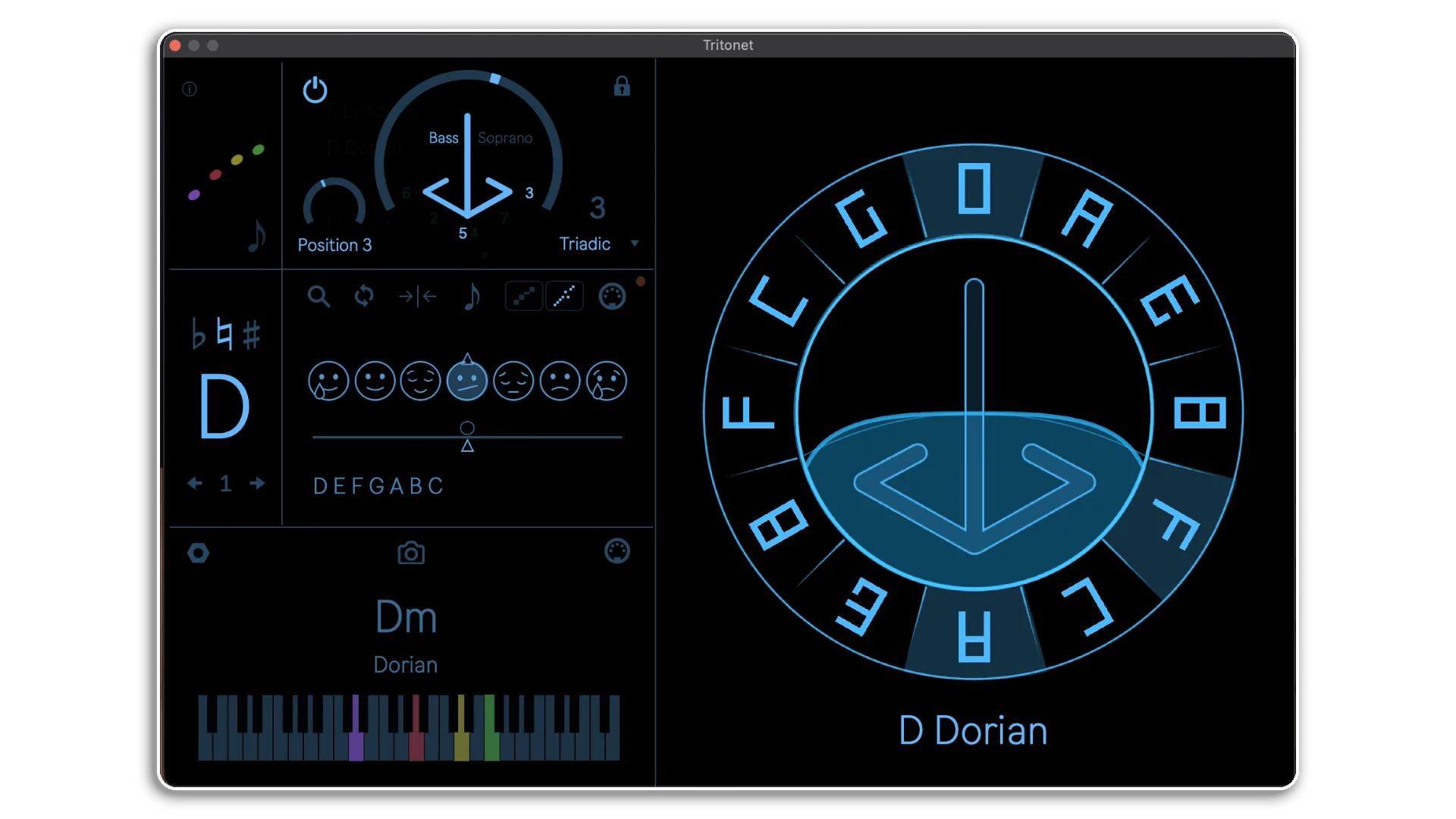
Tritonet V3 by Tolga Zafer
WHAT IF HARMONY COULD BE VISUAL, PLAYABLE, AND FULLY RESPONSIVE IN REAL TIME?
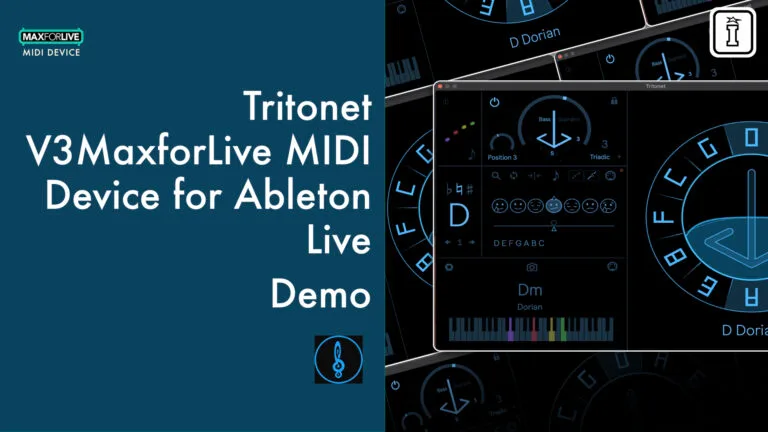
Tritonet v3 transforms the Circle of Fifths into a dynamic composition tool that navigates harmony across your entire Ableton Live project. This MaxforLive system treats the Circle not as a reference chart but as a compass for harmonic direction — clockwise movement adds tension, counterclockwise brings resolution. With three interconnected modules, you can define keys and scales in Tritonet Lead, automatically adapt MIDI tracks with the MIDI Module, and bring harmonic awareness to audio with the Audio Module.
Inside you’ll find:
- Interactive Circle of Fifths visualization with clickable, playable notes
- Polyphonic Chorder generating four-voice chords with dynamic voice leading
- 600+ scale library spanning Pentatonic, Natural, Compound, and Crystal families
- Mood system with Travel slider for exploring intermediate tonalities
- Listening Mode that analyzes your playing and determines fitting scales
- Input Panel for reinterpreting existing MIDI in new keys
- Snapshots system storing 12 key/scale combinations with MIDI mapping
- GPU-accelerated visuals (v3) leaving CPU free for audio processing
- Full MPE support including slide for expressive controller integration
- Negative Harmony, Random scale selection, and advanced harmonic tools
- Three modules: Tritonet Lead (control hub), MIDI Module (track adaptation), Audio Module (Resonator integration)
Built for musicians, producers, and educators, Tritonet bridges music theory and creative intuition. Change the key in Tritonet Lead and watch every connected track update instantly. Use the Chorder to generate rich progressions from single notes. Apply the Audio Module to reinforce harmonic centers or create evolving soundscapes. Whether you’re learning harmony, performing live with complex key changes, or composing multi-track arrangements, Tritonet makes harmonic navigation immediate and intuitive.
Requires Ableton Live 11 Suite or Live 12 Suite with Max for Live
Harmony as a compass, not a constraint.
USER GUIDE: Tritonet v3 Manual
Tritonet V3 by Tolga Zafer
WHAT IF HARMONY COULD BE VISUAL, PLAYABLE, AND FULLY RESPONSIVE IN REAL TIME?
Tritonet v3 transforms the Circle of Fifths into a dynamic composition tool that navigates harmony across your entire Ableton Live project. This MaxforLive system treats the Circle not as a reference chart but as a compass for harmonic direction — clockwise movement adds tension, counterclockwise brings resolution. With three interconnected modules, you can define keys and scales in Tritonet Lead, automatically adapt MIDI tracks with the MIDI Module, and bring harmonic awareness to audio with the Audio Module.
Inside you’ll find:
- Interactive Circle of Fifths visualization with clickable, playable notes
- Polyphonic Chorder generating four-voice chords with dynamic voice leading
- 600+ scale library spanning Pentatonic, Natural, Compound, and Crystal families
- Mood system with Travel slider for exploring intermediate tonalities
- Listening Mode that analyzes your playing and determines fitting scales
- Input Panel for reinterpreting existing MIDI in new keys
- Snapshots system storing 12 key/scale combinations with MIDI mapping
- GPU-accelerated visuals (v3) leaving CPU free for audio processing
- Full MPE support including slide for expressive controller integration
- Negative Harmony, Random scale selection, and advanced harmonic tools
- Three modules: Tritonet Lead (control hub), MIDI Module (track adaptation), Audio Module (Resonator integration)
Built for musicians, producers, and educators, Tritonet bridges music theory and creative intuition. Change the key in Tritonet Lead and watch every connected track update instantly. Use the Chorder to generate rich progressions from single notes. Apply the Audio Module to reinforce harmonic centers or create evolving soundscapes. Whether you’re learning harmony, performing live with complex key changes, or composing multi-track arrangements, Tritonet makes harmonic navigation immediate and intuitive.
Requires Ableton Live 11 Suite or Live 12 Suite with Max for Live
Harmony as a compass, not a constraint.
USER GUIDE: Tritonet v3 Manual
Product reviews
5 out of 5
2 reviews
How item rating is calculated
We show the average based on reviews. Only genuine reviews are displayed.
Sort by
December 18, 2025
This reviewer bought this product from our store.
Super tune
This interesting device, which I've been using for years, allows you to change the tuning and create new scales. My productions benefit from this tool, which sets you apart from the rest in chord creation, etc.
Incerdible results and new tune way
Only for advanced users
I recommend this product
August 16, 2022
One of the most incredible inventions in Midi harmony made ever. The opportunity's in making complex harmony through this thing are unbelievable, So excited about the future using this as a tool for studio and on stage. Cheers to the creator
Tritonet V3 by Tolga Zafer
What if harmony could be visual, playable, and responsive in real time? Tritonet v3 transforms the Circle of Fifths from a static reference into a dynamic composition tool that navigates harmony across your entire Ableton Live project. This isn’t just another MIDI effect — it’s a complete harmonic framework that bridges music theory and creative intuition, letting you shape progressions, generate chords, and maintain harmonic coherence across unlimited tracks simultaneously.
Born from 20 years of harmonic research, Tritonet treats harmony as proportional relationships between vibrations rather than abstract rules. By working with ratios (fifths, thirds, tritones), it adapts to any musical tradition or genre. Whether you’re learning harmony for the first time, performing live with complex key changes, or composing multi-track arrangements, Tritonet makes harmonic navigation immediate and intuitive.
Overview & Inspiration
Tritonet reimagines the Circle of Fifths as a harmonic compass where direction matters. Moving clockwise increases tension by adding upper harmonics. Moving counterclockwise creates resolution through lower harmonics. This directional approach lets you shape entire progressions by following or deliberately subverting these natural movements.
The system consists of three interconnected devices. Tritonet Lead serves as your harmonic control center, defining keys, scales, and chords. Tritonet MIDI Module applies this harmonic framework to any MIDI track, automatically adapting notes to your chosen tonality. Tritonet Audio Module extends Ableton’s Resonator with dynamic, harmony-aware tuning that reinforces your harmonic center on audio tracks.
Together, these modules create a unified harmonic ecosystem where changing the key in Tritonet Lead instantly updates every connected track, keeping your entire project locked in perfect harmonic alignment.
Features & Highlights
Interactive Circle of Fifths: The central visualization responds to your input, letting you click any note to trigger it. The Circle works as both a map and a playable instrument, making harmonic relationships visible and immediate.
Polyphonic Chorder with Dynamic Voice Leading: Transform single notes into rich four-voice chords (SATB) with intelligent voice leading. Build chords by thirds (triadic), fourths (quartal), or seconds (dyadic). Choose whether incoming notes represent the bass or soprano voice. Lock chord positions for consistent voicings across progressions. The Chorder analyzes all incoming MIDI, sending appropriate key and scale information to connected modules even when chord generation is disabled.
600+ Scale Library: Access an extensive collection organized into four families — Pentatonic (5 notes), Natural Modes (7 notes), Compound scales (7 notes with multiple tritones), and Crystal scales (8-12 notes). Search by name, filter by size, tritone pairs, or scale family. Use the Listening Mode to have Tritonet analyze notes you play and automatically determine the closest matching scale, or create temporary custom scales from any note collection.
Mood System with Travel Control: Explore seven natural modes, each tied to specific tritone pairs and emotional colors. The Travel slider lets you discover intermediate scales between moods while maintaining the same tritone foundation, creating smooth harmonic transitions beyond traditional modal relationships.
Advanced Scale Tools: Random scale selection for creative exploration. Negative Harmony function that mirrors tonality around its root. Input Panel for reinterpreting existing MIDI material — set an input key and scale, then watch Tritonet translate harmonic functions into your chosen output tonality while preserving the original’s musical intent.
Snapshots System: Store and recall up to 12 different key and scale combinations. Map snapshot changes to MIDI controllers for live performance. Load and save snapshot banks for different projects or sections. Snapshots persist with your Ableton Set, ensuring your harmonic workflows are always available.
GPU-Accelerated Visuals: Version 3 introduces a new Jitter-based visualization engine that uses GPU rendering, leaving CPU resources free for audio processing. Three visual schemes available (Abacus, Calculator, Mundi), with detachable fullscreen view for presentations or educational contexts. Animation can be disabled to further reduce GPU load.
Full MPE Support: Complete integration with MPE controllers including slide functionality, enabling expressive performance with per-note pitch bend, pressure, and timbre control.
How It Works
Tritonet is built around four interactive visual components that define how harmony is visualized and controlled.
The Table displays all 12 notes arranged as the Circle of Fifths. Each position is clickable and triggers MIDI events. Harmonic movement becomes directional — right (clockwise) adds tension, left (counterclockwise) provides resolution.
The Horizon is a horizontal line dividing the circle. Notes above the horizon constitute the active scale. Raising the horizon creates pentatonic scales (5 notes). The default position generates natural scales (7 notes). When the horizon disappears, crystal scales emerge (8-12 notes), connected by geometric patterns.
The Night is a vertical divider splitting the circle into two halves. Notes on the left side are sharpened (raised), while notes on the right are flattened (lowered). One Night configuration creates natural scales. Two Nights (Sun + Moon) produce compound scales containing multiple tritones. The crossing points between day and night mark the tritone positions — the “color tones” that define modal character.
The Compass defines chord construction and suggests harmonic motion. Its tip shows the bass note. Its wings contain chord tones grouped by function — wing tips hold modal intervals (3rds and 6ths), wing centers contain melodic intervals (2nds and 7ths), and positions directly below represent harmonic intervals (4ths and 5ths). Think of the Compass as suggesting a natural “flight direction” for progressions, which you can follow or deliberately avoid for different effects.
These four components interact to create Tritonet’s complete harmonic language, turning abstract theory into something tangible and playable.
The Three Modules
Tritonet Lead serves as the harmonic control hub. Place it on a MIDI track to define your project’s key, scale, and chord progression. The Chorder panel expands single notes into full chords. The Key & Scale panel provides access to the scale library, mood system, and harmonic tools. The Keyboard panel displays active chords with color-coded voices (bass, tenor, alto, soprano) and provides quick access to Preferences, Snapshots, and Ableton synchronization.
Tritonet MIDI Module extends Tritonet Lead’s harmonic framework to any MIDI track. Place it on tracks with instruments, clips, or live input. The module receives real-time key and scale information from Tritonet Lead and automatically adapts all notes to the correct harmony. Three resolution modes control how strictly notes are adapted — Chord Resolution forces everything into the active chord, Scale Resolution allows only scale tones, and Full Resolution preserves chromatic structures by mapping notes relative to input and output scales. The matrix display shows available notes with the root always centered. Five voice options let you lock to the global scale or follow individual chord voices (bass, tenor, alto, soprano), each with its own related key and scale. Transpose control shifts output up to two octaves in either direction.
Tritonet Audio Module makes Ableton’s Resonator dynamic and harmony-aware. Instead of static pitch settings, it follows Tritonet Lead’s key, scale, and active chords in real time. Three modes offer different applications — Mood mode uses the tonal center plus tritone notes for fixed harmonic environments, Voice mode provides monophonic resonance on a chosen voice (bass, tenor, alto, soprano, or neutral), and Chord mode inserts the active chord from Tritonet Lead with notes updating dynamically as chords change. The XY pad controls Dry/Wet (horizontal) and Decay (vertical) for intuitive two-parameter performance control. Use subtle settings to reinforce the harmonic center of vocals, guitars, or drum loops, or push settings for evolving, scale-locked sound design.
All three modules communicate seamlessly. Change the key, scale, or chord in Tritonet Lead and watch every MIDI and Audio Module across your entire project update instantly.
Ideal For
Music Educators and Students: Tritonet makes complex harmonic concepts visual and interactive. The Listening Mode helps beginners discover scales by ear. The directional Circle of Fifths demonstrates tension and resolution. The system condenses years of theory study into weeks of hands-on exploration.
Live Performers: Snapshots enable instant key changes mapped to MIDI controllers. The unified harmonic framework keeps all tracks aligned during improvisation. MPE support with slide functionality provides expressive control. GPU-based visuals work smoothly even during demanding performances (and can be disabled entirely for maximum stability). Push 3 compatibility, including standalone mode, makes Tritonet performance-ready without a computer.
Composers and Producers: Reharmonize entire arrangements by changing a single parameter in Tritonet Lead. The Input Panel reinterprets existing MIDI material in new keys while preserving harmonic relationships. The Chorder generates voice-led progressions from single-note input. Audio Module integration brings harmonic coherence to sample-based productions. The 600+ scale library provides endless creative possibilities beyond standard major and minor.
Experimental Musicians: Negative Harmony, compound scales, and crystal scales expand traditional tonal frameworks. Random scale selection sparks unexpected directions. The Travel slider discovers intermediate tonalities between familiar modes. Full Resolution mode preserves chromatic structures during key changes, enabling complex harmonic modulations.
What’s Included
Tritonet is distributed as a complete Ableton Live Pack containing three MaxforLive devices — Tritonet Lead, Tritonet MIDI Module, and Tritonet Audio Module (as a rack with Resonator pre-configured). A demo project is included to experience the system immediately, with devices ready to save to your User Library for quick access in any project. Installation is automatic on both macOS and Windows.
What’s New in v3
Version 3 introduces major performance and feature improvements. The new Jitter-based visualization engine uses GPU rendering instead of CPU, leaving more processing power for audio. The Chorder is now fully polyphonic, generating complete four-voice chords for each note with sophisticated voice leading. Full MPE support includes slide functionality for expressive per-note control. Inter-device communication ensures all modules stay synchronized across unlimited tracks.
Requirements
Tritonet v3 requires Ableton Live 11 Suite or Live 12 Suite with the complete Max for Live integration. The system is compatible with macOS and Windows. GPU is used for visuals but can be disabled in Preferences. Push 3 is supported including standalone mode (visuals unavailable in standalone, but all musical functionality works). Note that Ableton Live 12’s Scale Awareness feature currently operates independently from Tritonet, but both can be used together by setting them to the same fixed key and scale.
Frequently Asked Questions
A: Tritonet v3 is a MaxforLive harmonic navigation and composition system built around the Circle of Fifths. It consists of three interconnected devices — Tritonet Lead (control hub), Tritonet MIDI Module (automatic track adaptation), and Tritonet Audio Module (dynamic Resonator integration). The system visualizes harmony as directional movement, includes a polyphonic chorder with voice leading, provides access to 600+ scales, and keeps your entire Ableton Live project harmonically aligned through real-time key and scale broadcasting.
This behavior is related to how Max’s Jitter graphics engine initializes GPU contexts. When Ableton Live is running in fullscreen mode, opening Tritonet Lead can temporarily force the system to switch to the desktop view. This happens during the graphics initialization phase.
Once Tritonet finishes initializing, you can safely switch back to the Ableton Live screen and continue working normally. This does not affect audio, MIDI, or project stability.
n some cases, the Jitter graphics do not properly refresh when the device window is first opened. As a result, the circle graphic may not be visible even though Tritonet is running correctly.
Closing the Tritonet control window and opening it again forces a redraw of the graphics and resolves the issue.
Tritonet relies on Max’s Jitter graphics engine, which can behave differently depending on system configuration, operating system, and GPU drivers. On some systems, graphics may fail to appear entirely due to the default graphics backend.
To fix this:
Open any Max for Live device.
Click Edit in Max.
Go to File → Preferences → Jitter.
Change the graphics engine from QT to VIDDLL (Windows) or AVF (macOS).
Close Max and reopen Ableton Live.
After changing the graphics engine, Tritonet’s visuals should display correctly.
A: Yes, Tritonet v3 is a MaxforLive device and requires Ableton Live 11 Suite or Live 12 Suite with complete Max for Live integration.
A: MaxforLive is a platform that integrates the visual programming environment Max with Ableton Live, allowing users to create and use custom audio, MIDI, and control devices that extend Live’s native capabilities.
A:
- Ableton Live 11 Suite or Live 12 Suite
- Complete Max for Live integration
- Mac or Windows operating system
- GPU recommended for visuals (can be disabled in Preferences)
- Push 3 compatible (including standalone mode for musical functions)
A: You can visit the official website at www.tritonetcalculator.com, follow on Instagram at @tritonet, or watch tutorials on YouTube at youtube.com/@Tritonet. For support, contact [email protected].
Important Information
v3.2 – Released March 2026
What’s New:
- Fixed MIDI Automation: The Voice parameter is now clickable again, so you can easily use your mouse to set or automate it.
- Cleaner Scaling: Removed the “coll” objects in both MIDI and LEAD versions. This fixes those nagging scale name bugs and makes the plugin run smoother with multiple instances.
- Reliable Startup: Tritonet will now open in the exact same position every time, so you don’t have to worry about unpredictable settings when you start a session.
V3 – Released December 2025
V2 – Released March 2023
MASTER MODULE
• New library contains over 500 scales.
• No more font dependency for installing Tritonet into the user library. Just click and save the modules.
• Note animation have been added (can be turned off from the input menu if needed)
• There is a new mode for the chord algorithm. Tritonet now listens to the MIDI input and translates chords into the Voices when the Chorder is off. In that sense, users can play their keyboard instruments– either as simple as triadic chords or full pianistic approach- and Tritonet transfers harmonic information to the MIDI and Audio modules with an appropriate voice leading. .
• The Learn tab has been added. This allows users to control Tritonet via four wheels.
• Performance toggles are added to modulate the harmony dynamically.
MIDI MODULE
• A new design for the MIDI module. Now Tritonet has its own dedicated, CPU efficient and a single file MIDI module. (Place it before the virtual instrument)
• The MIDI module has its own input settings for the scale and the root. It allows users to automate the incoming scale and root, specific to each clip. This allows the use of different MIDI files with various tonalities to work together.
• MIDI Module can receive five individual harmonic zone information from Master Module. (S-A-TB-N) • N (neutral) stays fixed within the scale while SATB (Soprano – Alto – Tenor – Bass) are dynamically changing according to the chord information.
AUDIO MODULE
• A single file design for the Audio Module. It controls the native Ableton plugin Resonator (place it on the audio channel, also load Resonator and hit update)
• Now the resonator can also benefit from the Voices and Chords. Scale is fixed while Voice and Chord options are dynamic.
• Octave allows you to change the root note of the Resonator without changing the intervals in between. • Travel allows you to move within the scale up and down.
• There are also Decay and Dry/Wet parameters of Resonator that can be controlled from the Audio Module for the convenience.
Initial Release – May 2022
Our Products are generally provided as Zip file downloads which in all cases will need to be extracted and saved to your hard drive prior to installation. Details on the different file type provided and what to do with them are below.
.alp Files – These are Ableton Live Packs and will either install directly into the Packs Section of the browser of Ableton Live or ask you to save them to your hard drive. For packs that install to the library, when you double click on them you will see a pop up window asking you to confirm that installation is ok as the files are described as “Legacy”. This is fine and you are ok to proceed, the packs are created using the format for an earlier version of Live and so remain compatible with the current version.
.amxd files – These are individual MaxforLive Devices and can be stored anywhere on your hard drive. We’d advise creating a folder for them and then adding that folder as a location within the Places section of Lives Browser.
END-USER LICENSE AGREEMENT FOR ISOTONIK STUDIOS SOFTWARE PRODUCTS.
PLEASE READ THE TERMS AND CONDITIONS OF THIS LICENSE AGREEMENT CAREFULLY BEFORE CONTINUING WITH THIS PROGRAM INSTALL.
This End-User License Agreement (referred to as “EULA”) is a legal agreement between an individual or a single entity (referred to as “LICENSEE”) and Isotonik Studios for the Isotonik Studios software product(s) which may include associated software components, media, printed materials, and “online” or electronic documentation (referred to as “SOFTWARE PRODUCT”). By installing, copying, or otherwise using the SOFTWARE PRODUCT, the LICENSEE agrees to be bound by the terms of this EULA.
This EULA represents the entire agreement concerning the program between the LICENSEE and Isotonik Studios and it supersedes any prior proposal, representation, or understanding between the parties. If the LICENSEE does not agree to the terms of this EULA, the LICENSEE should not install or use the SOFTWARE PRODUCT.
The SOFTWARE PRODUCT is protected by copyright laws and international copyright treaties, as well as other intellectual property laws and treaties. The SOFTWARE PRODUCT is licensed, not sold.
- GRANT OF LICENSE.
The SOFTWARE PRODUCT is licensed as follows:
(a) Installation and Use. Providing that the LICENSEE has paid any applicable license fees, Isotonik Studios grants the LICENSEE the right to install and use copies of the SOFTWARE PRODUCT on up to two computers in the LICENSEE’s possession that are running a validly licensed copy of the operating system for which the SOFTWARE PRODUCT was designed [e.g., Windows 10, macOS]. The computer(s) must be owned by the LICENSEE.
(b) Backup Copies. The LICENSEE may also make copies of the SOFTWARE PRODUCT as may be necessary for backup and archival purposes.
- DESCRIPTION OF OTHER RIGHTS AND LIMITATIONS.
(a) Maintenance of Copyright Notices. The LICENSEE must not remove or alter any copyright notices on any and all copies of the SOFTWARE PRODUCT.
(b) Distribution. The LICENSEE may not distribute registered copies of the SOFTWARE PRODUCT to third parties.
(c) Prohibition on Reverse Engineering, Decompilation, and Disassembly. The LICENSEE may not reverse engineer, decompile, or disassemble the SOFTWARE PRODUCT, except and only to the extent that such activity is expressly permitted by applicable law notwithstanding this limitation.
(d) Rental. The LICENSEE may not rent, lease, or lend the SOFTWARE PRODUCT.
(e) License transfer The LICENSEE may not transfer their license to the SOFTWARE PRODUCT to any third party. Any attempt to do so will be considered a violation of this EULA.
(f) Support Services. Isotonik Studios may provide the LICENSEE with support services related to the SOFTWARE PRODUCT for a period of 12 months following the date of purchase. Any supplemental software code provided to the LICENSEE as part of the Support Services shall be considered part of the SOFTWARE PRODUCT and subject to the terms and conditions of this EULA.
(g) Compliance with Applicable Laws. The LICENSEE must comply with all applicable laws regarding use of the SOFTWARE PRODUCT.
- TERMINATION Without prejudice to any other rights, Isotonik Studios may terminate this EULA if the LICENSEE fails to comply with the terms and conditions of this EULA. In such event, the LICENSEE must destroy all copies of the SOFTWARE PRODUCT in the LICENSEE’s possession.
- COPYRIGHT All title, including but not limited to copyrights, in and to the SOFTWARE PRODUCT and any copies thereof are owned by Isotonik Studios or its suppliers. All title and intellectual property rights in and to the content which may be accessed through use of the SOFTWARE PRODUCT is the property of the respective content owner and may be protected by applicable copyright or other intellectual property laws and treaties. This EULA grants the LICENSEE no rights to use such content. All rights not expressly granted are reserved by Isotonik Studios.
- NO WARRANTIES Isotonik Studios expressly disclaims any warranty for the SOFTWARE PRODUCT. The SOFTWARE PRODUCT is provided ‘As Is’ without any express or implied warranty of any kind, including but not limited to any warranties of merchantability, noninfringement, or fitness of a particular purpose. Isotonik Studios does not warrant or assume responsibility for the accuracy or completeness of any information, text, graphics, links or other items contained within the SOFTWARE PRODUCT. Isotonik Studios makes no warranties respecting any harm that may be caused by the transmission of a computer virus, worm, time bomb, logic bomb, or other such computer program. Isotonik Studios further expressly disclaims any warranty or representation to the LICENSEE or to any third party.
- LIMITATION OF LIABILITY In no event shall Isotonik Studios be liable for any damages (including, without limitation, lost profits, business interruption, or lost information) arising out of the LICENSEE’s use of or inability to use the SOFTWARE PRODUCT, even if Isotonik Studios has been advised of the possibility of such damages. In no event will Isotonik Studios be liable for loss of data or for indirect, special, incidental, consequential (including lost profit), or other damages based in contract, tort or otherwise. Isotonik Studios shall have no liability with respect to the content of the SOFTWARE PRODUCT or any part thereof, including but not limited to errors or omissions contained therein, libel, infringements of rights of publicity, privacy, trademark rights, business interruption, personal injury, loss of privacy, moral rights or the disclosure of confidential information.
Frequently Bought Together