ALFIL Max von Killihu
LADEN SIE GERÄTE UND PRESETS SOFORT, OHNE IM BROWSER NAVIGIEREN ZU MÜSSEN.
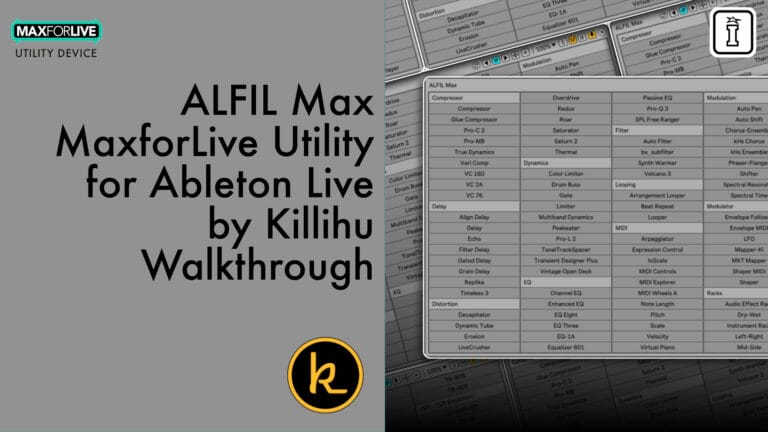
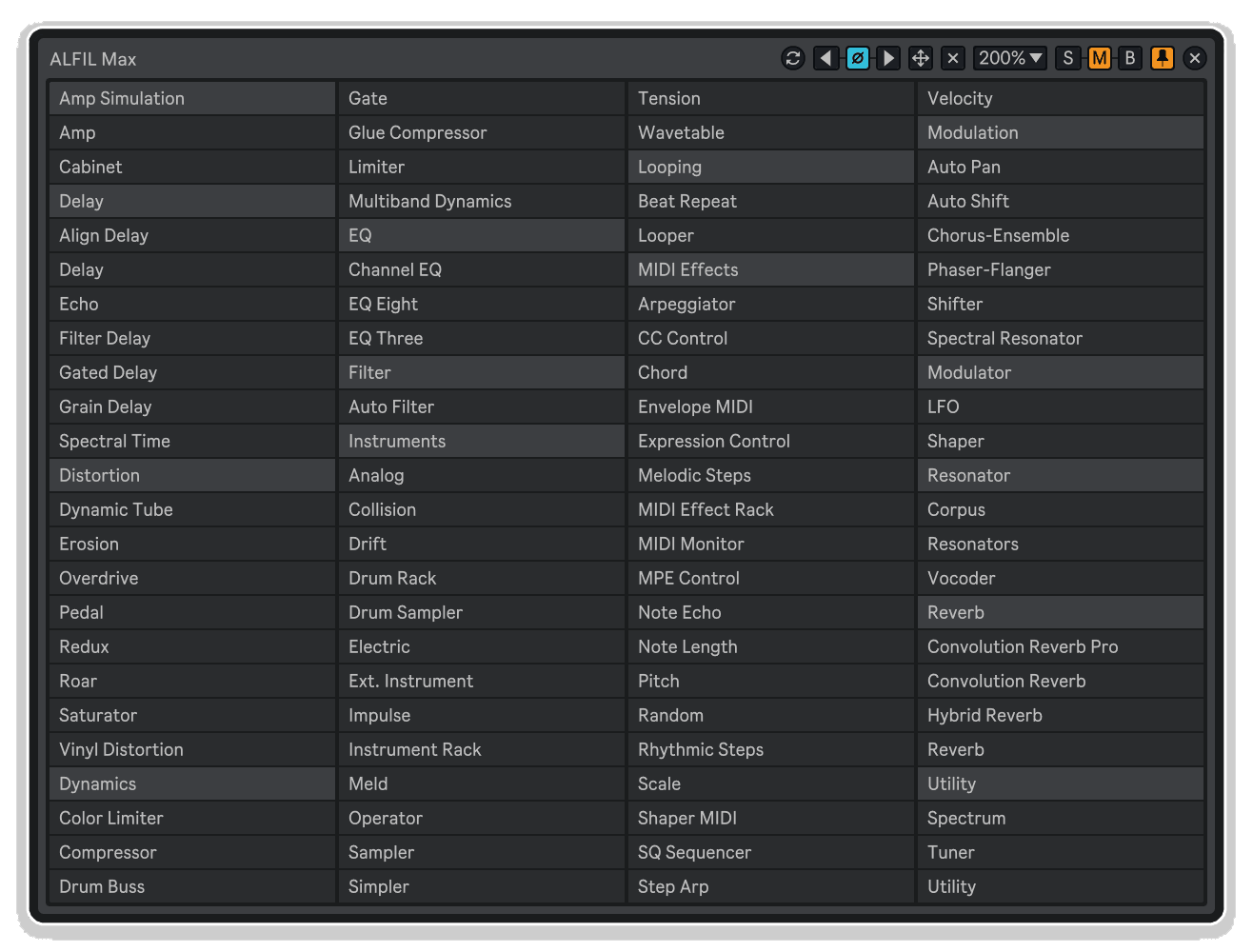
ALFIL Max (Ableton Live Fast Item Loader) ist ein MaxforLive-Gerät, das entwickelt wurde, um Ihren Workflow in Ableton Live zu beschleunigen. Laden Sie Browser-Elemente aus einem schwebenden Fenster, ohne durch endlose Browser-Ordner navigieren zu müssen.
Greifen Sie sofort auf Ihre Geräte, Instrumente und Presets über ein schwebendes Fenster zu, das immer im Vordergrund Ihrer Session bleibt. Kein mühsames Durchsuchen von Browser-Ordnern mehr und kein Ablenken von Ihrem kreativen Flow.
Das bietet Ihnen das Gerät:
- Schnelles Laden aus einem schwebenden, immer im Vordergrund bleibenden Fenster
- Unterstützung für ADG-, ADV-, ALS-, AMXD-, AUPRESET- und VSTPRESET-Dateien
- Stets aktuelle Elementliste (wird direkt von der Festplatte gelesen)
- Einfügen per Ein-Klick oder Drag-and-Drop
- Flexible Steuerung der Einfügeposition (links, rechts oder am Ende der Kette)
- Automatische Erstellung von MIDI-Spuren für Instrumente
- Drei Ordnermodi: „Auto“, „Manuell“ und „Multi“ (bis zu 8 Ordner mit Registerkarten)
- Anpassbare Farben der Benutzeroberfläche und Textausrichtung
- Über Tastatur zuweisbare Ein-/Ausblendsteuerung
- Option zum automatischen Schließen für einen übersichtlichen Arbeitsablauf
- Kompatibel mit Live 10, 11 und 12
Hören Sie auf, durch Browser-Ordner zu navigieren, und fangen Sie an, kreativ zu werden. Mit ALFIL Max sind Ihre am häufigsten verwendeten Geräte, Presets und Instrumente nur einen Klick entfernt, sodass Sie sich ganz auf das Musikmachen konzentrieren können, anstatt Dateien zu verwalten.
BENUTZERHANDBUCH: ALFIL Max 1.2
ALFIL Max von Killihu
LADEN SIE GERÄTE UND PRESETS SOFORT, OHNE IM BROWSER NAVIGIEREN ZU MÜSSEN.
ALFIL Max (Ableton Live Fast Item Loader) ist ein MaxforLive-Gerät, das entwickelt wurde, um Ihren Workflow in Ableton Live zu beschleunigen. Laden Sie Browser-Elemente aus einem schwebenden Fenster, ohne durch endlose Browser-Ordner navigieren zu müssen.
Greifen Sie sofort auf Ihre Geräte, Instrumente und Presets über ein schwebendes Fenster zu, das immer im Vordergrund Ihrer Session bleibt. Kein mühsames Durchsuchen von Browser-Ordnern mehr und kein Ablenken von Ihrem kreativen Flow.
Das bietet Ihnen das Gerät:
- Schnelles Laden aus einem schwebenden, immer im Vordergrund bleibenden Fenster
- Unterstützung für ADG-, ADV-, ALS-, AMXD-, AUPRESET- und VSTPRESET-Dateien
- Stets aktuelle Elementliste (wird direkt von der Festplatte gelesen)
- Einfügen per Ein-Klick oder Drag-and-Drop
- Flexible Steuerung der Einfügeposition (links, rechts oder am Ende der Kette)
- Automatische Erstellung von MIDI-Spuren für Instrumente
- Drei Ordnermodi: „Auto“, „Manuell“ und „Multi“ (bis zu 8 Ordner mit Registerkarten)
- Anpassbare Farben der Benutzeroberfläche und Textausrichtung
- Über Tastatur zuweisbare Ein-/Ausblendsteuerung
- Option zum automatischen Schließen für einen übersichtlichen Arbeitsablauf
- Kompatibel mit Live 10, 11 und 12
Hören Sie auf, durch Browser-Ordner zu navigieren, und fangen Sie an, kreativ zu werden. Mit ALFIL Max sind Ihre am häufigsten verwendeten Geräte, Presets und Instrumente nur einen Klick entfernt, sodass Sie sich ganz auf das Musikmachen konzentrieren können, anstatt Dateien zu verwalten.
BENUTZERHANDBUCH: ALFIL Max 1.2
Buying for someone?Send a gift card →
Zusätzliche Informationen
| MaxforLive | Control Devices |
|---|---|
| Kompatibilität mit Ableton Live | Ableton Live 12 Standard with MaxforLive, Ableton Live 12 Suite |
| Mindestanforderungen | Ableton Live Standard 12 with MaxforLive Installed or Ableton Live Suite 12 |
| Betriebssystem | Mac, Windows |
PRICE: £8.00
Product reviews
5 out of 5
5 reviews
How item rating is calculated
We show the average based on reviews. Only genuine reviews are displayed.
Sort by
Oktober 12, 2026
This reviewer bought this product from our store.
Das finde ich super! Es wäre toll, wenn sich VSTs auch per Tastenkombination laden ließen, aber so oder so ist es der Hammer.
November 23, 2025
This reviewer bought this product from our store.
Funktioniert sehr gut und beschleunigt meinen Arbeitsablauf erheblich. Bietet alle Optionen, die ich brauche (automatisches Schließen, Einfügen links/rechts usw.). Ich verwende drei Instanzen davon in meiner Vorlage. Einfach großartig!
Oktober 14, 2025
This reviewer bought this product from our store.
WOW!!! Wir nutzen das täglich und haben fast ein schlechtes Gewissen, wenn wir eine Palette aufrufen und mit ein paar Klicks etwas Sinnvolles erstellen. Gehört definitiv zu unseren Top 10. Danke, Dev!!!
August 1, 2025
This reviewer bought this product from our store.
Ein absolut unverzichtbares Tool für Ableton Live. Damit kannst du deine Effekte, Racks, VSTs und Presets nach Belieben organisieren. Das verbessert den Arbeitsablauf und die Produktivität enorm. Ich kann es gar nicht genug empfehlen!
Juni 10, 2025
This reviewer bought this product from our store.
Ein hervorragendes Tool, das den Arbeitsablauf definitiv beschleunigt. Besonders toll ist, dass es sowohl mit Live-Geräten als auch mit Plug-ins funktioniert. Großartige Arbeit!
ALFIL Max von Killihu
Übersicht & Inspiration
ALFIL Max (Ableton Live Fast Item Loader) ist ein MaxforLive-Gerät, das entwickelt wurde, um Ihren Workflow in Ableton Live zu beschleunigen. Laden Sie Browser-Elemente aus einem schwebenden Fenster, ohne sich durch endlose Browser-Ordner navigieren zu müssen.
Ganz gleich, ob Sie während einer kreativen Session Presets anhören, in einem Mix schnell Effekte austauschen oder live mit sofortigem Zugriff auf Geräte performen – ALFIL Max beseitigt die Reibungsverluste zwischen Idee und Umsetzung. Ihre am häufigsten verwendeten Geräte, Instrumente und Presets sind immer nur einen Klick entfernt.
Funktionen & Highlights
Schnelles Laden aus einem schwebenden Fenster – Greifen Sie auf Ihre Geräte, Presets und Instrumente über ein schwebendes Fenster zu, das immer im Vordergrund Ihrer Session bleibt. Kein mühsames Durchsuchen von Browser-Ordnern mehr und kein Verlust des Fokus auf Ihr Arrangement.
Unterstützung mehrerer Dateiformate – Funktioniert mit ADG-, ADV-, ALS-, AMXD-, AUPRESET- und VSTPRESET-Dateien. Laden Sie Audio-Effekt-Racks, Instrumente, Live-Sets, MaxforLive-Geräte und Plugin-Presets – alles über dieselbe Oberfläche.
Immer auf dem neuesten Stand – Das Gerät liest Dateien direkt von der Festplatte, sodass Ihre Objektliste auch beim Öffnen alter Projekte aktuell bleibt. Sie müssen Geräte-Presets nicht manuell erstellen oder aktualisieren.
Einfügen mit einem Klick oder per Drag-and-Drop – Klicken Sie auf ein beliebiges Element, um es sofort zu laden, oder aktivieren Sie den Drag-Modus, um Geräte manuell genau an der gewünschten Stelle in Ihrer Signalkette zu platzieren.
Flexible Steuerung der Einfügeposition – Wählen Sie aus, ob Elemente links oder rechts vom aktuell ausgewählten Gerät eingefügt werden sollen oder standardmäßig am Ende der Effektkette Ihrer Spur. Ideal, um einen übersichtlichen Signalfluss zu gewährleisten.
Automatische MIDI-Spur-Erstellung – Aktivieren Sie die automatische Erstellung von MIDI-Spuren beim Laden von Instrumenten. Verwenden Sie eine einzelne ALFIL Max-Instanz, die ausschließlich für Instrumente vorgesehen ist, und lassen Sie diese die Spur-Erstellung automatisch übernehmen.
Drei Ordnermodi – Im „Auto“-Modus werden alle Elemente relativ zur Gerätedatei platziert. Im „Manual“-Modus können Sie auf beliebige Ordner auf Ihrem System verweisen. Der „Multi“-Modus unterstützt bis zu 8 verschiedene Ordner mit Tab-Umschaltung zur Organisation verschiedener Gerätekategorien.
Anpassbare Benutzeroberfläche – Passen Sie die Textausrichtung, die Fensterposition, die Rahmenfarben und die Kategoriefarben an. Passen Sie das schwebende Fenster an Ihr Live-Theme oder Ihre visuellen Vorlieben an.
Tastaturbelegung – Weisen Sie die Steuerung zum Ein- und Ausblenden des Fensters einem beliebigen Tastaturkürzel zu, um während der Produktion oder Aufführung sofort darauf zugreifen zu können. So bleiben Ihre Hände auf der Tastatur und Ihr Blick auf das Arrangement gerichtet.
Option zum automatischen Schließen – Aktivieren Sie das automatische Schließen, damit das schwebende Fenster nach dem Laden eines Elements verschwindet, sodass Ihr Bildschirm übersichtlich bleibt und Sie sich ganz auf Ihre Arbeit konzentrieren können.
So wird es verwendet
Ziehe ALFIL Max auf eine beliebige MIDI- oder Audiospur in Ableton Live. Erstelle eine Ordnerstruktur mit Unterordnern für jede Gerätekategorie, auf die du schnell zugreifen möchtest (zum Beispiel: Hall, Delays, Synthesizer, Drums). Lege deine Gerätedateien, Presets oder Instrumentendateien in diesen Unterordnern ab.
Wählen Sie Ihren Ordnermodus: „Auto“ (relativ zum Gerätespeicherort), „Manuell“ (beliebigen Ordner angeben) oder „Multi“ (bis zu 8 Ordner mit Umschaltung per Registerkarte). Klicken Sie auf die Schaltfläche „Anzeigen“ oder verwenden Sie Ihre zugewiesene Tastenkombination, um das schwebende Fenster zu öffnen.
Klicken Sie auf ein beliebiges Element in der Liste, um es sofort zu laden, oder aktivieren Sie den Ziehmodus, um Elemente manuell in Ihr Projekt zu ziehen. Legen Sie die Einfügeposition fest, um zu steuern, an welcher Stelle in Ihrer Signalkette die Geräte platziert werden. Aktivieren Sie „MIDI-Spur erstellen“, wenn Sie beim Laden von Instrumenten eine automatische Spurerstellung wünschen.
Verwenden Sie die Schaltfläche „Aktualisieren“ (oder die Tabulatortasten im „Multi“-Modus), um die Elementliste zu aktualisieren, nachdem Sie neue Dateien zu Ihren Ordnern hinzugefügt haben. Passen Sie Farben, Textausrichtung und Fensterposition an Ihre Arbeitsabläufe an.
Ideal für
- Produzenten, die sofortigen Zugriff auf ihre Lieblingsgeräte ohne Navigation im Browser wünschen
- Live-Musiker, die während ihrer Sets schnell zwischen Geräten wechseln müssen
- Toningenieure, die Effekte und Bearbeitungsketten zügig testen
- Sounddesigner, die große Preset-Bibliotheken organisieren und darauf zugreifen
- Alle, die die sich wiederholende Navigation durch Browser-Ordner als lästig empfinden
- Workflow-Begeisterte, die maximale Effizienz in Ableton Live anstreben
Lieferumfang
- ALFIL Max Max for Live-Gerät (.amxd)
- Externe Max-Komponenten (11dragfiles.mxo und 11live.tools.mxo)
- Umfassendes Referenzhandbuch mit Einrichtungsanleitungen
- Drei Ordnermodi: „Auto“, „Manual“ und „Multi“ (bis zu 8 Ordner)
- Unterstützung für Tastaturbelegungen
Systemvoraussetzungen
- Ableton Live 10, 11 oder 12 mit Max for Live
- Mac oder Windows
- Zusätzliche Installationsschritte für Mac erforderlich (im Handbuch beschrieben)
Hinweis: Das Einfügen mit einem Klick dauert unter Windows länger. Windows-Nutzern wird für einen schnelleren Arbeitsablauf der Drag-and-Drop-Modus empfohlen.
ENTDECKEN SIE WEITERE PRODUKTE VON KILLIHU:
Device Navigator | Note Range Filter | Chord Memory | Velocity Mapper | MIDI Router
Frequently Asked Questions
A: ALFIL Max ist ein Max-for-Live-Utility-Device, das Ihren Ableton-Live-Workflow optimiert, indem es Ihnen ermöglicht, Racks, Presets und komplette Sets direkt aus einem schwebenden Fenster zu laden, sodass Sie nicht mehr durch die Browser-Ordner navigieren müssen.
A: Ja, für ALFIL Max ist MaxforLive erforderlich, das in der Ableton Live Suite enthalten ist oder separat als Add-on für Ableton Live Standard über Ihr Ableton.com-Konto erworben werden kann.
A: ALFIL Max ist mit Ableton Live 10, 11 und 12 kompatibel, sofern Max for Live installiert ist.
A: Ja. Mac-Nutzer müssen externe Max-Komponenten (11dragfiles.mxo und 11live.tools.mxo) installieren und einen Terminal-Befehl ausführen, um diese zu autorisieren. Eine vollständige Anleitung finden Sie im Referenzhandbuch. Beachten Sie, dass bei Live-Versionen vor 12.2 die Dateien im Max-8-Ordner statt im Max-9-Ordner abgelegt werden müssen.
A: Weitere Angebote von Killihu findest du auf der Entwicklerseite von Isotonik Studios.
Important Information
v1.2 Neue Funktionen und Verbesserungen:
– Es wurde eine Option hinzugefügt, mit der der Ordnerpfad, aus dem das Gerät Dateien liest, manuell ausgewählt werden kann. So können Sie die Funktion „Alle sammeln und speichern“ nutzen, ohne den Betrieb des Geräts zu unterbrechen.
– Es wurde ein Registerkartensystem hinzugefügt. Das Gerät kann 8 Registerkarten anzeigen, die jeweils auf einen anderen Ordnerpfad verweisen.
– Es wurde eine Option hinzugefügt, um vor dem Einfügen von Elementen eine MIDI-Spur zu erstellen. Dies ist nützlich, um Instrumente in das Projekt einzufügen.
– Der Text von Listenelementen kann nun linksbündig ausgerichtet werden.
– Einige Farben der Benutzeroberfläche können zur besseren Darstellung angepasst werden, insbesondere bei den dunklen Designs von Live.
– Es ist nun möglich, die Position des schwebenden Fensters auf dem Bildschirm beizubehalten, sodass es beim erneuten Öffnen von Projekten nicht an seine Standardposition zurückkehrt.
– Es ist nun möglich, den Zoom des schwebenden Fensters auf einen Wert unter 100 % einzustellen.
– Aktualisiertes PDF-Handbuch.
v1.1 Neue Funktionen und Verbesserungen:
– Ordner und Preset-Dateien sind als Beispiel für die Ordnerstruktur enthalten.
– Die Benutzeroberfläche wurde an das neue Rack-Design in Live Version 12.2 angepasst; die Funktionsweise des Geräts bleibt davon unberührt.
v1.0 – Erstveröffentlichung – Mai 2025
Unsere Produkte werden in der Regel als ZIP-Dateien zum Herunterladen bereitgestellt, die in jedem Fall vor der Installation entpackt und auf Ihrer Festplatte gespeichert werden müssen. Nachstehend finden Sie Einzelheiten zu den verschiedenen Dateitypen und deren Verwendung.
.alp-Dateien – Hierbei handelt es sich um Ableton Live-Packs, die entweder direkt im Bereich „Packs“ des Ableton Live-Browsers installiert werden oder bei denen Sie aufgefordert werden, sie auf Ihrer Festplatte zu speichern. Bei Packs, die in die Bibliothek installiert werden, erscheint beim Doppelklick ein Popup-Fenster, in dem Sie aufgefordert werden, die Installation zu bestätigen, da die Dateien als „Legacy“ gekennzeichnet sind. Das ist in Ordnung und Sie können fortfahren. Die Packs wurden im Format einer früheren Live-Version erstellt und sind daher weiterhin mit der aktuellen Version kompatibel.
.amxd-Dateien – Hierbei handelt es sich um einzelne MaxforLive-Geräte, die an einem beliebigen Ort auf Ihrer Festplatte gespeichert werden können. Wir empfehlen, einen eigenen Ordner dafür anzulegen und diesen Ordner dann als Speicherort im Bereich „Places“ des Live-Browsers hinzuzufügen.
ENDBENUTZER-LIZENZVEREINBARUNG FÜR SOFTWAREPRODUKTE VON ISOTONIK STUDIOS.
BITTE LESEN SIE DIE BEDINGUNGEN DIESER LIZENZVEREINBARUNG SORGFÄLTIG DURCH, BEVOR SIE MIT DER INSTALLATION DIESES PROGRAMMS FORTFAHREN.
Diese Endbenutzer-Lizenzvereinbarung (im Folgenden als „EULA“ bezeichnet) ist eine rechtliche Vereinbarung zwischen einer natürlichen Person oder einer einzelnen juristischen Person (im Folgenden als „LIZENZNEHMER“ bezeichnet) und Isotonik Studios über die Softwareprodukte von Isotonik Studios, die zugehörige Softwarekomponenten, Datenträger, gedruckte Materialien, sowie „Online“- oder elektronische Dokumentation umfassen können (im Folgenden als „SOFTWAREPRODUKT“ bezeichnet). Durch die Installation, das Kopieren oder die anderweitige Nutzung des SOFTWAREPRODUKTS erklärt sich der LIZENZNEHMER mit den Bedingungen dieser EULA einverstanden.
Diese EULA stellt die gesamte Vereinbarung zwischen dem LIZENZNEHMER und Isotonik Studios bezüglich des Programms dar und ersetzt alle früheren Vorschläge, Zusicherungen oder Absprachen zwischen den Parteien. Wenn der LIZENZNEHMER den Bedingungen dieser EULA nicht zustimmt, darf er das SOFTWAREPRODUKT nicht installieren oder nutzen.
Das SOFTWAREPRODUKT ist durch Urheberrechtsgesetze und internationale Urheberrechtsabkommen sowie durch andere Gesetze und Abkommen zum Schutz geistigen Eigentums geschützt. Das SOFTWAREPRODUKT wird lizenziert, nicht verkauft.
- LIZENZVERGABE.
Das SOFTWAREPRODUKT wird wie folgt lizenziert:
(a) Installation und Nutzung. Sofern der LIZENZNEHMER alle anfallenden Lizenzgebühren entrichtet hat, gewährt Isotonik Studios dem LIZENZNEHMER das Recht, Kopien des SOFTWAREPRODUKTS auf bis zu zwei Computern in seinem Besitz zu installieren und zu nutzen, auf denen eine gültig lizenzierte Kopie des Betriebssystems läuft, für das das SOFTWAREPRODUKT entwickelt wurde [z. B. Windows 10, macOS]. Der/die Computer muss/müssen Eigentum des LIZENZNEHMERS sein.
(b) Sicherungskopien. Der LIZENZNEHMER darf außerdem Kopien des SOFTWAREPRODUKTS anfertigen, soweit dies für Sicherungs- und Archivierungszwecke erforderlich ist.
- BESCHREIBUNG WEITERER RECHTE UND EINSCHRÄNKUNGEN.
(a) Beibehaltung von Urheberrechtsvermerken. Der LIZENZNEHMER darf keine Urheberrechtsvermerke auf irgendeiner Kopie des SOFTWAREPRODUKTS entfernen oder verändern.
(b) Weitergabe. Der LIZENZNEHMER darf registrierte Kopien des SOFTWAREPRODUKTS nicht an Dritte weitergeben.
(c) Verbot von Reverse Engineering, Dekompilierung und Disassemblierung. Der LIZENZNEHMER darf das SOFTWAREPRODUKT nicht rückentwickeln, dekompilieren oder disassemblieren, es sei denn, eine solche Tätigkeit ist ungeachtet dieser Einschränkung durch geltendes Recht ausdrücklich gestattet.
(d) Vermietung. Der LIZENZNEHMER darf das SOFTWAREPRODUKT nicht vermieten, verpachten oder verleihen.
(e) Lizenzübertragung. Der LIZENZNEHMER darf seine Lizenz für das SOFTWAREPRODUKT nicht an Dritte übertragen. Jeder Versuch, dies zu tun, gilt als Verstoß gegen diese EULA.
(f) Supportleistungen. Isotonik Studios kann dem LIZENZNEHMER für einen Zeitraum von 12 Monaten ab dem Kaufdatum Supportleistungen im Zusammenhang mit dem SOFTWAREPRODUKT bereitstellen. Jeder zusätzliche Softwarecode, der dem LIZENZNEHMER im Rahmen der Supportleistungen zur Verfügung gestellt wird, gilt als Teil des SOFTWAREPRODUKTS und unterliegt den Bestimmungen dieser EULA.
(g) Einhaltung geltender Gesetze. Der LIZENZNEHMER muss alle geltenden Gesetze bezüglich der Nutzung des SOFTWAREPRODUKTS einhalten.
- KÜNDIGUNG Unbeschadet sonstiger Rechte ist Isotonik Studios berechtigt, diese EULA zu kündigen, wenn der LIZENZNEHMER die Bestimmungen dieser EULA nicht einhält. In diesem Fall muss der LIZENZNEHMER alle in seinem Besitz befindlichen Kopien des SOFTWAREPRODUKTS vernichten.
- URHEBERRECHT Sämtliche Rechte, einschließlich, aber nicht beschränkt auf Urheberrechte, an dem SOFTWAREPRODUKT und allen Kopien davon liegen bei Isotonik Studios oder seinen Lieferanten. Alle Eigentums- und geistigen Eigentumsrechte an den Inhalten, auf die durch die Nutzung des SOFTWAREPRODUKTS zugegriffen werden kann, sind Eigentum der jeweiligen Inhaltseigentümer und können durch geltende Urheberrechtsgesetze oder andere Gesetze und Verträge zum Schutz geistigen Eigentums geschützt sein. Diese EULA gewährt dem LIZENZNEHMER keine Rechte zur Nutzung solcher Inhalte. Alle nicht ausdrücklich gewährten Rechte bleiben Isotonik Studios vorbehalten.
- KEINE GEWÄHRLEISTUNGEN Isotonik Studios lehnt ausdrücklich jegliche Gewährleistung für das SOFTWAREPRODUKT ab. Das SOFTWAREPRODUKT wird „wie besehen“ ohne jegliche ausdrückliche oder stillschweigende Gewährleistung jeglicher Art bereitgestellt, einschließlich, aber nicht beschränkt auf Gewährleistungen der Marktgängigkeit, der Nichtverletzung von Rechten Dritter oder der Eignung für einen bestimmten Zweck. Isotonik Studios übernimmt keine Gewährleistung oder Verantwortung für die Richtigkeit oder Vollständigkeit von Informationen, Texten, Grafiken, Links oder anderen im SOFTWAREPRODUKT enthaltenen Elementen. Isotonik Studios übernimmt keine Gewährleistung hinsichtlich etwaiger Schäden, die durch die Übertragung von Computerviren, Würmern, Zeitbomben, Logikbomben oder anderen derartigen Computerprogrammen verursacht werden könnten. Isotonik Studios schließt ferner ausdrücklich jegliche Gewährleistung oder Zusicherung gegenüber dem LIZENZNEHMER oder Dritten aus.
- HAFTUNGSBESCHRÄNKUNG Isotonik Studios haftet in keinem Fall für Schäden (einschließlich, aber nicht beschränkt auf entgangenen Gewinn, Betriebsunterbrechungen oder Informationsverluste), die sich aus der Nutzung oder der Unmöglichkeit der Nutzung des SOFTWAREPRODUKTS durch den LIZENZNEHMER ergeben, selbst wenn Isotonik Studios auf die Möglichkeit solcher Schäden hingewiesen wurde. In keinem Fall haftet Isotonik Studios für Datenverluste oder für indirekte, besondere, zufällige, Folge- (einschließlich entgangener Gewinne) oder sonstige Schäden, die auf Vertrag, unerlaubter Handlung oder anderweitig beruhen. Isotonik Studios übernimmt keine Haftung in Bezug auf den Inhalt des SOFTWAREPRODUKTS oder eines Teils davon, einschließlich, aber nicht beschränkt auf darin enthaltene Fehler oder Auslassungen, Verleumdung, Verletzungen von Persönlichkeitsrechten, Datenschutzrechten, Markenrechten, Betriebsunterbrechungen, Personenschäden, Verlust der Privatsphäre, Urheberpersönlichkeitsrechte oder die Offenlegung vertraulicher Informationen.
Frequently Bought Together