Modular Junction by MetaFunction

MODULAR SYNTHESIS EXPANSION FOR ABLETON LIVE

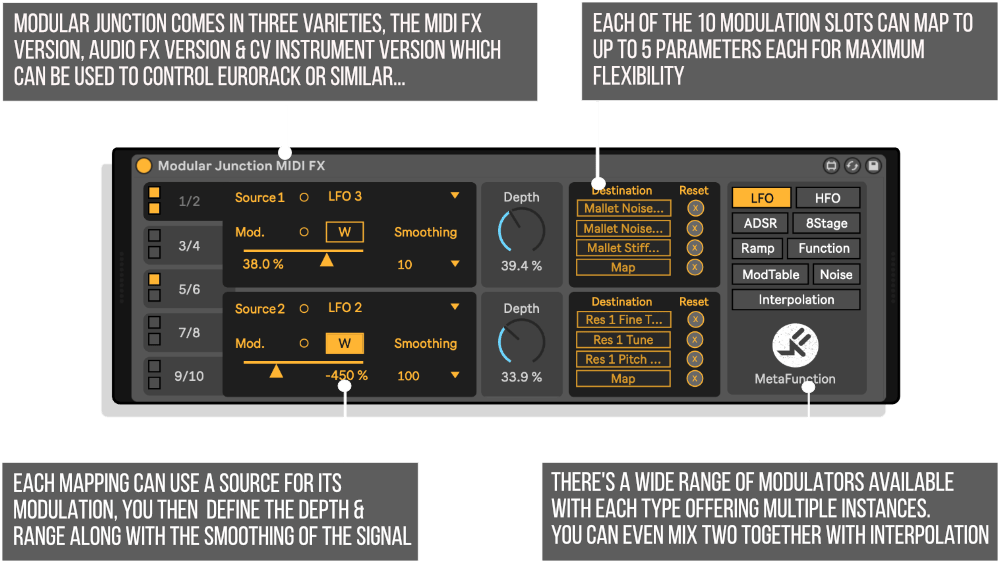
Designed to add new functionality to your workflow, Modular Junction provides a myriad of modulation tools that can augment existing hardware and software devices. The Modular Junction provides a selection of modulation sources that can be mapped to any parameter in Live, or patched to any CV based hardware instrument via a DC coupled audio interface.


Developed by Phelan Kane (aka Meta Function), an Ableton Certified Trainer and a Max Certified Trainer.


USER GUIDE: Modular Junction User Manual

Additional information

MaxforLive

Control Devices

Ableton Live Compatibility

Ableton Live 11 Standard with MaxforLive, Ableton Live 11 Suite, Ableton Live 12 Standard with MaxforLive, Ableton Live 12 Suite

Min. Requirements

Ableton Live 11 Standard with MaxforLive Installed or Ableton Live 11 Suite

OS

Mac, Windows

PRICE: £31.00
Modular Junction MIDI FX Maxforlive device by MetaFunction
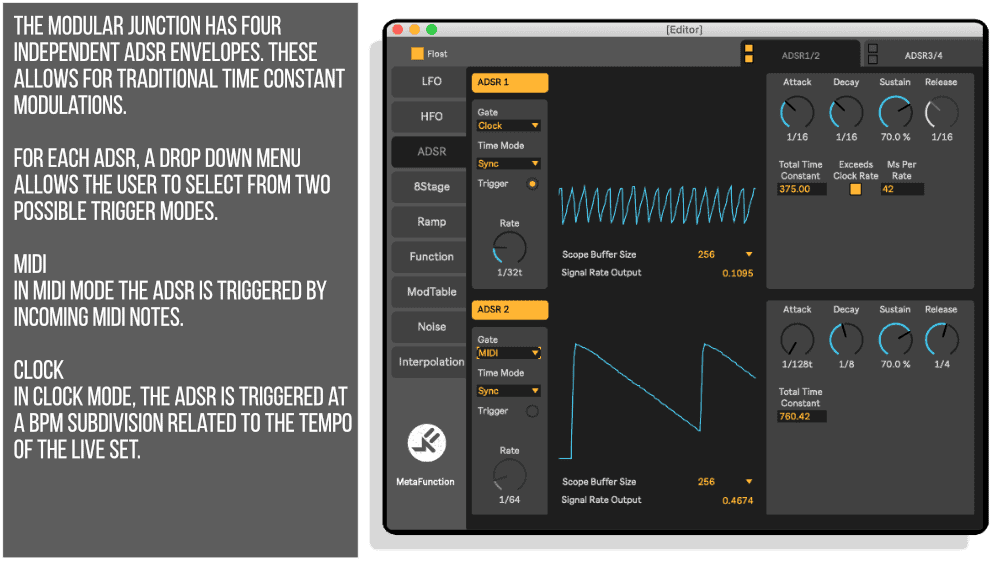
Modular Junction ADSR Infographic
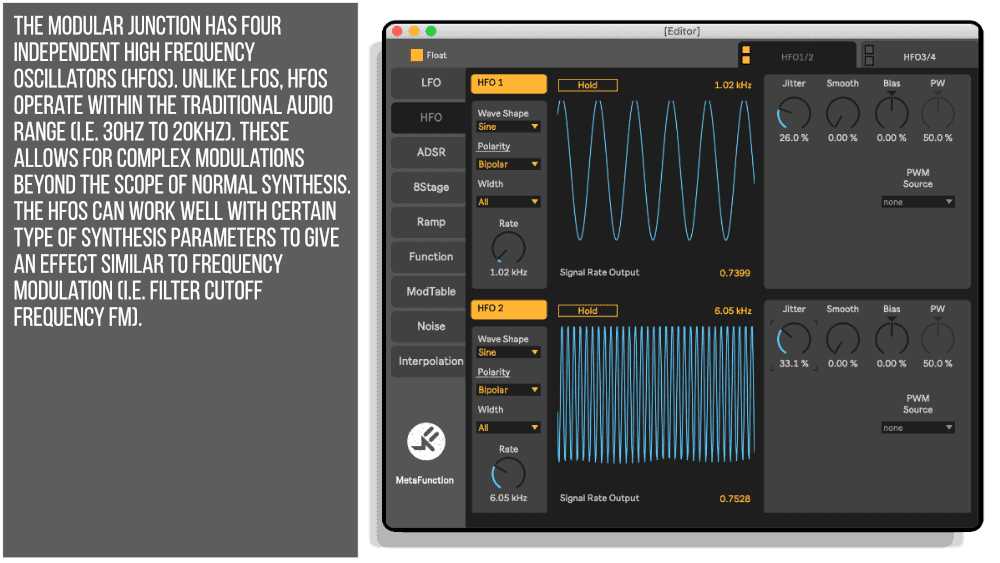
Modular Junction HFO Infographic
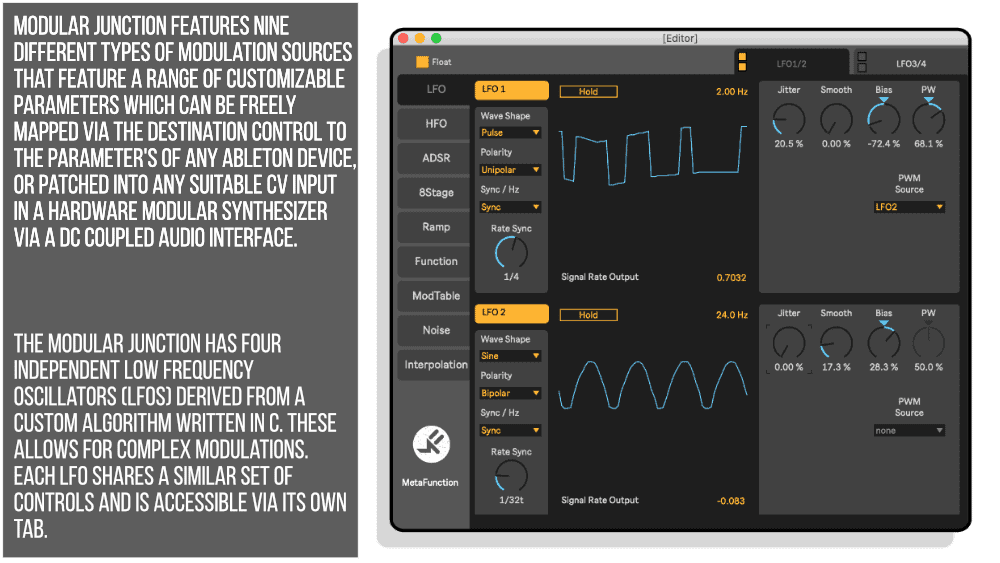
Modular Junction LFO Infographic
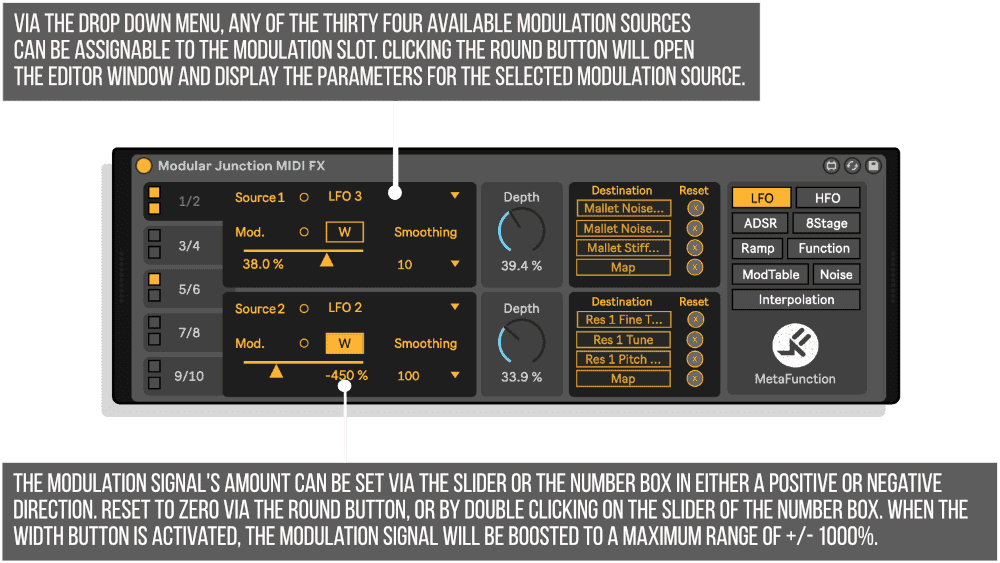
Modular Junction Source Width Infographic
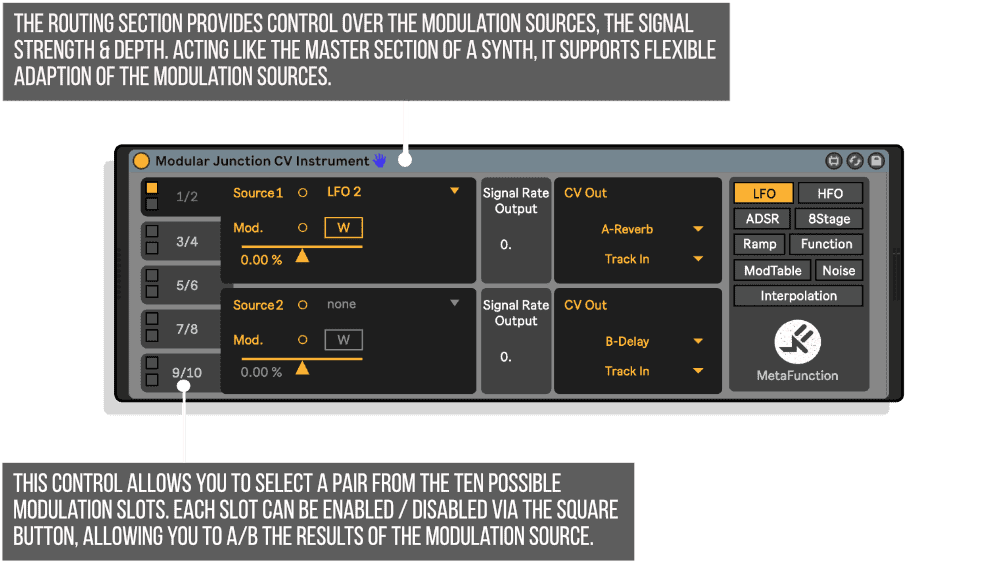
Modular Junction CV Infographic

Product reviews

Write a review

Leave a quick review of your shopping experience. Your feedback helps others make the right choice.
5/1000
0/500
0/500
What is the most important thing to know?

Would you recommend this product? *

No reviews yet. Be the first to review this product.

Modular Junction by MetaFunction

The Modular Junction is a modulation expander Max For Live device for Ableton Live. Designed to add new functionality to your workflow, the Modular Junction provides a myriad of modulation tools that can augment existing hardware and software devices. The Modular Junction provides a selection of modulation sources that can be mapped to any parameter in Live, or patched to any CV based hardware instrument via a DC coupled audio interface.

The Modular Junction is designed to spark creativity, add new possibilities to both familiar or new software instruments and audio effects and offers new modulation sources for compatible hardware modular instruments.

MODULAR JUNCTION FEATURES

  • Modular synthesis expansion for software based instruments and audio FX via a Max For Live MIDI FX device, or hardware CV based modular instruments via a DC coupled audio interface and a Max For Live Instrument
  • Ten modulation slots for assigning modulation sources to any parameter in Live (i.e. Wavetable Osc Position, Hybrid Reverb Decay etc.)
  • Ten modulation slots for routing modulation sources out of a DC coupled audio interface (i.e. to a eurorack or 5U system)
  • In the Max MIDI Effect and the Max Audio Effect, each modulation slot can be mapped to four parameters simultaneously
  • Thirty four modulation sources freely assignable to any modulation slot, with user control of modulation amount, polarity, width and smoothing. Custom DSP algorithms written in C code
  • Four Low Frequency Oscillators with rate (sync or Hz), polarity, bias and waveshape
  • Four High Frequency Oscillators with rate (sync or Hz), polarity, bias and waveshape
  • Four ADSR envelopes that can be triggered from MIDI note input or at subdivision clock rates via project transport
  • Four 8 Stage Envelopes for complex shapes, that can be triggered from MIDI note input or at subdivision clock rates via project transport
  • Four Ramps that can be triggered from MIDI note input or at subdivision clock rates via project transport
  • All envelope stages can be set to Ms, Secs or tempo clock subdivisions (i.e. Attack to 16th)
  • Four Functions with user drawable curves and presets, that can be triggered at subdivision clock rates via project transport
  • Four Modulation Tables. A novel modulation source. Trigger a Modulation Table at project clock subdivisions for complex evolving modulation sources. Create Modulation Tables with Meta Functions free Wave Weld device. Forty eight modulation table presets are included
  • Two pseudo 3D Perlin Noise sources, for unique random modulation sources
  • Four Interpolation sources. A novel modulation source. Interpolate between any two modulation sources within the Modular Junction to create unique shapes via linear, cosine, cubic and spline algorithms

MODULAR JUNCTION CONTENTS

  • Modular Junction MIDI FX – A Max For Live MIDI FX designed to be used with any Ableton Instrument (i.e. Wavetable or Operator) or any third party VST / AU virtual instrument plug-in.
  • Modular Junction Audio FX – A Max For Live Audio Effect designed to be used with any Ableton Audio Effects device (i.e. Hybrid Reverb or Echo) or any third party VST / AU audio effect plug-in.
  • Modular Junction CV Instrument – A Max For Live Instrument designed to be used with any CV based hardware instrument, such as a Eurorack or 5U modular synthesizer, via a DC coupled audio interface.
  • Over 20 Audio Effect rack presses and over 90 Instrument rack presets.

Frequently Asked Questions

Modular Junction requires Ableton Live with Max for Live installed. It is recommended to use the latest versions of both for full compatibility and stability.

Modular Junction operates as a Max for Live MIDI FX device, allowing you to map its modulation sources directly to any automatable parameter within Ableton Live using standard Live mapping. This makes it straightforward to modulate synths, effects, and any other compatible device in your session.

Yes, Modular Junction can output CV signals to hardware modular instruments, provided you have a DC coupled audio interface. Simply patch the output from your interface into your hardware modular as you would with any CV source.

Modular Junction provides a range of modulation sources designed to expand your creative toolkit, suitable for modulating both software instruments and audio effects. The device is built to offer flexible, patchable modulation in a workflow that feels closer to hardware modular synthesis.

A DC coupled audio interface is only required if you want to send CV signals to external hardware modular gear. If you are purely working within Ableton Live and modulating software devices, any standard audio interface will work fine.

Absolutely. Modular Junction is designed to introduce modular-style thinking into a familiar Ableton Live environment, making it approachable whether you are new to modulation or coming from a hardware modular background. It is a great way to explore new sonic possibilities without committing to physical hardware.

Once downloaded, drag the Max for Live device into your Ableton Live library or directly onto a MIDI track in your session. From there you can begin mapping modulation sources to parameters or routing CV out through a DC coupled interface straight away.

Important Information

V1.0.0 – Initial Release

Our Products are generally provided as Zip file downloads which in all cases will need to be extracted and saved to your hard drive prior to installation. Details on the different file type provided and what to do with them are below.

.alp Files – These are Ableton Live Packs and will either install directly into the Packs Section of the browser of Ableton Live or ask you to save them to your hard drive. For packs that install to the library, when you double click on them you will see a pop up window asking you to confirm that installation is ok as the files are described as “Legacy”. This is fine and you are ok to proceed, the packs are created using the format for an earlier version of Live and so remain compatible with the current version.

.amxd files – These are individual MaxforLive Devices and can be stored anywhere on your hard drive. We’d advise creating a folder for them and then adding that folder as a location within the Places section of Lives Browser.

END-USER LICENSE AGREEMENT FOR ISOTONIK STUDIOS SOFTWARE PRODUCTS.

PLEASE READ THE TERMS AND CONDITIONS OF THIS LICENSE AGREEMENT CAREFULLY BEFORE CONTINUING WITH THIS PROGRAM INSTALL.

This End-User License Agreement (referred to as “EULA”) is a legal agreement between an individual or a single entity (referred to as “LICENSEE”) and Isotonik Studios for the Isotonik Studios software product(s) which may include associated software components, media, printed materials, and “online” or electronic documentation (referred to as “SOFTWARE PRODUCT”). By installing, copying, or otherwise using the SOFTWARE PRODUCT, the LICENSEE agrees to be bound by the terms of this EULA.

This EULA represents the entire agreement concerning the program between the LICENSEE and Isotonik Studios and it supersedes any prior proposal, representation, or understanding between the parties. If the LICENSEE does not agree to the terms of this EULA, the LICENSEE should not install or use the SOFTWARE PRODUCT.

The SOFTWARE PRODUCT is protected by copyright laws and international copyright treaties, as well as other intellectual property laws and treaties. The SOFTWARE PRODUCT is licensed, not sold.

  1. GRANT OF LICENSE.

The SOFTWARE PRODUCT is licensed as follows:

(a) Installation and Use. Providing that the LICENSEE has paid any applicable license fees, Isotonik Studios grants the LICENSEE the right to install and use copies of the SOFTWARE PRODUCT on up to two computers in the LICENSEE’s possession that are running a validly licensed copy of the operating system for which the SOFTWARE PRODUCT was designed [e.g., Windows 10, macOS]. The computer(s) must be owned by the LICENSEE.

(b) Backup Copies. The LICENSEE may also make copies of the SOFTWARE PRODUCT as may be necessary for backup and archival purposes.

  1. DESCRIPTION OF OTHER RIGHTS AND LIMITATIONS.

(a) Maintenance of Copyright Notices. The LICENSEE must not remove or alter any copyright notices on any and all copies of the SOFTWARE PRODUCT.

(b) Distribution. The LICENSEE may not distribute registered copies of the SOFTWARE PRODUCT to third parties.

(c) Prohibition on Reverse Engineering, Decompilation, and Disassembly. The LICENSEE may not reverse engineer, decompile, or disassemble the SOFTWARE PRODUCT, except and only to the extent that such activity is expressly permitted by applicable law notwithstanding this limitation.

(d) Rental. The LICENSEE may not rent, lease, or lend the SOFTWARE PRODUCT.

(e) License transfer The LICENSEE may not transfer their license to the SOFTWARE PRODUCT to any third party. Any attempt to do so will be considered a violation of this EULA.

(f) Support Services. Isotonik Studios may provide the LICENSEE with support services related to the SOFTWARE PRODUCT for a period of 12 months following the date of purchase. Any supplemental software code provided to the LICENSEE as part of the Support Services shall be considered part of the SOFTWARE PRODUCT and subject to the terms and conditions of this EULA.

(g) Compliance with Applicable Laws. The LICENSEE must comply with all applicable laws regarding use of the SOFTWARE PRODUCT.

  1. TERMINATION Without prejudice to any other rights, Isotonik Studios may terminate this EULA if the LICENSEE fails to comply with the terms and conditions of this EULA. In such event, the LICENSEE must destroy all copies of the SOFTWARE PRODUCT in the LICENSEE’s possession.
  2. COPYRIGHT All title, including but not limited to copyrights, in and to the SOFTWARE PRODUCT and any copies thereof are owned by Isotonik Studios or its suppliers. All title and intellectual property rights in and to the content which may be accessed through use of the SOFTWARE PRODUCT is the property of the respective content owner and may be protected by applicable copyright or other intellectual property laws and treaties. This EULA grants the LICENSEE no rights to use such content. All rights not expressly granted are reserved by Isotonik Studios.
  3. NO WARRANTIES Isotonik Studios expressly disclaims any warranty for the SOFTWARE PRODUCT. The SOFTWARE PRODUCT is provided ‘As Is’ without any express or implied warranty of any kind, including but not limited to any warranties of merchantability, noninfringement, or fitness of a particular purpose. Isotonik Studios does not warrant or assume responsibility for the accuracy or completeness of any information, text, graphics, links or other items contained within the SOFTWARE PRODUCT. Isotonik Studios makes no warranties respecting any harm that may be caused by the transmission of a computer virus, worm, time bomb, logic bomb, or other such computer program. Isotonik Studios further expressly disclaims any warranty or representation to the LICENSEE or to any third party.
  4. LIMITATION OF LIABILITY In no event shall Isotonik Studios be liable for any damages (including, without limitation, lost profits, business interruption, or lost information) arising out of the LICENSEE’s use of or inability to use the SOFTWARE PRODUCT, even if Isotonik Studios has been advised of the possibility of such damages. In no event will Isotonik Studios be liable for loss of data or for indirect, special, incidental, consequential (including lost profit), or other damages based in contract, tort or otherwise. Isotonik Studios shall have no liability with respect to the content of the SOFTWARE PRODUCT or any part thereof, including but not limited to errors or omissions contained therein, libel, infringements of rights of publicity, privacy, trademark rights, business interruption, personal injury, loss of privacy, moral rights or the disclosure of confidential information.


MORE FROM MetaFunction...

FREQUENTLY BOUGHT TOGETHER

CONTACT US...
Tick the box below to sign up to our mailing list and register for our Access All Areas competition where you could win a years worth of new releases?
Modular Junction by MetaFunction
£31.00