Rabbit Hole by Culto
CAN YOU ESCAPE THE RABBIT HOLE?
“Curiouser and curiouser!” cried Alice as she gazed into the Rabbit Hole. Take a journey through this wonder tunnel and your sound will meet a new reality, unlike any other.
Rabbit Hole is the ultimate chaos modulation delay by Culto, where parallel modulators driven by a random function warp its delay lines into creating weird sonic events. It fills empty spaces in your samples, creating additional rhythmical layers and thick, swirling textures.
With Rabbit Hole, you can reverse the delay sound, filter it, loop portions of the random function, apply gentle modulation for chorusing effects, and add quirky jumps for bubbly streams of sound.
So, if you need unheard sounds, enter the wonder tunnel and let Rabbit Hole take you on a wild ride of sonic discovery.
USER GUIDE: Rabbit Hole User Manual
Rabbit Hole by Culto
CAN YOU ESCAPE THE RABBIT HOLE?
“Curiouser and curiouser!” cried Alice as she gazed into the Rabbit Hole. Take a journey through this wonder tunnel and your sound will meet a new reality, unlike any other.
Rabbit Hole is the ultimate chaos modulation delay by Culto, where parallel modulators driven by a random function warp its delay lines into creating weird sonic events. It fills empty spaces in your samples, creating additional rhythmical layers and thick, swirling textures.
With Rabbit Hole, you can reverse the delay sound, filter it, loop portions of the random function, apply gentle modulation for chorusing effects, and add quirky jumps for bubbly streams of sound.
So, if you need unheard sounds, enter the wonder tunnel and let Rabbit Hole take you on a wild ride of sonic discovery.
USER GUIDE: Rabbit Hole User Manual
Additional information
| MaxforLive | Audio Devices |
|---|---|
| Ableton Live Compatibility | Ableton Live 10 Standard with MaxforLive, Ableton Live 10 Suite, Ableton Live 11 Standard with MaxforLive, Ableton Live 11 Suite, Ableton Live 12 Standard with MaxforLive, Ableton Live 12 Suite |
| Min. Requirements | Ableton Live 10 Standard with MaxforLive Installed or Ableton Live 10 Suite |
| OS | Mac: Intel: 10.14 Mojave or later Silicon: OS 11.0 or later / Windows Windows: 10 (64-bit) or later |
PRICE: £20.00
Rabbit Hole by Culto
“Rabbit Hole” is derived from research on modulation delays that began with “Simbiosi”, Culto’s first M4L device. The aesthetic inspiration behind it includes glitch, IDM, and electroacoustic music.
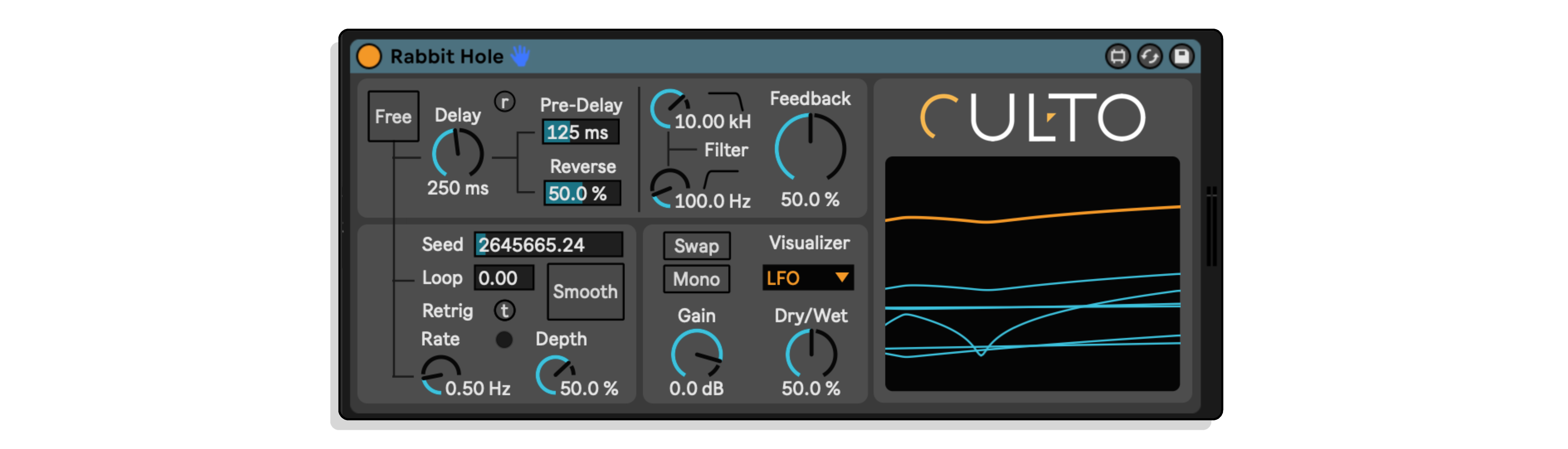
It uses the saturated feedback and cross-feedback chains from “Simbiosi” and applies them to a brand-new set of modulators. These modulators are phase-locked and bound to a primary noise — a random function, resulting in effects that range from subtle flanging to impactful detuning and chorusing. Controlled feedback is combined with this approach to generate a continuously variable sound stream. The built-in Low-Cut & High-Cut filter nested inside the delay’s feedback chain can also be used to further sculpt these textures, and the Reverse parameter can be used to mix the delayed sound with its reversed copy.
The engine of “Rabbit Hole” is designed entirely in Gen~ for accurate signal processing and control. The random function lets users set a Seed to generate different sequences of numbers at a sample rate resolution. The sequence is then downsampled with the Rate parameter for more suitable values for LFO usage. Rate, Depth, and Smooth control a set of parallel LFOs linked to the primary random function. These LFOs have slightly different phases and rates, contributing to the richness of the sound. Before modulating the delay lines, they are distorted by a set of dividers that continuously scale their amplitude, resulting in a series of springy jumps. The Smooth switch can be used to turn this off. The Visualizer shows all six LFOs in action, as well as the Random function progress that keeps track of the Seed.
“Rabbit Hole” can add vitality to drum beats with its unpredictable behavior, which can be managed by limiting its action with the Loop function. Starting with the Sync button turned on, users can set desired Delay Size, Rate, and Depth values, and finally, set the Loop duration to a larger value. Factory presets that have the Sync active can provide a good starting point for this method. Regulating the filters and feedback will help users achieve a more refined result.
When used with sounds other than a drum beat, it may work better without the Sync option, allowing users to fully adjust the parameters according to absolute values. Long delays with slow, high-depth modulations can create eerie glissandi, while short delays with high feedback values can produce howling effects. Depth can be used to constrain the tonal range of modulations, which also varies depending on the main Delay size.
Extra controls allow users to adjust the wet signal to the desired ratio with the dry one. Pre-Delay adjusts the “slapback effect” between dry and wet Gain affects the output gain of the wet signal, which can lose energy when filtered. Swap can be used to swap the left and right channels’ modulations, while Mono reduces stereo processing into a single channel.
Frequently Asked Questions
Rabbit Hole is a chaos modulation delay Max for Live device that runs parallel modulators driven by a random function, warping its delay lines to produce unpredictable, evolving sonic textures. Effects range from subtle flanging and chorusing through to heavy detuning and full-on glitchy sonic mayhem. It is designed to fill space, create movement, and push sounds into genuinely unexpected territory.
Yes, Rabbit Hole is a Max for Live device, so you will need Ableton Live Suite or a copy of Ableton Live Standard with Max for Live purchased separately. Make sure you are running a compatible version of Live and Max for Live as specified on the product page.
It is inspired by glitch, IDM, and electroacoustic music, making it a natural fit for experimental and electronic production. That said, its range from subtle chorusing to extreme modulation means it is equally useful for adding organic movement to pads, vocals, or guitars, or for completely destroying a sound in a controlled way.
The modulators are phase-locked and tied to a primary random function, so the modulation is unpredictable but internally coherent rather than entirely random noise. You can shape the results using the feedback and cross-feedback chains, the built-in Low-Cut and High-Cut filters within the feedback path, and the Reverse parameter to blend the delayed signal with its reversed counterpart.
The Reverse parameter lets you mix the delayed signal with a reversed version of itself, adding another layer of textural strangeness on top of the modulation. Blending it subtly adds a smeared, ghostly quality, while pushing it further creates more disorienting, otherworldly results.
Yes, Rabbit Hole is a direct evolution of Simbiosi, Culto’s first M4L device, borrowing its saturated feedback and cross-feedback architecture and building on it with an entirely new modulation system. If you are familiar with Simbiosi, Rabbit Hole takes that foundation considerably further into chaotic territory.
After purchase you will receive the device file which you drag and drop into Ableton Live, or place in your Max for Live devices folder so it appears in your browser. Full installation instructions are included with the download.
Important Information
V1.0.0 – Initial Release – April 2023
Our Products are generally provided as Zip file downloads which in all cases will need to be extracted and saved to your hard drive prior to installation. Details on the different file type provided and what to do with them are below.
.alp Files – These are Ableton Live Packs and will either install directly into the Packs Section of the browser of Ableton Live or ask you to save them to your hard drive. For packs that install to the library, when you double click on them you will see a pop up window asking you to confirm that installation is ok as the files are described as “Legacy”. This is fine and you are ok to proceed, the packs are created using the format for an earlier version of Live and so remain compatible with the current version.
.amxd files – These are individual MaxforLive Devices and can be stored anywhere on your hard drive. We’d advise creating a folder for them and then adding that folder as a location within the Places section of Lives Browser.
END-USER LICENSE AGREEMENT FOR ISOTONIK STUDIOS SOFTWARE PRODUCTS.
PLEASE READ THE TERMS AND CONDITIONS OF THIS LICENSE AGREEMENT CAREFULLY BEFORE CONTINUING WITH THIS PROGRAM INSTALL.
This End-User License Agreement (referred to as “EULA”) is a legal agreement between an individual or a single entity (referred to as “LICENSEE”) and Isotonik Studios for the Isotonik Studios software product(s) which may include associated software components, media, printed materials, and “online” or electronic documentation (referred to as “SOFTWARE PRODUCT”). By installing, copying, or otherwise using the SOFTWARE PRODUCT, the LICENSEE agrees to be bound by the terms of this EULA.
This EULA represents the entire agreement concerning the program between the LICENSEE and Isotonik Studios and it supersedes any prior proposal, representation, or understanding between the parties. If the LICENSEE does not agree to the terms of this EULA, the LICENSEE should not install or use the SOFTWARE PRODUCT.
The SOFTWARE PRODUCT is protected by copyright laws and international copyright treaties, as well as other intellectual property laws and treaties. The SOFTWARE PRODUCT is licensed, not sold.
- GRANT OF LICENSE.
The SOFTWARE PRODUCT is licensed as follows:
(a) Installation and Use. Providing that the LICENSEE has paid any applicable license fees, Isotonik Studios grants the LICENSEE the right to install and use copies of the SOFTWARE PRODUCT on up to two computers in the LICENSEE’s possession that are running a validly licensed copy of the operating system for which the SOFTWARE PRODUCT was designed [e.g., Windows 10, macOS]. The computer(s) must be owned by the LICENSEE.
(b) Backup Copies. The LICENSEE may also make copies of the SOFTWARE PRODUCT as may be necessary for backup and archival purposes.
- DESCRIPTION OF OTHER RIGHTS AND LIMITATIONS.
(a) Maintenance of Copyright Notices. The LICENSEE must not remove or alter any copyright notices on any and all copies of the SOFTWARE PRODUCT.
(b) Distribution. The LICENSEE may not distribute registered copies of the SOFTWARE PRODUCT to third parties.
(c) Prohibition on Reverse Engineering, Decompilation, and Disassembly. The LICENSEE may not reverse engineer, decompile, or disassemble the SOFTWARE PRODUCT, except and only to the extent that such activity is expressly permitted by applicable law notwithstanding this limitation.
(d) Rental. The LICENSEE may not rent, lease, or lend the SOFTWARE PRODUCT.
(e) License transfer The LICENSEE may not transfer their license to the SOFTWARE PRODUCT to any third party. Any attempt to do so will be considered a violation of this EULA.
(f) Support Services. Isotonik Studios may provide the LICENSEE with support services related to the SOFTWARE PRODUCT for a period of 12 months following the date of purchase. Any supplemental software code provided to the LICENSEE as part of the Support Services shall be considered part of the SOFTWARE PRODUCT and subject to the terms and conditions of this EULA.
(g) Compliance with Applicable Laws. The LICENSEE must comply with all applicable laws regarding use of the SOFTWARE PRODUCT.
- TERMINATION Without prejudice to any other rights, Isotonik Studios may terminate this EULA if the LICENSEE fails to comply with the terms and conditions of this EULA. In such event, the LICENSEE must destroy all copies of the SOFTWARE PRODUCT in the LICENSEE’s possession.
- COPYRIGHT All title, including but not limited to copyrights, in and to the SOFTWARE PRODUCT and any copies thereof are owned by Isotonik Studios or its suppliers. All title and intellectual property rights in and to the content which may be accessed through use of the SOFTWARE PRODUCT is the property of the respective content owner and may be protected by applicable copyright or other intellectual property laws and treaties. This EULA grants the LICENSEE no rights to use such content. All rights not expressly granted are reserved by Isotonik Studios.
- NO WARRANTIES Isotonik Studios expressly disclaims any warranty for the SOFTWARE PRODUCT. The SOFTWARE PRODUCT is provided ‘As Is’ without any express or implied warranty of any kind, including but not limited to any warranties of merchantability, noninfringement, or fitness of a particular purpose. Isotonik Studios does not warrant or assume responsibility for the accuracy or completeness of any information, text, graphics, links or other items contained within the SOFTWARE PRODUCT. Isotonik Studios makes no warranties respecting any harm that may be caused by the transmission of a computer virus, worm, time bomb, logic bomb, or other such computer program. Isotonik Studios further expressly disclaims any warranty or representation to the LICENSEE or to any third party.
- LIMITATION OF LIABILITY In no event shall Isotonik Studios be liable for any damages (including, without limitation, lost profits, business interruption, or lost information) arising out of the LICENSEE’s use of or inability to use the SOFTWARE PRODUCT, even if Isotonik Studios has been advised of the possibility of such damages. In no event will Isotonik Studios be liable for loss of data or for indirect, special, incidental, consequential (including lost profit), or other damages based in contract, tort or otherwise. Isotonik Studios shall have no liability with respect to the content of the SOFTWARE PRODUCT or any part thereof, including but not limited to errors or omissions contained therein, libel, infringements of rights of publicity, privacy, trademark rights, business interruption, personal injury, loss of privacy, moral rights or the disclosure of confidential information.
Frequently Bought Together
 ★ Popular