Console 40 brings the SSL 4000 series into Ableton Live and Push 3 Standalone as a component-modelled Max for Live suite. Here is everything it does.
Console 40 by Monomono brings the SSL 4000 series into Ableton Live as a complete Max for Live suite, modelled at the component level so the tolerances, character, and transparency of the original hardware carry across directly into your session. This walkthrough covers every device in the suite so you can hear exactly what it does before you commit.
What it does
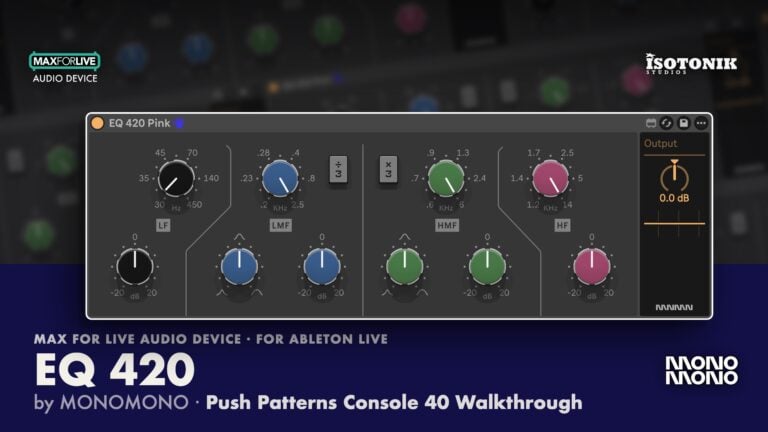
The suite contains six devices that cover the full SSL console signal chain. The EQ 424 Black is a four-band parametric with shelf and bell modes on the lows and highs, an adjustable Q on both mid bands, a built-in frequency analyser, a resonance control not found on the hardware original, and a mid-side mode for treating the stereo field independently. The EQ 422 Pink adds a wider gain range of plus or minus 20 dB and adjustable frequency sweep on the mid bands, with full mid-side processing. The EQ 420 Pink is the same circuit without the filter section or mid-side option.
The Dynamic 432 Module pairs a compressor and an expander in one device, with linked or independent left and right input gain, a sidechain filter, mid-side processing, a blend control for parallel compression, and the same component-level serial number variation found across the whole suite. The Bus 442 Saturation is deliberately simple: a bias dial that adds harmonics and a clip control that acts as a diode clipper with true-peak limiting behaviour. Stack it across multiple tracks to introduce consistent colour without obvious distortion. The Bus Compressor 452 is the centrepiece, delivering the glue compression sound the SSL 4000 is known for, with high-frequency sidechain filtering, a high shelf, blend for parallel use, and the same bias and clip saturation controls found on the Bus 442.
Every device shares a consistent set of design details: a live frequency analyser, GR metering, colour-selectable dials via the Monomono logo button, and randomisable serial numbers at the component level so no two instances of the same unit sound identical. That last feature is what gives the suite its width and sense of analogue variation rather than a single static emulation.
How to use it
- Install: Download the zip, unzip it, and drag all the Max for Live devices into a dedicated folder inside your Ableton User Library so they are available in every future session.
- Start with EQ: Place the EQ 424 Black or EQ 422 Pink on individual tracks. Use shelf mode on the lows and highs for broad tonal shaping, bell mode on the mids for surgical cuts, and engage mid-side mode on stereo sources to treat width separately from the centre.
- Add dynamics: Load the Dynamic 432 Module on drums or any source that needs control. Set the compressor threshold and ratio first, then engage the expander send and bring up the range gradually to tighten the transient rather than gate it. Use the blend knob to mix in the unprocessed signal for parallel compression.
- Spread saturation: Drop the Bus 442 across every track in the session. Keep the bias low for subtle harmonic density and use the clip control sparingly as a peak catcher rather than an obvious distortion effect.
- Glue the mix bus: Place the Bus Compressor 452 on the master. A slow attack and quick release is a reliable starting point. Use the high-frequency sidechain filter to stop the compressor pumping on low-end content, and blend back the dry signal if the compression is reducing energy rather than adding it.
- Randomise serial numbers: On any device, cycle through the serial number options to introduce subtle component-level variation between instances of the same EQ or compressor, which widens the stereo image and adds analogue character across a full mix.
- Push 3 Standalone: All devices are optimised for low CPU use and load directly into Push 3 Standalone without requiring external VSTs. Each device’s controls are mapped into Push 3’s parameter pages so the full suite is usable without a computer.
Why it matters
SSL-style processing is a staple of professional mixing because it is transparent until you push it, at which point it adds weight and glue rather than colour for colour’s sake. What makes Console 40 stand apart from other emulations is the component-level modelling: every instance of the same device behaves slightly differently depending on the serial number selected, which is how hardware units actually vary from console to console. Pair that with Push 3 Standalone compatibility and genuinely low CPU overhead and you have a suite that works in a full production environment rather than just as a tone demo. Whether you are mixing in the box or building a session entirely on Push 3, Console 40 gives you the SSL workflow without compromise.