
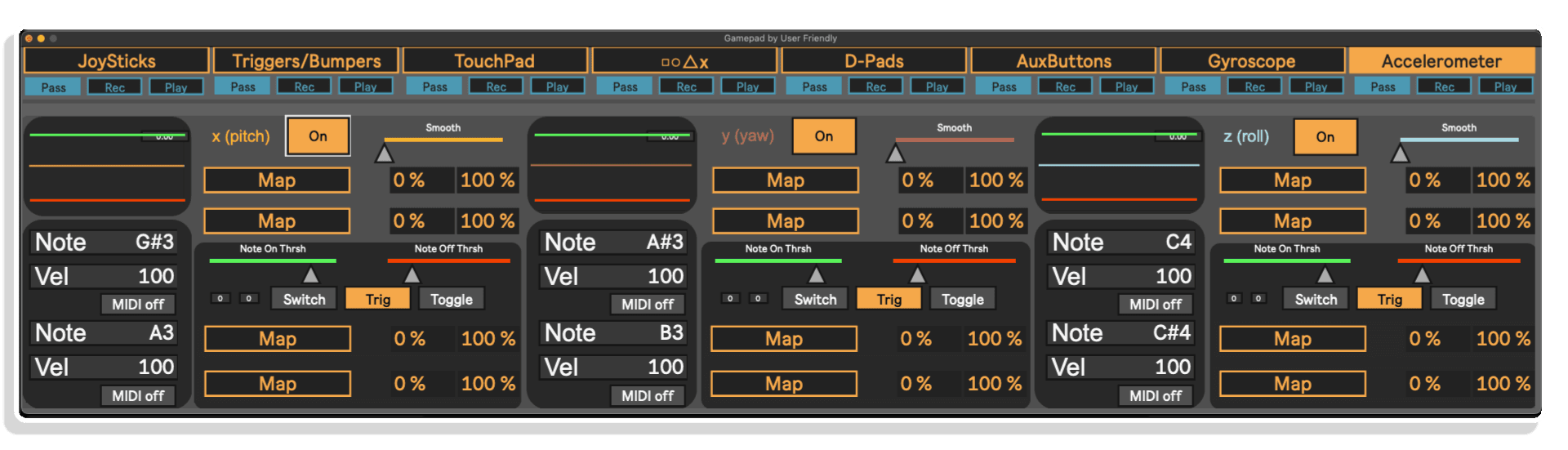
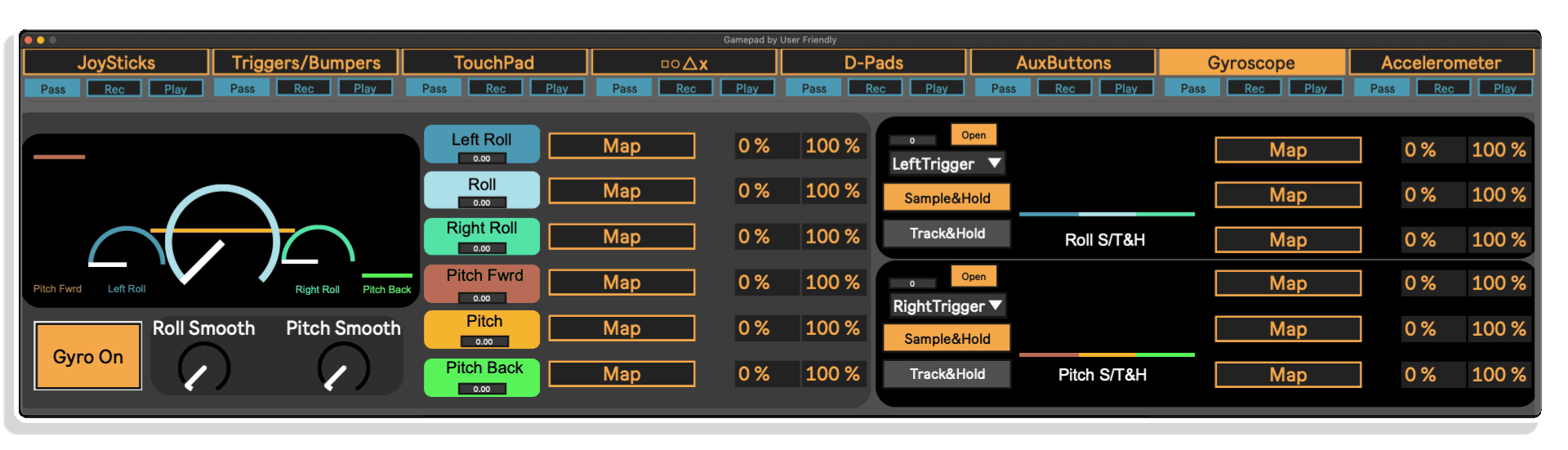
The accelerometer page includes 3 oscilloscopes (one for each axis) to help you see what is happening under the hood. But the real fun is in the MIDI and mappable outputs!
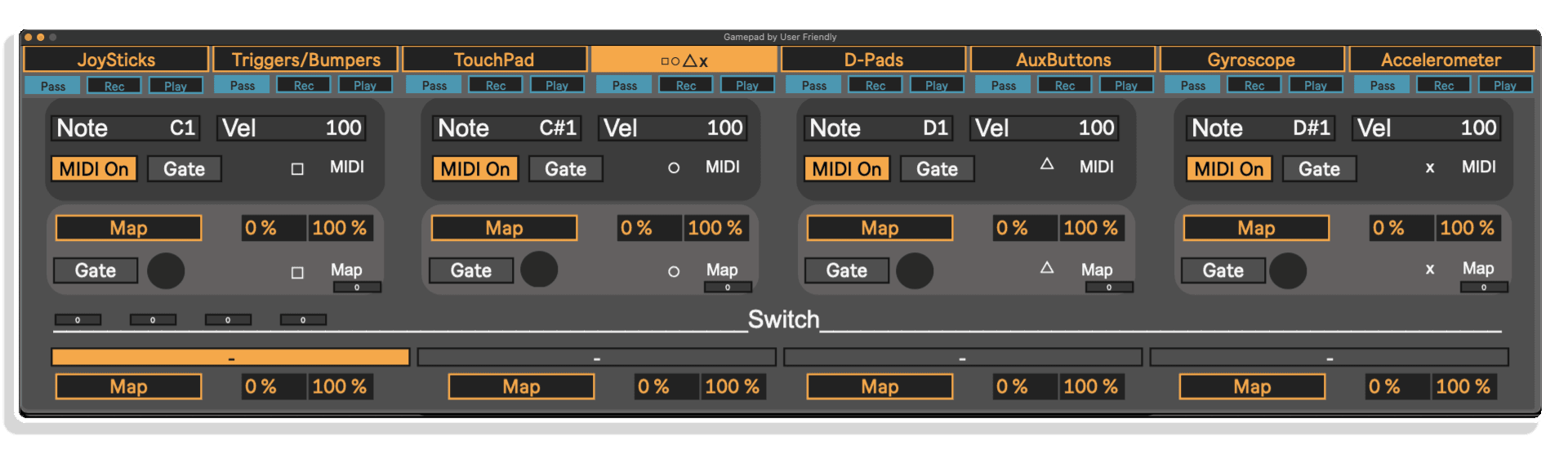
Take control of your Ableton Live sessions in a whole new way—using your console controller! Gamepad M4L Device by User Friendly transforms PS4, PS5, Xbox and compatible gamepads into fully mappable MIDI tools, packed with 64 controls.
Jam out drum beats with button taps, twist filters with gyros, or modulate synths using joystick motion—all without touching your mouse. Whether you’re performing live, capturing studio takes, or blending music-making with gaming fun, this device unlocks endless creative potential.
Key Features:
Fire up Gamepad, plug in your controller—and turn play into performance.
Take control of your Ableton Live sessions in a whole new way—using your console controller! Gamepad M4L Device by User Friendly transforms PS4, PS5, Xbox and compatible gamepads into fully mappable MIDI tools, packed with 64 controls.
Jam out drum beats with button taps, twist filters with gyros, or modulate synths using joystick motion—all without touching your mouse. Whether you’re performing live, capturing studio takes, or blending music-making with gaming fun, this device unlocks endless creative potential.
Key Features:
Fire up Gamepad, plug in your controller—and turn play into performance.
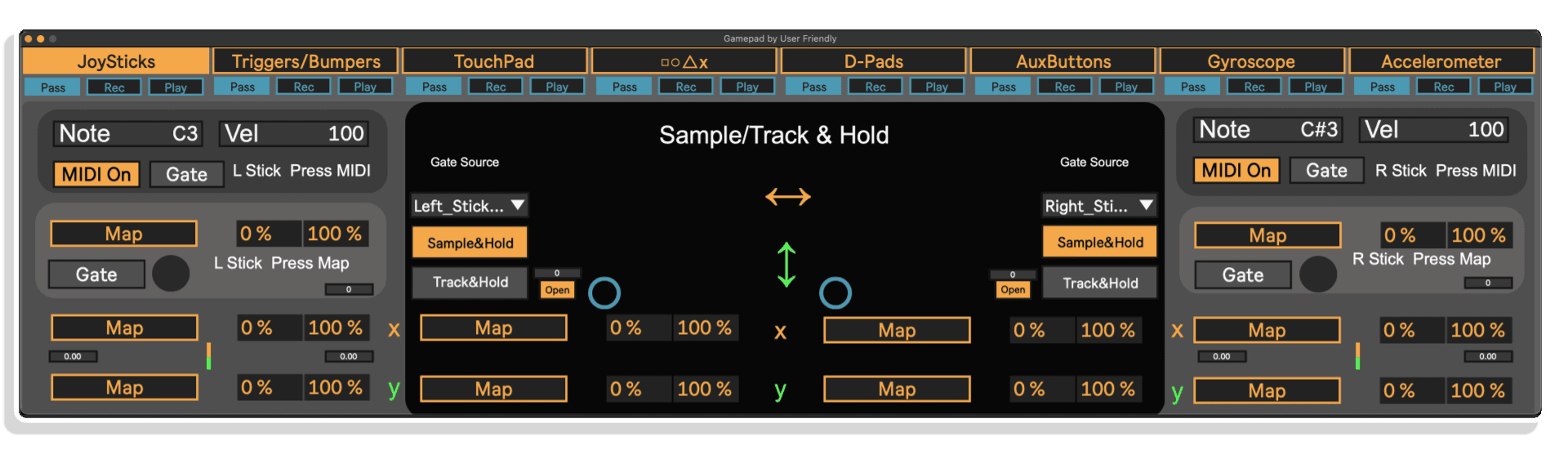
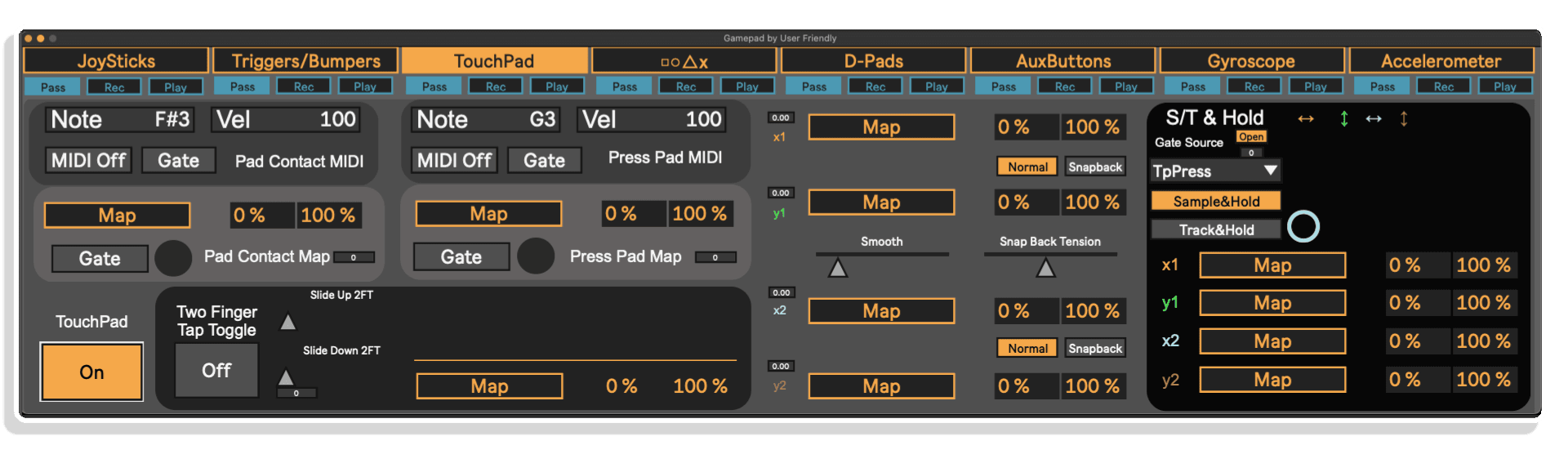
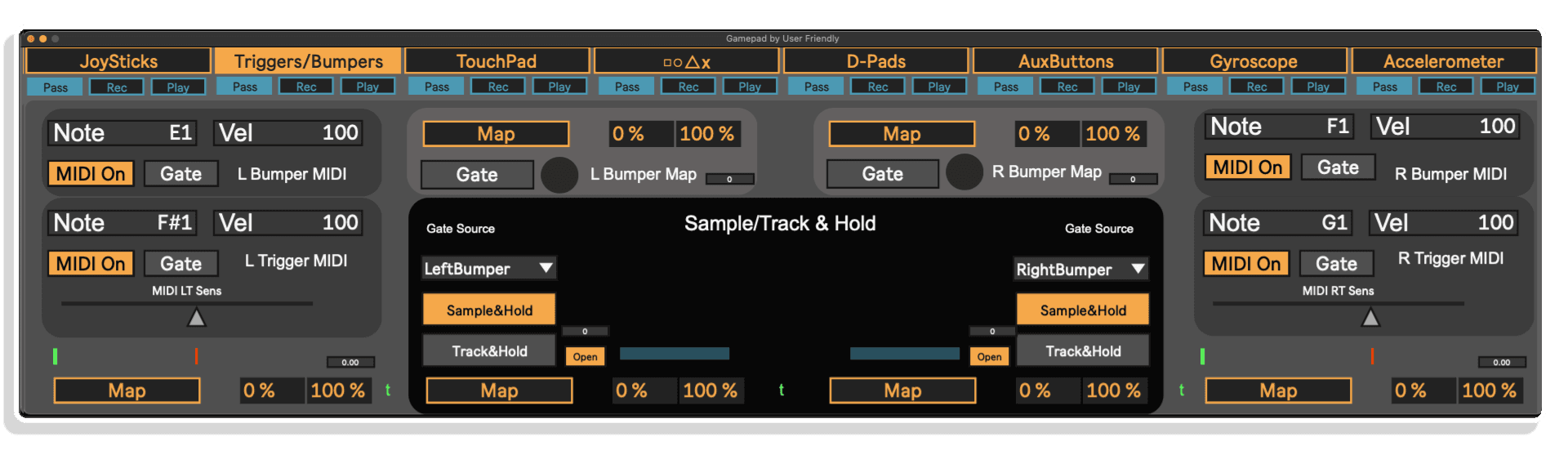
If you've already wired your brain to gaming controls, I can't imagine a better way to play parameters in the DAW.
I think the UI could be improved in terms of aliasing/readability.
Strongly recommend
Simple setup
Limited to certain controllers
I was looking for something to use my PS4 controllers and this was the answer. Very nice tool.
Automatic mapping
No cons
I had to finally go purchase a ps4 controller to get the gyro and accelerometer to work. I for what ever reason, could never make the Xbox elite controller do the same. Im using max 9.0.7 and ableton 12.2.1 live suite.
Great little tool, very comprehensive. Can now fly a synth like a spaceship.
Imagine jamming beats or modulating effects using nothing but a PlayStation or Xbox controller. That’s exactly what Gamepad M4L Device lets you do—bridging the world of gaming and music in one intuitive Max for Live tool. Designed by User Friendly, this device harnesses up to 64 control outputs from your gamepad and maps them inside Ableton Live 12. You can mash buttons to trigger MIDI notes, ride filters with joystick tilts, or sculpt FX with motion gestures via the controller’s gyroscope and accelerometer.
And because modern gamepads are designed to be ultra-ergonomic, you can access a wide range of controls with natural, handheld movement—way beyond what traditional MIDI keyboards or pad controllers offer. Perfect for live performance, beatmaking, recording automation, or even just having fun when you can’t decide between gaming and producing.
Controllers like the PS5 gamepad pack a ton of expressive potential in a compact form—64 controls all accessible at once. Beyond the buttons and sticks, subtle physical gestures (like tilts and movements) can dynamically control your sound. Play a beat while movement naturally adjusts reverb or modulation. Map joystick presses to FX toggles. Use gyro data to animate your mix. The creative applications are endless—and fun!
Whether you’re performing, producing, or just vibing in your studio, Gamepad M4L Device turns your trusty console controller into an inspiring and tactile part of your music workflow. Perfect for creative producers, performers, or gamers-turned-musicians—grab it and start pushing buttons in all the best ways.
ALSO AVAILABLE FROM USER FRIENDLY – AISSUF | ALSM | UFGM | A4SP | ASP8UF
A: Gamepad MaxforLive is a MaxforLive control device by User Friendly that allows you to map and use gamepad buttons and joysticks to control parameters in Ableton Live, ideal for DIY MIDI performance setups.
A: To use Gamepad MaxforLive, ensure the following requirements are met:
macOS or Windows operating system
A USB or Bluetooth gamepad compatible with your system
MAC: PS4 and PS5 controllers work on Mac with USB cable attached (full functionality) or
bluetooth (limited functionality). XBOX controllers will work on Mac, but currently, ONLY over
bluetooth. This is important because certain functionality for the controller requires a USB
connection, such as Gyro, Touchpad and accelerometer.
PC: For PS4 and PS5 there are reports of connectivity issues, but at the same time
confirmations of no issue with connection on PC. Modern Xbox controllers seem to work better
on PC.
Other Controllers: There are so many controllers out there and I can’t test all of them. There are Playstation controllers and Xbox controllers, yes, but there is also so many different
controllers just for these two consoles!
I know Playstation 4 and 5 work, but will Playstation 3? How about 2? Xbox 1? Xbox 360? A knock off Playstation controller not made by Sony?
What about a controller that doesn’t have Bluetooth? What about a controller that doesn’t
have a USB cable but you have a converter? What firmware is the controller itself on?
I just don’t know. On top of that, there is the question of what kind of Computer and OS you are on.
It may be that the controller will work for the Gamepad M4L device but may not work with your
computer. After that, some controllers are equipped with different functionality whether it be
gryo, touchpad, extra buttons ect.
A: Yes, this device requires MaxforLive, included with Ableton Live Suite or available as an add-on for Live Standard.
A: MaxforLive is a platform inside Ableton Live that enables the creation and use of custom audio/MIDI/control devices—like Gamepad MaxforLive—using visual programming. It’s bundled with Live Suite or available for Live Standard via your Ableton.com account.
A: You can explore more of User Friendly’s tools and devices here:
User Friendly
V1.0.0 – Initial Release – June 2025
Our Products are generally provided as Zip file downloads which in all cases will need to be extracted and saved to your hard drive prior to installation. Details on the different file type provided and what to do with them are below.
.alp Files – These are Ableton Live Packs and will either install directly into the Packs Section of the browser of Ableton Live or ask you to save the pack to your hard drive from where you’ll be open to open the live set.
For .alp files that install to your Live Packs Section, when you double click on them you will see a pop up window asking you to confirm that installation is ok as the files are described as “Legacy”. This is fine and you are ok to proceed, the packs are created using the format for an earlier version of Live and so remain compatible with the current version.
END-USER LICENSE AGREEMENT FOR ISOTONIK STUDIOS SOFTWARE PRODUCTS.
PLEASE READ THE TERMS AND CONDITIONS OF THIS LICENSE AGREEMENT CAREFULLY BEFORE CONTINUING WITH THIS PROGRAM INSTALL.
This End-User License Agreement (referred to as “EULA”) is a legal agreement between an individual or a single entity (referred to as “LICENSEE”) and Isotonik Studios for the Isotonik Studios software product(s) which may include associated software components, media, printed materials, and “online” or electronic documentation (referred to as “SOFTWARE PRODUCT”). By installing, copying, or otherwise using the SOFTWARE PRODUCT, the LICENSEE agrees to be bound by the terms of this EULA.
This EULA represents the entire agreement concerning the program between the LICENSEE and Isotonik Studios and it supersedes any prior proposal, representation, or understanding between the parties. If the LICENSEE does not agree to the terms of this EULA, the LICENSEE should not install or use the SOFTWARE PRODUCT.
The SOFTWARE PRODUCT is protected by copyright laws and international copyright treaties, as well as other intellectual property laws and treaties. The SOFTWARE PRODUCT is licensed, not sold.
The SOFTWARE PRODUCT is licensed as follows:
(a) Installation and Use. Providing that the LICENSEE has paid any applicable license fees, Isotonik Studios grants the LICENSEE the right to install and use copies of the SOFTWARE PRODUCT on up to two computers in the LICENSEE’s possession that are running a validly licensed copy of the operating system for which the SOFTWARE PRODUCT was designed [e.g., Windows 10, macOS]. The computer(s) must be owned by the LICENSEE.
(b) Backup Copies. The LICENSEE may also make copies of the SOFTWARE PRODUCT as may be necessary for backup and archival purposes.
(a) Maintenance of Copyright Notices. The LICENSEE must not remove or alter any copyright notices on any and all copies of the SOFTWARE PRODUCT.
(b) Distribution. The LICENSEE may not distribute registered copies of the SOFTWARE PRODUCT to third parties.
(c) Prohibition on Reverse Engineering, Decompilation, and Disassembly. The LICENSEE may not reverse engineer, decompile, or disassemble the SOFTWARE PRODUCT, except and only to the extent that such activity is expressly permitted by applicable law notwithstanding this limitation.
(d) Rental. The LICENSEE may not rent, lease, or lend the SOFTWARE PRODUCT.
(e) License transfer The LICENSEE may not transfer their license to the SOFTWARE PRODUCT to any third party. Any attempt to do so will be considered a violation of this EULA.
(f) Support Services. Isotonik Studios may provide the LICENSEE with support services related to the SOFTWARE PRODUCT for a period of 12 months following the date of purchase. Any supplemental software code provided to the LICENSEE as part of the Support Services shall be considered part of the SOFTWARE PRODUCT and subject to the terms and conditions of this EULA.
(g) Compliance with Applicable Laws. The LICENSEE must comply with all applicable laws regarding use of the SOFTWARE PRODUCT.
 -20%
-20%
Join the list for fresh Max for Live devices, sound packs and offers. No spam, unsubscribe anytime.

Curated Ableton Live, Max for Live & sound-design tools from the world's best independent developers.
Trusted by thousands of music producers worldwide