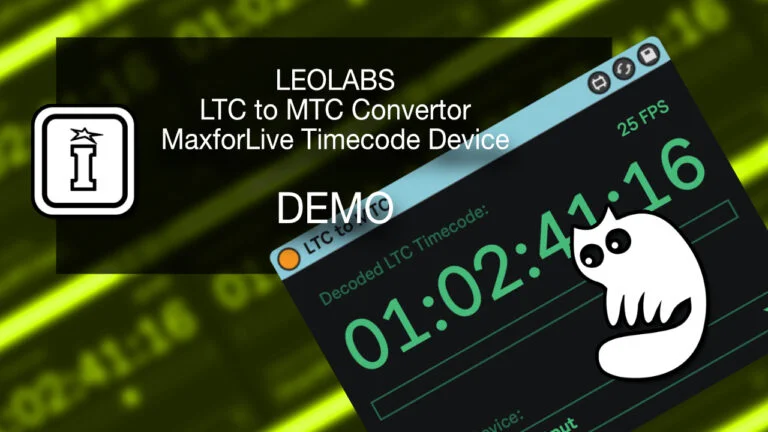

LTC to MTC Converter by Leolabs
DECODE AND DISPLAY LTC TIMECODES IN REAL-TIME
The LTC to MTC Converter decodes the SMPTE timecode and frame rate embedded in an audio track and outputs it as MIDI Timecode to a device of your choice.
Just drop the device on your timecode track and you‘re good to go.
PLEASE NOTE: Mac OS Only as described below.
USER GUIDE: LTC to MTC Converter Manual
LTC to MTC Converter by Leolabs
DECODE AND DISPLAY LTC TIMECODES IN REAL-TIME
The LTC to MTC Converter decodes the SMPTE timecode and frame rate embedded in an audio track and outputs it as MIDI Timecode to a device of your choice.
Just drop the device on your timecode track and you‘re good to go.
PLEASE NOTE: Mac OS Only as described below.
USER GUIDE: LTC to MTC Converter Manual
Buying for someone?Send a gift card →
Additional information
| MaxforLive | Control Devices |
|---|---|
| Ableton Live Compatibility | Ableton Live 10 Standard with MaxforLive, Ableton Live 10 Suite, Ableton Live 11 Standard with MaxforLive, Ableton Live 11 Suite, Ableton Live 12 Standard with MaxforLive, Ableton Live 12 Suite |
| Min. Requirements | Ableton Live 10.4.2 Standard with MaxforLive Installed or Ableton Live 10.4.2 Suite, macOS Catalina (10.15.7) |
| OS | Mac |
PRICE: £23.00
Product reviews
5 out of 5
2 reviews
How item rating is calculated
We show the average based on reviews. Only genuine reviews are displayed.
Sort by
September 10, 2026
This reviewer bought this product from our store.
works perfectly fine - plug and play :)
I recommend this product
August 27, 2026
This reviewer bought this product from our store.
It worked perfectly for the rehearsal I had where we needed to use MTC for rehearsing but ltc at the actual show
I recommend this product
LTC to MTC Converter by Leolabs
Using this tool, you can sync other DAWs like Pro Tools or Logic Pro to your Ableton Live session, enabling you, for example, to create a soundtrack for a movie in Ableton Live while editing its dialogue and foley in Pro Tools or Logic Pro.
The LTC to MTC Converter MaxforLive Device for Ableton Live automatically creates a virtual local MIDI device that you can use to send the MTC signal directly to any application on your computer.
The generated MTC signal can also be sent to external MIDI devices like light desks to synchronize them to your Live session.
To generate LTC audio files, use the free ElTeeSee tool: https://elteesee.pehrhovey.net/
The converter supports 24, 25, 29.97, and 30 FPS.
Frequently Asked Questions
This device is Mac OS only. It will not function on Windows, so please bear that in mind before purchasing.
You need Ableton Live with Max for Live installed, and a Mac running a compatible version of Mac OS. You will also need a pre-existing LTC audio file or a way to generate one, such as the free ElTeeSee tool.
The converter supports 24, 25, 29.97, and 30 FPS, covering the most common SMPTE timecode standards used in film, television, and live production.
Simply drop the device onto the audio track that contains your LTC timecode audio. The device automatically creates a virtual local MIDI port, which you can then route to any application or external device on your system.
Yes, that is one of the primary use cases. The MTC signal generated by the device can be sent to other DAWs running on the same Mac, allowing you to keep Ableton Live in sync with Pro Tools or Logic Pro for tasks like scoring to picture.
Yes, the MTC output can be routed to external MIDI devices such as lighting desks, making it useful for live performance and theatre production scenarios as well as studio work.
The developer recommends the free ElTeeSee tool, available at elteesee.pehrhovey.net, which lets you generate LTC timecode audio files to place on your timecode track in Ableton Live.
Important Information
V1.0.0 – Initial Release
Our Products are generally provided as Zip file downloads which in all cases will need to be extracted and saved to your hard drive prior to installation. Details on the different file type provided and what to do with them are below.
.alp Files – These are Ableton Live Packs and will either install directly into the Packs Section of the browser of Ableton Live or ask you to save them to your hard drive. For packs that install to the library, when you double click on them you will see a pop up window asking you to confirm that installation is ok as the files are described as “Legacy”. This is fine and you are ok to proceed, the packs are created using the format for an earlier version of Live and so remain compatible with the current version.
.amxd files – These are individual MaxforLive Devices and can be stored anywhere on your hard drive. We’d advise creating a folder for them and then adding that folder as a location within the Places section of Lives Browser.
END-USER LICENSE AGREEMENT FOR ISOTONIK STUDIOS SOFTWARE PRODUCTS.
PLEASE READ THE TERMS AND CONDITIONS OF THIS LICENSE AGREEMENT CAREFULLY BEFORE CONTINUING WITH THIS PROGRAM INSTALL.
This End-User License Agreement (referred to as “EULA”) is a legal agreement between an individual or a single entity (referred to as “LICENSEE”) and Isotonik Studios for the Isotonik Studios software product(s) which may include associated software components, media, printed materials, and “online” or electronic documentation (referred to as “SOFTWARE PRODUCT”). By installing, copying, or otherwise using the SOFTWARE PRODUCT, the LICENSEE agrees to be bound by the terms of this EULA.
This EULA represents the entire agreement concerning the program between the LICENSEE and Isotonik Studios and it supersedes any prior proposal, representation, or understanding between the parties. If the LICENSEE does not agree to the terms of this EULA, the LICENSEE should not install or use the SOFTWARE PRODUCT.
The SOFTWARE PRODUCT is protected by copyright laws and international copyright treaties, as well as other intellectual property laws and treaties. The SOFTWARE PRODUCT is licensed, not sold.
- GRANT OF LICENSE.
The SOFTWARE PRODUCT is licensed as follows:
(a) Installation and Use. Providing that the LICENSEE has paid any applicable license fees, Isotonik Studios grants the LICENSEE the right to install and use copies of the SOFTWARE PRODUCT on up to two computers in the LICENSEE’s possession that are running a validly licensed copy of the operating system for which the SOFTWARE PRODUCT was designed [e.g., Windows 10, macOS]. The computer(s) must be owned by the LICENSEE.
(b) Backup Copies. The LICENSEE may also make copies of the SOFTWARE PRODUCT as may be necessary for backup and archival purposes.
- DESCRIPTION OF OTHER RIGHTS AND LIMITATIONS.
(a) Maintenance of Copyright Notices. The LICENSEE must not remove or alter any copyright notices on any and all copies of the SOFTWARE PRODUCT.
(b) Distribution. The LICENSEE may not distribute registered copies of the SOFTWARE PRODUCT to third parties.
(c) Prohibition on Reverse Engineering, Decompilation, and Disassembly. The LICENSEE may not reverse engineer, decompile, or disassemble the SOFTWARE PRODUCT, except and only to the extent that such activity is expressly permitted by applicable law notwithstanding this limitation.
(d) Rental. The LICENSEE may not rent, lease, or lend the SOFTWARE PRODUCT.
(e) License transfer The LICENSEE may not transfer their license to the SOFTWARE PRODUCT to any third party. Any attempt to do so will be considered a violation of this EULA.
(f) Support Services. Isotonik Studios may provide the LICENSEE with support services related to the SOFTWARE PRODUCT for a period of 12 months following the date of purchase. Any supplemental software code provided to the LICENSEE as part of the Support Services shall be considered part of the SOFTWARE PRODUCT and subject to the terms and conditions of this EULA.
(g) Compliance with Applicable Laws. The LICENSEE must comply with all applicable laws regarding use of the SOFTWARE PRODUCT.
- TERMINATION Without prejudice to any other rights, Isotonik Studios may terminate this EULA if the LICENSEE fails to comply with the terms and conditions of this EULA. In such event, the LICENSEE must destroy all copies of the SOFTWARE PRODUCT in the LICENSEE’s possession.
- COPYRIGHT All title, including but not limited to copyrights, in and to the SOFTWARE PRODUCT and any copies thereof are owned by Isotonik Studios or its suppliers. All title and intellectual property rights in and to the content which may be accessed through use of the SOFTWARE PRODUCT is the property of the respective content owner and may be protected by applicable copyright or other intellectual property laws and treaties. This EULA grants the LICENSEE no rights to use such content. All rights not expressly granted are reserved by Isotonik Studios.
- NO WARRANTIES Isotonik Studios expressly disclaims any warranty for the SOFTWARE PRODUCT. The SOFTWARE PRODUCT is provided ‘As Is’ without any express or implied warranty of any kind, including but not limited to any warranties of merchantability, noninfringement, or fitness of a particular purpose. Isotonik Studios does not warrant or assume responsibility for the accuracy or completeness of any information, text, graphics, links or other items contained within the SOFTWARE PRODUCT. Isotonik Studios makes no warranties respecting any harm that may be caused by the transmission of a computer virus, worm, time bomb, logic bomb, or other such computer program. Isotonik Studios further expressly disclaims any warranty or representation to the LICENSEE or to any third party.
- LIMITATION OF LIABILITY In no event shall Isotonik Studios be liable for any damages (including, without limitation, lost profits, business interruption, or lost information) arising out of the LICENSEE’s use of or inability to use the SOFTWARE PRODUCT, even if Isotonik Studios has been advised of the possibility of such damages. In no event will Isotonik Studios be liable for loss of data or for indirect, special, incidental, consequential (including lost profit), or other damages based in contract, tort or otherwise. Isotonik Studios shall have no liability with respect to the content of the SOFTWARE PRODUCT or any part thereof, including but not limited to errors or omissions contained therein, libel, infringements of rights of publicity, privacy, trademark rights, business interruption, personal injury, loss of privacy, moral rights or the disclosure of confidential information.
More from Leolabs
 ★ Popular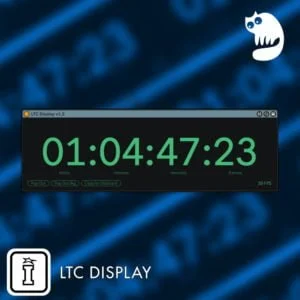
Frequently Bought Together