OSC Toolkit von Riccardo Sellan
WAS WÄRE, WENN ABLETON LIVE MIT ALLEN GERÄTEN IN IHREM NETZWERK KOMMUNIZIEREN KÖNNTE?
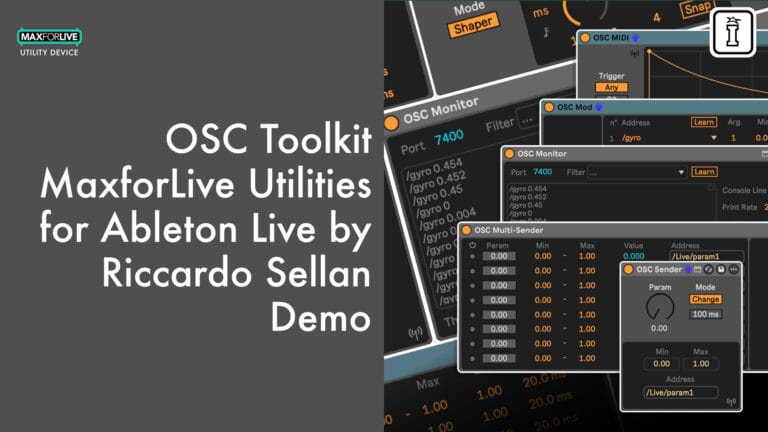
Das OSC Toolkit von Riccardo Sellan bietet eine vollständige OSC/UDP-Integration für Ableton Live. Mit fünf Max for Live-Geräten kannst du OSC-Nachrichten über dein lokales Netzwerk senden, empfangen, zuordnen, auslösen und überwachen und so Live mit visueller Software, Hardware-Controllern, Smartphones, IoT-Geräten und vielem mehr verbinden.
Im Lieferumfang enthalten sind:
- OSC Sender und OSC Multi-Sender zum Senden von Parameterdaten (bis zu 8 Kanäle gleichzeitig)
- OSC MIDI zur Erzeugung von zeichnungsfähigen oder ADSR-Hüllkurvenmodulationen, die durch MIDI-Noten ausgelöst werden
- OSC Mod zum Empfangen und Zuordnen externer OSC-Daten zu Ableton Live-Parametern
- OSC Monitor zur Echtzeit-Überprüfung, Fehlerbehebung und Kalibrierung von Nachrichten
Kompatibel mit TouchDesigner, Max, Unreal Engine, Unity, Resolume Arena, Pure Data, TouchOSC, ZigSim, Raspberry Pi, Arduino IoT und jedem OSC-fähigen Gerät in Ihrem Netzwerk.
Erfordert Ableton Live 10 Suite oder Ableton Live Standard mit Max for Live (oder höher).
Ihre DAW ist nun ein Knoten im Netzwerk.
BENUTZERHANDBUCH:
Osc Toolkit Benutzerhandbuch V.1.0.3
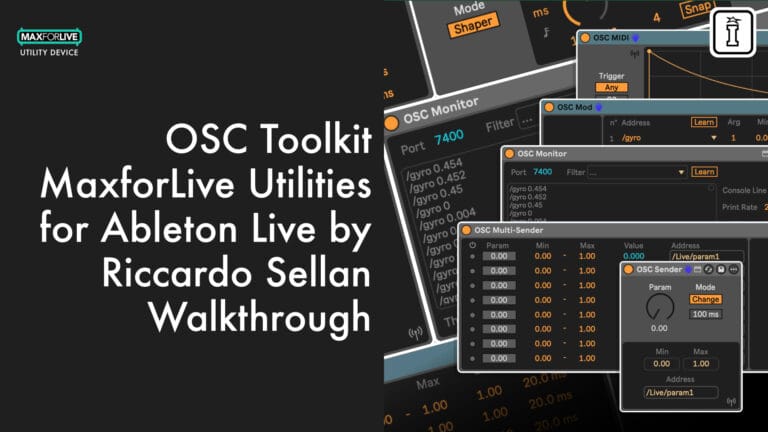
OSC Toolkit von Riccardo Sellan
WAS WÄRE, WENN ABLETON LIVE MIT ALLEN GERÄTEN IN IHREM NETZWERK KOMMUNIZIEREN KÖNNTE?
Das OSC Toolkit von Riccardo Sellan bietet eine vollständige OSC/UDP-Integration für Ableton Live. Mit fünf Max for Live-Geräten kannst du OSC-Nachrichten über dein lokales Netzwerk senden, empfangen, zuordnen, auslösen und überwachen und so Live mit visueller Software, Hardware-Controllern, Smartphones, IoT-Geräten und vielem mehr verbinden.
Im Lieferumfang enthalten sind:
- OSC Sender und OSC Multi-Sender zum Senden von Parameterdaten (bis zu 8 Kanäle gleichzeitig)
- OSC MIDI zur Erzeugung von zeichnungsfähigen oder ADSR-Hüllkurvenmodulationen, die durch MIDI-Noten ausgelöst werden
- OSC Mod zum Empfangen und Zuordnen externer OSC-Daten zu Ableton Live-Parametern
- OSC Monitor zur Echtzeit-Überprüfung, Fehlerbehebung und Kalibrierung von Nachrichten
Kompatibel mit TouchDesigner, Max, Unreal Engine, Unity, Resolume Arena, Pure Data, TouchOSC, ZigSim, Raspberry Pi, Arduino IoT und jedem OSC-fähigen Gerät in Ihrem Netzwerk.
Erfordert Ableton Live 10 Suite oder Ableton Live Standard mit Max for Live (oder höher).
Ihre DAW ist nun ein Knoten im Netzwerk.
BENUTZERHANDBUCH:
Osc Toolkit Benutzerhandbuch V.1.0.3
Buying for someone?Send a gift card →

Product reviews
5 out of 5
2 reviews
How item rating is calculated
We show the average based on reviews. Only genuine reviews are displayed.
Sort by
Oktober 14, 2026
This reviewer bought this product from our store.
Sehr praktisch
April 23, 2026
This reviewer bought this product from our store.
Das OSC Toolkit ist ein umfassender und clever gestalteter Ausgangspunkt für alle, die ihre Live-Projekte um OSC-Steuerung erweitern möchten. Ich entwerfe oft m4l-Geräte für meine eigenen Zwecke, aber diese Art von Tools ist ein absolutes Muss. Die Benutzeroberflächen sind übersichtlich und gut lesbar; wenn man mit diesen Steuerungsgeräten noch nicht vertraut ist, werden die Informationen im Info-Fenster von Live angezeigt, und es gibt zum Beispiel im MIDI-OSC-Gerät nette kleine Details (Loop, Jitter, benutzerdefinierte Formen in den Presets usw.).
OSC Toolkit von Riccardo Sellan
Übersicht
Ableton Live ist ein Kraftpaket für die Musikproduktion und -performance, doch wenn es um die Kommunikation mit der breiteren Welt der visuellen Software, Hardware-Controller und vernetzten Geräte geht, gab es bisher immer eine Lücke. Das OSC Toolkit von Riccardo Sellan schließt diese Lücke vollständig.
Dieses MaxforLive-Gerätepaket bringt die vollständige OSC/UDP-Integration direkt in Ihre Ableton Live-Session. Mit fünf speziell entwickelten Geräten können Sie OSC-Nachrichten über Ihr lokales Netzwerk senden, empfangen, filtern, zuordnen, auslösen und überwachen und so Live mit jeder OSC-kompatiblen Software oder Hardware verbinden, ohne Ihre DAW verlassen zu müssen.
Ganz gleich, ob Sie Visuals in TouchDesigner synchronisieren, Parameter in der Unreal Engine steuern, Lichtsequenzen in Resolume Arena auslösen oder Daten an eine Raspberry-Pi-Installation weiterleiten – das OSC Toolkit bietet Ihnen die Brücke, die Ihnen bisher gefehlt hat.
Die Geräte
Der OSC-Sender überträgt OSC/UDP-Nachrichten über das Netzwerk ausgehend von einem einzelnen Parameter. Passen Sie den Wert manuell an, automatisieren Sie ihn in Ihrem Arrangement oder ordnen Sie ihn über MIDI zu. Wählen Sie zwischen dem Change-Modus (Senden nur bei Wertänderung) und dem Continuous-Modus (Senden mit wählbarer Rate). Stellen Sie Ihre IP-Adresse, den Port, die Adresse sowie den Minimal- und Maximalbereich direkt über die Geräteoberfläche ein.
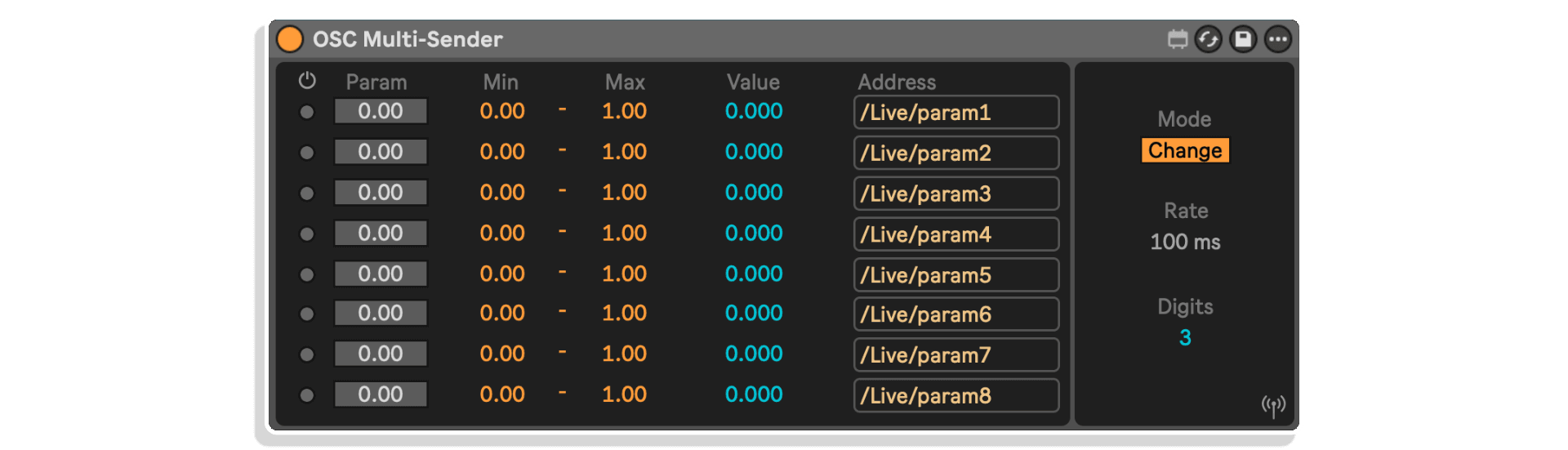
Der OSC-Multi-Sender funktioniert nach dem gleichen Prinzip, erweitert es jedoch: acht unabhängige Parameter, jeder mit eigener Adresse, eigenem Bereich und eigenem Aktivierungsschalter, die sich alle eine einzige Netzwerkverbindung teilen. Perfekt für die Steuerung komplexer Multiparameter-Systeme von einem Gerät aus.
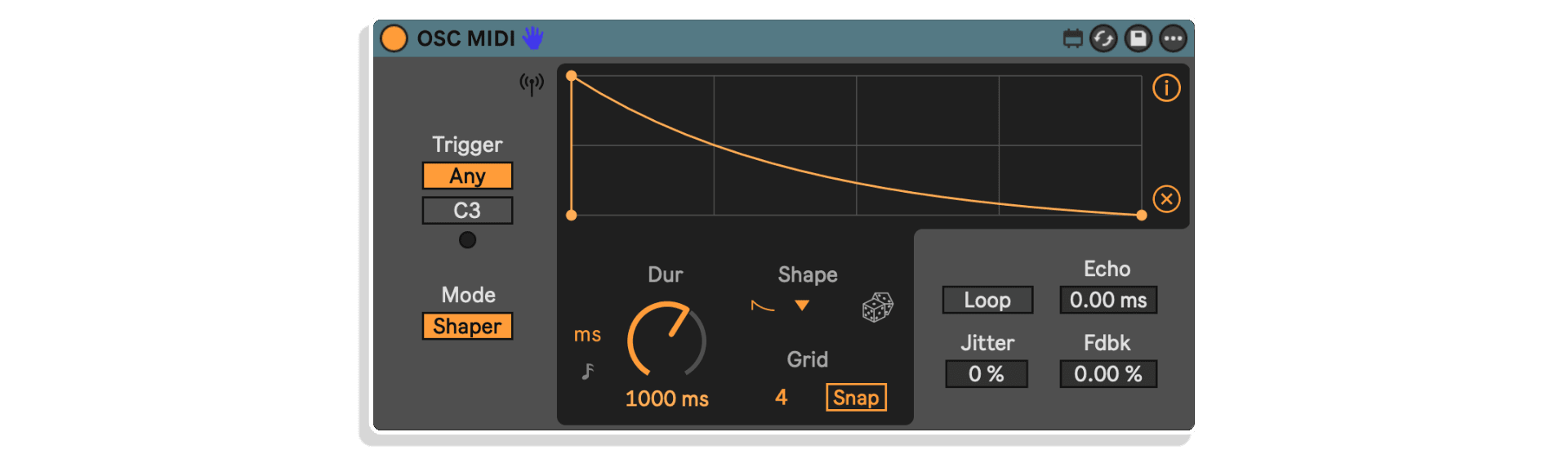
OSC MIDI verfolgt einen anderen Ansatz. Anstatt rohe Parameterwerte zu senden, nutzt es eingehende MIDI-Noten als Trigger, um Modulationsverläufe zu erzeugen, die über OSC gesendet werden. Wähle zwischen einer vollständig frei zeichnbaren Hüllkurve (Shaper-Modus) oder einem traditionellen ADSR. Füge Jitter, Echo und Feedback hinzu, um sich entwickelnde, organische Modulationen zu erzielen. Synchronisiere dich mit dem Tempo von Live oder laufe frei. Wähle bestimmte Trigger-Noten aus oder akzeptiere jede eingehende Note.
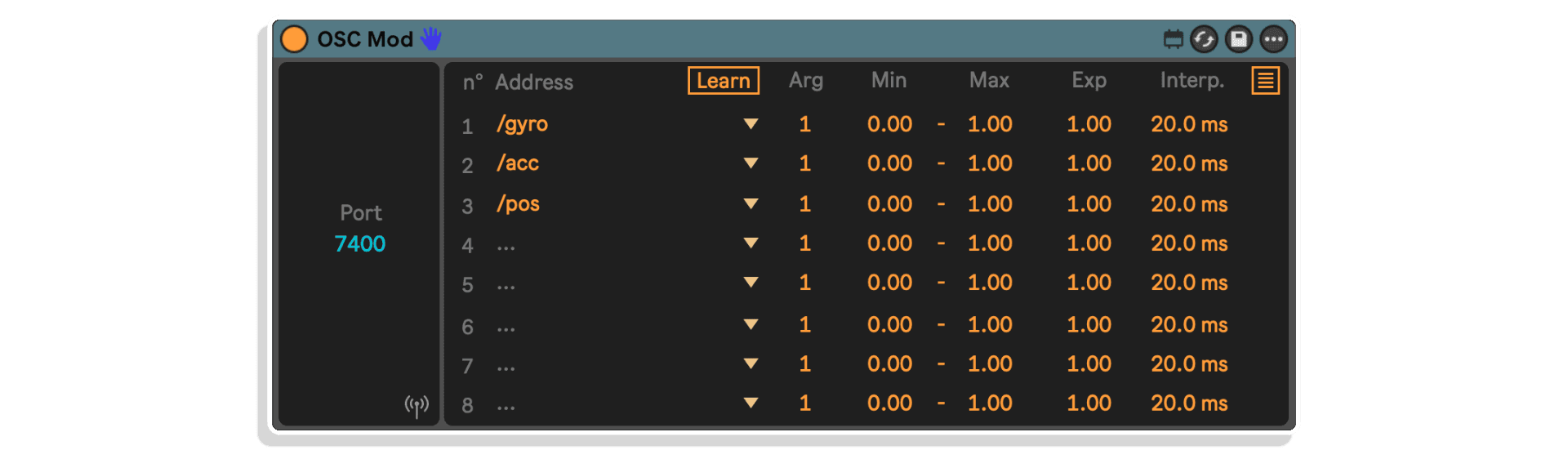
OSC Mod arbeitet in umgekehrter Richtung: Es empfängt OSC/UDP-Nachrichten von externen Quellen und ordnet diese den Parametern in Ableton Live zu. Filtere eingehende Nachrichten nach Adresse, wähle Argumentindizes aus, lege Datenbereiche fest, wende Exponentialkurven an und glätte eingehende Daten durch Interpolation. Die „Learn“-Funktion erkennt Adressfilter automatisch anhand des eingehenden Datenverkehrs und füllt sie automatisch aus.
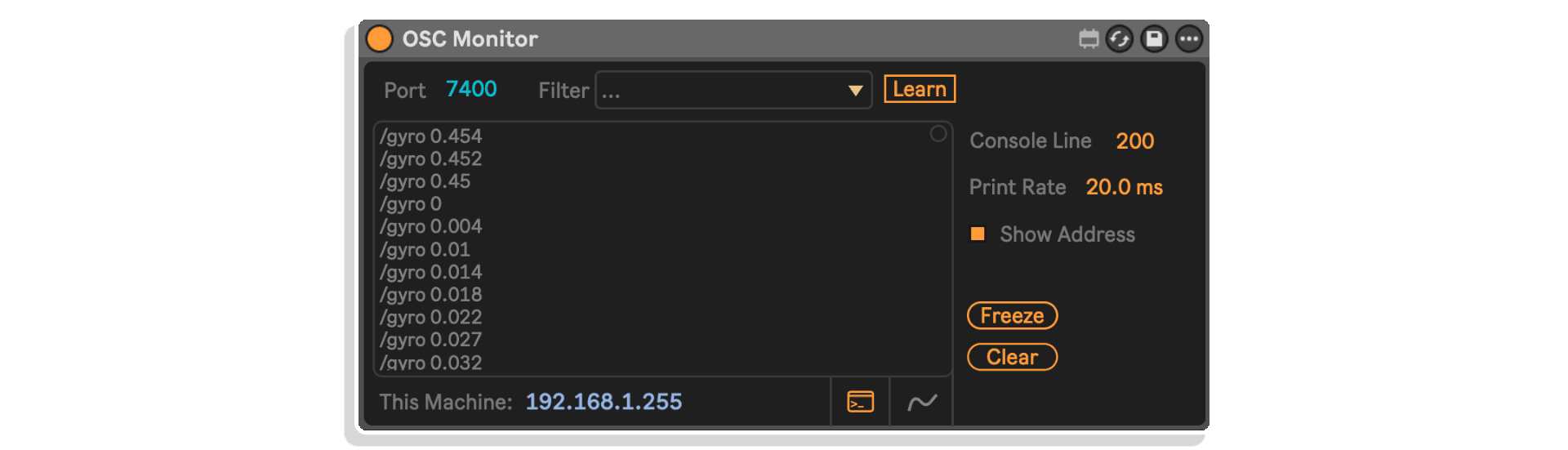
OSC Monitor bietet eine Echtzeit-Konsolenansicht aller OSC-Nachrichten, die an einem bestimmten Port eintreffen. Filtere nach Adresse, visualisiere Daten auf einem Oszilloskop, friere die Konsole ein oder lösche sie und passe die Ausgaberate sowie die Zeilenbegrenzungen an. Unverzichtbar für die Fehlersuche, Kalibrierung und zum Verständnis, welche Daten dein Netzwerk tatsächlich überträgt.
Was können Sie anschließen?
Jedes Gerät oder jede Software im selben lokalen Netzwerk, das bzw. die das OSC-Protokoll unterstützt. Die Möglichkeiten erstrecken sich über kreative, technische und experimentelle Bereiche:
- Software: TouchDesigner, Max, Unreal Engine, Unity, Pure Data, Resolume Arena und mehr
- Hardware: Smartphones mit TouchOSC oder ZigSim, Raspberry Pi, Arduino-IoT-Geräte und alle OSC-fähigen Controller
Ideal für
- Audiovisuelle Künstler, die eine Echtzeitkommunikation zwischen Live- und visuellen Umgebungen benötigen
- Installationskünstler, die Ableton Live mit Sensoren, Beleuchtung, Projektionen und Physical Computing verbinden
- Sounddesigner, die mit externen Syntheseumgebungen wie Max oder Pure Data arbeiten
- Pädagogen und Forscher, die interaktive Systeme entwickeln, die auf musikalische Eingaben reagieren
- Live-Künstler, die Smartphones oder maßgeschneiderte Hardware als drahtlose Controller nutzen
Lieferumfang
- 5 MaxforLive-Geräte: OSC Sender, OSC Multi-Sender, OSC MIDI, OSC Mod, OSC Monitor
- PDF-Benutzerhandbuch
Systemvoraussetzungen
- Ableton Live 10 Suite oder Ableton Live 10 Standard mit MaxforLive (oder höher)
- Mac: Intel Core 2 Duo oder neuer (Apple Silicon wird unterstützt), macOS El Capitan 10.11.6+
- Windows: 64-Bit-Intel- oder AMD-Multi-Core-Prozessor, Windows 8 oder höher
- 4 GB RAM (8 GB empfohlen)
- Stellen Sie sicher, dass in den Ableton Live-Einstellungen die neueste Version von Max ausgewählt ist
Entdecken Sie mehr von Riccardo Sellan
Lambda II | Sonic Mod Pack | Brightness Mod | Multi-Envelope Mod | Transient Mod | Alle Produkte von Riccardo Sellan anzeigen
Frequently Asked Questions
A: Das OSC Toolkit ist ein MaxforLive-Gerätepaket, das eine vollständige OSC/UDP-Integration in Ableton Live ermöglicht. Es umfasst fünf Geräte zum Senden, Empfangen, Zuordnen, Auslösen und Überwachen von OSC-Nachrichten in Ihrem lokalen Netzwerk und verbindet Live mit visueller Software, Hardware-Controllern, Smartphones und IoT-Geräten.
A: Ja, das OSC Toolkit ist ein MaxforLive-Gerätepaket.
A: MaxforLive ist eine Plattform, die die visuelle Programmierumgebung Max mit Ableton Live verbindet und es den Nutzern ermöglicht, eigene Audio-, MIDI- und Steuerungsgeräte zu erstellen und zu verwenden.
A: Jedes Gerät oder jede Software im selben lokalen Netzwerk, das bzw. die das OSC-Protokoll unterstützt. Dazu gehören Software wie TouchDesigner, Max, Unreal Engine, Unity, Pure Data und Resolume Arena sowie Hardware wie Smartphones mit TouchOSC oder ZigSim, Raspberry Pi und Arduino-IoT-Geräte.
A: Hier können Sie weitere Werkzeuge und Geräte von Riccardo Sellan entdecken: Riccardo Sellan
Important Information
## v1.0.3 – 9. August 2026
– Neuer Wertebereich [-65535, 65535] auf allen Geräten verfügbar;
– OSC MIDI: Die Funktion erreicht nun wie erwartet den Wert Null.
## v1.0.2 – 23. Juni 2026
Unterstützung für Push-Parameter hinzugefügt
OSC Mod: Modulationszuordnung funktioniert nun ordnungsgemäß
V1.0.1 – Veröffentlicht im April 2026
OSC Mod – IP-Informationen werden nun korrekt abgerufen
Erstveröffentlichung – April 2025
Unsere Produkte werden in der Regel als ZIP-Dateien zum Herunterladen bereitgestellt, die in jedem Fall vor der Installation entpackt und auf Ihrer Festplatte gespeichert werden müssen. Nachstehend finden Sie Einzelheiten zu den verschiedenen Dateitypen und deren Verwendung.
.alp-Dateien – Hierbei handelt es sich um Ableton Live-Packs, die entweder direkt im Bereich „Packs“ des Ableton Live-Browsers installiert werden oder bei denen Sie aufgefordert werden, sie auf Ihrer Festplatte zu speichern. Bei Packs, die in die Bibliothek installiert werden, erscheint beim Doppelklick ein Popup-Fenster, in dem Sie aufgefordert werden, die Installation zu bestätigen, da die Dateien als „Legacy“ gekennzeichnet sind. Das ist in Ordnung und Sie können fortfahren. Die Packs wurden im Format einer früheren Live-Version erstellt und sind daher weiterhin mit der aktuellen Version kompatibel.
.amxd-Dateien – Hierbei handelt es sich um einzelne MaxforLive-Geräte, die an einem beliebigen Ort auf Ihrer Festplatte gespeichert werden können. Wir empfehlen, einen eigenen Ordner dafür anzulegen und diesen Ordner dann als Speicherort im Bereich „Places“ des Live-Browsers hinzuzufügen.
ENDBENUTZER-LIZENZVEREINBARUNG FÜR SOFTWAREPRODUKTE VON ISOTONIK STUDIOS.
BITTE LESEN SIE DIE BEDINGUNGEN DIESER LIZENZVEREINBARUNG SORGFÄLTIG DURCH, BEVOR SIE MIT DER INSTALLATION DIESES PROGRAMMS FORTFAHREN.
Diese Endbenutzer-Lizenzvereinbarung (im Folgenden als „EULA“ bezeichnet) ist eine rechtliche Vereinbarung zwischen einer natürlichen Person oder einer einzelnen juristischen Person (im Folgenden als „LIZENZNEHMER“ bezeichnet) und Isotonik Studios über die Softwareprodukte von Isotonik Studios, die zugehörige Softwarekomponenten, Datenträger, gedruckte Materialien, sowie „Online“- oder elektronische Dokumentation umfassen können (im Folgenden als „SOFTWAREPRODUKT“ bezeichnet). Durch die Installation, das Kopieren oder die anderweitige Nutzung des SOFTWAREPRODUKTS erklärt sich der LIZENZNEHMER mit den Bedingungen dieser EULA einverstanden.
Diese EULA stellt die gesamte Vereinbarung zwischen dem LIZENZNEHMER und Isotonik Studios bezüglich des Programms dar und ersetzt alle früheren Vorschläge, Zusicherungen oder Absprachen zwischen den Parteien. Wenn der LIZENZNEHMER den Bedingungen dieser EULA nicht zustimmt, darf er das SOFTWAREPRODUKT nicht installieren oder nutzen.
Das SOFTWAREPRODUKT ist durch Urheberrechtsgesetze und internationale Urheberrechtsabkommen sowie durch andere Gesetze und Abkommen zum Schutz geistigen Eigentums geschützt. Das SOFTWAREPRODUKT wird lizenziert, nicht verkauft.
- LIZENZVERGABE.
Das SOFTWAREPRODUKT wird wie folgt lizenziert:
(a) Installation und Nutzung. Sofern der LIZENZNEHMER alle anfallenden Lizenzgebühren entrichtet hat, gewährt Isotonik Studios dem LIZENZNEHMER das Recht, Kopien des SOFTWAREPRODUKTS auf bis zu zwei Computern in seinem Besitz zu installieren und zu nutzen, auf denen eine gültig lizenzierte Kopie des Betriebssystems läuft, für das das SOFTWAREPRODUKT entwickelt wurde [z. B. Windows 10, macOS]. Der/die Computer muss/müssen Eigentum des LIZENZNEHMERS sein.
(b) Sicherungskopien. Der LIZENZNEHMER darf außerdem Kopien des SOFTWAREPRODUKTS anfertigen, soweit dies für Sicherungs- und Archivierungszwecke erforderlich ist.
- BESCHREIBUNG WEITERER RECHTE UND EINSCHRÄNKUNGEN.
(a) Beibehaltung von Urheberrechtsvermerken. Der LIZENZNEHMER darf keine Urheberrechtsvermerke auf irgendeiner der Kopien des SOFTWAREPRODUKTS entfernen oder verändern.
(b) Weitergabe. Der LIZENZNEHMER darf registrierte Kopien des SOFTWAREPRODUKTS nicht an Dritte weitergeben.
(c) Verbot von Reverse Engineering, Dekompilierung und Disassemblierung. Der LIZENZNEHMER darf das SOFTWAREPRODUKT nicht rückentwickeln, dekompilieren oder disassemblieren, es sei denn, eine solche Handlung ist ungeachtet dieser Einschränkung durch geltendes Recht ausdrücklich gestattet.
(d) Vermietung. Der LIZENZNEHMER darf das SOFTWAREPRODUKT nicht vermieten, verpachten oder verleihen.
(e) Lizenzübertragung. Der LIZENZNEHMER darf seine Lizenz für das SOFTWAREPRODUKT nicht an Dritte übertragen. Jeder Versuch, dies zu tun, gilt als Verstoß gegen diese EULA.
(f) Supportleistungen. Isotonik Studios kann dem LIZENZNEHMER für einen Zeitraum von 12 Monaten ab dem Kaufdatum Supportleistungen im Zusammenhang mit dem SOFTWAREPRODUKT bereitstellen. Jeder zusätzliche Softwarecode, der dem LIZENZNEHMER im Rahmen der Supportleistungen zur Verfügung gestellt wird, gilt als Teil des SOFTWAREPRODUKTS und unterliegt den Bestimmungen dieser EULA.
(g) Einhaltung geltender Gesetze. Der LIZENZNEHMER muss alle geltenden Gesetze bezüglich der Nutzung des SOFTWAREPRODUKTS einhalten.
- KÜNDIGUNG Unbeschadet sonstiger Rechte ist Isotonik Studios berechtigt, diese EULA zu kündigen, wenn der LIZENZNEHMER die Bestimmungen dieser EULA nicht einhält. In diesem Fall muss der LIZENZNEHMER alle in seinem Besitz befindlichen Kopien des SOFTWAREPRODUKTS vernichten.
- URHEBERRECHT Sämtliche Rechte, einschließlich, aber nicht beschränkt auf Urheberrechte, an dem SOFTWAREPRODUKT und allen Kopien davon liegen bei Isotonik Studios oder seinen Lieferanten. Alle Eigentums- und geistigen Eigentumsrechte an den Inhalten, auf die durch die Nutzung des SOFTWAREPRODUKTS zugegriffen werden kann, sind Eigentum der jeweiligen Inhaltseigentümer und können durch geltende Urheberrechtsgesetze oder andere Gesetze und Verträge zum Schutz geistigen Eigentums geschützt sein. Diese EULA gewährt dem LIZENZNEHMER keine Rechte zur Nutzung solcher Inhalte. Alle nicht ausdrücklich gewährten Rechte bleiben Isotonik Studios vorbehalten.
- KEINE GEWÄHRLEISTUNGEN Isotonik Studios lehnt ausdrücklich jegliche Gewährleistung für das SOFTWAREPRODUKT ab. Das SOFTWAREPRODUKT wird „wie besehen“ ohne jegliche ausdrückliche oder stillschweigende Gewährleistung jeglicher Art bereitgestellt, einschließlich, aber nicht beschränkt auf Gewährleistungen der Marktgängigkeit, der Nichtverletzung von Rechten Dritter oder der Eignung für einen bestimmten Zweck. Isotonik Studios übernimmt keine Gewährleistung oder Verantwortung für die Richtigkeit oder Vollständigkeit von Informationen, Texten, Grafiken, Links oder anderen im SOFTWAREPRODUKT enthaltenen Elementen. Isotonik Studios übernimmt keine Gewährleistung in Bezug auf Schäden, die durch die Übertragung von Computerviren, Würmern, Zeitbomben, Logikbomben oder ähnlichen Computerprogrammen verursacht werden könnten. Isotonik Studios schließt ferner ausdrücklich jegliche Gewährleistung oder Zusicherung gegenüber dem LIZENZNEHMER oder Dritten aus.
- HAFTUNGSBESCHRÄNKUNG Isotonik Studios haftet in keinem Fall für Schäden (einschließlich, aber nicht beschränkt auf entgangenen Gewinn, Betriebsunterbrechungen oder Informationsverluste), die sich aus der Nutzung oder der Unmöglichkeit der Nutzung des SOFTWAREPRODUKTS durch den LIZENZNEHMER ergeben, selbst wenn Isotonik Studios auf die Möglichkeit solcher Schäden hingewiesen wurde. In keinem Fall haftet Isotonik Studios für Datenverluste oder für indirekte, besondere, zufällige, Folge- (einschließlich entgangener Gewinne) oder sonstige Schäden, die auf Vertrag, unerlaubter Handlung oder anderweitig beruhen. Isotonik Studios übernimmt keine Haftung in Bezug auf den Inhalt des SOFTWAREPRODUKTS oder eines Teils davon, einschließlich, aber nicht beschränkt auf darin enthaltene Fehler oder Auslassungen, Verleumdung, Verletzungen von Persönlichkeitsrechten, Datenschutzrechten, Markenrechten, Betriebsunterbrechungen, Personenschäden, Verlust der Privatsphäre, Urheberpersönlichkeitsrechte oder die Offenlegung vertraulicher Informationen.
Frequently Bought Together
 -30%★ Popular
MonomonoConsolex8056 by MonomonoLive 11 & 12 · Max for Live Ursprünglicher Preis war: £50.00£35.00Aktueller Preis ist: £35.00.