Arpeggi8 by 36db
CREATE EVOLVING ARPEGGIOS WITH INTUITIVE CONTROL
TRIPLE PACK SAVINGS: Select any three or more 36db products (Environments, Elements, or Artist Series Packs) and save 20% automatically at checkout!
Creating cool ideas can sometimes be a challenge! Finding new sources of inspiration can be a brilliant catalyst when you’re writing music.
We developed our 36db Arpeggi8 MIDI Tools to give you a new take on your ideas. Arpeggi8 is a collection of unique arpeggios, MIDI tools and complex modulation ideas that will give you endless new and fresh musical melodies to explore.
This Elements bundle comes with 3 example tracks. Octave Scale Shifter, ARP Layers and Arpeggi8, and includes multiple preset snapshots for each device, allowing you to explore the unique possibilities at your fingertips.
USER GUIDE: 36db Arpeggi8 Install Guide
Arpeggi8 by 36db
CREATE EVOLVING ARPEGGIOS WITH INTUITIVE CONTROL
TRIPLE PACK SAVINGS: Select any three or more 36db products (Environments, Elements, or Artist Series Packs) and save 20% automatically at checkout!
Creating cool ideas can sometimes be a challenge! Finding new sources of inspiration can be a brilliant catalyst when you’re writing music.
We developed our 36db Arpeggi8 MIDI Tools to give you a new take on your ideas. Arpeggi8 is a collection of unique arpeggios, MIDI tools and complex modulation ideas that will give you endless new and fresh musical melodies to explore.
This Elements bundle comes with 3 example tracks. Octave Scale Shifter, ARP Layers and Arpeggi8, and includes multiple preset snapshots for each device, allowing you to explore the unique possibilities at your fingertips.
USER GUIDE: 36db Arpeggi8 Install Guide
Buying for someone?Send a gift card →
Demo
Unknown Artist
0:00
0:00
Additional information
| Controllers | Ableton Push THREE Controller, Ableton Push THREE Standalone, Ableton Push TWO |
|---|---|
| Ableton Live Compatibility | Ableton Live 11 Suite, Ableton Live 12 Suite |
| Min. Requirements | Ableton Live 11 Suite |
| OS | Mac, Windows |
PRICE: £15.00
Product reviews
5 out of 5
2 reviews
How item rating is calculated
We show the average based on reviews. Only genuine reviews are displayed.
Sort by
June 4, 2025
This reviewer bought this product from our store.
Really unusual and versatile arpeggio effect. I wasn't that interested in getting a 3rd party arpeggiator until I heard this one in action.
I was really surprised by how much it can do - really full featured and will lead you to places you never expected to go when you use it with your own synths. It was not something I was looking to buy, but I'm sure glad I did.
May 27, 2025
This reviewer bought this product from our store.
This is a really interesting arpeggio device. I have been able to come up with some great progressions using this device on its own, but more interestingly using my own synths & samples triggered by these arps. Nice tools for deep experimental studio sessions. Instant fun & creativity!
Arpeggi8 by 36db
Check out the Arpeggi8 walkthrough video for a full demonstration of what’s inside.
- Learn how to make complex arpeggios and sequences from very simple melodic ideas.
- Learn new ways to create complex polyrhythmic sequences with just one note or chord.
- Transform your sounds into complex and random melodies using Max for Live devices.
- Learn how to sculpt 3D soundscapes using our effects.
- Learn how the pro’s use effects racks to develop sequences.
Explore a collection of amazing presets for each device, and create endless variations of melodies, sounds and effects with just a few clicks.
All this using Ableton Live™ native plug-ins, synths, and samplers, most importantly, hear how all of this elevates your own music.
Creating cool ideas can sometimes be a challenge, and finding new sources of inspiration can be a brilliant catalyst when you’re writing music. We developed our 36db Arpeggi8 MIDI Tools to give you a new take on your ideas. Arpeggi8 is a collection of unique arpeggios, MIDI tools and complex modulation ideas that’ll give you an endless supply of new and fresh melodies to explore.
This Elements bundle comes with 3 example tracks, and includes 60 preset snapshots, allowing you to explore the unique possibilities at your fingertips.
We’re sure you’ll have fun exploring this 36db Element product and seeing where your creativity takes you!
The 36db Arpeggi8 MIDI Tools Collection comes with 3 example tracks. Each has a unique set of sounds, MIDI controls and effects.
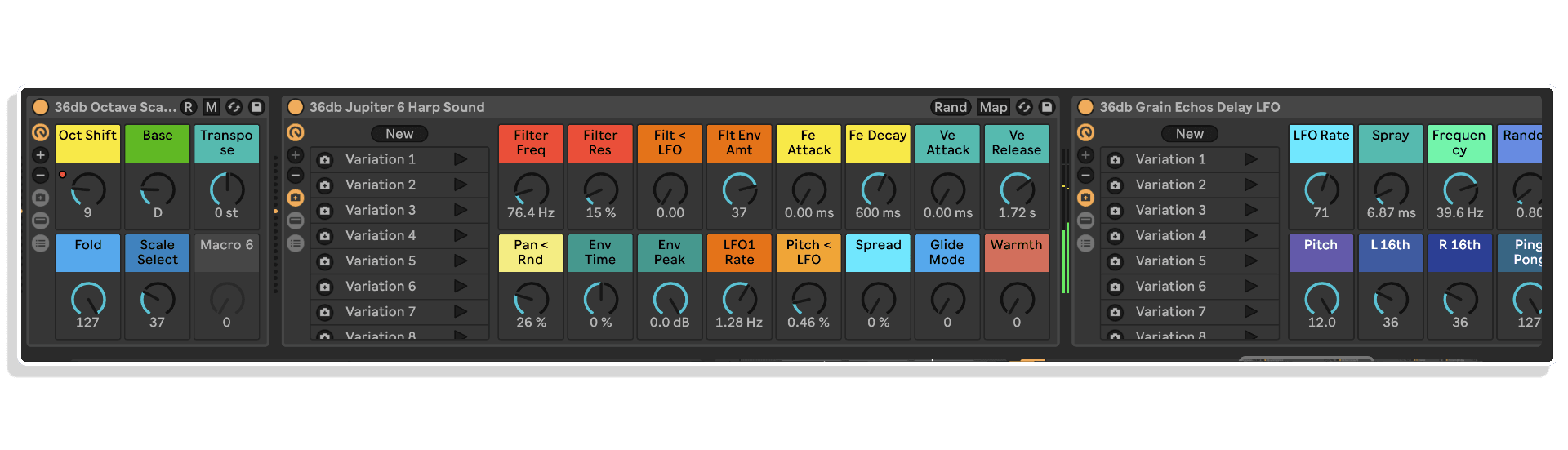
Instrument: 36db Jupiter 6 Harp Sound
This instrument was created by sampling our classic Roland Jupiter 6. It’s an emotive and expressive Harp sound which has an awesome feel when played. Using Ableton’s Sampler™, the 10 preset snapshots show the scope and quality of tones you can create with a sampled instrument.
We’ve also added 16 macros for optimal control, allowing you to sculpt the sound to your needs.
ARP Octave Scale Shifter (Channel 1)
We created the 36db Octave Scale Shifter Rack primarily to create more complex MIDI patterns from simple melodic ideas. Using the octave shift macro and scale selector macro together, you can create complex and random MIDI events. Using automation within your sequence clips will give you a wide and performance-based take.
Creating Glitch Delays & Echos
On this channel there are multiple MIDI LFOs assigned to some of the parameters of the devices. LFOs are assigned to sends within the channel and the returns have LFOs modulating the sends of other
effects returns. This creates random events and a feel that it’s almost playing itself. This is a super-creative way to work and stimulate ideas!
You’ll also find LFOs on some of the return effects racks. This again gives moving variations to the effects. One of these is Return C, The Glitch Delay. This rack has two LFOs which add movement to the delay time as well as the LFO offset, giving glitchy and random short delay burst effects, hence the name.
ARP Layers Channel (Channel 2)
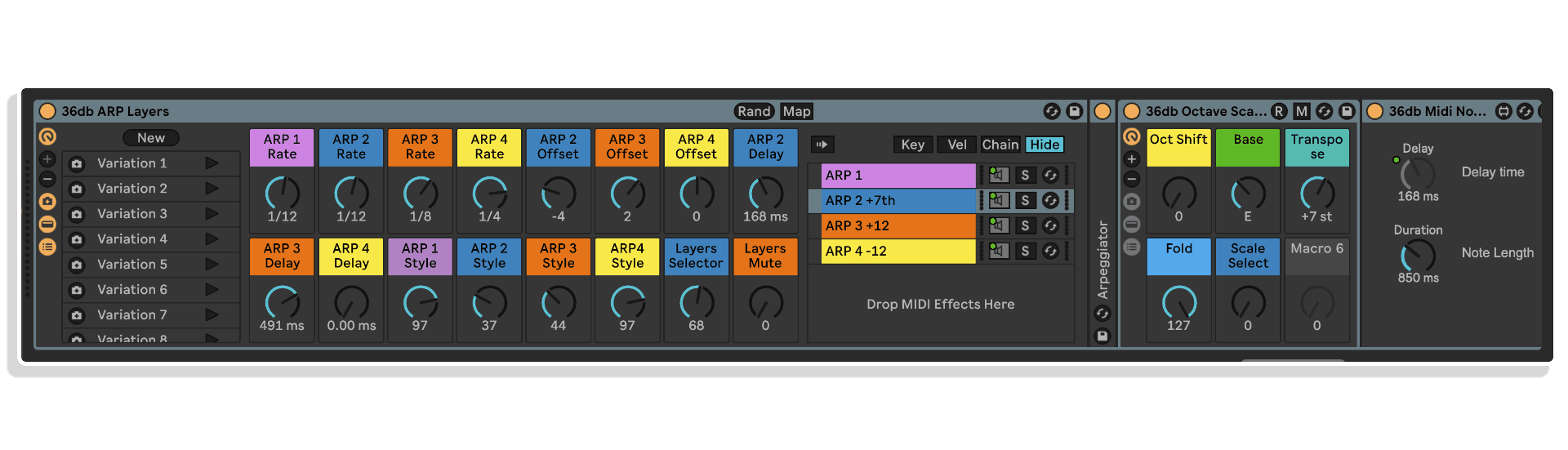
The 36db ARP Layers Rack is a complex 4-layer device with an Arpeggiator on each chain event in the rack. These are given pitch and MIDI timing offsets to create complex MIDI sequences from each layer.
Our 36db MIDI Note Offset Max for Live device allows you to delay the incoming MIDI event, giving you variations on the arpeggio sequences. This can be done to 3 of the 4 layered arpeggio lines. You can also change the arpeggio rate, offset the pattern start, or change the arpeggio style for each layer. This instantly gives you polyrhythmic patterns from just a simple note or chord sequence.
The final two macros will select combinations of the arpeggio layers for simpler patterns. The variations in snapshots will show you how diverse these patterns can be.
ARP Layers Split Channels
This session shows you how to create multitrack MIDI recordings using ARP Layers.
Channel 1 is the ARP Layers rack. This will still play the notes as normal.
Channel 2 ARP Layers Split Channels is a group channel. There are 4 independent tracks: ARP Layers 1-4. Each ARP Layer is routed to the MIDI input for each of these tracks. This allows you to record each ARP Layer separately, allowing for easier MIDI editing, and the ability to add a different instrument to each of the 4 layers. This gives you the freedom to create varied multi-MIDI patterns.
There are 4 pattern examples to listen to. Channel 1 is playing one instance of the Jupiter Harp Sound, whereas Channel 2’s tracks 1-4 each have a different preset snapshot of the Jupiter Harp Sound. This gives you 4 different textures to play with, each with its own ARP MIDI sequence.
ARPeggi8 Channel (Channel 3)
This final channel is the Arpeggi8 channel. This shows the 36db ARPeggi8 Rack, going into the 36db Octave Scale Shifter allowing you to create complex patterns with the racks by simply tweaking the
macros within the devices.
The ARPeggi8 has 3 LFOs that are assigned to arpeggio style, arpeggio offset and the arpeggio velocity. This adds a random and complex arpeggiator sequence to your chords. There are 10 preset variations to
choose from.
Tip: A cool idea is to record the outgoing MIDI to another MIDI track, giving you a more complex sequence of notes. This enables you to post-edit the MIDI notes from the sequences.
Effects Returns
There are four returns channels included with Arpeggi8. They each come with 10 preset snapshots, giving you a wide variety of effects types to play with. They have additional LFOs routed to macros in the racks, which add more movement and dynamics to the effects returns.
- Return A: Quarters of Echos
- Return B: Super Grain Delay 4
- Return C: The Glitch Delay
- Return D: Tripped & Floppy Delay LFO
MIDI Effects Racks (Max for Live)
We’ve also created 2 Max for Live custom MIDI devices. 36db MIDI Note Offset is a MIDI time delay device that’s not synced to the host clock.
The second device is the 36db MIDI Note Delay Sync. This can delay incoming MIDI notes by a clock synced division of the original time or be free running and not connected to the host clock.
ARPEGGI8 CONTENTS
- 1 X Custom Jupiter Harp Sound
- 1 X ARP Layers Midi Rack
- 1 X Arpeggi8 Midi Rack
- 1 X Octave Scale Shifter Midi Rack
- 1 X Grain Echo Delay LFO
- 5 X Project Sessions
- 15 X Midi Patterns
- 60 X Preset Snapshots
- 16 X Macro Mapping for Devices
- 4 X Custom Return Effects Racks
- Complex Modulation mapping
- Deep Routing & MIDI Recording
Frequently Asked Questions
Arpeggi8 is a collection of Max for Live MIDI tools designed to help you create evolving arpeggios, complex polyrhythmic sequences, and random melodies from simple melodic ideas or even a single note. The pack includes multiple Max for Live devices, effects, and a collection of presets for each device to get you producing straight away.
You’ll need Ableton Live Suite or Ableton Live Standard with Max for Live installed, as the devices are built on the Max for Live platform. We recommend using the latest version of Ableton Live for the best compatibility and performance.
Not at all. Arpeggi8 is designed to let you generate complex sequences and melodies from the simplest of starting points, including a single note or chord. The included presets and walkthrough video make it accessible regardless of your experience level.
Yes, the tools are designed to work with Ableton Live’s native plug-ins, synths, and samplers, so you can route the MIDI output to pretty much any instrument in your setup. It’s built to integrate naturally into an existing Ableton workflow.
After purchase you’ll receive a download containing the Max for Live devices and presets. Simply drag the devices into your Ableton Live User Library or drop them directly onto a MIDI track, and they’re ready to use.
Yes, a full walkthrough video is included that demonstrates everything inside the pack, from creating complex arpeggios to sculpting 3D soundscapes with the included effects. It covers both the individual devices and how they work together as a complete system.
Absolutely. While the tools are well suited to electronic and dance music, the ability to generate evolving melodic sequences and polyrhythmic patterns makes Arpeggi8 a useful creative tool across a wide range of genres, from ambient and cinematic scoring to experimental and beyond.
Important Information
V1.0.0 – Initial Release – 2025
Our Products are generally provided as Zip file downloads which in all cases will need to be extracted and saved to your hard drive prior to installation. Details on the different file type provided and what to do with them are below.
.alp Files – These are Ableton Live Packs and will either install directly into the Packs Section of the browser of Ableton Live or ask you to save them to your hard drive. For packs that install to the library, when you double click on them you will see a pop up window asking you to confirm that installation is ok as the files are described as “Legacy”. This is fine and you are ok to proceed, the packs are created using the format for an earlier version of Live and so remain compatible with the current version.
Royalty-Free Preset, Patch & Sample Pack License Agreement
This License Agreement ("Agreement") is made between Isotonik Studios Ltd, a private limited company incorporated in England & Wales (Company No. 10701748), with its registered office at 186 West Street, Dunstable, United Kingdom, LU6 1NX ("Licensor"), and the individual or entity ("Licensee") who purchases, downloads, or otherwise acquires the preset, patch or sample pack (the "Product").
By downloading, installing, or using the Product, the Licensee agrees to the terms set out below. If the Licensee does not agree to these terms, they must not use the Product.
1. Grant of License
The Licensor grants the Licensee a non-exclusive, non-transferable, worldwide, royalty-free license to use the presets, patches, samples, loops, and related content contained in the Product (the "Content") in original musical compositions, performances, and productions for both commercial and non-commercial purposes.
2. Permitted Uses
The Licensee may:
- Use the Content in combination with other sounds in music productions, including albums, singles, film scores, TV shows, radio broadcasts, podcasts, video games, live performances, and advertising.
- Modify, process, and combine the Content with other sounds to create derivative works.
- Distribute such derivative works in physical or digital formats without owing further royalties to the Licensor.
3. Restrictions
The Licensee may not:
- Resell, redistribute, sublicense, rent, lease, lend, share, or make the raw Content (in whole or in part) available as-is or in isolation, whether for free or for payment, in any way that competes with the original Product.
- Use the Content in a way that allows others to extract or use the sounds as standalone files (e.g., in sample libraries, preset or patch banks, sound packs, or virtual instruments).
- Claim ownership of the Content in its unmodified form.
4. Ownership
All rights, title, and interest in and to the Content remain the exclusive property of the Licensor. This Agreement grants a license to use the Content but does not transfer ownership.
5. Termination
This License is effective until terminated. It will terminate automatically if the Licensee breaches any term of this Agreement. Upon termination, the Licensee must cease all use of the Content in new works, but may continue to use works already created in compliance with this Agreement.
6. No Warranty
The Content is provided "as is" without warranty of any kind, whether express or implied. The Licensor is not liable for any damages arising from the use or inability to use the Content.
7. Governing Law
This Agreement shall be governed by and construed in accordance with the laws of England and Wales, and any disputes shall be subject to the exclusive jurisdiction of the courts of England and Wales.
© 2025 Isotonik Studios Ltd. All Rights Reserved.
More from 36db
Frequently Bought Together
 -30%★ Popular
MonomonoConsolex8056 by MonomonoLive 11 & 12 · Max for Live Original price was: £50.00.£35.00Current price is: £35.00.
 ★ Popular
 ★ Popular