

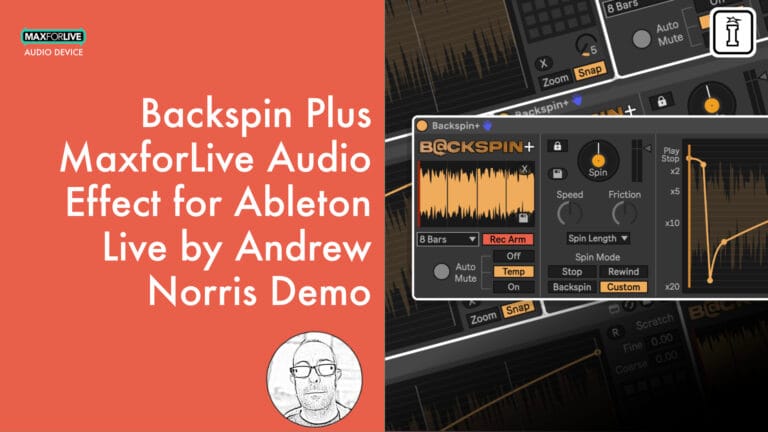
Backspin Plus by Andrew Norris
CUSTOM ENVELOPES. SCRATCH MODE. TOTAL CONTROL.
Backspin+ expands the essential vinyl effects into a comprehensive creative tool for sound designers and producers. Beyond the classic Stop, Rewind, and Backspin modes, Backspin+ adds Custom Mode with editable playback-speed envelopes, audio import functionality, 25 preset slots, and Scratch Mode for live manual control. Design experimental transitions, create signature effects, or perform intricate DJ techniques with precision impossible on hardware alone.
Inside you’ll find:
- Custom Mode: Draw your own playback-speed envelopes (2× forward to 20× backward)
- Scratch Mode: Fine and Coarse manual control for live performance
- 25 preset slots (5 built-in + 20 user-saveable) storing envelope + buffer
- Audio import: Drag & drop samples directly into buffer
- Stop, Rewind, and Backspin effect modes with full parameter control
- Zoom and Snap controls for precise envelope editing
- Visual feedback with playback speed and position indicators
- Full MIDI mapping, automation, and Push integration
Whether you’re crafting subtle production flourishes, designing experimental sound effects, or executing complex DJ transitions, Backspin+ delivers complete control over vinyl-style manipulation in Ableton Live.
Requires Ableton Live 12 Suite or Live 12 Standard with Max for Live
USER GUIDE: Backspin_Manual v1.0.2
Backspin Plus by Andrew Norris
CUSTOM ENVELOPES. SCRATCH MODE. TOTAL CONTROL.
Backspin+ expands the essential vinyl effects into a comprehensive creative tool for sound designers and producers. Beyond the classic Stop, Rewind, and Backspin modes, Backspin+ adds Custom Mode with editable playback-speed envelopes, audio import functionality, 25 preset slots, and Scratch Mode for live manual control. Design experimental transitions, create signature effects, or perform intricate DJ techniques with precision impossible on hardware alone.
Inside you’ll find:
- Custom Mode: Draw your own playback-speed envelopes (2× forward to 20× backward)
- Scratch Mode: Fine and Coarse manual control for live performance
- 25 preset slots (5 built-in + 20 user-saveable) storing envelope + buffer
- Audio import: Drag & drop samples directly into buffer
- Stop, Rewind, and Backspin effect modes with full parameter control
- Zoom and Snap controls for precise envelope editing
- Visual feedback with playback speed and position indicators
- Full MIDI mapping, automation, and Push integration
Whether you’re crafting subtle production flourishes, designing experimental sound effects, or executing complex DJ transitions, Backspin+ delivers complete control over vinyl-style manipulation in Ableton Live.
Requires Ableton Live 12 Suite or Live 12 Standard with Max for Live
USER GUIDE: Backspin_Manual v1.0.2
Product reviews
5 out of 5
2 reviews
How item rating is calculated
We show the average based on reviews. Only genuine reviews are displayed.
Sort by
March 30, 2026
This reviewer bought this product from our store.
Great max for live product. Great value
I recommend this product
January 16, 2026
This reviewer bought this product from our store.
Old school rules
Excellent
One device super cool
I play dj with vilnys and the same is the same that my technics 1200 mkII. Old scholl rules
esay and good results
nothing
I recommend this product
Backspin Plus by Andrew Norris
Master complete creative control over vinyl-style effects with Backspin+, the expanded Max for Live audio device that takes classic DJ techniques into unexplored territory. Building on the foundation of three essential effects (Stop, Rewind, and Backspin), Backspin+ adds Custom Mode with editable playback-speed envelopes, audio import functionality, comprehensive preset management, and Scratch Mode for live manual control.
This is backspin, rewind, and tape-stop manipulation evolved beyond traditional constraints. Create subtle production flourishes, design experimental sound effects, or perform complex DJ transitions with precision that goes far beyond what’s possible with hardware alone.
Core Effect Modes
Backspin+ includes the three foundational vinyl effects, each with complete Speed, Friction, and Spin Length control:
Stop Mode: Audio plays at normal speed before gradually slowing to a complete halt. Create short tape-stop effects (¼ to ½ bar) or extended turntable wind-downs spanning multiple bars.
Rewind Mode: From a stopped position, audio plays backwards, starting slowly and accelerating over time. The classic “rewind” or “pull-up” effect that announces a dramatic shift.
Backspin Mode: Starts at the end of the buffer, plays backwards at high speed, then gradually decelerates to silence. Perfect for DJ transitions demanding sudden genre or mood changes.
Custom Mode: Total Envelope Control
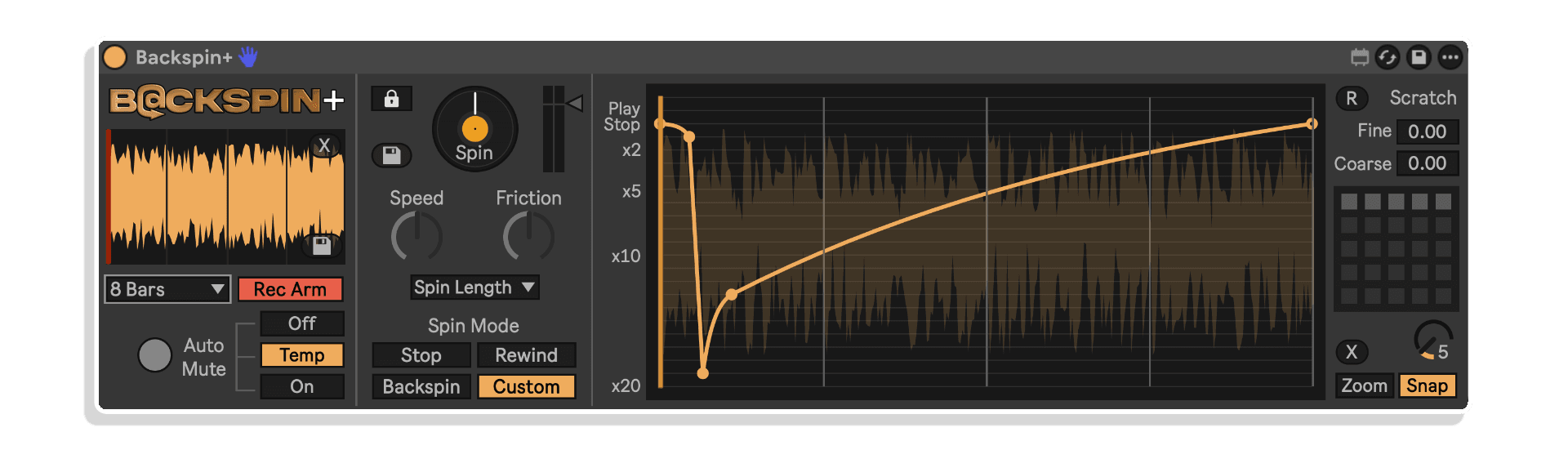
Custom Mode transforms Backspin+ into a precision sound design tool by letting you draw your own playback-speed envelope. The envelope’s x-axis represents time (determined by Spin Length), while the y-axis controls playback speed from 2× forwards to 20× backwards.
This granular control enables effects impossible with preset modes. Create stuttering forward-backward patterns, accelerating crescendos, subtle speed variations, or completely experimental movements. The device includes an intuitive editor where you can click to add breakpoints, drag to move points, Alt+Click+Drag to bend curves, and Shift-click to remove points.
Visual feedback includes an orange vertical line showing current playback speed and a grey line indicating playback position in the buffer, giving you complete awareness of what’s happening in real time.
Zoom & Snap: Zoom into the upper envelope section for fine editing at very slow speeds. Enable Snap for precise grid-aligned editing, or disable it for fluid, organic curves.
Preset System
Backspin+ includes 25 preset slots: 5 built-in presets (including Stop, Rewind, and Backspin replicas) plus 20 user-saveable slots. Each preset stores both the speed envelope and buffer contents, letting you build a library of signature effects.
Save: Shift-click any filled or empty slot to save the current envelope and buffer as a preset.
Load: Click a filled slot to recall a preset instantly.
Delete: Alt+Shift-click to remove a preset.
MIDI Control: The Preset Dial is MIDI-mappable and automatable, enabling seamless preset switching during performance or production.
Audio Import
Unlike the free version which only records live audio, Backspin+ lets you drag samples directly into the buffer. This opens creative possibilities like designing spin effects with custom audio, building preset libraries with signature samples, or creating hybrid effects combining imported audio with live recording.
To import: set the Record Length to match your sample’s bar length, then drag the audio file onto the smaller buffer window in the main display. The imported audio behaves exactly like recorded audio and can be spun, scratched, or processed with custom envelopes immediately.
Scratch Mode: Manual Performance Control
Scratch Mode provides live, tactile control over playback speed with two complementary parameters:
Scratch Fine: Control playback from backwards at normal speed to forwards at normal speed (-1.0 to 1.0 range). Ideal for detailed, musical scratching and tempo-matched manipulation.
Scratch Coarse: Control playback from 20× forwards to 20× backwards (-20 to 20 range). Perfect for dramatic movements, quick rewinds, and aggressive sound design.
R Button: Resets the playhead position to the start of the buffer instantly.
Both Scratch parameters can be controlled manually, mapped to MIDI controllers, activated via Push, or automated in Live. Note that Scratch Mode doesn’t internally record the resulting audio like performing a spin would, so you’ll need to either automate the Scratch controls or resample onto another track to capture your performance.
Smart Performance Features
Auto Mute Options: Control incoming audio behavior during spins. Choose Off (incoming audio remains audible), Temp (mutes during spin, then un-mutes), or On (mutes during and after spin, perfect for live DJ transitions).
Lock to Quantize: When enabled, the Spin button respects Live’s Global Quantisation setting, ensuring effects always trigger perfectly in time.
Save Spins to Disk: Export any spin as an audio file for later use, archiving, or further processing.
Buffer Management: Enable Record Arm on the device to start capturing audio. Set Record Length to determine buffer duration. The buffer loops continuously, always containing the last X bars before the current playback point.
Universal Integration
Backspin+ integrates seamlessly into any workflow. Trigger spins with your mouse, MIDI-mapped hardware, Push, or Live automation. Full Push integration provides organized access to all parameters across three sections: Record, Spin, and Custom.
Use Backspin+ on your master channel for full-track transitions, on individual instrument tracks for creative production techniques, on drum buses for rhythmic effects, or on return tracks for send-based processing. The device works equally well for live performance and studio production.
What’s Included
- Stop, Rewind, and Backspin effect modes
- Custom Mode with editable playback-speed envelope
- Scratch Mode with Fine and Coarse manual control
- 25 preset slots (5 built-in + 20 user-saveable)
- Audio import functionality (drag & drop samples into buffer)
- Preset save & recall (envelope + buffer contents)
- Speed, Friction, and Spin Length controls
- Auto Mute options (Off/Temp/On)
- Lock to Quantize integration
- Zoom and Snap controls for envelope editing
- Save spins to disk functionality
- Full MIDI mapping capability
- Complete Ableton Push integration
- Tempo-synced bar-length timing
Requirements
- Windows or MacOS
- Ableton Live 12 Suite, or Ableton Live 12 Standard with Max for Live installed
Frequently Asked Questions
A: Backspin+ is an advanced Max for Live audio effect that recreates vinyl-style DJ effects with expanded creative control. It includes Stop, Rewind, and Backspin modes, plus Custom Mode with editable playback-speed envelopes, Scratch Mode for manual control, audio import functionality, and 25 preset slots for saving custom effects.
A: Yes, Backspin+ is a Max for Live device.
A: Max for Live is a platform that integrates the visual programming environment Max with Ableton Live, allowing users to create and use custom audio, MIDI, and control devices.
A: Backspin (free) includes Stop, Rewind, and Backspin effects with Speed, Friction, and Spin Length controls. Backspin+ (paid) adds Custom Mode with editable playback-speed envelopes, audio import functionality, 25 preset slots with save & recall, and Scratch Mode for manual scrubbing control.
A: You can explore more of Andrew Norris’s tools and devices here: Andrew Norris
Important Information
V1.0.2 – Released January 2026
- All buttons & text are now clearly visible when using Ableton Live’s light themes.
- Speed and Friction parameters now use a 0 to 1 floating point range rather than a percentage to make things a little easier to edit in automation lanes.
- ‘Save Last Spin’ button is now disabled whenever a Spin is currently playing, preventing the saving of files with missing audio content.
- When switching Auto Mute from On to Temp after a spin, incoming audio no longer stays muted and the Auto Mute LED is set back to Off.
- When dragging and dropping a file into Backspin+, anything other than a file type supported by Ableton will be rejected and an ‘unsupported file type’ error will be displayed. Note that certain video files can be used but only the audio will be loaded. Supported file types: .wav, .aiff, .flac, .ogg, .mp3, .m4a (MacOS only), .rx2, .mov, .mp4 (H.264 with compatible audio)
Initial Release – January 2026
Our Products are generally provided as Zip file downloads which in all cases will need to be extracted and saved to your hard drive prior to installation. Details on the different file type provided and what to do with them are below.
.alp Files – These are Ableton Live Packs and will either install directly into the Packs Section of the browser of Ableton Live or ask you to save them to your hard drive. For packs that install to the library, when you double click on them you will see a pop up window asking you to confirm that installation is ok as the files are described as “Legacy”. This is fine and you are ok to proceed, the packs are created using the format for an earlier version of Live and so remain compatible with the current version.
.amxd files – These are individual MaxforLive Devices and can be stored anywhere on your hard drive. We’d advise creating a folder for them and then adding that folder as a location within the Places section of Lives Browser.
END-USER LICENSE AGREEMENT FOR ISOTONIK STUDIOS SOFTWARE PRODUCTS.
PLEASE READ THE TERMS AND CONDITIONS OF THIS LICENSE AGREEMENT CAREFULLY BEFORE CONTINUING WITH THIS PROGRAM INSTALL.
This End-User License Agreement (referred to as “EULA”) is a legal agreement between an individual or a single entity (referred to as “LICENSEE”) and Isotonik Studios for the Isotonik Studios software product(s) which may include associated software components, media, printed materials, and “online” or electronic documentation (referred to as “SOFTWARE PRODUCT”). By installing, copying, or otherwise using the SOFTWARE PRODUCT, the LICENSEE agrees to be bound by the terms of this EULA.
This EULA represents the entire agreement concerning the program between the LICENSEE and Isotonik Studios and it supersedes any prior proposal, representation, or understanding between the parties. If the LICENSEE does not agree to the terms of this EULA, the LICENSEE should not install or use the SOFTWARE PRODUCT.
The SOFTWARE PRODUCT is protected by copyright laws and international copyright treaties, as well as other intellectual property laws and treaties. The SOFTWARE PRODUCT is licensed, not sold.
- GRANT OF LICENSE.
The SOFTWARE PRODUCT is licensed as follows:
(a) Installation and Use. Providing that the LICENSEE has paid any applicable license fees, Isotonik Studios grants the LICENSEE the right to install and use copies of the SOFTWARE PRODUCT on up to two computers in the LICENSEE’s possession that are running a validly licensed copy of the operating system for which the SOFTWARE PRODUCT was designed [e.g., Windows 10, macOS]. The computer(s) must be owned by the LICENSEE.
(b) Backup Copies. The LICENSEE may also make copies of the SOFTWARE PRODUCT as may be necessary for backup and archival purposes.
- DESCRIPTION OF OTHER RIGHTS AND LIMITATIONS.
(a) Maintenance of Copyright Notices. The LICENSEE must not remove or alter any copyright notices on any and all copies of the SOFTWARE PRODUCT.
(b) Distribution. The LICENSEE may not distribute registered copies of the SOFTWARE PRODUCT to third parties.
(c) Prohibition on Reverse Engineering, Decompilation, and Disassembly. The LICENSEE may not reverse engineer, decompile, or disassemble the SOFTWARE PRODUCT, except and only to the extent that such activity is expressly permitted by applicable law notwithstanding this limitation.
(d) Rental. The LICENSEE may not rent, lease, or lend the SOFTWARE PRODUCT.
(e) License transfer The LICENSEE may not transfer their license to the SOFTWARE PRODUCT to any third party. Any attempt to do so will be considered a violation of this EULA.
(f) Support Services. Isotonik Studios may provide the LICENSEE with support services related to the SOFTWARE PRODUCT for a period of 12 months following the date of purchase. Any supplemental software code provided to the LICENSEE as part of the Support Services shall be considered part of the SOFTWARE PRODUCT and subject to the terms and conditions of this EULA.
(g) Compliance with Applicable Laws. The LICENSEE must comply with all applicable laws regarding use of the SOFTWARE PRODUCT.
- TERMINATION Without prejudice to any other rights, Isotonik Studios may terminate this EULA if the LICENSEE fails to comply with the terms and conditions of this EULA. In such event, the LICENSEE must destroy all copies of the SOFTWARE PRODUCT in the LICENSEE’s possession.
- COPYRIGHT All title, including but not limited to copyrights, in and to the SOFTWARE PRODUCT and any copies thereof are owned by Isotonik Studios or its suppliers. All title and intellectual property rights in and to the content which may be accessed through use of the SOFTWARE PRODUCT is the property of the respective content owner and may be protected by applicable copyright or other intellectual property laws and treaties. This EULA grants the LICENSEE no rights to use such content. All rights not expressly granted are reserved by Isotonik Studios.
- NO WARRANTIES Isotonik Studios expressly disclaims any warranty for the SOFTWARE PRODUCT. The SOFTWARE PRODUCT is provided ‘As Is’ without any express or implied warranty of any kind, including but not limited to any warranties of merchantability, noninfringement, or fitness of a particular purpose. Isotonik Studios does not warrant or assume responsibility for the accuracy or completeness of any information, text, graphics, links or other items contained within the SOFTWARE PRODUCT. Isotonik Studios makes no warranties respecting any harm that may be caused by the transmission of a computer virus, worm, time bomb, logic bomb, or other such computer program. Isotonik Studios further expressly disclaims any warranty or representation to the LICENSEE or to any third party.
- LIMITATION OF LIABILITY In no event shall Isotonik Studios be liable for any damages (including, without limitation, lost profits, business interruption, or lost information) arising out of the LICENSEE’s use of or inability to use the SOFTWARE PRODUCT, even if Isotonik Studios has been advised of the possibility of such damages. In no event will Isotonik Studios be liable for loss of data or for indirect, special, incidental, consequential (including lost profit), or other damages based in contract, tort or otherwise. Isotonik Studios shall have no liability with respect to the content of the SOFTWARE PRODUCT or any part thereof, including but not limited to errors or omissions contained therein, libel, infringements of rights of publicity, privacy, trademark rights, business interruption, personal injury, loss of privacy, moral rights or the disclosure of confidential information.
More from Andrew Norris
Frequently Bought Together
 ★ Popular
 -20%
-20%Chaos CultureModulat by Chaos CultureLive 10 & 11 & 12 · Max for Live Original price was: £100.00.£80.00Current price is: £80.00.