Dephaultz by PerforModule
WORKFLOW ENHANCING DEFAULT RACKS
TRIPLE PACK SAVINGS: Buy any three or more PerforModule products at the same time and get 20% off (automatically applied at checkout)
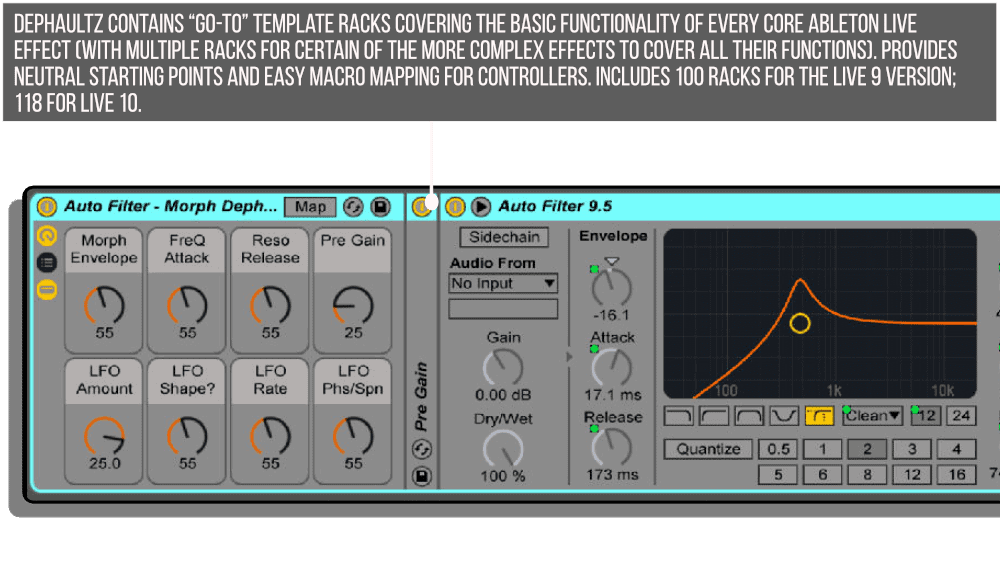
“Go-to” template racks covering the basic functionality of every core ableton live effect (with multiple racks for certain of the more complex effects to cover all their functions). Provides neutral starting points and easy macro mapping for controllers. Includes 133 racks for the Live 10 version; 165 for Live 11.Additional information
| Ableton Live Compatibility | Ableton Live 10 Standard with MaxforLive, Ableton Live 10 Suite, Ableton Live 11 Standard with MaxforLive, Ableton Live 11 Suite, Ableton Live 12 Standard with MaxforLive, Ableton Live 12 Suite |
|---|---|
| Min. Requirements | Ableton Live 10 Standard with MaxforLive Installed or Ableton Live 10 Suite |
| OS | Mac, Windows |
PRICE: £17.00
Product reviews
FEATURES
No reviews yet. Be the first to review this product.
Dephaultz by PerforModule
Dephaultz – Live 11 Update
•33 brand new racks!
•Racks covering the new Live Devices:
_Hybrid Reverb
_Spectral Resonator
_Spectral Time
_Chorus-Ensemble
_Phaser-Flanger
_Redux Update
•Existing racks updated to take advantage of Live 11’s abiltiy to have a custom number of macro knobs.
•165 racks total, encompassing every core audio effect.
•Easy Access to Legacy versions of devices (such as the old Compressor 1 and 2 models, the previous Redux, etc.).
•Macro Variation Presets loaded onto certain racks for snapping to useful arrangements of macro settings.
•Helpful mousover info from the user manual available for every device & macro control.
•Various other minor optimizations.
These template racks cover each and every native Ableton Live effect, with 8 parameters mapped and labeled for quick and easy usage, gainstaged for neutral initial states (or as a close as possible). Many effect types have multiple racks provided, each highlighting a particular functionality. Extremely useful for production with any 8-knob MIDI controller, they make it dead easy to twist and shape your essential parameters immediately with minimal fuss or confusion and get right into being creative.
Categorized to appear automatically in your Ableton Live browser in the Audio Effects Rack section, you are provided access to…
- 9 Amp Simulation effects
- 6 Clean Delay effects
- 20 Distortion effects
- 7 Drums effects
- 19 Filter effects
- 25 Formant effects
- 6 Hall effects
- 18 Mixing & Mastering effects
- 8 Modulated Delay effects
- 4Performance & DJ effects
- 3 Room effects
- 17 Space effects
- 20 Special effects
- 3 Vintage Delay effects
Note: the Live 10 version of the pack contains fewer racks (since it doesn’t have access to certain effects); however if you own the pack and later upgrade, you can always download and upgrade to the more current version of the pack seamlessly at any time.
All “Dephault” racks are designed to return as close to unity level as possible in their loaded states, calibrated with LCR pink noise to return the same integrated LUFS measurements.
Some perks of owning the pack…
- Increase overall efficiency when applying effects by focusing on specific results with clarity and precision.
- Avoid the “loudness illusion” from tricking you into thinking an effect is better simply because it boosted the signal by a half a dB or whatever.
- Hot-swap between different effect types (for example, swap Amp + Cab models while jamming on a guitar) to highlight which model’s contour naturally complements the audio the best.
- Explore purposeful functionality of devices you may not have considered previously.
- Generally fiddle with parameters less.
- Easily grab the 8 knobs with any blue hand automapped controller, or custom-map them to any controller.
- Hover your cursor over macros you don’t wuite understand to see useful help info about what they do.
- Consult the manual less and get to know how, what, why, when, where, and who to use your effects on.
Frequently Asked Questions
Dephaultz has been updated for Live 11 and takes full advantage of Live 11 features including custom macro knob counts. You will need Ableton Live 11 or later to get the most out of the pack, though legacy device racks are also included for older workflow compatibility.
The pack includes 165 template racks in total, covering every core native Ableton Live audio effect. This includes 33 brand new racks for Live 11 devices such as Hybrid Reverb, Spectral Resonator, Spectral Time, Chorus-Ensemble, Phaser-Flanger, and the updated Redux.
Each rack has 8 parameters mapped and clearly labelled for quick access, with Live 11 racks taking advantage of the custom macro knob count feature. Macro Variation Presets are also loaded onto certain racks, letting you snap to useful arrangements of settings instantly.
These are intentionally neutral template racks designed as sensible starting points rather than heavily coloured presets. The idea is to give you an organised, well-mapped foundation for every core effect so you can dial in your own sound quickly.
Yes, easy access to legacy versions of devices is built in, including the old Compressor 1 and 2 models and the previous Redux. This makes it straightforward to recall older device behaviour within your current Live set.
Helpful mouseover information from the user manual is available directly within every device and macro control, so you can get contextual guidance without leaving your session or hunting through a separate document.
After purchase you will receive the rack files to add to your Ableton Live User Library. Simply place them in your Live library and they will be available to drag into any session directly from the browser.
Important Information
Live 9 Version – 5 June 2018
Maintenance update, cosmetic polishing.
Final Live 9 update.
Live 10 Version – 5 June 2018
6 new Drum Buss racks | 6 new Echo racks | 3 new EQ Eight racks | 3 new Pedal racks.
Drum Buss – Hard Dephault – Medium Dephault – Soft Dephault
Drum Comp – Hard Dephault – Medium Dephault – Soft Dephault
Echo – Filter Dephault – Humanizer Dephault – Noise Gen Dephault – Reverb Dephault – Rhythmic Dephault – Wahbble Dephault
EQ Eight – High Focus Dephault – Low Focus Dephault – Mid Focus Dephault
Pedal – Distort Dephault – Fuzz Dephault – Overdrive Dephault
Live 10.1 Version – 22 June 2019
16 new racks | Utility – Dephault renamed to Utility – Legacy Dephault | Gate – Focus renamed to Gate – Mid Focus
Channel EQ – Dephault
EQ Eight – Logarithmic Dephault
Envelope Follower – Dephault
Gate – High Focus – Low Focus
LFO – Random Dephault – Sawtooth Down Dephault – Sawtooth Up Dephault – Sine Dephault – Square Dephault – Triangle Dephault
Shaper – Dephault
Utility – Left Dephault – Right Dephault – Stereo Dephault – Stereo Swap Dephault
Live 11 Version – 25 February 2021
•33 brand new racks.
•Racks covering the new Live Devices:
_Hybrid Reverb
_Spectral Resonator
_Spectral Time
_Chorus-Ensemble
_Phaser-Flanger
_Redux Update
•Existing racks updated to take advantage of Live 11’s abiltiy to have a custom number of macro knobs.
•165 racks total, encompassing every core audio effect.
•Easy Access to Legacy versions of devices (such as the old Compressor 1 and 2 models, the previous Redux, etc.).
•Macro Variation Presets loaded onto certain racks for snapping to useful arrangements of macro settings.
•Helpful mousover info from the user manual available for every device & macro control.
•Various other minor optimizations.
•Live 9 Version officialy retired.
Our Products are generally provided as Zip file downloads which in all cases will need to be extracted and saved to your hard drive prior to installation. Details on the different file type provided and what to do with them are below.
.alp Files – These are Ableton Live Packs and will either install directly into the Packs Section of the browser of Ableton Live or ask you to save them to your hard drive. For packs that install to the library, when you double click on them you will see a pop up window asking you to confirm that installation is ok as the files are described as “Legacy”. This is fine and you are ok to proceed, the packs are created using the format for an earlier version of Live and so remain compatible with the current version.
.amxd files – These are individual MaxforLive Devices and can be stored anywhere on your hard drive. We’d advise creating a folder for them and then adding that folder as a location within the Places section of Lives Browser.
END-USER LICENSE AGREEMENT FOR ISOTONIK STUDIOS SOFTWARE PRODUCTS.
PLEASE READ THE TERMS AND CONDITIONS OF THIS LICENSE AGREEMENT CAREFULLY BEFORE CONTINUING WITH THIS PROGRAM INSTALL.
This End-User License Agreement (referred to as “EULA”) is a legal agreement between an individual or a single entity (referred to as “LICENSEE”) and Isotonik Studios for the Isotonik Studios software product(s) which may include associated software components, media, printed materials, and “online” or electronic documentation (referred to as “SOFTWARE PRODUCT”). By installing, copying, or otherwise using the SOFTWARE PRODUCT, the LICENSEE agrees to be bound by the terms of this EULA.
This EULA represents the entire agreement concerning the program between the LICENSEE and Isotonik Studios and it supersedes any prior proposal, representation, or understanding between the parties. If the LICENSEE does not agree to the terms of this EULA, the LICENSEE should not install or use the SOFTWARE PRODUCT.
The SOFTWARE PRODUCT is protected by copyright laws and international copyright treaties, as well as other intellectual property laws and treaties. The SOFTWARE PRODUCT is licensed, not sold.
- GRANT OF LICENSE.
The SOFTWARE PRODUCT is licensed as follows:
(a) Installation and Use. Providing that the LICENSEE has paid any applicable license fees, Isotonik Studios grants the LICENSEE the right to install and use copies of the SOFTWARE PRODUCT on up to two computers in the LICENSEE’s possession that are running a validly licensed copy of the operating system for which the SOFTWARE PRODUCT was designed [e.g., Windows 10, macOS]. The computer(s) must be owned by the LICENSEE.
(b) Backup Copies. The LICENSEE may also make copies of the SOFTWARE PRODUCT as may be necessary for backup and archival purposes.
- DESCRIPTION OF OTHER RIGHTS AND LIMITATIONS.
(a) Maintenance of Copyright Notices. The LICENSEE must not remove or alter any copyright notices on any and all copies of the SOFTWARE PRODUCT.
(b) Distribution. The LICENSEE may not distribute registered copies of the SOFTWARE PRODUCT to third parties.
(c) Prohibition on Reverse Engineering, Decompilation, and Disassembly. The LICENSEE may not reverse engineer, decompile, or disassemble the SOFTWARE PRODUCT, except and only to the extent that such activity is expressly permitted by applicable law notwithstanding this limitation.
(d) Rental. The LICENSEE may not rent, lease, or lend the SOFTWARE PRODUCT.
(e) License transfer The LICENSEE may not transfer their license to the SOFTWARE PRODUCT to any third party. Any attempt to do so will be considered a violation of this EULA.
(f) Support Services. Isotonik Studios may provide the LICENSEE with support services related to the SOFTWARE PRODUCT for a period of 12 months following the date of purchase. Any supplemental software code provided to the LICENSEE as part of the Support Services shall be considered part of the SOFTWARE PRODUCT and subject to the terms and conditions of this EULA.
(g) Compliance with Applicable Laws. The LICENSEE must comply with all applicable laws regarding use of the SOFTWARE PRODUCT.
- TERMINATION Without prejudice to any other rights, Isotonik Studios may terminate this EULA if the LICENSEE fails to comply with the terms and conditions of this EULA. In such event, the LICENSEE must destroy all copies of the SOFTWARE PRODUCT in the LICENSEE’s possession.
- COPYRIGHT All title, including but not limited to copyrights, in and to the SOFTWARE PRODUCT and any copies thereof are owned by Isotonik Studios or its suppliers. All title and intellectual property rights in and to the content which may be accessed through use of the SOFTWARE PRODUCT is the property of the respective content owner and may be protected by applicable copyright or other intellectual property laws and treaties. This EULA grants the LICENSEE no rights to use such content. All rights not expressly granted are reserved by Isotonik Studios.
- NO WARRANTIES Isotonik Studios expressly disclaims any warranty for the SOFTWARE PRODUCT. The SOFTWARE PRODUCT is provided ‘As Is’ without any express or implied warranty of any kind, including but not limited to any warranties of merchantability, noninfringement, or fitness of a particular purpose. Isotonik Studios does not warrant or assume responsibility for the accuracy or completeness of any information, text, graphics, links or other items contained within the SOFTWARE PRODUCT. Isotonik Studios makes no warranties respecting any harm that may be caused by the transmission of a computer virus, worm, time bomb, logic bomb, or other such computer program. Isotonik Studios further expressly disclaims any warranty or representation to the LICENSEE or to any third party.
- LIMITATION OF LIABILITY In no event shall Isotonik Studios be liable for any damages (including, without limitation, lost profits, business interruption, or lost information) arising out of the LICENSEE’s use of or inability to use the SOFTWARE PRODUCT, even if Isotonik Studios has been advised of the possibility of such damages. In no event will Isotonik Studios be liable for loss of data or for indirect, special, incidental, consequential (including lost profit), or other damages based in contract, tort or otherwise. Isotonik Studios shall have no liability with respect to the content of the SOFTWARE PRODUCT or any part thereof, including but not limited to errors or omissions contained therein, libel, infringements of rights of publicity, privacy, trademark rights, business interruption, personal injury, loss of privacy, moral rights or the disclosure of confidential information.
More from PerforModule
 -23%
-23%PerforModuleDrum Enhancerz Bundle by PerforModuleLive 10 & 11 & 12 Original price was: £30.00.£23.00Current price is: £23.00.
Frequently Bought Together
 -20%
-20%Brian FunkADM Orchestral by Brian FunkLive 11 & 12 Original price was: £40.00.£32.00Current price is: £32.00.
 ★ Popular