LP Pack by LDM Design
BUILD YOUR BUNDLE
Select three or more LDM Design products and unlock an instant 20% discount, applied automatically when you check out.
Transform your Novation LaunchPad into a complete sequencing powerhouse with three MaxforLive devices that break free from the 8×8 grid’s limitations. Orbit delivers circular step sequencing with live performance tools. Paragome generates transposable arpeggios and melodies with multi-layer capabilities. s7epper_mk2 brings deep 7-note pattern sequencing with page management and on-hardware preset recall. Plus Nexus lets you run up to 8 apps simultaneously for complex live setups.
Inside you’ll find:
- Orbit — 16-step circular sequencer with beat-repeat, effect triggers, and fingerdrumming pads
- Paragome — Dynamic pattern instrument with 7 preset sequences and 6-layer polyphony
- s7epper_mk2 — 7-note step sequencer with 8 pattern pages and full page sequencing
- Nexus — Multi-app hub for running up to 8 LDM LaunchPad devices simultaneously
- Color-coded visual feedback for instant pattern recognition
- Independent sequence lengths for polyrhythmic patterns
- On-hardware preset management without touching your computer
- Minimal menu navigation with direct grid control
- Comprehensive PDF user guides for each device
- Compatible with LaunchPad MKI, MKII, S, and MINI
Built for live performance and hands-on creativity, LP Pack turns your LaunchPad from clip launcher to complete sequencing environment. Every function accessible from the grid, every pattern visible in color, every sequence ready for real-time manipulation.
Requires: Ableton Live 10/11/12 Standard (with MaxforLive) or Suite | Mac & Windows | Novation LaunchPad (NOT compatible with LaunchPad PRO)
USER GUIDE: Orbit
LP Pack by LDM Design
BUILD YOUR BUNDLE
Select three or more LDM Design products and unlock an instant 20% discount, applied automatically when you check out.
Transform your Novation LaunchPad into a complete sequencing powerhouse with three MaxforLive devices that break free from the 8×8 grid’s limitations. Orbit delivers circular step sequencing with live performance tools. Paragome generates transposable arpeggios and melodies with multi-layer capabilities. s7epper_mk2 brings deep 7-note pattern sequencing with page management and on-hardware preset recall. Plus Nexus lets you run up to 8 apps simultaneously for complex live setups.
Inside you’ll find:
- Orbit — 16-step circular sequencer with beat-repeat, effect triggers, and fingerdrumming pads
- Paragome — Dynamic pattern instrument with 7 preset sequences and 6-layer polyphony
- s7epper_mk2 — 7-note step sequencer with 8 pattern pages and full page sequencing
- Nexus — Multi-app hub for running up to 8 LDM LaunchPad devices simultaneously
- Color-coded visual feedback for instant pattern recognition
- Independent sequence lengths for polyrhythmic patterns
- On-hardware preset management without touching your computer
- Minimal menu navigation with direct grid control
- Comprehensive PDF user guides for each device
- Compatible with LaunchPad MKI, MKII, S, and MINI
Built for live performance and hands-on creativity, LP Pack turns your LaunchPad from clip launcher to complete sequencing environment. Every function accessible from the grid, every pattern visible in color, every sequence ready for real-time manipulation.
Requires: Ableton Live 10/11/12 Standard (with MaxforLive) or Suite | Mac & Windows | Novation LaunchPad (NOT compatible with LaunchPad PRO)
USER GUIDE: Orbit
Buying for someone?Send a gift card →
Additional information
| MaxforLive | MIDI Devices, Sequencers |
|---|---|
| Ableton Live Compatibility | Ableton Live 10 Standard with MaxforLive, Ableton Live 10 Suite, Ableton Live 11 Standard with MaxforLive, Ableton Live 11 Suite, Ableton Live 12 Standard with MaxforLive, Ableton Live 12 Suite |
| Controllers | Novation Launchpad |
| Min. Requirements | Ableton Live 10 Standard with MaxforLive Installed or Ableton Live 10 Suite |
| OS | Mac, Windows |
PRICE: £35.00
Product reviews
FEATURES
5 out of 5
1 review
How item rating is calculated
We show the average based on reviews. Only genuine reviews are displayed.
Sort by
February 8, 2018
This reviewer bought this product from our store.
Who thats a great thing in my home studio! Thank U very MUCH! :)
LP Pack by LDM Design
Overview & Inspiration
The Novation LaunchPad transforms from simple grid controller to sophisticated performance instrument with three MaxforLive sequencers that redefine what’s possible on an 8×8 matrix.
LP Pack delivers three distinct sequencing environments built specifically for the LaunchPad’s unique layout. Orbit breaks free from linear sequencing with a circular step sequencer. Paragome creates generative arpeggios and melodies inspired by Stretta’s classic Polygome for Monome. s7epper_mk2 brings deep pattern sequencing with page management and preset recall. Each device was designed to maximize the LaunchPad’s potential while maintaining intuitive, hands-on control without complex menu diving.
The pack also includes Nexus, a powerful utility that lets you run up to 8 LDM LaunchPad apps simultaneously, turning your LaunchPad into a complete live performance ecosystem. Whether you’re building beats, generating melodies, or creating evolving patterns, LP Pack gives you professional sequencing tools optimized for the grid controller you already own.
The Devices
Orbit — Circular Step Sequencer for Live Performance
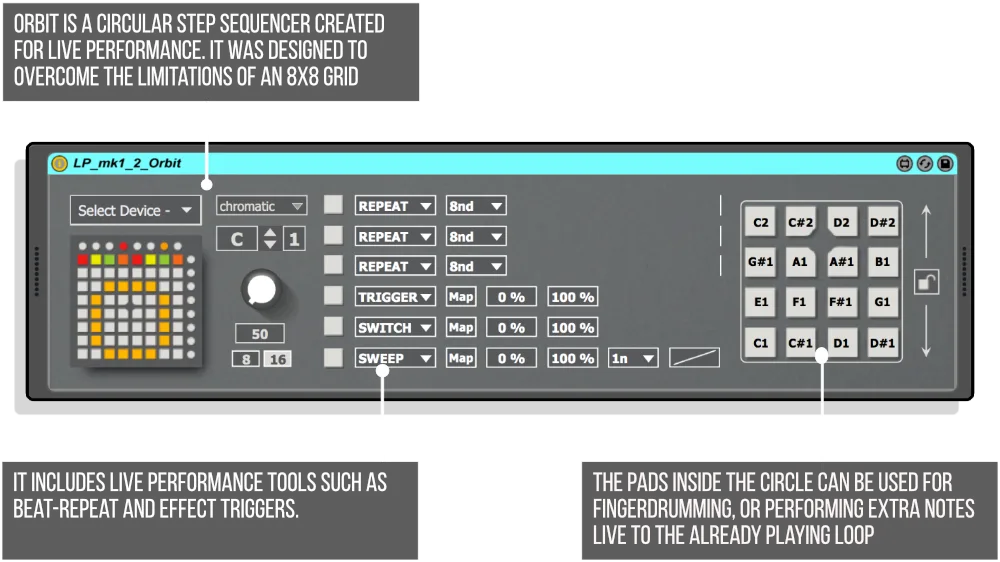
Orbit solves a fundamental LaunchPad limitation: how do you sequence 16 steps on an 8×8 grid? The answer is circular. The sequence flows clockwise around the grid, starting at the top, giving you visual feedback that’s both functional and hypnotic during performance.
Each of the 8 notes gets its own color-coded sequencing circle for instant visual clarity when programming drums. Individual sequence lengths mean your kick can loop every 4 steps while your hi-hat runs for 7, creating polyrhythmic patterns that evolve naturally. The velocity control sits on the right side of the circle for quick dynamic adjustments without stopping playback.
Live performance tools include beat-repeat with adjustable speed, effect triggers mapped to parameters anywhere in Live, momentary switches, and timed parameter sweeps with editable curves. Six effect pads on the left edge of the circle give you real-time control over stutters, filters, delays, or any mapped parameter. The center pads inside the circle double as fingerdrumming pads, letting you perform additional notes live over your sequenced loops.
Preset management is built in with 16 slots accessible directly from the LaunchPad. Load and save buttons display slots in the center of the circle, acting as “pages” for live pattern variations. Function buttons around the grid let you set individual or global sequence lengths, adjust velocity without affecting note on/off status, mute output, and clear sequences. Transport is directly connected to Live’s playback, and the mute/clear button can also wipe all presets when held with save or load.
Paragome — Dynamic Pattern Instrument for Arpeggios and Melodies
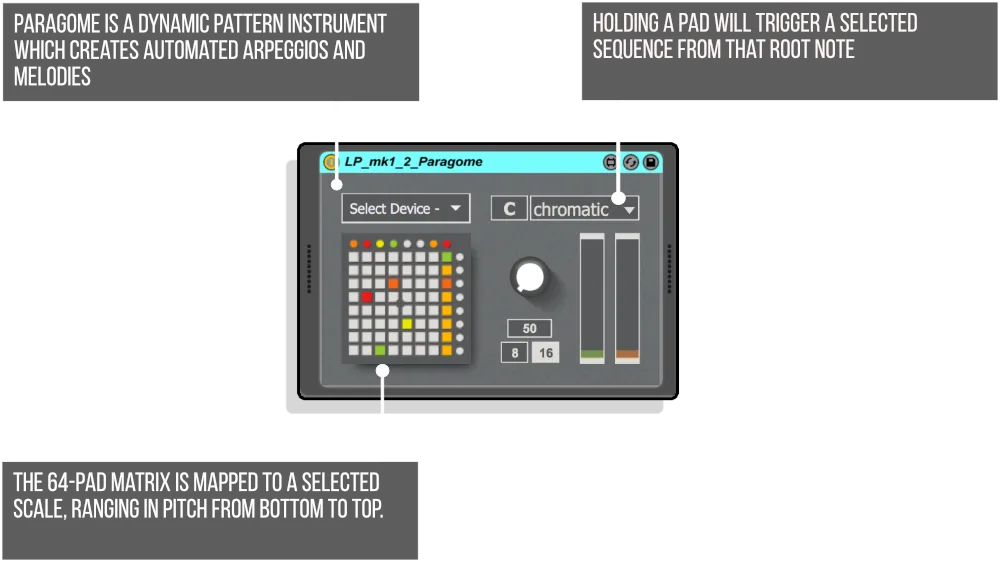
Paragome reimagines the LaunchPad as a melodic performance instrument. The 64-pad matrix maps to any selected scale, with pitch ranging from bottom to top. Hold any pad to trigger the currently selected sequence from that root note, instantly transposing patterns across the scale.
Seven preset sequence slots let you design different arpeggios, melodic patterns, or rhythmic phrases. Each sequence can be up to 8 notes long with individual velocity, note length, and timing control. The genius of Paragome is how it handles multiple sequences simultaneously. You can freeze any playing pattern to its own layer using dedicated freeze and add layer buttons, building up to 6 different sequences playing at once, each from different root notes.
Sequence editing happens directly on the LaunchPad across three pages: Pattern Edit for note selection and silent notes, Velocity Edit showing each note’s dynamic as a red vertical bar, and Time Edit for note lengths (128n to 4n) and sequence speed (8n, 16n, 8nt, 32n, 16nt, 64n). The remove layer page shows currently playing sequences color-coded in the right column, letting you selectively stop individual layers while others continue. This dynamic layering goes far beyond the original Polygome, making Paragome a powerful tool for generative composition and live improvisation.
The hold button offers two modes of operation: traditional hold where pressed pads stay on until deactivated, or the more dynamic layering system for building complex polyphonic arrangements. Each playing sequence displays its own color on the performance matrix, providing clear visual feedback of what’s active and what root note it’s playing from.
s7epper_mk2 — Advanced 7-Note Step Sequencer with Pages and Presets
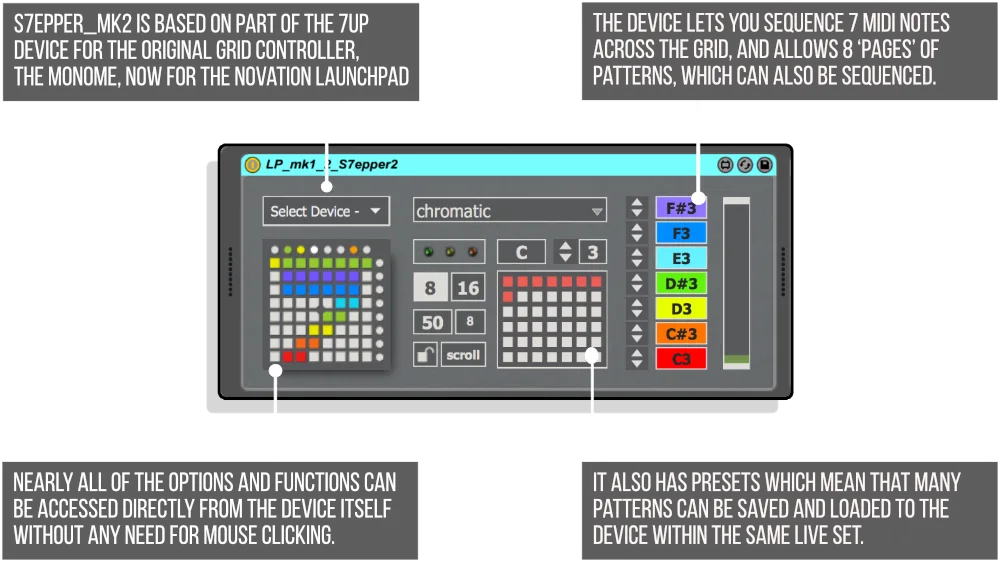
s7epper_mk2 brings deep pattern sequencing to the LaunchPad with 7 notes, 8 pattern pages, and comprehensive control accessible entirely from the grid. The bottom 7 rows are your pattern input, with each row corresponding to a MIDI note (editable in the GUI). Color-coded rows help you remember which note each row plays.
The page sequencer is where s7epper_mk2 reveals its power. Instead of looping a single 8-step pattern, you can create 8 different pages and then sequence which pages play in which order. Set up a pattern like 1-2-1-3-1-2-1-3 for variations and fills that never get boring. Copy and paste pages by holding one and pressing another. Clear the current page with a double-tap. The scroll function forces the LaunchPad to always display the currently playing page, perfect for on-the-fly editing during performance.
Options accessible directly from the grid include sequencer speed (8n or 16n), swing speed, beats per page (essentially time signature experimentation), note delay for each of the 7 notes (allowing creative timing like double-speed hi-hats), and velocity control per step. Load and save functions unlock preset slots right on the LaunchPad, with 8 slots accessible from the device and more available in the GUI. Transport control is nuanced: pressing play when Live is stopped starts playback immediately; if Live’s transport is already running, pressing play begins device output from the start of the next page. Double-press to stop both the device and Live’s transport.
The swing control includes a numerical display showing values from 50 (no swing) to 90, with 66 equal to triplets. Separate left and right controls adjust tens and units, with a unit shift button toggling between even and odd numbers for precise groove control. All these features combine to make s7epper_mk2 a complete drum sequencing environment that lives entirely on your LaunchPad.
Nexus — Multi-App Performance Hub
Nexus is the utility that ties everything together, allowing you to run up to 8 LDM LaunchPad apps simultaneously. Build powerful live performance setups using s7epper, Paragome, Orbit, mLPr, and Polyboing in combination. You can also use multiple instances of certain devices like mLPr and Polyboing. Nexus turns the LaunchPad from a single-purpose controller into a complete multi-instrument performance rig.
Features & Highlights
LaunchPad MKI, MKII, S, and MINI Compatible — All three sequencers work across multiple LaunchPad models, maximizing compatibility with the hardware you already own. Note: Not compatible with LaunchPad PRO.
Minimal Menu Navigation — LDM Design’s philosophy of hiding complexity without complex menus shines throughout LP Pack. Nearly every function is accessible directly from the LaunchPad grid with clear visual feedback and intuitive button combinations.
Color-Coded Visual Feedback — Each sequencer uses distinct colors for different notes, playing sequences, and function states. You always know what’s happening at a glance, crucial for live performance.
Independent Sequence Lengths — Create polyrhythmic patterns by giving each note its own loop length. Your bassline loops every 5 steps while your snare runs for 7, generating complex evolving grooves from simple inputs.
Preset Management on Hardware — Save and recall patterns directly from the LaunchPad without touching your computer. Essential for live performance and quick workflow when jamming.
Live Performance Tools — Beat-repeat, effect triggers, parameter sweeps, fingerdrumming pads, and transport control put creative tools at your fingertips without disrupting your flow.
Generative Capabilities — Paragome’s multi-layer sequencing and transposable patterns combined with s7epper_mk2’s page sequencing create evolving compositions that develop over time without static repetition.
Direct Live Integration — Transport controls, parameter mapping, and scale selection integrate seamlessly with Ableton Live’s workflow, making these devices feel like native extensions of your DAW.
How to Use
Drop Orbit, Paragome, or s7epper_mk2 onto a MIDI track before your instrument. The LaunchPad automatically becomes your sequencing interface when the device is selected. For Orbit, program your patterns in the circular grid, set velocities on the right side, and use the effect pads on the left for live manipulation. For Paragome, select your scale, design sequences in the edit pages, then perform by holding pads to trigger patterns from different root notes. For s7epper_mk2, input patterns across the 7 rows, set up your page sequence, and use the menu buttons to access speed, swing, velocity, and preset controls.
Use Nexus to run multiple sequencers simultaneously. Route Orbit to drums, Paragome to bass, and s7epper_mk2 to percussion, all controlled from a single LaunchPad. Save your setups as presets for instant recall during live performances or different sections of your productions.
The devices work best when you embrace the LaunchPad’s grid-based workflow. Instead of mouse clicking through menus, learn the button combinations for each function. Hold buttons to access secondary pages. Double-tap to clear or confirm. The muscle memory develops quickly, and soon you’ll be sequencing, editing, and performing without looking at your computer screen.
Ideal For
- LaunchPad owners who want to maximize their hardware’s potential beyond clip launching
- Electronic music producers looking for tactile, hands-on sequencing workflows
- Live performers who need reliable, hardware-based pattern control
- Beat makers who want polyrhythmic capabilities and generative pattern creation
- Anyone who loves Monome-inspired grid sequencing but uses a LaunchPad
- Producers who prefer physical interaction over mouse-based programming
- Experimental musicians exploring evolving, non-repetitive compositions
What’s Included
- Orbit — Circular step sequencer (.amxd)
- Paragome — Dynamic pattern instrument (.amxd)
- s7epper_mk2 — 7-note step sequencer (.amxd)
- Nexus — Multi-app performance hub (.amxd)
- Comprehensive PDF user guides for Orbit, Paragome, and s7epper_mk2
- Mac and Windows compatible
- Requires Ableton Live 10/11/12 Standard (with MaxforLive) or Suite
- Compatible with LaunchPad MKI, MKII, S, and MINI (NOT LaunchPad PRO)
Technical Notes
Each device includes scale selection via the GUI for Orbit and Paragome, allowing you to constrain notes to specific musical modes. MIDI note assignment for all sequencers is editable in the device interface. The devices respond to Live’s transport but also include independent transport control directly from the LaunchPad.
Orbit’s effect triggers use Live’s parameter mapping system, so you can map to any parameter in your set including third-party plugins. Paragome’s sequence editing happens in real-time without stopping playback. s7epper_mk2’s preset system stores pattern data in Live’s set file, meaning your sequences save with your project.
Explore More from LDM Design
Chance Pack FOUR | FRAKTOR | Organizm | ADD | View All LDM Design Products
Frequently Asked Questions
A: LP Pack is a collection of three MaxforLive sequencers (Orbit, Paragome, and s7epper_mk2) plus Nexus, a multi-app hub, designed specifically for Novation LaunchPad controllers (MKI, MKII, S, and MINI). Orbit is a circular step sequencer with live performance tools, Paragome creates dynamic arpeggios and melodies with multi-layer capabilities, and s7epper_mk2 offers deep 7-note pattern sequencing with 8 pages. All three devices maximize the LaunchPad’s potential with minimal menu navigation and direct grid control.
A: Yes, LP Pack consists of MaxforLive devices.
A: MaxforLive is a platform that integrates the visual programming environment Max with Ableton Live, allowing users to create and use custom audio, MIDI, and control devices.
A: LP Pack is compatible with Novation LaunchPad MKI, MKII, S, and MINI. It is NOT compatible with LaunchPad PRO.
A: Yes! The included Nexus device allows you to run up to 8 LDM LaunchPad apps simultaneously, letting you build complex multi-instrument performance setups. You can combine Orbit, Paragome, s7epper, and other LDM LaunchPad devices for comprehensive live sequencing environments.
A: Both Orbit and s7epper_mk2 include preset management accessible directly from the LaunchPad hardware. Orbit offers 16 preset slots visible in the center of the circular grid when save/load buttons are held. s7epper_mk2 provides 8 slots accessible from the grid, with additional slots available in the device GUI. Presets save with your Live set file.
A: You can explore more of LDM Design’s tools and devices here: LDM Design
Important Information
v1.1 – Released 2/11/2018
– Fixed bug with older Launchpads in Live10 not updating LEDs on going back into User 2 mode
Our Products are generally provided as Zip file downloads which in all cases will need to be extracted and saved to your hard drive prior to installation. Details on the different file type provided and what to do with them are below.
.alp Files – These are Ableton Live Packs and will either install directly into the Packs Section of the browser of Ableton Live or ask you to save them to your hard drive. For packs that install to the library, when you double click on them you will see a pop up window asking you to confirm that installation is ok as the files are described as “Legacy”. This is fine and you are ok to proceed, the packs are created using the format for an earlier version of Live and so remain compatible with the current version.
.amxd files – These are individual MaxforLive Devices and can be stored anywhere on your hard drive. We’d advise creating a folder for them and then adding that folder as a location within the Places section of Lives Browser.
END-USER LICENSE AGREEMENT FOR ISOTONIK STUDIOS SOFTWARE PRODUCTS.
PLEASE READ THE TERMS AND CONDITIONS OF THIS LICENSE AGREEMENT CAREFULLY BEFORE CONTINUING WITH THIS PROGRAM INSTALL.
This End-User License Agreement (referred to as “EULA”) is a legal agreement between an individual or a single entity (referred to as “LICENSEE”) and Isotonik Studios for the Isotonik Studios software product(s) which may include associated software components, media, printed materials, and “online” or electronic documentation (referred to as “SOFTWARE PRODUCT”). By installing, copying, or otherwise using the SOFTWARE PRODUCT, the LICENSEE agrees to be bound by the terms of this EULA.
This EULA represents the entire agreement concerning the program between the LICENSEE and Isotonik Studios and it supersedes any prior proposal, representation, or understanding between the parties. If the LICENSEE does not agree to the terms of this EULA, the LICENSEE should not install or use the SOFTWARE PRODUCT.
The SOFTWARE PRODUCT is protected by copyright laws and international copyright treaties, as well as other intellectual property laws and treaties. The SOFTWARE PRODUCT is licensed, not sold.
- GRANT OF LICENSE.
The SOFTWARE PRODUCT is licensed as follows:
(a) Installation and Use. Providing that the LICENSEE has paid any applicable license fees, Isotonik Studios grants the LICENSEE the right to install and use copies of the SOFTWARE PRODUCT on up to two computers in the LICENSEE’s possession that are running a validly licensed copy of the operating system for which the SOFTWARE PRODUCT was designed [e.g., Windows 10, macOS]. The computer(s) must be owned by the LICENSEE.
(b) Backup Copies. The LICENSEE may also make copies of the SOFTWARE PRODUCT as may be necessary for backup and archival purposes.
- DESCRIPTION OF OTHER RIGHTS AND LIMITATIONS.
(a) Maintenance of Copyright Notices. The LICENSEE must not remove or alter any copyright notices on any and all copies of the SOFTWARE PRODUCT.
(b) Distribution. The LICENSEE may not distribute registered copies of the SOFTWARE PRODUCT to third parties.
(c) Prohibition on Reverse Engineering, Decompilation, and Disassembly. The LICENSEE may not reverse engineer, decompile, or disassemble the SOFTWARE PRODUCT, except and only to the extent that such activity is expressly permitted by applicable law notwithstanding this limitation.
(d) Rental. The LICENSEE may not rent, lease, or lend the SOFTWARE PRODUCT.
(e) License transfer The LICENSEE may not transfer their license to the SOFTWARE PRODUCT to any third party. Any attempt to do so will be considered a violation of this EULA.
(f) Support Services. Isotonik Studios may provide the LICENSEE with support services related to the SOFTWARE PRODUCT for a period of 12 months following the date of purchase. Any supplemental software code provided to the LICENSEE as part of the Support Services shall be considered part of the SOFTWARE PRODUCT and subject to the terms and conditions of this EULA.
(g) Compliance with Applicable Laws. The LICENSEE must comply with all applicable laws regarding use of the SOFTWARE PRODUCT.
- TERMINATION Without prejudice to any other rights, Isotonik Studios may terminate this EULA if the LICENSEE fails to comply with the terms and conditions of this EULA. In such event, the LICENSEE must destroy all copies of the SOFTWARE PRODUCT in the LICENSEE’s possession.
- COPYRIGHT All title, including but not limited to copyrights, in and to the SOFTWARE PRODUCT and any copies thereof are owned by Isotonik Studios or its suppliers. All title and intellectual property rights in and to the content which may be accessed through use of the SOFTWARE PRODUCT is the property of the respective content owner and may be protected by applicable copyright or other intellectual property laws and treaties. This EULA grants the LICENSEE no rights to use such content. All rights not expressly granted are reserved by Isotonik Studios.
- NO WARRANTIES Isotonik Studios expressly disclaims any warranty for the SOFTWARE PRODUCT. The SOFTWARE PRODUCT is provided ‘As Is’ without any express or implied warranty of any kind, including but not limited to any warranties of merchantability, noninfringement, or fitness of a particular purpose. Isotonik Studios does not warrant or assume responsibility for the accuracy or completeness of any information, text, graphics, links or other items contained within the SOFTWARE PRODUCT. Isotonik Studios makes no warranties respecting any harm that may be caused by the transmission of a computer virus, worm, time bomb, logic bomb, or other such computer program. Isotonik Studios further expressly disclaims any warranty or representation to the LICENSEE or to any third party.
- LIMITATION OF LIABILITY In no event shall Isotonik Studios be liable for any damages (including, without limitation, lost profits, business interruption, or lost information) arising out of the LICENSEE’s use of or inability to use the SOFTWARE PRODUCT, even if Isotonik Studios has been advised of the possibility of such damages. In no event will Isotonik Studios be liable for loss of data or for indirect, special, incidental, consequential (including lost profit), or other damages based in contract, tort or otherwise. Isotonik Studios shall have no liability with respect to the content of the SOFTWARE PRODUCT or any part thereof, including but not limited to errors or omissions contained therein, libel, infringements of rights of publicity, privacy, trademark rights, business interruption, personal injury, loss of privacy, moral rights or the disclosure of confidential information.
More from LDM Design
Frequently Bought Together
 ★ Popular