

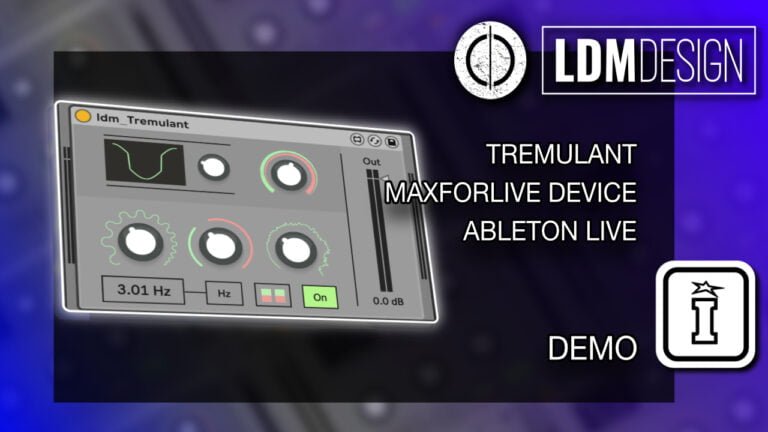
A: Tremulant is a MaxforLive harmonic tremolo audio effect that modulates highpass and lowpass filters rather than volume. An LFO controls the crossfade between two filters (with a notch at the center frequency), creating rhythmic tonal shifts where bass and treble frequencies trade places. This produces a distinctive sound different from traditional volume-modulating tremolos. Features include LFO wavetable morphing (triangle to sine to square to saw), stereo mode that flips one channel, noise modulation, center frequency control, phase adjustment, and tempo sync.
Tremulant by LDM Design
TONAL SHIFTS, NOT VOLUME PUMPS
BUILD YOUR BUNDLE: Select three or more LDM Design products and unlock an instant 20% discount—applied automatically when you check out.
Traditional tremolos modulate volume. Tremulant uses harmonic tremolo—an LFO modulating highpass and lowpass filters with a center notch frequency. The result? Rhythmic tonal shifts where bass and treble trade places, creating organic movement that sounds nothing like conventional tremolo.
Inside you’ll find:
- Harmonic Tremolo Effect — LFO modulates filter crossfade, not volume, for distinctive tonal character
- LFO Wavetable — morphs smoothly from triangle to sine to square to saw for varied modulation
- Stereo Mode — flips one channel opposite the other for wide, immersive stereo effects
- Noise Modulation — adds organic variation to LFO signal for analog-style imperfection
- Center Frequency Control — sets the notch point where highpass and lowpass filters meet
- Phase Adjustment — aligns modulation cycle with track rhythm or other effects
- Tempo Sync or Hz Mode — lock to project tempo or run free for loose, organic feel
- Footswitch Mappable — on/off control perfect for live performance
Designed for monophonic instruments like bass, lead synths, and guitars but experiment freely. Perfect for vintage amp character, synth movement, bass groove, experimental soundscapes, or live performance. The sound rotates through frequency space rather than just pulsing louder and quieter—that’s what makes harmonic tremolo so distinctive and musical.
Requires Ableton Live 10/11/12 Standard with MaxforLive or Suite | Mac/Windows
USER GUIDE: Tremulant User Guide
Tremulant by LDM Design
TONAL SHIFTS, NOT VOLUME PUMPS
BUILD YOUR BUNDLE: Select three or more LDM Design products and unlock an instant 20% discount—applied automatically when you check out.
Traditional tremolos modulate volume. Tremulant uses harmonic tremolo—an LFO modulating highpass and lowpass filters with a center notch frequency. The result? Rhythmic tonal shifts where bass and treble trade places, creating organic movement that sounds nothing like conventional tremolo.
Inside you’ll find:
- Harmonic Tremolo Effect — LFO modulates filter crossfade, not volume, for distinctive tonal character
- LFO Wavetable — morphs smoothly from triangle to sine to square to saw for varied modulation
- Stereo Mode — flips one channel opposite the other for wide, immersive stereo effects
- Noise Modulation — adds organic variation to LFO signal for analog-style imperfection
- Center Frequency Control — sets the notch point where highpass and lowpass filters meet
- Phase Adjustment — aligns modulation cycle with track rhythm or other effects
- Tempo Sync or Hz Mode — lock to project tempo or run free for loose, organic feel
- Footswitch Mappable — on/off control perfect for live performance
Designed for monophonic instruments like bass, lead synths, and guitars but experiment freely. Perfect for vintage amp character, synth movement, bass groove, experimental soundscapes, or live performance. The sound rotates through frequency space rather than just pulsing louder and quieter—that’s what makes harmonic tremolo so distinctive and musical.
Requires Ableton Live 10/11/12 Standard with MaxforLive or Suite | Mac/Windows
USER GUIDE: Tremulant User Guide
Additional information
| MaxforLive | Audio Devices |
|---|---|
| Ableton Live Compatibility | Ableton Live 10 Standard with MaxforLive, Ableton Live 10 Suite, Ableton Live 11 Standard with MaxforLive, Ableton Live 11 Suite, Ableton Live 12 Standard with MaxforLive, Ableton Live 12 Suite |
| Min. Requirements | Ableton Live 10 Standard with MaxforLive Installed or Ableton Live 10 Suite |
| OS | Mac, Windows |
PRICE: £12.00
Product reviews
4 out of 5
1 review
How item rating is calculated
We show the average based on reviews. Only genuine reviews are displayed.
Sort by
August 30, 2024
This reviewer bought this product from our store.
An interesting new take on the basic tremolo effect. It has a nice character to it. Great for adding motion and interest to simple synth lines.
Tremulant by LDM Design
Traditional tremolos modulate volume, creating rhythmic pulsing by making sounds louder and quieter. Tremulant takes a completely different approach, using an LFO to modulate highpass and lowpass filters with a center notch frequency. The result is harmonic tremolo—a distinctive effect where tonal character shifts rhythmically rather than just volume, creating organic movement and frequency-based modulation that sounds nothing like conventional tremolo.
This MaxforLive audio effect brings the classic harmonic tremolo sound (famously heard in vintage Fender amps) into Ableton Live with modern features like wavetable LFO scanning, stereo width control, noise modulation, and tempo sync. Designed primarily for monophonic instruments like bass, lead synths, or guitars, Tremulant adds movement, character, and spatial dimension to any sound willing to experiment with filter-based modulation.
Overview & Harmonic Tremolo Explained
Standard tremolo modulates amplitude—the signal gets louder and quieter in rhythm. Harmonic tremolo works differently. The incoming audio is split into two paths: one through a highpass filter, the other through a lowpass filter, with a notch at the center crossover frequency. An LFO then modulates the levels of these two filtered signals in opposite directions. When the lowpass level increases (emphasizing bass frequencies), the highpass level decreases (reducing treble). When the highpass swells, the lowpass fades.
This creates rhythmic tonal shifts rather than volume pulsing. The sound seems to rotate through frequency space, with bass and treble trading places in a hypnotic dance. It’s the tremolo sound heard on classic Fender Brownface amps, famously used on countless recordings from the 1960s onward. Unlike amplitude tremolo which can sound mechanical, harmonic tremolo feels more organic and musical because the overall perceived volume stays relatively constant—only the tonal balance shifts.
LFO Wavetable Control
Tremulant’s LFO doesn’t just offer fixed waveforms. Instead, it features a wavetable that morphs smoothly from triangle to sine to square to saw. Scan through this wavetable using the LFO control to find the perfect modulation character for your sound. Triangle waves create smooth, even crossfading between filters. Sine waves produce gentle, rounded modulation. Square waves generate abrupt filter switching for choppy, stuttering effects. Saw waves create ramped, asymmetrical modulation where one filter dominates longer than the other.
This wavetable approach gives you access to subtle variations in modulation character that significantly affect the final sound. Slight adjustments to the LFO scan position can transform gentle swaying into aggressive pulsing, or smooth rotation into rhythmic chopping. It’s the kind of detailed control that separates Tremulant from simple on/off harmonic tremolo implementations.
Stereo Width Through Channel Flipping
Enable Stereo Mode, and Tremulant flips the right channel’s LFO phase opposite to the left. When the left channel emphasizes bass frequencies, the right channel emphasizes treble, and vice versa. This creates an immersive, wide stereo effect where tonal character pans dynamically between left and right speakers. The sound seems to rotate through the stereo field, expanding beyond the boundaries of conventional stereo placement.
This stereo effect works particularly well on synth pads, electric pianos, or any instrument where you want movement and width. A static mono synth line becomes a swirling, three-dimensional texture. A plain bass sound gains spatial dimension. The effect is subtle enough to add interest without being distracting, or dramatic enough to serve as a featured production element when pushed to extremes.
Noise Modulation for Organic Character
The Noise parameter adds random variation to the LFO signal. Rather than perfectly periodic modulation, noise introduces subtle unpredictability—the filter crossfades wobble slightly, creating a more organic, less mechanical character. This mimics the natural imperfections of analog tremolo circuits, where components drift slightly and modulation isn’t perfectly stable.
Subtle noise amounts add warmth and humanity to the effect without obvious randomness. Push it higher, and the modulation becomes unstable and unpredictable, perfect for experimental soundscapes or glitchy textures. It’s the difference between a pristine digital tremolo and a vintage amp tremolo with tubes warming up and capacitors drifting.
Frequency & Phase Control
The Frequency parameter sets the center notch where the highpass and lowpass filters meet. Lower frequencies emphasize bass in one phase of modulation, while higher settings shift the emphasis toward midrange and treble. This dramatically affects the character of the harmonic tremolo—low frequencies create deep, woozy modulation, while high frequencies produce airy, shimmering effects.
Experiment with different center frequencies to find the sweet spot for your instrument. Bass sounds might work best with lower center frequencies (200-500Hz), allowing deep bass to pulse against midbass. Lead synths might prefer higher settings (1-3kHz) where the modulation creates sparkle and air. Guitar and keys often sit well in the 500Hz-1.5kHz range.
Phase control adjusts where in the LFO cycle the modulation begins. This is particularly useful when layering multiple instances of Tremulant or syncing the effect’s rhythm with other modulated elements in your track. Shift the phase 180 degrees, and the filter modulation inverts—what was emphasizing bass now emphasizes treble at that point in the cycle.
Rate Control – Hz or Tempo Sync
Set the modulation Rate in either Hertz (free-running) or tempo-synced values. Free-running Hz mode lets the tremolo pulse independently of your project tempo, useful for creating effects that feel loose and organic. Tempo sync locks the modulation to your track’s tempo, ensuring filter crossfades align perfectly with beats, eighth notes, triplets, or any subdivision you choose.
Tempo-synced harmonic tremolo creates rhythmic movement that integrates seamlessly with your track’s groove. Set it to eighth notes for steady pulsing, dotted eighths for lilting swing, or 16th notes for rapid flutter. Switch to Hz mode when you want the effect to drift slightly against the beat, creating interesting polyrhythmic tension.
Dry/Wet & On/Off Control
The Dry/Wet control blends the processed signal with the original, letting you dial in subtle harmonic movement or full-on filter modulation. Keep it low (20-40%) for gentle tonal shifts that add character without dominating. Push it high (80-100%) for pronounced filter sweeps that become a featured element of the sound.
The On/Off switch can be mapped to footswitches or MIDI controllers, perfect for live performance scenarios where you want to engage the effect at specific moments. Automate it in your DAW to bring harmonic tremolo in during choruses, breakdowns, or specific sections where you want added movement.
Designed for Monophonic Sources
While Tremulant works on any audio, it’s particularly effective on monophonic instruments—bass synths, lead lines, guitars, electric pianos, or solo instrumental performances. Single-note sources showcase the harmonic tremolo effect most clearly, as the filter modulation creates distinct tonal character without the complexity of multiple simultaneous notes interacting with the filter crossfade.
That said, experimentation is encouraged. Try Tremulant on synth chords for swirling, breathing pad textures. Apply it to drum loops for rhythmic filter sweeps. Use it on vocals for unique vocal treatments. The effect reveals different characteristics depending on the source material, so don’t limit yourself to the “intended” use case.
Creative Applications
Vintage Amp Character: Apply Tremulant to electric guitar or keys to recreate the classic Fender Brownface tremolo sound, adding vintage warmth and movement.
Synth Movement: Use on static synth pads with stereo mode enabled to create swirling, three-dimensional textures that breathe and rotate through the stereo field.
Bass Groove: Add subtle harmonic tremolo to bass lines, creating rhythmic tonal shifts that add groove without volume pumping. Works particularly well tempo-synced to eighth or sixteenth notes.
Experimental Soundscapes: Push noise modulation high with slow LFO rates and stereo enabled for unstable, evolving soundscapes perfect for ambient or experimental productions.
Live Performance Tool: Map the on/off switch to a footswitch or MIDI controller for instant harmonic tremolo effects during live performance, bringing sounds to life with filter-based movement.
How to Use
Insert Tremulant as an audio effect on any track in Ableton Live. Start with the default settings for classic harmonic tremolo, then adjust the center Frequency to find the sweet spot for your source material. Scan through the LFO wavetable to dial in the modulation character, and set your Rate in Hz or tempo sync mode.
Enable Stereo mode for wide, spatial effects. Add Noise for organic variation. Use Phase control to align the modulation with your track’s rhythm or other modulated elements. Adjust Dry/Wet to taste, from subtle tonal shifts to dramatic filter sweeps.
All parameters are fully mappable to MIDI controllers, automation, or footswitches. Automate the on/off state for section-specific effects, modulate the Rate for accelerating/decelerating tremolo, or map LFO wavetable position to expression controls for live performance variation.
Ideal For
Guitarists seeking authentic vintage Fender tremolo tones. Electronic producers adding movement and character to synth lines. Bass players wanting groove without volume pumping. Ambient musicians creating swirling, spatial soundscapes. Live performers needing instant-access tremolo effects via footswitch. Anyone frustrated by mechanical-sounding amplitude tremolo who wants organic, filter-based modulation instead.
What’s Included
- Tremulant MaxforLive audio effect device
- Comprehensive user guide with parameter explanations
- Full parameter mapping for MIDI controllers and footswitches
- Compatible with Ableton Live 10, 11 & 12 (Standard with MaxforLive or Suite)
Requirements
- Ableton Live 10 Standard with MaxforLive installed, or Ableton Live 10/11/12 Suite
- Mac or Windows operating system
Tremulant by LDM Design brings harmonic tremolo—the classic filter-based modulation effect—into Ableton Live with modern features. Wavetable LFO, stereo width, noise modulation, and tempo sync make this more than a vintage amp recreation. It’s a creative tool for adding organic movement and tonal character to any sound.
TRIPLE PACK SAVINGS
BUILD YOUR BUNDLE: Select three or more LDM Design products and unlock an instant 20% discount—applied automatically when you check out.
Explore More LDM Design Tools: GDelay | Noizebox | Hepta Delay | Sicu | View All LDM Design Products
Frequently Asked Questions
A: Yes, Tremulant is a MaxforLive device.
A: MaxforLive is a platform that integrates the visual programming environment Max with Ableton Live, allowing users to create and use custom audio, MIDI, and control devices.
A: Regular tremolo modulates amplitude—the signal gets louder and quieter rhythmically. Harmonic tremolo splits the audio into highpass and lowpass filtered paths, then modulates the levels of these two signals in opposite directions. When the lowpass (bass) swells, the highpass (treble) fades, and vice versa. This creates tonal character shifts rather than volume pulsing. The overall perceived volume stays relatively constant, but the frequency balance rotates rhythmically. It’s the tremolo sound from classic Fender Brownface amps—more organic and musical than amplitude tremolo.
A: Stereo mode flips the right channel’s LFO phase opposite to the left channel. When the left channel emphasizes bass frequencies, the right channel emphasizes treble, and vice versa. This creates an immersive, wide stereo effect where tonal character pans dynamically between left and right speakers, making the sound seem to rotate through the stereo field.
A: Tremulant is designed primarily for monophonic instruments—bass synths, lead lines, guitars, electric pianos, or solo performances—where the filter modulation creates distinct tonal character. However, experimentation is encouraged on any source including synth chords, drum loops, or vocals. Different source materials reveal different characteristics of the harmonic tremolo effect.
A: You can explore more of LDM Design’s tools and devices here: LDM Design
Important Information
V1.0.0 – Initial Release – May 2024
Our Products are generally provided as Zip file downloads which in all cases will need to be extracted and saved to your hard drive prior to installation. Details on the different file type provided and what to do with them are below.
.alp Files – These are Ableton Live Packs and will either install directly into the Packs Section of the browser of Ableton Live or ask you to save them to your hard drive. For packs that install to the library, when you double click on them you will see a pop up window asking you to confirm that installation is ok as the files are described as “Legacy”. This is fine and you are ok to proceed, the packs are created using the format for an earlier version of Live and so remain compatible with the current version.
.amxd files – These are individual MaxforLive Devices and can be stored anywhere on your hard drive. We’d advise creating a folder for them and then adding that folder as a location within the Places section of Lives Browser.
END-USER LICENSE AGREEMENT FOR ISOTONIK STUDIOS SOFTWARE PRODUCTS.
PLEASE READ THE TERMS AND CONDITIONS OF THIS LICENSE AGREEMENT CAREFULLY BEFORE CONTINUING WITH THIS PROGRAM INSTALL.
This End-User License Agreement (referred to as “EULA”) is a legal agreement between an individual or a single entity (referred to as “LICENSEE”) and Isotonik Studios for the Isotonik Studios software product(s) which may include associated software components, media, printed materials, and “online” or electronic documentation (referred to as “SOFTWARE PRODUCT”). By installing, copying, or otherwise using the SOFTWARE PRODUCT, the LICENSEE agrees to be bound by the terms of this EULA.
This EULA represents the entire agreement concerning the program between the LICENSEE and Isotonik Studios and it supersedes any prior proposal, representation, or understanding between the parties. If the LICENSEE does not agree to the terms of this EULA, the LICENSEE should not install or use the SOFTWARE PRODUCT.
The SOFTWARE PRODUCT is protected by copyright laws and international copyright treaties, as well as other intellectual property laws and treaties. The SOFTWARE PRODUCT is licensed, not sold.
- GRANT OF LICENSE.
The SOFTWARE PRODUCT is licensed as follows:
(a) Installation and Use. Providing that the LICENSEE has paid any applicable license fees, Isotonik Studios grants the LICENSEE the right to install and use copies of the SOFTWARE PRODUCT on up to two computers in the LICENSEE’s possession that are running a validly licensed copy of the operating system for which the SOFTWARE PRODUCT was designed [e.g., Windows 10, macOS]. The computer(s) must be owned by the LICENSEE.
(b) Backup Copies. The LICENSEE may also make copies of the SOFTWARE PRODUCT as may be necessary for backup and archival purposes.
- DESCRIPTION OF OTHER RIGHTS AND LIMITATIONS.
(a) Maintenance of Copyright Notices. The LICENSEE must not remove or alter any copyright notices on any and all copies of the SOFTWARE PRODUCT.
(b) Distribution. The LICENSEE may not distribute registered copies of the SOFTWARE PRODUCT to third parties.
(c) Prohibition on Reverse Engineering, Decompilation, and Disassembly. The LICENSEE may not reverse engineer, decompile, or disassemble the SOFTWARE PRODUCT, except and only to the extent that such activity is expressly permitted by applicable law notwithstanding this limitation.
(d) Rental. The LICENSEE may not rent, lease, or lend the SOFTWARE PRODUCT.
(e) License transfer The LICENSEE may not transfer their license to the SOFTWARE PRODUCT to any third party. Any attempt to do so will be considered a violation of this EULA.
(f) Support Services. Isotonik Studios may provide the LICENSEE with support services related to the SOFTWARE PRODUCT for a period of 12 months following the date of purchase. Any supplemental software code provided to the LICENSEE as part of the Support Services shall be considered part of the SOFTWARE PRODUCT and subject to the terms and conditions of this EULA.
(g) Compliance with Applicable Laws. The LICENSEE must comply with all applicable laws regarding use of the SOFTWARE PRODUCT.
- TERMINATION Without prejudice to any other rights, Isotonik Studios may terminate this EULA if the LICENSEE fails to comply with the terms and conditions of this EULA. In such event, the LICENSEE must destroy all copies of the SOFTWARE PRODUCT in the LICENSEE’s possession.
- COPYRIGHT All title, including but not limited to copyrights, in and to the SOFTWARE PRODUCT and any copies thereof are owned by Isotonik Studios or its suppliers. All title and intellectual property rights in and to the content which may be accessed through use of the SOFTWARE PRODUCT is the property of the respective content owner and may be protected by applicable copyright or other intellectual property laws and treaties. This EULA grants the LICENSEE no rights to use such content. All rights not expressly granted are reserved by Isotonik Studios.
- NO WARRANTIES Isotonik Studios expressly disclaims any warranty for the SOFTWARE PRODUCT. The SOFTWARE PRODUCT is provided ‘As Is’ without any express or implied warranty of any kind, including but not limited to any warranties of merchantability, noninfringement, or fitness of a particular purpose. Isotonik Studios does not warrant or assume responsibility for the accuracy or completeness of any information, text, graphics, links or other items contained within the SOFTWARE PRODUCT. Isotonik Studios makes no warranties respecting any harm that may be caused by the transmission of a computer virus, worm, time bomb, logic bomb, or other such computer program. Isotonik Studios further expressly disclaims any warranty or representation to the LICENSEE or to any third party.
- LIMITATION OF LIABILITY In no event shall Isotonik Studios be liable for any damages (including, without limitation, lost profits, business interruption, or lost information) arising out of the LICENSEE’s use of or inability to use the SOFTWARE PRODUCT, even if Isotonik Studios has been advised of the possibility of such damages. In no event will Isotonik Studios be liable for loss of data or for indirect, special, incidental, consequential (including lost profit), or other damages based in contract, tort or otherwise. Isotonik Studios shall have no liability with respect to the content of the SOFTWARE PRODUCT or any part thereof, including but not limited to errors or omissions contained therein, libel, infringements of rights of publicity, privacy, trademark rights, business interruption, personal injury, loss of privacy, moral rights or the disclosure of confidential information.
More from LDM Design
Frequently Bought Together
 -30%★ Popular
MonomonoVolume One by MonomonoLive 11 & 12 · Max for Live Original price was: £50.00.£35.00Current price is: £35.00.