Mask Pattern is designed specifically for Ableton Live 12 and requires Max for Live, so you’ll need either Live 12 Suite or Live 12 Standard with the Max for Live add-on.
Mask Pattern by Philip Meyer
PHILIP MEYER MIDI TOOLS FOR LIVE 12
Idiosyncratic polyrhythmic pattern generator
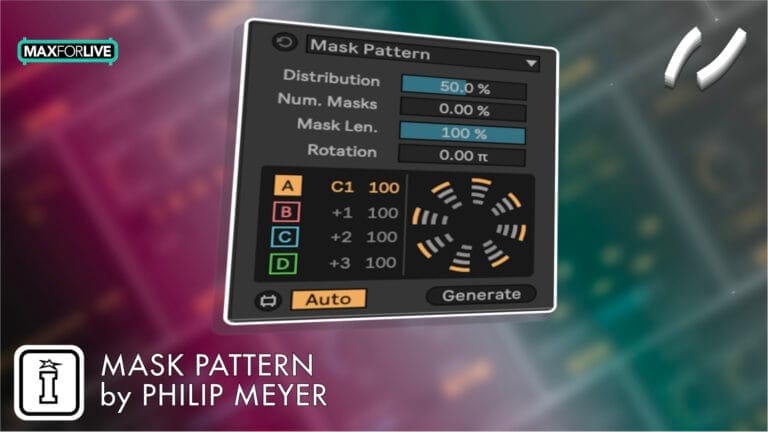
Mask Pattern is a Max for Live device that enables advanced rhythmic manipulation by selectively masking notes in your sequences, offering a new layer of creative control for your patterns in Ableton Live.
USER GUIDE: Meyer Devices MIDI Tools Manual
Mask Pattern by Philip Meyer
PHILIP MEYER MIDI TOOLS FOR LIVE 12
Idiosyncratic polyrhythmic pattern generator
Mask Pattern is a Max for Live device that enables advanced rhythmic manipulation by selectively masking notes in your sequences, offering a new layer of creative control for your patterns in Ableton Live.
USER GUIDE: Meyer Devices MIDI Tools Manual
Additional information
| MaxforLive | Live 12 MIDI Tool Generators |
|---|---|
| OS | Mac, Windows |
| Ableton Live Compatibility | Ableton Live 12 Standard with MaxforLive, Ableton Live 12 Suite |
PRICE: £7.00
Product reviews
No reviews yet. Be the first to review this product.
Mask Pattern by Philip Meyer
An idiosyncratic rhythm generator that builds patterns from negative space. The initial inspiration for this device was my desire to create a rhythm generation algorithm that would be able to produce the regular, evenly-distributed patterns that the Euclidean algorithm is known for, as well as lopsided patterns that are unevenly distributed, with clusters of notes in a short amount of time. What ended up coming out was an algorithm that could do exactly what I hoped AND way more: a one-to-four track rhythm generator that can produce a range of interlocking polymetric patterns. It works great for percussion, obviously, but also Mask Pattern 2 delivers surprising melodic discoveries through the interplay of patterns running at different pitches.
I strongly recommend pairing this one with the Reduce transformer, which allows you to generate a crazy polyrhythmic pattern, then systematically reduce its density to arrive at something appealing.
Technical Explanation
This is one of those devices that is much easier to grasp through play than through a written explanation, but here’s my attempt at a written explanation:
There are two euclidean patterns: the “underlying pattern” and the “masking pattern”. To be honest, these two names are a bit misnomer-y, but it’s fine… bear with me. The interaction of these two patterns allows us to great four separate resulting patterns A, B, C, and D.
Put as succinctly as possible, these patterns are the following:
- Pattern A is the expression of the underlying pattern, masked by the masking pattern
- Pattern B is the inverse of pattern A
- Pattern C is the expression of the masking pattern, masked by the underlying pattern.
- Pattern D is the inverse of pattern C.
Maybe that makes sense. But I doubt it! If you’re still curious, read on. Of course, you might want to stop reading now and just go use the device. Or you could keep reading! Up to you…
Underlying Pattern
The underlying pattern is a euclidean pattern whose number of steps is equal to the length of the clip selection divided by the grid interval. The number of events in the underlying pattern is set by the Distribution parameter of the device.
Masking Pattern
The masking pattern has two parameters: Masks and Mask Length . Masks sets the number of steps in the pattern. These steps will be stretched such that the masking pattern’s length is the same as the underlying pattern. The Mask Length sets what proportion of each step is “filled in”. In the example above, Masks is 4 and Mask Length is 50%
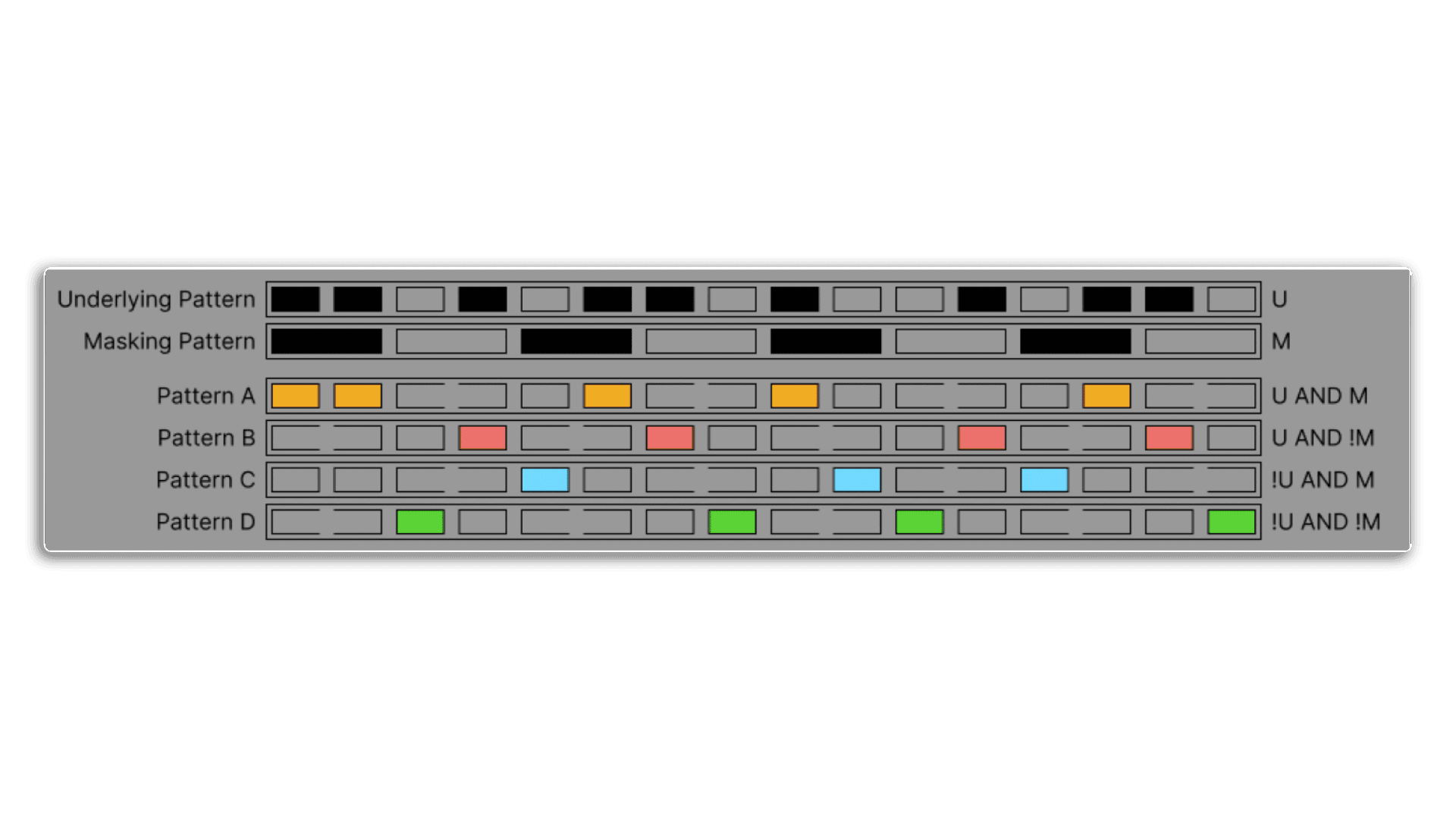
With the underlying and masking patterns, we can create four output patterns using boolean logic as follows:
- Pattern A: Underlying and Masking are both TRUE
- Pattern B: Underlying is TRUE, Masking is FALSE
- Pattern C: Underlying is FALSE, Masking is TRUE
- Pattern D: Underlying and Masking are both FALSE.
The result is a set of four patterns, each of which fills the negative space left by the other patterns. Another way to think about it is that the device is distributing the available events across the four voices. The Distribution , Masks , and Mask Length parameters can be used to modify this distribution.
The Rotation parameter rotates Pattern A in increments of +1, Pattern B in increments of -1, Pattern C in increments of +1.5, and Pattern D in increments of Mask Pattern 4 -1.5, which allows notes in different patterns to overlap and makes lopsided patterns possible.
Each of these 4 patterns can be assigned to a separate MIDI note, can be enabled or disabled, and can have an independent velocity.
Frequently Asked Questions
Rather than placing notes directly, Mask Pattern builds rhythms from negative space by selectively masking out notes within a sequence. This means patterns emerge from what’s removed rather than what’s added, which produces results that feel organic and less mechanical than traditional step sequencers.
Yes, that’s the whole point. The algorithm was specifically designed to cover both evenly distributed patterns similar to what a Euclidean generator would produce, and lopsided patterns with note clusters bunched tightly together, giving you a much wider rhythmic palette from a single device.
Mask Pattern runs up to four tracks at once, and they can operate as interlocking polymetric patterns, meaning each track can run at a different length or metre. This creates evolving, shifting rhythmic relationships between the layers over time.
It works brilliantly for percussion, but Philip Meyer specifically highlights its melodic potential. By running patterns at different pitches across the four tracks, you can uncover unexpected melodic phrases and harmonic movement that would be very difficult to programme manually.
Full documentation is available in the Meyer Devices MIDI Tools Manual, which covers Mask Pattern alongside Philip Meyer’s other MIDI tools for Live 12.
After purchasing, you’ll download the device file and drag it into your Ableton Live library or directly onto a MIDI track. As a Max for Live device, no separate software installation is required beyond having Max for Live active in your Live setup.
Important Information
V1.0.0 – Initial Release – November 2024
To install MIDI Tools, first double-click to decompress the ZIP archive it arrived in. !
In Live’s Browser, navigate to the User Library in Places
Then find the MIDI Tools folder located there. If you don’t see a folder called MIDI Tools in your User Library, simply create it yourself.
We’d advice adding two subfolders for Generators and Transformers for neatness.
Finally, drag our Generators to the Generators subfolder and our Transformers to the Transformers subfolder
Live should automatically detect them and within the next few minutes, they should appear in the dropdown chooser of Live’s Generators or Transformers in the corresponding tab of any MIDI Clip’s Note Editor.
PLEASE NOTE: Once installed MIDI Tools, since they are not Max MIDI Effects, cannot be dragged and dropped onto MIDI tracks: they can only be loaded by the Generator and Transformer tabs of the MIDI clip editor.
END-USER LICENSE AGREEMENT FOR ISOTONIK STUDIOS SOFTWARE PRODUCTS.
PLEASE READ THE TERMS AND CONDITIONS OF THIS LICENSE AGREEMENT CAREFULLY BEFORE CONTINUING WITH THIS PROGRAM INSTALL.
This End-User License Agreement (referred to as “EULA”) is a legal agreement between an individual or a single entity (referred to as “LICENSEE”) and Isotonik Studios for the Isotonik Studios software product(s) which may include associated software components, media, printed materials, and “online” or electronic documentation (referred to as “SOFTWARE PRODUCT”). By installing, copying, or otherwise using the SOFTWARE PRODUCT, the LICENSEE agrees to be bound by the terms of this EULA.
This EULA represents the entire agreement concerning the program between the LICENSEE and Isotonik Studios and it supersedes any prior proposal, representation, or understanding between the parties. If the LICENSEE does not agree to the terms of this EULA, the LICENSEE should not install or use the SOFTWARE PRODUCT.
The SOFTWARE PRODUCT is protected by copyright laws and international copyright treaties, as well as other intellectual property laws and treaties. The SOFTWARE PRODUCT is licensed, not sold.
- GRANT OF LICENSE.
The SOFTWARE PRODUCT is licensed as follows:
(a) Installation and Use. Providing that the LICENSEE has paid any applicable license fees, Isotonik Studios grants the LICENSEE the right to install and use copies of the SOFTWARE PRODUCT on up to two computers in the LICENSEE’s possession that are running a validly licensed copy of the operating system for which the SOFTWARE PRODUCT was designed [e.g., Windows 10, macOS]. The computer(s) must be owned by the LICENSEE.
(b) Backup Copies. The LICENSEE may also make copies of the SOFTWARE PRODUCT as may be necessary for backup and archival purposes.
- DESCRIPTION OF OTHER RIGHTS AND LIMITATIONS.
(a) Maintenance of Copyright Notices. The LICENSEE must not remove or alter any copyright notices on any and all copies of the SOFTWARE PRODUCT.
(b) Distribution. The LICENSEE may not distribute registered copies of the SOFTWARE PRODUCT to third parties.
(c) Prohibition on Reverse Engineering, Decompilation, and Disassembly. The LICENSEE may not reverse engineer, decompile, or disassemble the SOFTWARE PRODUCT, except and only to the extent that such activity is expressly permitted by applicable law notwithstanding this limitation.
(d) Rental. The LICENSEE may not rent, lease, or lend the SOFTWARE PRODUCT.
(e) License transfer The LICENSEE may not transfer their license to the SOFTWARE PRODUCT to any third party. Any attempt to do so will be considered a violation of this EULA.
(f) Support Services. Isotonik Studios may provide the LICENSEE with support services related to the SOFTWARE PRODUCT for a period of 12 months following the date of purchase. Any supplemental software code provided to the LICENSEE as part of the Support Services shall be considered part of the SOFTWARE PRODUCT and subject to the terms and conditions of this EULA.
(g) Compliance with Applicable Laws. The LICENSEE must comply with all applicable laws regarding use of the SOFTWARE PRODUCT.
- TERMINATION Without prejudice to any other rights, Isotonik Studios may terminate this EULA if the LICENSEE fails to comply with the terms and conditions of this EULA. In such event, the LICENSEE must destroy all copies of the SOFTWARE PRODUCT in the LICENSEE’s possession.
- COPYRIGHT All title, including but not limited to copyrights, in and to the SOFTWARE PRODUCT and any copies thereof are owned by Isotonik Studios or its suppliers. All title and intellectual property rights in and to the content which may be accessed through use of the SOFTWARE PRODUCT is the property of the respective content owner and may be protected by applicable copyright or other intellectual property laws and treaties. This EULA grants the LICENSEE no rights to use such content. All rights not expressly granted are reserved by Isotonik Studios.
- NO WARRANTIES Isotonik Studios expressly disclaims any warranty for the SOFTWARE PRODUCT. The SOFTWARE PRODUCT is provided ‘As Is’ without any express or implied warranty of any kind, including but not limited to any warranties of merchantability, noninfringement, or fitness of a particular purpose. Isotonik Studios does not warrant or assume responsibility for the accuracy or completeness of any information, text, graphics, links or other items contained within the SOFTWARE PRODUCT. Isotonik Studios makes no warranties respecting any harm that may be caused by the transmission of a computer virus, worm, time bomb, logic bomb, or other such computer program. Isotonik Studios further expressly disclaims any warranty or representation to the LICENSEE or to any third party.
- LIMITATION OF LIABILITY In no event shall Isotonik Studios be liable for any damages (including, without limitation, lost profits, business interruption, or lost information) arising out of the LICENSEE’s use of or inability to use the SOFTWARE PRODUCT, even if Isotonik Studios has been advised of the possibility of such damages. In no event will Isotonik Studios be liable for loss of data or for indirect, special, incidental, consequential (including lost profit), or other damages based in contract, tort or otherwise. Isotonik Studios shall have no liability with respect to the content of the SOFTWARE PRODUCT or any part thereof, including but not limited to errors or omissions contained therein, libel, infringements of rights of publicity, privacy, trademark rights, business interruption, personal injury, loss of privacy, moral rights or the disclosure of confidential information.