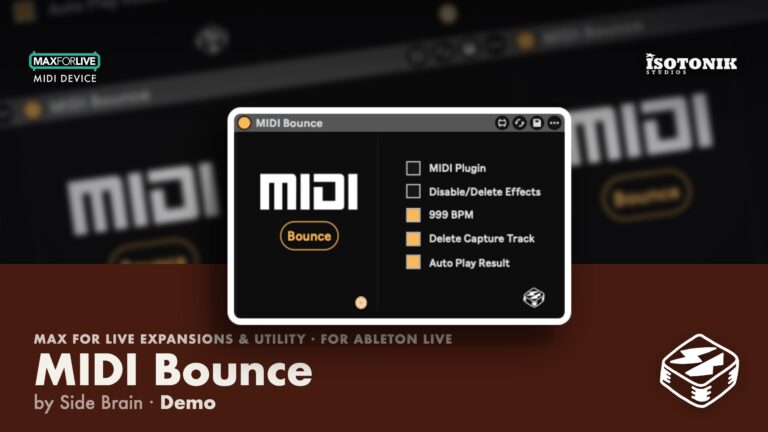
MIDI Bounce by Side Brain
ONE CLICK. PURE MIDI. NO WAITING
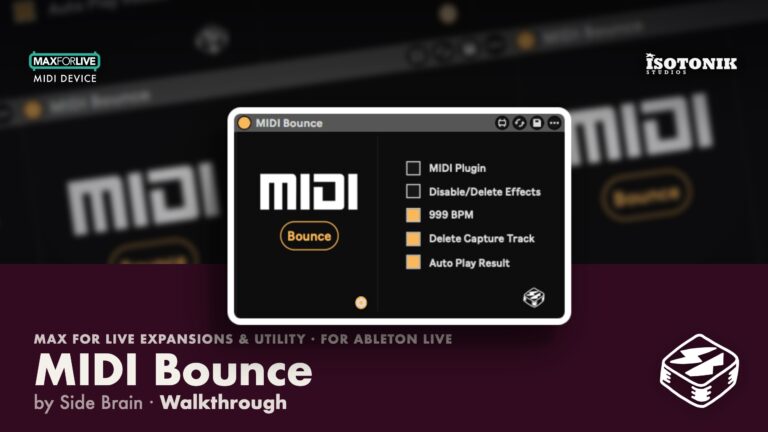
MIDI Bounce by Side Brain is a no-fuss MaxforLive utility that radically streamlines the process of printing MIDI from effects and plugins. Whether you’re working with MIDI FX or external MIDI generators like Cthulhu or Scaler, this device automates everything—from creating a new track to routing, recording, disabling effects, and cleaning up the temp track.
Designed to integrate seamlessly into your workflow, it speeds up creativity with a single button press.
Key features:
- One-click MIDI bounce
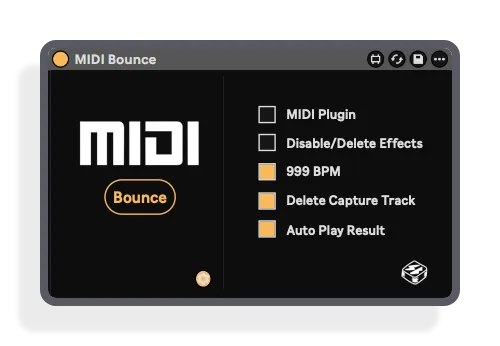
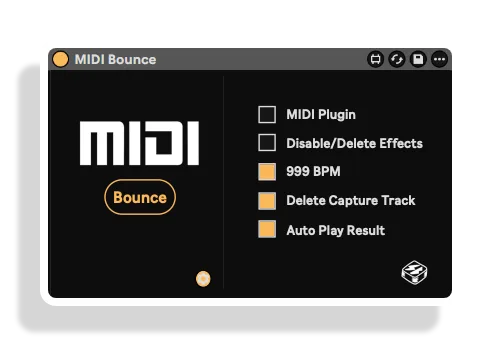
- Auto-routing and recording at 999 BPM
- Works with MIDI FX, Max devices & plugins
- Deletes or disables MIDI effects post-bounce
- Compatible with Arrangement and Session View
- Auto-deletion of temp track (Session View only)
Get back to making music—MIDI Bounce handles the busywork.
USER GUIDE: MIDI Bounce User Guide

Side Brain
MIDI Bounce streamlines printing MIDI from MIDI effects and plugins — one click, pure MIDI, no waiting.
View all products by Side BrainOverview
One-click MIDI printing, straight back into your project
Setting up MIDI routing, starting a recording, then untangling the mess afterwards pulls you straight out of the music. MIDI Bounce collapses all of that into a single button press, because the setup should never be louder than the idea. Drop it into any template and hear your MIDI effects and plugins print cleanly back into your project, exactly where they belong.
Whether you are capturing unquantized strums, arpeggios, or complex plugin output, MIDI Bounce handles the routing, recording, and cleanup automatically, which means you stay in the creative moment from the first note to the last. Works across Arrangement and Session View, with flexible options to replace originals, keep backups, or trigger open-ended recordings on the fly.
- One-click MIDI bounce, fully automating track creation, routing, recording, effect cleanup, and temp track deletion
- Records at 999 BPM for high-precision capture of unquantized or dynamic data such as strums and arpeggios
- Works with MIDI FX, Max devices, and third-party MIDI plugins including Cthulhu and Scaler
- Deletes or disables MIDI effects post-bounce, with a Plugin Mode toggle for third-party generators
- Session View: bounced clips appear in the first available slot below the source clip, with automatic scene creation, optional auto-playback, and open-ended recording mode (press Bounce again to stop)
- Session View: automatically launches a selected source clip if not already playing, and stops it after capture only if MIDI Bounce launched it
- Arrangement View: bounces begin at the selected clip's actual Arrangement position, using its precise start and end times, with the playhead returned to the bounced clip on completion
- Replace Original and Keep Original Backup modes, with Keep Original Backup duplicating and muting the complete original track including its clips, devices, and routing
- Safety tail captures final notes and note-offs, then physically crops beyond the original loop boundaries
- Single mappable button fits any custom workflow or template; a full PDF user guide is included
- Installation Guide
- Max for Live Audio Effect + MIDI Device .amxd device
Reviews
Everything’s fine, everything works smoothly. For VST plugins, just make sure the MIDI Plugin checkbox is enabled — that’s all you need to know, a happy user here :)
Important Information
CHANGELOG
## v1.6 – 11 September 2026
Session View
– Bounced clips now appear in the first available slot below the source clip.
– Automatically creates a new scene if no lower clip slot is available.
– Added a safety tail to reliably capture final notes and note-offs.
– Physically crops the safety tail, preventing notes beyond the original loop boundaries.
– Fixed bounces capturing only the first note or cutting off later notes.
– Removed the delay before transferring the finished clip back.
– Added optional automatic playback of the bounced clip.
– Automatically launches a selected source clip if it is not already playing, synchronized with the capture clip.
– Does not retrigger source clips that are already playing.
– Stops the source clip after capture only if MIDI Bounce launched it.
– Added open-ended recording when no Session clip is selected. Press Bounce again to stop.
Arrangement View
– Bounces now begin at the selected clip’s actual Arrangement position instead of bar 1.
– Uses the selected clip’s precise start and end times.
– Fixed playback occasionally jumping to bar 1 and stopping after one beat.
– Automatically stops recording and transport at the end of the selected clip.
– Returns the bounced clip to the source clip’s original timeline position.
– Places the playhead at the bounced clip’s beginning after completion.
– Added Replace Original and Keep Original Backup modes.
– Keep Original Backup duplicates and mutes the complete original track, preserving its clips, devices, routing, automation, and clip activation state.
– Prevents repeated “Pre-Bounce” suffixes in backup track names.
– Made Delete Capture Track available for Arrangement cleanup.
– Automatically selects the finished Arrangement clip.
– Preserves the source clip’s color.
– Restores Arrangement loop, punch, recording, and transport settings afterward.
General and Reliability
– Improved source-track and focused-clip detection.
– Finished bounced clips now have Loop enabled automatically in both Session and Arrangement View.
– Temporarily activates deactivated source clips so their MIDI is captured.
– Restores surviving source clips to their previous activation state.
– Verifies that the bounced clip was copied successfully before deleting the capture track.
– Preserves a completed capture track if copy-back cannot be confirmed.
– Restores original track-arm states after bouncing.
– Restores the original tempo and Global Quantization after 999 BPM bouncing.
– Improved cleanup of temporary scenes after failed or incomplete bounces.
– Prevented repeated names such as MIDI Bounce MIDI Bounce MIDI Bounce.
– Updated the device and JavaScript version identification to 1.6.
Initial Release – August 2025
INSTALLATION
Our Products are generally provided as Zip file downloads which in all cases will need to be extracted and saved to your hard drive prior to installation. Details on the different file type provided and what to do with them are below.
.alp Files – These are Ableton Live Packs and will either install directly into the Packs Section of the browser of Ableton Live or ask you to save them to your hard drive. For packs that install to the library, when you double click on them you will see a pop up window asking you to confirm that installation is ok as the files are described as “Legacy”. This is fine and you are ok to proceed, the packs are created using the format for an earlier version of Live and so remain compatible with the current version.
.amxd files – These are individual MaxforLive Devices and can be stored anywhere on your hard drive. We’d advise creating a folder for them and then adding that folder as a location within the Places section of Lives Browser.
LICENSE
END-USER LICENSE AGREEMENT FOR ISOTONIK STUDIOS SOFTWARE PRODUCTS.
PLEASE READ THE TERMS AND CONDITIONS OF THIS LICENSE AGREEMENT CAREFULLY BEFORE CONTINUING WITH THIS PROGRAM INSTALL.
This End-User License Agreement (referred to as “EULA”) is a legal agreement between an individual or a single entity (referred to as “LICENSEE”) and Isotonik Studios for the Isotonik Studios software product(s) which may include associated software components, media, printed materials, and “online” or electronic documentation (referred to as “SOFTWARE PRODUCT”). By installing, copying, or otherwise using the SOFTWARE PRODUCT, the LICENSEE agrees to be bound by the terms of this EULA.
This EULA represents the entire agreement concerning the program between the LICENSEE and Isotonik Studios and it supersedes any prior proposal, representation, or understanding between the parties. If the LICENSEE does not agree to the terms of this EULA, the LICENSEE should not install or use the SOFTWARE PRODUCT.
The SOFTWARE PRODUCT is protected by copyright laws and international copyright treaties, as well as other intellectual property laws and treaties. The SOFTWARE PRODUCT is licensed, not sold.
- GRANT OF LICENSE.
The SOFTWARE PRODUCT is licensed as follows:
(a) Installation and Use. Providing that the LICENSEE has paid any applicable license fees, Isotonik Studios grants the LICENSEE the right to install and use copies of the SOFTWARE PRODUCT on up to two computers in the LICENSEE’s possession that are running a validly licensed copy of the operating system for which the SOFTWARE PRODUCT was designed [e.g., Windows 10, macOS]. The computer(s) must be owned by the LICENSEE.
(b) Backup Copies. The LICENSEE may also make copies of the SOFTWARE PRODUCT as may be necessary for backup and archival purposes.
- DESCRIPTION OF OTHER RIGHTS AND LIMITATIONS.
(a) Maintenance of Copyright Notices. The LICENSEE must not remove or alter any copyright notices on any and all copies of the SOFTWARE PRODUCT.
(b) Distribution. The LICENSEE may not distribute registered copies of the SOFTWARE PRODUCT to third parties.
(c) Prohibition on Reverse Engineering, Decompilation, and Disassembly. The LICENSEE may not reverse engineer, decompile, or disassemble the SOFTWARE PRODUCT, except and only to the extent that such activity is expressly permitted by applicable law notwithstanding this limitation.
(d) Rental. The LICENSEE may not rent, lease, or lend the SOFTWARE PRODUCT.
(e) License transfer The LICENSEE may not transfer their license to the SOFTWARE PRODUCT to any third party. Any attempt to do so will be considered a violation of this EULA.
(f) Support Services. Isotonik Studios may provide the LICENSEE with support services related to the SOFTWARE PRODUCT for a period of 12 months following the date of purchase. Any supplemental software code provided to the LICENSEE as part of the Support Services shall be considered part of the SOFTWARE PRODUCT and subject to the terms and conditions of this EULA.
(g) Compliance with Applicable Laws. The LICENSEE must comply with all applicable laws regarding use of the SOFTWARE PRODUCT.
- TERMINATION Without prejudice to any other rights, Isotonik Studios may terminate this EULA if the LICENSEE fails to comply with the terms and conditions of this EULA. In such event, the LICENSEE must destroy all copies of the SOFTWARE PRODUCT in the LICENSEE’s possession.
- COPYRIGHT All title, including but not limited to copyrights, in and to the SOFTWARE PRODUCT and any copies thereof are owned by Isotonik Studios or its suppliers. All title and intellectual property rights in and to the content which may be accessed through use of the SOFTWARE PRODUCT is the property of the respective content owner and may be protected by applicable copyright or other intellectual property laws and treaties. This EULA grants the LICENSEE no rights to use such content. All rights not expressly granted are reserved by Isotonik Studios.
- NO WARRANTIES Isotonik Studios expressly disclaims any warranty for the SOFTWARE PRODUCT. The SOFTWARE PRODUCT is provided ‘As Is’ without any express or implied warranty of any kind, including but not limited to any warranties of merchantability, noninfringement, or fitness of a particular purpose. Isotonik Studios does not warrant or assume responsibility for the accuracy or completeness of any information, text, graphics, links or other items contained within the SOFTWARE PRODUCT. Isotonik Studios makes no warranties respecting any harm that may be caused by the transmission of a computer virus, worm, time bomb, logic bomb, or other such computer program. Isotonik Studios further expressly disclaims any warranty or representation to the LICENSEE or to any third party.
- LIMITATION OF LIABILITY In no event shall Isotonik Studios be liable for any damages (including, without limitation, lost profits, business interruption, or lost information) arising out of the LICENSEE’s use of or inability to use the SOFTWARE PRODUCT, even if Isotonik Studios has been advised of the possibility of such damages. In no event will Isotonik Studios be liable for loss of data or for indirect, special, incidental, consequential (including lost profit), or other damages based in contract, tort or otherwise. Isotonik Studios shall have no liability with respect to the content of the SOFTWARE PRODUCT or any part thereof, including but not limited to errors or omissions contained therein, libel, infringements of rights of publicity, privacy, trademark rights, business interruption, personal injury, loss of privacy, moral rights or the disclosure of confidential information.
Frequently Asked Questions
What is MIDI Bounce by Side Brain?
MIDI Bounce is a MaxforLive device that captures and prints MIDI from effects and plugins in Ableton Live, automating track routing, recording, and cleanup.
Does this product require MaxforLive?
Yes, MIDI Bounce requires MaxforLive.
What is MaxforLive?
MaxforLive is a platform that integrates the visual programming environment Max with Ableton Live, allowing users to create and use custom audio, MIDI, and control devices.
What version of Ableton Live do I need?
You’ll need Ableton Live 10 or newer, with Max for Live (included in Suite or available as an add-on).
Where can I find more products by Side Brain?
You can explore more of Side Brain’s tools and devices here: SIDE BRAIN
In Depth
Streamline your creative process with MIDI Bounce—the ultimate MaxforLive workflow enhancer by Side Brain. Instead of manually setting up routing, recording tracks, or disabling effects, MIDI Bounce does it all for you in a single click. Whether you’re jamming with MIDI effects or using complex MIDI plugins, this device captures that performance instantly and prints it back into your project—without breaking your flow.
Fast MIDI Capture at 999 BPM
The device temporarily ramps Ableton Live to 999 BPM to snap your MIDI into place with high precision. It’s especially useful for unquantized or dynamic data like strums or arpeggios.
Hands-Free Routing & Cleanup
MIDI Bounce auto-creates a track, routes input/output, starts recording at the right length, and then disables or deletes the effects—clean and efficient. Session View users even benefit from automatic clip reinsertion and temp track deletion.
Simple Controls, Deep Impact
With just one mappable button, it fits easily into any custom workflow or template. Toggle options like Delete Effects or Plugin Mode via the Settings Menu to fine-tune the behavior to your setup.
Flexible & Compatible
Works across Live Suite versions 10–12, on both Windows and Mac. Whether you’re capturing from Max MIDI effects or third-party MIDI plugins, MIDI Bounce has you covered.
Ideal for producers, sound designers, and live performers who want to focus on making music—not technical setup. Drop MIDI Bounce into your template and make bouncing MIDI as easy as clicking a button.
Frequently Bought Together