
Paraphonic MIDI von Heaps of Bleeps
SIMULIEREN SIE MIT DIESEM KOSTENLOSEN MAX-MIDI-EFFEKT PARAPHONISCHE SYNTHESIZER MIT POLYPHONEN!
Mit diesem kostenlosen Max-MIDI-Effekt können Sie klassische paraphonische Synthesizer mit polyphonen nachbilden. Er löst alle gehaltenen Noten jedes Mal neu aus, wenn Sie eine neue Note spielen. Dadurch entsteht der Eindruck, dass mehrere Oszillatoren eine gemeinsame Einzelstimmen-Architektur nutzen, während alle anderen Vorteile polyphoner Synthesizer erhalten bleiben.Paraphonic MIDI von Heaps of Bleeps
SIMULIEREN SIE MIT DIESEM KOSTENLOSEN MAX-MIDI-EFFEKT PARAPHONISCHE SYNTHESIZER MIT POLYPHONEN!
Mit diesem kostenlosen Max-MIDI-Effekt können Sie klassische paraphonische Synthesizer mit polyphonen nachbilden. Er löst alle gehaltenen Noten jedes Mal neu aus, wenn Sie eine neue Note spielen. Dadurch entsteht der Eindruck, dass mehrere Oszillatoren eine gemeinsame Einzelstimmen-Architektur nutzen, während alle anderen Vorteile polyphoner Synthesizer erhalten bleiben.Zusätzliche Informationen
| MaxforLive | MIDI Devices |
|---|---|
| Ableton Live Compatibility | Ableton Live 10 Standard with MaxforLive, Ableton Live 10 Suite, Ableton Live 11 Standard with MaxforLive, Ableton Live 11 Suite, Ableton Live 12 Standard with MaxforLive, Ableton Live 12 Suite |
| Min. Requirements | Ableton Live 10 Standard with MaxforLive Installed or Ableton Live 10 Suite |
| OS | Mac, Windows |
Product reviews
No reviews yet. Be the first to review this product.
Paraphonic MIDI von Heaps of Bleeps
Mit diesem kostenlosen Max-MIDI-Effekt können Sie klassische paraphonische Synthesizer mit polyphonen nachbilden. Er löst alle gehaltenen Noten jedes Mal neu aus, wenn Sie eine neue Note spielen. Dadurch entsteht der Eindruck, als gäbe es eine gemeinsame Einzelstimmen-Architektur für mehrere Oszillatoren, während alle anderen Vorteile polyphoner Synthesizer erhalten bleiben.
Paraphonische MIDI-Steuerungen
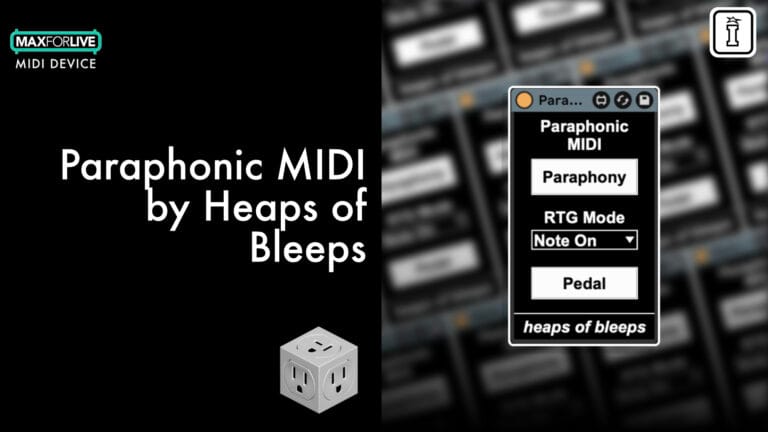
Als Bonus habe ich außerdem zwei weitere Re-Trigger-Modi hinzugefügt, die weit mehr können, als nur paraphonische Synthesizer nachzuahmen. Wählen Sie aus, ob „Note On“ (Standard), „Note Off“ oder beide die gehaltene MIDI-Note erneut auslösen sollen.
Der „Note-On“-Modus (Standard) simuliert paraphonische Synthesizer wie oben beschrieben.
Wenn der „Note-Off“-Modus ausgewählt ist, verhält er sich gewissermaßen wie eine polyphone Version des monophonen Re-Triggers, da er alle gehaltenen Noten jedes Mal neu auslöst, wenn eine Note losgelassen wird.
Wenn „Beides“ ausgewählt ist, entstehen unvorhersehbare, piepsende, blubbernde Synthesizer-Klänge, da alle gehaltenen Noten jedes Mal neu ausgelöst werden, wenn eine neue Note gespielt oder losgelassen wird.
Außerdem gibt es einen Pedal-Schalter, mit dem gesteuert werden kann, ob Noten, die über das Sustain-Pedal gehalten werden, ebenfalls zusammen mit den anderen neu ausgelöst werden.
Und wenn du gerne mit MIDI arbeitest, schau dir doch mal das Heap MIDI Tools Bundle an!
Frequently Asked Questions
„Paraphonic MIDI“ ist ein Max-for-Live-MIDI-Effekt. Du benötigst daher Ableton Live Suite oder eine Version von Live Standard oder Intro mit einer separaten Max-for-Live-Lizenz. In Live Lite oder Versionen ohne Max-for-Live-Unterstützung funktioniert er nicht.
Jedes Mal, wenn Sie eine neue Note anschlagen, löst das Gerät alle derzeit gehaltenen Noten gleichzeitig erneut aus. Dies ahmt das gemeinsame Hüllkurven- und Filterverhalten klassischer paraphoner Synthesizer nach, bei denen mehrere Oszillatoren über eine einzige Stimmarchitektur laufen.
Im „Note On“-Modus werden gehaltene Noten neu ausgelöst, sobald eine neue Note gespielt wird – dies ist die klassische paraphonische Simulation. Im „Note-Off“-Modus werden gehaltene Noten beim Loslassen einer Taste erneut ausgelöst, was eher einer polyphonen Variante des monophonen Re-Triggers entspricht. Der Modus „Beide“ kombiniert beide Verfahren und löst bei jedem „Note-On“- und „Note-Off“-Ereignis einen Re-Trigger aus.
Er funktioniert mit jedem polyphonen Instrument in Ableton Live, egal ob es sich dabei um einen Software-Synthesizer, einen Sampler oder ein externes Instrument handelt. Der Effekt arbeitet ausschließlich mit MIDI, ist also völlig instrumentunabhängig.
Laden Sie die Gerätedatei herunter und ziehen Sie sie in Ihre Ableton Live-Benutzerbibliothek, oder öffnen Sie sie direkt durch einen Doppelklick. Sobald sie sich in Ihrer Bibliothek befindet, können Sie sie wie jedes andere Max for Live-Gerät auf eine beliebige MIDI-Spur ziehen.
Ja, Paraphonic MIDI ist völlig kostenlos und unterliegt keinerlei Funktionseinschränkungen. Sie erhalten sofort das komplette Gerät inklusive aller drei Re-Trigger-Modi.
Es eignet sich ideal, um den Klang klassischer paraphoner Synthesizer wie des Oberheim Two Voice oder früher Korg-Instrumente nachzubilden, bei denen Akkorde durch einen gemeinsamen Filter gemeinsam atmen und anschwellen. Außerdem ist es ein kreatives Werkzeug für unkonventionelle Poly-Retriggering-Effekte, die weit über eine einfache paraphone Emulation hinausgehen.
Important Information
V1.0.0 – Erstveröffentlichung – Mai 2025
Unsere Produkte werden in der Regel als ZIP-Dateien zum Herunterladen bereitgestellt, die in jedem Fall vor der Installation entpackt und auf Ihrer Festplatte gespeichert werden müssen. Nachstehend finden Sie Einzelheiten zu den verschiedenen Dateitypen und deren Verwendung.
.alp-Dateien – Hierbei handelt es sich um Ableton Live-Packs, die entweder direkt im Bereich „Packs“ des Ableton Live-Browsers installiert werden oder bei denen Sie aufgefordert werden, sie auf Ihrer Festplatte zu speichern. Bei Packs, die in die Bibliothek installiert werden, erscheint beim Doppelklick ein Popup-Fenster, in dem Sie aufgefordert werden, die Installation zu bestätigen, da die Dateien als „Legacy“ gekennzeichnet sind. Das ist in Ordnung und Sie können fortfahren. Die Packs wurden im Format einer früheren Live-Version erstellt und sind daher weiterhin mit der aktuellen Version kompatibel.
.amxd-Dateien – Hierbei handelt es sich um einzelne MaxforLive-Geräte, die an einem beliebigen Ort auf Ihrer Festplatte gespeichert werden können. Wir empfehlen, einen eigenen Ordner dafür anzulegen und diesen Ordner dann als Speicherort im Bereich „Places“ des Live-Browsers hinzuzufügen.
ENDBENUTZER-LIZENZVEREINBARUNG FÜR SOFTWAREPRODUKTE VON ISOTONIK STUDIOS.
BITTE LESEN SIE DIE BEDINGUNGEN DIESER LIZENZVEREINBARUNG SORGFÄLTIG DURCH, BEVOR SIE MIT DER INSTALLATION DIESES PROGRAMMS FORTFAHREN.
Diese Endbenutzer-Lizenzvereinbarung (im Folgenden als „EULA“ bezeichnet) ist eine rechtliche Vereinbarung zwischen einer natürlichen Person oder einer einzelnen juristischen Person (im Folgenden als „LIZENZNEHMER“ bezeichnet) und Isotonik Studios über die Softwareprodukte von Isotonik Studios, die zugehörige Softwarekomponenten, Datenträger, gedruckte Materialien, sowie „Online“- oder elektronische Dokumentation umfassen können (im Folgenden als „SOFTWAREPRODUKT“ bezeichnet). Durch die Installation, das Kopieren oder die anderweitige Nutzung des SOFTWAREPRODUKTS erklärt sich der LIZENZNEHMER mit den Bedingungen dieser EULA einverstanden.
Diese EULA stellt die gesamte Vereinbarung zwischen dem LIZENZNEHMER und Isotonik Studios bezüglich des Programms dar und ersetzt alle früheren Vorschläge, Zusicherungen oder Absprachen zwischen den Parteien. Wenn der LIZENZNEHMER den Bedingungen dieser EULA nicht zustimmt, darf er das SOFTWAREPRODUKT nicht installieren oder nutzen.
Das SOFTWAREPRODUKT ist durch Urheberrechtsgesetze und internationale Urheberrechtsabkommen sowie durch andere Gesetze und Abkommen zum Schutz geistigen Eigentums geschützt. Das SOFTWAREPRODUKT wird lizenziert, nicht verkauft.
- LIZENZVERGABE.
Das SOFTWAREPRODUKT wird wie folgt lizenziert:
(a) Installation und Nutzung. Sofern der LIZENZNEHMER alle anfallenden Lizenzgebühren entrichtet hat, gewährt Isotonik Studios dem LIZENZNEHMER das Recht, Kopien des SOFTWAREPRODUKTS auf bis zu zwei Computern in seinem Besitz zu installieren und zu nutzen, auf denen eine gültig lizenzierte Kopie des Betriebssystems läuft, für das das SOFTWAREPRODUKT entwickelt wurde [z. B. Windows 10, macOS]. Der/die Computer muss/müssen Eigentum des LIZENZNEHMERS sein.
(b) Sicherungskopien. Der LIZENZNEHMER darf außerdem Kopien des SOFTWAREPRODUKTS anfertigen, soweit dies für Sicherungs- und Archivierungszwecke erforderlich ist.
- BESCHREIBUNG WEITERER RECHTE UND EINSCHRÄNKUNGEN.
(a) Beibehaltung von Urheberrechtsvermerken. Der LIZENZNEHMER darf keine Urheberrechtsvermerke auf irgendeiner der Kopien des SOFTWAREPRODUKTS entfernen oder verändern.
(b) Weitergabe. Der LIZENZNEHMER darf registrierte Kopien des SOFTWAREPRODUKTS nicht an Dritte weitergeben.
(c) Verbot von Reverse Engineering, Dekompilierung und Disassemblierung. Der LIZENZNEHMER darf das SOFTWAREPRODUKT nicht rückentwickeln, dekompilieren oder disassemblieren, es sei denn, eine solche Tätigkeit ist ungeachtet dieser Einschränkung durch geltendes Recht ausdrücklich gestattet.
(d) Vermietung. Der LIZENZNEHMER darf das SOFTWAREPRODUKT nicht vermieten, verpachten oder verleihen.
(e) Lizenzübertragung. Der LIZENZNEHMER darf seine Lizenz für das SOFTWAREPRODUKT nicht an Dritte übertragen. Jeder Versuch, dies zu tun, gilt als Verstoß gegen diese EULA.
(f) Supportleistungen. Isotonik Studios kann dem LIZENZNEHMER für einen Zeitraum von 12 Monaten ab dem Kaufdatum Supportleistungen im Zusammenhang mit dem SOFTWAREPRODUKT bereitstellen. Jeder zusätzliche Softwarecode, der dem LIZENZNEHMER im Rahmen der Supportleistungen zur Verfügung gestellt wird, gilt als Teil des SOFTWAREPRODUKTS und unterliegt den Bestimmungen dieser EULA.
(g) Einhaltung geltender Gesetze. Der LIZENZNEHMER muss alle geltenden Gesetze bezüglich der Nutzung des SOFTWAREPRODUKTS einhalten.
- KÜNDIGUNG Unbeschadet sonstiger Rechte ist Isotonik Studios berechtigt, diese EULA zu kündigen, wenn der LIZENZNEHMER die Bestimmungen dieser EULA nicht einhält. In diesem Fall muss der LIZENZNEHMER alle in seinem Besitz befindlichen Kopien des SOFTWAREPRODUKTS vernichten.
- URHEBERRECHT Sämtliche Rechte, einschließlich, aber nicht beschränkt auf Urheberrechte, an dem SOFTWAREPRODUKT und allen Kopien davon liegen bei Isotonik Studios oder seinen Lieferanten. Alle Eigentums- und geistigen Eigentumsrechte an den Inhalten, auf die durch die Nutzung des SOFTWAREPRODUKTS zugegriffen werden kann, sind Eigentum der jeweiligen Inhaltseigentümer und können durch geltende Urheberrechtsgesetze oder andere Gesetze und Verträge zum Schutz geistigen Eigentums geschützt sein. Diese EULA gewährt dem LIZENZNEHMER keine Rechte zur Nutzung solcher Inhalte. Alle nicht ausdrücklich gewährten Rechte bleiben Isotonik Studios vorbehalten.
- KEINE GEWÄHRLEISTUNGEN Isotonik Studios lehnt ausdrücklich jegliche Gewährleistung für das SOFTWAREPRODUKT ab. Das SOFTWAREPRODUKT wird „wie besehen“ ohne jegliche ausdrückliche oder stillschweigende Gewährleistung jeglicher Art bereitgestellt, einschließlich, aber nicht beschränkt auf Gewährleistungen der Marktgängigkeit, der Nichtverletzung von Rechten Dritter oder der Eignung für einen bestimmten Zweck. Isotonik Studios übernimmt keine Gewährleistung oder Verantwortung für die Richtigkeit oder Vollständigkeit von Informationen, Texten, Grafiken, Links oder anderen im SOFTWAREPRODUKT enthaltenen Elementen. Isotonik Studios übernimmt keine Gewährleistung in Bezug auf Schäden, die durch die Übertragung von Computerviren, Würmern, Zeitbomben, Logikbomben oder ähnlichen Computerprogrammen verursacht werden könnten. Isotonik Studios schließt ferner ausdrücklich jegliche Gewährleistung oder Zusicherung gegenüber dem LIZENZNEHMER oder Dritten aus.
- HAFTUNGSBESCHRÄNKUNG Isotonik Studios haftet in keinem Fall für Schäden (einschließlich, aber nicht beschränkt auf entgangenen Gewinn, Betriebsunterbrechungen oder Informationsverluste), die sich aus der Nutzung oder der Unmöglichkeit der Nutzung des SOFTWAREPRODUKTS durch den LIZENZNEHMER ergeben, selbst wenn Isotonik Studios auf die Möglichkeit solcher Schäden hingewiesen wurde. In keinem Fall haftet Isotonik Studios für Datenverluste oder für indirekte, besondere, zufällige, Folge- (einschließlich entgangener Gewinne) oder sonstige Schäden, die auf Vertrag, unerlaubter Handlung oder anderweitig beruhen. Isotonik Studios übernimmt keine Haftung in Bezug auf den Inhalt des SOFTWAREPRODUKTS oder eines Teils davon, einschließlich, aber nicht beschränkt auf darin enthaltene Fehler oder Auslassungen, Verleumdung, Verletzungen von Persönlichkeitsrechten, Datenschutzrechten, Markenrechten, Betriebsunterbrechungen, Personenschäden, Verlust der Privatsphäre, Urheberpersönlichkeitsrechte oder die Offenlegung vertraulicher Informationen.
Frequently Bought Together