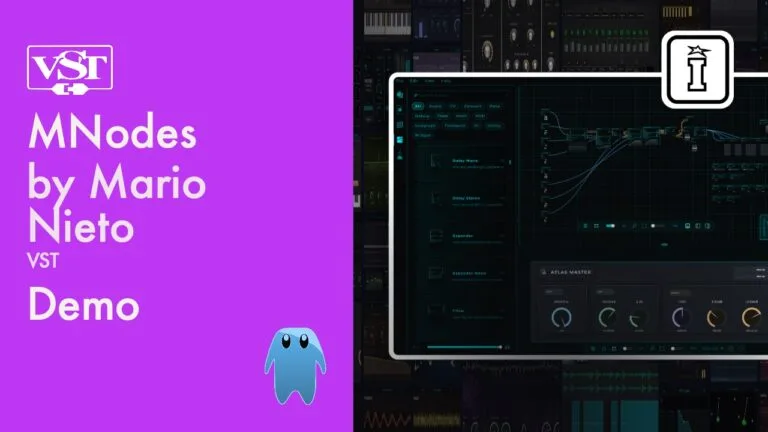
MNodes by Mario Nieto
ONE PLUGIN. INFINITE INSTRUMENTS. ZERO LIMITS.
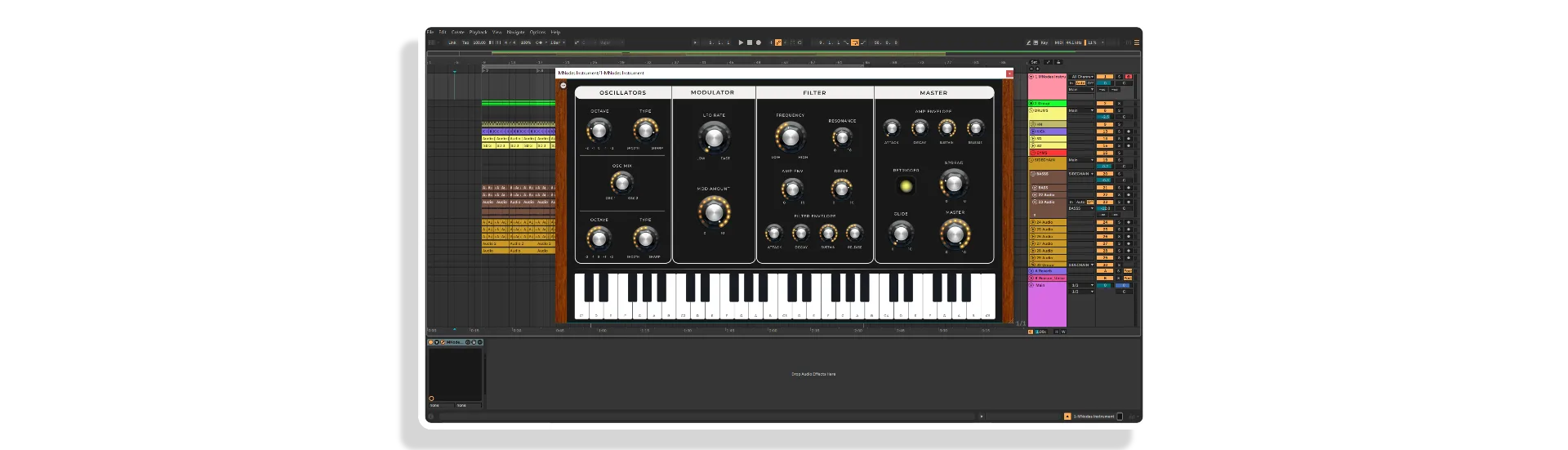
MNodes by Mario Nieto is a single plugin that morphs into anything — synths, samplers, drum machines, MIDI effects, sequencers, and more. Load a ready-made instrument from the Hub, let the LAB conjure a brand-new plugin at the click of a button, or wire up your own from 332+ modular building blocks. No code. No subscriptions. No ceiling.
- The LAB: One-click AI-style plugin generator — every result is unique, playable, and yours to keep
- 332+ Nodes: 31 generators, 66 effects, 48 CV & sequencing, 33 MIDI tools, 32 UI widgets, 71 logic/math/data nodes
- Built-in VST3 Host: Drop any VST3 plugin into the graph and modulate its parameters directly
- Custom UI Builder: Design your own control surface, then switch to Perform mode and play it live
- The Hub: Browse, download and load ready-made instruments, effects, and sound libraries in one click
- Microtonal Support: EDO, just intonation, and Scala quantizers built in
- Polyphony: Poly modules up to 16 voices with full per-voice modulation
- Yours to Share or Sell: Anything you build can be distributed or sold — any MNodes user can open it
PLEASE NOTE: This product will not qualify for any promotional discounts at any time.
USER GUIDE: MNodes GuideMNodes by Mario Nieto
ONE PLUGIN. INFINITE INSTRUMENTS. ZERO LIMITS.
MNodes by Mario Nieto is a single plugin that morphs into anything — synths, samplers, drum machines, MIDI effects, sequencers, and more. Load a ready-made instrument from the Hub, let the LAB conjure a brand-new plugin at the click of a button, or wire up your own from 332+ modular building blocks. No code. No subscriptions. No ceiling.
- The LAB: One-click AI-style plugin generator — every result is unique, playable, and yours to keep
- 332+ Nodes: 31 generators, 66 effects, 48 CV & sequencing, 33 MIDI tools, 32 UI widgets, 71 logic/math/data nodes
- Built-in VST3 Host: Drop any VST3 plugin into the graph and modulate its parameters directly
- Custom UI Builder: Design your own control surface, then switch to Perform mode and play it live
- The Hub: Browse, download and load ready-made instruments, effects, and sound libraries in one click
- Microtonal Support: EDO, just intonation, and Scala quantizers built in
- Polyphony: Poly modules up to 16 voices with full per-voice modulation
- Yours to Share or Sell: Anything you build can be distributed or sold — any MNodes user can open it
PLEASE NOTE: This product will not qualify for any promotional discounts at any time.
USER GUIDE: MNodes Guide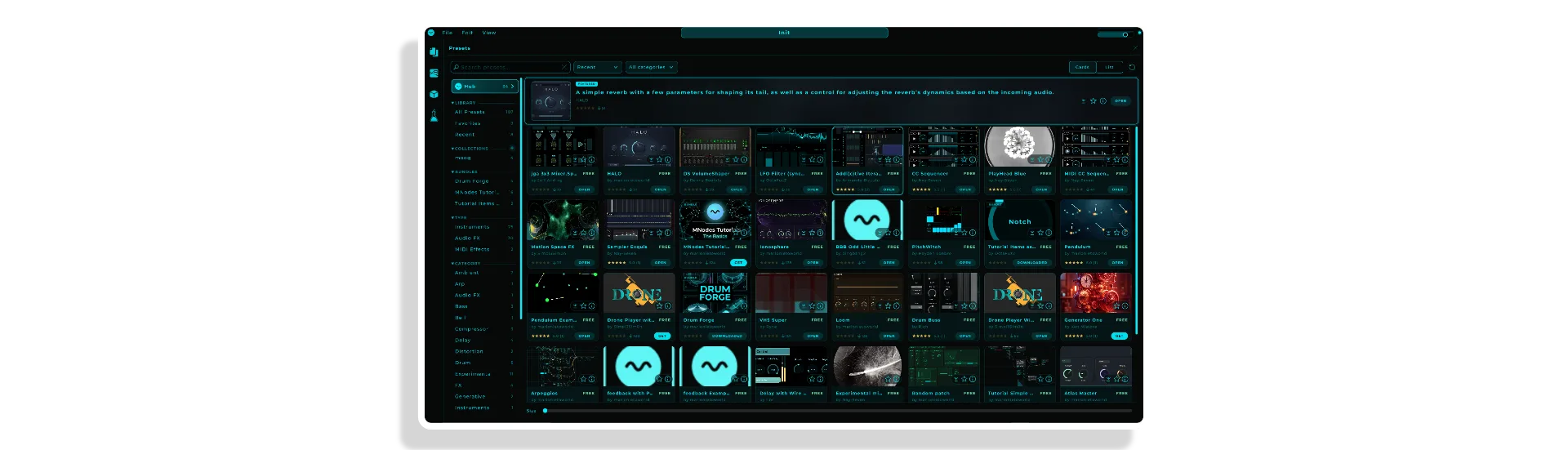

Product reviews
5 out of 5
2 reviews
How item rating is calculated
We show the average based on reviews. Only genuine reviews are displayed.
Sort by
September 13, 2026
This reviewer bought this product from our store.
The kind of plugin I've dreamed about
Node-based plugins are great, but most of them just host the stuff you already own and tend to be a little clunky. MNodes can do everything they can do, but it also has a wide variety of built-in effects and ways of changing them that allows for you to make essentially anything you want. The workflow might be initially confusing for those unfamiliar with working with nodes, but once it starts to click, the sky's the limit. Easily the most fun I've had with a plugin in years.
I recommend this product
September 13, 2026
This reviewer bought this product from our store.
The kind of plugin I've dreamed about
Node-based plugins are great, but most of them just host the stuff you already own and tend to be a little clunky. MNodes can do everything they can do, but it also has a wide variety of built-in effects and ways of changing them that allows for you to make essentially anything you want. The workflow might be initially confusing for those unfamiliar with working with nodes, but once it starts to click, the sky's the limit. Easily the most fun I've had with a plugin in years.
I recommend this product
MNodes by Mario Nieto
What if a single plugin could be every instrument you’ve ever needed — and every one you haven’t invented yet? That’s the idea behind MNodes. Built by Mario Nieto, it’s a self-contained modular environment that lives inside one plugin window and can become absolutely anything: a lush polyphonic synth, a granular sampler, a rhythmic MIDI processor, a generative sequencer, a custom effects chain with its own bespoke interface. Load it, shape it, perform it.
This isn’t a preset browser dressed up as something deeper. MNodes is a fully-featured node-based signal environment — 332 building blocks and counting — wrapped in a workflow that’s genuinely approachable. You don’t need to write a single line of code. You just connect, create, and play.
The Hub: Ready to Play, Right Now
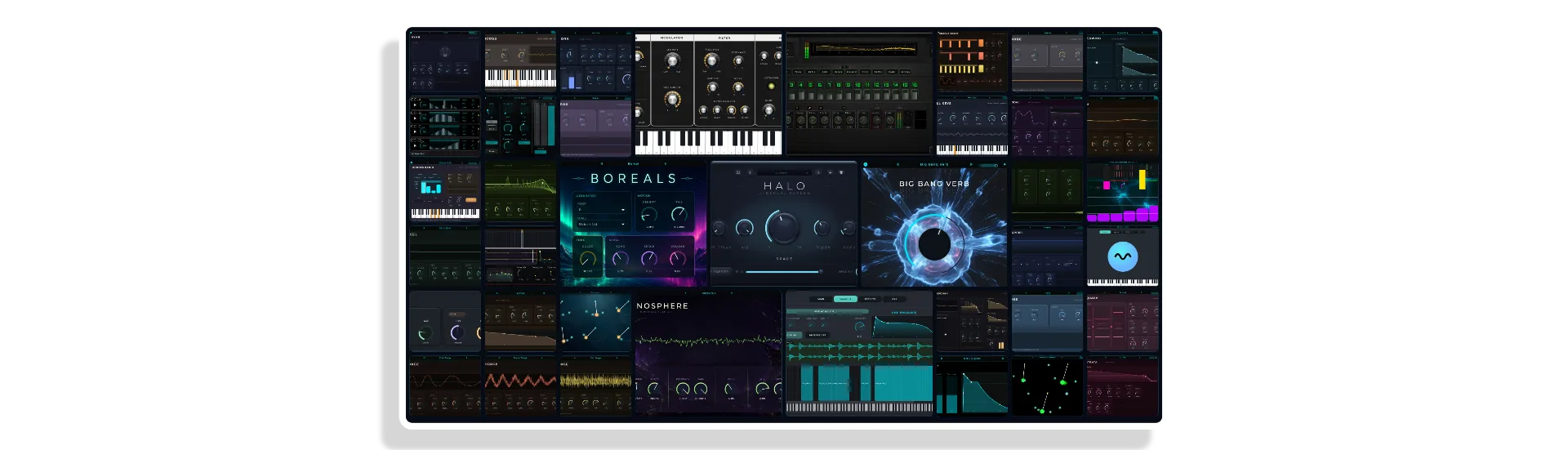
Not in the mood to build from scratch? The Hub has you covered. It’s a curated, ever-expanding library of ready-made instruments and effects — synths, drum machines, keys, pads, MIDI tools, sequencers — contributed by Mario and the growing MNodes community. Browse, download, load. One click and you’re making music. New projects are added continuously, so there’s always something fresh to explore.
The LAB: Pure Creative Magic
Staring at a blank patch wondering where to start? Hit the wand. The LAB generates a completely new, fully playable plugin from scratch — its own sound design, its own control layout, its own character. No two results are ever the same. Don’t love it? Click again. When something sparks, keep it, tweak it, save it. The LAB is equally useful as a creative springboard for producers who know exactly what they want and a lifesaver when inspiration has gone quiet.
Build Your Own: 332+ Nodes and Counting
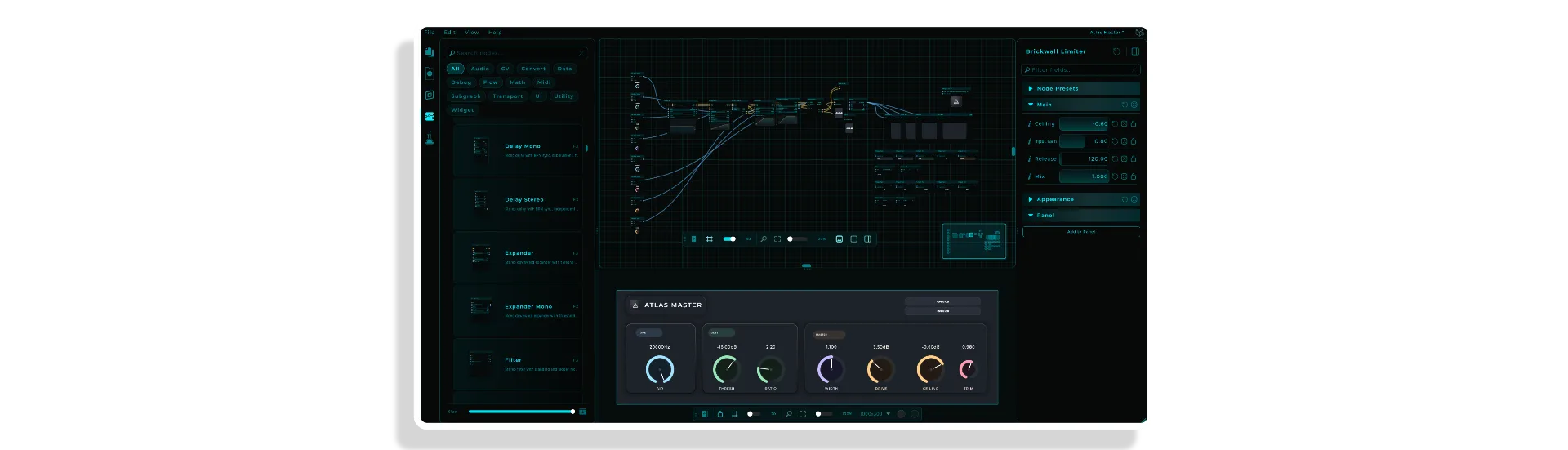
For those who want to go deeper, MNodes is a fully modular playground. Connect, disconnect, rewire — every signal path is yours to define. Drop in your own VST3 plugins and route modulation directly into any of their parameters. The node library spans every corner of audio and MIDI production:
- 31 Generators & Envelopes: Sine, saw, triangle, square, pulse, wavetable, subtractive, additive, supersaw/unison, FM voice, FM op, PM op, west coast, drum synth, Karplus-Strong, formant synthesis, granular, AM/ring mod, convolver, player, looper, recorder, noise, and more
- 66 Effects & Dynamics: Six-band parametric EQ, filters, allpass, resonator, reverb, stereo/mono delay, chorus, pitch shift, frequency shifter, vocoder (up to 100 bands), OTT, compressor, limiter, maximiser, expander, noise gate, transient shaper, beat repeat, waveshaper, tube saturation, bitcrush, foldback, stereo width, wow/flutter, tape damage, and more
- 48 CV & Sequencing: LFO, clock, clock divider, PPQ divider, step sequencer, slider sequencer, toggle sequencer, route sequencer, quantise, microtonal quantisers (EDO, just intonation, Scala), scale keyboard, curve, sample & hold, glide, detune, transpose, octave, BPM/Hz conversion, transport, trigger, random trigger, counter, and more
- 33 MIDI Tools: Keyboard, arpeggiator, chord, scale, riff generator, transpose, velocity, split, merge, channel filter, note filter, CC transform, convert, voice allocator, monitor, looper, pattern to MIDI file, MIDI file player, and more
- 32 UI Widgets: Knobs, vertical sliders, range sliders, XY pads, buttons, combo boxes, filmstrip, image, pendulum, sampler view, sample map, envelope view, state morpher, and more
- 71 Logic, Math & Data Nodes: Everything you need for complex modulation routing, conditional logic, data transformation, and advanced signal flow
Design Your Own Interface
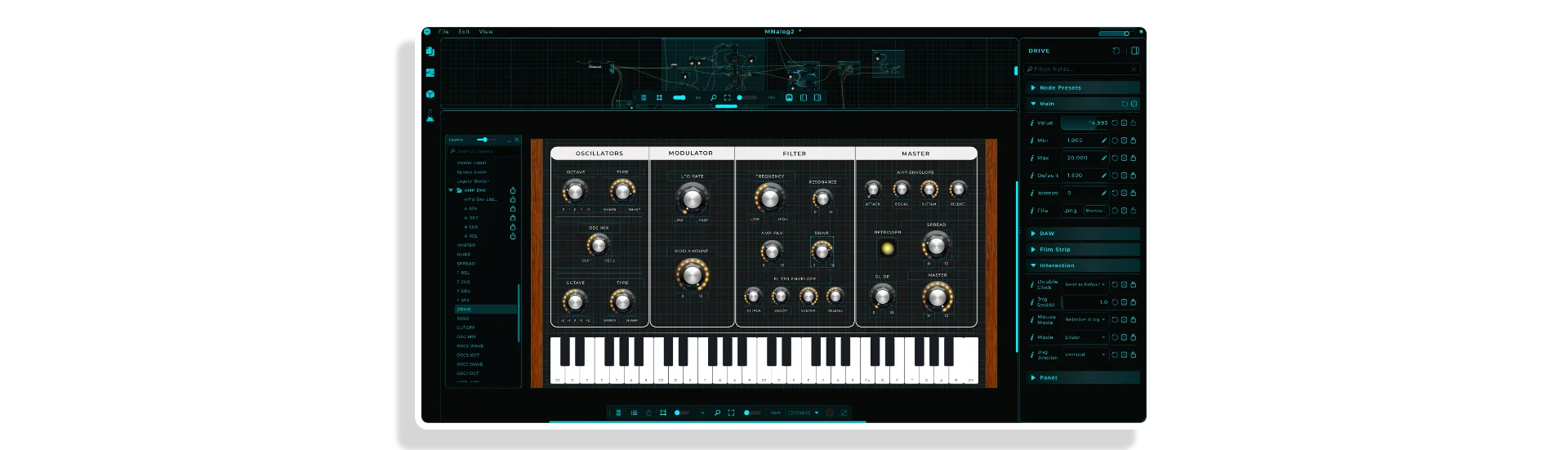
MNodes doesn’t just let you build the sound — it lets you build the instrument. The UI designer lets you arrange widgets, assign controls, and craft a visual layout that’s entirely your own. Switch to Perform mode and you’ve got a polished, expressive instrument ready for the stage or the studio. It looks and feels like a plugin you’d buy — because it is one. Yours.
It’s Yours to Keep, Share, or Sell
Everything you create in MNodes belongs entirely to you. Build a synth, a multi-effects processor, a generative sequencer, a full performance instrument — then drag it into your DAW, share it with collaborators, give it away, or sell it. Anyone with MNodes can load and play your creation. There are no royalties, no restrictions, no catches. You made it; it’s yours.
Under the Hood
MNodes ships as a VST3, AU, and Standalone application for both Windows and macOS. It includes a built-in VST3 host so you can wire third-party plugins directly into your node graph. Polyphonic modules support up to 16 voices. Microtonal systems — EDO, just intonation, and Scala — are baked in. The vocoder runs up to 100 bands. The parametric EQ spans six bands. OTT and multiband dynamics are right there in the node library. This is a deep, professional environment that grows with you — and with its community.
Up to 3 activations, works offline, and backed by a 30-day money-back guarantee. One licence, yours forever — no subscription, ever.
Frequently Asked Questions
A: Yes. MNodes is available as VST3 and AU, so it works in any DAW that supports those formats — including Ableton Live, Logic Pro, Cubase, Studio One, Bitwig, and more. It also runs as a fully standalone application.
A: Not at all. You can load ready-made instruments and effects from the Hub with a single click, or use the LAB to generate brand-new plugins instantly — no patching required. If you do want to build your own instruments from the 332+ node library, it’s all done visually by connecting nodes, with zero code involved.
A: The LAB is MNodes’ one-click plugin generator. Hit the wand icon and it builds a completely unique, fully playable instrument from scratch — with its own sound design and its own control layout. Every result is different. If you don’t love it, click again. When you find something you like, you can keep it, tweak it, and save it as your own.
A: Yes. MNodes includes a built-in VST3 host node, which lets you drop any VST3 plugin directly into your node graph. You can then route MNodes’ modulation sources — LFOs, envelopes, sequencers, and more — into any of the plugin’s parameters.
A: Absolutely. Anything you create in MNodes is entirely yours — there are no royalties, no licensing restrictions, and no catches. You can share your creations freely, sell them however you like, or distribute them to collaborators. Any MNodes user can load and play what you’ve built.
A: Your MNodes licence allows up to 3 activations. It also works fully offline, so you’re not dependent on an internet connection to use it once activated.
A: Yes. MNodes comes with a 30-day money-back guarantee. If it’s not for you, you can get a full refund within 30 days of purchase — no questions asked.
A: Yes. The node library, the Hub, and the wider MNodes ecosystem are actively growing — with new instruments, effects, and nodes being added by Mario and the community on an ongoing basis. It’s a one-time purchase with no subscription, and all updates are included.
Important Information
## v1.1.2 – 12 September 2026
MNodes 1.1.2
NEW
– Joints on the cables -> Alt-click a cable to drop a joint, and drag it to route the cable where you want it; Alt-click or double-click it and it is gone. As many as you like, saved with the project, one undo step each.
– The little i beside a parameter says what it does -> two out of three used to open on nothing but the name and the range. Nearly three thousand of them now say what they do, what each end gives you and what Off means, across every node.
– The State Morpher and the Spectral Morph can be exposed to the DAW -> tick Expose to DAW and the two axes of the pad become two host parameters to automate or map, X and Y on one, Shape and Detail on the other. No more extra knob wired into the pad to get there.
– Unused Outputs, on the Plugin Host -> Omnisphere runs nine stereo outs by default and pays for every one. Set Unused Outputs to Off and the buses beyond Output Pairs stop running, the way a DAW switches them off. Active is still the default.
– Play Again, on the Audio Player and the Recorder -> what a second press of Play does while the file runs: Restart, Pause, Stop or Nothing. Each node keeps its old habit as the default, and the Recorder gains a Loop switch with its pin.
– A Data output on the MIDI CC Extract -> Data Out sends the value the moment a matching CC arrives, and nothing in between, so a step or a counter is no longer fed the resting value by a CV To Data. The Value pin is unchanged.
– Every project in the library shows its file date -> the date the file was last written, at the end of each card’s line. The Newest and Oldest sort orders work now.
– A knob’s ticks can be dots -> Tick Shape: Lines, as always, or Dots. A dot is as wide as its line is long, so Tick Length sizes both.
IMPROVED
– A project opens where it is -> drag a .mnprt in and it opens from its own folder, with Save writing back to the same file, instead of a silent copy into Projects/User under a numbered name. Copy to Library is there when you want one, and a project that is moved or left on a drive you unplug shows as MISSING, to locate or remove. Bundles, module packs and Hub downloads still land in the library.
– One library folder for the standalone and the plugins -> the folder is remembered the first time it is resolved, so a machine whose Music folder resolves differently for two programs no longer keeps two libraries, one on E: and one on C:, with the same project in both.
FIXED
– Five things the Inspector was promising and not doing -> the File Drop ignored its six gradient settings, the Beat Repeat its Body Background and Frame Colour, the Soft Clipper in stereo had no descriptions at all, and the Delay named two of its three ways of setting the time. Found while writing the new ones.
– The State Morpher’s puck stuttered under automation when a Map fed it -> a Map reached the pad twice, as a value and as a stream, one block apart. The wired stream now owns its axis. A puck driven by an LFO also moves while the pad is off screen.
– The right-click palette opens under the cursor again -> since 1.1.1 it could land above the click, below it or off the edge of the screen. It places itself now, top-left corner under the cursor, like a menu.
– Save As says when the name is already taken elsewhere in your library -> saving under another category quietly made a second file with the same name, and the browser listed it twice. It now asks: keep both, or replace the one you have.
– An imported preset that lands under a numbered name says so inside -> the copy was “Name 2.mnprt” with “Name” still written inside it, so the browser showed two rows called the same. The numbered name goes into the copy now.
– A Plugin Host’s exposed parameters name their output pins again -> since 1.0.6 the output pin was a bare dot, the only unnamed outputs on the canvas.
## v1.1.0 – 7 September 2026
NEW
* Preset Manager — the preset system of the device you build, on its front panel: prev/next, favourite, name, Save and a browser. A preset is the panel and nothing else, so it survives a rewire. Yours ship as the factory set; users’ saves sit in their own folder, untouched by Hub updates. Every action is a pin.
* Jack Out, Jack In and patch cables — sockets you drag a cable between while the instrument plays. A real graph edge, not a picture: it saves with the project and obeys the usual type and feedback rules.
* Sidechain from the DAW — MNodes FX declares a second bus, off until the host routes to it. Pick a track as you would for a compressor; Sidechain In carries SC 1–8 into the patch, and never mixes with Audio In.
* Sample maps as one file — a .mnsmap with every sample packed inside, unpacking itself into the library on any machine.
* Sampler: One Shot and Normalize per zone — One Shot plays to the end whatever the key does. Normalize trims that zone’s Gain to full scale: a pin, undoable, file untouched.
* Chord Palette — a MIDI In, so holding keys holds chords, and 64 pads with their own trigger keys.
* New nodes — MIDI Program Change, MIDI Filter (which kinds of message get through), File Info, Is Extension.
* Fewer steps to a wired patch — Shift-drag a node onto a cable to drop it into the chain, or away to lift it out and close the gap. Drop a cable on empty canvas and the node list opens filtered, already connected; on a wrong-type pin and the converter goes in for you. Ctrl/Cmd brings the neighbouring pins along.
* Also — Show Node Latency badges, bypass driven from the patch, a Show Panel pin on Modules, an endless Knob, a checkbox Toggle, Peak and RMS out of the Meter, 64-slot Clip Tracks, and a new Home screen.
IMPROVED
* The Nodes explorer reads at a glance — six fixed tabs in signal order, underlined in their cable colours; mono/stereo pairs on one row.
* Categories filed by what a node does — Utilities held 36 unrelated nodes. It’s empty now.
* Settings is seven short pages, not five long ones, with Shortcuts learning new keys.
* A quieter Inspector — icons on hover, foldable sections, a knob opens at 14 lines instead of 84, and the search survives the next click.
* Crash reports name the module and offset, not a misleading nearby symbol.
* Modules show up in right-click search; Data Select is now Input Select; every delay line reaches 10 seconds.
FIXED
* States capture every widget again, and no longer crash inside a Module or Subgraph.
* Latency is right: parallel paths line up, bypass no longer shifts time, and spectral nodes stop under-reporting by 512 samples.
* DAW automation — a preset recall no longer makes an exposed control one-way, plus three defects on the way in.
* Clip Track — Launch fires the row you picked, and slots 9+ have their defaults.
* The Piano Roll listens to its own control pins, projects open faster, and the Hub tells an update from the copy you already have.
v1.0.3 – Initial Release
Our Products are generally provided as Zip file downloads which in all cases will need to be extracted before use. For Max for Live Devices please place the extracted device in your User Library. For Ableton Live Packs please double click the extracted .alp file to install. For Ableton Live Projects please place in your projects folder.
END-USER LICENSE AGREEMENT FOR ISOTONIK STUDIOS SOFTWARE PRODUCTS.
PLEASE READ THE TERMS AND CONDITIONS OF THIS LICENSE AGREEMENT CAREFULLY BEFORE CONTINUING WITH THIS PROGRAM INSTALL.
This End-User License Agreement (referred to as “EULA”) is a legal agreement between an individual or a single entity (referred to as “LICENSEE”) and Isotonik Studios for the Isotonik Studios software product(s) which may include associated software components, media, printed materials, and “online” or electronic documentation (referred to as “SOFTWARE PRODUCT”). By installing, copying, or otherwise using the SOFTWARE PRODUCT, the LICENSEE agrees to be bound by the terms of this EULA.
This EULA represents the entire agreement concerning the program between the LICENSEE and Isotonik Studios and it supersedes any prior proposal, representation, or understanding between the parties. If the LICENSEE does not agree to the terms of this EULA, the LICENSEE should not install or use the SOFTWARE PRODUCT.
The SOFTWARE PRODUCT is protected by copyright laws and international copyright treaties, as well as other intellectual property laws and treaties. The SOFTWARE PRODUCT is licensed, not sold.
- GRANT OF LICENSE.
The SOFTWARE PRODUCT is licensed as follows:
(a) Installation and Use. Providing that the LICENSEE has paid any applicable license fees, Isotonik Studios grants the LICENSEE the right to install and use copies of the SOFTWARE PRODUCT on up to two computers in the LICENSEE’s possession that are running a validly licensed copy of the operating system for which the SOFTWARE PRODUCT was designed [e.g., Windows 10, macOS]. The computer(s) must be owned by the LICENSEE.
(b) Backup Copies. The LICENSEE may also make copies of the SOFTWARE PRODUCT as may be necessary for backup and archival purposes.
- DESCRIPTION OF OTHER RIGHTS AND LIMITATIONS.
(a) Maintenance of Copyright Notices. The LICENSEE must not remove or alter any copyright notices on any and all copies of the SOFTWARE PRODUCT.
(b) Distribution. The LICENSEE may not distribute registered copies of the SOFTWARE PRODUCT to third parties.
(c) Prohibition on Reverse Engineering, Decompilation, and Disassembly. The LICENSEE may not reverse engineer, decompile, or disassemble the SOFTWARE PRODUCT, except and only to the extent that such activity is expressly permitted by applicable law notwithstanding this limitation.
(d) Rental. The LICENSEE may not rent, lease, or lend the SOFTWARE PRODUCT.
(e) License transfer The LICENSEE may not transfer their license to the SOFTWARE PRODUCT to any third party. Any attempt to do so will be considered a violation of this EULA.
(f) Support Services. Isotonik Studios may provide the LICENSEE with support services related to the SOFTWARE PRODUCT for a period of 12 months following the date of purchase. Any supplemental software code provided to the LICENSEE as part of the Support Services shall be considered part of the SOFTWARE PRODUCT and subject to the terms and conditions of this EULA.
(g) Compliance with Applicable Laws. The LICENSEE must comply with all applicable laws regarding use of the SOFTWARE PRODUCT.
- TERMINATION Without prejudice to any other rights, Isotonik Studios may terminate this EULA if the LICENSEE fails to comply with the terms and conditions of this EULA. In such event, the LICENSEE must destroy all copies of the SOFTWARE PRODUCT in the LICENSEE’s possession.
- COPYRIGHT All title, including but not limited to copyrights, in and to the SOFTWARE PRODUCT and any copies thereof are owned by Isotonik Studios or its suppliers. All title and intellectual property rights in and to the content which may be accessed through use of the SOFTWARE PRODUCT is the property of the respective content owner and may be protected by applicable copyright or other intellectual property laws and treaties. This EULA grants the LICENSEE no rights to use such content. All rights not expressly granted are reserved by Isotonik Studios.
- NO WARRANTIES Isotonik Studios expressly disclaims any warranty for the SOFTWARE PRODUCT. The SOFTWARE PRODUCT is provided ‘As Is’ without any express or implied warranty of any kind, including but not limited to any warranties of merchantability, noninfringement, or fitness of a particular purpose. Isotonik Studios does not warrant or assume responsibility for the accuracy or completeness of any information, text, graphics, links or other items contained within the SOFTWARE PRODUCT. Isotonik Studios makes no warranties respecting any harm that may be caused by the transmission of a computer virus, worm, time bomb, logic bomb, or other such computer program. Isotonik Studios further expressly disclaims any warranty or representation to the LICENSEE or to any third party.
- LIMITATION OF LIABILITY In no event shall Isotonik Studios be liable for any damages (including, without limitation, lost profits, business interruption, or lost information) arising out of the LICENSEE’s use of or inability to use the SOFTWARE PRODUCT, even if Isotonik Studios has been advised of the possibility of such damages. In no event will Isotonik Studios be liable for loss of data or for indirect, special, incidental, consequential (including lost profit), or other damages based in contract, tort or otherwise. Isotonik Studios shall have no liability with respect to the content of the SOFTWARE PRODUCT or any part thereof, including but not limited to errors or omissions contained therein, libel, infringements of rights of publicity, privacy, trademark rights, business interruption, personal injury, loss of privacy, moral rights or the disclosure of confidential information.
More from Mario Nieto