Grain Freezer by Amazing Noises
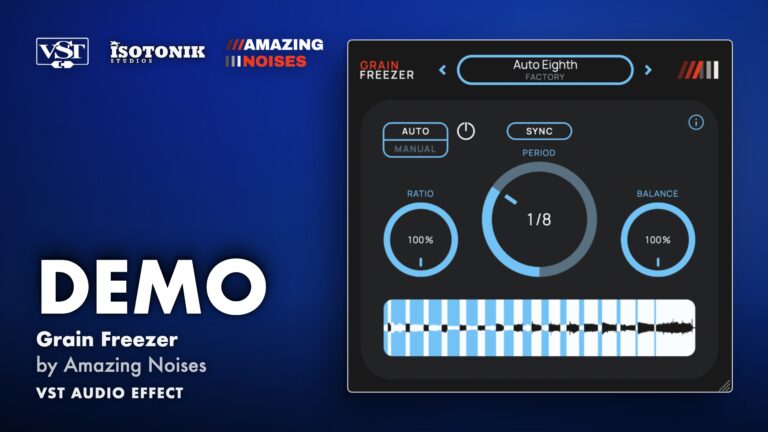
FREE GRANULAR FREEZE EFFECT FOR MAC AND WINDOWS Grain Freezer captures a short fragment of incoming audio and turns it into a continuous granular texture. Blend the texture with your live signal, capture moments manually, or let it refresh automatically on a timed or beat-synced interval. Nine factory presets are included, and your own presets save and recall in .angfr format. • Granular Freeze: Captures a 150 ms fragment and sustains it as a stereo granular texture, with Balance blending texture against the original signal. • Manual and Auto Modes: Trigger a freeze on command or let it refresh automatically at a set time or bar-synced interval. • Stereo Field Spread: Mono material is spread across the stereo field grain by grain; stereo input preserves its image. • DAW Automation: The Freeze control can be automated directly from your DAW. • Factory Presets: Nine factory presets included, with user preset saving and recall in .angfr format.

Amazing Noises
Amazing Noises is the brainchild of Maurizio Giri the co-author of the Max Bible, Electronic Music & Sound Design.
View all products by Amazing NoisesOverview
Granular freeze texture, free for Mac and Windows
Every mix has a moment worth holding. Grain Freezer captures a 150 ms fragment of incoming audio and scatters it into a continuous granular texture, so that fleeting chord, breath, or room tone becomes something you can sustain, shape, and blend back against the live signal. Dry and present to suspended and atmospheric, in a single click. Grain Freezer is free, and a full PDF quick guide is included in your download. Nine factory presets are ready the moment you load it, and your own presets save and recall in the dedicated .angfr format, surviving reinstallation without touching the factory content.
- Captures a 150 ms audio fragment and sustains it as a continuous stereo granular texture
- Balance control runs from 0 to 100 percent, blending the granular texture against the original signal or replacing it entirely
- Manual mode offers Toggle and Hold behaviour, so the freeze stays active between clicks or only while held
- Preload control shifts the capture window anywhere from 150 ms before the trigger to the moment after it, because what you hear in your head is what gets frozen
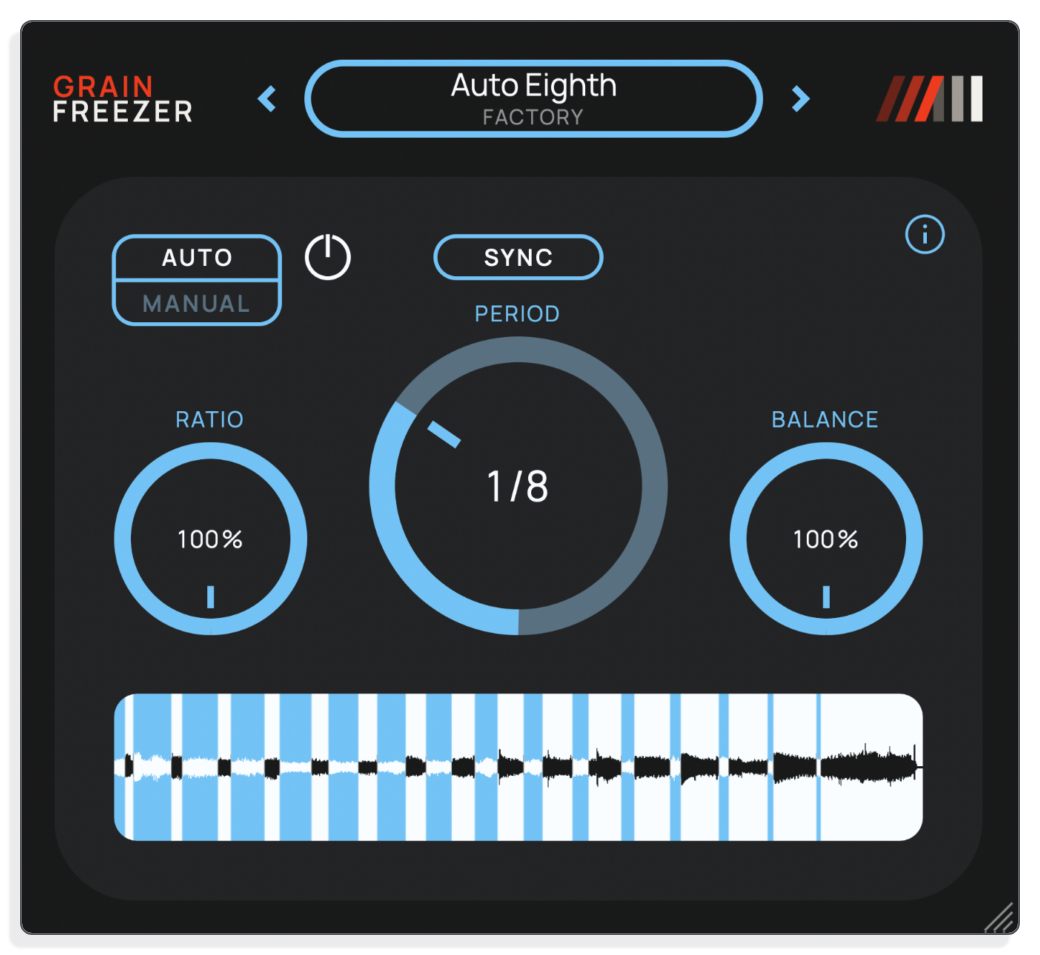
- Auto mode refreshes the fragment on a set Time period from 0 to 16 seconds, or locked to a DAW bar subdivision from 1/64 of a bar up to 8 bars; Ratio sets the proportion of each interval during which the texture is active
- At Time 0, the effect follows the input continuously for a moving granular wash rather than a true freeze
- Mono material is spread across the stereo field grain by grain; stereo input preserves its image through the granular process
- The Freeze button responds to DAW automation directly, so freeze events can be drawn into the arrangement
- Nine factory presets included, with user preset saving and recall in .angfr format stored separately from factory content
- Installation Guide
- Mac installer
- Windows installer
- User manual (PDF)
Free for subscribers
Join the list and get 8 free downloads
Subscribers get Isotonik FX, Live Scratcher, Modular Series LE Part ONE, Modular Series LE Part TWO and more for free. You also hear about new releases and deals first.
Subscribers hear first about new VST plugin releases.
Just your email. No spam, unsubscribe anytime.


Reviews
No reviews yet. Be the first to review this product.
Core Engine
Granular Freeze Texture
Grain Freezer takes a short fragment of incoming audio and turns it into a continuous granular texture. That texture can sit alongside your original signal or replace it entirely, depending on how you set the Balance control.
Capture Control
Manual and Auto Freeze Modes
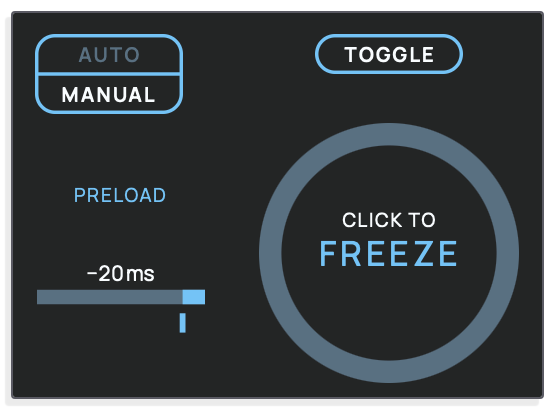
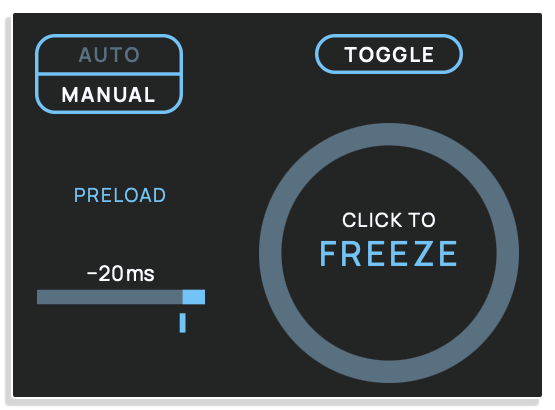
Manual mode lets you decide exactly when to capture, with Toggle and Hold behaviour and a Preload control that shifts the capture window anywhere from 150 ms before the command to the moment after it. Auto mode removes the decision entirely, refreshing the fragment on a timed or bar-synced interval, with the Ratio control setting the proportion of each interval during which the granular texture is active.


Stereo Image
Stereo Field Spread
A stereo input preserves its image through the granular process. Mono material on a stereo output is spread across the stereo field grain by grain, so a centred source naturally opens up into a wide texture as soon as the effect becomes active.
Presets
Factory and User Presets
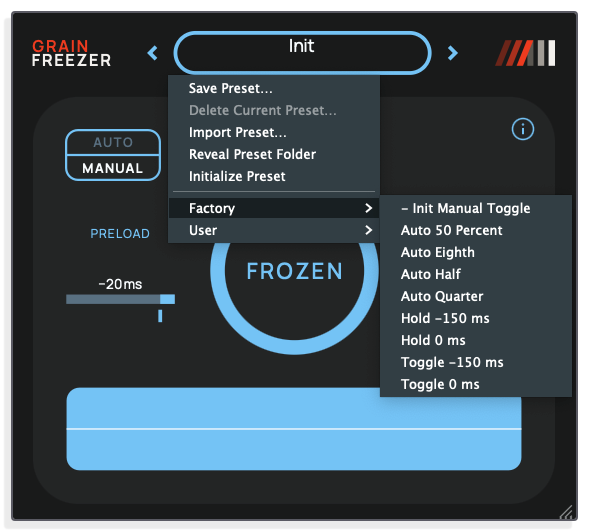
Nine factory presets are included inside the plugin bundle. User presets save and recall in .angfr format and are stored separately from the factory content, so they survive reinstallation.
Important Information
INSTALLATION
Our Products are generally provided as Zip file downloads which in all cases will need to be extracted and saved to your hard drive prior to installation. Details on the different file type provided and what to do with them are below.
.alp Files – These are Ableton Live Packs and will either install directly into the Packs Section of the browser of Ableton Live or ask you to save them to your hard drive. For packs that install to the library, when you double click on them you will see a pop up window asking you to confirm that installation is ok as the files are described as “Legacy”. This is fine and you are ok to proceed, the packs are created using the format for an earlier version of Live and so remain compatible with the current version.
.amxd files – These are individual MaxforLive Devices and can be stored anywhere on your hard drive. We’d advise creating a folder for them and then adding that folder as a location within the Places section of Lives Browser.
LICENSE
END-USER LICENSE AGREEMENT FOR ISOTONIK STUDIOS SOFTWARE PRODUCTS.
PLEASE READ THE TERMS AND CONDITIONS OF THIS LICENSE AGREEMENT CAREFULLY BEFORE CONTINUING WITH THIS PROGRAM INSTALL.
This End-User License Agreement (referred to as “EULA”) is a legal agreement between an individual or a single entity (referred to as “LICENSEE”) and Isotonik Studios for the Isotonik Studios software product(s) which may include associated software components, media, printed materials, and “online” or electronic documentation (referred to as “SOFTWARE PRODUCT”). By installing, copying, or otherwise using the SOFTWARE PRODUCT, the LICENSEE agrees to be bound by the terms of this EULA.
This EULA represents the entire agreement concerning the program between the LICENSEE and Isotonik Studios and it supersedes any prior proposal, representation, or understanding between the parties. If the LICENSEE does not agree to the terms of this EULA, the LICENSEE should not install or use the SOFTWARE PRODUCT.
The SOFTWARE PRODUCT is protected by copyright laws and international copyright treaties, as well as other intellectual property laws and treaties. The SOFTWARE PRODUCT is licensed, not sold.
- GRANT OF LICENSE.
The SOFTWARE PRODUCT is licensed as follows:
(a) Installation and Use. Providing that the LICENSEE has paid any applicable license fees, Isotonik Studios grants the LICENSEE the right to install and use copies of the SOFTWARE PRODUCT on up to two computers in the LICENSEE’s possession that are running a validly licensed copy of the operating system for which the SOFTWARE PRODUCT was designed [e.g., Windows 10, macOS]. The computer(s) must be owned by the LICENSEE.
(b) Backup Copies. The LICENSEE may also make copies of the SOFTWARE PRODUCT as may be necessary for backup and archival purposes.
- DESCRIPTION OF OTHER RIGHTS AND LIMITATIONS.
(a) Maintenance of Copyright Notices. The LICENSEE must not remove or alter any copyright notices on any and all copies of the SOFTWARE PRODUCT.
(b) Distribution. The LICENSEE may not distribute registered copies of the SOFTWARE PRODUCT to third parties.
(c) Prohibition on Reverse Engineering, Decompilation, and Disassembly. The LICENSEE may not reverse engineer, decompile, or disassemble the SOFTWARE PRODUCT, except and only to the extent that such activity is expressly permitted by applicable law notwithstanding this limitation.
(d) Rental. The LICENSEE may not rent, lease, or lend the SOFTWARE PRODUCT.
(e) License transfer The LICENSEE may not transfer their license to the SOFTWARE PRODUCT to any third party. Any attempt to do so will be considered a violation of this EULA.
(f) Support Services. Isotonik Studios may provide the LICENSEE with support services related to the SOFTWARE PRODUCT for a period of 12 months following the date of purchase. Any supplemental software code provided to the LICENSEE as part of the Support Services shall be considered part of the SOFTWARE PRODUCT and subject to the terms and conditions of this EULA.
(g) Compliance with Applicable Laws. The LICENSEE must comply with all applicable laws regarding use of the SOFTWARE PRODUCT.
- TERMINATION Without prejudice to any other rights, Isotonik Studios may terminate this EULA if the LICENSEE fails to comply with the terms and conditions of this EULA. In such event, the LICENSEE must destroy all copies of the SOFTWARE PRODUCT in the LICENSEE’s possession.
- COPYRIGHT All title, including but not limited to copyrights, in and to the SOFTWARE PRODUCT and any copies thereof are owned by Isotonik Studios or its suppliers. All title and intellectual property rights in and to the content which may be accessed through use of the SOFTWARE PRODUCT is the property of the respective content owner and may be protected by applicable copyright or other intellectual property laws and treaties. This EULA grants the LICENSEE no rights to use such content. All rights not expressly granted are reserved by Isotonik Studios.
- NO WARRANTIES Isotonik Studios expressly disclaims any warranty for the SOFTWARE PRODUCT. The SOFTWARE PRODUCT is provided ‘As Is’ without any express or implied warranty of any kind, including but not limited to any warranties of merchantability, noninfringement, or fitness of a particular purpose. Isotonik Studios does not warrant or assume responsibility for the accuracy or completeness of any information, text, graphics, links or other items contained within the SOFTWARE PRODUCT. Isotonik Studios makes no warranties respecting any harm that may be caused by the transmission of a computer virus, worm, time bomb, logic bomb, or other such computer program. Isotonik Studios further expressly disclaims any warranty or representation to the LICENSEE or to any third party.
- LIMITATION OF LIABILITY In no event shall Isotonik Studios be liable for any damages (including, without limitation, lost profits, business interruption, or lost information) arising out of the LICENSEE’s use of or inability to use the SOFTWARE PRODUCT, even if Isotonik Studios has been advised of the possibility of such damages. In no event will Isotonik Studios be liable for loss of data or for indirect, special, incidental, consequential (including lost profit), or other damages based in contract, tort or otherwise. Isotonik Studios shall have no liability with respect to the content of the SOFTWARE PRODUCT or any part thereof, including but not limited to errors or omissions contained therein, libel, infringements of rights of publicity, privacy, trademark rights, business interruption, personal injury, loss of privacy, moral rights or the disclosure of confidential information.
Frequently Asked Questions
What is Grain Freezer?
Grain Freezer is a free stereo granular freeze effect by Amazing Noises. It captures a short fragment of incoming audio and turns it into a continuous granular texture, which you can blend with the live signal.
What formats does Grain Freezer come in?
On macOS it is available as both AU and VST3 in a Universal Binary installer covering Intel and Apple Silicon. On Windows it is a 64-bit VST3, available as an installer or a whole-bundle ZIP.
What are the system requirements?
macOS: Intel Macs require macOS 10.13 High Sierra or later; Apple Silicon requires macOS 11 or later. Windows: requires Windows 10 x64 or later. Windows 11 ARM is supported via x64 emulation using an x64 DAW. Compatibility with every DAW version has not been verified.
Does Grain Freezer include presets?
Yes. Nine factory presets are included inside the plugin bundle. You can also save and recall your own presets in .angfr format. Presets store settings but not the captured audio fragment.
Can Grain Freezer be automated?
Yes. The Freeze control can be automated directly from your DAW, so you can write freeze events into your arrangement and replay them precisely.
What happens to a mono signal when processed by Grain Freezer?
Mono material is spread across the stereo field grain by grain when using a stereo output. A stereo input keeps its original stereo image.
In Depth
What Grain Freezer Does
Grain Freezer is a stereo VST3 and AU audio effect from Amazing Noises. It takes a short fragment of incoming audio and turns it into a continuous granular texture. That texture can sit alongside your original signal or replace it entirely, depending on how you set the Balance control. The result moves from dry and present to suspended and atmospheric in a single click.
Two Ways to Work
Manual mode lets you decide exactly when to capture. Click Freeze and a 150 ms window is held and scattered into grains. Toggle keeps the freeze active between clicks; Hold sustains it only while you press. The Preload control shifts the capture window anywhere from 150 ms before the command to the moment after it, so what you hear in your head is what gets frozen.
Auto mode removes the decision entirely. Set a Time period from 0 to 16 seconds, or lock to a DAW bar subdivision from 1/64 of a bar up to 8 bars, and the fragment refreshes on its own. The Ratio control sets the proportion of each interval during which the granular texture is active. At Time 0, the effect follows the input continuously rather than holding any single moment: useful for a moving granular wash rather than a true freeze.
Blending and Automation
Balance runs from 0 percent, where only the original audio passes, to 100 percent, where only the texture is heard. Values in between blend the two, which means your next session can use Grain Freezer as a subtle shimmer behind a lead or as a complete replacement of the source. The Freeze button responds to DAW automation directly, so you can draw in freeze events as part of your arrangement rather than relying on manual clicks.
Stereo Behaviour
A stereo input preserves its image through the granular process. Mono material on a stereo output is spread across the stereo field grain by grain, which means a centred source naturally opens up into a wide texture as soon as the effect becomes active.
Presets
Nine factory presets are included inside the plugin bundle. User presets save and recall in .angfr format and are stored separately from the factory content, so they survive reinstallation. Session files retain all control settings but not the captured audio fragment itself. When you reopen a project, Manual mode resets Freeze to off and Auto captures a fresh fragment from the input on the next playback.
Format and Compatibility
On macOS, one universal installer covers AU and VST3 for both Intel machines running macOS 10.13 High Sierra or later and Apple Silicon machines running macOS 11 or later. On Windows, a 64-bit VST3 installer supports Windows 10 x64 or later, and Windows 11 ARM with x64 emulation when used with an x64 DAW. A whole-bundle ZIP is also available for manual installation. Copy the entire Grain Freezer.vst3 bundle to your DAW’s VST3 folder; do not copy only the internal binary file.
Controls at a Glance
Drag any control to adjust it. Hold Shift for fine adjustment. Double-click to restore the default value. Time, Preload, Ratio, and Balance also accept typed values. Typed Time values are always in milliseconds, so type 1500 to set 1.5 seconds. The Freeze button is mouse-operated in the interface and automation-controlled from the DAW.
More from Amazing Noises