Tech House Environment by 36db
170 PRESETS, FX CHAINS, AND RACKS FOR PROFESSIONAL TECH HOUSE PRODUCTION
MAKE YOUR OWN TRIPLE PACK: Buy any three or more 36db Artist Series Packs, Environments or Elements at the same time and get a 20% discount (automatically applied at checkout).
36db’s Tech House Environment for Ableton Live™ is your ultimate toolkit for making Tech House tracks like Jamie Jones, Michael Bibi, Fisher, and Joseph Capriati.
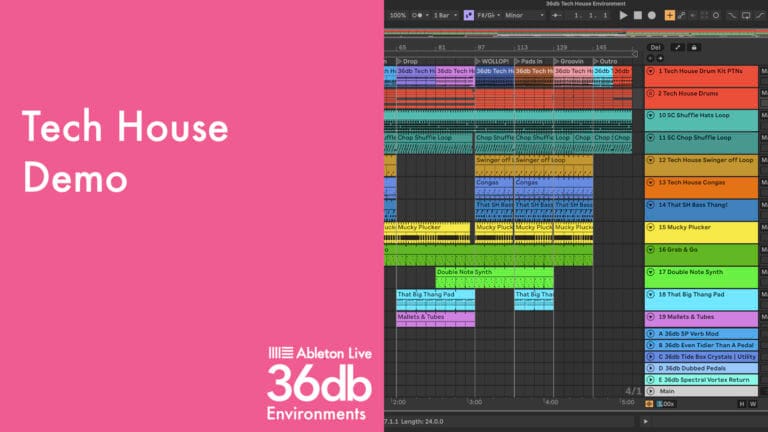
This all-in-one production template comes with 170 presets mapped to 16 macros for Instrument & Effects Racks, all using Ableton Live™ native plug-ins. It’s packed with fully functioning instruments, Drum Racks™, FX chains, channel strips, and MIDI, plus a demo arrangement you can endlessly deconstruct and remix. With its unlimited versatility and PUSH 3 readiness, it’s perfect for live performances, DJ gigs, or studio sessions, whether you’re a beginner or an expert.
Check out the table below for all the features, and for more detail watch the Walkthrough videos
USER GUIDE: 36db Tech House Environment Live 11 Content
Tech House Environment by 36db
170 PRESETS, FX CHAINS, AND RACKS FOR PROFESSIONAL TECH HOUSE PRODUCTION
MAKE YOUR OWN TRIPLE PACK: Buy any three or more 36db Artist Series Packs, Environments or Elements at the same time and get a 20% discount (automatically applied at checkout).
36db’s Tech House Environment for Ableton Live™ is your ultimate toolkit for making Tech House tracks like Jamie Jones, Michael Bibi, Fisher, and Joseph Capriati.
This all-in-one production template comes with 170 presets mapped to 16 macros for Instrument & Effects Racks, all using Ableton Live™ native plug-ins. It’s packed with fully functioning instruments, Drum Racks™, FX chains, channel strips, and MIDI, plus a demo arrangement you can endlessly deconstruct and remix. With its unlimited versatility and PUSH 3 readiness, it’s perfect for live performances, DJ gigs, or studio sessions, whether you’re a beginner or an expert.
Check out the table below for all the features, and for more detail watch the Walkthrough videos
USER GUIDE: 36db Tech House Environment Live 11 Content
Buying for someone?Send a gift card →
Additional information
| Controllers | Ableton Push THREE Controller, Ableton Push THREE Standalone, Ableton Push TWO |
|---|---|
| Ableton Live Compatibility | Ableton Live 11 Suite, Ableton Live 12 Suite |
| Min. Requirements | Ableton Live 11 Suite |
| OS | Mac, Windows |
PRICE: £35.00
Product reviews
5 out of 5
1 review
How item rating is calculated
We show the average based on reviews. Only genuine reviews are displayed.
Sort by
May 14, 2025
This reviewer bought this product from our store.
Great introduction for learning production techniques in an entirely new style of music for me. I've been incorporating the drums sounds & drum rack into my work (especially the kick & hats) along with the effects racks. It's also been super instructive to open up the included racks and see which Ableton devices are being used & how they're put together.
Tech House Environment by 36db
Focus On The Music
When trying to tap into your creative side, it can be tough to find the perfect mix of sounds. That’s where 36db’s Environments comes in. With our top-of-the-line instruments and effects racks, you can focus on the music and let your creative ideas flow freely.
Intuitive Controls
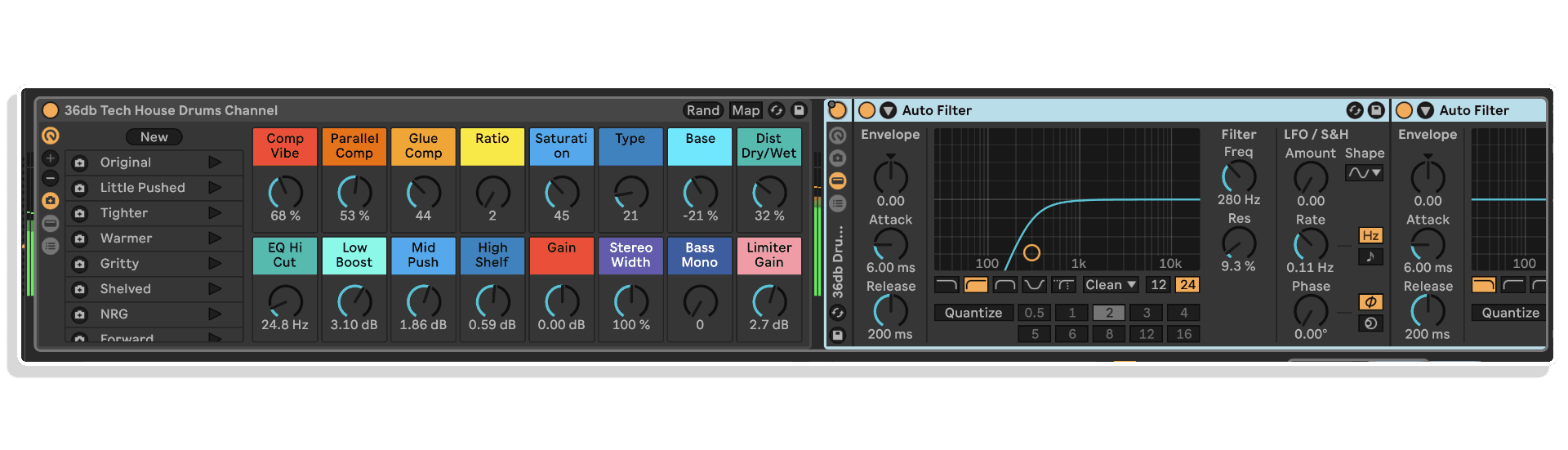
We have meticulously mapped the 36db macros to ensure maximum control and a hands-on experience with every Instrument & Effects Rack. This allows your musical ideas to come to life quickly, helping you maintain the desired vibe.
Stunning Effects
Discover the unparalleled style and texture of each 36db Effects Rack, elevating your sounds and bringing your tracks to life. Each Effects Rack includes 10 presets to enhance your sounds.
Tips and Tricks
Each of our Instrument Racks contain tips and insights. Open the info tab at the bottom left of the clip viewer and highlight the rack.
There are colour coded tutorials on what each of the macros will achieve when changed. By flicking through the presets you’ll find a host of new sounds and effects textures that instantly change the instrument or effect. You can also try using the randomize button at the top right of the rack. You’ll get some impressive results, or a cool new starting point to dial in and make your own preset snapshot. This will be saved with the rack within your Environment, or within the Rack preset when you save it to your browser.
TECH HOUSE ENVIRONMENT CONTENTS
- 4 x Live sets. Full Environment, Drum Rack™ Channel & Drum tracks
- 60 x Custom Instrument Rack presets
- 100 x Custom Effects Racks presets
- 1 x Custom Drum Rack™ featuring 16 custom drum sounds & percussive
- 4 x Custom Percussion Loop Drum Racks™
- Drums as individual tracks with MIDI
- 6 x Custom synth Instrument Racks using Ableton’s Analog™ Bass and Collision™
- 1 x Rhodes Drone Layer Drum Rack™ with 16 Custom samples
- 5 x Custom vocal samples
- 1 x EFX Sample
- 3 x Custom Impulse Response Samples
- 23 x MIDI Clips
- 5 x Custom Effects Racks
- 5 x Return Channels
- 1 x Custom Drum Channel Strips with 10 Custom Presets
- 1 x Master Channel Strip
- Full Presets for each Instrument Rack™ and Effect Rack.
Frequently Asked Questions
Tech House Environment is designed for Ableton Live and requires a version that supports Instrument and Effects Racks with macro controls. Ableton Live 10 or higher is recommended for full compatibility.
The pack includes a combination of Instrument Racks, Effects Racks, and FX Chains, all tailored for Tech House production. Each Effects Rack comes with 10 presets, and every Instrument Rack includes tips and tricks to help you get the most from the sounds.
Tech House Environment is built entirely within Ableton Live’s native devices, so no third-party plugins are required. As long as you have a compatible version of Ableton Live, you are good to go.
The pack is inspired by artists like Jamie Jones, Michael Bibi, Fisher, and Jose, covering the organic, groove-driven end of the Tech House spectrum. It is well suited to both club-ready productions and more melodic Tech House styles.
The 36db macros have been carefully mapped across every Rack to give you immediate, hands-on control over the most musical parameters. This makes it straightforward to tweak sounds in real time without diving into complex routing or editing.
Once downloaded, you can drag the Racks and presets directly into your Ableton Live User Library or place them in a folder you have added to your Places in the browser. From there they are instantly accessible for any project.
Yes, the intuitive macro layout and included tips and tricks within each Instrument Rack make this accessible for intermediate producers as well as more experienced users. The focus is on keeping your workflow fast and creative rather than technical.
Important Information
V1.0.0 – Initial Release – 2025
Our Products are generally provided as Zip file downloads which in all cases will need to be extracted and saved to your hard drive prior to installation. Details on the different file type provided and what to do with them are below.
.alp Files – These are Ableton Live Packs and will either install directly into the Packs Section of the browser of Ableton Live or ask you to save them to your hard drive. For packs that install to the library, when you double click on them you will see a pop up window asking you to confirm that installation is ok as the files are described as “Legacy”. This is fine and you are ok to proceed, the packs are created using the format for an earlier version of Live and so remain compatible with the current version.
Royalty-Free Preset, Patch & Sample Pack License Agreement
This License Agreement ("Agreement") is made between Isotonik Studios Ltd, a private limited company incorporated in England & Wales (Company No. 10701748), with its registered office at 186 West Street, Dunstable, United Kingdom, LU6 1NX ("Licensor"), and the individual or entity ("Licensee") who purchases, downloads, or otherwise acquires the preset, patch or sample pack (the "Product").
By downloading, installing, or using the Product, the Licensee agrees to the terms set out below. If the Licensee does not agree to these terms, they must not use the Product.
1. Grant of License
The Licensor grants the Licensee a non-exclusive, non-transferable, worldwide, royalty-free license to use the presets, patches, samples, loops, and related content contained in the Product (the "Content") in original musical compositions, performances, and productions for both commercial and non-commercial purposes.
2. Permitted Uses
The Licensee may:
- Use the Content in combination with other sounds in music productions, including albums, singles, film scores, TV shows, radio broadcasts, podcasts, video games, live performances, and advertising.
- Modify, process, and combine the Content with other sounds to create derivative works.
- Distribute such derivative works in physical or digital formats without owing further royalties to the Licensor.
3. Restrictions
The Licensee may not:
- Resell, redistribute, sublicense, rent, lease, lend, share, or make the raw Content (in whole or in part) available as-is or in isolation, whether for free or for payment, in any way that competes with the original Product.
- Use the Content in a way that allows others to extract or use the sounds as standalone files (e.g., in sample libraries, preset or patch banks, sound packs, or virtual instruments).
- Claim ownership of the Content in its unmodified form.
4. Ownership
All rights, title, and interest in and to the Content remain the exclusive property of the Licensor. This Agreement grants a license to use the Content but does not transfer ownership.
5. Termination
This License is effective until terminated. It will terminate automatically if the Licensee breaches any term of this Agreement. Upon termination, the Licensee must cease all use of the Content in new works, but may continue to use works already created in compliance with this Agreement.
6. No Warranty
The Content is provided "as is" without warranty of any kind, whether express or implied. The Licensor is not liable for any damages arising from the use or inability to use the Content.
7. Governing Law
This Agreement shall be governed by and construed in accordance with the laws of England and Wales, and any disputes shall be subject to the exclusive jurisdiction of the courts of England and Wales.
© 2025 Isotonik Studios Ltd. All Rights Reserved.
More from 36db
Frequently Bought Together
 -30%★ Popular
MonomonoConsolex8056 by MonomonoLive 11 & 12 · Max for Live Original price was: £50.00.£35.00Current price is: £35.00.
 ★ Popular
 ★ Popular