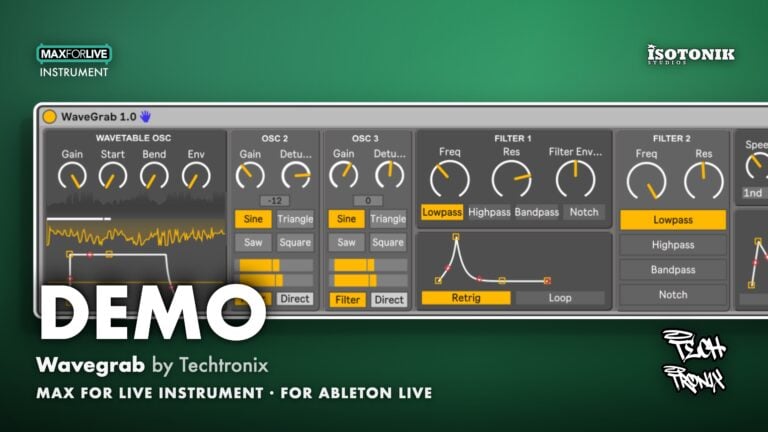
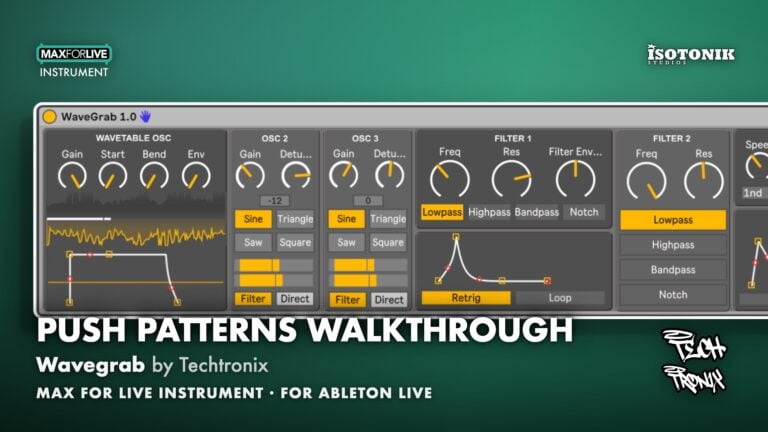
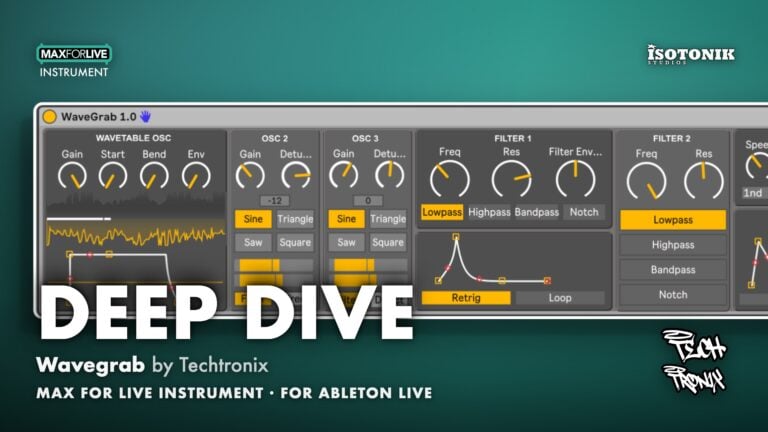
Wavegrab by Techtronix
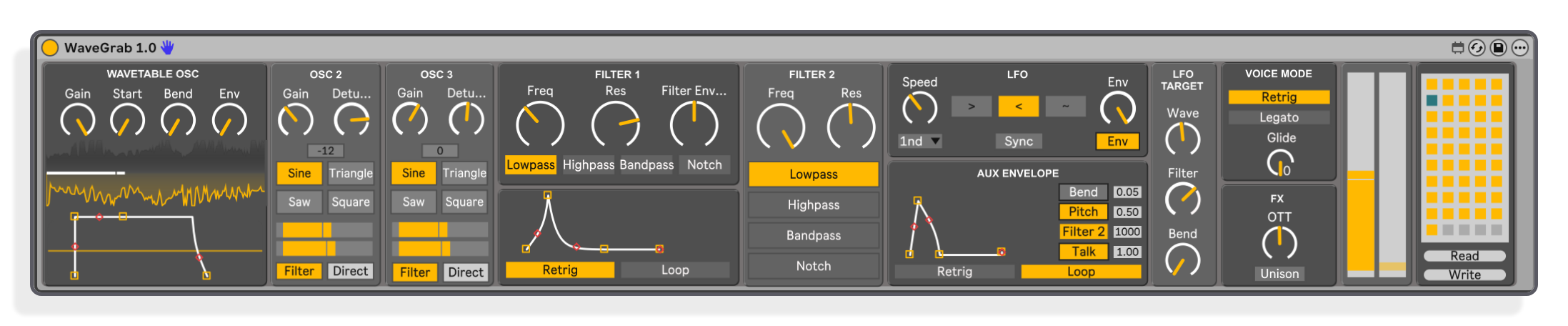
SPECTRAL MORPHING WAVETABLE SYNTHESIZER FOR ABLETON LIVE AND PUSH 3 Wavegrab is a monophonic spectral morphing wavetable synthesizer built exclusively for Ableton Live and Push 3 Controller Mode. Drag any sample or wavetable directly into the interface and Wavegrab automatically analyses, calculates and stretches it to 256 frames, delivering ultra-smooth spectral morphing without any manual pre-processing. Engineered entirely in 64-bit floating-point precision, it avoids the interpolation artefacts that limit standard 32-bit instruments. • Automatic spectral morphing: Drag any wavetable, single-cycle wave or raw sample in and Wavegrab calculates and interpolates frames instantly, no pre-processing required. • 64-bit float architecture: Sub-frame interpolation avoids digital stepping and artefacts, providing an exceptionally clean, high-fidelity morph between adjacent waveforms. • Dual auxiliary oscillators: Two independent oscillators with sine, triangle, sawtooth and square shapes, PWM modulation, fine detune, semitone tuning across two octaves, and a direct output bypass that skips the main filters entirely. • Serial filter matrix plus talking filter: Two state-variable filters in fixed serial configuration, each with LP, HP, BP and Notch topologies, plus a dedicated vowel and formant talking filter for organic, vocal-style movement. • Three independent envelopes: Amp envelope, filter and wavetable-position envelope with retrigger and loop modes, and a multi-destination auxiliary envelope for pitch, bend, Filter 2 cutoff, LFO speed and the talking filter. • Versatile LFO: Three shapes, tempo sync, retriggered on every note, routable to wavetable position, waveform bend and Filter 1 cutoff, with the auxiliary envelope able to modulate LFO speed over time. • Waveform bend: PWM-style bending applicable to any waveform, routeable to the same modulation destinations as wavetable position for complex modulations. • Custom-modelled OTT stage: Built-in multiband compressor hardwired to the master output, adding instant presence, energy and dynamic control. • Push 3 Controller Mode: Built exclusively for Ableton with Push 3 controller mode. with integrated preset saving and loading and full MIDI pitchbend and mod wheel support. • Unison mode: Dedicated unison mode for wide, layered sounds directly from the wavetable engine.
Buying for someone?Send a gift card →
Techtronix
Techtronix gains his influences from not only the classic genres we love and cherish, but also caters to the modern styles and techniques of todays music.
View all products by TechtronixOverview
Spectral morphing wavetable synth for Ableton
Meet WaveGrab: A high-fidelity spectral morphing Wavetable Synthesizer built exclusively for Ableton Live and Push 3 Controller Mode.
Engineered with an ultra-clean 64-bit floating-point precision architecture, WaveGrab delivers pristine, industry-standard spectral morphing with zero manual configuration.
Simply drop any Wavetable directly into the automated file-parsing engine. It instantly analyzes and interpolates the audio into a flawless 256-frame Wavetable, producing the smooth scanning behavior of Serum 2 and Vital without forcing you into tedious sub-menus, and with a higher precision.
Designed for complex, dynamic sound design, the core engine features an advanced Wavetable bending feature-giving you Serum-style pulse-width modulation behavior on any custom waveform. This can then be linked directly to the modulation engine to evolve over time.
Wavegrab backs up this power with dual multi-shape auxiliary oscillators featuring direct filter bypass, for massive sub-bass preservation, a serial dual-filter matrix, and a dedicated resonant talking filter for organic, vocal-style movement.
With hardware integration for push controller mode that automatically maps across seven dedicated Push 3 macro banks, an onboard grid system packed with 45 presets and 69 custom Wavetables, and a custom-modeled master OTT multiband compressor for instant dynamic grit. Along with a unison.
WaveGrab is a Monophinc Wavetable powerhouse, designed specifically for bass and lead duties. with immense sound design capabilities directly into your Ableton setup.
- Monophonic Spectral Morphing Wavetable Synthesizer built exclusively for Ableton Live and Push 3 Controller Mode
- Automated file-parsing engine: drag any wavetable into the interface and Wavegrab instantly analyses the file, calculates the number of frames in the Wavetable and stretches them to 256 frames, with no manual pre-processing or morphing required.
- 64-bit floating-point architecture delivers sub-frame interpolation, avoiding digital stepping and artefacts for an exceptionally clean, high-fidelity morph between adjacent waveforms
- Waveform bend modulation, operating like PWM but applicable to any waveform, routeable to the same destinations as wavetable position for complex modulations
- Dual auxiliary oscillators (Osc 2 and 3) with sine, triangle, sawtooth and square shapes, PWM modulation with speed and depth control, fine detune, semitone tuning across two octaves, and a direct output switch that bypasses the main filters entirely
- Serial dual state-variable filter matrix: two filters permanently routed in series, each with LP, HP, BP and Notch topologies, plus a dedicated talking filter for organic, vocal-style vowel and formant movement
- Three independent envelopes: Amp envelope hardwired to master amplitude, Filter envelope for Filter 1 cutoff and wavetable position with retrigger and loop modes, and a multi-destination auxiliary envelope for pitch, bend, Filter 2 cutoff, LFO speed and the talking filter
- Versatile LFO with three shapes (Saw down, Saw up, Sine), tempo sync, per-note retrigger, and routing to wavetable position, waveform bend and Filter 1 cutoff; auxiliary envelope can modulate LFO speed over time
- Dedicated Unison mode for wide, layered sounds from the wavetable engine
- Custom-modelled OTT multiband compressor hardwired to the master output, plus integrated preset saving and loading and full MIDI pitchbend and mod wheel support
- Installation Guide
- Max for Live Instrument .amxd device
- Ableton Live .als demo set
- Presets
- User manual (PDF)
Reviews
No reviews yet. Be the first to review this product.
Wavegrab
Auto Spectral Morph
Auto Spectral Morph analyses any dropped wavetable instantly, interpolating it into a precise 256-frame wavetable with no manual configuration required. The 64-bit floating-point engine produces smooth scanning behaviour comparable to Serum 2 and Vital, but at higher precision.
Important Information
INSTALLATION
Our Products are generally provided as Zip file downloads which in all cases will need to be extracted and saved to your hard drive prior to installation. Details on the different file type provided and what to do with them are below.
.alp Files – These are Ableton Live Packs and will either install directly into the Packs Section of the browser of Ableton Live or ask you to save them to your hard drive. For packs that install to the library, when you double click on them you will see a pop up window asking you to confirm that installation is ok as the files are described as “Legacy”. This is fine and you are ok to proceed, the packs are created using the format for an earlier version of Live and so remain compatible with the current version.
.amxd files – These are individual MaxforLive Devices and can be stored anywhere on your hard drive. We’d advise creating a folder for them and then adding that folder as a location within the Places section of Lives Browser.
LICENSE
END-USER LICENSE AGREEMENT FOR ISOTONIK STUDIOS SOFTWARE PRODUCTS.
PLEASE READ THE TERMS AND CONDITIONS OF THIS LICENSE AGREEMENT CAREFULLY BEFORE CONTINUING WITH THIS PROGRAM INSTALL.
This End-User License Agreement (referred to as “EULA”) is a legal agreement between an individual or a single entity (referred to as “LICENSEE”) and Isotonik Studios for the Isotonik Studios software product(s) which may include associated software components, media, printed materials, and “online” or electronic documentation (referred to as “SOFTWARE PRODUCT”). By installing, copying, or otherwise using the SOFTWARE PRODUCT, the LICENSEE agrees to be bound by the terms of this EULA.
This EULA represents the entire agreement concerning the program between the LICENSEE and Isotonik Studios and it supersedes any prior proposal, representation, or understanding between the parties. If the LICENSEE does not agree to the terms of this EULA, the LICENSEE should not install or use the SOFTWARE PRODUCT.
The SOFTWARE PRODUCT is protected by copyright laws and international copyright treaties, as well as other intellectual property laws and treaties. The SOFTWARE PRODUCT is licensed, not sold.
- GRANT OF LICENSE.
The SOFTWARE PRODUCT is licensed as follows:
(a) Installation and Use. Providing that the LICENSEE has paid any applicable license fees, Isotonik Studios grants the LICENSEE the right to install and use copies of the SOFTWARE PRODUCT on up to two computers in the LICENSEE’s possession that are running a validly licensed copy of the operating system for which the SOFTWARE PRODUCT was designed [e.g., Windows 10, macOS]. The computer(s) must be owned by the LICENSEE.
(b) Backup Copies. The LICENSEE may also make copies of the SOFTWARE PRODUCT as may be necessary for backup and archival purposes.
- DESCRIPTION OF OTHER RIGHTS AND LIMITATIONS.
(a) Maintenance of Copyright Notices. The LICENSEE must not remove or alter any copyright notices on any and all copies of the SOFTWARE PRODUCT.
(b) Distribution. The LICENSEE may not distribute registered copies of the SOFTWARE PRODUCT to third parties.
(c) Prohibition on Reverse Engineering, Decompilation, and Disassembly. The LICENSEE may not reverse engineer, decompile, or disassemble the SOFTWARE PRODUCT, except and only to the extent that such activity is expressly permitted by applicable law notwithstanding this limitation.
(d) Rental. The LICENSEE may not rent, lease, or lend the SOFTWARE PRODUCT.
(e) License transfer The LICENSEE may not transfer their license to the SOFTWARE PRODUCT to any third party. Any attempt to do so will be considered a violation of this EULA.
(f) Support Services. Isotonik Studios may provide the LICENSEE with support services related to the SOFTWARE PRODUCT for a period of 12 months following the date of purchase. Any supplemental software code provided to the LICENSEE as part of the Support Services shall be considered part of the SOFTWARE PRODUCT and subject to the terms and conditions of this EULA.
(g) Compliance with Applicable Laws. The LICENSEE must comply with all applicable laws regarding use of the SOFTWARE PRODUCT.
- TERMINATION Without prejudice to any other rights, Isotonik Studios may terminate this EULA if the LICENSEE fails to comply with the terms and conditions of this EULA. In such event, the LICENSEE must destroy all copies of the SOFTWARE PRODUCT in the LICENSEE’s possession.
- COPYRIGHT All title, including but not limited to copyrights, in and to the SOFTWARE PRODUCT and any copies thereof are owned by Isotonik Studios or its suppliers. All title and intellectual property rights in and to the content which may be accessed through use of the SOFTWARE PRODUCT is the property of the respective content owner and may be protected by applicable copyright or other intellectual property laws and treaties. This EULA grants the LICENSEE no rights to use such content. All rights not expressly granted are reserved by Isotonik Studios.
- NO WARRANTIES Isotonik Studios expressly disclaims any warranty for the SOFTWARE PRODUCT. The SOFTWARE PRODUCT is provided ‘As Is’ without any express or implied warranty of any kind, including but not limited to any warranties of merchantability, noninfringement, or fitness of a particular purpose. Isotonik Studios does not warrant or assume responsibility for the accuracy or completeness of any information, text, graphics, links or other items contained within the SOFTWARE PRODUCT. Isotonik Studios makes no warranties respecting any harm that may be caused by the transmission of a computer virus, worm, time bomb, logic bomb, or other such computer program. Isotonik Studios further expressly disclaims any warranty or representation to the LICENSEE or to any third party.
- LIMITATION OF LIABILITY In no event shall Isotonik Studios be liable for any damages (including, without limitation, lost profits, business interruption, or lost information) arising out of the LICENSEE’s use of or inability to use the SOFTWARE PRODUCT, even if Isotonik Studios has been advised of the possibility of such damages. In no event will Isotonik Studios be liable for loss of data or for indirect, special, incidental, consequential (including lost profit), or other damages based in contract, tort or otherwise. Isotonik Studios shall have no liability with respect to the content of the SOFTWARE PRODUCT or any part thereof, including but not limited to errors or omissions contained therein, libel, infringements of rights of publicity, privacy, trademark rights, business interruption, personal injury, loss of privacy, moral rights or the disclosure of confidential information.
Frequently Asked Questions
What is Wavegrab?
Wavegrab is a monophonic spectral morphing wavetable synthesizer built as a Max for Live instrument, designed exclusively for Ableton Live and Push 3 Controller Mode. It runs on 64-bit floating-point precision and features an automated file-parsing engine “Drag and Drop”, dual auxiliary oscillators, a serial filter matrix, a talking filter, three independent envelopes, a tempo-syncable LFO, a custom-modelled OTT compressor and unison on the master output.
Which versions of Ableton Live does Wavegrab support?
Wavegrab supports Ableton Live 12. It requires the Suite edition because Max for Live is included with Suite.
Does Wavegrab work on both Mac and Windows?
Yes, Wavegrab is compatible with both Mac and Windows. Mac users need to load the included Mac preset JSON file into the synth after installation to get the presets working.
What kinds of files can I load into the wavetable oscillator?
You can drag in pre-made wavetable files, raw single-cycle waves, custom hand-drawn shapes, or regular audio samples. Wavegrab automatically analyses the file length, calculates the number of frames, and stretches them to 256 with no manual configuration needed. Wavegrab was designed for Wavetables, so they will morph smoothly. samples will work well for granular and single cycle waveforms will work as expected.
How does Wavegrab's spectral morphing compare to other wavetable synthesizers?
Wavegrab performs spectral interpolation automatically on any wavetable you load, including files that have not been pre-processed in a separate editor. In tools like Serum you would need to open the wavetable editor and manually select spectral morph; Wavegrab does this for you. Its 64-bit float architecture also provides cleaner sub-frame interpolation than standard 32-bit instruments. such as Vital and Serum 2.
Do the auxiliary oscillators have to pass through the main filters?
No. Each auxiliary oscillator (Osc 2 and Osc 3) has a direct output switch that routes its signal straight to the master output stage, bypassing the main filters entirely. This is useful for preserving sub-bass when the main filters are set to high-pass, for example.
Does Wavegrab come with Presets and Wavetables?
Yes, Wavegrab comes with 45 presets and the ability to write and save your own banks as well as patches. It also comes with 69 Custom made Wavetables.
In Depth
What Wavegrab Is
Wavegrab is a monophonic spectral morphing wavetable synthesizer built as a Max for Live instrument, engineered exclusively for Ableton Live and Push 3 Controller Mode. Every calculation inside it runs at 64-bit floating-point precision, which means sub-frame interpolation avoids the digital stepping and artefacts that appear in standard 32-bit architectures. The result is an exceptionally clean, high-fidelity morph between adjacent waveforms, heard directly in your next session the moment you drag a file in.
How the Wavetable Engine Works
Wavegrab operates via an automated file-parsing engine. Drag any Wavetable file into the interface, whether it is non-morphed or pre-morphed. Wavegrab instantly analyses the file length, calculates the precise number of tables present, using this information and stretches them out to 256 frames, averaging them automatically. in exactly the same way serum will do this. but without the need to edit the wavetable. No manual configuration or pre-processing is required. Because this scanning behaviour works on any audio file, samples can be scanned just like wavetables for a granular effect, as well as single-cycle waveforms behaving as expected.
Wavegrab performs spectral morphing interpolation automatically, even on basic shapes. In Serum you would need to open the editor and select spectral morph manually. Wavegrab does this for you, producing an identical spectral morphing result without touching the wavetable file. The interpolation matches the ultra-smooth, seamless scanning behaviour found in industry-standard wavetable synthesizers, but at higher numerical precision.
Waveform Bend
Alongside Wavetable position control, Wavegrab includes a Bend parameter. Think of it as PWM applied to any waveform, not just squares. Bend can be routed to the same modulation destinations as Wavetable position, which means you can layer complex, evolving shapes that move in ways a conventional PWM oscillator cannot reach. The scope at the bottom of the oscillator section gives you a real-time view of what the output waveform actually looks like as you manipulate and bend it.
Oscillators
Two independent auxiliary oscillators supplement the wavetable engine. Each offers four classic shapes: Sine, Triangle, Sawtooth, and Square. Both oscillators include fine detune and semitone tuning across two octaves up and down. Square waves on Oscillators 2 and 3 also carry PWM modulation with independent speed and depth controls. A dedicated Direct Out switch on each auxiliary oscillator bypasses the main filters entirely and feeds straight to the master output stage. This is useful when a high-pass filter is cutting the low end of the main signal: route a sine wave direct and you keep a thick sub underneath without colouring it with the filter chain.
Filtering
Wavegrab includes a flexible multi-stage filtering matrix. Two state-variable primary filters sit in a fixed serial configuration, Filter 1 feeding into Filter 2. Both filters offer four selectable topologies: Lowpass, Highpass, Bandpass, and Notch. A dedicated Talking Filter forms a third, specialised stage for organic, vocal-style formant movement, controlled dynamically via the modulation engine. Between the two serial filters and the Talking Filter you have a wide range of tonal shaping available in a single device, from tight resonant sweeps to expressive vowel movement.
Modulation
Three independent envelopes handle modulation across the signal chain. Envelope 1 is hardwired to master amplitude. Envelope 2 is hardwired to Filter 1 cutoff and wavetable position, and can be set to Retrigger or Loop mode, where attack and decay determine loop speed. Envelope 3 is a multi-destination auxiliary source: activate any combination of Bend, Pitch, Filter 2 cutoff, LFO Speed, and Talking Filter, with positive or negative depth on each destination. Envelope 3 can also be set to loop, giving you slow, rhythmic modulation without an LFO.
The LFO provides three shapes: Saw Down, Saw Up, and Sine. Each shape retriggers on every note for a consistent result. The LFO can be tempo-synced to Ableton’s clock, and its destinations include wavetable position, waveform bend, and Filter 1 cutoff. An Envelope Switch control lets the Aux Envelope modulate LFO speed over time, giving flexible and complex routing from a compact interface.
Effects and Output
Wavegrab includes a custom-modelled OTT multiband compressor hardwired to the master output. It adds presence and energy to wavetables and layered textures without requiring a separate effects chain. A dedicated Unison mode is also included. Wavegrab responds fully to standard MIDI inputs, including hardware Pitchbend and Mod Wheel data. An integrated preset saving and loading architecture is built in, with Push 3 bank support included.
Compatibility and Installation
Wavegrab runs on Ableton Live 11 and 12 on both Mac and Windows. Installation involves copying the AMXD file to your User Library and dropping the included Wavetable folder to the correct shared documents location for your operating system. Mac users load the included JSON preset file via the Read button to activate the preset system.
LowCpu Usage
Wavegrab uses a very small amount of cpu and ram usage. expect to have as many as 35 + instances running on most modern Pc’s
More from Techtronix