

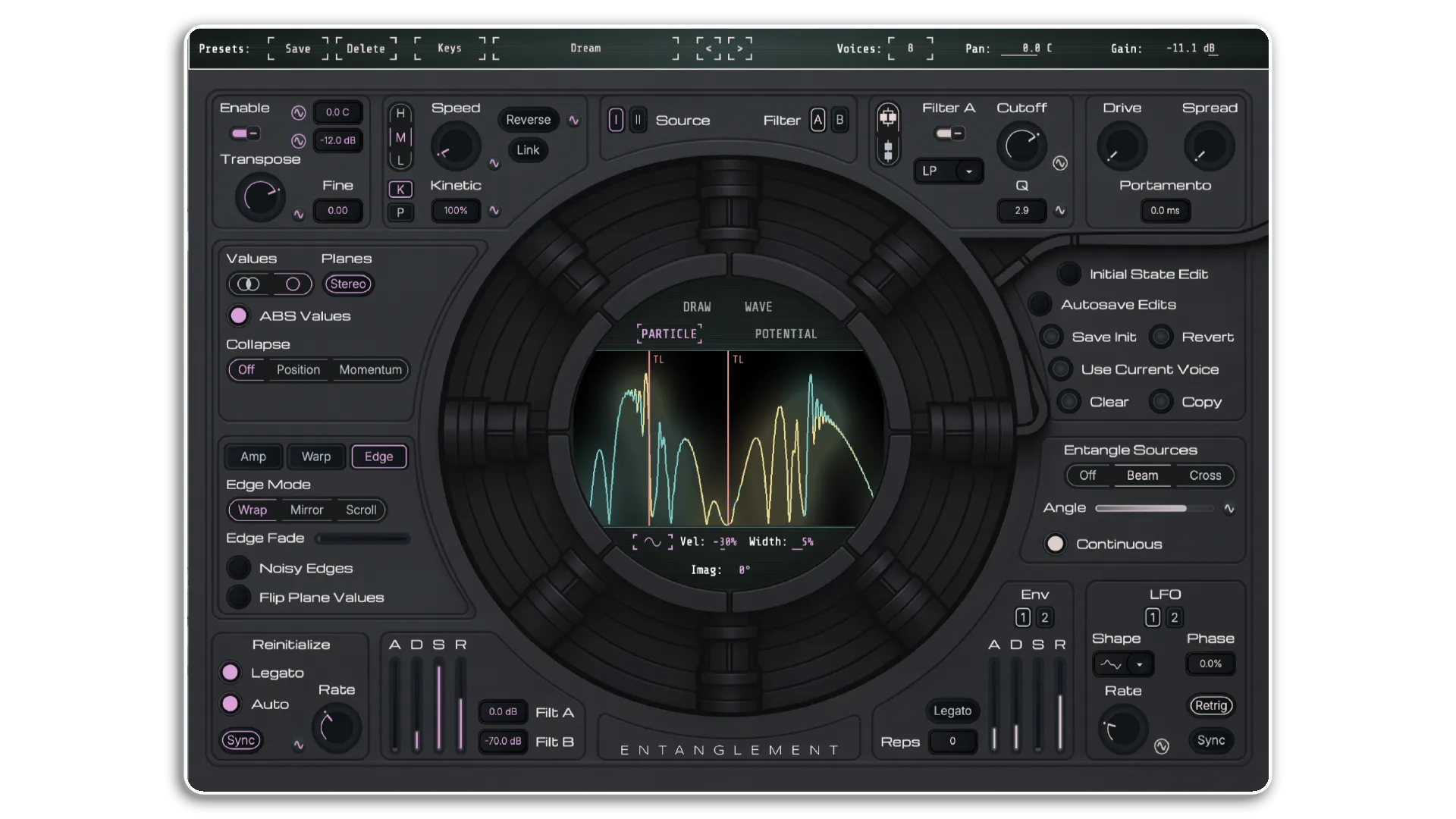
Entanglement VST by Dillon Bastan
SYNTHESIS WHERE THE PHYSICS IS REAL
Entanglement is a dual-oscillator wavetable synthesizer powered by an actual quantum wave function simulation — waveforms that evolve, cascade, and transform in real time according to the Schrödinger equation. From pristine, breathing pads to cascading harmonic chaos, no two voices ever sound exactly the same.
Inside you’ll find:
- 200 professionally designed presets spanning ambient, experimental, cinematic, and beyond
- Two independent quantum oscillators with particle, draw, potential, and waveform injection modes
- Quantum Entanglement system (Beam Splitter & Cross-Kerr) for complex inter-oscillator waveform coupling
- Full MPE support with per-voice modulation from 2 LFOs, 2 ADSRs, 2 Spray sources, and all standard MIDI sources
- Two multi-mode filters (ladder and biquad) in parallel or serial routing
- Waveform manipulation suite: Amp, Warp, and Edge processing post-simulation
- Preset contributions from Jason Gear, Apu Nanu, TRNGS, Warkyuu, Tunnel, and Ah! Kosmos
Available for Windows (VST3/Standalone), Mac (AU/VST3/Standalone; macOS 11.0+ for Standalone), and Linux (LV2/VST3/Standalone; amd64).
Sound design at the quantum level — and it sounds like nothing else.
USER GUIDE: Entanglement User Manual
Entanglement VST by Dillon Bastan
SYNTHESIS WHERE THE PHYSICS IS REAL
Entanglement is a dual-oscillator wavetable synthesizer powered by an actual quantum wave function simulation — waveforms that evolve, cascade, and transform in real time according to the Schrödinger equation. From pristine, breathing pads to cascading harmonic chaos, no two voices ever sound exactly the same.
Inside you’ll find:
- 200 professionally designed presets spanning ambient, experimental, cinematic, and beyond
- Two independent quantum oscillators with particle, draw, potential, and waveform injection modes
- Quantum Entanglement system (Beam Splitter & Cross-Kerr) for complex inter-oscillator waveform coupling
- Full MPE support with per-voice modulation from 2 LFOs, 2 ADSRs, 2 Spray sources, and all standard MIDI sources
- Two multi-mode filters (ladder and biquad) in parallel or serial routing
- Waveform manipulation suite: Amp, Warp, and Edge processing post-simulation
- Preset contributions from Jason Gear, Apu Nanu, TRNGS, Warkyuu, Tunnel, and Ah! Kosmos
Available for Windows (VST3/Standalone), Mac (AU/VST3/Standalone; macOS 11.0+ for Standalone), and Linux (LV2/VST3/Standalone; amd64).
Sound design at the quantum level — and it sounds like nothing else.
USER GUIDE: Entanglement User Manual
Buying for someone?Send a gift card →
Additional information
| OS | Mac, Windows |
|---|
PRICE: £46.00
Product reviews
5 out of 5
8 reviews
How item rating is calculated
We show the average based on reviews. Only genuine reviews are displayed.
Customer media
Sort by
September 4, 2026
This reviewer bought this product from our store.
I was already impressed with the M4L version but VST is a bit more refined in more ways than one. I’d put Entanglement on par with any of the larger developer’s more expensive plugins that cover similar ground.
I recommend this product
May 18, 2026
This reviewer bought this product from our store.
You can make fresh sounds
A synth that has put a new spin on plugins...a bit daunting at first but when you get familiar becomes easier to achieve new sounds...it sits very well with all of my other stuff..great price also
A very impressive range of presets
Honestly can't think of any!
I recommend this product
March 29, 2026
This reviewer bought this product from our store.
I love it!!!
The perfect tool for creating dynamic ambient drones.
I use the M4L DRONE NOTE tool to control it, and then I use the M4L ROTATION tool to add stereo to the mono.
I recommend this product
March 23, 2026
This reviewer bought this product from our store.
Dillon Bastan's Entanglement VST is a mind-blowing wavetable synthesizer based on true quantum mechanics simulations (Schrödinger's equation). Instead of simple oscillators, audio is generated by continuously evolving, organic and chaotic waveforms. It's an incredibly deep and captivating instrument, perfect for complex ambient pads, experimental textures, and generative sound design. Now available in all formats (VST/AU/Standalone), not just for Max for Live. An absolute masterpiece for those seeking never-before-heard sounds.
I recommend this product
March 14, 2026
This reviewer bought this product from our store.
Good stuff
Seemed intimidating at first, but surprisingly easy to use and get good results.
Sharing a side-by-side comparison with the m4l in case anyone is curious. The plugin version has more presets and features.
Sounds great
Creative presets
Quick results, tinkering doesn't take much time after the initial learning curve
Probably not your main synth
I recommend this product
Entanglement VST by Dillon Bastan
Quantum mechanics governs the behavior of matter at its smallest scale. Entanglement brings that same mathematics directly into your sound design — a dual-oscillator wavetable synthesizer where waveforms don’t just play back, they evolve in real time according to the Schrödinger equation. The result is a synthesizer unlike anything else on the market: organically shifting, physically grounded, and capable of sounds that range from pristine fundamentals to mind-bending, cascading harmonic chaos.
At its core, Entanglement simulates a 1D quantum wave function for each of its two independent oscillators. You seed the simulation with energy — quantum particles, free-drawn waveforms, or your own audio files — and the physics engine takes over, continuously transforming what you hear. Layer in environmental Potentials to sculpt how the energy behaves, apply post-processing manipulations, and then entangle both oscillators together for complex, intertwined modulation that no conventional wavetable synth can replicate.
With 200 professionally designed presets, a deep internal modulation matrix, full MPE support, and cross-platform availability as a VST3, AU, LV2, and standalone instrument, Entanglement is built for producers, sound designers, and experimenters who want to go somewhere genuinely new.
The Quantum Engine
Each of Entanglement’s two source oscillators runs its own independent quantum wave function simulation. You populate the simulation with energy using four distinct cursor modes:
- Particle — Click to place quantum wave packets of various shapes (Sine, Chirped, Square, Triangle, Noise, and more). Velocity sets frequency and direction; Width shapes the packet; Imag rotates the imaginary plane phase for directional splitting and complex dynamics.
- Potential — Add environmental factors that warp and redirect energy in different ways. Each Potential type carries its own Strength parameter and interacts uniquely with simulation speed for dramatic timbral results.
- Draw — Free-draw energy directly onto the waveform display, with Erase mode and external controller/automation mapping via Ext Draw for real-time, Etch-A-Sketch-style interaction.
- Wave — Inject single-cycle waveform shapes — from built-in options to your own .wav/.aif files — directly into the simulation. At zero speed this becomes a conventional wavetable oscillator; increase speed and your waveform transforms as quantum energy.
Wave Value Modes & Waveform Shaping
The simulation maintains two simultaneous waveform planes — Real and Imaginary. Entanglement gives you full control over how you derive a final waveform from these:
- Combined Mode — Multiple mathematical equations merge the Real and Imaginary planes (r² + i², |r + i|, and others), each producing a distinctly different sonic character — from smooth and polar to noisy and bipolar.
- Single Plane Mode — Use just the Real or Imaginary plane individually, or enable Stereo to hard-pan both planes left and right for instant, naturally evolving stereo width.
- ABS Values — Apply absolute values for a waveform centered at the bottom, adding body and density to the sound.
- Bandlimiting — Optional anti-aliasing toggle, switchable for those moments where a rawer, more aliased character is the right choice.
- Quantum Collapse — Collapse the waveform to its highest-energy point (Position) or into the phase/momentum space (Momentum) for glitchy, rhythmically interesting instability.
Waveform Manipulations
Applied after the quantum simulation, three manipulation menus give you precise control over the resulting waveform:
- Amp — Hard Clip, Soft Clip, Fold, Normalize, and Compress modes handle amplitude behavior. Pre/Post gain staging, Smooth for rounding off edges, and Damp for time-linked amplitude decay.
- Warp — Stretch (compress/expand the waveform horizontally), Warp (compress toward/from center), FM shaping with ratio control, peak Width scaling, and Step quantization of amplitude values.
- Edge — Three edge modes determine what happens when waveform energy reaches the boundary: Wrap (clean and standard), Mirror (reflective, explosive at higher speeds), and Scroll (damped fade-out). Edge Fade, Noisy Edges, and Flip Plane Values add further creative texture.
Quantum Entanglement
When both oscillators are active, they can be quantum entangled — linking their wave states in ways that go far beyond conventional cross-modulation:
- Beam Splitter — The Angle parameter determines how the two wave states are balanced and intertwined. Enable Continuous entanglement to apply it at every simulation frame, producing a complex, evolving AM-like modulation as the waveforms become genuinely intertwined.
- Cross-Kerr — Always-on continuous entanglement with independent bipolar sensitivity controls for each oscillator’s influence on the other. Higher sensitivity values produce more dramatic waveform transformations.
Simulation Control
- Speed — The core simulation rate knob, scalable from near-static to dramatically fast. Three framerate modes (H/M/L) balance CPU load against temporal resolution — Low is recommended for most applications.
- Reverse — Run the simulation backwards (negative dt) for mirror-image waveform evolution.
- BPM Link — Sync simulation speed to host tempo (120 BPM = 1:1 scaling).
- Kinetic & Potential Scaling — Individually scale the Kinetic hamiltonian (rate of waveform value change) and Potential hamiltonian (rate of Potential influence) for fine-tuned control over simulation dynamics.
- Reinitialize — Set a designed initial quantum state that each new voice starts from. Auto-reinitialize at synced or free MS rates for rhythmic stutter effects. Legato mode determines whether held-note transitions preserve or reset wave state.
Modulation, Filters & Global Settings
- Internal Modulation System — 2 LFOs (basic, complex, and Perlin noise shapes; free or synced rate; phase offset and retrig), 2 ADSR envelopes (with repeat/loop and Legato options), and 2 Spray values (random per-voice). Any modulatable parameter accepts any combination of sources with no limit.
- MPE Support — Full MPE modulation including Slide and Pressure (enable MPE in your DAW for Ableton compatibility).
- MIDI Sources — Velocity, Aftertouch, Modwheel, and Key pitch all available as bipolar modulation sources.
- Filters — Two filters (A and B) with Parallel or Serial routing. Ladder filter types (12 and 24) alongside standard biquadratic options. Each filter has independent Cutoff and Q/Resonance.
- Global — Overdrive, stereo Spread, Portamento (legato glide in MS), master Voices count, global Pan and Gain.
What’s Included
- Entanglement plugin (VST3, AU, LV2, and Standalone formats)
- 200 professionally designed presets across multiple categories
- Full user manual
- Preset contributions from Jason Gear, Apu Nanu, TRNGS, Warkyuu, Tunnel, and Ah! Kosmos
System Requirements
- Windows: VST3 / Standalone
- Mac: AU / VST3 / Standalone (minimum macOS 11.0 for Standalone)
- Linux: LV2 / VST3 / Standalone (amd64)
Frequently Asked Questions
A: Entanglement is a dual-oscillator wavetable synthesizer that uses a 1D quantum wave function (Schrödinger equation) simulation to generate and evolve waveforms in real time. Each of its two oscillators runs an independent quantum simulation that you seed with energy — via quantum particles, free drawing, environmental potentials, or imported waveform files — producing sounds that continuously transform and evolve. It includes 200 presets, full MPE support, quantum oscillator entanglement, an internal modulation system, and dual multi-mode filters.
A:
- Windows: VST3, Standalone
- Mac: AU, VST3, Standalone (macOS 11.0 minimum for Standalone)
- Linux: LV2, VST3, Standalone (amd64)
A: When both oscillators are active, Entanglement allows you to couple their wave states using Beam Splitter or Cross-Kerr algorithms — physically inspired entanglement methods that create complex inter-oscillator modulation impossible to achieve with conventional FM or AM techniques. Beam Splitter with Continuous mode, for example, produces an evolving AM-like effect where both waveforms become genuinely intertwined over time.
A: Yes. Entanglement supports full MPE modulation including Slide and Pressure alongside standard MIDI sources (Velocity, Aftertouch, Modwheel, and Key pitch). Note that in some DAWs, including Ableton Live, you’ll need to enable MPE for the plugin manually.
Entanglement for Linux Install instructions
This archive contains:
– VST3/ Entanglement.vst3 bundle (directory)
– LV2/ Entanglement.lv2 bundle (directory)
– Standalone/ Entanglement standalone application (binary)
– install.sh Installer script (recommended)
– ReadMe-Linux.txt
Recommended install (easy)
————————–
1) Extract the archive:
tar -xzf Entanglement-linux-
cd Entanglement-linux-
2) Install for the current user (no sudo):
./install.sh user
This installs to:
VST3: ~/.vst3/
LV2: ~/.lv2/
Standalone: ~/.local/bin/
NOTE: Make sure ~/.local/bin is in your PATH to run the standalone from a terminal:
echo ‘export PATH=”$HOME/.local/bin:$PATH”‘ >> ~/.bashrc
source ~/.bashrc
System-wide install (requires sudo)
———————————–
If you want all users to have access, run:
./install.sh system
This installs to:
VST3: /usr/local/lib/vst3/
LV2: /usr/local/lib/lv2/
Standalone: /usr/local/bin/
Network requirements (trial / activation)
—————————————–
Entanglement uses HTTPS for licensing on Linux. Make sure these are installed:
– libcurl (or curl)
– ca-certificates
If you see “Trial error: Network error”, install the packages above and retry.
Examples:
Ubuntu/Debian: sudo apt install libcurl4 ca-certificates
Fedora: sudo dnf install libcurl ca-certificates
Arch: sudo pacman -S curl ca-certificates
After installing
—————-
– Restart your DAW and rescan plugins.
– If your DAW does not automatically scan user plugin locations, add:
~/.vst3 and/or ~/.lv2
Uninstall
———
User install:
Remove:
~/.vst3/Entanglement.vst3
~/.lv2/Entanglement.lv2
~/.local/bin/Entanglement
~/.local/share/Dillon Bastan/Entanglement
System install:
Remove:
/usr/local/lib/vst3/Entanglement.vst3
/usr/local/lib/lv2/Entanglement.lv2
/usr/local/bin/Entanglement
/usr/local/share/Dillon Bastan/Entanglement
Notes
—–
– VST3 and LV2 are distributed as directory “bundles”, so they must be copied as folders.
– If you installed system-wide, you may need to run your DAW once after install so it refreshes plugin caches.
– For any issues reach out to [email protected]
Thanks for the support and enjoy <3
Install automatically with the PKG installer which installs: the VST3, AU, and Standalone.
The presets should appear in “Users/Shared/Dillon Bastan/” when you first launch the plugin/standalone.
You’ll likely have to choose “Open Anyway” from your Security and Privacy settings as an “Unidentified Developer”.
A: You can explore more of Dillon Bastan’s tools and devices here: DILLON BASTAN
Important Information
## v1.0.4 – 29 July 2026
Release Notes:
– Fixed crashes dealing with OpenGL lifecycle
– Notarization for Mac installers
V1.0.0 – Initial Release – March 2026
Our Products are generally provided as Zip file downloads which in all cases will need to be extracted and saved to your hard drive prior to installation. Details on the different file type provided and what to do with them are below.
.alp Files – These are Ableton Live Packs and will either install directly into the Packs Section of the browser of Ableton Live or ask you to save them to your hard drive. For packs that install to the library, when you double click on them you will see a pop up window asking you to confirm that installation is ok as the files are described as “Legacy”. This is fine and you are ok to proceed, the packs are created using the format for an earlier version of Live and so remain compatible with the current version.
.amxd files – These are individual MaxforLive Devices and can be stored anywhere on your hard drive. We’d advise creating a folder for them and then adding that folder as a location within the Places section of Lives Browser.
To Install And Use Presets:
TO INSTALL AND USE THE DEVICE:
Drop the entire folder called “Entanglement” (NOT the folder called “Entanglement v.x.x.x” but the one within it) into the folder called “…/ableton/user library/presets/instruments/max instrument”. This is found in the “Places” section in Live’s browser or in your finder/file browser. If you are going through finder (mac) the Ableton folder is typically in your “Music” folder. If you are going through your file browser (windows) it is typically in the “My Music” folder.
So if you followed the above instructions correctly for the presets to load, the full path to the device file (the .amxd file) shoulde be:
…/user library/presets/instuments/max instrument/Entanglement/Entanglement.amxd
NOTE:
The device will not recall presets nor will you be able to share presets on other systems unless this is installed correctly in the User Library!!!
END-USER LICENSE AGREEMENT FOR ISOTONIK STUDIOS SOFTWARE PRODUCTS.
PLEASE READ THE TERMS AND CONDITIONS OF THIS LICENSE AGREEMENT CAREFULLY BEFORE CONTINUING WITH THIS PROGRAM INSTALL.
This End-User License Agreement (referred to as “EULA”) is a legal agreement between an individual or a single entity (referred to as “LICENSEE”) and Isotonik Studios for the Isotonik Studios software product(s) which may include associated software components, media, printed materials, and “online” or electronic documentation (referred to as “SOFTWARE PRODUCT”). By installing, copying, or otherwise using the SOFTWARE PRODUCT, the LICENSEE agrees to be bound by the terms of this EULA.
This EULA represents the entire agreement concerning the program between the LICENSEE and Isotonik Studios and it supersedes any prior proposal, representation, or understanding between the parties. If the LICENSEE does not agree to the terms of this EULA, the LICENSEE should not install or use the SOFTWARE PRODUCT.
The SOFTWARE PRODUCT is protected by copyright laws and international copyright treaties, as well as other intellectual property laws and treaties. The SOFTWARE PRODUCT is licensed, not sold.
- GRANT OF LICENSE.
The SOFTWARE PRODUCT is licensed as follows:
(a) Installation and Use. Providing that the LICENSEE has paid any applicable license fees, Isotonik Studios grants the LICENSEE the right to install and use copies of the SOFTWARE PRODUCT on up to two computers in the LICENSEE’s possession that are running a validly licensed copy of the operating system for which the SOFTWARE PRODUCT was designed [e.g., Windows 10, macOS]. The computer(s) must be owned by the LICENSEE.
(b) Backup Copies. The LICENSEE may also make copies of the SOFTWARE PRODUCT as may be necessary for backup and archival purposes.
- DESCRIPTION OF OTHER RIGHTS AND LIMITATIONS.
(a) Maintenance of Copyright Notices. The LICENSEE must not remove or alter any copyright notices on any and all copies of the SOFTWARE PRODUCT.
(b) Distribution. The LICENSEE may not distribute registered copies of the SOFTWARE PRODUCT to third parties.
(c) Prohibition on Reverse Engineering, Decompilation, and Disassembly. The LICENSEE may not reverse engineer, decompile, or disassemble the SOFTWARE PRODUCT, except and only to the extent that such activity is expressly permitted by applicable law notwithstanding this limitation.
(d) Rental. The LICENSEE may not rent, lease, or lend the SOFTWARE PRODUCT.
(e) License transfer The LICENSEE may not transfer their license to the SOFTWARE PRODUCT to any third party. Any attempt to do so will be considered a violation of this EULA.
(f) Support Services. Isotonik Studios may provide the LICENSEE with support services related to the SOFTWARE PRODUCT for a period of 12 months following the date of purchase. Any supplemental software code provided to the LICENSEE as part of the Support Services shall be considered part of the SOFTWARE PRODUCT and subject to the terms and conditions of this EULA.
(g) Compliance with Applicable Laws. The LICENSEE must comply with all applicable laws regarding use of the SOFTWARE PRODUCT.
- TERMINATION Without prejudice to any other rights, Isotonik Studios may terminate this EULA if the LICENSEE fails to comply with the terms and conditions of this EULA. In such event, the LICENSEE must destroy all copies of the SOFTWARE PRODUCT in the LICENSEE’s possession.
- COPYRIGHT All title, including but not limited to copyrights, in and to the SOFTWARE PRODUCT and any copies thereof are owned by Isotonik Studios or its suppliers. All title and intellectual property rights in and to the content which may be accessed through use of the SOFTWARE PRODUCT is the property of the respective content owner and may be protected by applicable copyright or other intellectual property laws and treaties. This EULA grants the LICENSEE no rights to use such content. All rights not expressly granted are reserved by Isotonik Studios.
- NO WARRANTIES Isotonik Studios expressly disclaims any warranty for the SOFTWARE PRODUCT. The SOFTWARE PRODUCT is provided ‘As Is’ without any express or implied warranty of any kind, including but not limited to any warranties of merchantability, noninfringement, or fitness of a particular purpose. Isotonik Studios does not warrant or assume responsibility for the accuracy or completeness of any information, text, graphics, links or other items contained within the SOFTWARE PRODUCT. Isotonik Studios makes no warranties respecting any harm that may be caused by the transmission of a computer virus, worm, time bomb, logic bomb, or other such computer program. Isotonik Studios further expressly disclaims any warranty or representation to the LICENSEE or to any third party.
- LIMITATION OF LIABILITY In no event shall Isotonik Studios be liable for any damages (including, without limitation, lost profits, business interruption, or lost information) arising out of the LICENSEE’s use of or inability to use the SOFTWARE PRODUCT, even if Isotonik Studios has been advised of the possibility of such damages. In no event will Isotonik Studios be liable for loss of data or for indirect, special, incidental, consequential (including lost profit), or other damages based in contract, tort or otherwise. Isotonik Studios shall have no liability with respect to the content of the SOFTWARE PRODUCT or any part thereof, including but not limited to errors or omissions contained therein, libel, infringements of rights of publicity, privacy, trademark rights, business interruption, personal injury, loss of privacy, moral rights or the disclosure of confidential information.
More from Dillon Bastan
Frequently Bought Together
 Sale
SaleAqusmatiq AudioDedalus Delay VST by Aqusmatiq AudioLive 10 & 11 & 12 Price range: £0.00 through £26.00