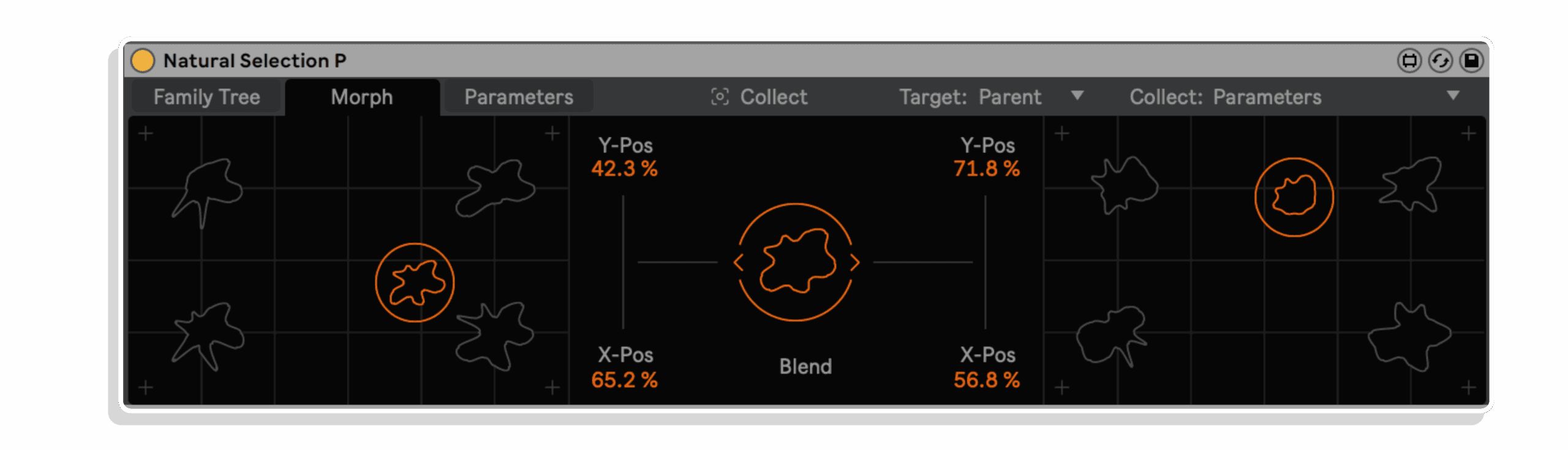
Natural Selection P by Dillon Bastan
EVOLVE AND MORPH PRESETS OF ANY DEVICE OR RACK OF DEVICES IN LIVE
TRIPLE PACK SAVINGS: Add any three or more Dillon Bastan products to your cart and save 20% automatically at checkout!
Natural Selection P is a groundbreaking sound design tool that evolves presets of any external device or rack in Ableton, treating their parameter values like DNA. By mixing and mutating these values, you can create new sounds and refine them over generations. You play the role of the environment, guiding the evolution of sounds without manually tweaking synth parameters.
Key Features:
- Genetic preset evolution for external devices
- Morph up to 8 presets with XY quadrants
- Comprehensive parameter management for external devices
- 12 versatile presets included
USER GUIDE: Natural Selection P User Manual
Natural Selection P by Dillon Bastan
EVOLVE AND MORPH PRESETS OF ANY DEVICE OR RACK OF DEVICES IN LIVE
TRIPLE PACK SAVINGS: Add any three or more Dillon Bastan products to your cart and save 20% automatically at checkout!
Natural Selection P is a groundbreaking sound design tool that evolves presets of any external device or rack in Ableton, treating their parameter values like DNA. By mixing and mutating these values, you can create new sounds and refine them over generations. You play the role of the environment, guiding the evolution of sounds without manually tweaking synth parameters.
Key Features:
- Genetic preset evolution for external devices
- Morph up to 8 presets with XY quadrants
- Comprehensive parameter management for external devices
- 12 versatile presets included
USER GUIDE: Natural Selection P User Manual
Buying for someone?Send a gift card →
Additional information
| MaxforLive | Control Devices |
|---|---|
| Ableton Live Compatibility | Ableton Live 10 Standard with MaxforLive, Ableton Live 10 Suite, Ableton Live 11 Standard with MaxforLive, Ableton Live 11 Suite, Ableton Live 12 Standard with MaxforLive, Ableton Live 12 Suite |
| Min. Requirements | Ableton Live 10 Standard with MaxforLive Installed or Ableton Live 10 Suite |
| OS | Mac, Windows |
PRICE: £16.00

Product reviews
No reviews yet. Be the first to review this product.
Natural Selection P by Dillon Bastan
OVERVIEW AND INSPIRATION
Natural Selection explores an evolutionary process with sound design!
It treats the parameter values of presets as DNA values which are mixed together and mutated over generations to create new sounds.
You play the role of the environment, selecting preferable sounds to continue to pass their DNA to the next generations. And over the generations the sound will evolve closer to your preferences.
Sound design with your sonic intuition, without even touching the synth parameters (unless you want to;))!
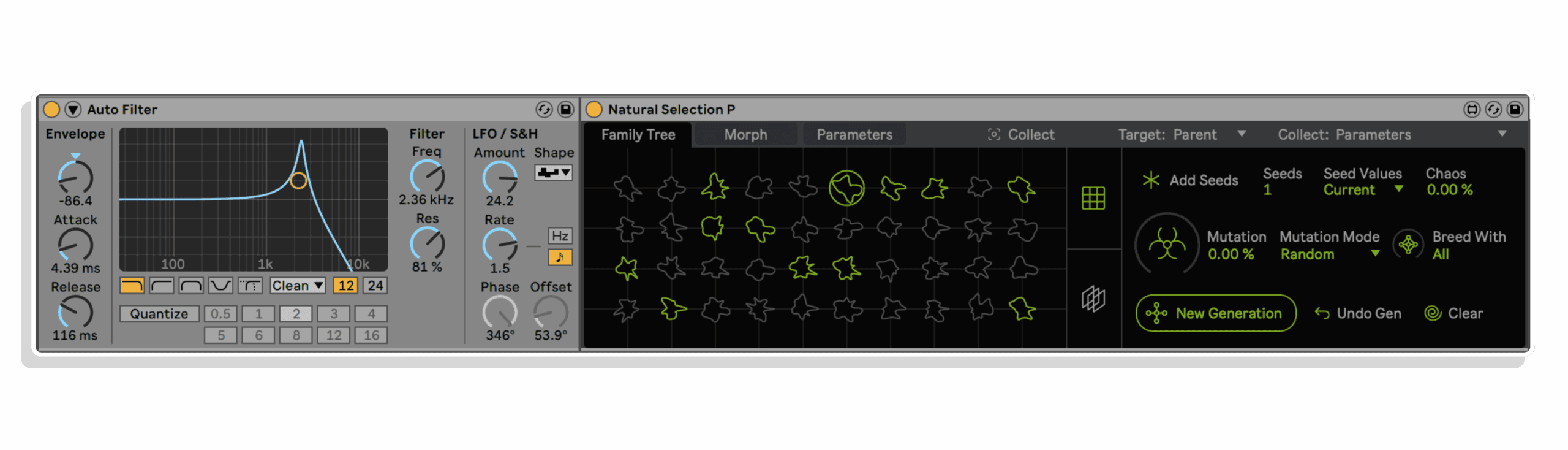
There are two versions of Natural Selection. This device, Natural Selection P, can mix and mutate presets of any external device or rack of devices in Ableton to discover new sounds and combinations. Check out the features and videos below to understand more the evolution system!
The other version – Natural Selection S – applies this process to an internal versatile poly synth + rhythm generator + effects system without any limitations!
The design of these devices is by River Marchand
***IMPORTANT*** scroll down to the ‘LIMITATIONS AND CAVEATS OF USING THIS DEVICE’ section to make sure you understand its limitations BEFORE PURCHASING!
NATURAL SELECTION P INCLUDES:
The device, user manual, 12 presets (each of which contain many presets!)
NATURAL SELECTION P FEATURES:
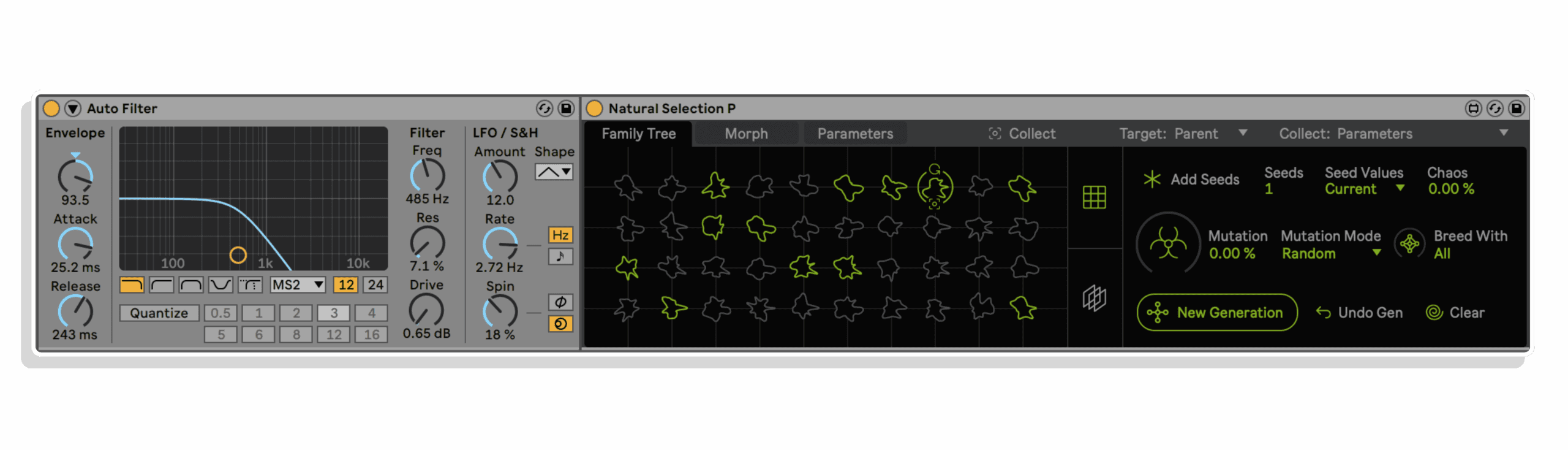
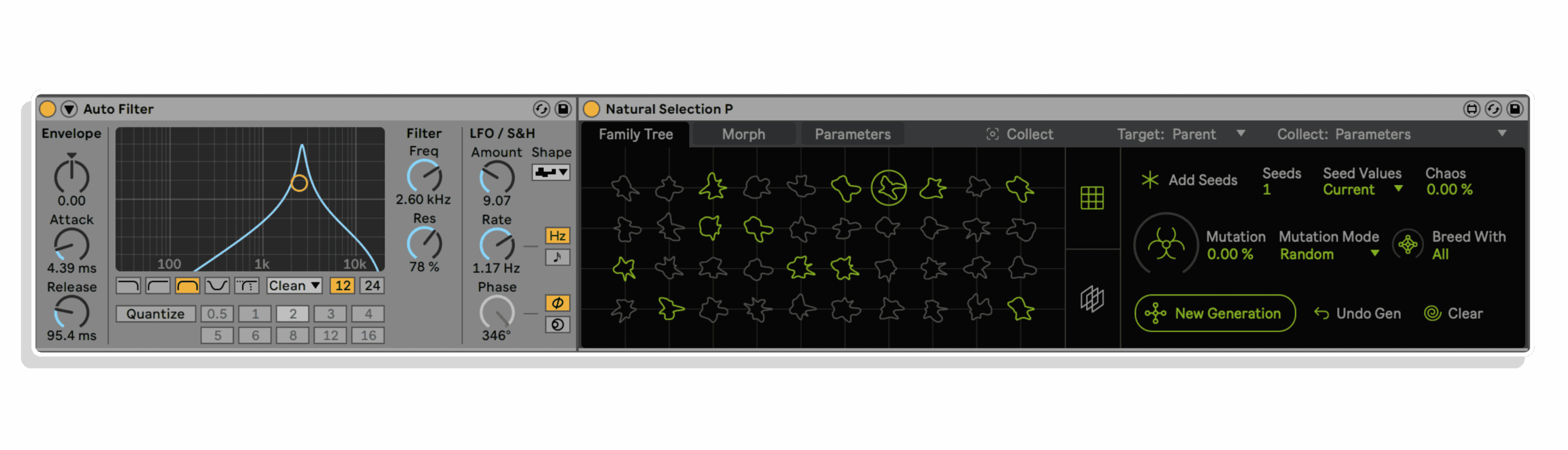
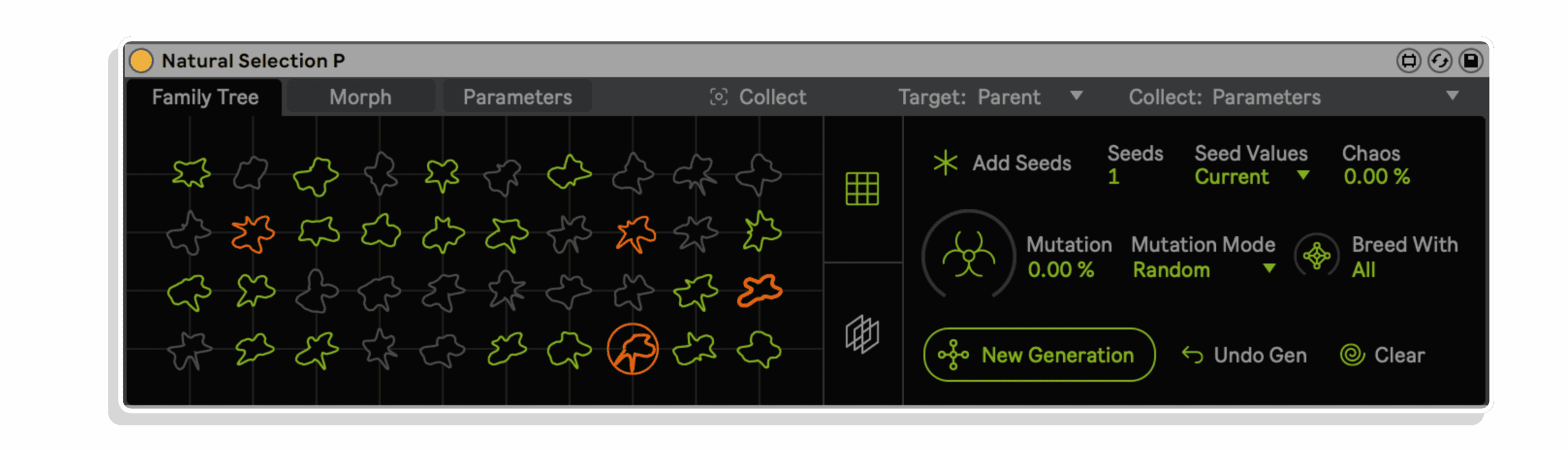
- Genetic algorithm that treats parameter value presets as a genotypes or ‘DNA’. New ‘child’ presets are created by mixing 2 parents’ parameter values to create new generations of presets (all generations forming a ‘Family Tree’ of presets). Some of the functions included in this system:
- Mutation amount and two mutation modes
- Ability to limit the number of generations copulating for a new generation
- Ability to start a new tree of presets from those of a previoius tree
- Two modes for adding ‘seed’ presets: (1) current values of the device with optional random spreading (this way you can also load in adv presets and add them as seeds to the tree). (2) Randomized seeds
- Functions for remixing parent presets DNA to create a new child and for saving the current parameter values into any child’s DNA
- Rating system to add bias to certain genetics when creating a new generation
- Two page UI for navigating the various generations and children of presets
- A section where you can morph up to 8 presets with two XY quadrants and a blend slider between them
- For this device, the genetic preset system applies to presets of any external device or rack of devices in Ableton
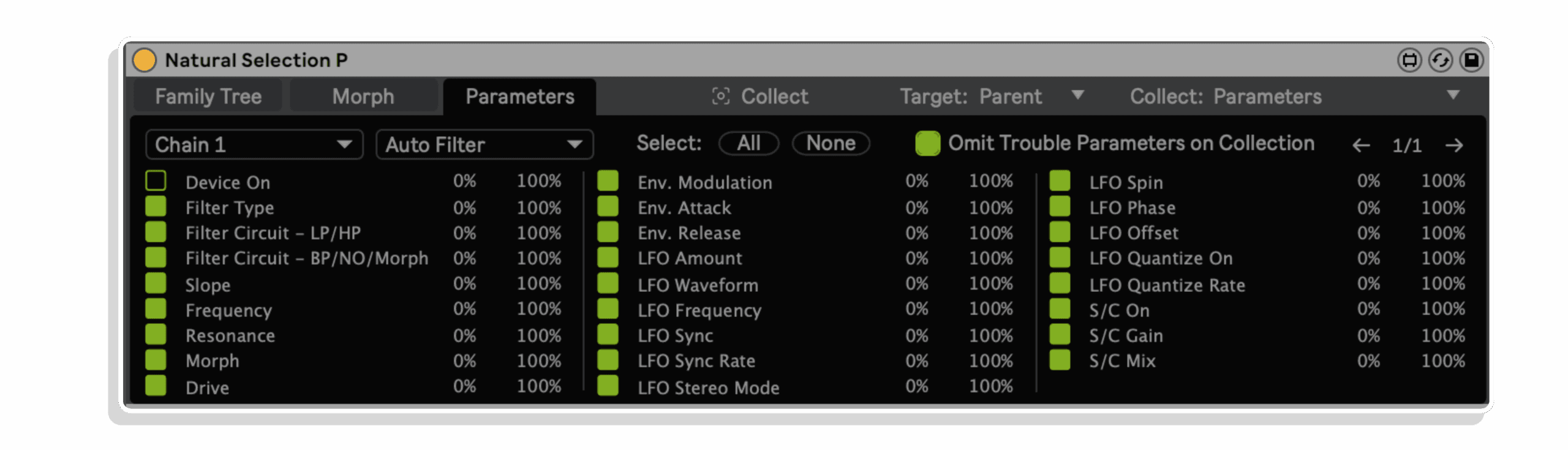
- A section where you can manage the targeted parameters from the target device(s):
- Ability to toggle a parameter being included in the genetic preset system or not
- Ability to scale the value range of any parameter for the genetic preset loading to function within
- Toggle to automatically filter out problematic paramaters to target such as a ‘Device On’ parameter
- Functions for selecting or deselecting all parameters for a selected device
- *** LIMITATIONS AND CAVEATS OF USING THIS DEVICE. VERY IMPORTANT READ ***
- This device works with external devices parameters. Therefore, it can only work with parameters that are Automatable and Visible. What this means is that the only parameters it (and any device for that matter) can access and set are ones that you can MIDI map and automate and map to macros. So parameters like Wavetable’s waveform selection, or any newer devices modulation matrix, or Operators’ custom partial multislider, etc etc cannot be accessed by this device and therefore can not be included in the child/seed preset creation, mixing and recollection. Additionally and similarly there are big limitations with plugins. The only plugin parameters it can access are the ones that are set visible through the ‘Configure’ process. Ableton only allows up to 127 parameter values in a plugin to be exposed, so Natural Selection P can only collect up to 127 values from presets to use, and of course complex parameters in a plugin that can’t be exposed to Live can’t be used.
- So this means that if you want to use Natural Selection P to mix entire presets then you won’t be able to do that for cases mentioned above. Now that doesn’t mean you can’t use it at all on those devices, but maybe not in ways of evolving entire presets. For example, maybe you can;t change Wavetable’s modulation matrix at or or selected wavetable waveform. But you could still evolve and mutate a patch that includes other parameters of it, or the macros of a rack it is in, etc.
- So if you do want to evolve complete entire presets of external devices, you will have to use more basic ones such as Operator, all the OG effects, etc, or plugins that don’t have over 127 parameter values. This is also the reason I made the other device, Natural Selection S, which applies the same evolution process to an internal synth/rhythm generator/FX engine.
ALSO AVAILABLE AS PART OF THE NATURAL SELECTION BUNDLE WHICH ALSO INCLUDES NATURAL SELECTION S
BUILD YOUR OWN BUNDLE! Purchase any 3 Dillon Bastan Products at the same time and claim a 20% discount at checkout!
Frequently Asked Questions
Natural Selection P treats the parameter values of any external device or rack in Ableton Live as genetic DNA, mixing and mutating them across generations to evolve entirely new sounds. Rather than tweaking knobs manually, you act as the environment by selecting which sounds survive and pass their traits forward. It is a genuinely unique approach to sound design driven by evolutionary logic.
Natural Selection P works with Ableton Live and requires Max for Live, so Live Suite or a separate Max for Live licence is needed. It is compatible with any external device or rack of devices within Live, meaning it can evolve parameters across synthesisers, effects, and instrument racks.
Yes, Natural Selection P is a Max for Live device, so you will need either Ableton Live Suite or Ableton Live Standard with a Max for Live licence to run it.
You load presets into Natural Selection P, and the device mixes and mutates their parameter values to generate a population of new sound variations. You listen and select the ones you prefer, and those chosen sounds pass their parameter DNA to the next generation. Over multiple generations, the sounds evolve progressively closer to your sonic preference.
Natural Selection P can work with any device or rack of devices in Ableton Live, including third-party plugins, as long as their parameters are exposed and mappable within Live. If the plugin makes its parameters available to Live, Natural Selection P can treat them as evolvable DNA values.
Yes, there are two versions. Natural Selection P, which is this device, focuses specifically on mixing and mutating presets of external devices and racks within Ableton Live. The other version of Natural Selection has a different focus, so it is worth checking both product pages to find the right fit for your workflow.
After purchase you will receive a downloadable file containing the Max for Live device. Simply drag it into your Ableton Live browser or place it in your Max for Live devices folder, and it will be ready to use on any track in your session.
Important Information
V1.0.0 – Initial Release – September 2024
Our Products are generally provided as Zip file downloads which in all cases will need to be extracted and saved to your hard drive prior to installation. Details on the different file type provided and what to do with them are below.
.alp Files: These are Ableton Live Packs and will either install directly into the Packs Section of the browser of Ableton Live or ask you to save them to your hard drive. For packs that install to the library, when you double click on them you will see a pop up window asking you to confirm that installation is ok as the files are described as “Legacy”. This is fine and you are ok to proceed, the packs are created using the format for an earlier version of Live and so remain compatible with the current version.
.amxd files: These are individual MaxforLive Devices and can be stored anywhere on your hard drive. We’d advise creating a folder for them and then adding that folder as a location within the Places section of Lives Browser.
TO INSTALL AND USE PRESETS:
Drop the entire folder called “Natural Selection P” (NOT the folder called “Natural Selection P v.x.x.x”, but the one that is next to this file) into the folder called “ableton/user library/presets/audio effects/max audio effect”. This is found in the “Places” section in Live’s browser or in your finder/file browser. If you are going through finder (mac) the Ableton User Library folder is typically in your “Music” folder. If you are going through your file browser (windows) it is typically in the “My Music” folder.
The full path to the MaxForLive device should be:
“…/ableton/user library/presets/audio effects/max audio effect/Natural Selection P/Natural Selection P.amxd”
IF THERE ARE ISSUES:
Make sure you have the latest version of Live 10/11/12. If that doesn’t resolve things then download the latest version of Max/MSP from cycling74.com (you don’t need a license to download it), then in Live’s preferences, set max to that version and reset Live (if you have an old crack of Live then you will have to add a line in the options.txt text to make that work, google for more info). If you still have issues after that then reach out to me at [email protected].
END-USER LICENSE AGREEMENT FOR ISOTONIK STUDIOS SOFTWARE PRODUCTS.
PLEASE READ THE TERMS AND CONDITIONS OF THIS LICENSE AGREEMENT CAREFULLY BEFORE CONTINUING WITH THIS PROGRAM INSTALL.
This End-User License Agreement (referred to as “EULA”) is a legal agreement between an individual or a single entity (referred to as “LICENSEE”) and Isotonik Studios for the Isotonik Studios software product(s) which may include associated software components, media, printed materials, and “online” or electronic documentation (referred to as “SOFTWARE PRODUCT”). By installing, copying, or otherwise using the SOFTWARE PRODUCT, the LICENSEE agrees to be bound by the terms of this EULA.
This EULA represents the entire agreement concerning the program between the LICENSEE and Isotonik Studios and it supersedes any prior proposal, representation, or understanding between the parties. If the LICENSEE does not agree to the terms of this EULA, the LICENSEE should not install or use the SOFTWARE PRODUCT.
The SOFTWARE PRODUCT is protected by copyright laws and international copyright treaties, as well as other intellectual property laws and treaties. The SOFTWARE PRODUCT is licensed, not sold.
- GRANT OF LICENSE.
The SOFTWARE PRODUCT is licensed as follows:
(a) Installation and Use. Providing that the LICENSEE has paid any applicable license fees, Isotonik Studios grants the LICENSEE the right to install and use copies of the SOFTWARE PRODUCT on up to two computers in the LICENSEE’s possession that are running a validly licensed copy of the operating system for which the SOFTWARE PRODUCT was designed [e.g., Windows 10, macOS]. The computer(s) must be owned by the LICENSEE.
(b) Backup Copies. The LICENSEE may also make copies of the SOFTWARE PRODUCT as may be necessary for backup and archival purposes.
- DESCRIPTION OF OTHER RIGHTS AND LIMITATIONS.
(a) Maintenance of Copyright Notices. The LICENSEE must not remove or alter any copyright notices on any and all copies of the SOFTWARE PRODUCT.
(b) Distribution. The LICENSEE may not distribute registered copies of the SOFTWARE PRODUCT to third parties.
(c) Prohibition on Reverse Engineering, Decompilation, and Disassembly. The LICENSEE may not reverse engineer, decompile, or disassemble the SOFTWARE PRODUCT, except and only to the extent that such activity is expressly permitted by applicable law notwithstanding this limitation.
(d) Rental. The LICENSEE may not rent, lease, or lend the SOFTWARE PRODUCT.
(e) License transfer The LICENSEE may not transfer their license to the SOFTWARE PRODUCT to any third party. Any attempt to do so will be considered a violation of this EULA.
(f) Support Services. Isotonik Studios may provide the LICENSEE with support services related to the SOFTWARE PRODUCT for a period of 12 months following the date of purchase. Any supplemental software code provided to the LICENSEE as part of the Support Services shall be considered part of the SOFTWARE PRODUCT and subject to the terms and conditions of this EULA.
(g) Compliance with Applicable Laws. The LICENSEE must comply with all applicable laws regarding use of the SOFTWARE PRODUCT.
- TERMINATION Without prejudice to any other rights, Isotonik Studios may terminate this EULA if the LICENSEE fails to comply with the terms and conditions of this EULA. In such event, the LICENSEE must destroy all copies of the SOFTWARE PRODUCT in the LICENSEE’s possession.
- COPYRIGHT All title, including but not limited to copyrights, in and to the SOFTWARE PRODUCT and any copies thereof are owned by Isotonik Studios or its suppliers. All title and intellectual property rights in and to the content which may be accessed through use of the SOFTWARE PRODUCT is the property of the respective content owner and may be protected by applicable copyright or other intellectual property laws and treaties. This EULA grants the LICENSEE no rights to use such content. All rights not expressly granted are reserved by Isotonik Studios.
- NO WARRANTIES Isotonik Studios expressly disclaims any warranty for the SOFTWARE PRODUCT. The SOFTWARE PRODUCT is provided ‘As Is’ without any express or implied warranty of any kind, including but not limited to any warranties of merchantability, noninfringement, or fitness of a particular purpose. Isotonik Studios does not warrant or assume responsibility for the accuracy or completeness of any information, text, graphics, links or other items contained within the SOFTWARE PRODUCT. Isotonik Studios makes no warranties respecting any harm that may be caused by the transmission of a computer virus, worm, time bomb, logic bomb, or other such computer program. Isotonik Studios further expressly disclaims any warranty or representation to the LICENSEE or to any third party.
- LIMITATION OF LIABILITY In no event shall Isotonik Studios be liable for any damages (including, without limitation, lost profits, business interruption, or lost information) arising out of the LICENSEE’s use of or inability to use the SOFTWARE PRODUCT, even if Isotonik Studios has been advised of the possibility of such damages. In no event will Isotonik Studios be liable for loss of data or for indirect, special, incidental, consequential (including lost profit), or other damages based in contract, tort or otherwise. Isotonik Studios shall have no liability with respect to the content of the SOFTWARE PRODUCT or any part thereof, including but not limited to errors or omissions contained therein, libel, infringements of rights of publicity, privacy, trademark rights, business interruption, personal injury, loss of privacy, moral rights or the disclosure of confidential information.
More from Dillon Bastan
 Coming Soon
Frequently Bought Together