MGenBend by Tomavatars
BEND TIME. RESHAPE RHYTHM. A CURVE-DRIVEN MIDI SEQUENCER FOR ABLETON LIVE.
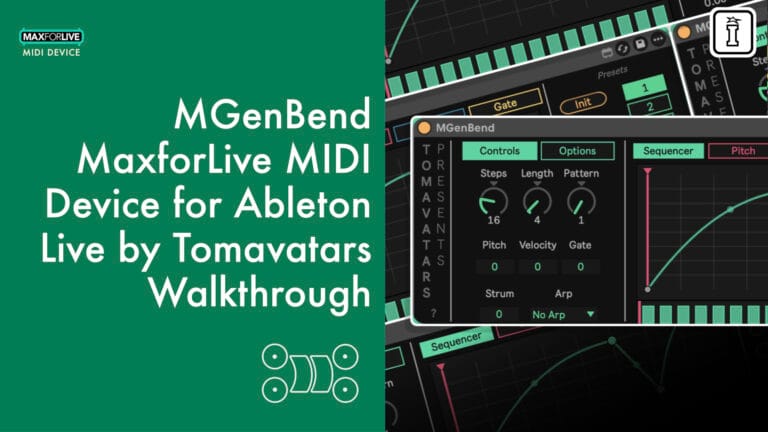
What if the timing of your sequence wasn’t fixed—but something you could physically bend? MGenBend by Tomavatars is a MaxforLive MIDI effect that warps how notes fire across a loop using a drawable curve, turning rigid step patterns into fluid, time-bent rhythmic landscapes.
Inside you’ll find:
- A phasor-based curve sequencer with up to 6 editable points and segment bending for acceleration/deceleration
- Pitch, Velocity, and Gate sequencer lanes for per-step melodic and dynamic control
- 79 auto-generated patterns, strum control, and ascending/descending/random arpeggiator
- 8 presets with smooth morphing, full Push integration, and complete automation support
- Polymeter and polyrhythm from independent step count and loop length settings
Requires Ableton Live 12 with MaxforLive (Live 11 may also be compatible) | Mac & Windows
Time is a curve. Start bending it.
USER GUIDE: MGenBend Manual
MGenBend by Tomavatars
BEND TIME. RESHAPE RHYTHM. A CURVE-DRIVEN MIDI SEQUENCER FOR ABLETON LIVE.
What if the timing of your sequence wasn’t fixed—but something you could physically bend? MGenBend by Tomavatars is a MaxforLive MIDI effect that warps how notes fire across a loop using a drawable curve, turning rigid step patterns into fluid, time-bent rhythmic landscapes.
Inside you’ll find:
- A phasor-based curve sequencer with up to 6 editable points and segment bending for acceleration/deceleration
- Pitch, Velocity, and Gate sequencer lanes for per-step melodic and dynamic control
- 79 auto-generated patterns, strum control, and ascending/descending/random arpeggiator
- 8 presets with smooth morphing, full Push integration, and complete automation support
- Polymeter and polyrhythm from independent step count and loop length settings
Requires Ableton Live 12 with MaxforLive (Live 11 may also be compatible) | Mac & Windows
Time is a curve. Start bending it.
USER GUIDE: MGenBend Manual
Buying for someone?Send a gift card →
Additional information
| MaxforLive | MIDI Devices, Sequencers |
|---|---|
| Ableton Live Compatibility | Ableton Live 12 Standard with MaxforLive, Ableton Live 12 Suite |
| Min. Requirements | Ableton Live 12 with MaxforLive Installed |
PRICE: £15.00
Product reviews
No reviews yet. Be the first to review this product.
MGenBend by Tomavatars
Overview & Inspiration
Traditional step sequencers move through time in a straight line. MGenBend lets you warp that line—accelerating, decelerating, and reshaping how notes unfold across a loop. Created by Tomavatars, this MaxforLive MIDI effect takes a phasor-based approach to sequencing, where a drawable curve determines the timing relationship between steps. The result is a device that generates rhythmic patterns impossible to achieve with conventional sequencers, all from a beautifully simple interface.
At its core, MGenBend works relative to the notes already in your MIDI clip. Rather than generating notes from scratch, it retriggers and reshapes existing clip content according to its curve sequencer, pitch, velocity, and gate lanes. This means your musical material stays rooted in intention while MGenBend introduces controlled chaos, unexpected syncopation, and evolving rhythmic variation.
Features & Highlights
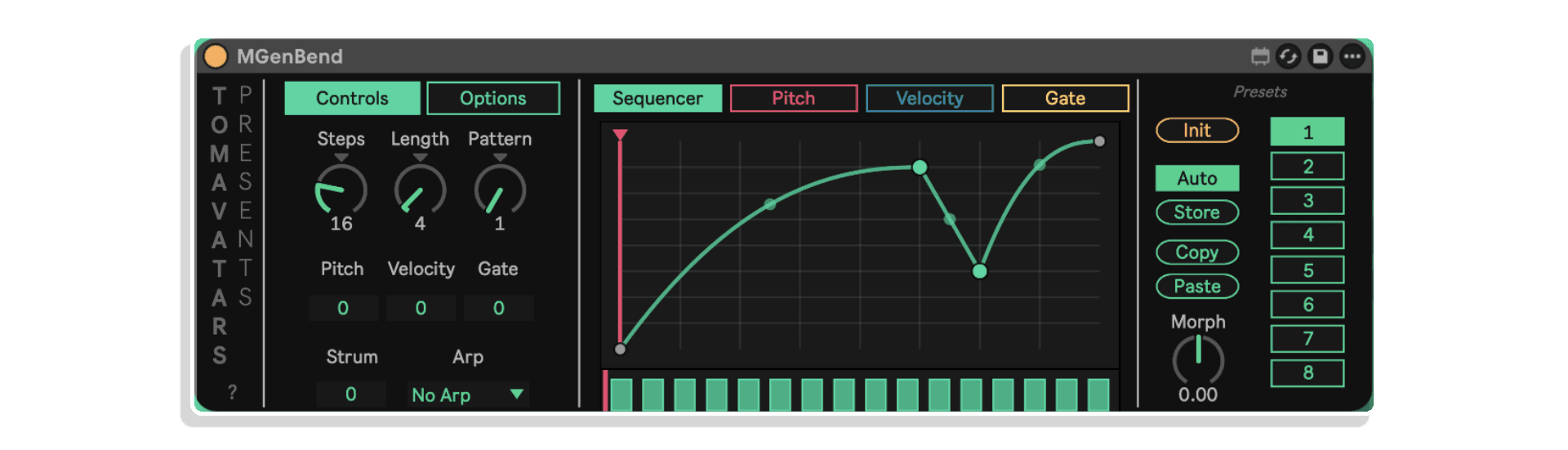
Curve-Based Time Sequencer – The heart of MGenBend. Draw a curve across the central display to control when steps fire within a loop. A straight diagonal triggers notes evenly; bend the curve and time itself warps—notes cluster, rush, drag, and stutter. Add up to six additional control points to create complex timing shapes, and use segment bending for smooth acceleration and deceleration between points.
Pitch Sequencer – Transpose individual steps from -12 to +12 semitones relative to the clip’s original pitch. Build melodic variation, create chromatic runs, or introduce tonal surprises without touching your original MIDI data.
Velocity Sequencer – Shape dynamics per step using an averaged velocity system. The sequencer blends its values with the incoming note velocity (0–127), giving you musical dynamic control that respects the original performance while adding rhythmic accents and fades.
Gate Sequencer – Control note length per step between 5 and 250 ms. Craft tight staccato bursts, sustained legato phrases, or anything in between—all independently per step.
79 Auto-Generated Patterns – The Pattern control instantly generates rhythmic templates with steps and silences, giving you immediate starting points for complex sequences. Dial through patterns to discover rhythms you’d never program manually.
Polymeter & Polyrhythm – Set the number of steps independently from the loop length (measured in bars) to create naturally evolving polymetric relationships. What takes careful planning in a standard sequencer happens here in seconds.
Strum & Arpeggiator – When playing chords, the Strum control adds delay between notes for guitar-like strumming effects. The built-in arpeggiator offers ascending, descending, and random modes for instant melodic movement from held chords.
8 Presets with Morphing – Save complete device states across eight preset slots, including all curve shapes, sequencer lanes, and control parameters. The Morph dial smoothly interpolates between the previous, current, and next preset—perfect for live transitions and evolving arrangements. Auto-store keeps changes saved automatically, or switch to manual mode for deliberate recall.
Full Push Integration & Automation – Every parameter is fully automatable and optimized for Ableton Push control. A dedicated “show when touch” option displays the active parameter window on Push for intuitive hands-on performance.
How to Use
Drop MGenBend onto a MIDI track before your instrument, then create a clip with notes in Session or Arrangement View. MGenBend reads the incoming MIDI and retriggers those notes according to its internal sequencer. Start by adjusting the Steps and Length controls to define your rhythmic grid, then draw curves in the main Sequencer tab to bend the timing. Layer in pitch, velocity, and gate variations from their respective tabs for deeper expression.
For performance, use the Pattern knob to quickly swap between 79 auto-generated rhythmic templates, or store your own configurations across the eight preset slots. The Morph dial is especially powerful in live contexts—automate it to glide smoothly between contrasting rhythmic states over time.
Ideal For
- Producers seeking unconventional rhythmic patterns and time-bent sequences
- Live performers who need real-time MIDI manipulation with Push integration
- Composers exploring polymetric and polyrhythmic structures
- Sound designers looking for a quick pattern generator with deep tweakability
- Anyone who wants to transform static MIDI clips into dynamic, evolving performances
What’s Included
- MGenBend MaxforLive MIDI effect device (.amxd)
- Comprehensive PDF manual with setup and workflow instructions
Requirements
- Ableton Live 12 with MaxforLive (Live 11 may also be compatible)
- Mac or Windows
MGenBend turns the simple act of bending a curve into a gateway for rhythmic discovery. Whether you’re generating patterns for a live set or warping melodies in the studio, it’s a device built for fun, speed, and genuine surprise.
Frequently Asked Questions
A: MGenBend is a MaxforLive MIDI effect that uses a drawable curve to control the timing of step sequences. Rather than triggering notes at fixed intervals, you shape a curve that bends time—accelerating, decelerating, and reshaping when notes fire within a loop. It also includes pitch, velocity, and gate sequencer lanes, 79 auto-generated patterns, an arpeggiator, and preset morphing.
A: Yes, MGenBend is a MaxforLive MIDI effect device.
A: MaxforLive is a platform within Ableton Live that connects the Max visual programming environment directly to Live’s audio and MIDI engine, allowing developers to build custom instruments, effects, and control devices that run natively inside your sessions.
A:
- Ableton Live 12 with MaxforLive (Live 11 may also be compatible)
- Mac or Windows operating system
A: You can explore more of Tomavatars’ tools and devices here: Tomavatars
Important Information
V1.1 – Released February 2026
- New Chance sequencer
- New Midi Filter option: use midi notes to trigger preset changes
- New Random button to randomise individual sequencers
- New Curve Editor popup
- New Humanise control
- Bug fixes and quality of life improvements
Initial Release – February 2026
Our Products are generally provided as Zip file downloads which in all cases will need to be extracted and saved to your hard drive prior to installation. Details on the different file type provided and what to do with them are below.
.alp Files – These are Ableton Live Packs and will either install directly into the Packs Section of the browser of Ableton Live or ask you to save them to your hard drive. For packs that install to the library, when you double click on them you will see a pop up window asking you to confirm that installation is ok as the files are described as “Legacy”. This is fine and you are ok to proceed, the packs are created using the format for an earlier version of Live and so remain compatible with the current version.
.amxd files – These are individual MaxforLive Devices and can be stored anywhere on your hard drive. We’d advise creating a folder for them and then adding that folder as a location within the Places section of Lives Browser.
END-USER LICENSE AGREEMENT FOR ISOTONIK STUDIOS SOFTWARE PRODUCTS.
PLEASE READ THE TERMS AND CONDITIONS OF THIS LICENSE AGREEMENT CAREFULLY BEFORE CONTINUING WITH THIS PROGRAM INSTALL.
This End-User License Agreement (referred to as “EULA”) is a legal agreement between an individual or a single entity (referred to as “LICENSEE”) and Isotonik Studios for the Isotonik Studios software product(s) which may include associated software components, media, printed materials, and “online” or electronic documentation (referred to as “SOFTWARE PRODUCT”). By installing, copying, or otherwise using the SOFTWARE PRODUCT, the LICENSEE agrees to be bound by the terms of this EULA.
This EULA represents the entire agreement concerning the program between the LICENSEE and Isotonik Studios and it supersedes any prior proposal, representation, or understanding between the parties. If the LICENSEE does not agree to the terms of this EULA, the LICENSEE should not install or use the SOFTWARE PRODUCT.
The SOFTWARE PRODUCT is protected by copyright laws and international copyright treaties, as well as other intellectual property laws and treaties. The SOFTWARE PRODUCT is licensed, not sold.
- GRANT OF LICENSE.
The SOFTWARE PRODUCT is licensed as follows:
(a) Installation and Use. Providing that the LICENSEE has paid any applicable license fees, Isotonik Studios grants the LICENSEE the right to install and use copies of the SOFTWARE PRODUCT on up to two computers in the LICENSEE’s possession that are running a validly licensed copy of the operating system for which the SOFTWARE PRODUCT was designed [e.g., Windows 10, macOS]. The computer(s) must be owned by the LICENSEE.
(b) Backup Copies. The LICENSEE may also make copies of the SOFTWARE PRODUCT as may be necessary for backup and archival purposes.
- DESCRIPTION OF OTHER RIGHTS AND LIMITATIONS.
(a) Maintenance of Copyright Notices. The LICENSEE must not remove or alter any copyright notices on any and all copies of the SOFTWARE PRODUCT.
(b) Distribution. The LICENSEE may not distribute registered copies of the SOFTWARE PRODUCT to third parties.
(c) Prohibition on Reverse Engineering, Decompilation, and Disassembly. The LICENSEE may not reverse engineer, decompile, or disassemble the SOFTWARE PRODUCT, except and only to the extent that such activity is expressly permitted by applicable law notwithstanding this limitation.
(d) Rental. The LICENSEE may not rent, lease, or lend the SOFTWARE PRODUCT.
(e) License transfer The LICENSEE may not transfer their license to the SOFTWARE PRODUCT to any third party. Any attempt to do so will be considered a violation of this EULA.
(f) Support Services. Isotonik Studios may provide the LICENSEE with support services related to the SOFTWARE PRODUCT for a period of 12 months following the date of purchase. Any supplemental software code provided to the LICENSEE as part of the Support Services shall be considered part of the SOFTWARE PRODUCT and subject to the terms and conditions of this EULA.
(g) Compliance with Applicable Laws. The LICENSEE must comply with all applicable laws regarding use of the SOFTWARE PRODUCT.
- TERMINATION Without prejudice to any other rights, Isotonik Studios may terminate this EULA if the LICENSEE fails to comply with the terms and conditions of this EULA. In such event, the LICENSEE must destroy all copies of the SOFTWARE PRODUCT in the LICENSEE’s possession.
- COPYRIGHT All title, including but not limited to copyrights, in and to the SOFTWARE PRODUCT and any copies thereof are owned by Isotonik Studios or its suppliers. All title and intellectual property rights in and to the content which may be accessed through use of the SOFTWARE PRODUCT is the property of the respective content owner and may be protected by applicable copyright or other intellectual property laws and treaties. This EULA grants the LICENSEE no rights to use such content. All rights not expressly granted are reserved by Isotonik Studios.
- NO WARRANTIES Isotonik Studios expressly disclaims any warranty for the SOFTWARE PRODUCT. The SOFTWARE PRODUCT is provided ‘As Is’ without any express or implied warranty of any kind, including but not limited to any warranties of merchantability, noninfringement, or fitness of a particular purpose. Isotonik Studios does not warrant or assume responsibility for the accuracy or completeness of any information, text, graphics, links or other items contained within the SOFTWARE PRODUCT. Isotonik Studios makes no warranties respecting any harm that may be caused by the transmission of a computer virus, worm, time bomb, logic bomb, or other such computer program. Isotonik Studios further expressly disclaims any warranty or representation to the LICENSEE or to any third party.
- LIMITATION OF LIABILITY In no event shall Isotonik Studios be liable for any damages (including, without limitation, lost profits, business interruption, or lost information) arising out of the LICENSEE’s use of or inability to use the SOFTWARE PRODUCT, even if Isotonik Studios has been advised of the possibility of such damages. In no event will Isotonik Studios be liable for loss of data or for indirect, special, incidental, consequential (including lost profit), or other damages based in contract, tort or otherwise. Isotonik Studios shall have no liability with respect to the content of the SOFTWARE PRODUCT or any part thereof, including but not limited to errors or omissions contained therein, libel, infringements of rights of publicity, privacy, trademark rights, business interruption, personal injury, loss of privacy, moral rights or the disclosure of confidential information.
More from Tomavatars
Frequently Bought Together
 ★ Popular