MSteppySnap by Tomavatars
MODULATE EVERYTHING. TRIGGER ANYTHING. MORPH IT ALL.
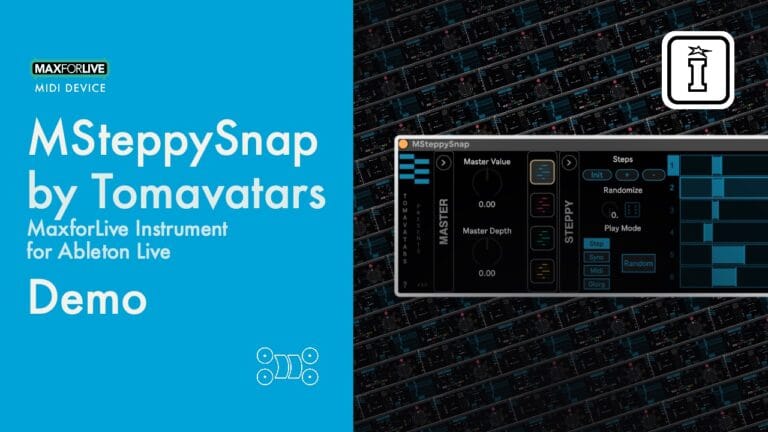
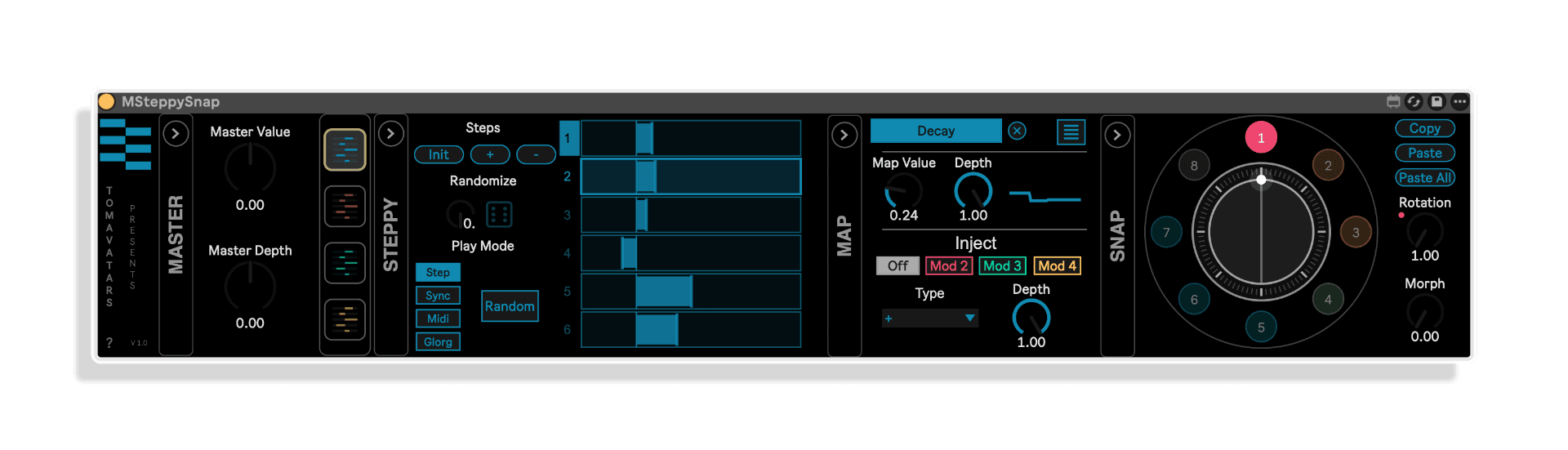
MSteppySnap by Tomavatars is a MIDI-triggered Max for Live modulator that puts four multi-length lane sequencers, 16 mappable parameters, and a snapshot morphing preset wheel at your fingertips — all playable live, all deeply expressive.
- 4 independent sequencers: Variable-length, top-to-bottom layout for modulating any Ableton or VST/AU parameter
- 16 mappable parameters: 4 per sequencer — map instruments, effects, anything in your session
- 4 playback modes: Increment from note-in, classic synced rate, MIDI note selection, and the mysterious Glorg mode
- Sequencer injection: Feed one sequencer into another for complex, evolving algorithmic modulations
- 8-preset snapshot wheel: Store, recall, rotate, and morph between sequencer shapes in real time
- Master depth & centre controls: Globally adjust the centre value and modulation depth across all mapped parameters at once
- Full Push support: Complete Ableton Push control and automation ready
- External modulation: Map the preset wheel from other modulators — or even another MSteppySnap unit
USER GUIDE:
Msteppysnap Manual
MSteppySnap by Tomavatars
MODULATE EVERYTHING. TRIGGER ANYTHING. MORPH IT ALL.
MSteppySnap by Tomavatars is a MIDI-triggered Max for Live modulator that puts four multi-length lane sequencers, 16 mappable parameters, and a snapshot morphing preset wheel at your fingertips — all playable live, all deeply expressive.
- 4 independent sequencers: Variable-length, top-to-bottom layout for modulating any Ableton or VST/AU parameter
- 16 mappable parameters: 4 per sequencer — map instruments, effects, anything in your session
- 4 playback modes: Increment from note-in, classic synced rate, MIDI note selection, and the mysterious Glorg mode
- Sequencer injection: Feed one sequencer into another for complex, evolving algorithmic modulations
- 8-preset snapshot wheel: Store, recall, rotate, and morph between sequencer shapes in real time
- Master depth & centre controls: Globally adjust the centre value and modulation depth across all mapped parameters at once
- Full Push support: Complete Ableton Push control and automation ready
- External modulation: Map the preset wheel from other modulators — or even another MSteppySnap unit
USER GUIDE:
Msteppysnap Manual
Buying for someone?Send a gift card →
Additional information
| MaxforLive | MIDI Devices & Sequencers |
|---|---|
| OS | Mac, Windows |
| Ableton Live Compatibility | Ableton Live 12 Standard with MaxforLive, Ableton Live 12 Suite |
| Min. Requirements | Ableton Live 12 with MaxforLive Installed, Live 12.4 is required for the included Live Set |
PRICE: £14.00
Product reviews
5 out of 5
2 reviews
How item rating is calculated
We show the average based on reviews. Only genuine reviews are displayed.
Sort by
July 13, 2026
This reviewer bought this product from our store.
Highly focused step-based parameter control, but with plenty of scope for surprises with the morphing scenes and steps controlling other steps. A ton of fun and capable of producing some very interesting interactions with all devices. Great stuff.
I recommend this product
Reply from Tomavatars
July 16, 2026
July 5, 2026
This reviewer bought this product from our store.
This should be part of stock Ableton it's so handy for adding some organic modulation.
I recommend this product
MSteppySnap by Tomavatars
Most modulation tools in Ableton Live follow the same formula: draw an LFO shape, sync it to the transport, and let it loop. MSteppySnap throws that playbook out entirely. Built by Tomavatars, this Max for Live MIDI instrument is built around one powerful idea — that modulation should be triggered, performed, and morphed, not just looped on a grid. The result is a genuinely playful yet deeply powerful control centre that can transform the way you build and perform music in Ableton Live.
Born out of frustration with conventional map-and-play modulation systems, MSteppySnap was designed from the ground up to respond to MIDI note input in real time. Rather than relying on a running playhead, each of its four sequencers can advance on a note trigger, sync to a clock, respond to specific MIDI note values, or behave in entirely unexpected ways via the enigmatic Glorg mode. Whether you’re sculpting filter sweeps in a live techno set, creating generative harmonic movements in ambient productions, or automating complex effect chains on the fly, MSteppySnap gives you a level of expressive control that traditional modulation simply can’t match.
Key Features
- 4 multi-length lane sequencers: Independent top-to-bottom sequencers, each with its own variable step length — allowing polyrhythmic and evolving modulation patterns that never feel static
- 16 mappable parameters in total: Each sequencer can modulate up to 4 parameters simultaneously — map any Ableton Live or VST/AU instrument and effect parameter with ease
- Sequencer injection: Route the output of one sequencer into another to create complex, interconnected algorithmic modulations — perfect for generative and evolving textures
- 4 playback modes per sequencer: Choose between Increment from Note In (advance one step per MIDI trigger), Classic Synced Rate (tempo-locked looping), MIDI Note Selection (jump to specific steps via note values), and Glorg (a unique playback behaviour — explore it to discover what it does)
- 8-preset snapshot wheel: Store up to 8 distinct sequencer configurations and use the built-in preset wheel to rotate and morph between them — turning MSteppySnap into a full performance preset morphing system
- Rotation and morph controls: Dial in how the preset wheel spins and blends between states — map these controls from external modulators or even a second MSteppySnap for layered, evolving control
- Master centre and depth controls: A global offset for the centre value of all mapped parameters, plus a master depth knob to scale up or down the intensity of every modulation at once
- Full Ableton Push control: Every parameter accessible from Push — ideal for tactile, hands-on live performance and studio sessions
- Full automation support: Record and automate everything for detailed arrangement work and hybrid live/studio workflows
How It Works
Drop MSteppySnap onto a MIDI track and begin mapping parameters from other devices in your session — synth cutoffs, reverb sizes, delay feedback, LFO rates, anything accessible via Ableton’s native mapping system. Each of the four sequencers operates independently, with its own step sequence drawn vertically in a clean and intuitive grid. Set the length of each sequencer separately, assign a playback mode that suits your workflow, and route MIDI notes into MSteppySnap to trigger or advance the sequencers exactly as you want them to behave.
The real magic comes when you start combining sequencers. By injecting one sequencer’s values into another, you create compound modulation curves that shift and evolve over time — far beyond what a standard LFO or envelope follower could produce. Layer this with the preset wheel system — which lets you store up to 8 full sequencer snapshots and morph smoothly between them — and you have an instrument that can generate hours of unique modulation behaviour without ever repeating itself in an obvious way.
The Vibe — Who Is This For?
MSteppySnap was built for producers who treat their DAW as an instrument. If you’re making techno and want filter sequences that respond to drum hits rather than a metronome, this is for you. If you’re into ambient and generative music and you want slowly evolving parameter clouds that shift like weather, this is absolutely for you. If you’re a live performer who wants to flip between radically different sonic states at the press of a key — and have them morph gracefully rather than cut hard — MSteppySnap delivers that with style.
It also excels as a modular-style control hub inside Ableton. Think of it as a performance-oriented macro system on steroids: you’re not just assigning a knob to a parameter, you’re giving that parameter a dynamic, musical sequence that responds to what you play. Pair it with drum machines, synths, granular processors, or even other Max for Live devices and watch your productions take on a life of their own.
Technical Details
MSteppySnap is a Max for Live MIDI instrument compatible with Ableton Live 12 Suite, or Ableton Live 12 Standard with the Max for Live add-on. Compatible with Mac and Windows. Supports VST/AU parameter mapping in addition to native Ableton Live device parameters. Full Ableton Push support and automation included.
📖 Download the MSteppySnap User Guide for full setup instructions, sequencer mode breakdowns, and workflow tips.
Explore more from Tomavatars in the Isotonik Studios store.
Frequently Asked Questions
A: It’s a MIDI-triggered parameter modulator. Rather than looping an LFO automatically, MSteppySnap uses four independent step sequencers that can advance on MIDI note input, sync to your tempo, respond to specific notes, or operate in the unique Glorg mode. You map its outputs to any parameters in your Ableton session — synth knobs, effect settings, anything — and it drives them musically and expressively.
A: MSteppySnap has four sequencers, each capable of modulating four parameters simultaneously, giving you a total of 16 mappable parameters in a single instance. These can span multiple devices across your Ableton session.
A: You can map both native Ableton Live device parameters and parameters from third-party VST and AU plugins — as long as they’re accessible via Ableton Live’s standard mapping system.
A: The preset wheel lets you store up to 8 different sequencer configurations (snapshots) and switch or morph between them using rotation and morph controls. These controls can themselves be mapped from external modulators or even a second MSteppySnap unit, allowing smooth, expressive transitions between entirely different modulation states during a live set.
A: Yes — MSteppySnap includes full Ableton Push support, meaning you can control all parameters directly from your Push controller without touching your mouse. It also supports full automation recording in Ableton’s arrangement view.
A: Absolutely — and in fact, Tomavatars designed the preset wheel’s rotation and morph controls to be mappable from external sources, including another MSteppySnap instance. Running multiple units and having them modulate each other opens up deeply complex and evolving control structures.
A: MSteppySnap requires Ableton Live 12 Suite (Max for Live is included). If you’re on Ableton Live 12 Standard, you’ll also need the Max for Live add-on. Compatible with both Mac and Windows.
Important Information
v1.0.0 – Initial Release
Our Products are generally provided as Zip file downloads which in all cases will need to be extracted before use. For Max for Live Devices please place the extracted device in your User Library. For Ableton Live Packs please double click the extracted .alp file to install. For Ableton Live Projects please place in your projects folder.
END-USER LICENSE AGREEMENT FOR ISOTONIK STUDIOS SOFTWARE PRODUCTS.
PLEASE READ THE TERMS AND CONDITIONS OF THIS LICENSE AGREEMENT CAREFULLY BEFORE CONTINUING WITH THIS PROGRAM INSTALL.
This End-User License Agreement (referred to as “EULA”) is a legal agreement between an individual or a single entity (referred to as “LICENSEE”) and Isotonik Studios for the Isotonik Studios software product(s) which may include associated software components, media, printed materials, and “online” or electronic documentation (referred to as “SOFTWARE PRODUCT”). By installing, copying, or otherwise using the SOFTWARE PRODUCT, the LICENSEE agrees to be bound by the terms of this EULA.
This EULA represents the entire agreement concerning the program between the LICENSEE and Isotonik Studios and it supersedes any prior proposal, representation, or understanding between the parties. If the LICENSEE does not agree to the terms of this EULA, the LICENSEE should not install or use the SOFTWARE PRODUCT.
The SOFTWARE PRODUCT is protected by copyright laws and international copyright treaties, as well as other intellectual property laws and treaties. The SOFTWARE PRODUCT is licensed, not sold.
- GRANT OF LICENSE.
The SOFTWARE PRODUCT is licensed as follows:
(a) Installation and Use. Providing that the LICENSEE has paid any applicable license fees, Isotonik Studios grants the LICENSEE the right to install and use copies of the SOFTWARE PRODUCT on up to two computers in the LICENSEE’s possession that are running a validly licensed copy of the operating system for which the SOFTWARE PRODUCT was designed [e.g., Windows 10, macOS]. The computer(s) must be owned by the LICENSEE.
(b) Backup Copies. The LICENSEE may also make copies of the SOFTWARE PRODUCT as may be necessary for backup and archival purposes.
- DESCRIPTION OF OTHER RIGHTS AND LIMITATIONS.
(a) Maintenance of Copyright Notices. The LICENSEE must not remove or alter any copyright notices on any and all copies of the SOFTWARE PRODUCT.
(b) Distribution. The LICENSEE may not distribute registered copies of the SOFTWARE PRODUCT to third parties.
(c) Prohibition on Reverse Engineering, Decompilation, and Disassembly. The LICENSEE may not reverse engineer, decompile, or disassemble the SOFTWARE PRODUCT, except and only to the extent that such activity is expressly permitted by applicable law notwithstanding this limitation.
(d) Rental. The LICENSEE may not rent, lease, or lend the SOFTWARE PRODUCT.
(e) License transfer The LICENSEE may not transfer their license to the SOFTWARE PRODUCT to any third party. Any attempt to do so will be considered a violation of this EULA.
(f) Support Services. Isotonik Studios may provide the LICENSEE with support services related to the SOFTWARE PRODUCT for a period of 12 months following the date of purchase. Any supplemental software code provided to the LICENSEE as part of the Support Services shall be considered part of the SOFTWARE PRODUCT and subject to the terms and conditions of this EULA.
(g) Compliance with Applicable Laws. The LICENSEE must comply with all applicable laws regarding use of the SOFTWARE PRODUCT.
- TERMINATION Without prejudice to any other rights, Isotonik Studios may terminate this EULA if the LICENSEE fails to comply with the terms and conditions of this EULA. In such event, the LICENSEE must destroy all copies of the SOFTWARE PRODUCT in the LICENSEE’s possession.
- COPYRIGHT All title, including but not limited to copyrights, in and to the SOFTWARE PRODUCT and any copies thereof are owned by Isotonik Studios or its suppliers. All title and intellectual property rights in and to the content which may be accessed through use of the SOFTWARE PRODUCT is the property of the respective content owner and may be protected by applicable copyright or other intellectual property laws and treaties. This EULA grants the LICENSEE no rights to use such content. All rights not expressly granted are reserved by Isotonik Studios.
- NO WARRANTIES Isotonik Studios expressly disclaims any warranty for the SOFTWARE PRODUCT. The SOFTWARE PRODUCT is provided ‘As Is’ without any express or implied warranty of any kind, including but not limited to any warranties of merchantability, noninfringement, or fitness of a particular purpose. Isotonik Studios does not warrant or assume responsibility for the accuracy or completeness of any information, text, graphics, links or other items contained within the SOFTWARE PRODUCT. Isotonik Studios makes no warranties respecting any harm that may be caused by the transmission of a computer virus, worm, time bomb, logic bomb, or other such computer program. Isotonik Studios further expressly disclaims any warranty or representation to the LICENSEE or to any third party.
- LIMITATION OF LIABILITY In no event shall Isotonik Studios be liable for any damages (including, without limitation, lost profits, business interruption, or lost information) arising out of the LICENSEE’s use of or inability to use the SOFTWARE PRODUCT, even if Isotonik Studios has been advised of the possibility of such damages. In no event will Isotonik Studios be liable for loss of data or for indirect, special, incidental, consequential (including lost profit), or other damages based in contract, tort or otherwise. Isotonik Studios shall have no liability with respect to the content of the SOFTWARE PRODUCT or any part thereof, including but not limited to errors or omissions contained therein, libel, infringements of rights of publicity, privacy, trademark rights, business interruption, personal injury, loss of privacy, moral rights or the disclosure of confidential information.
More from Tomavatars
Frequently Bought Together
 ★ Popular