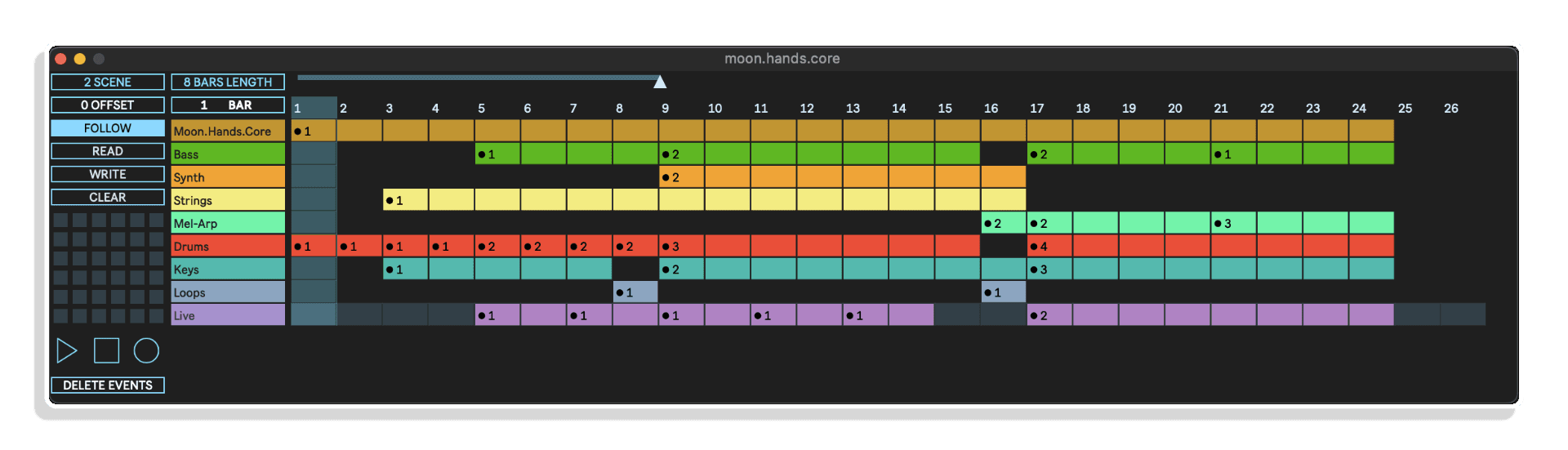
Moon.Hands.Core von elian.studio
AUTOMATISIEREN SIE ABLETON LIVE MIT EINER FLEXIBLEN ZEITLEISTE IM GANTT-STIL
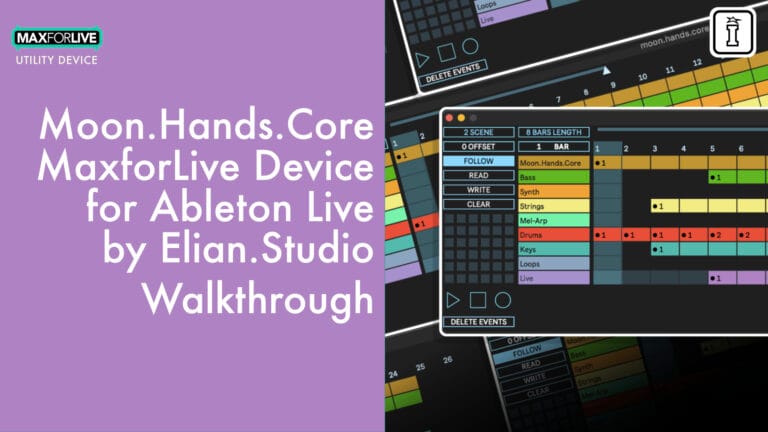
Bringen Sie Ihre Live-Sets und Studio-Sessions auf ein neues Niveau – mit moon.hands.core, einem vielseitigen Max-for-Live-Gerät, das entwickelt wurde, um komplexe Ereignisabläufe in Ableton Live zu automatisieren, zu sequenzieren und auszuführen.
Ganz gleich, ob du sich weiterentwickelnde Kompositionen erstellst, Loop-Workflows steuerst oder dynamische Live-Auftritte gestaltest: moon.hands.core bietet dir eine leistungsstarke, an Gantt-Diagramme angelehnte Benutzeroberfläche, mit der du Ereignisse über Spuren und Szenen hinweg planen und auslösen kannst.
Dieses Tool optimiert kreatives Experimentieren und reduziert sich wiederholende Aufgaben – damit du dich ganz auf das Musikmachen konzentrieren kannst.
Funktionen:
- Zeitleiste im Gantt-Stil für die visuelle Event-Sequenzierung
- Automatisierung von Aufnahme, Clip-Start, Arming, Stopp und Wiedergabe
- Elastische Szenen: Clip-Gruppen auslösen, ohne neue Ableton-Szenen zu verwenden
- Speichern und Abrufen mehrerer Voreinstellungen mit JSON-Export
- Enge Integration mit den Transport- und Spurdaten von Ableton Live
- Integrierte Transportsteuerung für absolut zuverlässige Live-Auftritte
- Nahtlose Kompatibilität mit Ableton Live 12+ und Max for Live
Laden Sie moon.hands.core noch heute herunter und beginnen Sie, intelligentere und flüssigere musikalische Arrangements zu erstellen.
BENUTZERHANDBUCH: Moon.Hands.Core-Handbuch
Moon.Hands.Core von elian.studio
AUTOMATISIEREN SIE ABLETON LIVE MIT EINER FLEXIBLEN ZEITLEISTE IM GANTT-STIL
Bringen Sie Ihre Live-Sets und Studio-Sessions auf ein neues Niveau – mit moon.hands.core, einem vielseitigen Max-for-Live-Gerät, das entwickelt wurde, um komplexe Ereignisabläufe in Ableton Live zu automatisieren, zu sequenzieren und auszuführen.
Ganz gleich, ob du sich weiterentwickelnde Kompositionen erstellst, Loop-Workflows steuerst oder dynamische Live-Auftritte gestaltest: moon.hands.core bietet dir eine leistungsstarke, an Gantt-Diagramme angelehnte Benutzeroberfläche, mit der du Ereignisse über Spuren und Szenen hinweg planen und auslösen kannst.
Dieses Tool optimiert kreatives Experimentieren und reduziert sich wiederholende Aufgaben – damit du dich ganz auf das Musikmachen konzentrieren kannst.
Funktionen:
- Zeitleiste im Gantt-Stil für die visuelle Event-Sequenzierung
- Automatisierung von Aufnahme, Clip-Start, Arming, Stopp und Wiedergabe
- Elastische Szenen: Clip-Gruppen auslösen, ohne neue Ableton-Szenen zu verwenden
- Speichern und Abrufen mehrerer Voreinstellungen mit JSON-Export
- Enge Integration mit den Transport- und Spurdaten von Ableton Live
- Integrierte Transportsteuerung für absolut zuverlässige Live-Auftritte
- Nahtlose Kompatibilität mit Ableton Live 12+ und Max for Live
Laden Sie moon.hands.core noch heute herunter und beginnen Sie, intelligentere und flüssigere musikalische Arrangements zu erstellen.
BENUTZERHANDBUCH: Moon.Hands.Core-Handbuch
Zusätzliche Informationen
| MaxforLive | Control Devices |
|---|---|
| Kompatibilität mit Ableton Live | Ableton Live 12 Standard with MaxforLive, Ableton Live 12 Suite |
| Mindestanforderungen | Ableton Live Standard 12 with MaxforLive Installed or Ableton Live Suite 12 |
| Betriebssystem | Mac, Windows |
PRICE: £28.00
Product reviews
5 out of 5
5 reviews
How item rating is calculated
We show the average based on reviews. Only genuine reviews are displayed.
Sort by
Februar 16, 2026
This reviewer bought this product from our store.
Eines der besten Max-for-Live-Geräte, die ich je entdeckt habe!
Oktober 11, 2025
This reviewer bought this product from our store.
Eines der besten M4L-Geräte aller Zeiten. Nicht mehr und nicht weniger.
August 5, 2025
This reviewer bought this product from our store.
Meine Bewertung: 5 Sterne. Tolle Tools für Live-Auftritte.
August 5, 2025
This reviewer bought this product from our store.
Ein wirklich tolles Tool. Ich freue mich schon riesig darauf, es nächste Woche bei meinem ersten Auftritt einzusetzen. Damit fühle ich mich sicherer als nur mit „Follow-Actions“. Gut gemacht.
Juli 23, 2025
This reviewer bought this product from our store.
Wow, Live 12.2 wurde gerade von diesem Gerät aktualisiert :D
Moon.Hands.Core von elian.studio
Übersicht & Inspiration
Stellen Sie sich vor, Sie hätten die volle Kontrolle darüber, wie sich Ihre Musik entfaltet – mit flexiblen Clip-Starts, Live-Loop-Automation und dynamischen Preset-Wechseln –, alles visualisiert auf einer einfachen Gantt-Zeitleiste. Das ist die Stärke von moon.hands.core.
Dieses von elian.studio entwickelte, intuitive Max-for-Live-Device ermöglicht es dir, ausdrucksstarke Clip-Event-Sequenzen in Ableton Live zu gestalten – so kannst du dich ganz auf deine Kreativität konzentrieren, anstatt immer wieder dieselben Tasten zu drücken. moon.hands.core eignet sich perfekt für die Studioproduktion, Komposition und Live-Auftritte und fügt sich nahtlos in deinen Workflow ein.
Moon.Hands.Core – Features & Funktionen
- Zeitleiste im Gantt-Stil: Erstelle Event-Sequenzen, indem du Blöcke über Zeit und Spuren ziehst
- Erweiterte Automation: Clips auslösen, Aufnahmen automatisieren, Spuren mit präzisem Timing aktivieren/stoppen
- Elastische Szenen: Kombiniere Clips aus verschiedenen Szenen – du musst in Live keine neuen erstellen
- Preset-System: Speichern, Laden und Exportieren von Presets als JSON für den schnellen Projektruf
- Live-Synchronisation: Automatische Synchronisation mit Abletons Transport, Spuren und Clip-Daten
- Benutzerdefinierter Transport: Abspielen, Stoppen, Aufnehmen mit Millisekundengenauigkeit – unverzichtbar für den Live-Einsatz
- Flexibler Zoom und Navigation: Verwalten Sie Projekte von Mikro-Bearbeitungen bis hin zu umfangreichen Arrangements (bis zu 1.000 Takte)
So funktioniert es:
Lade einfach „moon.hands.core“ auf eine MIDI-Spur in Ableton Live, klicke auf das Logo, um die Benutzeroberfläche zu öffnen, und beginne mit der Erstellung von Events. Lege per Drag-and-Drop Clip-Starts, Loop-Punkte oder Aufnahme-Trigger fest – und passe sie anschließend präzise an. Für maximale Flexibilität speichern Sie Presets während der Arbeit und exportieren Sie diese zur Verwendung in mehreren Sets oder Projekten.
Lieferumfang
- moon.hands.core.amxd-Gerätedatei
- Bedienungsanleitung als PDF
Systemanforderungen
- Ableton Live 12 oder neuer (Suite-Version empfohlen)
- Max for Live (in der Ableton Live Suite enthalten)
Ideal für:
- Live-Performer, die eine automatische Steuerung von Clips und Szenen wünschen
- Studio-Produzenten, die nach innovativen Möglichkeiten suchen, Tracks zu strukturieren
- Looping-Künstler, die eine präzise Steuerung von Aufnahme und Wiedergabe benötigen
- Sounddesigner, die sich mit komplexer, ereignisbasierter Automatisierung beschäftigen
Frequently Asked Questions
A: „moon.hands.core“ ist ein Max-for-Live-Gerät für Ableton Live, mit dem Sie Ereignisse auf einer Zeitleiste im Gantt-Stil automatisieren, sequenzieren und ausführen können – ideal, um Clips, Szenen, Loops und Presets freihändig zu steuern.
A: Du benötigst Ableton Live 11 oder eine neuere Version sowie Max for Live (in der Suite enthalten oder als Add-on erhältlich).
A: Auf jeden Fall! Speichere mehrere Voreinstellungen in deinem Live-Set oder exportiere sie als JSON-Dateien, um sie jederzeit wieder aufrufen und mit anderen teilen zu können.
A: Ja – moon.hands.core wurde speziell für Live-Auftritte entwickelt. Nutzen Sie die integrierte Transportsteuerung für eine zuverlässige, synchronisierte Wiedergabesteuerung und wechseln Sie Presets im Handumdrehen.
A: Ganz und gar nicht. moon.hands.core lässt sich nahtlos in Ihr Live-Set integrieren und ergänzt Ihre vorhandenen Clips, Szenen und Arrangements, ohne diese zu überschreiben.
A: Nein – dank der Funktion „Elastic Scenes“ kannst du Gruppen von Clips auslösen, ohne in Live zusätzliche Szenen hinzuzufügen.
A: Wenn Sie noch kein Preset gespeichert haben, lassen sich die Ereignisse nicht wiederherstellen – daher empfehlen wir Ihnen, Ihre Konfiguration regelmäßig als Preset zu speichern (einfach mit Umschalt + Klick auf einen leeren Preset-Platz).
A: Änderungen an den Spuren werden nicht automatisch mit den Events synchronisiert. Um die Änderungen zu übernehmen, speichere einfach dein Preset, ordne deine Spuren in Live neu an und lade das Preset erneut.
A: Ja – nutzen Sie den Tracking-Offset, um die vertikale Wiedergabelinie zu verschieben und eine Vorschau auf den folgenden Abschnitt anzuzeigen.
Important Information
Erstveröffentlichung – Juli 2025
Unsere Produkte werden in der Regel als ZIP-Dateien zum Herunterladen bereitgestellt, die in jedem Fall vor der Installation entpackt und auf Ihrer Festplatte gespeichert werden müssen. Nachstehend finden Sie Einzelheiten zu den verschiedenen Dateitypen und deren Verwendung.
.alp-Dateien – Hierbei handelt es sich um Ableton Live-Packs, die entweder direkt im Bereich „Packs“ des Ableton Live-Browsers installiert werden oder bei denen Sie aufgefordert werden, sie auf Ihrer Festplatte zu speichern. Bei Packs, die in die Bibliothek installiert werden, erscheint beim Doppelklick ein Popup-Fenster, in dem Sie aufgefordert werden, die Installation zu bestätigen, da die Dateien als „Legacy“ gekennzeichnet sind. Das ist in Ordnung und Sie können fortfahren. Die Packs wurden im Format einer früheren Live-Version erstellt und sind daher weiterhin mit der aktuellen Version kompatibel.
.amxd-Dateien – Hierbei handelt es sich um einzelne MaxforLive-Geräte, die an einem beliebigen Ort auf Ihrer Festplatte gespeichert werden können. Wir empfehlen, einen eigenen Ordner dafür anzulegen und diesen Ordner dann als Speicherort im Bereich „Places“ des Live-Browsers hinzuzufügen.
ENDBENUTZER-LIZENZVEREINBARUNG FÜR SOFTWAREPRODUKTE VON ISOTONIK STUDIOS.
BITTE LESEN SIE DIE BEDINGUNGEN DIESER LIZENZVEREINBARUNG SORGFÄLTIG DURCH, BEVOR SIE MIT DER INSTALLATION DIESES PROGRAMMS FORTFAHREN.
Diese Endbenutzer-Lizenzvereinbarung (im Folgenden als „EULA“ bezeichnet) ist eine rechtliche Vereinbarung zwischen einer natürlichen Person oder einer einzelnen juristischen Person (im Folgenden als „LIZENZNEHMER“ bezeichnet) und Isotonik Studios über die Softwareprodukte von Isotonik Studios, die zugehörige Softwarekomponenten, Datenträger, gedruckte Materialien, sowie „Online“- oder elektronische Dokumentation umfassen können (im Folgenden als „SOFTWAREPRODUKT“ bezeichnet). Durch die Installation, das Kopieren oder die sonstige Nutzung des SOFTWAREPRODUKTS erklärt sich der LIZENZNEHMER mit den Bestimmungen dieser EULA einverstanden.
Diese EULA stellt die gesamte Vereinbarung zwischen dem LIZENZNEHMER und Isotonik Studios bezüglich des Programms dar und ersetzt alle früheren Vorschläge, Zusicherungen oder Absprachen zwischen den Parteien. Wenn der LIZENZNEHMER den Bedingungen dieser EULA nicht zustimmt, darf er das SOFTWAREPRODUKT nicht installieren oder nutzen.
Das SOFTWAREPRODUKT ist durch Urheberrechtsgesetze und internationale Urheberrechtsabkommen sowie durch andere Gesetze und Abkommen zum Schutz geistigen Eigentums geschützt. Das SOFTWAREPRODUKT wird lizenziert, nicht verkauft.
- LIZENZVERGABE.
Das SOFTWAREPRODUKT wird wie folgt lizenziert:
(a) Installation und Nutzung. Sofern der LIZENZNEHMER alle anfallenden Lizenzgebühren entrichtet hat, gewährt Isotonik Studios dem LIZENZNEHMER das Recht, Kopien des SOFTWAREPRODUKTS auf bis zu zwei Computern in seinem Besitz zu installieren und zu nutzen, auf denen eine gültig lizenzierte Kopie des Betriebssystems läuft, für das das SOFTWAREPRODUKT entwickelt wurde [z. B. Windows 10, macOS]. Der/die Computer muss/müssen Eigentum des LIZENZNEHMERS sein.
(b) Sicherungskopien. Der LIZENZNEHMER darf außerdem Kopien des SOFTWAREPRODUKTS anfertigen, soweit dies für Sicherungs- und Archivierungszwecke erforderlich ist.
- BESCHREIBUNG WEITERER RECHTE UND EINSCHRÄNKUNGEN.
(a) Beibehaltung von Urheberrechtsvermerken. Der LIZENZNEHMER darf keine Urheberrechtsvermerke auf irgendeiner Kopie des SOFTWAREPRODUKTS entfernen oder verändern.
(b) Weitergabe. Der LIZENZNEHMER darf registrierte Kopien des SOFTWAREPRODUKTS nicht an Dritte weitergeben.
(c) Verbot von Reverse Engineering, Dekompilierung und Disassemblierung. Der LIZENZNEHMER darf das SOFTWAREPRODUKT nicht rückentwickeln, dekompilieren oder disassemblieren, es sei denn, eine solche Handlung ist ungeachtet dieser Einschränkung durch geltendes Recht ausdrücklich gestattet.
(d) Vermietung. Der LIZENZNEHMER darf das SOFTWAREPRODUKT nicht vermieten, verpachten oder verleihen.
(e) Lizenzübertragung. Der LIZENZNEHMER darf seine Lizenz für das SOFTWAREPRODUKT nicht an Dritte übertragen. Jeder Versuch, dies zu tun, gilt als Verstoß gegen diese EULA.
(f) Supportleistungen. Isotonik Studios kann dem LIZENZNEHMER für einen Zeitraum von 12 Monaten ab dem Kaufdatum Supportleistungen im Zusammenhang mit dem SOFTWAREPRODUKT bereitstellen. Jeder zusätzliche Softwarecode, der dem LIZENZNEHMER im Rahmen der Supportleistungen zur Verfügung gestellt wird, gilt als Teil des SOFTWAREPRODUKTS und unterliegt den Bestimmungen dieser EULA.
(g) Einhaltung geltender Gesetze. Der LIZENZNEHMER muss alle geltenden Gesetze bezüglich der Nutzung des SOFTWAREPRODUKTS einhalten.
- KÜNDIGUNG Unbeschadet sonstiger Rechte ist Isotonik Studios berechtigt, diese EULA zu kündigen, wenn der LIZENZNEHMER die Bestimmungen dieser EULA nicht einhält. In diesem Fall muss der LIZENZNEHMER alle in seinem Besitz befindlichen Kopien des SOFTWAREPRODUKTS vernichten.
- URHEBERRECHT Sämtliche Rechte, einschließlich, aber nicht beschränkt auf Urheberrechte, an dem SOFTWAREPRODUKT und allen Kopien davon liegen bei Isotonik Studios oder seinen Lieferanten. Alle Eigentums- und geistigen Eigentumsrechte an den Inhalten, auf die durch die Nutzung des SOFTWAREPRODUKTS zugegriffen werden kann, sind Eigentum der jeweiligen Inhaltseigentümer und können durch geltende Urheberrechtsgesetze oder andere Gesetze und Verträge zum Schutz geistigen Eigentums geschützt sein. Diese EULA gewährt dem LIZENZNEHMER keine Rechte zur Nutzung solcher Inhalte. Alle nicht ausdrücklich gewährten Rechte bleiben Isotonik Studios vorbehalten.
- KEINE GEWÄHRLEISTUNGEN Isotonik Studios schließt jegliche Gewährleistung für das SOFTWAREPRODUKT ausdrücklich aus. Das SOFTWAREPRODUKT wird „wie besehen“ ohne jegliche ausdrückliche oder stillschweigende Gewährleistung jeglicher Art bereitgestellt, einschließlich, aber nicht beschränkt auf Gewährleistungen der Marktgängigkeit, der Nichtverletzung von Rechten Dritter oder der Eignung für einen bestimmten Zweck. Isotonik Studios übernimmt keine Gewährleistung oder Verantwortung für die Richtigkeit oder Vollständigkeit von Informationen, Texten, Grafiken, Links oder anderen im SOFTWAREPRODUKT enthaltenen Elementen. Isotonik Studios übernimmt keine Gewährleistung in Bezug auf Schäden, die durch die Übertragung von Computerviren, Würmern, Zeitbomben, Logikbomben oder ähnlichen Computerprogrammen verursacht werden könnten. Isotonik Studios schließt ferner ausdrücklich jegliche Gewährleistung oder Zusicherung gegenüber dem LIZENZNEHMER oder Dritten aus.
- HAFTUNGSBESCHRÄNKUNG Isotonik Studios haftet in keinem Fall für Schäden (einschließlich, aber nicht beschränkt auf entgangenen Gewinn, Betriebsunterbrechungen oder Informationsverluste), die sich aus der Nutzung oder der Unmöglichkeit der Nutzung des SOFTWAREPRODUKTS durch den LIZENZNEHMER ergeben, selbst wenn Isotonik Studios auf die Möglichkeit solcher Schäden hingewiesen wurde. In keinem Fall haftet Isotonik Studios für Datenverluste oder für indirekte, besondere, zufällige, Folge- (einschließlich entgangener Gewinne) oder sonstige Schäden, die auf Vertrag, unerlaubter Handlung oder anderweitig beruhen. Isotonik Studios übernimmt keine Haftung in Bezug auf den Inhalt des SOFTWAREPRODUKTS oder eines Teils davon, einschließlich, aber nicht beschränkt auf darin enthaltene Fehler oder Auslassungen, Verleumdung, Verletzungen von Persönlichkeitsrechten, Datenschutzrechten, Markenrechten, Betriebsunterbrechungen, Personenschäden, Verlust der Privatsphäre, Urheberpersönlichkeitsrechte oder die Offenlegung vertraulicher Informationen.
Frequently Bought Together