IOTA II by Dillon Bastan
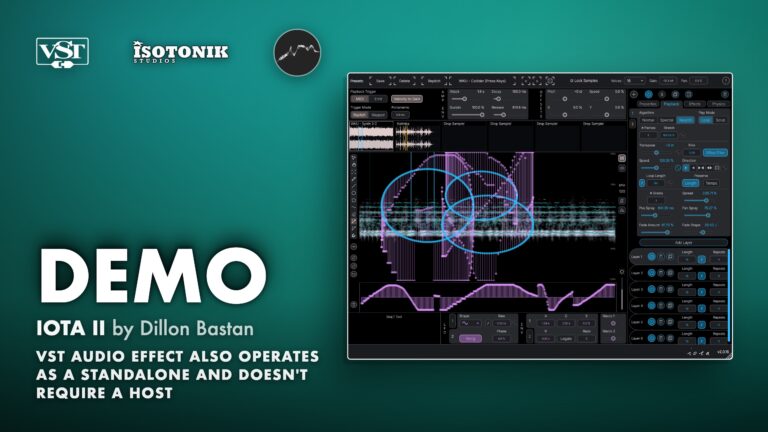
VISUAL SPECTROGRAM SAMPLER WITH PHYSICS, GRANULAR, SPECTRAL AND CONCATENATIVE ENGINES Iota II is an advanced multi-sampling instrument built around a visual spectrogram canvas. Draw 2D playback sequences directly onto the spectrogram, layer them across up to 6 samples, and pull the results through granular, spectral, resynth or classic playback engines. The result spans precise multisample chopping, concatenative synthesis, spectral textures and rhythm design, all from one instrument. Comes with 94 presets and 44 samples, covering the full range of what the instrument can do, because the best way to understand an endless rabbit hole is to fall in with a map. • Visual spectrogram canvas: Draw 2D playback sequences as points on a live spectrogram, with X controlling sample position and Y controlling filtering position. • Up to 12 playback Paths: Each Path has infinite Layers, unique sample, effect, modulation and physics settings. • Three playback algorithms: Classic, Spectral (phase vocoder with blur attack and decay), and Resynth (sine resynthesizer with partials and partials stretch options). • Granular and Scrub playback modes: Granular looping with full grain control, or Scrub mode for nonlinear, point-to-point time stretching. • Physics engine: Friction, magnetic force, path point attraction, polarity and edge behaviour (bounce, clip, wrap, remove) shape playback in real time. • Comprehensive modulation system: 2 LFOs, 2 looping envelopes, 2 sequences, 2 random spray values, 2 Macros, MIDI pitch, velocity, aftertouch, modwheel, and MPE slide and pressure. • 94 presets and 44 samples included: Preset credits from a community of artists including acadjmia, Ari Liloia, Jason Gear, Marco Heinle, mleuc, Mvd0ae and Warkyuu. • Rich canvas drawing toolkit: Select, zoom, free pen, line, shape, polygon, wave, eraser, loop creator, transient-snap point placement, and gravity Attractor tools. • Flexible trigger modes: MIDI Repitch (classic sampler style with portamento) and MIDI Mapped (per-Path note assignment), plus Auto Emit mode with interval, delay, skip and variance settings. • Three filter modes and additional effects: Spectral FFT filter with gap control, Classic Biquadratic, and Ladder filter, plus delay line, overdrive, sample reduction and ring modulation per Path.

Dillon Bastan
Dillon Bastan is a Los Angeles based sound artist, developer, music producer, and performer.
View all products by Dillon BastanOverview
Visual spectrogram sampler with physics and granular engines
Iota II centres on a visual spectrogram canvas where you draw 2D playback sequences directly onto your samples. Each point on the canvas represents both a sample position and a filtering position, which means you can sculpt rhythms, textures and tones the way a visual artist would, not the way a traditional sampler expects. Up to 12 independent Paths, each with infinite Layers, feed into Classic, Spectral phase vocoder or Resynth engines, taking you from precise multisample chopping through to concatenative synthesis and wild spectral textures.
Physics, a comprehensive bipolar modulation system, gravity Attractors, and three filter types keep the results moving and evolving. The instrument ships with 94 presets and 44 samples, contributed by a community of artists, so you can hear what it does before drawing a single point yourself. It runs as a plugin or standalone, with no host required.
- Visual spectrogram canvas: draw 2D playback sequences as points where X sets sample position and Y sets filtering position
- Up to 12 playback Paths, each with infinite Layers and unique playback, modulation and effect settings
- Three playback algorithms: Classic, Spectral (phase vocoder with blur attack and decay settings), and Resynth (sine resynthesizer with number of partials and partials stretch options)
- Two playback modes: Granular/Classic looping with full grain control (loop length, direction, grain count, spread, position spray, pan spray, fade window depth and shape), and Scrub mode for nonlinear point-to-point time stretching
- Physics engine with friction, path point attraction force, magnetic force and polarity, and edge behaviour modes (bounce, clip, wrap, remove)
- Comprehensive bipolar modulation system: 2 LFOs with Perlin noise option, 2 looping envelopes, 2 per-path-point sequences, 2 random spray values, 2 Macros, playhead Y position, MIDI pitch, velocity, aftertouch, modwheel, and MPE slide and pressure
- Three filter modes per Path: Spectral FFT filter with gap depth control, Classic Biquadratic, and Ladder; plus delay line, overdrive, sample reduction and ring modulation
- Rich canvas drawing toolkit including free pen, line, shape, polygon, wave (with spiral option), loop creator, transient-snap and grid-snap point placement, and gravity Attractor creator with gravity, vortex and three chaos attractor modes
- Two MIDI trigger modes (Repitch with portamento and Mapped per-Path note assignment) plus Auto Emit mode with interval, delay, skip, variance and emit-once settings
- 94 presets and 44 samples included, with preset contributions from acadjmia, Ari Liloia, Jason Gear, Marco Heinle, mleuc, Mvd0ae and Warkyuu
- Serial key (emailed on purchase)
- Mac installer
- Windows installer
- User manual (PDF)
Free for subscribers
Join the list and get 9 free downloads
Subscribers get Isotonik FX, Live Scratcher, Modular Series LE Part ONE, Modular Series LE Part TWO and more for free. You also hear about new releases and deals first.
Subscribers hear first about new VST plugin releases.
Just your email. No spam, unsubscribe anytime.


Reviews
No reviews yet. Be the first to review this product.
IOTA II
Overview
Iota II is a visual multi-sampling instrument built around a spectrogram canvas, where playback sequences are drawn as 2D points controlling both sample position and filter position. Up to 12 playback Paths can run across up to 6 samples, each with its own layers, modulation, effects, and physics settings.
Effects
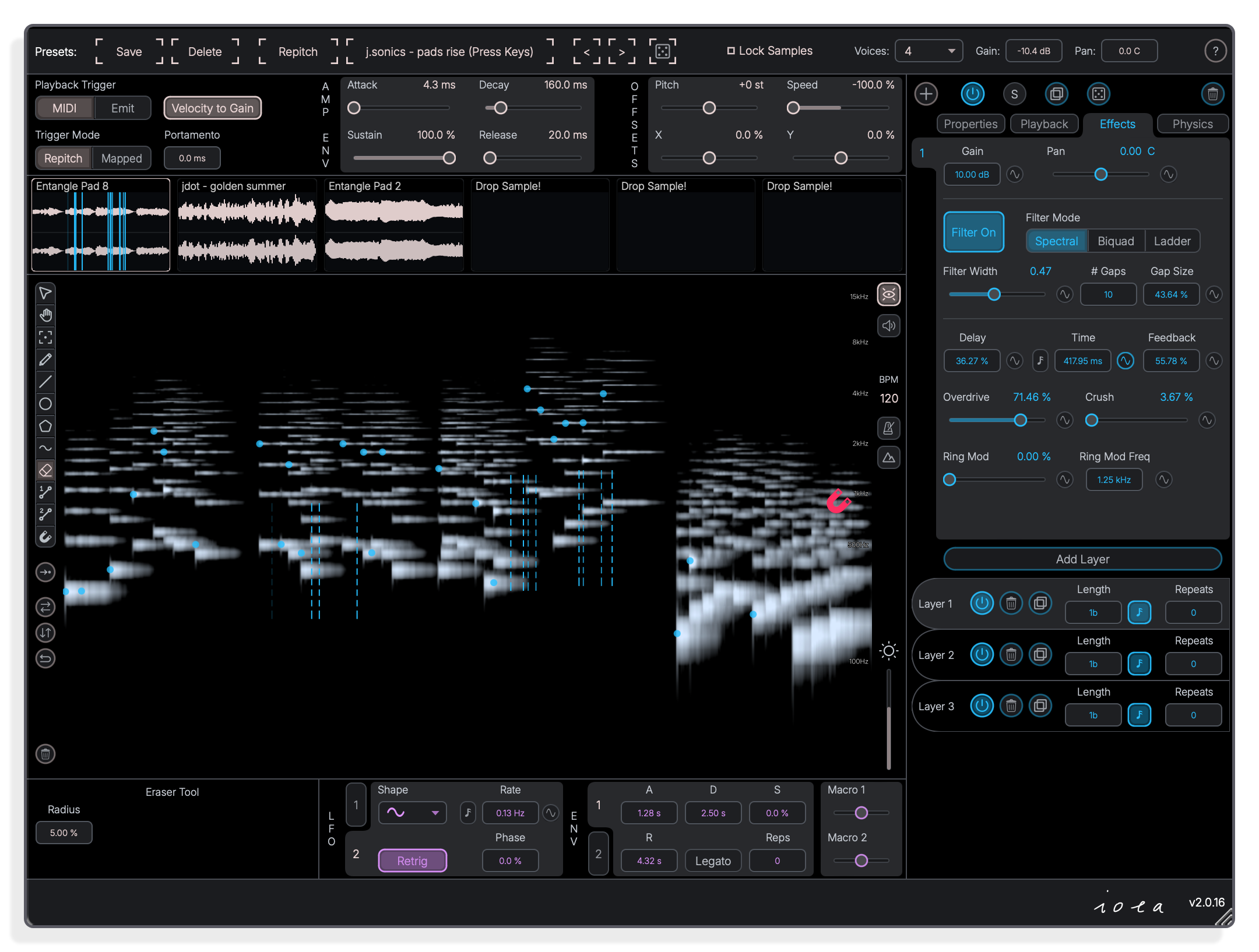
Spectral filter, delay, overdrive and ring mod
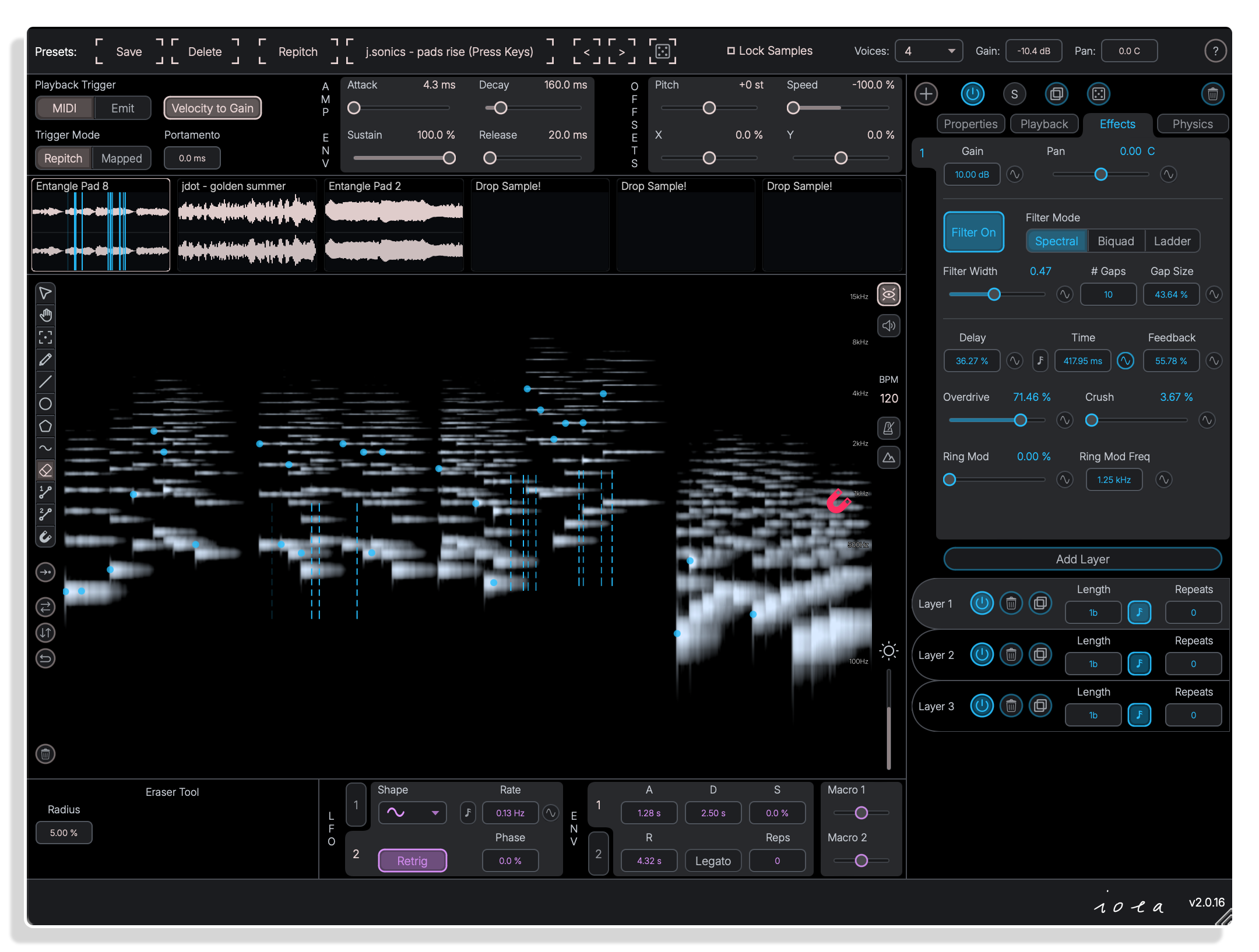
The Effects panel offers three filter modes, including a spectral FFT filter with gap control, plus a delay line, overdrive, sample reduction and ring modulation. Each path carries its own independent effect chain.
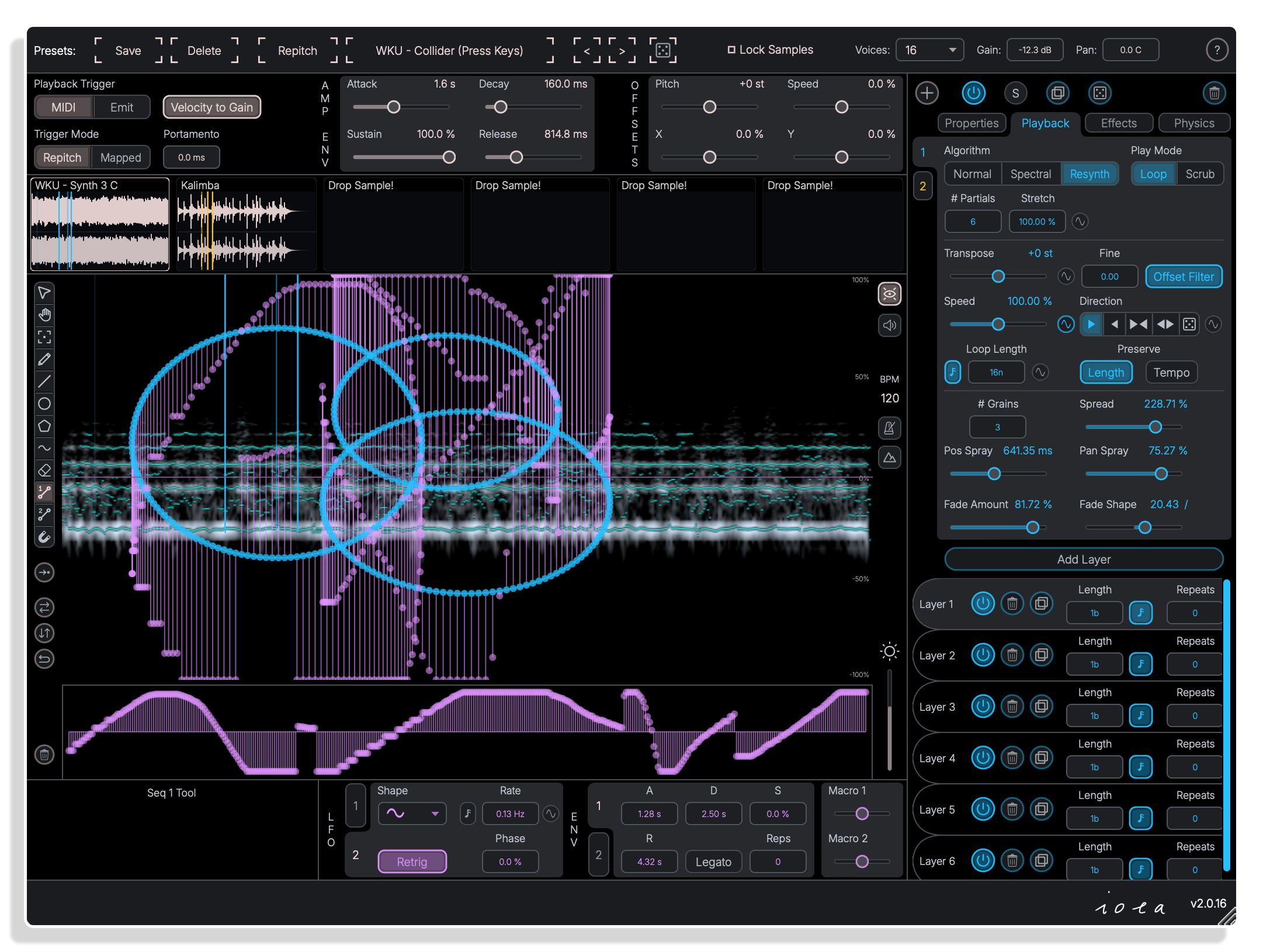
Resynth
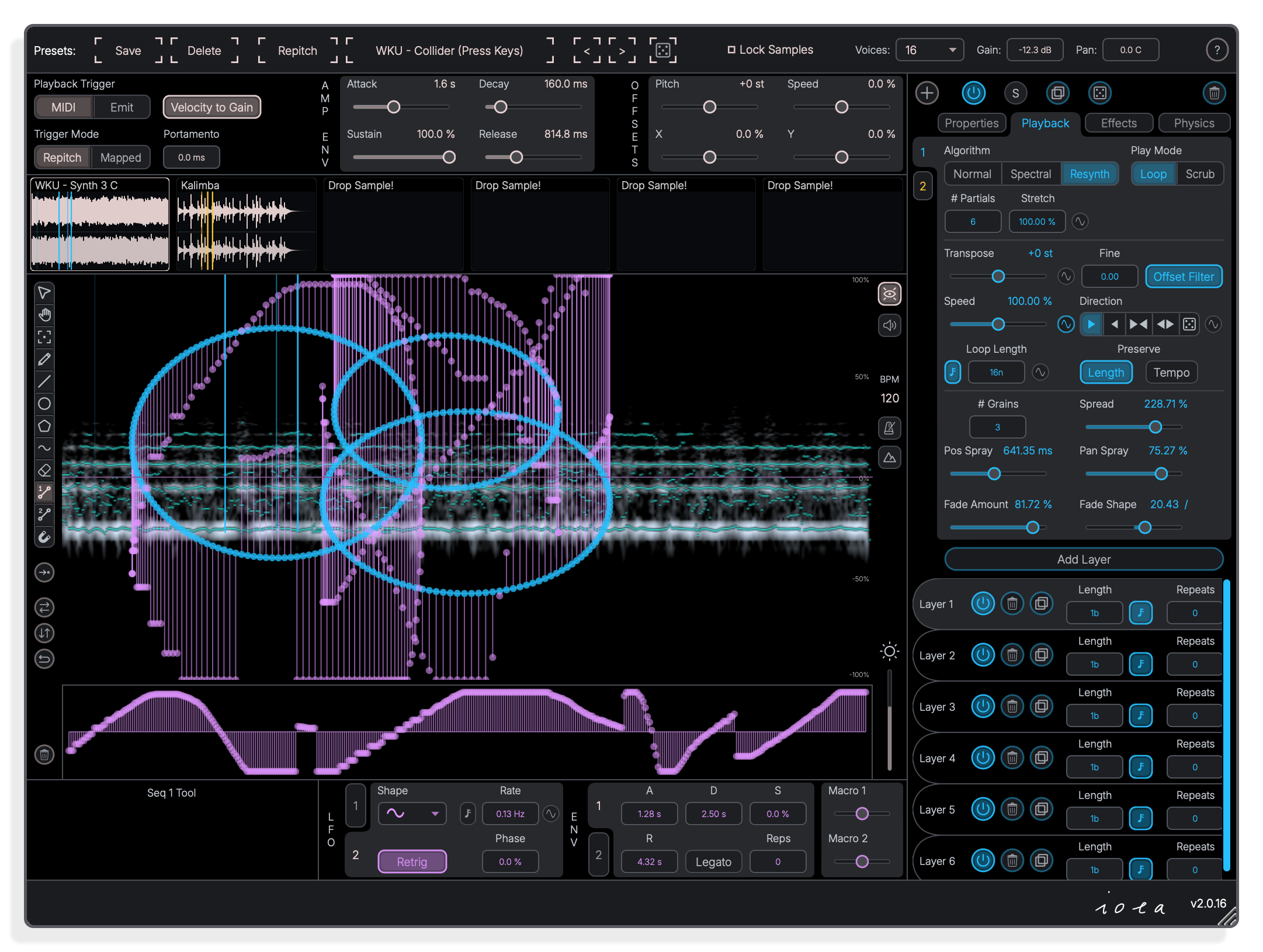
Resynth algorithm for sine-based resynthesis
The Resynth play mode rebuilds audio from sine partials, with controls for the number of partials and partials stretch. Granular loop settings including grain spread, position spray and fade shape sit alongside it.
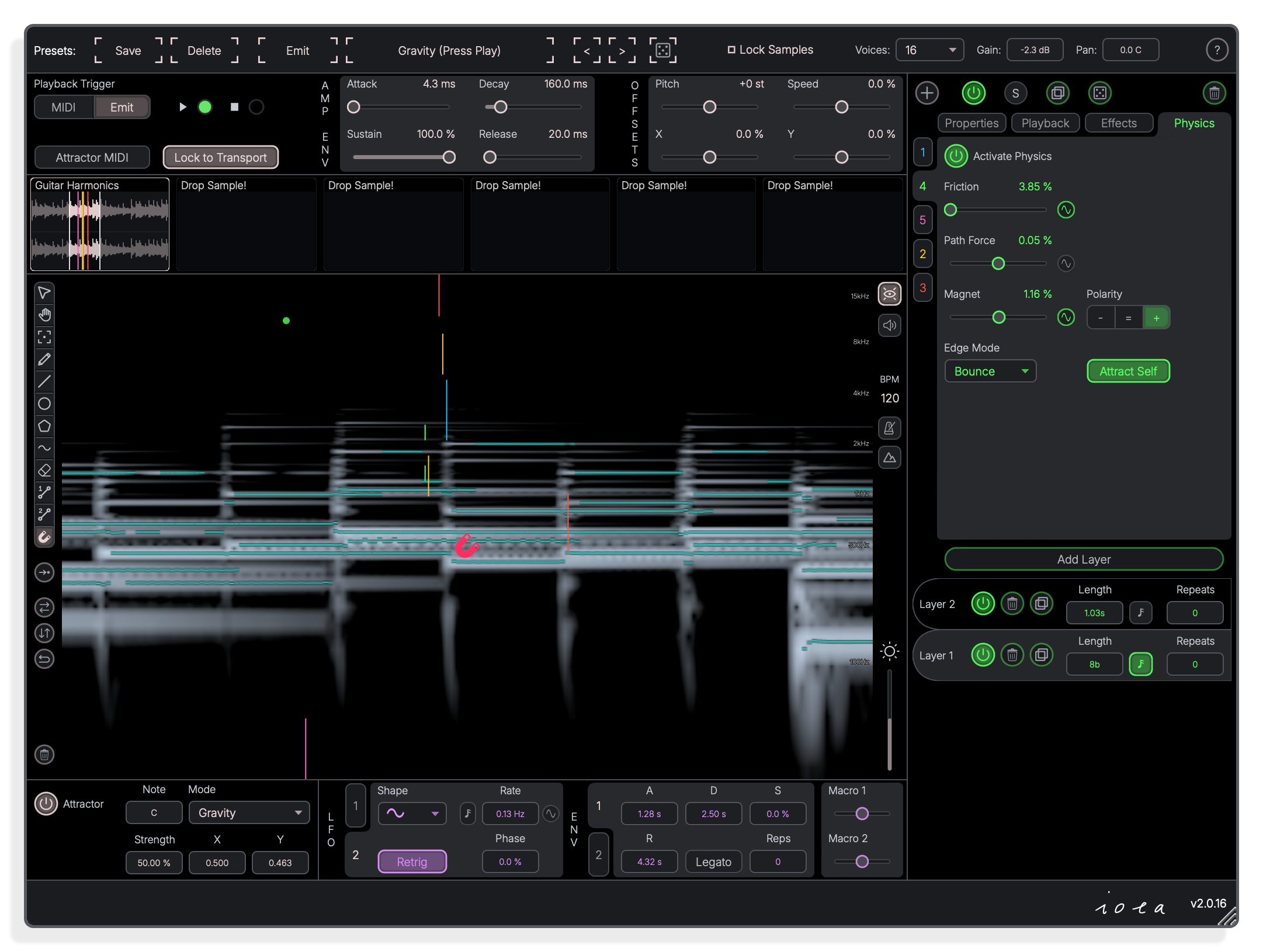
Physics
Physics engine drives playhead movement
The Physics panel lets you set friction, path-point force, magnetic strength and polarity, plus an edge mode such as Bounce. An Attractor tool in Gravity mode pulls the playhead through the spectrogram canvas.
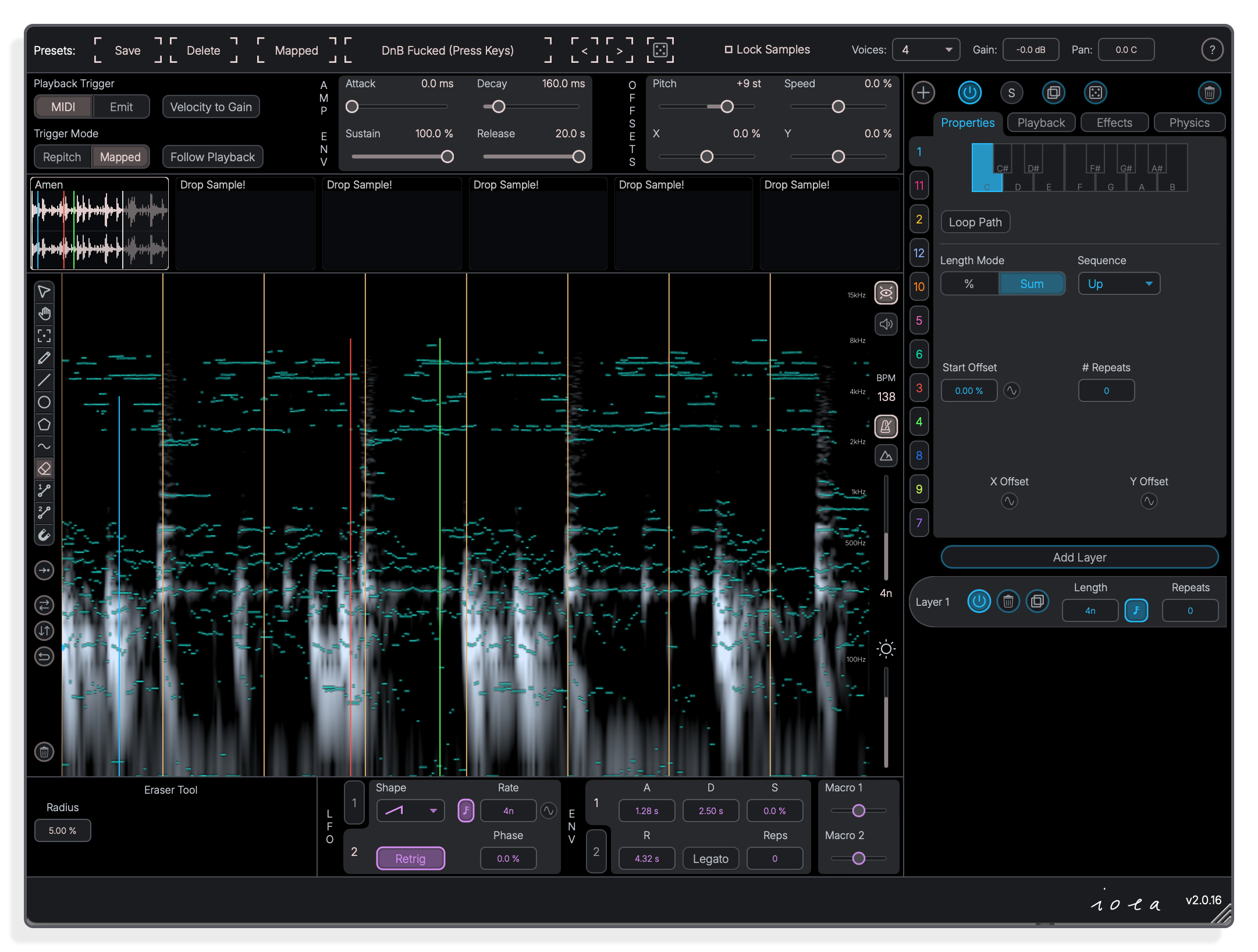
Properties
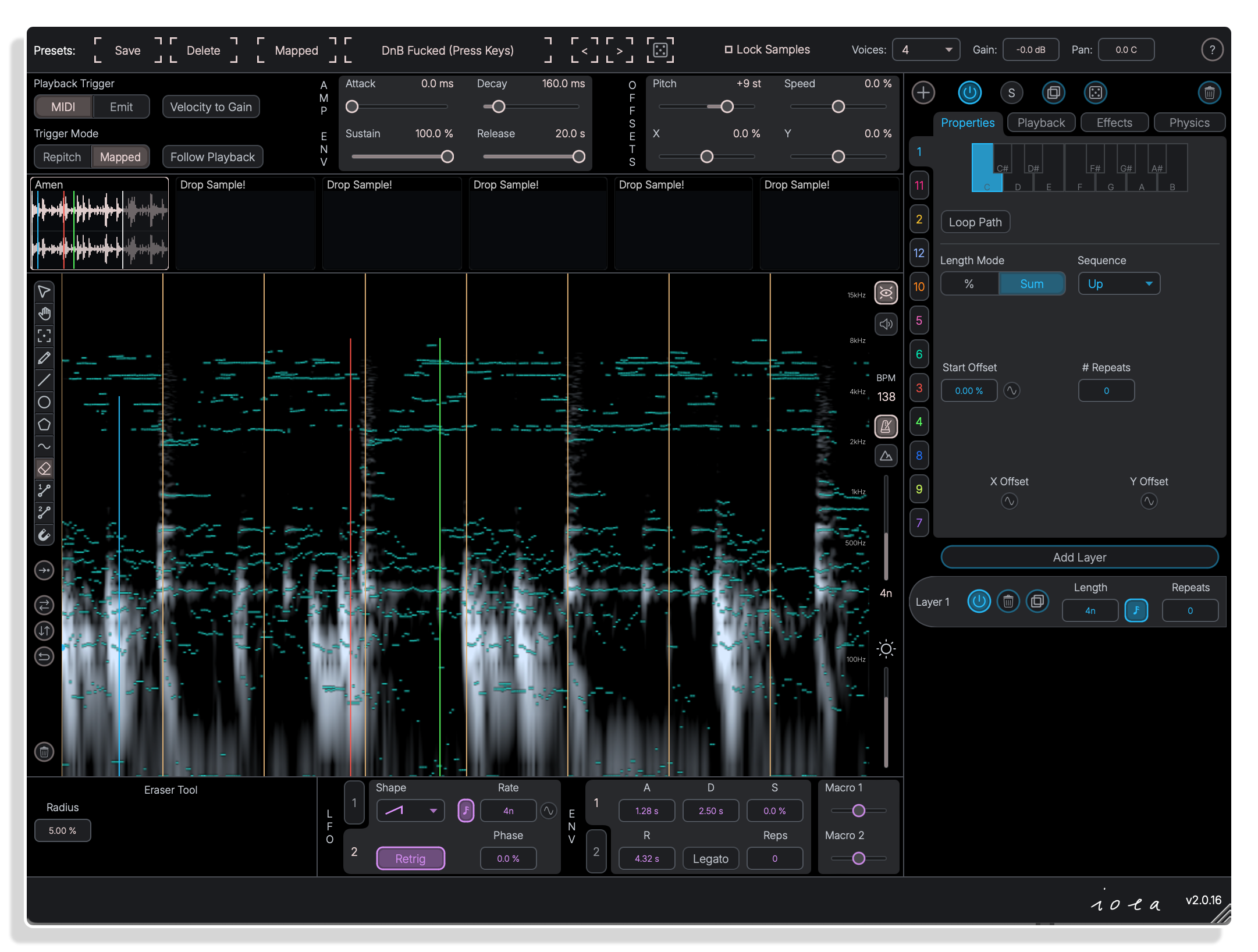
MIDI Mapped mode assigns notes to paths
In Mapped trigger mode a piano roll lets you assign one or more pitch classes to each path, so incoming MIDI notes fire only the paths mapped to them. Loop Path, Length Mode and Sequence order options sit beneath.
Loop Tool
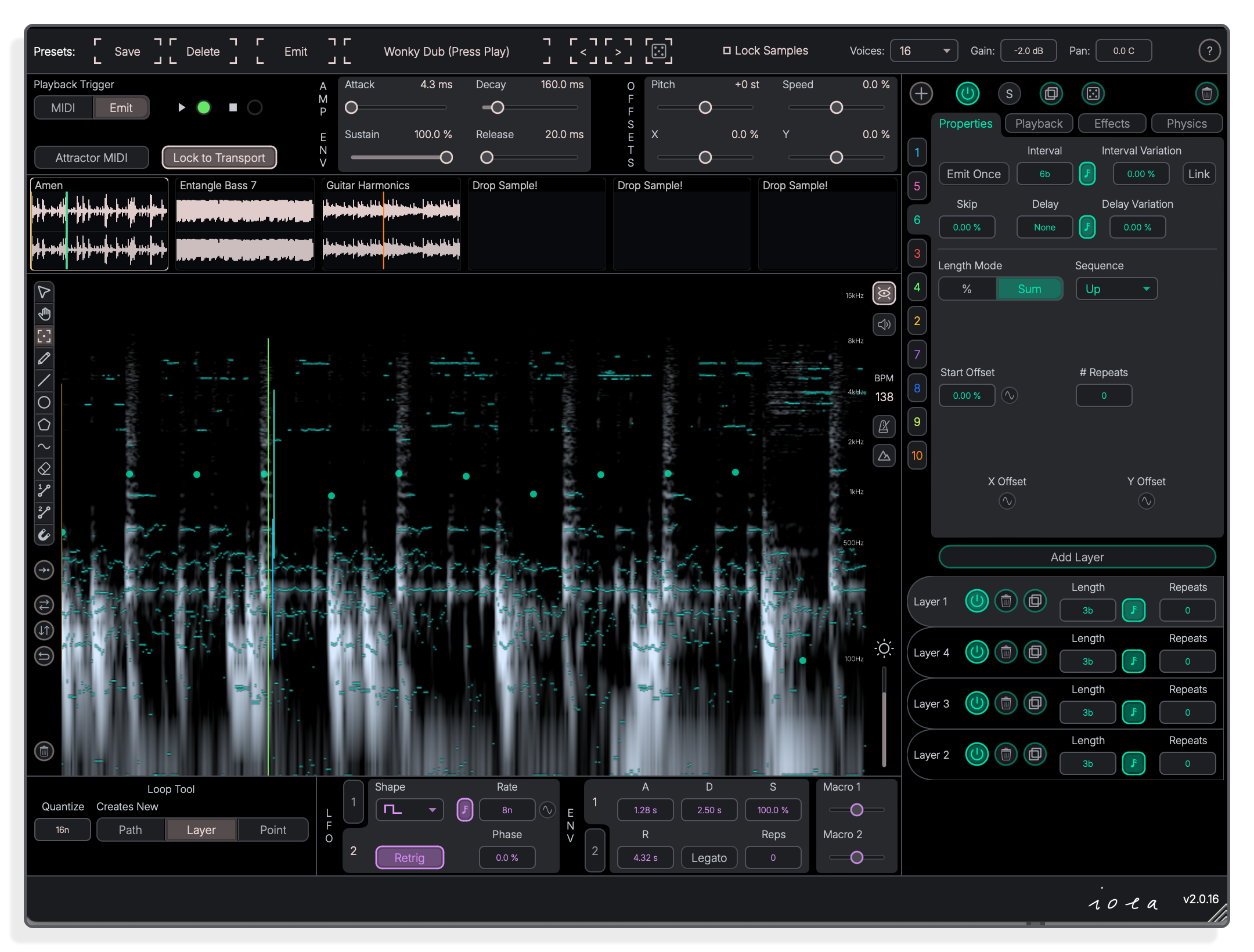
Loop tool draws playback sequences on canvas
The Loop Tool lets you draw playback sequences directly onto the spectrogram canvas as 2D points, with quantise, Path and Layer options at the bottom. Multiple layers per path can be built up independently.
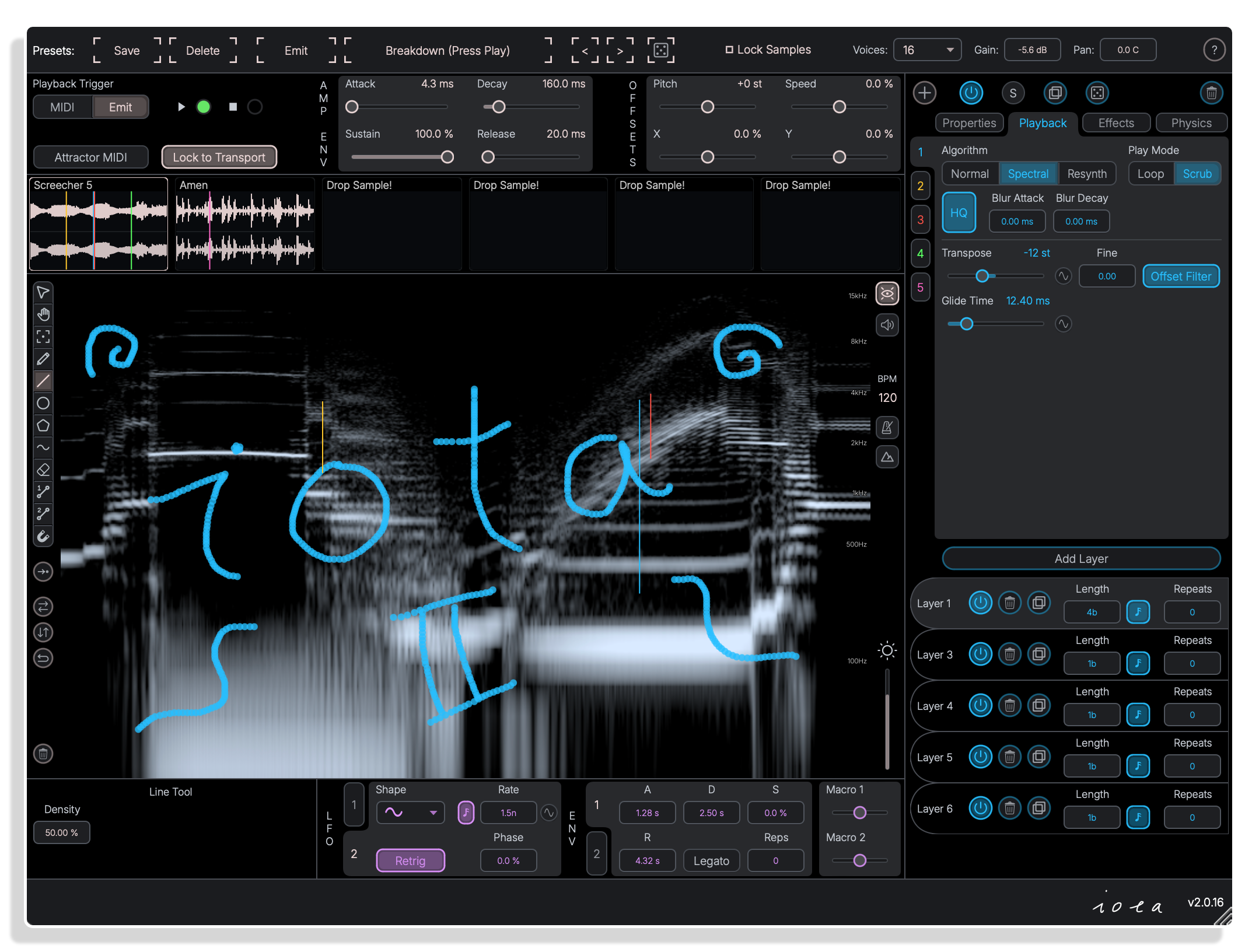
Line Tool
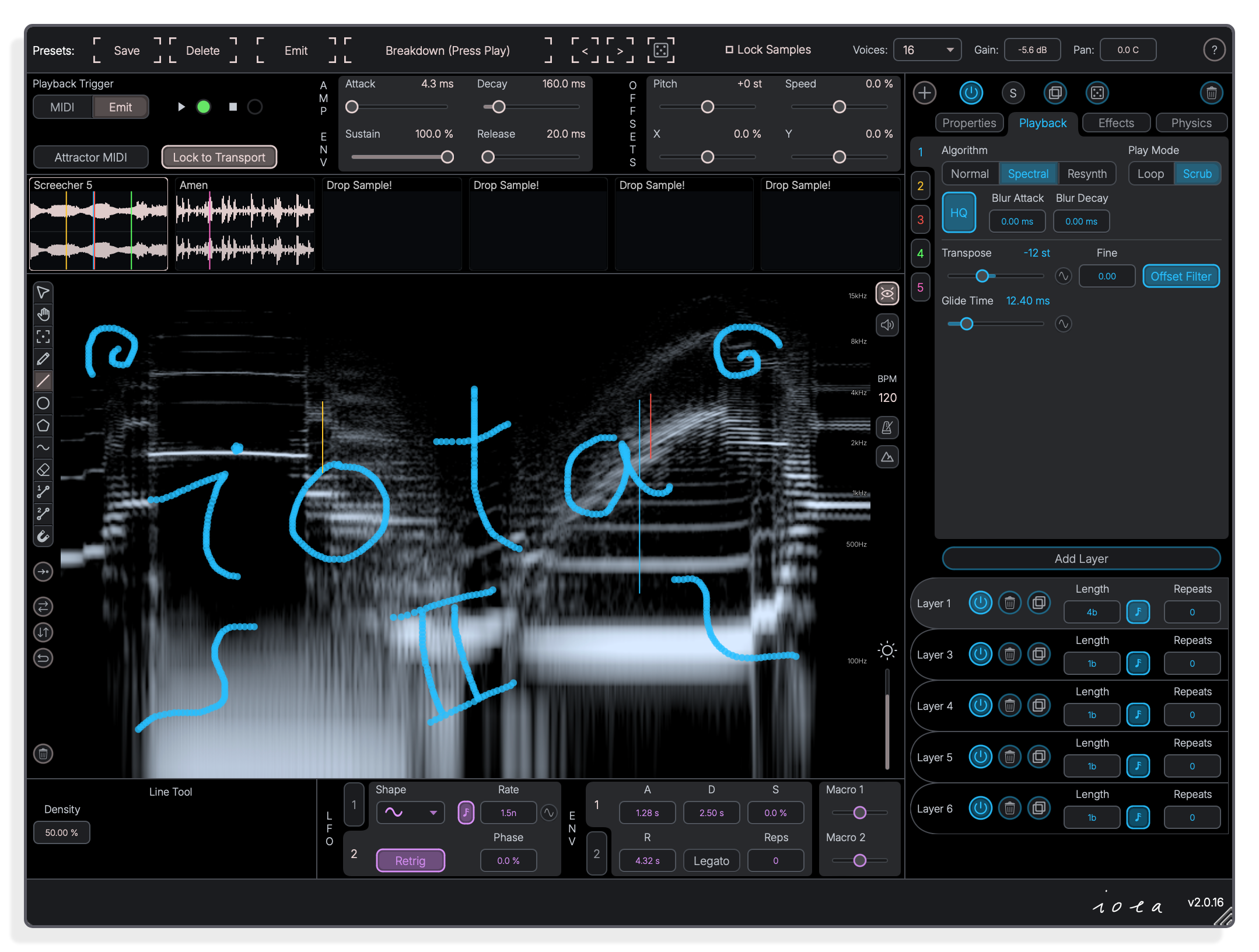
Line tool draws straight paths across the spectrogram
The line tool lets you place straight playback sequences directly on the spectrogram canvas. Each point on the line maps a sample position on the X axis and a filtering position on the Y axis.
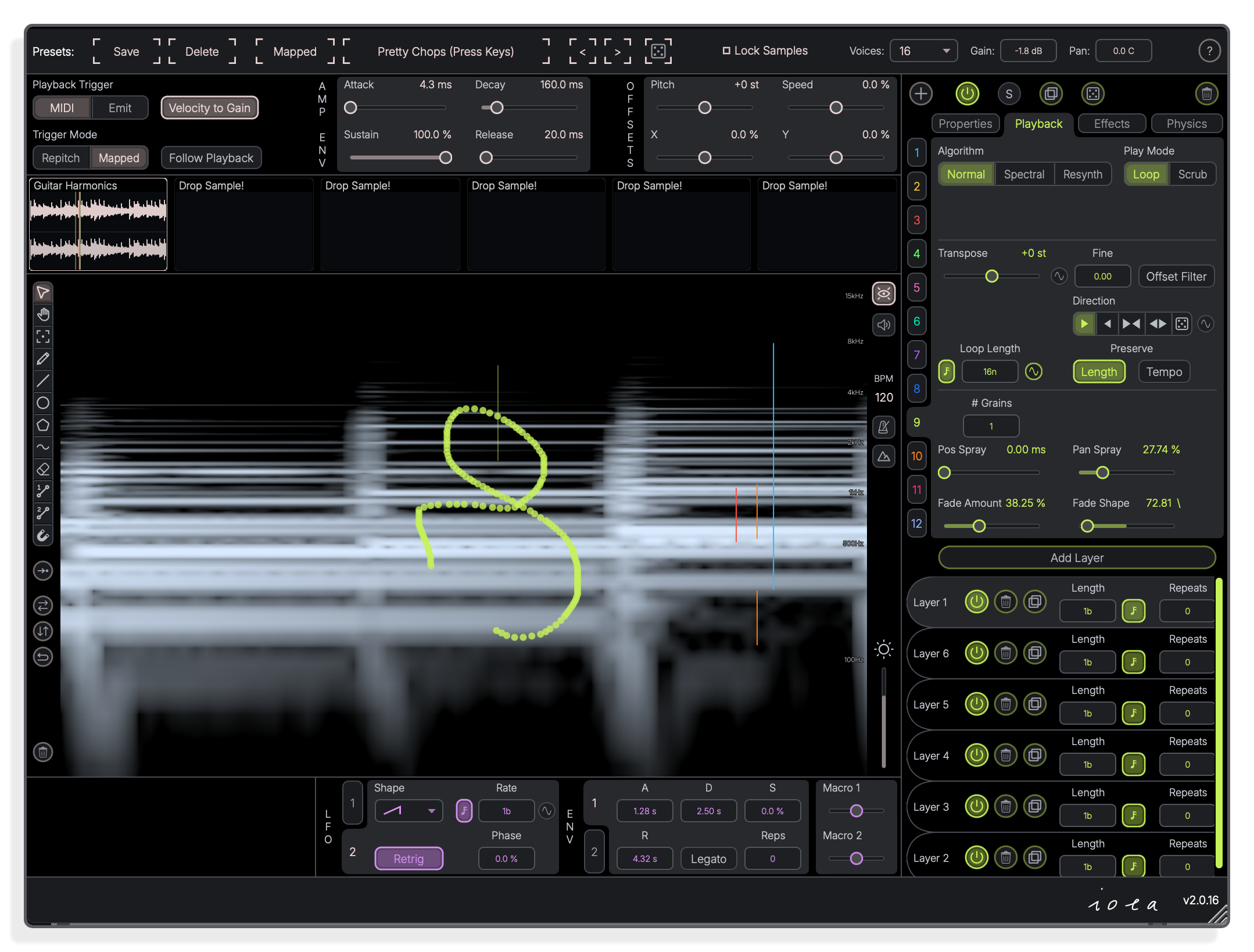
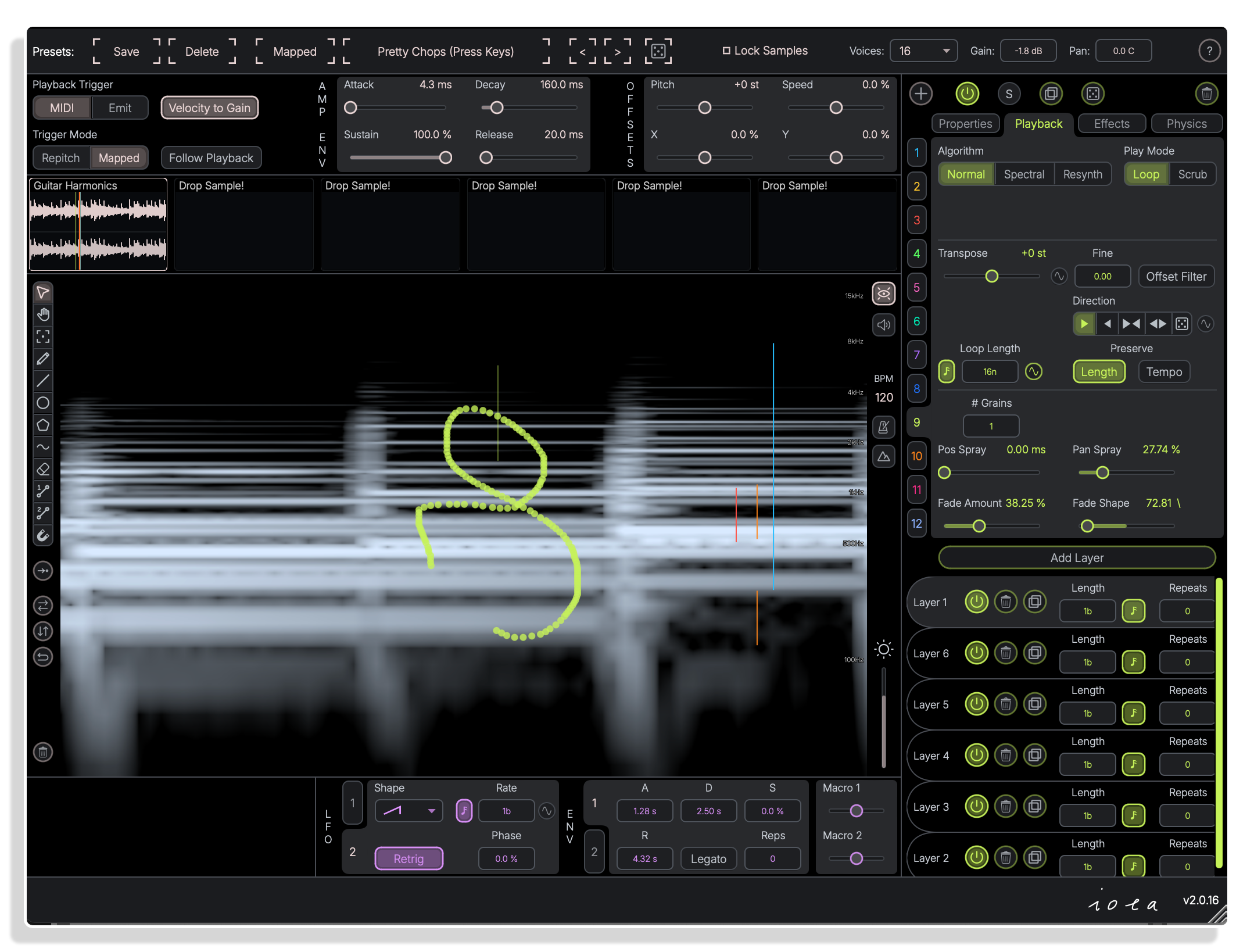
Loop
Loop play mode sets length and direction controls
Loop mode provides controls for loop length, direction, number of grains, position spray and fade shape. The Mapped trigger mode assigns each drawn path to specific MIDI pitch classes, triggering only the matching path when that note is played.
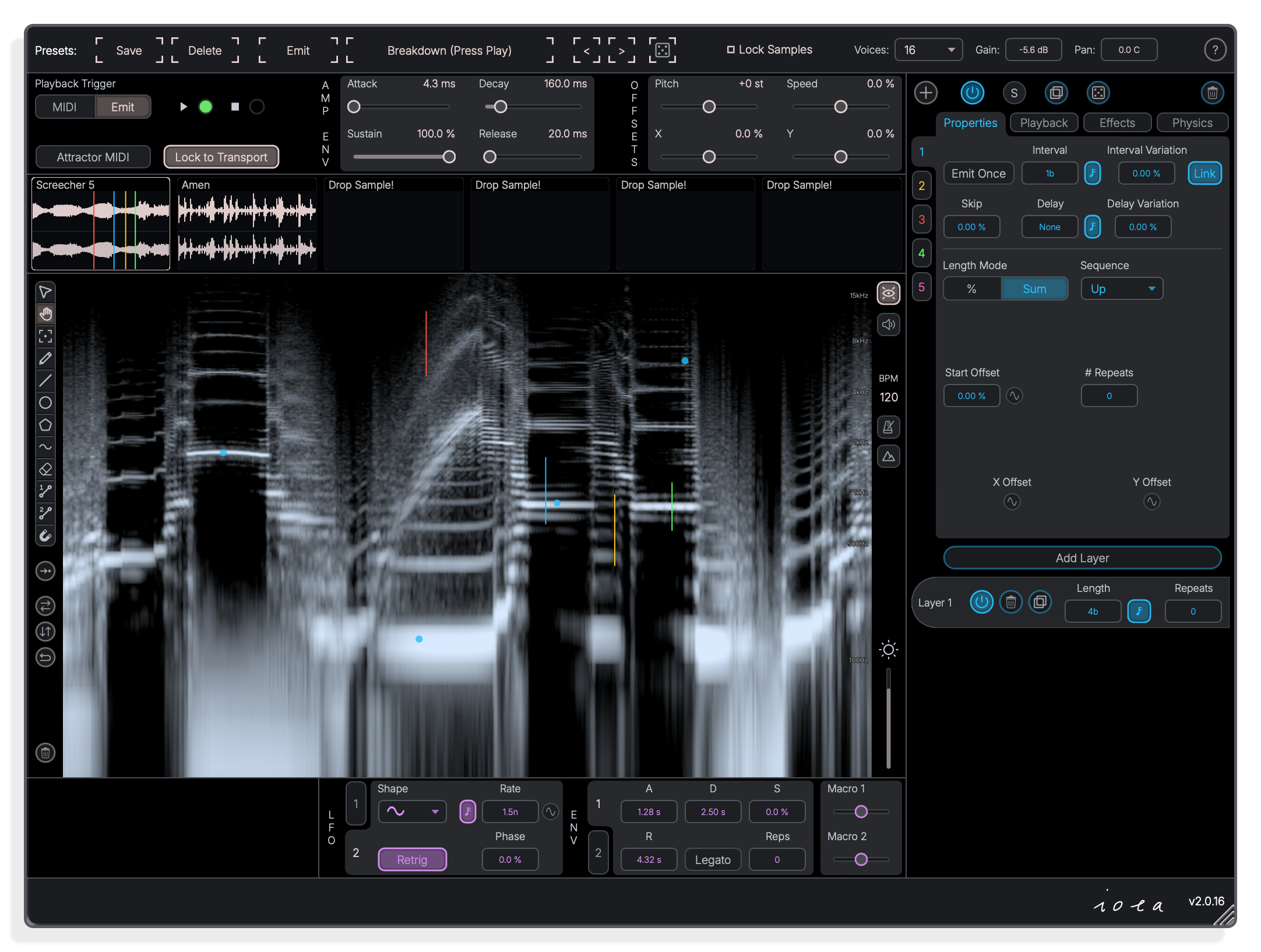
Properties
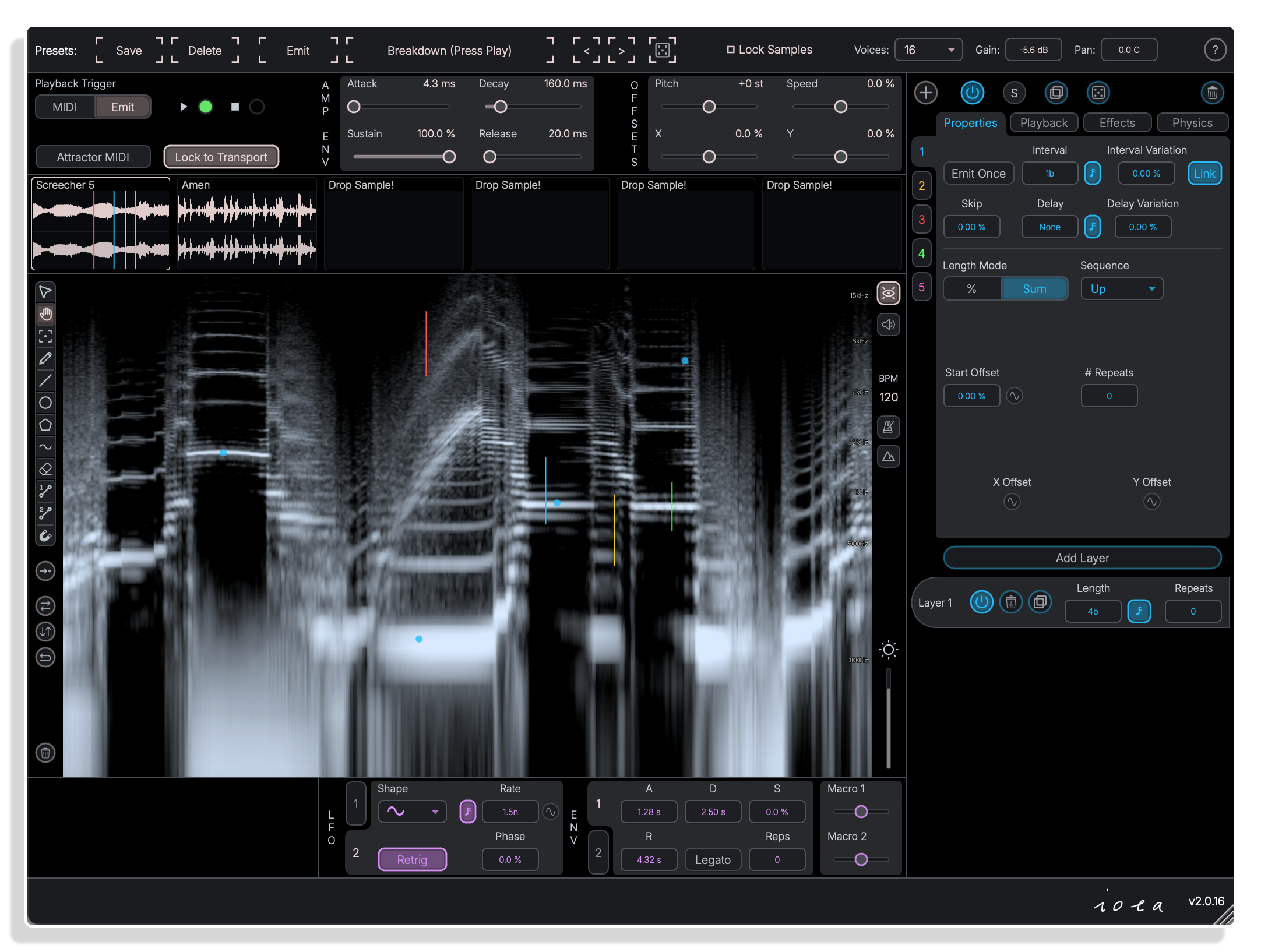
Emit mode auto-triggers paths at set intervals
In Emit mode, paths play back automatically without any MIDI input. The Properties panel controls interval, delay, skip, variance and emit-once settings, and can link the interval to the path length.
Effects
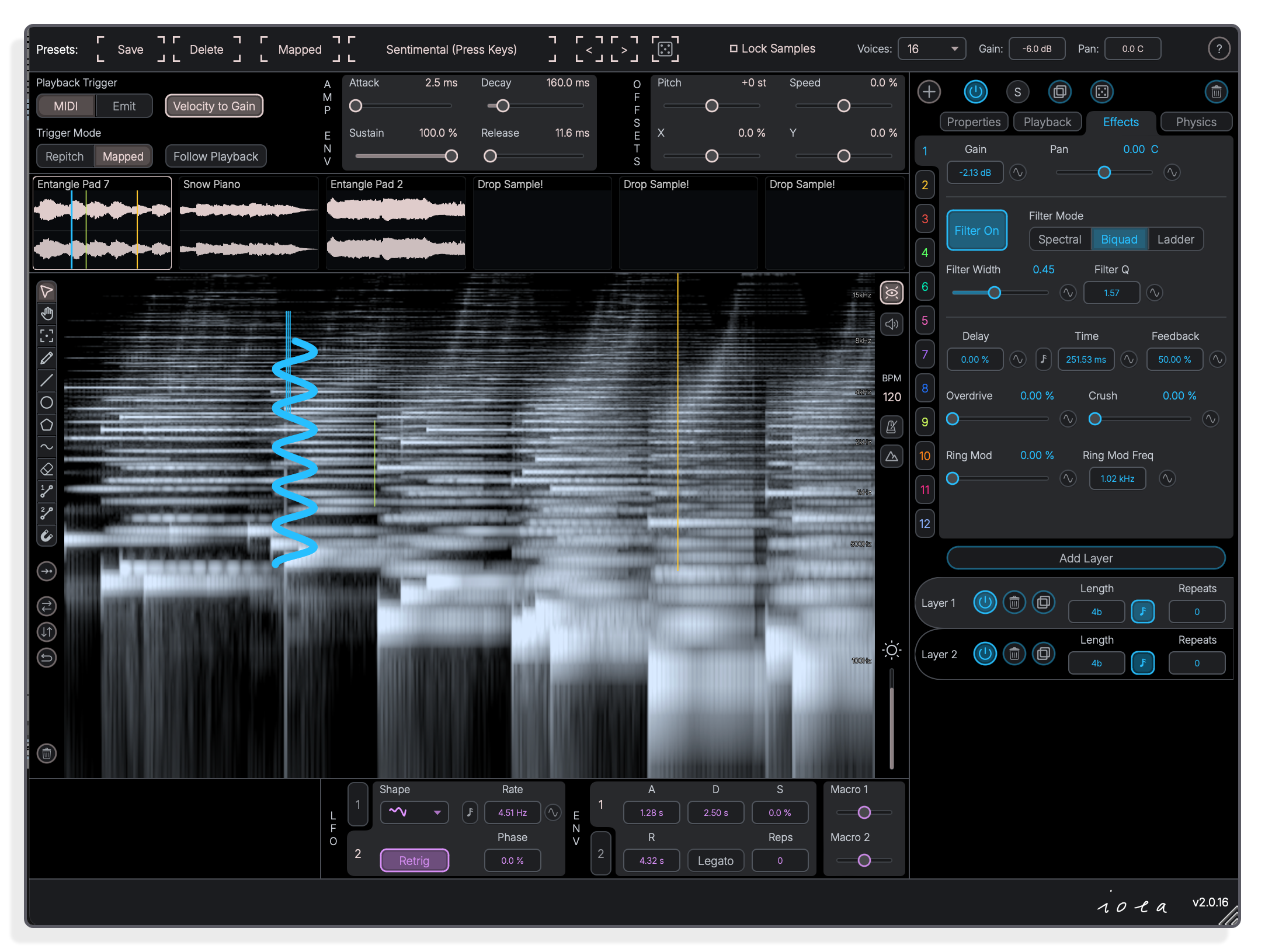
Biquad and ladder filters shape each path independently
The Effects panel offers three filter modes, classic biquadratic and ladder, each with a resonance option, alongside delay, overdrive, sample reduction and ring modulation. Every path carries its own independent effect settings.
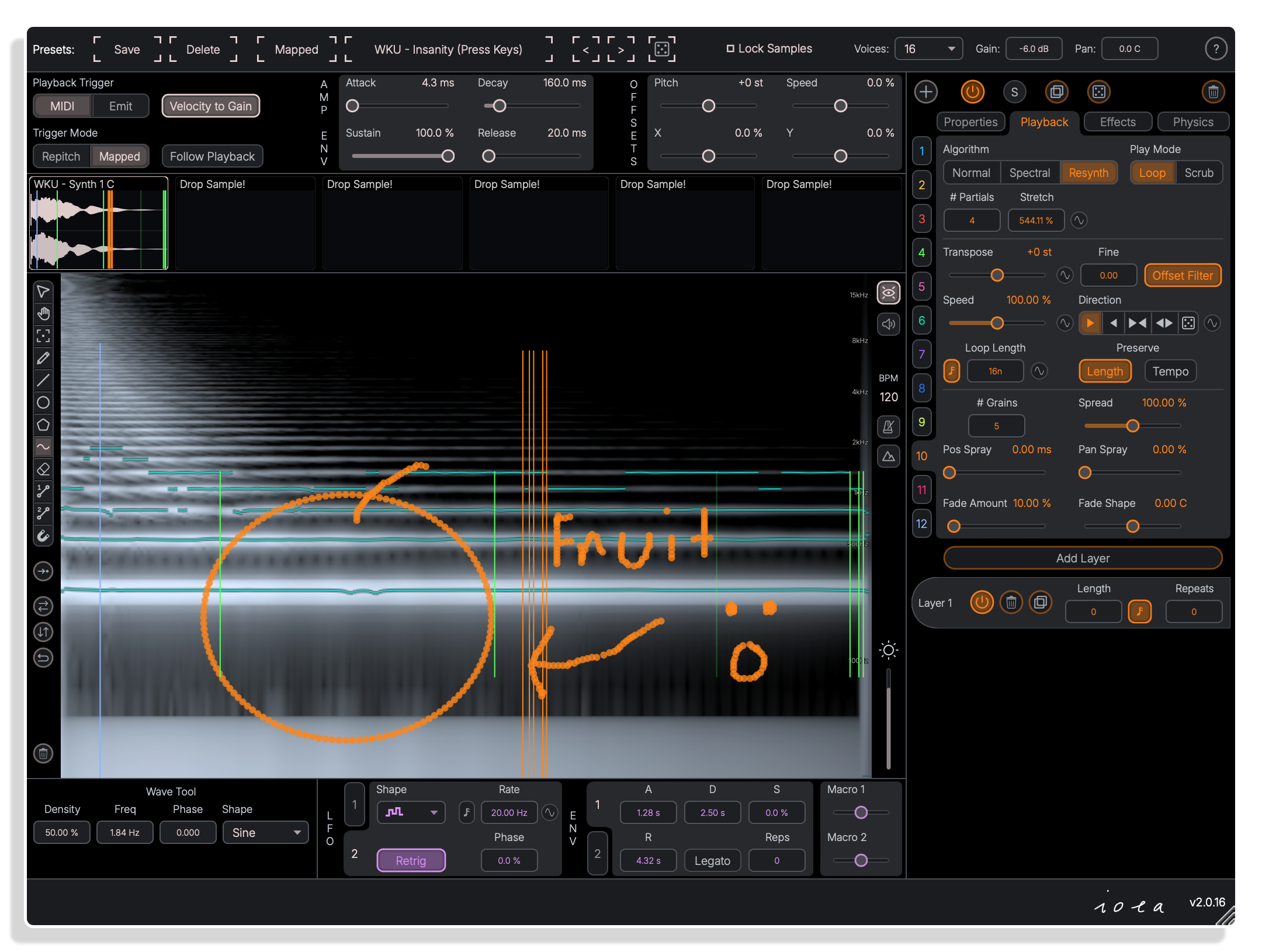
Resynth
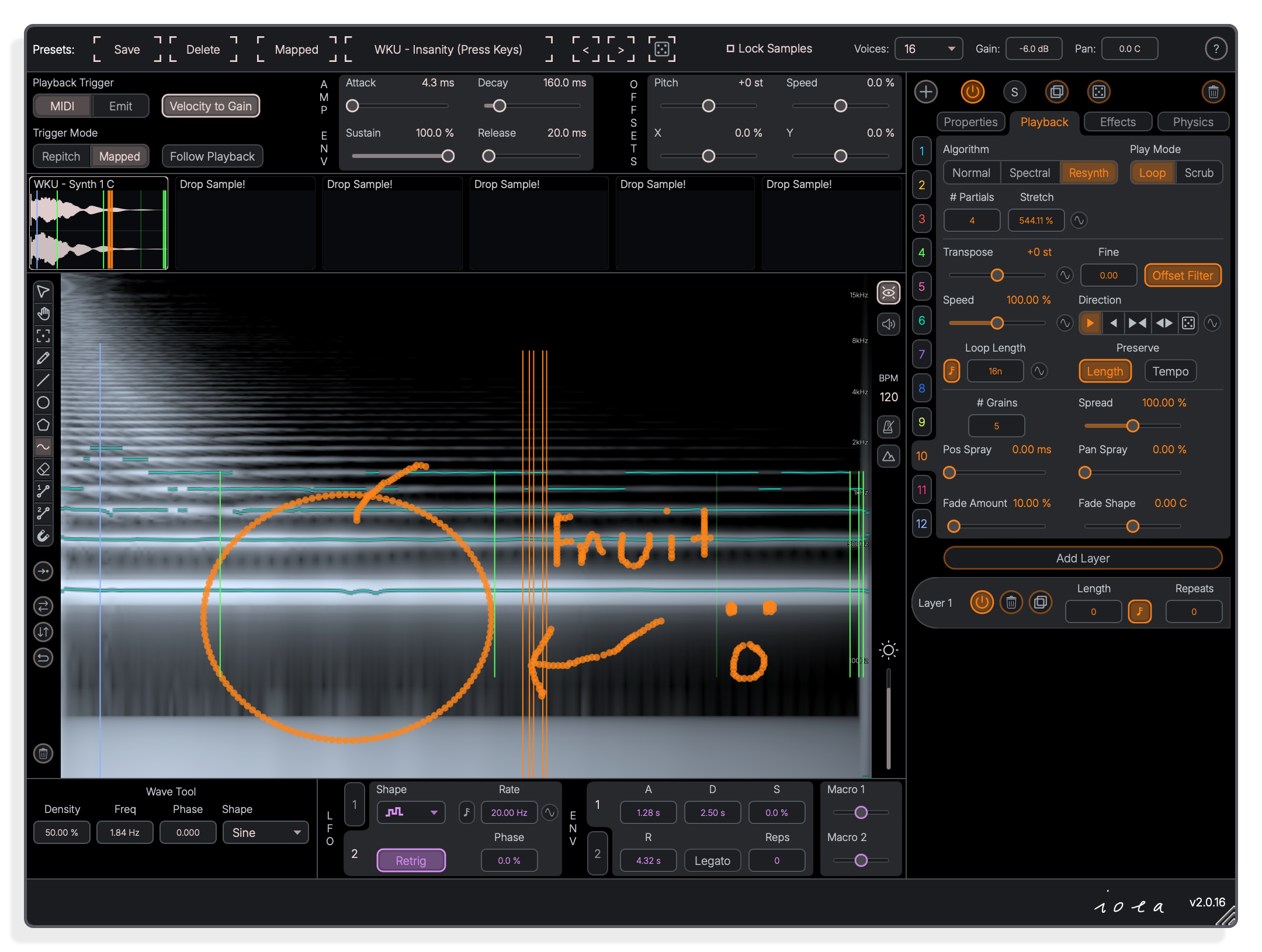
Resynth mode with partials stretch for tonal textures
The Resynth algorithm rebuilds audio from sine partials, with controls for the number of partials and a partials stretch amount. The wave tool, shown active at the bottom, lets you draw waveform-shaped playback paths including spirals directly onto the spectrogram.
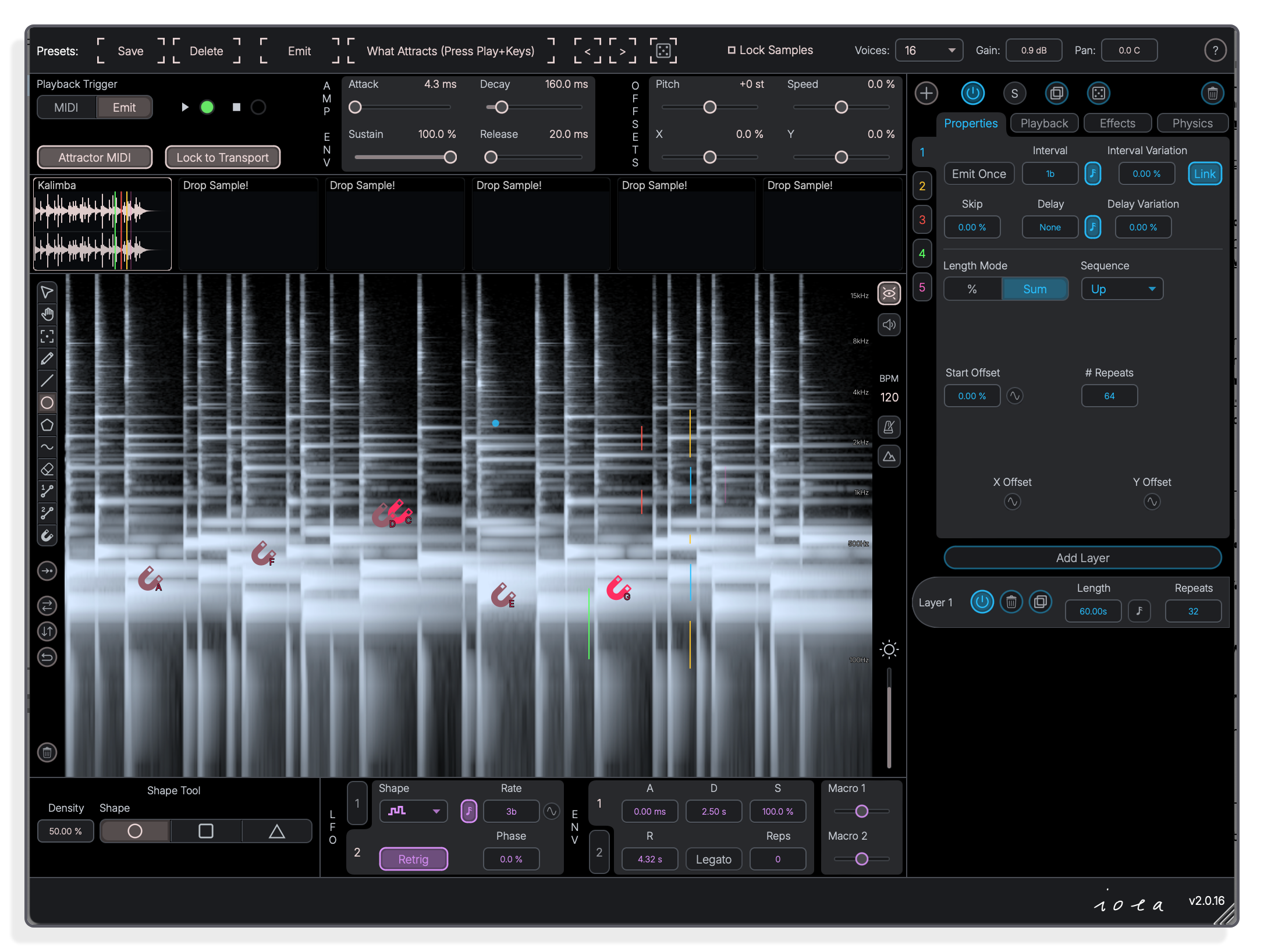
Shape Tool
Shape tool places points across the spectrogram canvas
The shape tool lets you draw ellipse, rectangle or triangle playback sequences directly onto the spectrogram. Each shape becomes a set of 2D path points where X sets sample position and Y sets filter position.
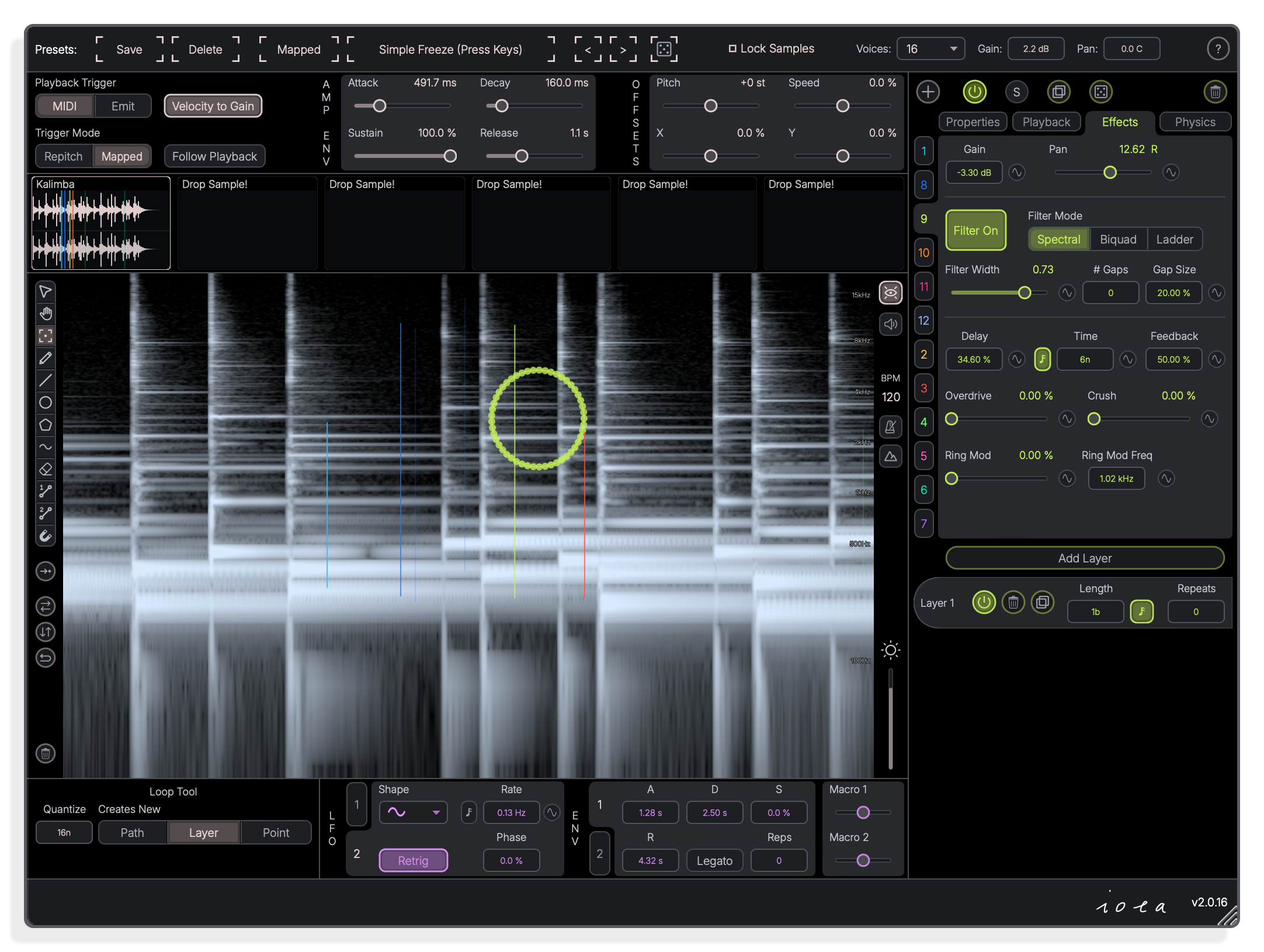
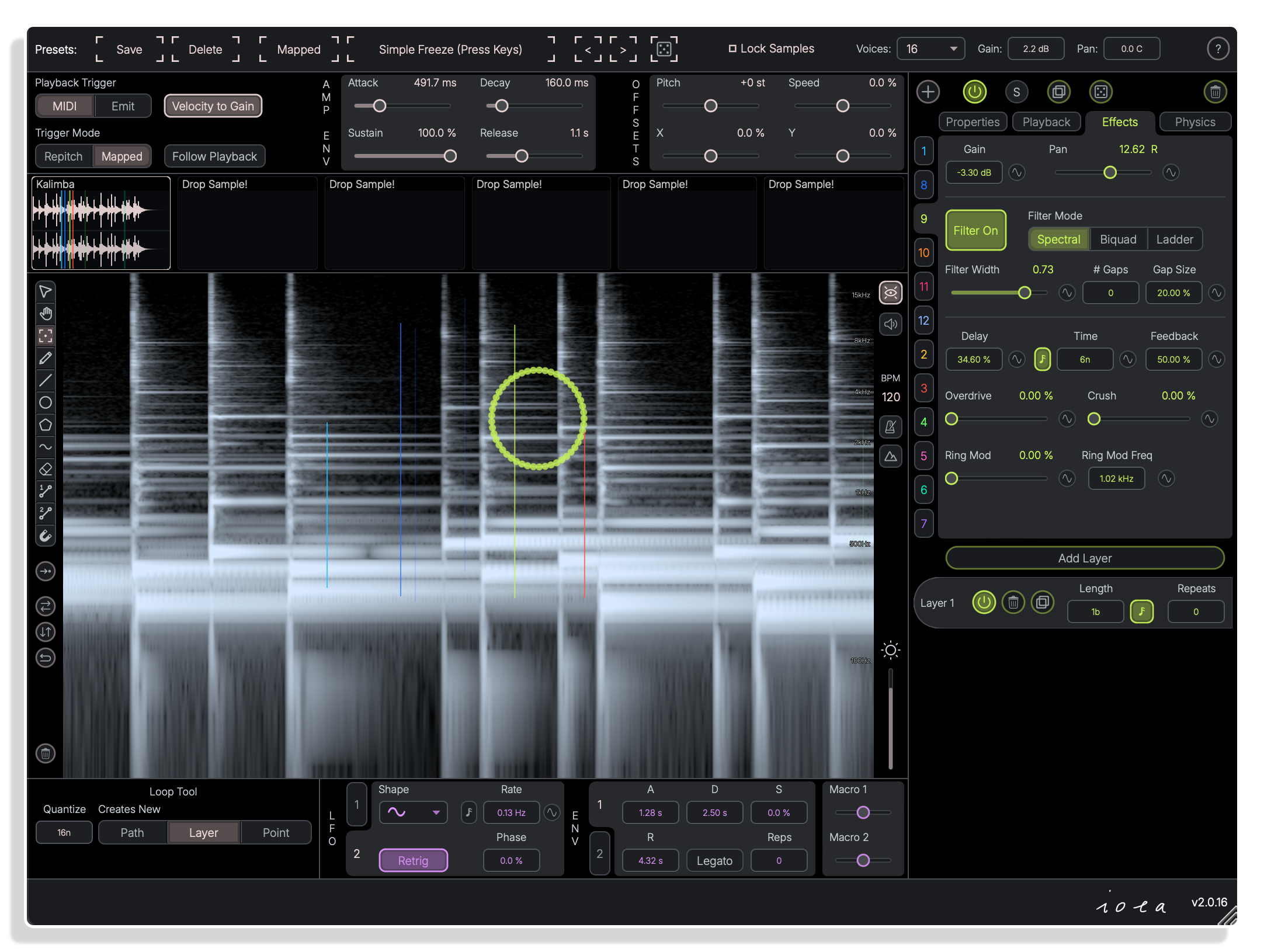
Effects
Velocity to Gain scales voice level from MIDI input
With Velocity to Gain enabled, incoming MIDI note velocity directly controls the gain for each triggered voice. The Effects panel also shows the spectral filter, delay, overdrive and ring mod controls available per path.
Important Information
INSTALLATION
Our Products are generally provided as Zip file downloads which in all cases will need to be extracted and saved to your hard drive prior to installation. Details on the different file type provided and what to do with them are below.
.alp Files – These are Ableton Live Packs and will either install directly into the Packs Section of the browser of Ableton Live or ask you to save them to your hard drive. For packs that install to the library, when you double click on them you will see a pop up window asking you to confirm that installation is ok as the files are described as “Legacy”. This is fine and you are ok to proceed, the packs are created using the format for an earlier version of Live and so remain compatible with the current version.
.amxd files – These are individual MaxforLive Devices and can be stored anywhere on your hard drive. We’d advise creating a folder for them and then adding that folder as a location within the Places section of Lives Browser.
LICENSE
END-USER LICENSE AGREEMENT FOR ISOTONIK STUDIOS SOFTWARE PRODUCTS.
PLEASE READ THE TERMS AND CONDITIONS OF THIS LICENSE AGREEMENT CAREFULLY BEFORE CONTINUING WITH THIS PROGRAM INSTALL.
This End-User License Agreement (referred to as “EULA”) is a legal agreement between an individual or a single entity (referred to as “LICENSEE”) and Isotonik Studios for the Isotonik Studios software product(s) which may include associated software components, media, printed materials, and “online” or electronic documentation (referred to as “SOFTWARE PRODUCT”). By installing, copying, or otherwise using the SOFTWARE PRODUCT, the LICENSEE agrees to be bound by the terms of this EULA.
This EULA represents the entire agreement concerning the program between the LICENSEE and Isotonik Studios and it supersedes any prior proposal, representation, or understanding between the parties. If the LICENSEE does not agree to the terms of this EULA, the LICENSEE should not install or use the SOFTWARE PRODUCT.
The SOFTWARE PRODUCT is protected by copyright laws and international copyright treaties, as well as other intellectual property laws and treaties. The SOFTWARE PRODUCT is licensed, not sold.
- GRANT OF LICENSE.
The SOFTWARE PRODUCT is licensed as follows:
(a) Installation and Use. Providing that the LICENSEE has paid any applicable license fees, Isotonik Studios grants the LICENSEE the right to install and use copies of the SOFTWARE PRODUCT on up to two computers in the LICENSEE’s possession that are running a validly licensed copy of the operating system for which the SOFTWARE PRODUCT was designed [e.g., Windows 10, macOS]. The computer(s) must be owned by the LICENSEE.
(b) Backup Copies. The LICENSEE may also make copies of the SOFTWARE PRODUCT as may be necessary for backup and archival purposes.
- DESCRIPTION OF OTHER RIGHTS AND LIMITATIONS.
(a) Maintenance of Copyright Notices. The LICENSEE must not remove or alter any copyright notices on any and all copies of the SOFTWARE PRODUCT.
(b) Distribution. The LICENSEE may not distribute registered copies of the SOFTWARE PRODUCT to third parties.
(c) Prohibition on Reverse Engineering, Decompilation, and Disassembly. The LICENSEE may not reverse engineer, decompile, or disassemble the SOFTWARE PRODUCT, except and only to the extent that such activity is expressly permitted by applicable law notwithstanding this limitation.
(d) Rental. The LICENSEE may not rent, lease, or lend the SOFTWARE PRODUCT.
(e) License transfer The LICENSEE may not transfer their license to the SOFTWARE PRODUCT to any third party. Any attempt to do so will be considered a violation of this EULA.
(f) Support Services. Isotonik Studios may provide the LICENSEE with support services related to the SOFTWARE PRODUCT for a period of 12 months following the date of purchase. Any supplemental software code provided to the LICENSEE as part of the Support Services shall be considered part of the SOFTWARE PRODUCT and subject to the terms and conditions of this EULA.
(g) Compliance with Applicable Laws. The LICENSEE must comply with all applicable laws regarding use of the SOFTWARE PRODUCT.
- TERMINATION Without prejudice to any other rights, Isotonik Studios may terminate this EULA if the LICENSEE fails to comply with the terms and conditions of this EULA. In such event, the LICENSEE must destroy all copies of the SOFTWARE PRODUCT in the LICENSEE’s possession.
- COPYRIGHT All title, including but not limited to copyrights, in and to the SOFTWARE PRODUCT and any copies thereof are owned by Isotonik Studios or its suppliers. All title and intellectual property rights in and to the content which may be accessed through use of the SOFTWARE PRODUCT is the property of the respective content owner and may be protected by applicable copyright or other intellectual property laws and treaties. This EULA grants the LICENSEE no rights to use such content. All rights not expressly granted are reserved by Isotonik Studios.
- NO WARRANTIES Isotonik Studios expressly disclaims any warranty for the SOFTWARE PRODUCT. The SOFTWARE PRODUCT is provided ‘As Is’ without any express or implied warranty of any kind, including but not limited to any warranties of merchantability, noninfringement, or fitness of a particular purpose. Isotonik Studios does not warrant or assume responsibility for the accuracy or completeness of any information, text, graphics, links or other items contained within the SOFTWARE PRODUCT. Isotonik Studios makes no warranties respecting any harm that may be caused by the transmission of a computer virus, worm, time bomb, logic bomb, or other such computer program. Isotonik Studios further expressly disclaims any warranty or representation to the LICENSEE or to any third party.
- LIMITATION OF LIABILITY In no event shall Isotonik Studios be liable for any damages (including, without limitation, lost profits, business interruption, or lost information) arising out of the LICENSEE’s use of or inability to use the SOFTWARE PRODUCT, even if Isotonik Studios has been advised of the possibility of such damages. In no event will Isotonik Studios be liable for loss of data or for indirect, special, incidental, consequential (including lost profit), or other damages based in contract, tort or otherwise. Isotonik Studios shall have no liability with respect to the content of the SOFTWARE PRODUCT or any part thereof, including but not limited to errors or omissions contained therein, libel, infringements of rights of publicity, privacy, trademark rights, business interruption, personal injury, loss of privacy, moral rights or the disclosure of confidential information.
Frequently Asked Questions
What is Iota II?
Iota II is an advanced multi-sampling instrument built around a visual spectrogram canvas. You draw 2D playback sequences onto your samples and route them through Classic, Spectral phase vocoder or Resynth engines. It covers granular synthesis, concatenative synthesis, precise sample chopping and spectral texture design all in one instrument.
Does Iota II require a DAW or host to run?
No. Iota II includes a Standalone version on Mac, Windows and Linux, so it runs without a host. It also works as a plugin: AU and VST3 on Mac, VST3 on Windows, and LV2 and VST3 on Linux.
What formats are supported on each platform?
Mac: AU, VST3, and Standalone (minimum macOS 11.0 for Standalone). Windows: VST3 and Standalone. Linux (amd64): LV2, VST3, and Standalone.
What is included with Iota II?
Iota II ships with 94 presets, 44 samples and a full user manual. Presets were contributed by a community of artists including acadjmia, Ari Liloia, Jason Gear, Marco Heinle, mleuc, Mvd0ae and Warkyuu.
Can I try Iota II before buying?
Yes. A free trial version is available. The developer’s walkthrough video is also on YouTube, giving a thorough overview of the instrument before you commit.
What makes Iota II different from other samplers?
Iota II combines a visual spectrogram drawing interface with multiple playback engines (granular, spectral, resynth, classic), a physics system, gravity Attractors, and a deep modulation system in a single instrument. The developer describes it as pulling many sampling approaches together in a way that sets it apart from samplers that may share individual features but not the full combination.
In Depth
What Is Iota II?
Iota II is an advanced experimental sampler built around a visual spectrogram canvas. Load a sample and the spectrogram fills the screen. From there you draw 2D playback sequences directly onto that canvas, where each point sets both a sample position (X axis) and a filtering position (Y axis). The result is a sampler that you see as much as you hear, pulling precise control and open-ended experimentation into the same workflow.
It runs as a VST3 on Windows and Mac, as an AU on Mac, and as an LV2 on Linux. It also runs as a standalone application without a host, because not every workflow starts in a DAW. Minimum macOS for standalone is 11.0.
The Core Idea: Paths and Layers
Playback in Iota II is organised around Paths. Each Path is an independent playback sequence drawn onto the spectrogram, with its own sample settings, effects, modulation, and physics. You can run up to 12 Paths simultaneously, and each Path supports infinite Layers. Every Layer holds its own drawn sequence, length, number of repeats, and modulation sequences, which means a single preset can carry enormous depth before you have touched a single parameter.
Paths are triggered in two main ways. MIDI mode fires playback from your controller or DAW. In Repitch mode every MIDI note triggers all Paths, transposing pitch relative to C3 exactly as a classic sampler would, with an optional portamento glide. In Mapped mode each Path is assigned to specific pitch classes so you can play different Paths from different keys. Emit mode fires Paths automatically on a set interval, with delay, skip, and variance controls, and can lock to the host transport so playback only runs when the DAW is rolling.
Three Playback Algorithms
The sample engine offers three distinct algorithms. Classic mode plays the sample in the traditional sense. Spectral mode uses a phase vocoder with blur attack and decay settings, opening up smeared and evolving textures that move from one moment to the next. Resynth mode rebuilds the sound from sine partials, with controls for the number of partials and a partials stretch parameter, giving you resynthesised tones that sit somewhere between the original recording and pure synthesis.
Within each algorithm you choose between two playback modes. Granular and Classic looping gives you a looping engine with loop length, two preservation options, loop direction (forward, reverse, bounce, and random), grain count, grain spread, position spray, pan spray, and fade window shape. Scrub mode moves the playhead directly from point to point along the drawn path with no fixed loop, including a glide time setting. In scrub mode you can draw nonlinear paths to create all manner of time stretching effects without touching a time-stretch parameter directly.
Effects Per Path
Each Path carries its own effect chain. Gain and pan sit at the top. Filtering offers three modes: Spectral (an FFT filter with an option for spectral gaps and gap depth control), Classic Biquadratic (with resonance), and Ladder (also with resonance). Beyond filtering there is a delay line, overdrive, sample reduction, and ring modulation, all applied independently per Path because what works for one sequence should not impose itself on another.
Physics
Iota II adds a physics layer to the canvas. Friction, path-point force, magnetic force, polarity, and edge behaviour (bounce, clip, wrap, or remove) all affect how the playhead moves through a drawn sequence. Gravity Attractors can be placed on the canvas with modes including gravity, vortex, and three chaos attractor types. Each Attractor can be assigned a MIDI note to activate it, and its position is mappable for external control. This is where rhythms and textures start to take on a life of their own.
Modulation
The modulation system is bipolar and comprehensive. Sources include two LFOs (with a Perlin noise option for organic movement), two looping envelopes, two sequences that track each playback path point, two random spray values, two Macros, the playhead Y position (with an absolute value option), MIDI pitch, velocity, aftertouch, and mod wheel, and MPE slide and pressure. These sources route to a wide range of Path parameters, because modulation locked to a single destination gets boring fast.
Canvas Tools
Drawing on the spectrogram uses a full set of canvas tools: a select tool for resizing, moving, and rotating shapes; a zoom tool (also works with the scroll wheel); a loop creator; a free pen; a line tool; shape tools for ellipses, rectangles, and triangles; a polygon tool with variable side count; a wave tool with basic waveform options including a spiral; an eraser; point sequence tools; and the Attractor creator. You can also create playback points at each transient or grid line division automatically, flip and reverse shapes, rasterize drawn shapes to free points, and drop an image onto the canvas to generate a playback sequence from it.
Samples and Presets
Iota II supports up to 6 samples loaded simultaneously. Each sample has its own gain, tuning, and BPM settings. A lock samples function lets you swap presets without changing the loaded samples, which means auditioning presets with your own material stays quick. A load random preset function is there for when you want the instrument to surprise you. The package ships with 94 presets and 44 samples, with preset contributions from acadjmia, Ari Liloia, Jason Gear (jsonics), Marco Heinle, mleuc, Mvd0ae, and Warkyuu.
Global Controls
Global offsets let you shift all Paths at once for transposition, speed, and X and Y position. A main gain and main panning control sit at the top level. Voice count is adjustable, including a monophonic mode. An overall voice amp ADSR envelope shapes the amplitude of every voice. Holding shift while adjusting any parameter changes that parameter across all Paths simultaneously, because editing twelve Paths one at a time is nobody’s idea of a good workflow.
Use Cases
Depending on how you draw your Paths and which algorithm you pick, Iota II operates as a precise multisample chopper, a concatenative synthesiser, a granular synth in many forms, a spectral texture generator, a rhythmic resampler, or something that does not have a name yet. The developer describes it as an endless rabbit hole beast of a sampler, and that description is honest. The 94 included presets cover a wide range of starting points, but the real territory opens up once you start drawing.
More from Dillon Bastan