OSC Toolkit by Riccardo Sellan
WHAT IF ABLETON LIVE COULD TALK TO EVERYTHING ON YOUR NETWORK?
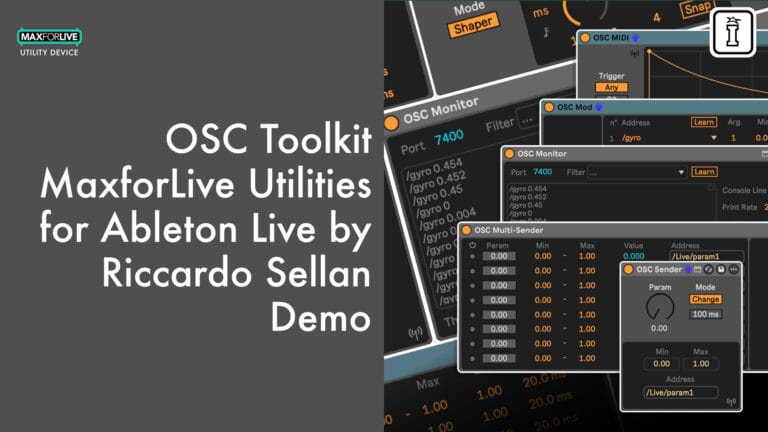
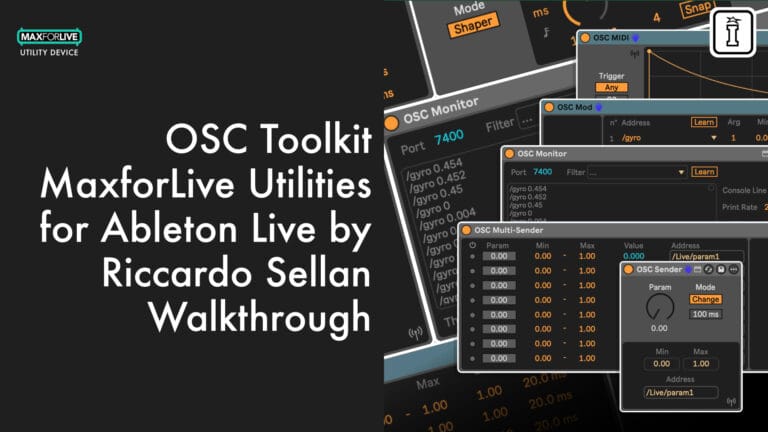
The OSC Toolkit by Riccardo Sellan brings full OSC/UDP integration to Ableton Live. Five MaxforLive devices let you send, receive, map, trigger, and monitor OSC messages across your local network, connecting Live to visual software, hardware controllers, smartphones, IoT devices, and more.
Inside you’ll find:
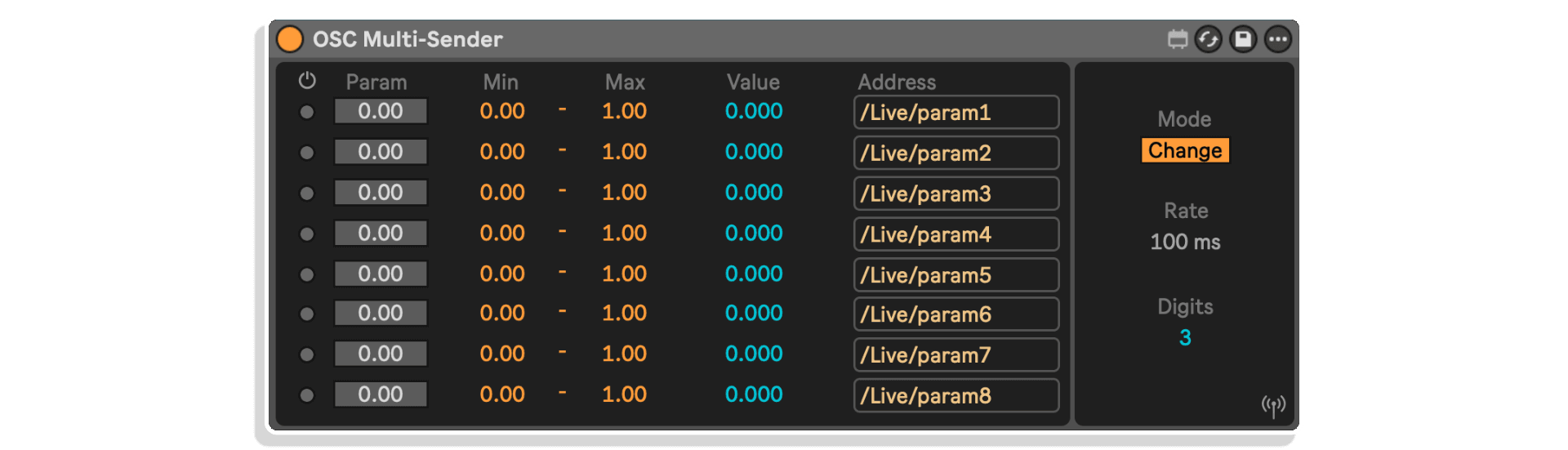
- OSC Sender and OSC Multi-Sender for transmitting parameter data (up to 8 channels simultaneously)
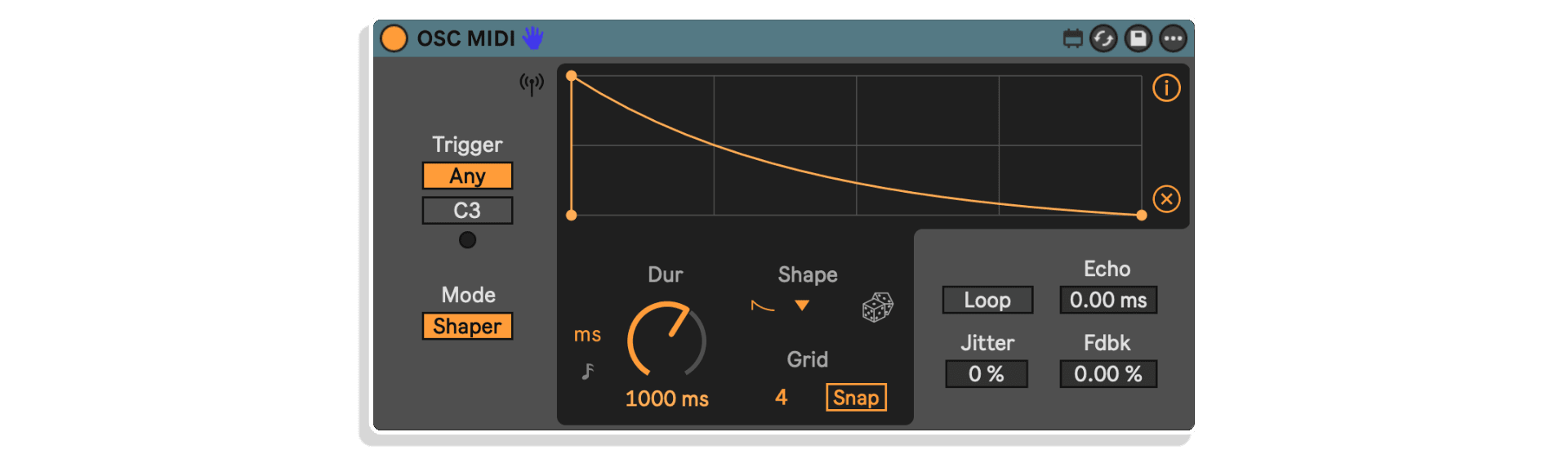
- OSC MIDI for generating drawable or ADSR envelope modulation triggered by MIDI notes
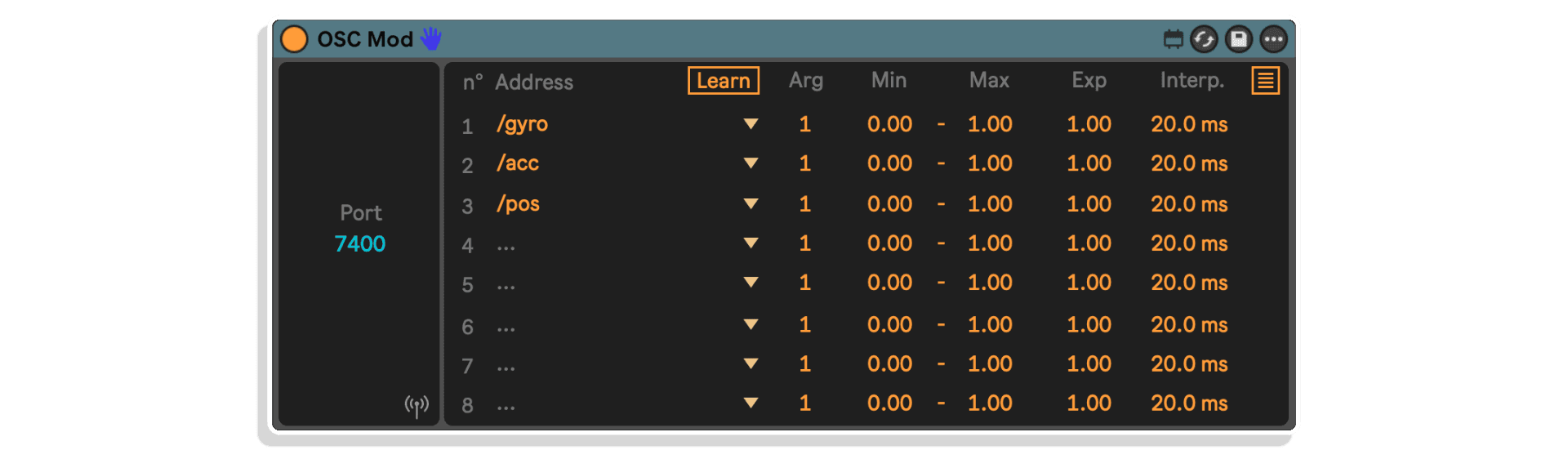
- OSC Mod for receiving and mapping external OSC data to Ableton Live parameters
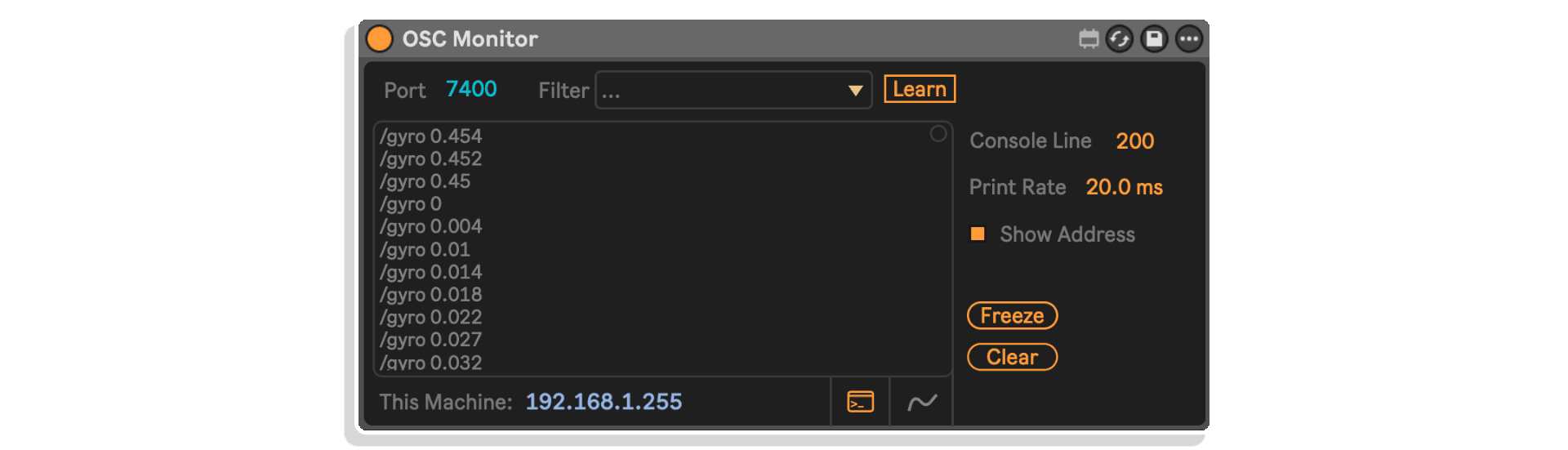
- OSC Monitor for real-time message inspection, debugging, and calibration
Compatible with TouchDesigner, Max, Unreal Engine, Unity, Resolume Arena, Pure Data, TouchOSC, ZigSim, Raspberry Pi, Arduino IoT, and any OSC-capable device on your network.
Requires Ableton Live 10 Suite or Ableton Live Standard with MaxforLive (or later).
Your DAW just became a node on the network.
USER GUIDE:
Osc Toolkit User Manual V.1.0.3
OSC Toolkit by Riccardo Sellan
WHAT IF ABLETON LIVE COULD TALK TO EVERYTHING ON YOUR NETWORK?
The OSC Toolkit by Riccardo Sellan brings full OSC/UDP integration to Ableton Live. Five MaxforLive devices let you send, receive, map, trigger, and monitor OSC messages across your local network, connecting Live to visual software, hardware controllers, smartphones, IoT devices, and more.
Inside you’ll find:
- OSC Sender and OSC Multi-Sender for transmitting parameter data (up to 8 channels simultaneously)
- OSC MIDI for generating drawable or ADSR envelope modulation triggered by MIDI notes
- OSC Mod for receiving and mapping external OSC data to Ableton Live parameters
- OSC Monitor for real-time message inspection, debugging, and calibration
Compatible with TouchDesigner, Max, Unreal Engine, Unity, Resolume Arena, Pure Data, TouchOSC, ZigSim, Raspberry Pi, Arduino IoT, and any OSC-capable device on your network.
Requires Ableton Live 10 Suite or Ableton Live Standard with MaxforLive (or later).
Your DAW just became a node on the network.
USER GUIDE:
Osc Toolkit User Manual V.1.0.3
Buying for someone?Send a gift card →

Product reviews
5 out of 5
2 reviews
How item rating is calculated
We show the average based on reviews. Only genuine reviews are displayed.
Sort by
October 14, 2026
This reviewer bought this product from our store.
Very practical
I recommend this product
Reply from Riccardo Sellan
October 14, 2026
April 23, 2026
This reviewer bought this product from our store.
Useful and well thought out OSC tools
OSC Toolkit is a complete and cleverly laid out startpoint for those wishing to add OSC control to their live projects. I often design m4l devices for my own needs but this is the kind of tools which is a no-brainer. The GUIs are clear and readable, with info readable in Live's info window if you're not familiar with those control devices, and nice little details in the MIDI osc device for example (loop, jitter, user custom shapes in the presets, etc,...).
I recommend this product
OSC Toolkit by Riccardo Sellan
Overview
Ableton Live is a powerhouse for music production and performance, but when it comes to communicating with the wider world of visual software, hardware controllers, and networked devices, there has always been a gap. The OSC Toolkit by Riccardo Sellan closes that gap entirely.
This MaxforLive device pack brings full OSC/UDP integration directly into your Ableton Live session. Five purpose-built devices let you send, receive, filter, map, trigger, and monitor OSC messages across your local network, connecting Live to any OSC-compatible software or hardware without leaving your DAW.
Whether you are syncing visuals in TouchDesigner, controlling parameters in Unreal Engine, triggering lighting cues in Resolume Arena, or feeding data to a Raspberry Pi installation, the OSC Toolkit gives you the bridge you have been missing.
The Devices
OSC Sender transmits OSC/UDP messages over the network from a single parameter. Adjust the value manually, automate it in your arrangement, or map it via MIDI. Choose between Change mode (sends only when the value updates) or Continuous mode (sends at a selectable rate). Set your IP, port, address, and min/max range directly from the device interface.
OSC Multi-Sender works on the same principle but scales it up: eight independent parameters, each with its own address, range, and active toggle, all sharing a single network connection. Perfect for controlling complex multi-parameter systems from one device.
OSC MIDI takes a different approach. Instead of sending raw parameter values, it uses incoming MIDI notes as triggers to generate modulation shapes sent over OSC. Choose between a fully drawable envelope (Shaper mode) or a traditional ADSR. Add jitter, echo, and feedback for evolving, organic modulation. Sync to Live’s tempo or run free. Select specific trigger notes or accept any incoming note.
OSC Mod works in the opposite direction, receiving OSC/UDP messages from external sources and mapping them to parameters inside Ableton Live. Filter incoming messages by address, select argument indices, set data ranges, apply exponential curves, and smooth incoming data with interpolation. The Learn function automatically detects and populates address filters from incoming traffic.
OSC Monitor provides a real-time console view of all OSC messages arriving on a specified port. Filter by address, visualise data on a scope, freeze or clear the console, and adjust print rate and line limits. Essential for debugging, calibrating, and understanding what data your network is actually carrying.
What Can You Connect?
Any device or software on the same local network that supports the OSC protocol. The possibilities span creative, technical, and experimental territories:
- Software: TouchDesigner, Max, Unreal Engine, Unity, Pure Data, Resolume Arena, and more
- Hardware: Smartphones running TouchOSC or ZigSim, Raspberry Pi, Arduino IoT devices, and any OSC-capable controller
Ideal For
- Audio-visual performers who need real-time communication between Live and visual environments
- Installation artists connecting Ableton Live to sensors, lighting, projections, and physical computing
- Sound designers working with external synthesis environments like Max or Pure Data
- Educators and researchers building interactive systems that respond to musical input
- Live performers using smartphones or custom hardware as wireless controllers
What’s Included
- 5 MaxforLive devices: OSC Sender, OSC Multi-Sender, OSC MIDI, OSC Mod, OSC Monitor
- PDF User Guide
Requirements
- Ableton Live 10 Suite or Ableton Live 10 Standard with MaxforLive (or later)
- Mac: Intel Core 2 Duo or later (Apple Silicon supported), macOS El Capitan 10.11.6+
- Windows: 64-bit Intel or AMD multi-core processor, Windows 8 or later
- 4 GB RAM (8 GB recommended)
- Ensure the latest version of Max is selected in Ableton Live preferences
Explore More from Riccardo Sellan
Lambda II | Sonic Mod Pack | Brightness Mod | Multi-Envelope Mod | Transient Mod | View All Riccardo Sellan Products
Frequently Asked Questions
A: The OSC Toolkit is a MaxforLive device pack that brings full OSC/UDP integration to Ableton Live. It includes five devices for sending, receiving, mapping, triggering, and monitoring OSC messages across your local network, connecting Live to visual software, hardware controllers, smartphones, and IoT devices.
A: Yes, the OSC Toolkit is a MaxforLive device pack.
A: MaxforLive is a platform that integrates the visual programming environment Max with Ableton Live, allowing users to create and use custom audio, MIDI, and control devices.
A: Any device or software on the same local network that supports the OSC protocol. This includes software such as TouchDesigner, Max, Unreal Engine, Unity, Pure Data, and Resolume Arena, as well as hardware like smartphones running TouchOSC or ZigSim, Raspberry Pi, and Arduino IoT devices.
A: You can explore more of Riccardo Sellan’s tools and devices here: Riccardo Sellan
Important Information
## v1.0.3 – 9 August 2026
– New available range of [-65535 , 65535] in every device;
– OSC MIDI: now function reach zero as expected.
## v1.0.2 – 23 June 2026
Add Push parameters support
OSC Mod: modulation mapping now works properly
V1.0.1 – Released April 2026
OSC Mod – Now getting IP information correctly
Initial Release – April 2025
Our Products are generally provided as Zip file downloads which in all cases will need to be extracted and saved to your hard drive prior to installation. Details on the different file type provided and what to do with them are below.
.alp Files – These are Ableton Live Packs and will either install directly into the Packs Section of the browser of Ableton Live or ask you to save them to your hard drive. For packs that install to the library, when you double click on them you will see a pop up window asking you to confirm that installation is ok as the files are described as “Legacy”. This is fine and you are ok to proceed, the packs are created using the format for an earlier version of Live and so remain compatible with the current version.
.amxd files – These are individual MaxforLive Devices and can be stored anywhere on your hard drive. We’d advise creating a folder for them and then adding that folder as a location within the Places section of Lives Browser.
END-USER LICENSE AGREEMENT FOR ISOTONIK STUDIOS SOFTWARE PRODUCTS.
PLEASE READ THE TERMS AND CONDITIONS OF THIS LICENSE AGREEMENT CAREFULLY BEFORE CONTINUING WITH THIS PROGRAM INSTALL.
This End-User License Agreement (referred to as “EULA”) is a legal agreement between an individual or a single entity (referred to as “LICENSEE”) and Isotonik Studios for the Isotonik Studios software product(s) which may include associated software components, media, printed materials, and “online” or electronic documentation (referred to as “SOFTWARE PRODUCT”). By installing, copying, or otherwise using the SOFTWARE PRODUCT, the LICENSEE agrees to be bound by the terms of this EULA.
This EULA represents the entire agreement concerning the program between the LICENSEE and Isotonik Studios and it supersedes any prior proposal, representation, or understanding between the parties. If the LICENSEE does not agree to the terms of this EULA, the LICENSEE should not install or use the SOFTWARE PRODUCT.
The SOFTWARE PRODUCT is protected by copyright laws and international copyright treaties, as well as other intellectual property laws and treaties. The SOFTWARE PRODUCT is licensed, not sold.
- GRANT OF LICENSE.
The SOFTWARE PRODUCT is licensed as follows:
(a) Installation and Use. Providing that the LICENSEE has paid any applicable license fees, Isotonik Studios grants the LICENSEE the right to install and use copies of the SOFTWARE PRODUCT on up to two computers in the LICENSEE’s possession that are running a validly licensed copy of the operating system for which the SOFTWARE PRODUCT was designed [e.g., Windows 10, macOS]. The computer(s) must be owned by the LICENSEE.
(b) Backup Copies. The LICENSEE may also make copies of the SOFTWARE PRODUCT as may be necessary for backup and archival purposes.
- DESCRIPTION OF OTHER RIGHTS AND LIMITATIONS.
(a) Maintenance of Copyright Notices. The LICENSEE must not remove or alter any copyright notices on any and all copies of the SOFTWARE PRODUCT.
(b) Distribution. The LICENSEE may not distribute registered copies of the SOFTWARE PRODUCT to third parties.
(c) Prohibition on Reverse Engineering, Decompilation, and Disassembly. The LICENSEE may not reverse engineer, decompile, or disassemble the SOFTWARE PRODUCT, except and only to the extent that such activity is expressly permitted by applicable law notwithstanding this limitation.
(d) Rental. The LICENSEE may not rent, lease, or lend the SOFTWARE PRODUCT.
(e) License transfer The LICENSEE may not transfer their license to the SOFTWARE PRODUCT to any third party. Any attempt to do so will be considered a violation of this EULA.
(f) Support Services. Isotonik Studios may provide the LICENSEE with support services related to the SOFTWARE PRODUCT for a period of 12 months following the date of purchase. Any supplemental software code provided to the LICENSEE as part of the Support Services shall be considered part of the SOFTWARE PRODUCT and subject to the terms and conditions of this EULA.
(g) Compliance with Applicable Laws. The LICENSEE must comply with all applicable laws regarding use of the SOFTWARE PRODUCT.
- TERMINATION Without prejudice to any other rights, Isotonik Studios may terminate this EULA if the LICENSEE fails to comply with the terms and conditions of this EULA. In such event, the LICENSEE must destroy all copies of the SOFTWARE PRODUCT in the LICENSEE’s possession.
- COPYRIGHT All title, including but not limited to copyrights, in and to the SOFTWARE PRODUCT and any copies thereof are owned by Isotonik Studios or its suppliers. All title and intellectual property rights in and to the content which may be accessed through use of the SOFTWARE PRODUCT is the property of the respective content owner and may be protected by applicable copyright or other intellectual property laws and treaties. This EULA grants the LICENSEE no rights to use such content. All rights not expressly granted are reserved by Isotonik Studios.
- NO WARRANTIES Isotonik Studios expressly disclaims any warranty for the SOFTWARE PRODUCT. The SOFTWARE PRODUCT is provided ‘As Is’ without any express or implied warranty of any kind, including but not limited to any warranties of merchantability, noninfringement, or fitness of a particular purpose. Isotonik Studios does not warrant or assume responsibility for the accuracy or completeness of any information, text, graphics, links or other items contained within the SOFTWARE PRODUCT. Isotonik Studios makes no warranties respecting any harm that may be caused by the transmission of a computer virus, worm, time bomb, logic bomb, or other such computer program. Isotonik Studios further expressly disclaims any warranty or representation to the LICENSEE or to any third party.
- LIMITATION OF LIABILITY In no event shall Isotonik Studios be liable for any damages (including, without limitation, lost profits, business interruption, or lost information) arising out of the LICENSEE’s use of or inability to use the SOFTWARE PRODUCT, even if Isotonik Studios has been advised of the possibility of such damages. In no event will Isotonik Studios be liable for loss of data or for indirect, special, incidental, consequential (including lost profit), or other damages based in contract, tort or otherwise. Isotonik Studios shall have no liability with respect to the content of the SOFTWARE PRODUCT or any part thereof, including but not limited to errors or omissions contained therein, libel, infringements of rights of publicity, privacy, trademark rights, business interruption, personal injury, loss of privacy, moral rights or the disclosure of confidential information.
More from Riccardo Sellan
Frequently Bought Together
 -30%★ Popular
MonomonoConsolex8056 by MonomonoLive 11 & 12 · Max for Live Original price was: £50.00.£35.00Current price is: £35.00.