

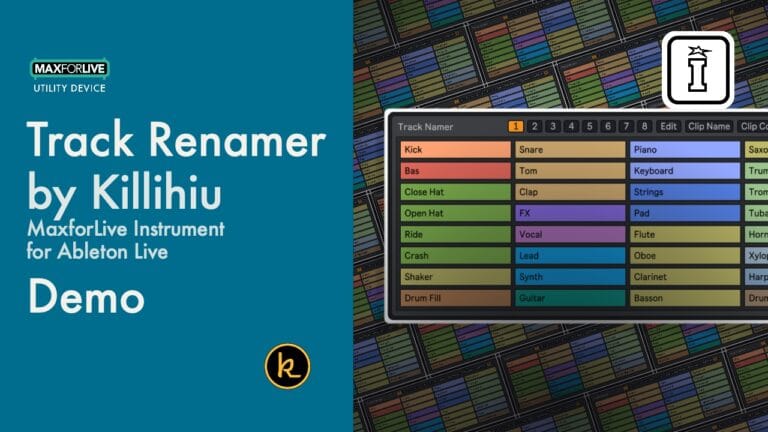
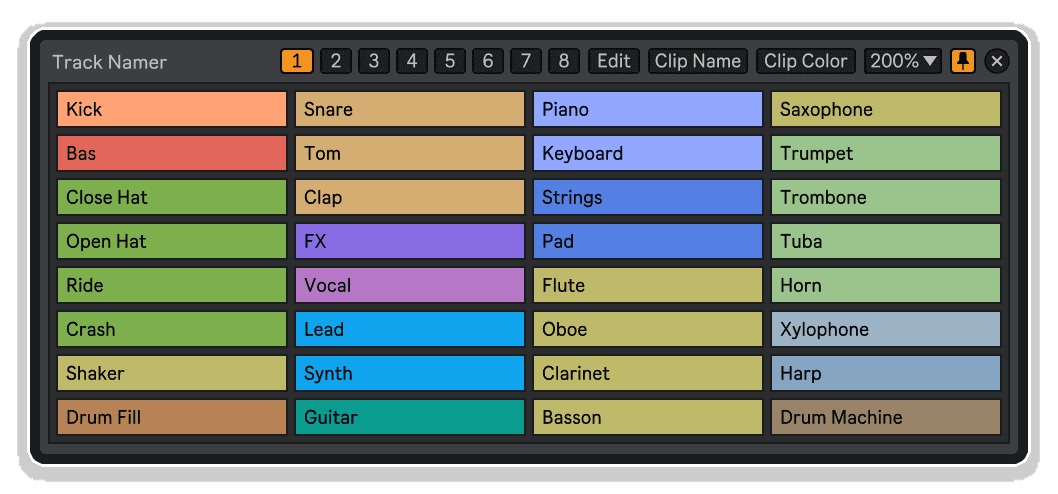
Track Namer von Killihu
BENENNEN. FINDEN. DEINE SESSION IM GRIFF.
Schluss mit dem endlosen Scrollen durch eine Flut von „Audio“- und „MIDI“-Spuren. Track Namer von KILLIHU ist ein raffiniertes Max-for-Live-Tool, das schnelle, intelligente Spurbennung direkt in deinen Ableton-Live-Workflow integriert – damit deine Sessions übersichtlich, organisiert und bereit zum Teilen bleiben.
- Sofortige Track-Benennung: Benenne jeden Track direkt in Live um, ohne deinen kreativen Flow zu unterbrechen
- Tastaturgesteuerter Workflow: Navigiere und benenne Spuren blitzschnell mit deiner Tastatur
- Übersichtliche Sessions: Halte komplexe Ableton-Projekte mit vielen Spuren organisiert und auf einen Blick übersichtlich
- Geringer Speicherbedarf: Ein kleines, fokussiertes Tool, das dir nicht im Weg steht, bis du es brauchst
- Max for Live-basiert: Tiefe Live-Integration über das M4L-Framework für zuverlässige, native Leistung
- Einfach per Drag & Drop: Keine komplizierte Einrichtung – einfach einfügen und sofort mit der Benennung beginnen
BENUTZERHANDBUCH:
Track Namer-Handbuch
Track Namer von Killihu
BENENNEN. FINDEN. DEINE SESSION IM GRIFF.
Schluss mit dem endlosen Scrollen durch eine Flut von „Audio“- und „MIDI“-Spuren. Track Namer von KILLIHU ist ein raffiniertes Max-for-Live-Tool, das schnelle, intelligente Spurbennung direkt in deinen Ableton-Live-Workflow integriert – damit deine Sessions übersichtlich, organisiert und bereit zum Teilen bleiben.
- Sofortige Track-Benennung: Benenne jeden Track direkt in Live um, ohne deinen kreativen Flow zu unterbrechen
- Tastaturgesteuerter Workflow: Navigiere und benenne Spuren blitzschnell mit deiner Tastatur
- Übersichtliche Sessions: Halte komplexe Ableton-Projekte mit vielen Spuren organisiert und auf einen Blick übersichtlich
- Geringer Speicherbedarf: Ein kleines, fokussiertes Tool, das dir nicht im Weg steht, bis du es brauchst
- Max for Live-basiert: Tiefe Live-Integration über das M4L-Framework für zuverlässige, native Leistung
- Einfach per Drag & Drop: Keine komplizierte Einrichtung – einfach einfügen und sofort mit der Benennung beginnen
BENUTZERHANDBUCH:
Track Namer-Handbuch
Zusätzliche Informationen
| MaxforLive | Control Devices |
|---|---|
| Betriebssystem | Mac, Windows |
| Kompatibilität mit Ableton Live | Ableton Live 11 Standard with MaxforLive, Ableton Live 11 Suite, Ableton Live 12 Standard with MaxforLive, Ableton Live 12 Suite |
| Mindestanforderungen | Ableton Live 11 Suite or Ableton Live 11 Standard with Max for Live add-on |
PRICE: £4.00
Product reviews
No reviews yet. Be the first to review this product.
Track Namer von Killihu
Du hast Stunden damit verbracht, eine hammermäßige Session aufzubauen – Synth-Layers, Percussion-Busse, Send-Kanäle, MIDI-Routing und vieles mehr. Am nächsten Tag schaust du dir das Ganze noch einmal an und starrst auf Reihen von „Audio“, „Audio 2“, „MIDI“ und „MIDI 3“. Kommt dir das bekannt vor? KILLIHU’s „Track Namer“ ist ein wunderbar einfaches Max-for-Live-Device, das genau dieses Problem lösen soll. Schnell, intuitiv und völlig unauffällig fügt es sich in deinen Workflow ein und ermöglicht es dir, deine Spuren richtig zu benennen – ganz ohne umständliches Herumprobieren.
Die Organisation der Spuren ist vielleicht nicht der glamouröseste Teil des Musikmachens, aber einer der wichtigsten. Ganz gleich, ob du alleine an einem komplexen Live-Setup arbeitest, mit anderen Produzenten zusammenarbeitest oder eine Session für einen Mix-Engineer vorbereitest – klare Spurnamen machen den Unterschied zwischen einer Session, die reibungslos verläuft, und einer, die dich wertvolle Zeit kostet. Track Namer bietet dir das Werkzeug, um diesen Prozess mühelos, schnell und sogar angenehm zu gestalten.
Wichtigste Funktionen
- Schnelle Umbenennung von Tracks: Benenne jeden Track in deiner Ableton-Session schnell und direkt über die Geräteoberfläche – ganz ohne umständliches Menünavigieren
- Navigation vorrangig über die Tastatur: Wechsle zwischen den Spuren und bestätige Namen über deine Tastatur, sodass du die Hände von der Maus lassen und dich ganz auf die Musik konzentrieren kannst
- Funktioniert mit allen Track-Typen: Kompatibel mit Audio-Tracks, MIDI-Tracks, Return-Tracks und mehr – deckt deine gesamte Session ab
- Minimale Benutzeroberfläche, maximale Übersichtlichkeit: Eine klare, übersichtliche Oberfläche, die dir genau das bietet, was du brauchst, ohne visuelle Ablenkung
- Schlankes Utility-Design: Speziell als fokussiertes Dienstprogramm entwickelt – es lädt schnell, läuft ressourcenschonend und steht dir nie im Weg
- Max for Live-nativ: Basiert auf dem M4L-Framework für eine tiefgreifende, zuverlässige Integration direkt in Ableton Live
- Sofort einsatzbereit: Zieh es einfach auf eine beliebige Spur, und schon kann es losgehen – keine Konfiguration, kein Aufwand
Warum die Organisation der Session wichtig ist
Jeder professionelle Produzent weiß: Eine gut benannte Session ist eine Session, in der man tatsächlich arbeiten kann. Wenn man tief im kreativen Flow steckt, ist das Letzte, was man will, anzuhalten und sich mit Abletons Standard-Workflow „Doppelklick zum Umbenennen“ herumzuschlagen. Track Namer beseitigt diese Reibungsverluste. Anstelle eines störenden Kontextwechsels erhältst du ein flüssiges, über die Tastatur gesteuertes Benennungserlebnis, das dich im Flow hält. Für Live-Musiker, die komplexe Setups verwalten, Session-Musiker, die unter Zeitdruck arbeiten, oder Sounddesigner, die Dutzende von überlagerten Spuren jonglieren, summiert sich diese Art der Mikrooptimierung im Laufe der Zeit zu einem wirklich bedeutenden Vorteil.
Der Unterschied im Workflow
Stell dir vor, du erstellst einen neuen Track und kannst jede Ebene sofort benennen – Kicks, Snares, Bass, Pad, Arps –, ohne jemals deinen kreativen Schwung zu unterbrechen. Oder du kehrst zu einer Live-Performance-Vorlage zurück und weißt sofort, welcher Kanal deinen Vocal-Bus führt und welcher deine Drum-Machine routet. Mit Track Namer fühlen sich beide Szenarien ganz natürlich und mühelos an. Es ist eines dieser kleinen Tools, bei denen man sich, sobald man sie einmal benutzt hat, fragt, wie man jemals ohne sie arbeiten konnte. Eine aufgeräumte Session, ein aufgeräumter Kopf – und mehr Energie für das, was wirklich zählt: großartige Musik zu machen.
Für wen ist Track Namer gedacht?
Track Namer ist ideal für jeden Ableton Live-Produzenten, der Wert auf einen übersichtlichen, professionellen Workflow legt. Besonders nützlich ist es für Live-Performer, die auf einen Blick erfassbare Session-Layouts benötigen, für Dozenten und Content-Ersteller, die ihre Bildschirme und Sessions teilen, sowie für Produzenten, die gemeinsam an Projekten arbeiten und diese zwischen verschiedenen Studios austauschen. Wenn du zu den Leuten gehörst, die ihre Tracks farblich kennzeichnen und ihre Ketten logisch gruppieren – dann ist Track Namer dein neuer bester Freund. Und wenn du zu den Leuten gehörst, die wissen, dass sie all das tun sollten, aber nie so recht dazu kommen, macht Track Namer den Einstieg in diese Gewohnheit fast mühelos.
Technische Details
Track Namer ist ein Max-for-Live-Steuerungsgerät. Es erfordert Ableton Live 11 Suite oder höher oder Ableton Live 11 Standard mit dem Max-for-Live-Add-on. Kompatibel mit Mac und Windows. Ziehe das Gerät einfach auf eine beliebige Spur in deiner Session, um loszulegen.
Frequently Asked Questions
A: Track Namer ist ein Max-for-Live-Utility-Device, mit dem du deine Ableton-Live-Tracks schnell und über die Tastatur direkt aus der Device-Oberfläche heraus umbenennen kannst – ohne den üblichen Ableton-Workflow mit Doppelklick zum Umbenennen zu unterbrechen.
A: Für „Track Namer“ ist Ableton Live 11 oder höher erforderlich. Das Programm funktioniert mit Ableton Live Suite oder mit Ableton Live Standard in Verbindung mit dem separat erhältlichen Add-on „Max for Live“.
A: Ja – Track Namer ist sowohl mit Mac- als auch mit Windows-Betriebssystemen kompatibel, sofern Sie eine unterstützte Version von Ableton Live mit Max for Live verwenden.
A: „Track Namer“ ist so konzipiert, dass es mit allen Spurtypen in Ihrer Ableton Live-Session funktioniert, einschließlich Audio-, MIDI- und Return-Spuren. Eine vollständige Übersicht über die unterstützten Spurtypen finden Sie im Benutzerhandbuch.
A: Ganz und gar nicht. Track Namer ist ein schlankes Dienstprogramm, das speziell darauf ausgelegt ist, nur minimalen Speicherplatz zu beanspruchen. Es ist so konzipiert, dass es Sie nicht behindert, und hat nur vernachlässigbare Auswirkungen auf die CPU-Leistung.
A: Auf jeden Fall. Track Namer ist besonders nützlich für Live-Musiker, die sofort übersichtliche und gut organisierte Session-Layouts benötigen. Klar benannte Spuren in einem Live-Setup können den Unterschied zwischen einem reibungslosen und einem stressigen Auftritt ausmachen.
A: Ja – eine vollständige Bedienungsanleitung im PDF-Format finden Sie unter: https://isotonikstudios.com/wp-content/uploads/track-namer-manual.pdf
A: Nein. Track Namer ist ein sofort einsatzbereites Plugin – ziehe es einfach auf eine beliebige Spur in deiner Ableton-Session, und schon kannst du loslegen. Es sind keine Programmierkenntnisse in Max for Live und keine Konfiguration erforderlich.
Important Information
v1.0.0 – Erstveröffentlichung
Unsere Produkte werden in der Regel als ZIP-Dateien zum Herunterladen bereitgestellt, die in jedem Fall vor der Verwendung entpackt werden müssen. Bei Max-for-Live-Geräten legen Sie das entpackte Gerät bitte in Ihrer Benutzerbibliothek ab. Bei Ableton-Live-Packs doppelklicken Sie zur Installation bitte auf die entpackte .alp-Datei. Ableton-Live-Projekte legen Sie bitte in Ihrem Projektordner ab.
ENDBENUTZER-LIZENZVEREINBARUNG FÜR SOFTWAREPRODUKTE VON ISOTONIK STUDIOS.
BITTE LESEN SIE DIE BEDINGUNGEN DIESER LIZENZVEREINBARUNG SORGFÄLTIG DURCH, BEVOR SIE MIT DER INSTALLATION DIESES PROGRAMMS FORTFAHREN.
Diese Endbenutzer-Lizenzvereinbarung (im Folgenden als „EULA“ bezeichnet) ist eine rechtliche Vereinbarung zwischen einer natürlichen Person oder einer einzelnen juristischen Person (im Folgenden als „LIZENZNEHMER“ bezeichnet) und Isotonik Studios über die Softwareprodukte von Isotonik Studios, die zugehörige Softwarekomponenten, Datenträger, gedruckte Materialien, sowie „Online“- oder elektronische Dokumentation umfassen können (im Folgenden als „SOFTWAREPRODUKT“ bezeichnet). Durch die Installation, das Kopieren oder die anderweitige Nutzung des SOFTWAREPRODUKTS erklärt sich der LIZENZNEHMER mit den Bedingungen dieser EULA einverstanden.
Diese EULA stellt die gesamte Vereinbarung zwischen dem LIZENZNEHMER und Isotonik Studios bezüglich des Programms dar und ersetzt alle früheren Vorschläge, Zusicherungen oder Absprachen zwischen den Parteien. Wenn der LIZENZNEHMER den Bedingungen dieser EULA nicht zustimmt, darf er das SOFTWAREPRODUKT nicht installieren oder nutzen.
Das SOFTWAREPRODUKT ist durch Urheberrechtsgesetze und internationale Urheberrechtsabkommen sowie durch andere Gesetze und Abkommen zum Schutz geistigen Eigentums geschützt. Das SOFTWAREPRODUKT wird lizenziert, nicht verkauft.
- LIZENZVERGABE.
Das SOFTWAREPRODUKT wird wie folgt lizenziert:
(a) Installation und Nutzung. Sofern der LIZENZNEHMER alle anfallenden Lizenzgebühren entrichtet hat, gewährt Isotonik Studios dem LIZENZNEHMER das Recht, Kopien des SOFTWAREPRODUKTS auf bis zu zwei Computern in seinem Besitz zu installieren und zu nutzen, auf denen eine gültig lizenzierte Kopie des Betriebssystems läuft, für das das SOFTWAREPRODUKT entwickelt wurde [z. B. Windows 10, macOS]. Der/die Computer muss/müssen Eigentum des LIZENZNEHMERS sein.
(b) Sicherungskopien. Der LIZENZNEHMER darf außerdem Kopien des SOFTWAREPRODUKTS anfertigen, soweit dies für Sicherungs- und Archivierungszwecke erforderlich ist.
- BESCHREIBUNG WEITERER RECHTE UND EINSCHRÄNKUNGEN.
(a) Beibehaltung von Urheberrechtsvermerken. Der LIZENZNEHMER darf keine Urheberrechtsvermerke auf irgendeiner Kopie des SOFTWAREPRODUKTS entfernen oder verändern.
(b) Weitergabe. Der LIZENZNEHMER darf registrierte Kopien des SOFTWAREPRODUKTS nicht an Dritte weitergeben.
(c) Verbot von Reverse Engineering, Dekompilierung und Disassemblierung. Der LIZENZNEHMER darf das SOFTWAREPRODUKT nicht rückentwickeln, dekompilieren oder disassemblieren, es sei denn, eine solche Tätigkeit ist ungeachtet dieser Einschränkung durch geltendes Recht ausdrücklich gestattet.
(d) Vermietung. Der LIZENZNEHMER darf das SOFTWAREPRODUKT nicht vermieten, verpachten oder verleihen.
(e) Lizenzübertragung. Der LIZENZNEHMER darf seine Lizenz für das SOFTWAREPRODUKT nicht an Dritte übertragen. Jeder Versuch, dies zu tun, gilt als Verstoß gegen diese EULA.
(f) Supportleistungen. Isotonik Studios kann dem LIZENZNEHMER für einen Zeitraum von 12 Monaten ab dem Kaufdatum Supportleistungen im Zusammenhang mit dem SOFTWAREPRODUKT bereitstellen. Jeder zusätzliche Softwarecode, der dem LIZENZNEHMER im Rahmen der Supportleistungen zur Verfügung gestellt wird, gilt als Teil des SOFTWAREPRODUKTS und unterliegt den Bestimmungen und Bedingungen dieser EULA.
(g) Einhaltung geltender Gesetze. Der LIZENZNEHMER muss alle geltenden Gesetze bezüglich der Nutzung des SOFTWAREPRODUKTS einhalten.
- KÜNDIGUNG Unbeschadet sonstiger Rechte ist Isotonik Studios berechtigt, diese EULA zu kündigen, wenn der LIZENZNEHMER die Bestimmungen dieser EULA nicht einhält. In diesem Fall muss der LIZENZNEHMER alle in seinem Besitz befindlichen Kopien des SOFTWAREPRODUKTS vernichten.
- URHEBERRECHT Sämtliche Rechte, einschließlich, aber nicht beschränkt auf Urheberrechte, an dem SOFTWAREPRODUKT und allen Kopien davon liegen bei Isotonik Studios oder seinen Lieferanten. Alle Eigentums- und geistigen Eigentumsrechte an den Inhalten, auf die durch die Nutzung des SOFTWAREPRODUKTS zugegriffen werden kann, sind Eigentum der jeweiligen Inhaltseigentümer und können durch geltende Urheberrechtsgesetze oder andere Gesetze und Verträge zum Schutz geistigen Eigentums geschützt sein. Diese EULA gewährt dem LIZENZNEHMER keine Rechte zur Nutzung solcher Inhalte. Alle nicht ausdrücklich gewährten Rechte bleiben Isotonik Studios vorbehalten.
- KEINE GEWÄHRLEISTUNGEN Isotonik Studios lehnt ausdrücklich jegliche Gewährleistung für das SOFTWAREPRODUKT ab. Das SOFTWAREPRODUKT wird „wie besehen“ ohne jegliche ausdrückliche oder stillschweigende Gewährleistung jeglicher Art bereitgestellt, einschließlich, aber nicht beschränkt auf Gewährleistungen der Marktgängigkeit, der Nichtverletzung von Rechten Dritter oder der Eignung für einen bestimmten Zweck. Isotonik Studios übernimmt keine Gewährleistung oder Verantwortung für die Richtigkeit oder Vollständigkeit von Informationen, Texten, Grafiken, Links oder anderen im SOFTWAREPRODUKT enthaltenen Elementen. Isotonik Studios übernimmt keine Gewährleistung in Bezug auf Schäden, die durch die Übertragung von Computerviren, Würmern, Zeitbomben, Logikbomben oder ähnlichen Computerprogrammen verursacht werden könnten. Isotonik Studios schließt ferner ausdrücklich jegliche Gewährleistung oder Zusicherung gegenüber dem LIZENZNEHMER oder Dritten aus.
- HAFTUNGSBESCHRÄNKUNG Isotonik Studios haftet in keinem Fall für Schäden (einschließlich, aber nicht beschränkt auf entgangenen Gewinn, Betriebsunterbrechungen oder Informationsverluste), die sich aus der Nutzung oder der Unmöglichkeit der Nutzung des SOFTWAREPRODUKTS durch den LIZENZNEHMER ergeben, selbst wenn Isotonik Studios auf die Möglichkeit solcher Schäden hingewiesen wurde. In keinem Fall haftet Isotonik Studios für Datenverluste oder für indirekte, besondere, zufällige, Folge- (einschließlich entgangener Gewinne) oder sonstige Schäden, die auf Vertrag, unerlaubter Handlung oder anderweitig beruhen. Isotonik Studios übernimmt keine Haftung in Bezug auf den Inhalt des SOFTWAREPRODUKTS oder eines Teils davon, einschließlich, aber nicht beschränkt auf darin enthaltene Fehler oder Auslassungen, Verleumdung, Verletzungen von Persönlichkeitsrechten, Datenschutzrechten, Markenrechten, Betriebsunterbrechungen, Personenschäden, Verlust der Privatsphäre, Urheberpersönlichkeitsrechte oder die Offenlegung vertraulicher Informationen.