
Backspin by Andrew Norris
AUTHENTIC VINYL EFFECTS WITHOUT THE TURNTABLE
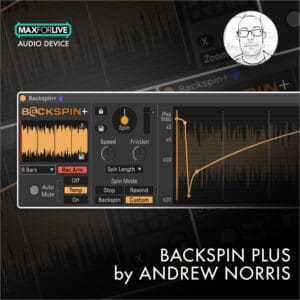
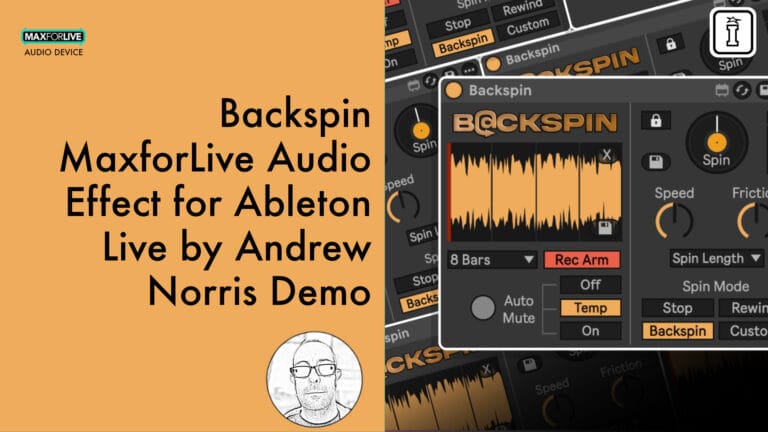
Backspin delivers the essential DJ effects every producer needs: tape stop, wind-down, rewind, and backspin. This Max for Live audio effect continually captures your track’s audio into a looping buffer, then generates effects in real time from the exact material currently playing. No generic samples, no awkward timing—just natural, responsive vinyl-style transitions that work perfectly for live DJs and studio producers alike.
Inside you’ll find:
- Three essential effect modes: Stop, Rewind, and Backspin
- Speed, Friction, and Spin Length controls for precise effect shaping
- Auto Mute options (Off/Temp/On) for seamless transitions
- Lock to Quantize integration for perfect timing
- Auto live audio recording with adjustable buffer length
- Save spins to disk for later use
- Full MIDI mapping and Push integration
Whether you’re performing dramatic track transitions in a DJ set or adding creative flair to individual instruments in the studio, Backspin gives you authentic turntable effects with modern, real-time control.
Requires Ableton Live 12 Suite or Live 12 Standard with Max for Live
Upgrade for even more features and control Backspin Plus
USER GUIDE: Backspin_Manual v1.0.2
Backspin by Andrew Norris
AUTHENTIC VINYL EFFECTS WITHOUT THE TURNTABLE
Backspin delivers the essential DJ effects every producer needs: tape stop, wind-down, rewind, and backspin. This Max for Live audio effect continually captures your track’s audio into a looping buffer, then generates effects in real time from the exact material currently playing. No generic samples, no awkward timing—just natural, responsive vinyl-style transitions that work perfectly for live DJs and studio producers alike.
Inside you’ll find:
- Three essential effect modes: Stop, Rewind, and Backspin
- Speed, Friction, and Spin Length controls for precise effect shaping
- Auto Mute options (Off/Temp/On) for seamless transitions
- Lock to Quantize integration for perfect timing
- Auto live audio recording with adjustable buffer length
- Save spins to disk for later use
- Full MIDI mapping and Push integration
Whether you’re performing dramatic track transitions in a DJ set or adding creative flair to individual instruments in the studio, Backspin gives you authentic turntable effects with modern, real-time control.
Requires Ableton Live 12 Suite or Live 12 Standard with Max for Live
Upgrade for even more features and control Backspin Plus
USER GUIDE: Backspin_Manual v1.0.2
Additional information
| MaxforLive | Audio Devices |
|---|---|
| Ableton Live Compatibility | Ableton Live 12 Standard with MaxforLive, Ableton Live 12 Suite |
| Min. Requirements | Live 12 Standard with MaxforLive or Live 12 Suite is required to load the provided Live Set |
| OS | Mac, Windows |
Product reviews
5 out of 5
3 reviews
How item rating is calculated
We show the average based on reviews. Only genuine reviews are displayed.
Sort by
December 25, 2025
This reviewer bought this product from our store.
Sick little backspin tool, worth a spin!
I recommend this product
December 25, 2025
This reviewer bought this product from our store.
DJ Effects - this is a no-brainer
It does what it says on the tin, nice and simple way to add some bread and butter effects to your mix ...oh and 0.00....why wouldn't you ?
Well Designed
Enthusiasts Parameter Set
Nothing I can see
I recommend this product
December 25, 2025
This reviewer bought this product from our store.
a gem of a device that does things that I havent found an easy way to do before .
a simple device that does what it says on the tin
a slightly more intuitive trigger function would be good but the functions can be understood by reading the documentation
I recommend this product
Backspin by Andrew Norris
Authentic vinyl-style effects without the turntable. Backspin is a Max for Live audio effect that recreates the classic DJ techniques every producer needs: tape stop, wind-down, rewind, and backspin. Whether you’re transitioning between tracks in a live set or adding dramatic flair to a single instrument in the studio, Backspin delivers the real-time control and natural sound that generic samples simply can’t match.
Unlike pre-recorded backspin samples, Backspin continually captures your track’s audio into a looping buffer, then generates effects from the exact material that was just playing. The result? Backspins, rewinds, and stops that sound completely organic, perfectly timed, and utterly convincing.
How It Works
Backspin records your track’s audio into a buffer that loops continuously, always containing the last X bars before the current playback point. When you trigger an effect, Backspin plays back this captured audio with precise speed manipulation, moving backwards through the material you just heard exactly like a real turntable or jog wheel would.
This approach makes every spin feel natural and responsive because it’s always working with your actual audio in real time, not a static sample that never quite fits the moment.
Three Essential Effects
Stop Mode: Audio plays at normal speed before gradually slowing to a complete halt. Perfect for short tape-stop effects (¼ to ½ bar) or long, dramatic turntable wind-downs over multiple bars.
Rewind Mode: From a stopped position, audio plays backwards, starting slowly and accelerating over time. The classic “rewind” or “pull-up” effect that signals a dramatic shift.
Backspin Mode: Starts at the end of the buffer, plays backwards at high speed, then gradually decelerates to silence. Ideal for DJ transitions when you need to make a sudden change in genre or mood.
Precision Control
Speed: Controls the force of the spin. Higher settings create faster playback and higher pitch; lower settings produce slower, gentler movement with lower pitch.
Friction: Determines how quickly the spin slows down. Low friction creates longer, sustained spins at higher speeds; high friction causes earlier slowdown for tighter effects.
Spin Length: Defines the total duration of the effect in bar lengths, synced to your project tempo. Range from quick ¼-bar bursts to extended multi-bar transitions.
Smart Performance Features
Auto Mute Options: Control what happens to incoming audio during the spin. Choose Off (incoming audio remains audible), Temp (mutes during spin, then un-mutes), or On (mutes during and after spin, perfect for live DJ transitions).
Lock to Quantize: When enabled, the Spin button respects Live’s Global Quantisation setting, ensuring your effects always trigger perfectly in time like Session View clips.
Record Arm & Buffer Control: Enable Record Arm on the device (not the track) to start capturing audio. Set your desired Record Length to determine how many bars of audio the buffer holds.
Save Spins to Disk: Export any spin as an audio file for later use or processing.
Universal Integration
Backspin integrates seamlessly into any workflow. The Spin button can be triggered with your mouse, MIDI mapped to hardware controllers, activated via Push, or automated in Live using the Spin parameter. Full Push integration provides direct access to all primary parameters across three organized sections.
Use Backspin on your master channel for full-track transitions, on individual instrument tracks for creative production techniques, or on drum buses for rhythmic effects. The device works equally well for live performance and studio production.
What’s Included
- Stop, Rewind, and Backspin effect modes
- Speed, Friction, and Spin Length controls
- Auto Mute options (Off/Temp/On)
- Lock to Quantize integration
- Auto live audio recording with adjustable buffer length
- Save spins to disk functionality
- Full MIDI mapping capability
- Complete Ableton Push integration
- Tempo-synced bar-length timing
Requirements
- Windows or MacOS
- Ableton Live 12 Suite, or Ableton Live 12 Standard with Max for Live installed
Frequently Asked Questions
A: Backspin is a Max for Live audio effect that recreates classic vinyl-style DJ effects including tape stop, wind-down, rewind, and backspin. It continually captures your track’s audio into a looping buffer and generates effects in real time, creating natural, authentic-sounding transitions without relying on generic samples.
A: Yes, Backspin is a Max for Live device.
A: Max for Live is a platform that integrates the visual programming environment Max with Ableton Live, allowing users to create and use custom audio, MIDI, and control devices.
A: Backspin (free) includes Stop, Rewind, and Backspin effects with Speed, Friction, and Spin Length controls. Backspin+ (paid) adds Custom Mode with editable playback-speed envelopes, audio import functionality, preset save & recall, and Scratch Mode for manual scrubbing control.
A: You can explore more of Andrew Norris’s tools and devices here: Andrew Norris
Important Information
V1.0.2 – Released January 2026
- All buttons & text are now clearly visible when using Ableton Live’s light themes.
- Speed and Friction parameters now use a 0 to 1 floating point range rather than a percentage to make things a little easier to edit in automation lanes.
- ‘Save Last Spin’ button is now disabled whenever a Spin is currently playing, preventing the saving of files with missing audio content.
- When switching Auto Mute from On to Temp after a spin, incoming audio no longer stays muted and the Auto Mute LED is set back to Off.
- When dragging and dropping a file into Backspin+, anything other than a file type supported by Ableton will be rejected and an ‘unsupported file type’ error will be displayed. Note that certain video files can be used but only the audio will be loaded. Supported file types: .wav, .aiff, .flac, .ogg, .mp3, .m4a (MacOS only), .rx2, .mov, .mp4 (H.264 with compatible audio)
Initial Release – January 2026
Our Products are generally provided as Zip file downloads which in all cases will need to be extracted and saved to your hard drive prior to installation. Details on the different file type provided and what to do with them are below.
.alp Files – These are Ableton Live Packs and will either install directly into the Packs Section of the browser of Ableton Live or ask you to save them to your hard drive. For packs that install to the library, when you double click on them you will see a pop up window asking you to confirm that installation is ok as the files are described as “Legacy”. This is fine and you are ok to proceed, the packs are created using the format for an earlier version of Live and so remain compatible with the current version.
.amxd files – These are individual MaxforLive Devices and can be stored anywhere on your hard drive. We’d advise creating a folder for them and then adding that folder as a location within the Places section of Lives Browser.
END-USER LICENSE AGREEMENT FOR ISOTONIK STUDIOS SOFTWARE PRODUCTS.
PLEASE READ THE TERMS AND CONDITIONS OF THIS LICENSE AGREEMENT CAREFULLY BEFORE CONTINUING WITH THIS PROGRAM INSTALL.
This End-User License Agreement (referred to as “EULA”) is a legal agreement between an individual or a single entity (referred to as “LICENSEE”) and Isotonik Studios for the Isotonik Studios software product(s) which may include associated software components, media, printed materials, and “online” or electronic documentation (referred to as “SOFTWARE PRODUCT”). By installing, copying, or otherwise using the SOFTWARE PRODUCT, the LICENSEE agrees to be bound by the terms of this EULA.
This EULA represents the entire agreement concerning the program between the LICENSEE and Isotonik Studios and it supersedes any prior proposal, representation, or understanding between the parties. If the LICENSEE does not agree to the terms of this EULA, the LICENSEE should not install or use the SOFTWARE PRODUCT.
The SOFTWARE PRODUCT is protected by copyright laws and international copyright treaties, as well as other intellectual property laws and treaties. The SOFTWARE PRODUCT is licensed, not sold.
- GRANT OF LICENSE.
The SOFTWARE PRODUCT is licensed as follows:
(a) Installation and Use. Providing that the LICENSEE has paid any applicable license fees, Isotonik Studios grants the LICENSEE the right to install and use copies of the SOFTWARE PRODUCT on up to two computers in the LICENSEE’s possession that are running a validly licensed copy of the operating system for which the SOFTWARE PRODUCT was designed [e.g., Windows 10, macOS]. The computer(s) must be owned by the LICENSEE.
(b) Backup Copies. The LICENSEE may also make copies of the SOFTWARE PRODUCT as may be necessary for backup and archival purposes.
- DESCRIPTION OF OTHER RIGHTS AND LIMITATIONS.
(a) Maintenance of Copyright Notices. The LICENSEE must not remove or alter any copyright notices on any and all copies of the SOFTWARE PRODUCT.
(b) Distribution. The LICENSEE may not distribute registered copies of the SOFTWARE PRODUCT to third parties.
(c) Prohibition on Reverse Engineering, Decompilation, and Disassembly. The LICENSEE may not reverse engineer, decompile, or disassemble the SOFTWARE PRODUCT, except and only to the extent that such activity is expressly permitted by applicable law notwithstanding this limitation.
(d) Rental. The LICENSEE may not rent, lease, or lend the SOFTWARE PRODUCT.
(e) License transfer The LICENSEE may not transfer their license to the SOFTWARE PRODUCT to any third party. Any attempt to do so will be considered a violation of this EULA.
(f) Support Services. Isotonik Studios may provide the LICENSEE with support services related to the SOFTWARE PRODUCT for a period of 12 months following the date of purchase. Any supplemental software code provided to the LICENSEE as part of the Support Services shall be considered part of the SOFTWARE PRODUCT and subject to the terms and conditions of this EULA.
(g) Compliance with Applicable Laws. The LICENSEE must comply with all applicable laws regarding use of the SOFTWARE PRODUCT.
- TERMINATION Without prejudice to any other rights, Isotonik Studios may terminate this EULA if the LICENSEE fails to comply with the terms and conditions of this EULA. In such event, the LICENSEE must destroy all copies of the SOFTWARE PRODUCT in the LICENSEE’s possession.
- COPYRIGHT All title, including but not limited to copyrights, in and to the SOFTWARE PRODUCT and any copies thereof are owned by Isotonik Studios or its suppliers. All title and intellectual property rights in and to the content which may be accessed through use of the SOFTWARE PRODUCT is the property of the respective content owner and may be protected by applicable copyright or other intellectual property laws and treaties. This EULA grants the LICENSEE no rights to use such content. All rights not expressly granted are reserved by Isotonik Studios.
- NO WARRANTIES Isotonik Studios expressly disclaims any warranty for the SOFTWARE PRODUCT. The SOFTWARE PRODUCT is provided ‘As Is’ without any express or implied warranty of any kind, including but not limited to any warranties of merchantability, noninfringement, or fitness of a particular purpose. Isotonik Studios does not warrant or assume responsibility for the accuracy or completeness of any information, text, graphics, links or other items contained within the SOFTWARE PRODUCT. Isotonik Studios makes no warranties respecting any harm that may be caused by the transmission of a computer virus, worm, time bomb, logic bomb, or other such computer program. Isotonik Studios further expressly disclaims any warranty or representation to the LICENSEE or to any third party.
- LIMITATION OF LIABILITY In no event shall Isotonik Studios be liable for any damages (including, without limitation, lost profits, business interruption, or lost information) arising out of the LICENSEE’s use of or inability to use the SOFTWARE PRODUCT, even if Isotonik Studios has been advised of the possibility of such damages. In no event will Isotonik Studios be liable for loss of data or for indirect, special, incidental, consequential (including lost profit), or other damages based in contract, tort or otherwise. Isotonik Studios shall have no liability with respect to the content of the SOFTWARE PRODUCT or any part thereof, including but not limited to errors or omissions contained therein, libel, infringements of rights of publicity, privacy, trademark rights, business interruption, personal injury, loss of privacy, moral rights or the disclosure of confidential information.