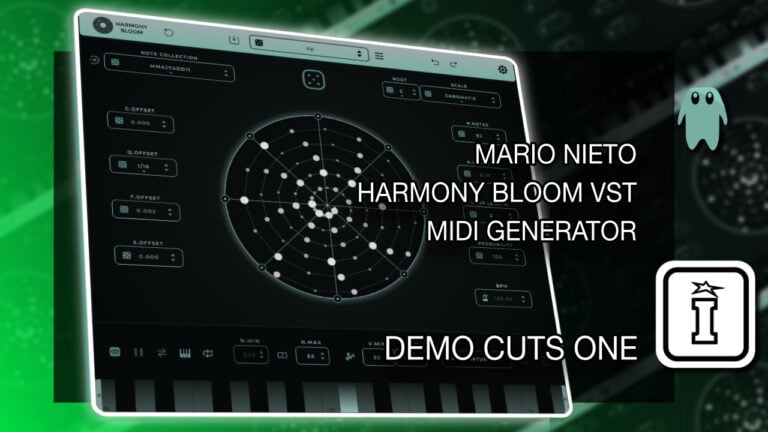
Harmony Bloom VST by Mario Nieto
THE FUTURE OF MIDI GENERATION AND MUSICAL VISUALIZATION
Harmony Bloom, revolutionizes music creation with polyrhythmic MIDI generation and stunning visuals. Compatible with Windows and MacOS, it offers unmatched creative freedom for musicians and producers. An essential tool for innovative musical exploration.
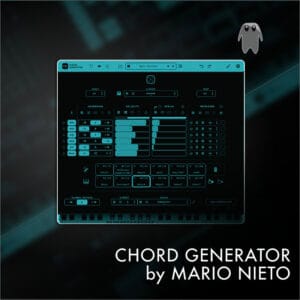
Also by Mario Nieto – Chord Generator
USER GUIDE: Harmony Bloom 1.3.1 Manual
Harmony Bloom VST by Mario Nieto
THE FUTURE OF MIDI GENERATION AND MUSICAL VISUALIZATION
Harmony Bloom, revolutionizes music creation with polyrhythmic MIDI generation and stunning visuals. Compatible with Windows and MacOS, it offers unmatched creative freedom for musicians and producers. An essential tool for innovative musical exploration.
Also by Mario Nieto – Chord Generator
USER GUIDE: Harmony Bloom 1.3.1 Manual
Additional information
| Ableton Live Compatibility | Ableton Live 10 Intro, Ableton Live 10 Standard, Ableton Live 10 Standard with MaxforLive, Ableton Live 10 Suite, Ableton Live 11 Intro, Ableton Live 11 Standard, Ableton Live 11 Standard with MaxforLive, Ableton Live 11 Suite, Ableton Live 12 Intro, Ableton Live 12 Standard, Ableton Live 12 Standard with MaxforLive, Ableton Live 12 Suite |
|---|---|
| Min. Requirements | A Recent DAW that can run a VST3 or AU Plugin, Processor: Intel Core i5 or equivalent. | RAM: 4GB. | Additional: Initial internet connection required for license activation. |
| OS | MacOS: Version 10.13 or higher, with native Apple Silicon support. | Windows: Windows 10 or higher. |
PRICE: £24.00
Product reviews
4.8 out of 5
20 reviews
How item rating is calculated
We show the average based on reviews. Only genuine reviews are displayed.
Sort by
December 8, 2025
This reviewer bought this product from our store.
Yeh I love. Sounds good and is lovely to look at too. Cool for ambient soundscapes
I recommend this product
July 6, 2025
This reviewer bought this product from our store.
one of my favorites sequencers at the time. verry insiring and i realy like the visual aspect of it. its already a staple tool for creativity. i can highly recommend it.
July 3, 2025
This reviewer bought this product from our store.
Mario Nieto is a genius
All his devices change your flow.
random melodies in seconds , easy to use , you can save quickly presets etc
This device is in my top 5 Midi devices.
I recommend 100x100.
March 21, 2025
This reviewer bought this product from our store.
You can create nice melodies and unconventional arps with this one. Also the support is great and there are regular updates.
February 17, 2025
This reviewer bought this product from our store.
Very unique approach to the sequencing of notes. Love the complexity and diversity in harmonic expression.
With the ability to capture, midi drum patterns I wouldn't have thought of my self can be serendipitously discovered.
UPDATE THOUGHT: Single notes being able to generate chords in the selected scale with randomization of inversions and in/exclusions of notes in the chord per user discretion.
[I can dream can't I? ]
Harmony Bloom VST by Mario Nieto
Harmony Bloom, crafted by Mario Nieto, is a groundbreaking MIDI generator that seamlessly integrates polyrhythmic patterns with stunning visuals. Compatible with Windows and MacOS as a VST3, AU plugin, and standalone app, it revolutionizes musical creativity by enabling MIDI data transmission to compatible devices, enhanced by its visual experience.
Distinct from typical MIDI generators, Harmony Bloom offers unique functionalities. The standalone version’s ability to generate audio, with five selectable sounds, broadens its usability. It features a comprehensive control set for musical creation, including a Scale Selector with 57 options for melodic consistency, and various offset controls for sequence customization.
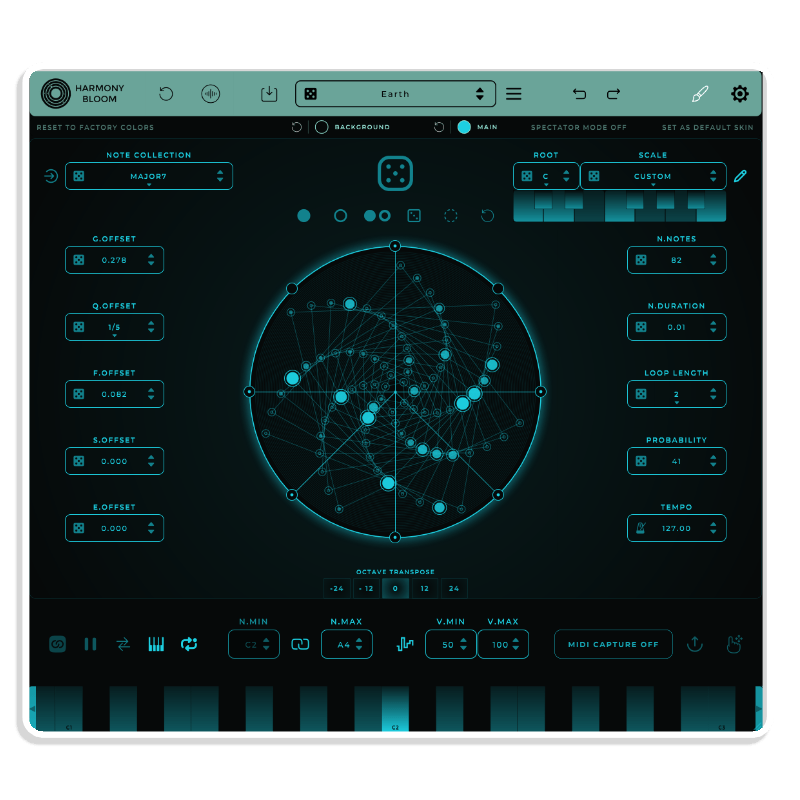
The software’s visual component, the Sequencer Visualizer, displays intricate patterns of notes, enhancing the creative process. Key features like MIDI Capture and Export simplify the integration of sequences into digital audio workstations, making Harmony Bloom a valuable tool for music production.
Its adaptability is a core strength, with features like ‘Use Input Notes’ and ‘Root Mode’ ensuring dynamic musical responses and coherence. ‘Global Randomization’ allows for exploratory creativity, offering a blend of technical control and artistic freedom.
Harmony Bloom emphasizes user experience, providing easy installation, intuitive preset management, and up to three activations per purchase. This focus on accessibility and flexibility makes it an ideal choice for musicians, producers, and composers eager to explore new musical dimensions.
In essence, Harmony Bloom is not just a MIDI generator but a comprehensive tool for musical exploration and creation. Its combination of polyrhythmic generation, visual feedback, and detailed musical control positions it as a standout instrument for creative and professional applications.
Harmony Bloom aims to effortlessly create magical sequences while letting users add their personality. It offers many parameters for customization or randomization until the desired result is achieved.
VISUAL MAGIC
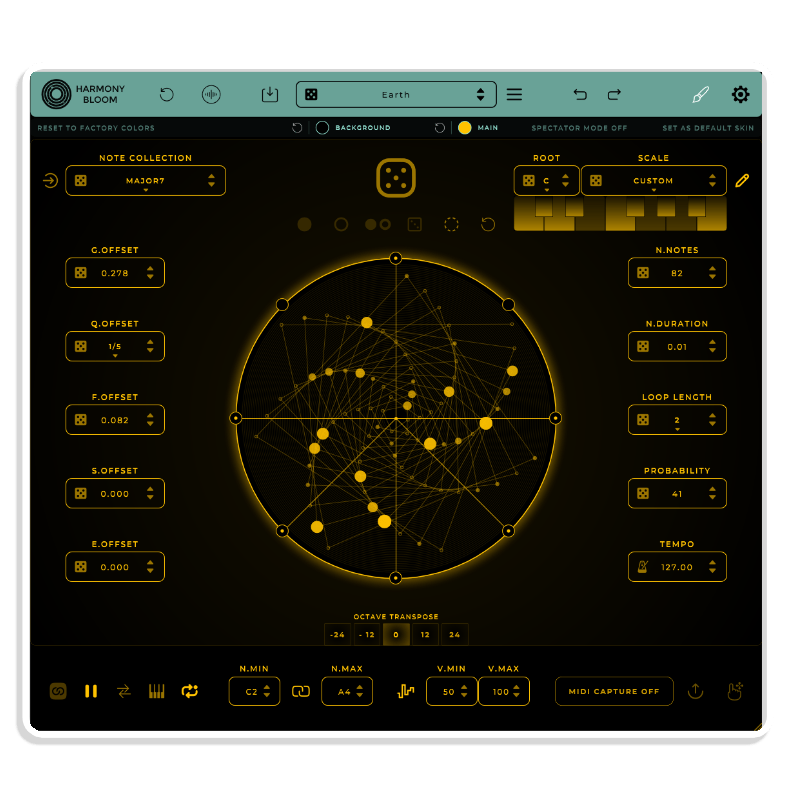
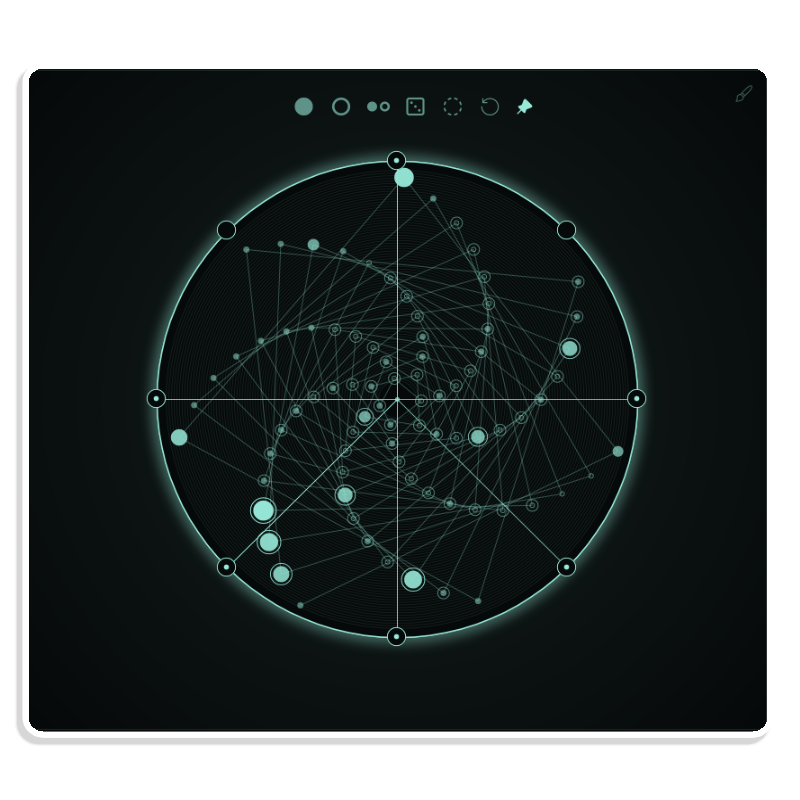
The Circle Central displays notes clearly and creatively, linking each one to form pleasant patterns that boost creativity and make creating more enjoyable.
KEYBOARD MODE
Control it from your MIDI keyboard, activating or deactivating the sequence and transposing it based on the note sent, or use it freely and independently.
NOTE COLLECTIONS
It features 57 meticulously chosen note collections to cover a wide range of sounds.
RANDOM ADVANCED CONTROLS
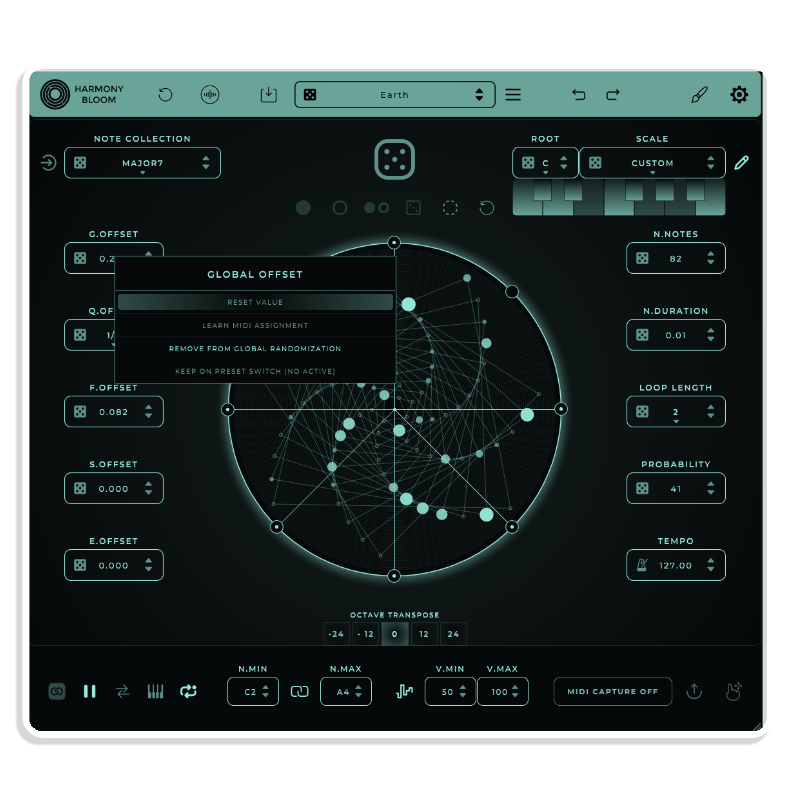
It has a Global Random button that randomizes all (controls can be excluded), creating new states with each press. Each control also has its own random button for quick, surprising changes.
NUMBER OF NOTES
From simple melodies to complex musical patterns ranging from 2 up to 82 notes, this allows for a wide variety of musical shapes.
QUANTIZED & FREE OFFSET
You control note distances, either quantized for equal timing and direct rhythms, or free for total flexibility. You can also combine both methods.
PROBABILITY FUNCTION
This function enables the creation of dynamic and randomized musical patterns by triggering notes according to a specified probability percentage. A setting of 0% indicates that there is no chance of notes being triggered, while 100% ensures that notes will be triggered with certainty.
TEMPO SYNC
It can sync with your DAW bpm or not, ensuring what you generate always fits your project.
RANDOM VELOCITY GENERATOR
Velocity Range Controller with V.MIN and V.MAX for setting minimum and maximum note velocities, and a Randomize Velocity button for dynamic, human-like velocity variation within defined limits. Perfect for nuanced control and expressive playback.
The Circle Central displays notes clearly and creatively, linking each one to form pleasant patterns that boost creativity and make creating more enjoyable.
Control it from your MIDI keyboard, activating or deactivating the sequence and transposing it based on the note sent, or use it freely and independently.
It features 57 meticulously chosen note collections to cover a wide range of sounds.
It has a Global Random button that randomizes all (controls can be excluded), creating new states with each press. Each control also has its own random button for quick, surprising changes.
From simple melodies to complex musical patterns ranging from 2 up to 82 notes, this allows for a wide variety of musical shapes.
You control note distances, either quantized for equal timing and direct rhythms, or free for total flexibility. You can also combine both methods.
This function enables the creation of dynamic and randomized musical patterns by triggering notes according to a specified probability percentage. A setting of 0% indicates that there is no chance of notes being triggered, while 100% ensures that notes will be triggered with certainty.
It can sync with your DAW bpm or not, ensuring what you generate always fits your project.
Velocity Range Controller with V.MIN and V.MAX for setting minimum and maximum note velocities, and a Randomize Velocity button for dynamic, human-like velocity variation within defined limits. Perfect for nuanced control and expressive playback.
TRIGGER BARS
The sequencer has 8 points to activate or deactivate. Click the circles around it to toggle a trigger bar, triggering a note when it reaches an activated bar.
SPEED OFFSET
Controls the timing between notes: for values from 0.0 to 1.0, notes progressively speed up from the center outward; for values between 0.0 and -1.0, notes slow down from the center outward.
SCALE & ROOT SELECTOR
Offers 57 musical scales or modes, ensuring notes fit the selected scale for consistent melody and harmony in your music.
MIDI LEARN
Presets can be easily saved and shared with other users as files.
PRESETS
From simple melodies to complex musical patterns ranging from 2 up to 82 notes, this allows for a wide variety of musical shapes.
DAW COMPATIBILITY
It works with most DAWs supporting VST3 and AU formats like Ableton, Logic, Bitwig, Cubase, Reaper, FL Studio, Studio One, etc.
FULL SUPPORT
Got questions about how to install it? Something not working as expected? Any suggestions for improvement? I’m Mario, and I’ll personally respond to any questions or suggestions you have.
[email protected]
MIDI CAPTURE
Easily export MIDI sequences with the “MIDI Export Button” to a designated folder, or use “DragDrop MIDI Export” to intuitively drag and drop them into a DAW or desired location for streamlined processing.
The sequencer has 8 points to activate or deactivate. Click the circles around it to toggle a trigger bar, triggering a note when it reaches an activated bar.
Controls the timing between notes: for values from 0.0 to 1.0, notes progressively speed up from the center outward; for values between 0.0 and -1.0, notes slow down from the center outward.
Offers 57 musical scales or modes, ensuring notes fit the selected scale for consistent melody and harmony in your music.
Presets can be easily saved and shared with other users as files.
From simple melodies to complex musical patterns ranging from 2 up to 82 notes, this allows for a wide variety of musical shapes.
It works with most DAWs supporting VST3 and AU formats like Ableton, Logic, Bitwig, Cubase, Reaper, FL Studio, Studio One, etc.
Got questions about how to install it? Something not working as expected? Any suggestions for improvement? I’m Mario, and I’ll personally respond to any questions or suggestions you have.
[email protected]
Easily export MIDI sequences with the “MIDI Export Button” to a designated folder, or use “DragDrop MIDI Export” to intuitively drag and drop them into a DAW or desired location for streamlined processing.
Frequently Asked Questions
A: Harmony Bloom is an innovative MIDI generator and visual sequencer plugin that creates stunning polyrhythmic patterns and harmonies, blending musical creativity with beautiful real-time visuals.
A: No — Harmony Bloom is a VST3/AU plugin and standalone app, compatible with most modern DAWs.
A: To use this product, ensure the following requirements are met:
A DAW that supports VST3 or AU plugins
MacOS 10.13 (Apple Silicon supported) or Windows 10 or higher
Intel Core i5 or equivalent
4 GB RAM
Internet connection for license activation
A: You can explore more of Mario Nieto’s tools and devices here:
Mario Nieto
Important Information
V1.3.6 – Released August 2025
FIXED: CC controls can now control Play/Stop.
It is now possible to lock the minimum note in any playback mode by right-clicking on the Min Note control and selecting Lock. Previously, this value could only be controlled by incoming notes or by changing it manually.
You can keep the state of min and max notes when switching presets by enabling the Keep on preset switch option.
This version should work fine in all DAWs. Some DAWs, such as FL Studio 25 or Reaper, occasionally flagged it as invalid. Everything should now work without issues.
V1.3.4 – Released February 2025
Version 1.3.4:
- NEW: A new panel has been added to download new preset packs directly, without needing to do it from the website.
- The appearance of the rescaled corner (bottom-right corner) has been slightly adjusted to make it clearer.
- Fixed: The resizing in the Standalone version was unrestricted, which led to aspect ratios that caused some elements to overlap.
- IMPROVED: A new pop-up window system was implemented with a fixed size and a scrollable list. This prevents the window from becoming too large.
V1.3.1 – Released September 2024
- NEW: Significant UI performance enhancements, resulting in faster load times, smoother scaling, and more fluid navigation through the presets list.
- NEW: Added patterns (states) that can be saved quickly. These patterns are stored together with the presets.
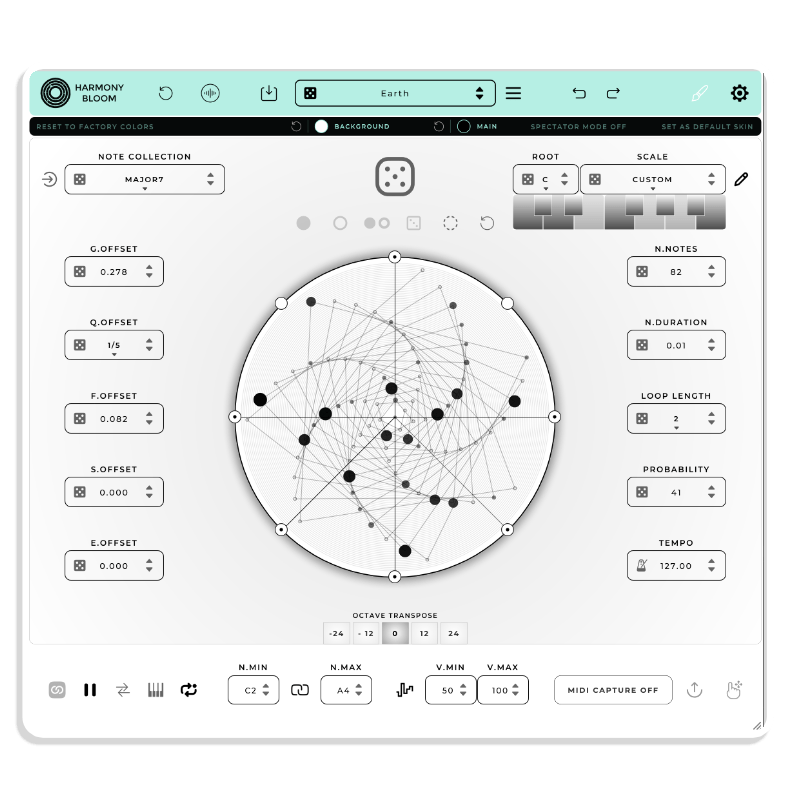
- NEW: option to Randomizes the colors of the interface.. The colors can be excluded/included from randomization by right-clicking on the color and selecting ‘IGNORE RANDOM COLOUR ACTION’ or ‘ENABLE RANDOM COLOUR ACTION’.
- NEW: Quantize Notes Duration: It is now possible to quantize the duration of notes relative to the loop time, allowing notes to be held for precise intervals. When active, the duration is measured relative to the loop and quantized instead of in seconds. For example, setting QUANT. NOTE DURATION to 1/1 will trigger and hold the note for the entire loop cycle, enabling detailed control over note timing and duration in your compositions.
- NEW: When MIDI Learn is active, a text message is displayed in the window to notify us that we are in MIDI Learn mode. A new function has been added to stop MIDI Learn via right click on a parameter.
- NEW: Now the presets or looks files exported from the iPad version can be imported into the desktop version and vice versa.
- NEW: added midi learn for notes actions random active notes ,select all notes, etc…
- NEW: Show the notes that are being played on the keyboard.
- NEW: Copy / Paste colors options.
- NEW: Color changes can now be undone or redone.
- NEW: added reset for midi output channels and retrigger oct options.
- NEW: Harmony Bloom Icon and UI Changes.
- NEW: A new button in the Library panel allows preset imports without right-clicking (long press on iOS).
- FIXED: When loading the presets in Standalone version the midi out was disconnected.
- FIXED: Harmony Bloom can now read imported presets directly by adding the preset folder to the root preset folder.
- FIXED: Occasionally did not save the window size correctly.
- FIXED: small corrections…
V1.2.9 – Change Log:
- NEW: Harmony Bloom Expansion pack with 60 new presets
- NEW: Import Presets. You can now import presets by simply dragging and dropping a folder or the presets individually onto Harmony Bloom.
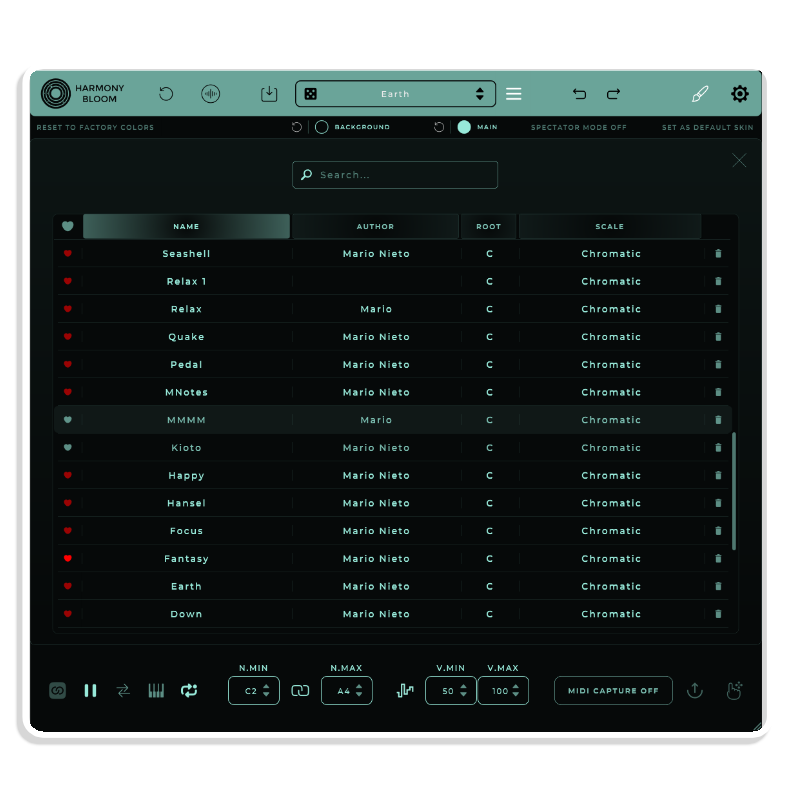
- Improved preset navigation and management: now, when you open the list of presets, the loaded preset is marked for quick identification. Additionally, you can navigate and select a new preset using the arrow keys, press Enter to load the selected preset, or press Delete to delete the selected preset.
- NEW: Import/Export Look. It is now possible to export or import custom looks using new buttons to select the file you want to export or import. You can also simply drag and drop the look file onto Harmony Bloom.
- NEW: Double-clicking on a note now toggles its status between active and inactive.
- FIXED: On Mac computers with M1 Max processors, Logic would sometimes crash immediately and other times after a while.
- FIXED: When activating the toggle Random Oct for trigger 1, trigger 7 gets activated.
- FIXED: Issue with displaying panel menus on right-click.
- CHANGED: Now the full name of most parameters is shown instead of being truncated.
- FIXED: Note Min and Note Max parameters were not saved and loaded correctly with the state.
- UI small corrections.
V1.2.7 – Released 23rd April 2024
- Root Text Font Issues.
- FIXED: The tempo control arrows were not functioning properly.
- FIX: Reset to factory colors did not reset the colors of the center Notes and Outer Notes.
- NEW: In this latest release, I have implemented an automatic update checking feature. Now, Harmony Bloom identifies if a newer version is available and, if the user has enabled update alerts, automatically presents a popup window that enables direct download of the new version, all without requiring user login.
V1.2.5 – Released 19th April 2024
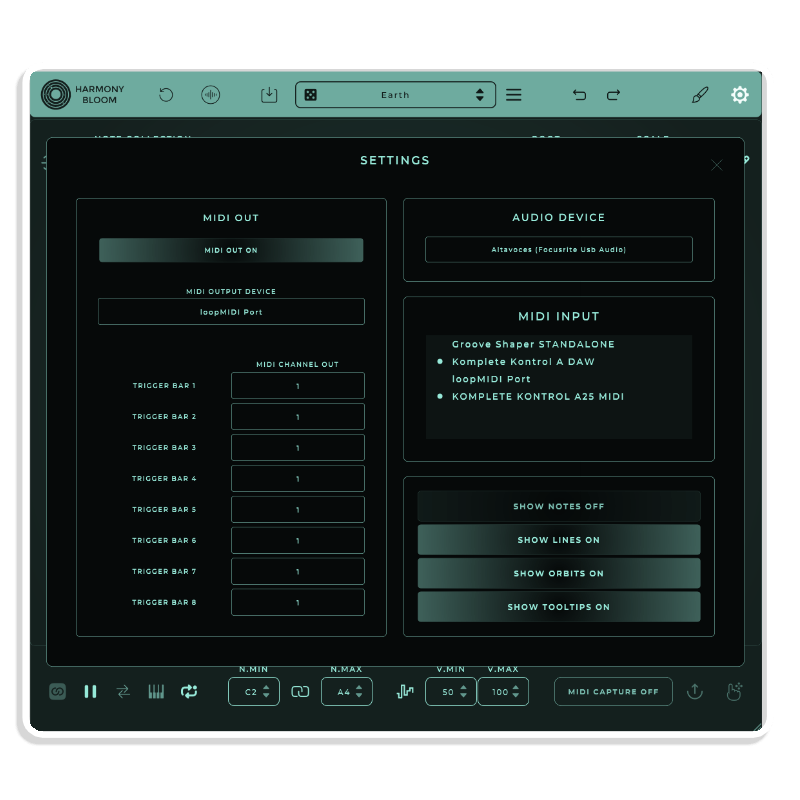
- NEW: Now in the plugin version, Trigger Bars can be mapped to be sent through different independent MIDI channels. Additionally, it is possible to select the octave for each trigger bar independently.
- IMPORTANT NOTE: Not all DAWs can handle internal multi-channel MIDI routing. For instance, Ableton cannot do this on Desktop, as it is a limitation imposed by the DAW itself. The same applies to some DAWs for iPadOS, so depending on the DAW you use, multi-channel sending internally may not be possible.
- NEW: Bypass. When active, all incoming MIDI signals pass through Harmony Bloom unaffected, effectively bypassing its processing. It’s equivalent to disabling the plugin.
- NEW: Added new Custom Colors for Dots. Customize the appearance of dots (notes on the spiral) with your choice of colors, enhancing visual feedback and personalizing your user experience.
- NEW: The header colors now match the selected colors.
- NEW: Now the presets can be exported one by one.
- Change of direction and position of the arrows for changing presets to have better control.
- Now, various playback controls, like the midi keyboard mode, have the option active to maintain the state through preset changes by default.
- UI Changes and corrections.
- FIXED: MIDI mappings for the trigger bars were not working correctly.
- FIXED: Fixed issue with correct loading using factory presets, quantize offset was loaded a value below the original.
V1.2.3 – Released 3rd April 2024
- NEW: Show or hide orbits.
- NEW: New tools and options to select notes and change their state to be active or not, giving total control to the user over which notes will play.
- NEW: Octave selector.
- NEW: Control-click acts as right-click.
- NEW: Added controls for the user to choose the UI colors and save them as a default.
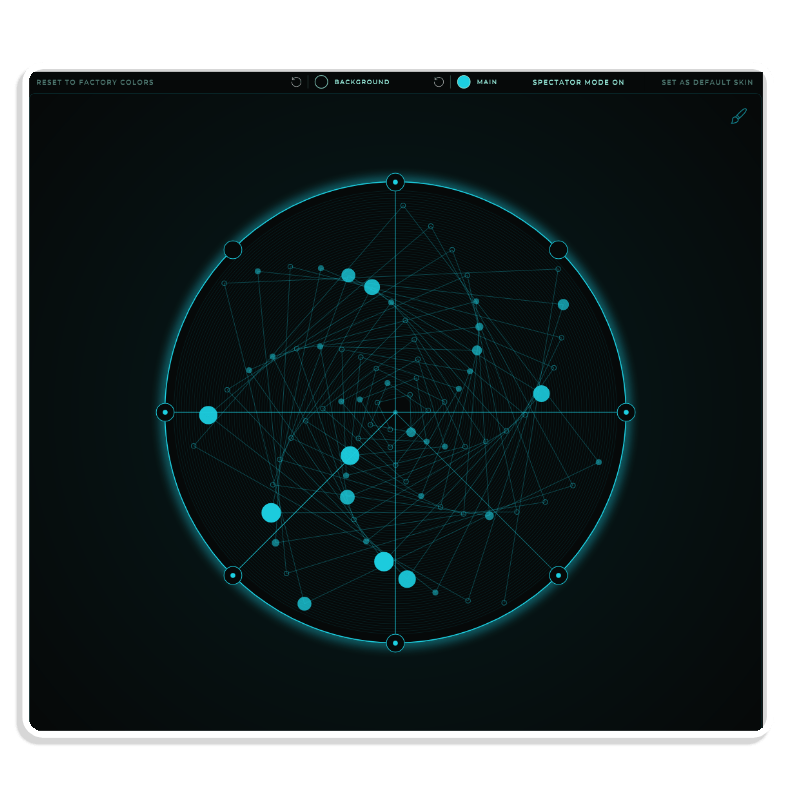
- NEW (Experimental): The spectator mode is an experimental feature designed to provide a cleaner and more focused viewing experience. When activated, this mode hides all interface elements associated with sequence editing. This leaves only the sequencer visible in the center of the screen, allowing for a distraction-free immersion in the content being viewed.
- FIXED: MIDI export buttons generate an empty file when there are no MIDI data recorded, which creates an unusable and problematic file in some DAWs.
- NEW: Custom Scales Option
- New Setting panel Layout For Plugin.
- NEW: Trigger bars that can be mapped to different midi channels. (ONLY IN STANDALONE) , incompatible with DAWs like Ableton due to their internal routing limitations that merge all MIDI messages.
- NEW: Setting panel Layout For Standalone.
- FIXED: Can’t choose ’53’ or ’59’ under Probability.
- FIXED: To Bar popup options for buttons.
- FIXED: CC mapped fail with top Bar Buttons, Random Speed Offset, Random Even Offset.
- FIXED: Random Probability percentage CC tied to Loop Length.
- FIXED: Global reset reset G.Offset and E.Offset.
- Several fixes and corrections in the UI.
V1.1.9 – Released 21st March 2024
- NEW: “Even Offset delays even notes, very useful for creating swing patterns or exploring new shapes and rhythmic patterns.”
- Fixed: In Standalone mode, resetting all parameters mutes the sound, requiring a return to the Sample panel to re-enable it;
- Probability: Automating and MIDI control CC doesn’t work.
- Fixed: Global Reset resets V.MIN, V.MAX and random Velocity to the its default states.
- Fixed: In Bitwig, the speed offset value is calculated as an integer.
- Small adjustments in the UI: The parameter titles are slightly larger to improve their readability + some minor adjustments in the UI
- Added new buttons in the info panel for quick access to frequently asked questions, manual, videos, website and contact.
- Some Improvement on The Register Manager.
- NEW: Significant UI performance enhancements, resulting in faster load times, smoother scaling, and more fluid navigation through the presets list.
- NEW: Added patterns (states) that can be saved quickly. These patterns are stored together with the presets.
- NEW: option to Randomizes the colors of the interface.. The colors can be excluded/included from randomization by right-clicking on the color and selecting ‘IGNORE RANDOM COLOUR ACTION’ or ‘ENABLE RANDOM COLOUR ACTION’.
- NEW: Quantize Notes Duration: It is now possible to quantize the duration of notes relative to the loop time, allowing notes to be held for precise intervals. When active, the duration is measured relative to the loop and quantized instead of in seconds. For example, setting QUANT. NOTE DURATION to 1/1 will trigger and hold the note for the entire loop cycle, enabling detailed control over note timing and duration in your compositions.
- NEW: When MIDI Learn is active, a text message is displayed in the window to notify us that we are in MIDI Learn mode. A new function has been added to stop MIDI Learn via right click on a parameter.
- NEW: Now the presets or looks files exported from the iPad version can be imported into the desktop version and vice versa.
- NEW: added midi learn for notes actions random active notes ,select all notes, etc…
- NEW: Show the notes that are being played on the keyboard.
- NEW: Copy / Paste colors options.
- NEW: Color changes can now be undone or redone.
- NEW: added reset for midi output channels and retrigger oct options.
- NEW: Harmony Bloom Icon and UI Changes.
- NEW: A new button in the Library panel allows preset imports without right-clicking (long press on iOS).
- FIXED: When loading the presets in Standalone version the midi out was disconnected.
- FIXED: Harmony Bloom can now read imported presets directly by adding the preset folder to the root preset folder.
- FIXED: Occasionally did not save the window size correctly.
- FIXED: small corrections…
V1.2.9 – Change Log:
- NEW: Harmony Bloom Expansion pack with 60 new presets
- NEW: Import Presets. You can now import presets by simply dragging and dropping a folder or the presets individually onto Harmony Bloom.
- Improved preset navigation and management: now, when you open the list of presets, the loaded preset is marked for quick identification. Additionally, you can navigate and select a new preset using the arrow keys, press Enter to load the selected preset, or press Delete to delete the selected preset.
- NEW: Import/Export Look. It is now possible to export or import custom looks using new buttons to select the file you want to export or import. You can also simply drag and drop the look file onto Harmony Bloom.
- NEW: Double-clicking on a note now toggles its status between active and inactive.
- FIXED: On Mac computers with M1 Max processors, Logic would sometimes crash immediately and other times after a while.
- FIXED: When activating the toggle Random Oct for trigger 1, trigger 7 gets activated.
- FIXED: Issue with displaying panel menus on right-click.
- CHANGED: Now the full name of most parameters is shown instead of being truncated.
- FIXED: Note Min and Note Max parameters were not saved and loaded correctly with the state.
- UI small corrections.
V1.2.7 – Released 23rd April 2024
- Root Text Font Issues.
- FIXED: The tempo control arrows were not functioning properly.
- FIX: Reset to factory colors did not reset the colors of the center Notes and Outer Notes.
- NEW: In this latest release, I have implemented an automatic update checking feature. Now, Harmony Bloom identifies if a newer version is available and, if the user has enabled update alerts, automatically presents a popup window that enables direct download of the new version, all without requiring user login.
V1.2.5 – Released 19th April 2024
- NEW: Now in the plugin version, Trigger Bars can be mapped to be sent through different independent MIDI channels. Additionally, it is possible to select the octave for each trigger bar independently.
- IMPORTANT NOTE: Not all DAWs can handle internal multi-channel MIDI routing. For instance, Ableton cannot do this on Desktop, as it is a limitation imposed by the DAW itself. The same applies to some DAWs for iPadOS, so depending on the DAW you use, multi-channel sending internally may not be possible.
- NEW: Bypass. When active, all incoming MIDI signals pass through Harmony Bloom unaffected, effectively bypassing its processing. It’s equivalent to disabling the plugin.
- NEW: Added new Custom Colors for Dots. Customize the appearance of dots (notes on the spiral) with your choice of colors, enhancing visual feedback and personalizing your user experience.
- NEW: The header colors now match the selected colors.
- NEW: Now the presets can be exported one by one.
- Change of direction and position of the arrows for changing presets to have better control.
- Now, various playback controls, like the midi keyboard mode, have the option active to maintain the state through preset changes by default.
- UI Changes and corrections.
- FIXED: MIDI mappings for the trigger bars were not working correctly.
- FIXED: Fixed issue with correct loading using factory presets, quantize offset was loaded a value below the original.
V1.2.3 – Released 3rd April 2024
- NEW: Show or hide orbits.
- NEW: New tools and options to select notes and change their state to be active or not, giving total control to the user over which notes will play.
- NEW: Octave selector.
- NEW: Control-click acts as right-click.
- NEW: Added controls for the user to choose the UI colors and save them as a default.
- NEW (Experimental): The spectator mode is an experimental feature designed to provide a cleaner and more focused viewing experience. When activated, this mode hides all interface elements associated with sequence editing. This leaves only the sequencer visible in the center of the screen, allowing for a distraction-free immersion in the content being viewed.
- FIXED: MIDI export buttons generate an empty file when there are no MIDI data recorded, which creates an unusable and problematic file in some DAWs.
- NEW: Custom Scales Option
- New Setting panel Layout For Plugin.
- NEW: Trigger bars that can be mapped to different midi channels. (ONLY IN STANDALONE) , incompatible with DAWs like Ableton due to their internal routing limitations that merge all MIDI messages.
- NEW: Setting panel Layout For Standalone.
- FIXED: Can’t choose ’53’ or ’59’ under Probability.
- FIXED: To Bar popup options for buttons.
- FIXED: CC mapped fail with top Bar Buttons, Random Speed Offset, Random Even Offset.
- FIXED: Random Probability percentage CC tied to Loop Length.
- FIXED: Global reset reset G.Offset and E.Offset.
- Several fixes and corrections in the UI.
V1.1.9 – Released 21st March 2024
- NEW: “Even Offset delays even notes, very useful for creating swing patterns or exploring new shapes and rhythmic patterns.”
- Fixed: In Standalone mode, resetting all parameters mutes the sound, requiring a return to the Sample panel to re-enable it;
- Probability: Automating and MIDI control CC doesn’t work.
- Fixed: Global Reset resets V.MIN, V.MAX and random Velocity to the its default states.
- Fixed: In Bitwig, the speed offset value is calculated as an integer.
- Small adjustments in the UI: The parameter titles are slightly larger to improve their readability + some minor adjustments in the UI
- Added new buttons in the info panel for quick access to frequently asked questions, manual, videos, website and contact.
- Some Improvement on The Register Manager.
END-USER LICENSE AGREEMENT FOR ISOTONIK STUDIOS SOFTWARE PRODUCTS.
PLEASE READ THE TERMS AND CONDITIONS OF THIS LICENSE AGREEMENT CAREFULLY BEFORE CONTINUING WITH THIS PROGRAM INSTALL.
This End-User License Agreement (referred to as “EULA”) is a legal agreement between an individual or a single entity (referred to as “LICENSEE”) and Isotonik Studios for the Isotonik Studios software product(s) which may include associated software components, media, printed materials, and “online” or electronic documentation (referred to as “SOFTWARE PRODUCT”). By installing, copying, or otherwise using the SOFTWARE PRODUCT, the LICENSEE agrees to be bound by the terms of this EULA.
This EULA represents the entire agreement concerning the program between the LICENSEE and Isotonik Studios and it supersedes any prior proposal, representation, or understanding between the parties. If the LICENSEE does not agree to the terms of this EULA, the LICENSEE should not install or use the SOFTWARE PRODUCT.
The SOFTWARE PRODUCT is protected by copyright laws and international copyright treaties, as well as other intellectual property laws and treaties. The SOFTWARE PRODUCT is licensed, not sold.
- GRANT OF LICENSE.
The SOFTWARE PRODUCT is licensed as follows:
(a) Installation and Use. Providing that the LICENSEE has paid any applicable license fees, Isotonik Studios grants the LICENSEE the right to install and use copies of the SOFTWARE PRODUCT on up to two computers in the LICENSEE’s possession that are running a validly licensed copy of the operating system for which the SOFTWARE PRODUCT was designed [e.g., Windows 10, macOS]. The computer(s) must be owned by the LICENSEE.
(b) Backup Copies. The LICENSEE may also make copies of the SOFTWARE PRODUCT as may be necessary for backup and archival purposes.
- DESCRIPTION OF OTHER RIGHTS AND LIMITATIONS.
(a) Maintenance of Copyright Notices. The LICENSEE must not remove or alter any copyright notices on any and all copies of the SOFTWARE PRODUCT.
(b) Distribution. The LICENSEE may not distribute registered copies of the SOFTWARE PRODUCT to third parties.
(c) Prohibition on Reverse Engineering, Decompilation, and Disassembly. The LICENSEE may not reverse engineer, decompile, or disassemble the SOFTWARE PRODUCT, except and only to the extent that such activity is expressly permitted by applicable law notwithstanding this limitation.
(d) Rental. The LICENSEE may not rent, lease, or lend the SOFTWARE PRODUCT.
(e) License transfer The LICENSEE may not transfer their license to the SOFTWARE PRODUCT to any third party. Any attempt to do so will be considered a violation of this EULA.
(f) Support Services. Isotonik Studios may provide the LICENSEE with support services related to the SOFTWARE PRODUCT for a period of 12 months following the date of purchase. Any supplemental software code provided to the LICENSEE as part of the Support Services shall be considered part of the SOFTWARE PRODUCT and subject to the terms and conditions of this EULA.
(g) Compliance with Applicable Laws. The LICENSEE must comply with all applicable laws regarding use of the SOFTWARE PRODUCT.
- TERMINATION Without prejudice to any other rights, Isotonik Studios may terminate this EULA if the LICENSEE fails to comply with the terms and conditions of this EULA. In such event, the LICENSEE must destroy all copies of the SOFTWARE PRODUCT in the LICENSEE’s possession.
- COPYRIGHT All title, including but not limited to copyrights, in and to the SOFTWARE PRODUCT and any copies thereof are owned by Isotonik Studios or its suppliers. All title and intellectual property rights in and to the content which may be accessed through use of the SOFTWARE PRODUCT is the property of the respective content owner and may be protected by applicable copyright or other intellectual property laws and treaties. This EULA grants the LICENSEE no rights to use such content. All rights not expressly granted are reserved by Isotonik Studios.
- NO WARRANTIES Isotonik Studios expressly disclaims any warranty for the SOFTWARE PRODUCT. The SOFTWARE PRODUCT is provided ‘As Is’ without any express or implied warranty of any kind, including but not limited to any warranties of merchantability, noninfringement, or fitness of a particular purpose. Isotonik Studios does not warrant or assume responsibility for the accuracy or completeness of any information, text, graphics, links or other items contained within the SOFTWARE PRODUCT. Isotonik Studios makes no warranties respecting any harm that may be caused by the transmission of a computer virus, worm, time bomb, logic bomb, or other such computer program. Isotonik Studios further expressly disclaims any warranty or representation to the LICENSEE or to any third party.
- LIMITATION OF LIABILITY In no event shall Isotonik Studios be liable for any damages (including, without limitation, lost profits, business interruption, or lost information) arising out of the LICENSEE’s use of or inability to use the SOFTWARE PRODUCT, even if Isotonik Studios has been advised of the possibility of such damages. In no event will Isotonik Studios be liable for loss of data or for indirect, special, incidental, consequential (including lost profit), or other damages based in contract, tort or otherwise. Isotonik Studios shall have no liability with respect to the content of the SOFTWARE PRODUCT or any part thereof, including but not limited to errors or omissions contained therein, libel, infringements of rights of publicity, privacy, trademark rights, business interruption, personal injury, loss of privacy, moral rights or the disclosure of confidential information.