
LFOLava by AVAL
DOUBLE OSCILLATING LFO DEVICE
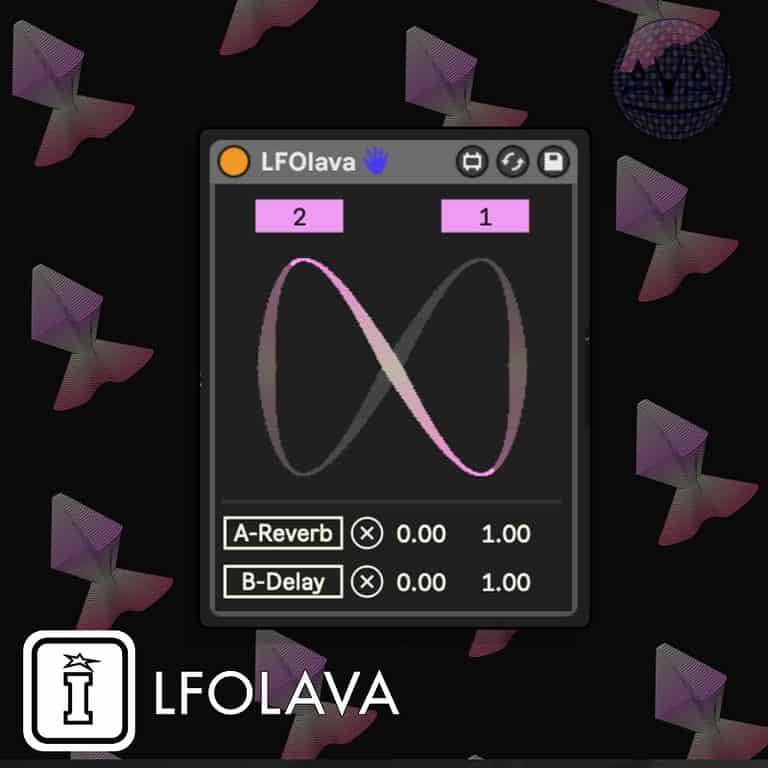
LFOLava is a mappable LFO device with two oscillators, where you can set their speed using ratios and get intuitive graphic response, and map them to any (enabled) parameter inside Ableton: as you'll map them, you'll get the exact values of the chosen param directly from Ableton's API.LFOLava by AVAL
DOUBLE OSCILLATING LFO DEVICE
LFOLava is a mappable LFO device with two oscillators, where you can set their speed using ratios and get intuitive graphic response, and map them to any (enabled) parameter inside Ableton: as you'll map them, you'll get the exact values of the chosen param directly from Ableton's API.Buying for someone?Send a gift card →
Additional information
| MaxforLive | Control Devices |
|---|---|
| Ableton Live Compatibility | Ableton Live 10 Standard with MaxforLive, Ableton Live 10 Suite, Ableton Live 11 Standard with MaxforLive, Ableton Live 11 Suite, Ableton Live 12 Standard with MaxforLive, Ableton Live 12 Suite |
| Min. Requirements | Ableton Live 10 Standard with MaxforLive Installed or Ableton Live 10 Suite |
| OS | Mac, Windows |
Product reviews
4 out of 5
2 reviews
How item rating is calculated
We show the average based on reviews. Only genuine reviews are displayed.
Sort by
October 29, 2024
This reviewer bought this product from our store.
This works really well. Use it to modulate other free Isotonik devices and you can create some wild stuff.
September 8, 2024
This reviewer bought this product from our store.
I wish it was possible for it to run slower, but being able to visualize the way the two LFO's are interacting makes it surprisingly useful for generating modulation that feels interconnected.
LFOLava by AVAL
LFOlava is a free max4live designed and built by Aval.
It’s a mappable LFO device with two oscillators, where you can set their speed using ratios and get intuitive graphic response, and map them to any (enabled) parameter inside Ableton: as you’ll map them, you’ll get the exact values of the chosen param directly from Ableton’s API.
Use it as a drag & drop double lfo, to modulate values you don’t want to be exactly the same, getting intuitive ratios and meeting points from the graph.
- Ratio boxes: set the ratio of the single oscillators, they’ll be 1/x where “x” is the value selected, synced to Ableton BPM.
- Cool graph that show rhythms and repetions.
- Map box: click on it and then on the value you’d like to map, a cross box will appear next to it in order to disconnect.
- Range boxes: left one for the minimum and right for the maximum, you’ll get the param min and max when connecting.
IMPORTANT: some Ableton parameters are not like they’re shown but sometimes they could be 0-1 float ranges.
Frequently Asked Questions
LFOLava is a Max for Live device, so you’ll need Ableton Live Suite or a copy of Live Standard with a separate Max for Live licence. Make sure your Max for Live installation is up to date for the best compatibility.
Each oscillator’s speed is set as a fraction of 1/x, where x is the value you dial in, and both oscillators sync automatically to Ableton’s BPM. This makes it straightforward to create polyrhythmic modulations where the two LFOs drift apart and converge at predictable points.
Click the map box on the device and then click the parameter you want to control anywhere in your session. A cross box will appear next to the mapping so you can disconnect it at any time. The device reads the exact value range of the chosen parameter directly from Ableton’s API, so the modulation always stays accurate.
Yes, as long as the parameter is enabled and exposed within Ableton’s environment, LFOLava can map to it. This includes most VST and AU plugin parameters that Ableton allows automation on.
The graph gives you a visual representation of both oscillator cycles running simultaneously, so you can see the rhythmic relationship, repetition points, and where the two LFOs will meet. It makes designing complex modulation shapes much more intuitive than working blind.
Yes, it works as a standard Max for Live MIDI or audio effect device that you drag onto a track in Ableton. Once it is on a track you can map its two oscillators to parameters anywhere in your project.
LFOLava is a single Max for Live device file, so installation is simply a case of dropping it into your Ableton User Library or directly onto a track. There are no additional dependencies or third-party tools required beyond a working Max for Live setup.
Important Information
V1.0.0 – Initial Release
Our Products are generally provided as Zip file downloads which in all cases will need to be extracted and saved to your hard drive prior to installation. Details on the different file type provided and what to do with them are below.
.alp Files – These are Ableton Live Packs and will either install directly into the Packs Section of the browser of Ableton Live or ask you to save them to your hard drive. For packs that install to the library, when you double click on them you will see a pop up window asking you to confirm that installation is ok as the files are described as “Legacy”. This is fine and you are ok to proceed, the packs are created using the format for an earlier version of Live and so remain compatible with the current version.
.amxd files – These are individual MaxforLive Devices and can be stored anywhere on your hard drive. We’d advise creating a folder for them and then adding that folder as a location within the Places section of Lives Browser.
END-USER LICENSE AGREEMENT FOR ISOTONIK STUDIOS SOFTWARE PRODUCTS.
PLEASE READ THE TERMS AND CONDITIONS OF THIS LICENSE AGREEMENT CAREFULLY BEFORE CONTINUING WITH THIS PROGRAM INSTALL.
This End-User License Agreement (referred to as “EULA”) is a legal agreement between an individual or a single entity (referred to as “LICENSEE”) and Isotonik Studios for the Isotonik Studios software product(s) which may include associated software components, media, printed materials, and “online” or electronic documentation (referred to as “SOFTWARE PRODUCT”). By installing, copying, or otherwise using the SOFTWARE PRODUCT, the LICENSEE agrees to be bound by the terms of this EULA.
This EULA represents the entire agreement concerning the program between the LICENSEE and Isotonik Studios and it supersedes any prior proposal, representation, or understanding between the parties. If the LICENSEE does not agree to the terms of this EULA, the LICENSEE should not install or use the SOFTWARE PRODUCT.
The SOFTWARE PRODUCT is protected by copyright laws and international copyright treaties, as well as other intellectual property laws and treaties. The SOFTWARE PRODUCT is licensed, not sold.
- GRANT OF LICENSE.
The SOFTWARE PRODUCT is licensed as follows:
(a) Installation and Use. Providing that the LICENSEE has paid any applicable license fees, Isotonik Studios grants the LICENSEE the right to install and use copies of the SOFTWARE PRODUCT on up to two computers in the LICENSEE’s possession that are running a validly licensed copy of the operating system for which the SOFTWARE PRODUCT was designed [e.g., Windows 10, macOS]. The computer(s) must be owned by the LICENSEE.
(b) Backup Copies. The LICENSEE may also make copies of the SOFTWARE PRODUCT as may be necessary for backup and archival purposes.
- DESCRIPTION OF OTHER RIGHTS AND LIMITATIONS.
(a) Maintenance of Copyright Notices. The LICENSEE must not remove or alter any copyright notices on any and all copies of the SOFTWARE PRODUCT.
(b) Distribution. The LICENSEE may not distribute registered copies of the SOFTWARE PRODUCT to third parties.
(c) Prohibition on Reverse Engineering, Decompilation, and Disassembly. The LICENSEE may not reverse engineer, decompile, or disassemble the SOFTWARE PRODUCT, except and only to the extent that such activity is expressly permitted by applicable law notwithstanding this limitation.
(d) Rental. The LICENSEE may not rent, lease, or lend the SOFTWARE PRODUCT.
(e) License transfer The LICENSEE may not transfer their license to the SOFTWARE PRODUCT to any third party. Any attempt to do so will be considered a violation of this EULA.
(f) Support Services. Isotonik Studios may provide the LICENSEE with support services related to the SOFTWARE PRODUCT for a period of 12 months following the date of purchase. Any supplemental software code provided to the LICENSEE as part of the Support Services shall be considered part of the SOFTWARE PRODUCT and subject to the terms and conditions of this EULA.
(g) Compliance with Applicable Laws. The LICENSEE must comply with all applicable laws regarding use of the SOFTWARE PRODUCT.
- TERMINATION Without prejudice to any other rights, Isotonik Studios may terminate this EULA if the LICENSEE fails to comply with the terms and conditions of this EULA. In such event, the LICENSEE must destroy all copies of the SOFTWARE PRODUCT in the LICENSEE’s possession.
- COPYRIGHT All title, including but not limited to copyrights, in and to the SOFTWARE PRODUCT and any copies thereof are owned by Isotonik Studios or its suppliers. All title and intellectual property rights in and to the content which may be accessed through use of the SOFTWARE PRODUCT is the property of the respective content owner and may be protected by applicable copyright or other intellectual property laws and treaties. This EULA grants the LICENSEE no rights to use such content. All rights not expressly granted are reserved by Isotonik Studios.
- NO WARRANTIES Isotonik Studios expressly disclaims any warranty for the SOFTWARE PRODUCT. The SOFTWARE PRODUCT is provided ‘As Is’ without any express or implied warranty of any kind, including but not limited to any warranties of merchantability, noninfringement, or fitness of a particular purpose. Isotonik Studios does not warrant or assume responsibility for the accuracy or completeness of any information, text, graphics, links or other items contained within the SOFTWARE PRODUCT. Isotonik Studios makes no warranties respecting any harm that may be caused by the transmission of a computer virus, worm, time bomb, logic bomb, or other such computer program. Isotonik Studios further expressly disclaims any warranty or representation to the LICENSEE or to any third party.
- LIMITATION OF LIABILITY In no event shall Isotonik Studios be liable for any damages (including, without limitation, lost profits, business interruption, or lost information) arising out of the LICENSEE’s use of or inability to use the SOFTWARE PRODUCT, even if Isotonik Studios has been advised of the possibility of such damages. In no event will Isotonik Studios be liable for loss of data or for indirect, special, incidental, consequential (including lost profit), or other damages based in contract, tort or otherwise. Isotonik Studios shall have no liability with respect to the content of the SOFTWARE PRODUCT or any part thereof, including but not limited to errors or omissions contained therein, libel, infringements of rights of publicity, privacy, trademark rights, business interruption, personal injury, loss of privacy, moral rights or the disclosure of confidential information.
More from AVAL

Frequently Bought Together