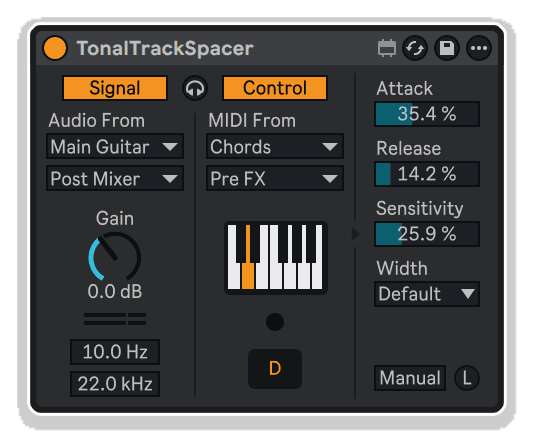
TonalTrackSpacer by KILLIHU
FREQUENCY SPACE CARVED BY NOTES, NOT JUST SPECTRUM
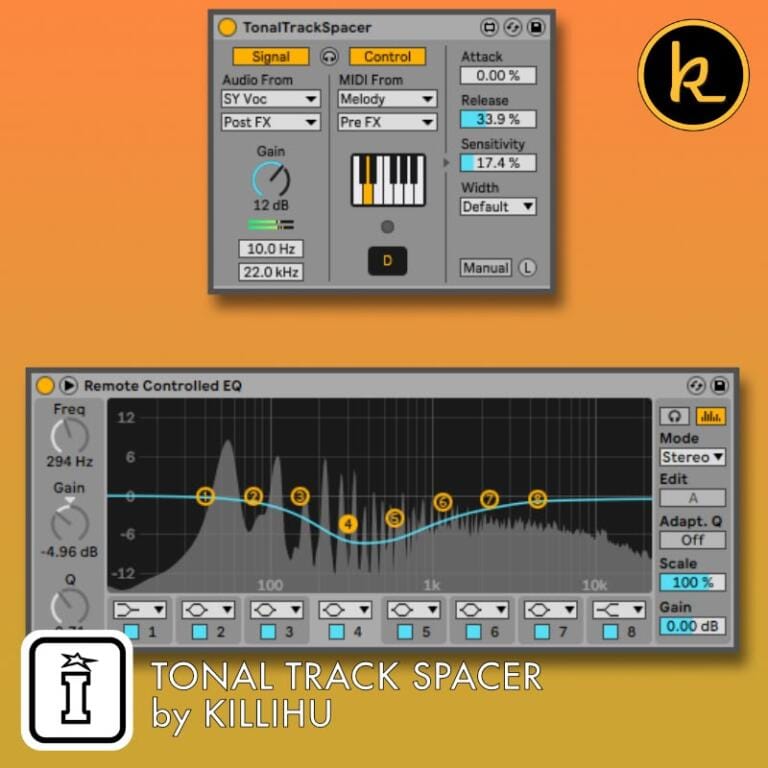
Move beyond traditional track spacers with TonalTrackSpacer by killihu—a note-aware dynamic EQ that creates mix separation based on musical pitches rather than arbitrary frequency bands, intelligently controlling EQ Eight across eight octaves using external audio and MIDI input.
CPU-efficient, musically intelligent frequency management that follows the harmony, not just the spectrum.
Inside you’ll find:
- Musical note-based frequency attenuation (not fixed bands)
- Automatic EQ Eight control across eight octaves
- MIDI note input for dynamic pitch-following behavior
- Eight detection filters positioned by musical notes
- Manual mode with independent filter adjustment
- Adjustable detection sensitivity for precise frequency targeting
- Musical width parameter (octaves and note counts)
- Attack and Release envelope smoothing
- External audio gain control (affects attenuation depth)
- High-cut and low-cut sidechain filtering
- External signal listen mode for monitoring
- Flexible audio and MIDI routing from any track
- Static note selection (no MIDI input required)
- Piano keyboard note display with LED indicator
- CPU-efficient focused frequency detection
- Invert EQ Eight Scale for harmonic enhancement
- Access EQ Eight’s full filter type modes
- Example ADG preset included
- Compatible with Live 11
- Complete PDF reference manual included
Attenuation that follows the notes—musically intelligent mix separation.
USER GUIDE: TonalTrackSpacer Manual
TonalTrackSpacer by KILLIHU
FREQUENCY SPACE CARVED BY NOTES, NOT JUST SPECTRUM
Move beyond traditional track spacers with TonalTrackSpacer by killihu—a note-aware dynamic EQ that creates mix separation based on musical pitches rather than arbitrary frequency bands, intelligently controlling EQ Eight across eight octaves using external audio and MIDI input.
CPU-efficient, musically intelligent frequency management that follows the harmony, not just the spectrum.
Inside you’ll find:
- Musical note-based frequency attenuation (not fixed bands)
- Automatic EQ Eight control across eight octaves
- MIDI note input for dynamic pitch-following behavior
- Eight detection filters positioned by musical notes
- Manual mode with independent filter adjustment
- Adjustable detection sensitivity for precise frequency targeting
- Musical width parameter (octaves and note counts)
- Attack and Release envelope smoothing
- External audio gain control (affects attenuation depth)
- High-cut and low-cut sidechain filtering
- External signal listen mode for monitoring
- Flexible audio and MIDI routing from any track
- Static note selection (no MIDI input required)
- Piano keyboard note display with LED indicator
- CPU-efficient focused frequency detection
- Invert EQ Eight Scale for harmonic enhancement
- Access EQ Eight’s full filter type modes
- Example ADG preset included
- Compatible with Live 11
- Complete PDF reference manual included
Attenuation that follows the notes—musically intelligent mix separation.
USER GUIDE: TonalTrackSpacer Manual
Buying for someone?Send a gift card →
Additional information
| MaxforLive | Control Devices |
|---|---|
| Ableton Live Compatibility | Ableton Live 11 Standard with MaxforLive, Ableton Live 11 Suite, Ableton Live 12 Standard with MaxforLive, Ableton Live 12 Suite |
| Min. Requirements | Ableton Live 11 Standard with MaxforLive Installed or Ableton Live 11 Suite |
| OS | Mac, Windows |
PRICE: £20.00
Product reviews
No reviews yet. Be the first to review this product.
TonalTrackSpacer by KILLIHU
Overview & Inspiration
Traditional track spacer plugins carve out frequency space using fixed bands or dynamic spectrums, but what if your mix collisions are fundamentally musical rather than spectral? What if the problem isn’t just frequencies, but overlapping notes?
TonalTrackSpacer by killihu approaches mix separation from a musical perspective, applying inverse EQ based on actual notes rather than arbitrary frequency bands. By intelligently controlling EQ Eight’s filters using MIDI note input and audio analysis, it creates precise tonal space where instruments compete—attenuation that follows the music, not just the spectrum.
This MaxforLive device uses eight detection filters positioned across eight octaves, automatically adjusting EQ Eight’s frequency and gain parameters in response to external audio and MIDI signals. The result is CPU-efficient, musically intelligent dynamic EQ that solves frequency masking with note-aware precision.
Features & Highlights
Musical Note-Based Processing – Unlike traditional track spacers using fixed frequency bands, TonalTrackSpacer positions filters according to musical notes and octaves, creating attenuation that follows harmonic relationships rather than arbitrary spectral divisions.
Intelligent EQ Eight Control – Automatically manipulates an EQ Eight instance, positioning each of eight filters at different octaves while dynamically adjusting frequency and gain parameters based on external audio and MIDI input.
Eight Octave Detection System – Eight internal detection filters span eight octaves, focusing frequency analysis precisely where musical content occurs, enabling efficient attenuation without unnecessary filter proliferation.
MIDI Note Control – Receive MIDI notes to automatically tune detection and EQ filters to specific pitches and octaves, ensuring attenuation targets exact musical conflicts rather than broad frequency ranges.
Dual Input Modes – Operate with MIDI input for dynamic note-following behavior, or without MIDI by manually setting a single target note—flexibility for both harmonic and static frequency management.
Manual Filter Adjustment Mode – Disable automatic control to manually position all eight detection frequencies and EQ Eight filters independently, perfect for custom tonal carving or creative effect processing.
Adjustable Detection Sensitivity – Fine-tune internal filter bandwidth for more accurate frequency detection at higher values or broader response at lower values, matching analysis precision to source material complexity.
Musical Width Parameter – Set EQ Eight filter bandwidth using musical intervals (octaves or note counts like “1 Oct” or “4N”), maintaining musical relationships rather than working in abstract Hz values.
Attack and Release Smoothing – Control how quickly EQ Eight filter gains respond to detected signals, enabling everything from transparent dynamic separation to rhythmic pumping effects.
External Signal Processing – External audio input features adjustable gain (affecting attenuation depth), dedicated low-cut and high-cut filters for focusing analysis on specific frequency ranges, plus a listen mode for monitoring the sidechain signal.
Flexible Routing Options – Select external audio and MIDI sources from any track and tap point in your project, with independent enable/disable controls for audio and MIDI inputs.
CPU Efficiency – By focusing detection filters on musically relevant frequencies determined by MIDI notes, TonalTrackSpacer uses significantly fewer resources than spectrum-scanning alternatives while achieving more musical results.
Creative EQ Eight Integration – Access EQ Eight’s full feature set including filter type modes and Scale control—invert Scale to boost target frequencies instead of cutting them, transforming the device into a note-following enhancer.
How to Use
Drop TonalTrackSpacer onto the track requiring frequency space. The device automatically links to an EQ Eight instance placed immediately to its right (if EQ Eight loads first, the link happens automatically). Use the Link button to manually establish this connection if needed.
Select your external audio source using the Audio From menus, choosing both the track and tap point (Pre Fader, Post Fader, Post FX). Enable the Signal button to activate audio detection. Adjust Gain to control how much the external signal’s level affects attenuation depth.
For MIDI control, select your MIDI source using the MIDI From menus and enable the Control button. When MIDI notes arrive, TonalTrackSpacer automatically tunes all eight detection filters and EQ Eight filters to match the note across eight octaves. The piano keyboard displays incoming notes with LED indication.
To set a static target note without MIDI input, disable the Control button and click the desired note on the piano keyboard. The device will store this note and position all filters accordingly.
Use Attack and Release to smooth how quickly EQ Eight’s filter gains respond to detected signals. Higher Attack values prevent abrupt attenuation, while faster Release allows filters to return quickly when signals stop. Adjust Sensitivity to focus detection—higher values narrow internal filter bandwidth for precise frequency targeting.
Set Width using musical intervals: “1 Oct” creates octave-wide notches, while values like “4N” (four notes) create narrower cuts. This musical approach ensures filter bandwidth maintains harmonic relationships with detected pitches.
Apply Low Cut and High Cut filters to the external audio input to focus detection on specific frequency ranges, preventing low-frequency rumble or high-frequency noise from triggering unnecessary attenuation.
Enable External Signal Listen to monitor only the sidechain input while bypassing EQ Eight, useful for diagnosing detection behavior and setting input parameters correctly.
Activate Manual mode to disable automatic filter control. The eight detection frequency knobs appear, allowing you to position internal filters manually. In this mode, EQ Eight’s filter frequencies and bandwidth become independently adjustable, enabling custom tonal sculpting or creative processing.
For creative applications, use EQ Eight’s Scale control: normal (positive) values create attenuation, but inverted (negative) values boost detected frequencies instead, transforming TonalTrackSpacer into a note-following harmonic enhancer.
Ideal For
- Creating frequency space between bass and kick with note-aware precision
- Ducking vocals or lead instruments around conflicting melodic elements
- Tonal separation in dense harmonic arrangements
- Musical sidechain ducking that follows note relationships
- Dynamic EQ that responds to specific pitches rather than broad bands
- Harmonic enhancement when using inverted Scale values
- Anyone seeking more musical, less technical frequency management
What’s Included
- TonalTrackSpacer MaxforLive device (.amxd)
- Example ADG preset file
- Complete PDF reference manual
- Automatic EQ Eight control with eight octave positioning
- MIDI note input for dynamic pitch tracking
- Eight-octave detection filter system
- Manual mode with independent filter adjustment
- Attack and Release envelope smoothing
- Adjustable detection sensitivity
- Musical width parameter (octaves and note counts)
- External audio gain control
- High-cut and low-cut sidechain filtering
- External signal listen mode
- Flexible audio and MIDI routing
- Piano keyboard note display with LED indicator
- Static note selection (without MIDI input)
- Compatible with Live 11
Requirements
- Ableton Live 11 Standard (with MaxforLive) or Ableton Live 11 Suite
- MaxforLive 8+
- EQ Eight (included with Live Suite, or Live Standard with MaxforLive)
- Compatible with both Mac and Windows
- Note: Device must be placed immediately before an EQ Eight instance for automatic linking
Explore More
MKT Mapper | Sequencer-Ki | Control Matrix | Mapper Ki | View All killihu Products
Frequently Asked Questions
A: TonalTrackSpacer is a MaxforLive device that creates frequency space using musical note relationships rather than fixed frequency bands. It automatically controls an EQ Eight instance across eight octaves using external audio detection and MIDI note input, providing musically intelligent dynamic EQ that follows harmonic content.
A: Yes, TonalTrackSpacer is a MaxforLive device.
A: MaxforLive is a platform that integrates the visual programming environment Max with Ableton Live, allowing users to create and use custom audio, MIDI, and control devices.
A: Traditional track spacers use fixed frequency bands or continuous spectrum analysis. TonalTrackSpacer positions its eight detection filters according to musical notes and octaves, creating attenuation that follows harmonic relationships. When you send MIDI notes, all eight filters automatically tune to that note across eight octaves, providing musically precise frequency carving with lower CPU usage.
A: No, MIDI input is optional. You can disable the Control button and manually click a note on the piano keyboard to set a static target pitch. The device will store this note and position all eight detection filters accordingly. MIDI input is useful when you want the device to dynamically follow changing notes in real-time.
A: TonalTrackSpacer must be placed immediately before an EQ Eight instance. It automatically links and controls EQ Eight’s eight filters, positioning each at a different octave and dynamically adjusting their frequency and gain based on detected audio content. You can still access EQ Eight’s controls for additional adjustments like filter type modes.
A: Manual mode disables automatic MIDI and audio-based filter control, revealing eight frequency knobs for positioning detection filters independently. In this mode, EQ Eight’s filter frequencies and bandwidth also become manually adjustable, enabling custom tonal sculpting beyond the device’s automatic note-following behavior.
A: Yes! Beyond transparent mix separation, try inverting EQ Eight’s Scale control (negative values) to boost detected frequencies instead of cutting them, transforming TonalTrackSpacer into a note-following harmonic enhancer. Adjust Attack/Release for rhythmic pumping effects or use Manual mode for creative filter positioning.
A: You can explore more of killihu’s tools and devices here: killihu
Important Information
Initial Release – November 2024
Our Products are generally provided as Zip file downloads which in all cases will need to be extracted and saved to your hard drive prior to installation. Details on the different file type provided and what to do with them are below.
.alp Files – These are Ableton Live Packs and will either install directly into the Packs Section of the browser of Ableton Live or ask you to save them to your hard drive. For packs that install to the library, when you double click on them you will see a pop up window asking you to confirm that installation is ok as the files are described as “Legacy”. This is fine and you are ok to proceed, the packs are created using the format for an earlier version of Live and so remain compatible with the current version.
.amxd files – These are individual MaxforLive Devices and can be stored anywhere on your hard drive. We’d advise creating a folder for them and then adding that folder as a location within the Places section of Lives Browser.
END-USER LICENSE AGREEMENT FOR ISOTONIK STUDIOS SOFTWARE PRODUCTS.
PLEASE READ THE TERMS AND CONDITIONS OF THIS LICENSE AGREEMENT CAREFULLY BEFORE CONTINUING WITH THIS PROGRAM INSTALL.
This End-User License Agreement (referred to as “EULA”) is a legal agreement between an individual or a single entity (referred to as “LICENSEE”) and Isotonik Studios for the Isotonik Studios software product(s) which may include associated software components, media, printed materials, and “online” or electronic documentation (referred to as “SOFTWARE PRODUCT”). By installing, copying, or otherwise using the SOFTWARE PRODUCT, the LICENSEE agrees to be bound by the terms of this EULA.
This EULA represents the entire agreement concerning the program between the LICENSEE and Isotonik Studios and it supersedes any prior proposal, representation, or understanding between the parties. If the LICENSEE does not agree to the terms of this EULA, the LICENSEE should not install or use the SOFTWARE PRODUCT.
The SOFTWARE PRODUCT is protected by copyright laws and international copyright treaties, as well as other intellectual property laws and treaties. The SOFTWARE PRODUCT is licensed, not sold.
- GRANT OF LICENSE.
The SOFTWARE PRODUCT is licensed as follows:
(a) Installation and Use. Providing that the LICENSEE has paid any applicable license fees, Isotonik Studios grants the LICENSEE the right to install and use copies of the SOFTWARE PRODUCT on up to two computers in the LICENSEE’s possession that are running a validly licensed copy of the operating system for which the SOFTWARE PRODUCT was designed [e.g., Windows 10, macOS]. The computer(s) must be owned by the LICENSEE.
(b) Backup Copies. The LICENSEE may also make copies of the SOFTWARE PRODUCT as may be necessary for backup and archival purposes.
- DESCRIPTION OF OTHER RIGHTS AND LIMITATIONS.
(a) Maintenance of Copyright Notices. The LICENSEE must not remove or alter any copyright notices on any and all copies of the SOFTWARE PRODUCT.
(b) Distribution. The LICENSEE may not distribute registered copies of the SOFTWARE PRODUCT to third parties.
(c) Prohibition on Reverse Engineering, Decompilation, and Disassembly. The LICENSEE may not reverse engineer, decompile, or disassemble the SOFTWARE PRODUCT, except and only to the extent that such activity is expressly permitted by applicable law notwithstanding this limitation.
(d) Rental. The LICENSEE may not rent, lease, or lend the SOFTWARE PRODUCT.
(e) License transfer The LICENSEE may not transfer their license to the SOFTWARE PRODUCT to any third party. Any attempt to do so will be considered a violation of this EULA.
(f) Support Services. Isotonik Studios may provide the LICENSEE with support services related to the SOFTWARE PRODUCT for a period of 12 months following the date of purchase. Any supplemental software code provided to the LICENSEE as part of the Support Services shall be considered part of the SOFTWARE PRODUCT and subject to the terms and conditions of this EULA.
(g) Compliance with Applicable Laws. The LICENSEE must comply with all applicable laws regarding use of the SOFTWARE PRODUCT.
- TERMINATION Without prejudice to any other rights, Isotonik Studios may terminate this EULA if the LICENSEE fails to comply with the terms and conditions of this EULA. In such event, the LICENSEE must destroy all copies of the SOFTWARE PRODUCT in the LICENSEE’s possession.
- COPYRIGHT All title, including but not limited to copyrights, in and to the SOFTWARE PRODUCT and any copies thereof are owned by Isotonik Studios or its suppliers. All title and intellectual property rights in and to the content which may be accessed through use of the SOFTWARE PRODUCT is the property of the respective content owner and may be protected by applicable copyright or other intellectual property laws and treaties. This EULA grants the LICENSEE no rights to use such content. All rights not expressly granted are reserved by Isotonik Studios.
- NO WARRANTIES Isotonik Studios expressly disclaims any warranty for the SOFTWARE PRODUCT. The SOFTWARE PRODUCT is provided ‘As Is’ without any express or implied warranty of any kind, including but not limited to any warranties of merchantability, noninfringement, or fitness of a particular purpose. Isotonik Studios does not warrant or assume responsibility for the accuracy or completeness of any information, text, graphics, links or other items contained within the SOFTWARE PRODUCT. Isotonik Studios makes no warranties respecting any harm that may be caused by the transmission of a computer virus, worm, time bomb, logic bomb, or other such computer program. Isotonik Studios further expressly disclaims any warranty or representation to the LICENSEE or to any third party.
- LIMITATION OF LIABILITY In no event shall Isotonik Studios be liable for any damages (including, without limitation, lost profits, business interruption, or lost information) arising out of the LICENSEE’s use of or inability to use the SOFTWARE PRODUCT, even if Isotonik Studios has been advised of the possibility of such damages. In no event will Isotonik Studios be liable for loss of data or for indirect, special, incidental, consequential (including lost profit), or other damages based in contract, tort or otherwise. Isotonik Studios shall have no liability with respect to the content of the SOFTWARE PRODUCT or any part thereof, including but not limited to errors or omissions contained therein, libel, infringements of rights of publicity, privacy, trademark rights, business interruption, personal injury, loss of privacy, moral rights or the disclosure of confidential information.
More from Killihu

 ★ Popular
Frequently Bought Together