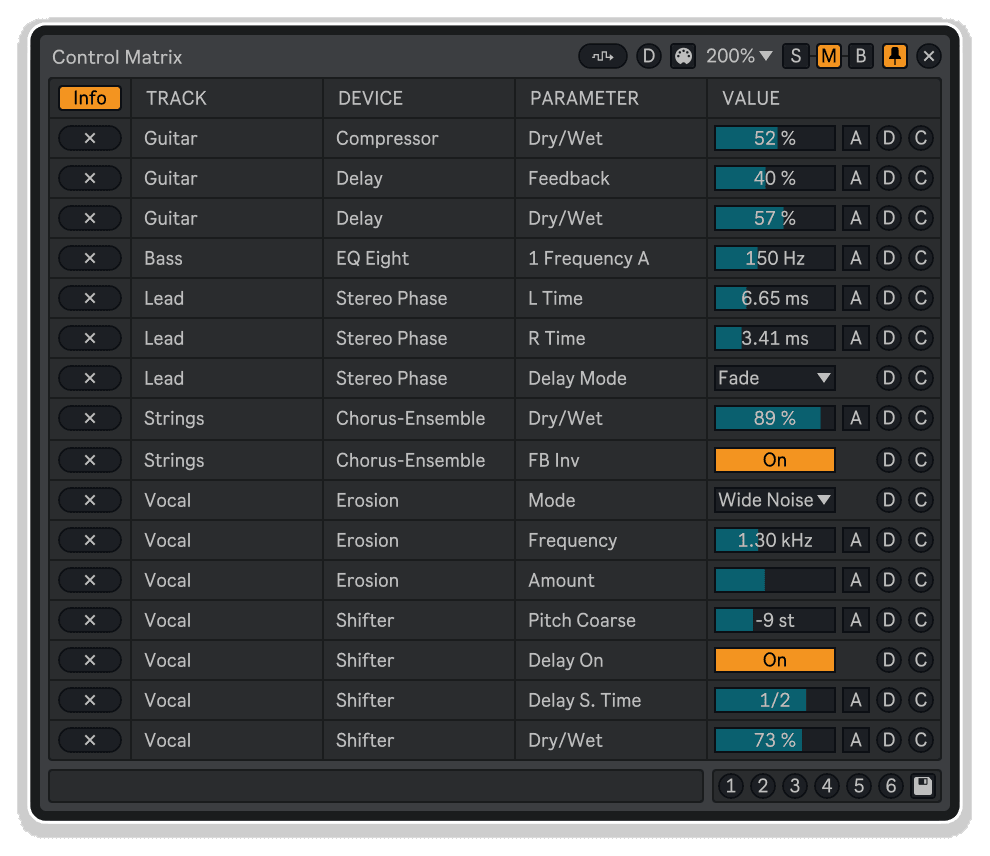
Control Matrix by KILLIHU
CENTRALIZED CONTROL WITHOUT THE COMPROMISE
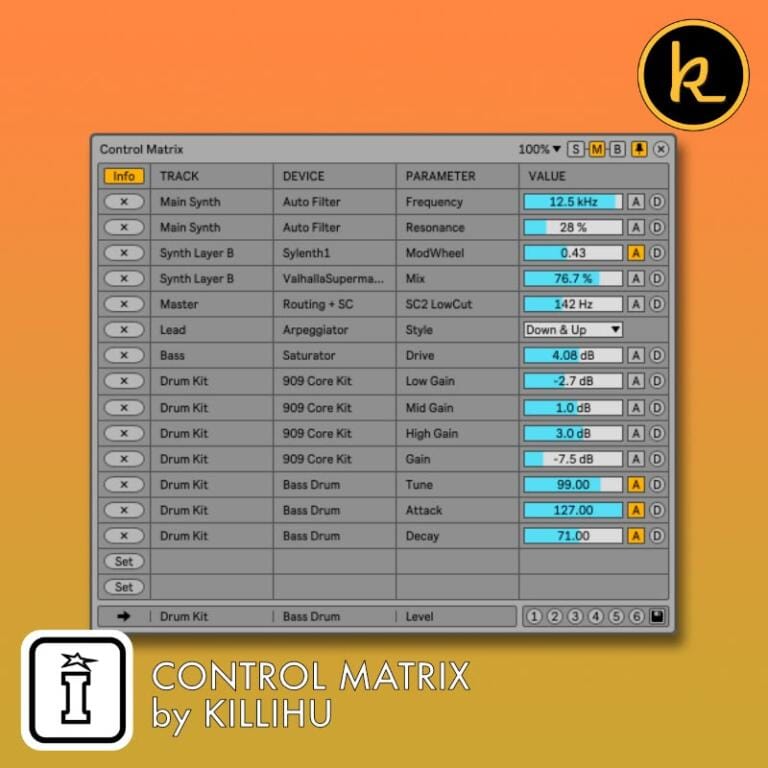
Control Matrix by killihu links parameters from different tracks and devices into one floating window without taking exclusive control—adjust values from the device or directly on source controls, both remain active and synchronized. Finally, centralized parameter access that doesn’t lock you out of your original interface.
Inside you’ll find:
- Non-exclusive parameter linking—control from device window or source tracks simultaneously
- Up to 32 parameters across three window sizes (8, 16, or 32 parameter views)
- 16 saveable presets for instant A/B comparisons without undo history impact
- Global randomization with per-parameter range control for sound design exploration
- Global default value recall for instant reset to reference points
- Info and Notes views for technical reference or creative organization
- MIDI note and CC control for hardware integration and live performance
- Custom color coding, parameter range constraints, and automation indicators
- One-click linking to any automatable parameter (devices, mixer, sends)
Perfect for layering synthesizers, managing parallel processing chains, multi-track mixing adjustments, or any workflow requiring simultaneous control over dispersed parameters. Link controls, save comparison presets, trigger global randomization, assign MIDI hardware, and maintain full access to your original track controls—all without mapping conflicts or locked parameters.
Compatible with Ableton Live 10, 11, and 12 with Max for Live. Windows and Mac. MIDI control requires Live 11+.
USER GUIDE: Control Matrix 1.3
Control Matrix by KILLIHU
CENTRALIZED CONTROL WITHOUT THE COMPROMISE
Control Matrix by killihu links parameters from different tracks and devices into one floating window without taking exclusive control—adjust values from the device or directly on source controls, both remain active and synchronized. Finally, centralized parameter access that doesn’t lock you out of your original interface.
Inside you’ll find:
- Non-exclusive parameter linking—control from device window or source tracks simultaneously
- Up to 32 parameters across three window sizes (8, 16, or 32 parameter views)
- 16 saveable presets for instant A/B comparisons without undo history impact
- Global randomization with per-parameter range control for sound design exploration
- Global default value recall for instant reset to reference points
- Info and Notes views for technical reference or creative organization
- MIDI note and CC control for hardware integration and live performance
- Custom color coding, parameter range constraints, and automation indicators
- One-click linking to any automatable parameter (devices, mixer, sends)
Perfect for layering synthesizers, managing parallel processing chains, multi-track mixing adjustments, or any workflow requiring simultaneous control over dispersed parameters. Link controls, save comparison presets, trigger global randomization, assign MIDI hardware, and maintain full access to your original track controls—all without mapping conflicts or locked parameters.
Compatible with Ableton Live 10, 11, and 12 with Max for Live. Windows and Mac. MIDI control requires Live 11+.
USER GUIDE: Control Matrix 1.3
Additional information
| MaxforLive | Control Devices |
|---|---|
| Ableton Live Compatibility | Ableton Live 10 Standard with MaxforLive, Ableton Live 10 Suite, Ableton Live 11 Standard with MaxforLive, Ableton Live 11 Suite, Ableton Live 12 Standard with MaxforLive, Ableton Live 12 Suite |
| Min. Requirements | Ableton Live 10 Standard with MaxforLive Installed or Ableton Live 10 Suite |
| OS | Mac, Windows |
PRICE: £13.00
Product reviews
No reviews yet. Be the first to review this product.
Control Matrix by KILLIHU
Overview & Inspiration
Why do parameter mapping devices force you to choose between convenient centralized control and the ability to use your original track controls?
Control Matrix by killihu solves the exclusive control problem by linking parameters from different tracks and devices into one floating window without taking them hostage. Adjust synth cutoff from your centralized interface, then reach over and tweak the same parameter on the device itself—both controls remain fully functional, with changes reflected bidirectionally. No mapping conflicts, no locked controls, no workflow disruption.
The device excels at A/B comparisons and sound design workflows where small parameter adjustments across multiple tracks require constant attention. Link up to 32 parameters from any automatable source (device controls, mixer faders, sends), save 16 comparison presets, and switch between variations instantly without touching Live’s undo history. Add global randomization for happy accidents, set custom parameter ranges for controlled experimentation, assign MIDI CC for hardware control, and organize everything with custom notes and color coding.
Three window sizes (8, 16, or 32 parameters) accommodate different workflow densities, while the floating interface docks anywhere on screen for permanent visibility. Perfect for layering synthesizers, parallel processing chains, multi-track mixing adjustments, or any scenario demanding simultaneous control over dispersed parameters.
Features & Highlights
Non-Exclusive Parameter Control – Control Matrix links parameters like an external controller rather than mapping them exclusively. Adjust values from the device window or directly on the source track/device—both controls remain active and bidirectionally synchronized. Unlike traditional mapping devices that lock parameters to single control points, Control Matrix preserves your normal workflow while adding centralized access.
Up to 32 Parameter Slots Across Three Window Sizes – Small view displays 8 parameters, Medium view shows 16, Big view accommodates 32. Choose the size matching your project complexity, or load multiple instances for accessing more parameters simultaneously. Each parameter slot includes Link/Unlink buttons, value controls, default value recall, and custom color assignment.
16 Saveable Presets for A/B Comparisons – Save up to 16 preset snapshots containing all linked parameter values, then switch between them instantly for rapid comparison workflows. Perfect for evaluating multiple mix approaches, comparing sound design variations, or testing different mastering chains without committing to changes or cluttering undo history. Presets can be triggered via MIDI for live performance applications.
One-Click Parameter Linking – Click the Link button, then touch any automatable parameter in Live (device controls, mixer faders, sends). The parameter immediately connects to Control Matrix with full bidirectional control. The last-touched parameter displays in the device’s bottom bar for confirmation. Unlink removes the connection and clears associated notes/settings.
Global Randomization with Range Control – Enable randomization switches for desired parameters, set minimum/maximum value ranges per parameter, then trigger global randomization to generate variations within controlled bounds. Perfect for sound design exploration, happy accident discovery, or breaking creative blocks. Individual parameter ranges ensure randomization stays musically useful rather than chaotic.
Global Default Value Recall – Activate default value switches for specific parameters, then return them all to defined starting points with one button. For continuous parameters, defaults match Live’s native double-click behavior. For quantized parameters (menus, buttons), manually set defaults using the switch in Notes view—capturing current values as reference points for instant recall.
Info and Notes Views – Info view displays Track/Device/Parameter columns showing exactly where each linked parameter originates. Notes view hides location details and reveals customizable text fields for each parameter, plus controls for randomization switches, default value switches, and parameter range settings. Toggle between views depending on whether you need technical reference or creative organization.
MIDI Control Integration – Route MIDI data from external controllers or MIDI tracks into the device (audio effect receives MIDI in Live 11+). Assign MIDI notes or CC messages to individual parameters, preset recall buttons, global randomization, and global default value functions. Perfect for live performance parameter control, hardware integration, or automating preset changes via MIDI clips.
Custom Color Coding – Assign unique colors to each parameter slot for visual organization. Group related parameters by color families, highlight critical controls with bright hues, or create visual hierarchies matching your mental model. Color assignments persist with device presets for consistent visual reference across projects.
Parameter Range Constraints – Set minimum and maximum values for each parameter independently, constraining both global randomization and MIDI CC control to musically useful ranges. Reverse min/max values to invert control direction—useful for matching different hardware controller behaviors or creating intuitive performance mappings.
Alternative Value Display – Some parameters display standard formatted values (dB, Hz, %, etc.) while others require internal numerical representation. Toggle Alternative Value to see the raw 0-1 range that MaxforLive uses internally—helpful when linked parameters don’t initially display values correctly or when precise numerical reference is needed.
Floating Window Interface – Resizable, dockable floating window positions anywhere on screen and stays on top of all applications when docked. Move by dragging the top bar, resize using window controls, and maintain permanent visibility while working in plugin windows, browsers, or external applications. Three size modes adapt to available screen real estate.
Mappable Show/Hide Control – The show/hide button on the device rack accepts keyboard mapping, allowing hotkey access to the parameter window. Keep your workspace uncluttered until needed, then reveal the interface instantly without mouse navigation—especially useful in live performance contexts or dense studio sessions.
Automation Indicators – When linked parameters contain automation, Control Matrix displays automation indicators matching Live’s native visual feedback. These indicators reflect automation on source parameters, not on Control Matrix itself—providing clear visual confirmation when working with automated tracks and devices.
How to Use
Load Control Matrix onto any audio track (the Master track works well for organizational clarity). Click Show on the device rack to display the floating window. Choose your preferred window size using the S/M/B buttons (Small: 8 parameters, Medium: 16, Big: 32).
To link parameters, click any Link button in Control Matrix, then touch the desired parameter in Live—any automatable device control or mixer parameter. The parameter immediately connects with bidirectional control. Repeat for additional parameters, building your centralized control interface. The bottom bar displays the last-touched parameter for confirmation.
Adjust parameter values using Control Matrix’s controls or directly on source tracks/devices—both methods work simultaneously. For quantized parameters (menus, switches), Control Matrix displays dropdown menus or buttons. For continuous parameters, use mouse dragging or keyboard arrows (hold Shift for fine adjustment).
Toggle between Info and Notes views using the Info/Notes button. Info view shows parameter locations (Track/Device/Parameter columns). Notes view reveals customization options: click in Notes fields to add text descriptions, activate randomization switches for parameters you want included in global randomization, set parameter ranges using min/max controls, and activate default value switches to enable global default recall.
To create presets, adjust all parameters to desired values, click the Save button (right side of preset section), then click any numbered preset button to store the snapshot. To cancel saving, click Save again. Load presets by clicking numbered buttons without Save active. All 16 preset buttons appear in Big view—smaller views show fewer buttons but all presets remain accessible.
For global randomization, activate randomization switches in Notes view for desired parameters, set appropriate min/max ranges to constrain randomization to useful values, then click the Global Randomization button. For global default recall, activate default value switches for desired parameters (quantized parameters capture current value as default when switch activates), then click Global Default Value button.
For MIDI control (Live 11+ required), open Settings and select MIDI From source. Choose MIDI Mode (Notes or CC) matching your controller. Activate MIDI Config in the floating window to display MIDI assignment controls for each parameter. Assign MIDI notes/CC to Random, Default, and Presets in Settings for global function control.
Customize parameter colors by clicking Set Color buttons and selecting from the color palette. Click outside the palette to cancel. Use Unlink buttons to disconnect parameters and clear their settings. Position the floating window anywhere on screen, dock it for permanent visibility, and resize as needed.
Live 10 Note: MIDI reception doesn’t work in Live 10 (audio effects gained MIDI capability in Live 11). Live 10 users can download version 1.1 which includes a MIDI effect version with reduced features—check the changelog on the product website for differences.
Ideal For
- Sound designers layering multiple synthesizers requiring simultaneous parameter tweaking
- Mixing engineers making small adjustments across multiple tracks without constant navigation
- Electronic music producers managing parallel processing chains with distributed controls
- Anyone frustrated with exclusive parameter mapping that locks source controls
- Users needing A/B comparison workflows without cluttering undo history
- Live performers requiring centralized hardware control over dispersed parameters
- Producers exploring sound design variations through controlled randomization
- Anyone who wishes they could control multiple track parameters from one window without sacrificing direct access
What’s Included
- Control Matrix MaxforLive device (.amxd)
- 11-page PDF reference manual
- Three window sizes (8, 16, or 32 parameters)
- 16 saveable preset slots
- Global randomization with parameter range control
- Global default value recall
- MIDI note and CC control capability
- Info and Notes view modes
- Custom color assignment per parameter
- Mappable show/hide keyboard control
Requirements
- Ableton Live 10, 11, or 12 with Max for Live
- Compatible with both Windows and Mac
- MIDI control requires Live 11 or higher (audio effects gained MIDI reception in Live 11)
- Live 10 users: Version 1.1 available with MIDI effect alternative (reduced features)
Explore More
Advanced Toolbar Buttons 2 | Device Navigator | Clipboard Device | Master Pitch Pro | View All killihu Products
MIDI data reception does not work in Live 10 because the MIDI reception function in audio effects was implemented in Live 11.
Live 10 users can download version 1.1 of the device, which includes a device as a MIDI effect. It does not have all the features of version 1.2, check the changelog to find out the differences.
For the device to work correctly on Live 10 a separate installation of Max for Live must be used. Instructions in the following article on the Ableton website.
Frequently Asked Questions
A: Control Matrix is a MaxforLive device that links parameters from different tracks and devices into a centralized floating window without taking exclusive control—you can adjust values from the Control Matrix interface or directly on source tracks/devices, with both remaining active and bidirectionally synchronized.
A: Yes, Control Matrix is a MaxforLive device.
A: MaxforLive is a platform that integrates the visual programming environment Max with Ableton Live, allowing users to create and use custom audio, MIDI, and control devices.
A: Traditional mapping devices take exclusive control of parameters—once mapped, you can only adjust values from the mapping interface, not from the original source control. Control Matrix links parameters like an external controller, preserving full functionality of both the Control Matrix interface and the original track/device controls. Changes made in either location are reflected in both.
A: Small view displays 8 parameters, Medium view shows 16 parameters, and Big view accommodates 32 parameters. Choose the size matching your project complexity, or load multiple instances for accessing even more parameters simultaneously. All presets and features work across all sizes.
A: Control Matrix stores parameter value snapshots internally rather than creating automation or generating Live undo steps. Switching between presets recalls stored values without adding to Live’s undo queue—perfect for A/B comparisons where you want to evaluate different settings without committing to changes or cluttering your undo history.
A: Yes, in Live 11 and higher (audio effects gained MIDI reception capability in Live 11). Route MIDI from external controllers or MIDI tracks into the device, assign notes or CC messages to individual parameters plus global functions (randomization, default recall, preset switching), and control everything via hardware. Live 10 users can download version 1.1 which includes a MIDI effect alternative with reduced features.
A: You can explore more of killihu’s tools and devices here: killihu
Important Information
v1.3.1 xc2xb7 11 June 2026
Unnecessary entries removed from undo history.
v1.3 New features and improvements:
– Modified GUI to adapt to the new rack design in Live version 12.2, does not change the operation of the device.
v1.2 New features and improvements:
- Added feature to set custom colors for each parameter.
- Added feature to set the default value of each parameter.
- Added feature to reset all parameters to their default value at the same time. It is possible to select which parameters it acts on. Activated by button or MIDI input.
- Added randomization feature with option to adjust the range of values. Activated by button or MIDI input.
- Quantized controls with only two values, such as on/off buttons, now display as a button instead of a drop-down menu.
- Increased the number of presets up to 16.
- Previously there were two devices, one of them as a MIDI effect to control the parameters remotely. It is now a single audio effect device that can receive MIDI data.
- MIDI remote control can be done by sending MIDI notes or MIDI CC to the device.
- Added minimum and maximum range selectors for control via MIDI CC.
- Now when you click on the device rack icon, in addition to showing the device version, it checks if an update is available. If there is, a message is displayed indicating it.
- Updated PDF Manual.
v1.1 New features and improvements:
- Added variant of the device for live performances. It accepts MIDI control changes to control parameters, and MIDI input notes to change presets.
- The color of the save preset buttons has been changed so that it is clearer when the save process is in progress.
- Updated PDF Manual.
v1.0 – Initial release
Our Products are generally provided as Zip file downloads which in all cases will need to be extracted and saved to your hard drive prior to installation. Details on the different file type provided and what to do with them are below.
.alp Files – These are Ableton Live Packs and will either install directly into the Packs Section of the browser of Ableton Live or ask you to save them to your hard drive. For packs that install to the library, when you double click on them you will see a pop up window asking you to confirm that installation is ok as the files are described as “Legacy”. This is fine and you are ok to proceed, the packs are created using the format for an earlier version of Live and so remain compatible with the current version.
.amxd files – These are individual MaxforLive Devices and can be stored anywhere on your hard drive. We’d advise creating a folder for them and then adding that folder as a location within the Places section of Lives Browser.
END-USER LICENSE AGREEMENT FOR ISOTONIK STUDIOS SOFTWARE PRODUCTS.
PLEASE READ THE TERMS AND CONDITIONS OF THIS LICENSE AGREEMENT CAREFULLY BEFORE CONTINUING WITH THIS PROGRAM INSTALL.
This End-User License Agreement (referred to as “EULA”) is a legal agreement between an individual or a single entity (referred to as “LICENSEE”) and Isotonik Studios for the Isotonik Studios software product(s) which may include associated software components, media, printed materials, and “online” or electronic documentation (referred to as “SOFTWARE PRODUCT”). By installing, copying, or otherwise using the SOFTWARE PRODUCT, the LICENSEE agrees to be bound by the terms of this EULA.
This EULA represents the entire agreement concerning the program between the LICENSEE and Isotonik Studios and it supersedes any prior proposal, representation, or understanding between the parties. If the LICENSEE does not agree to the terms of this EULA, the LICENSEE should not install or use the SOFTWARE PRODUCT.
The SOFTWARE PRODUCT is protected by copyright laws and international copyright treaties, as well as other intellectual property laws and treaties. The SOFTWARE PRODUCT is licensed, not sold.
- GRANT OF LICENSE.
The SOFTWARE PRODUCT is licensed as follows:
(a) Installation and Use. Providing that the LICENSEE has paid any applicable license fees, Isotonik Studios grants the LICENSEE the right to install and use copies of the SOFTWARE PRODUCT on up to two computers in the LICENSEE’s possession that are running a validly licensed copy of the operating system for which the SOFTWARE PRODUCT was designed [e.g., Windows 10, macOS]. The computer(s) must be owned by the LICENSEE.
(b) Backup Copies. The LICENSEE may also make copies of the SOFTWARE PRODUCT as may be necessary for backup and archival purposes.
- DESCRIPTION OF OTHER RIGHTS AND LIMITATIONS.
(a) Maintenance of Copyright Notices. The LICENSEE must not remove or alter any copyright notices on any and all copies of the SOFTWARE PRODUCT.
(b) Distribution. The LICENSEE may not distribute registered copies of the SOFTWARE PRODUCT to third parties.
(c) Prohibition on Reverse Engineering, Decompilation, and Disassembly. The LICENSEE may not reverse engineer, decompile, or disassemble the SOFTWARE PRODUCT, except and only to the extent that such activity is expressly permitted by applicable law notwithstanding this limitation.
(d) Rental. The LICENSEE may not rent, lease, or lend the SOFTWARE PRODUCT.
(e) License transfer The LICENSEE may not transfer their license to the SOFTWARE PRODUCT to any third party. Any attempt to do so will be considered a violation of this EULA.
(f) Support Services. Isotonik Studios may provide the LICENSEE with support services related to the SOFTWARE PRODUCT for a period of 12 months following the date of purchase. Any supplemental software code provided to the LICENSEE as part of the Support Services shall be considered part of the SOFTWARE PRODUCT and subject to the terms and conditions of this EULA.
(g) Compliance with Applicable Laws. The LICENSEE must comply with all applicable laws regarding use of the SOFTWARE PRODUCT.
- TERMINATION Without prejudice to any other rights, Isotonik Studios may terminate this EULA if the LICENSEE fails to comply with the terms and conditions of this EULA. In such event, the LICENSEE must destroy all copies of the SOFTWARE PRODUCT in the LICENSEE’s possession.
- COPYRIGHT All title, including but not limited to copyrights, in and to the SOFTWARE PRODUCT and any copies thereof are owned by Isotonik Studios or its suppliers. All title and intellectual property rights in and to the content which may be accessed through use of the SOFTWARE PRODUCT is the property of the respective content owner and may be protected by applicable copyright or other intellectual property laws and treaties. This EULA grants the LICENSEE no rights to use such content. All rights not expressly granted are reserved by Isotonik Studios.
- NO WARRANTIES Isotonik Studios expressly disclaims any warranty for the SOFTWARE PRODUCT. The SOFTWARE PRODUCT is provided ‘As Is’ without any express or implied warranty of any kind, including but not limited to any warranties of merchantability, noninfringement, or fitness of a particular purpose. Isotonik Studios does not warrant or assume responsibility for the accuracy or completeness of any information, text, graphics, links or other items contained within the SOFTWARE PRODUCT. Isotonik Studios makes no warranties respecting any harm that may be caused by the transmission of a computer virus, worm, time bomb, logic bomb, or other such computer program. Isotonik Studios further expressly disclaims any warranty or representation to the LICENSEE or to any third party.
- LIMITATION OF LIABILITY In no event shall Isotonik Studios be liable for any damages (including, without limitation, lost profits, business interruption, or lost information) arising out of the LICENSEE’s use of or inability to use the SOFTWARE PRODUCT, even if Isotonik Studios has been advised of the possibility of such damages. In no event will Isotonik Studios be liable for loss of data or for indirect, special, incidental, consequential (including lost profit), or other damages based in contract, tort or otherwise. Isotonik Studios shall have no liability with respect to the content of the SOFTWARE PRODUCT or any part thereof, including but not limited to errors or omissions contained therein, libel, infringements of rights of publicity, privacy, trademark rights, business interruption, personal injury, loss of privacy, moral rights or the disclosure of confidential information.
More from Killihu


Frequently Bought Together