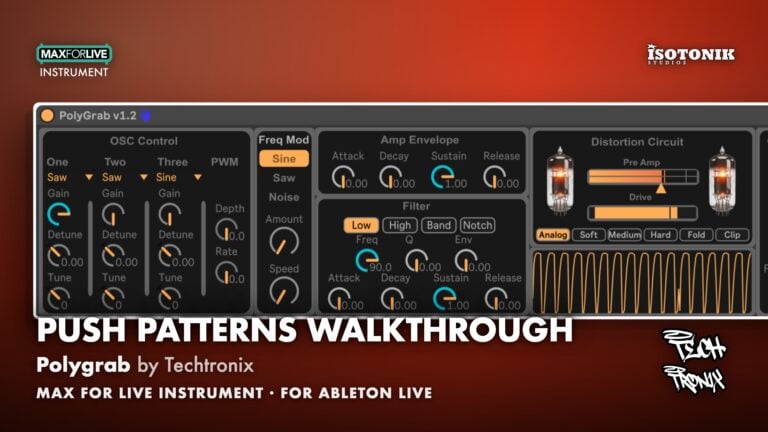
Polygrab is a 16-voice Max for Live polyphonic synthesiser from Techtronix, built for Ableton Live and optimised for Push 3 Standalone. Here is a full walkthrough of what it does.
Polygrab by Techtronix is a 16-voice polyphonic synthesiser built entirely in Max for Live, designed to work inside Ableton Live and optimised for use on the Push 3 Standalone. It brings together three oscillators, dual envelopes, a four-mode filter, pulse width and frequency modulation, a built-in effects chain, and a 50-slot preset bank in one cohesive instrument. Whether you are stacking rich chord voicings, sculpting slow drone textures, or building a dense Reese bass, Polygrab is engineered to handle the full range.
What It Does
At its core, Polygrab is a three-oscillator polyphonic synthesiser with 16 voices and smart voice management that allows notes to overlap cleanly. Each oscillator offers five waveform shapes: sine, triangle, saw, square, and noise. Each has its own gain, coarse tune in semitones, and fine-tune control for detuning, making it straightforward to build wide, chorused unison sounds or tightly stacked chords.
Pulse width modulation is available for the square wave, adding movement and width to pad and lead sounds. Frequency modulation can be applied across the oscillator stack to introduce metallic and inharmonic textures. Two independent ADSR envelopes, each with times up to 5 seconds, control amplitude and filter cutoff separately, making Polygrab well suited to everything from punchy leads to evolving drones. The filter section provides low pass, high pass, band pass, and notch modes, each with a Q (resonance) control and an envelope amount that maps the second envelope to the filter cutoff.
The built-in effects section includes a chorus with rate control and a drive with automatic volume compensation, so pushing the drive hard does not cause unwanted level spikes. A visual metering section displays both the output level and the current waveform shape in real time. All parameters are fully accessible on the Push 3 Standalone, including the filter section, oscillator stack, and preset browser.
How to Use It
- Chord stacks and pads: Load two or three oscillators with saw or triangle waves, apply slight detuning across them, and set the amplitude envelope to a slow attack and long release. The 16-voice polyphony means complex chords ring out cleanly without voice stealing.
- Reese bass: Set all three oscillators to saw waves with gain pushed up, detune two of them slightly against the third, add drive, and engage chorus at a low rate. The result is a thick, saturated low-end texture suited to techno, drum and bass, and industrial styles.
- Drones and textures: Push the amplitude envelope attack and release to their maximum 5-second times, use frequency modulation to introduce harmonic complexity, and let the notch or band pass filter shape the spectral content over time.
- Push 3 Standalone workflow: Load Polygrab on Push 3, navigate between the filter, amp, oscillator, and preset sections using the hardware controls, and audition sounds from the 50-slot preset bank without touching a laptop.
- Preset management: The 50-slot preset bank allows you to store and recall sounds directly from the interface. Use it to build a personal library of bass patches, pads, and leads within a single session.
Why It Matters
Polyphonic synthesisers inside Ableton Live that are genuinely purpose-built for Push 3 Standalone are still relatively rare, and Polygrab fills that gap with a focused, well-structured feature set. The combination of per-oscillator tuning, FM, PWM, a multi-mode filter, and on-board drive and chorus means there is enough range to cover a wide variety of sounds without the interface becoming overwhelming. It is a practical, capable instrument that works as well on a laptop screen as it does on the Push 3 hardware, and it earns its place in a production toolkit from the first session.