Chord Change von XY Studio Tools
EIN ECHTZEIT-AKKORDFOLGEN-EXPLORER FÜR ABLETON LIVE
DREIFACH-PAKET-RABATT: Legen Sie drei oder mehr Produkte von XY Studiotools in Ihren Warenkorb und sparen Sie automatisch 20 % an der Kasse!
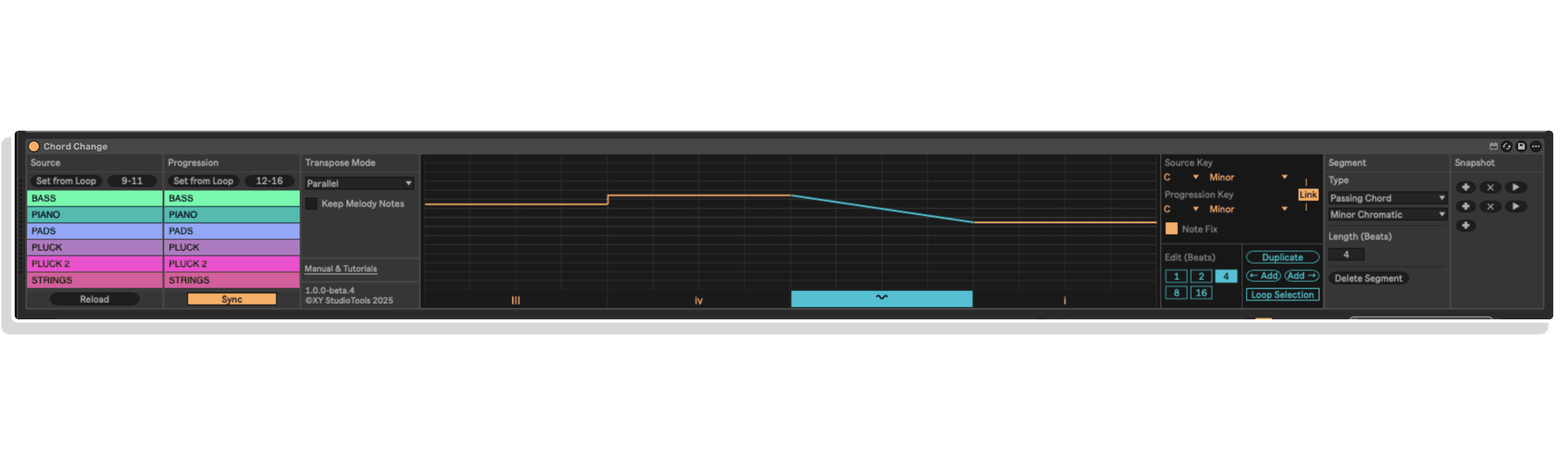
„Chord Change“ von XY STUDIO TOOLS ist ein kreatives Max-for-Live-Device, das die Art und Weise neu definiert, wie du in Ableton Live Akkordfolgen schreibst und damit experimentierst. Durch die Visualisierung der Harmonie als Progressionsdiagramm kannst du musikalische Ideen intuitiv gestalten und dabei sicherstellen, dass jede Note in der Tonart bleibt.
Ganz gleich, ob Sie gefühlvolle, vom Jazz inspirierte Progressionen erstellen, mit chromatischen Bewegungen experimentieren oder sich entwickelnde Harmonien über mehrere Spuren hinweg überlagern – Chord Change bietet einen inspirierenden, theoriegeleiteten Workflow, der sich flüssig und musikalisch anfühlt.
Wichtigste Funktionen:
- Bearbeitung von Akkordfolgen in Echtzeit über eine visuelle Diagrammoberfläche
- Ziehen Sie Noten nach Tonstufen, um natürliche harmonische Bewegungen zu erzielen
- Enthält über 10 Arten von Durchgangsakkorden für ausdrucksstarke Übergänge
- Stimmenführung und parallele Transponierungsmodi für fließende Abläufe
- Arbeiten Sie mit sofortiger Synchronisation auf bis zu 8 MIDI-Spuren gleichzeitig
- Speichern und rufen Sie Ihre Lieblingsideen mit Snapshots ab
Wenn Sie schon immer einmal Harmonielehre in Ihren Arbeitsablauf integrieren wollten, ohne dabei Ihre Kreativität einzuschränken, bietet Ihnen Chord Change die Freiheit, mühelos zu komponieren und zu experimentieren.
BENUTZERHANDBUCH: Bedienungsanleitung Chord Change
Chord Change von XY Studio Tools
EIN ECHTZEIT-AKKORDFOLGEN-EXPLORER FÜR ABLETON LIVE
DREIFACH-PAKET-RABATT: Legen Sie drei oder mehr Produkte von XY Studiotools in Ihren Warenkorb und sparen Sie automatisch 20 % an der Kasse!
„Chord Change“ von XY STUDIO TOOLS ist ein kreatives Max-for-Live-Device, das die Art und Weise neu definiert, wie du in Ableton Live Akkordfolgen schreibst und damit experimentierst. Durch die Visualisierung der Harmonie als Progressionsdiagramm kannst du musikalische Ideen intuitiv gestalten und dabei sicherstellen, dass jede Note in der Tonart bleibt.
Ganz gleich, ob Sie gefühlvolle, vom Jazz inspirierte Progressionen erstellen, mit chromatischen Bewegungen experimentieren oder sich entwickelnde Harmonien über mehrere Spuren hinweg überlagern – Chord Change bietet einen inspirierenden, theoriegeleiteten Workflow, der sich flüssig und musikalisch anfühlt.
Wichtigste Funktionen:
- Bearbeitung von Akkordfolgen in Echtzeit über eine visuelle Diagrammoberfläche
- Ziehen Sie Noten nach Tonstufen, um natürliche harmonische Bewegungen zu erzielen
- Enthält über 10 Arten von Durchgangsakkorden für ausdrucksstarke Übergänge
- Stimmenführung und parallele Transponierungsmodi für fließende Abläufe
- Arbeiten Sie mit sofortiger Synchronisation auf bis zu 8 MIDI-Spuren gleichzeitig
- Speichern und rufen Sie Ihre Lieblingsideen mit Snapshots ab
Wenn Sie schon immer einmal Harmonielehre in Ihren Arbeitsablauf integrieren wollten, ohne dabei Ihre Kreativität einzuschränken, bietet Ihnen Chord Change die Freiheit, mühelos zu komponieren und zu experimentieren.
BENUTZERHANDBUCH: Bedienungsanleitung Chord Change
Zusätzliche Informationen
| MaxforLive | Control Devices |
|---|---|
| Kompatibilität mit Ableton Live | Ableton Live 11 Standard with MaxforLive, Ableton Live 11 Suite, Ableton Live 12 Standard with MaxforLive, Ableton Live 12 Suite |
| Mindestanforderungen | Ableton Live 11 Standard with MaxforLive Installed or Ableton Live 11 Suite |
| Betriebssystem | Mac, Windows |
PRICE: £23.00
Product reviews
5 out of 5
4 reviews
How item rating is calculated
We show the average based on reviews. Only genuine reviews are displayed.
Sort by
Februar 9, 2026
This reviewer bought this product from our store.
In der Produktion ist Zeit die wertvollste Ressource. Bei „Chord Change“ von XY Studio Tools dreht sich in erster Linie alles um Geschwindigkeit. Ich finde es toll, dass das Plugin nicht versucht, den Komponisten zu ersetzen, sondern einfach nur die mechanische Routinearbeit überflüssig macht. Wenn man schnell überprüfen möchte, wie ein Track in einer anderen Tonart oder mit anderen Umkehrungen klingt, gibt es kein besseres Tool. Alles läuft reibungslos, vorhersehbar und professionell.
Dezember 9, 2025
This reviewer bought this product from our store.
Tolles Plugin, beschleunigt den Arbeitsablauf. Top!
Oktober 16, 2025
This reviewer bought this product from our store.
Ein wirklich cleveres Gerät. Es hilft mir sehr dabei, Akkordfolgen ganz einfach zu erstellen.
Oktober 10, 2025
This reviewer bought this product from our store.
„Chord Change“ von XY Studio Tools ist ein fantastischer Workflow-Beschleuniger für alle, die mit Akkordfolgen arbeiten. Mit diesem cleveren MIDI-Gerät kannst du ganze Sequenzen komplexer Akkorde über einzelne Noten zuweisen und auslösen, was das Songwriting und Live-Auftritte unglaublich flüssig macht. Die integrierten Strum- und Humanisierungsfunktionen sind das Tüpfelchen auf dem i und verleihen deinen Ideen sofort mehr Musikalität. Ein unverzichtbares, schnelles und inspirierendes Tool, mit dem Sie Ihre Harmonien mühelos umsetzen können.
Chord Change von XY Studio Tools
„Chord Change“ von XY STUDIO TOOLS ist ein Max-for-Live-Gerät, das das Schreiben von Akkordfolgen schneller, musikalischer und unterhaltsamer machen soll. Anstatt Noten manuell zu transponieren oder Harmonien zu erraten, visualisiert es Ihre Akkordfolge als interaktives Diagramm, in dem Sie Elemente per Drag & Drop verschieben und die Ergebnisse sofort anhören können. Perfekt für Songwriter, Produzenten und Elektronikmusiker, die sich mehr harmonische Tiefe in Ableton Live wünschen.
Chord Change basiert auf der Transposition nach Tonstufen und verschiebt Noten relativ zu Ihrer gewählten Tonart – dabei bleiben alle harmonischen Beziehungen erhalten, während Sie neue Ideen ausprobieren. Über die Standardharmonik hinaus führt es eine Reihe von Durchgangsakkorden ein, die auf klassischer Theorie basieren, und ermöglicht Ihnen so auf einfache Weise den Zugang zu fortgeschrittenen klanglichen Nuancen.
So funktioniert es:
- Lade deine MIDI-Quellclips in die Arrangement-Ansicht (bis zu 8 Spuren)
- Stellen Sie Ihre Tonart mithilfe des Ableton-Skalenmodus oder manuell im Gerät ein
- Zieh die Progressionsgrafik, um Akkorde um Tonstufen zu verschieben oder Durchgangsakkorde hinzuzufügen
- Synchronisieren und hören Sie sich die Änderungen sofort an – alles in Echtzeit
Optionen zur Bearbeitung der Akkordfolge:
- Modi „Parallel“, „Parallel Min Movement“, „Voice Lead“ und „Fixed Transpose“
- Behalten Sie die Melodienoten bei, wenn Sie Akkorde und Melodielinien kombinieren
- Passen Sie die Länge der Akkordfolge an, duplizieren Sie Segmente oder fügen Sie nahtlos neue hinzu
- Experimentieren Sie mit den Optionen „Note Fix“ und „Key Linking“ für eine präzisere Steuerung
- Zu den verfügbaren Durchgangsakkordtypen gehören „Minor Chromatic“, „Secondary Dominant“, „Backdoor Dominant“, „Whole Tone Dominant“ und weitere
Inhalt & Kompatibilität:
- Kompatibel mit Ableton Live 11 Standard/Suite oder Live 12 Standard/Suite (Max for Live erforderlich)
- Kompatibel mit Mac und Windows
- Enthält ein umfassendes Handbuch und Video-Tutorials
Chord Change verwandelt Harmonie in ein praktisches kreatives Werkzeug – es schlägt eine Brücke zwischen Theorie und Intuition, damit Sie sich auf das Wesentliche konzentrieren können: das Musizieren.
STELLEN SIE IHR EIGENES BUNDLE ZUSAMMEN: Kaufen Sie drei beliebige XY Studio-Produkte gleichzeitig und sichern Sie sich einen Rabatt von 20 %, der automatisch an der Kasse abgezogen wird!
AUCH ERHÄLTLICH: SONG SKETCH | LOOP FLIP | KEY ARRANGER
Frequently Asked Questions
A: „Chord Change“ ist ein Max-for-Live-Gerät, mit dem Sie Akkordfolgen in Ableton Live visuell und interaktiv erkunden können. Es verschiebt Noten entsprechend der Tonleiterstufen statt anhand der Tonhöhe und bewahrt dabei die harmonischen Beziehungen, während Sie in Echtzeit experimentieren.
A: Um dieses Produkt nutzen zu können, müssen die folgenden Voraussetzungen erfüllt sein:
Ableton Live 11 Standard oder Suite bzw. Live 12 Standard oder Suite
MaxforLive muss installiert sein
macOS- oder Windows-Betriebssystem
A: Ja. Für den Betrieb von „Chord Change“ ist Max for Live erforderlich.
A: MaxforLive ist eine Plattform, die die visuelle Programmierumgebung Max mit Ableton Live verbindet und es den Nutzern ermöglicht, eigene Audio-, MIDI- und Steuerungsgeräte zu erstellen und zu verwenden.
A: Hier können Sie weitere Werkzeuge und Geräte von XY STUDIO TOOLS entdecken:
XY STUDIO TOOLS
Important Information
V1.0.0 – Erstveröffentlichung – Oktober 2025
Unsere Produkte werden in der Regel als ZIP-Dateien zum Herunterladen bereitgestellt, die in jedem Fall vor der Installation entpackt und auf Ihrer Festplatte gespeichert werden müssen. Nachstehend finden Sie Einzelheiten zu den verschiedenen Dateitypen und deren Verwendung.
.alp-Dateien – Hierbei handelt es sich um Ableton Live-Packs, die entweder direkt im Bereich „Packs“ des Ableton Live-Browsers installiert werden oder bei denen Sie aufgefordert werden, sie auf Ihrer Festplatte zu speichern. Bei Packs, die in die Bibliothek installiert werden, erscheint beim Doppelklick ein Popup-Fenster, in dem Sie aufgefordert werden, die Installation zu bestätigen, da die Dateien als „Legacy“ gekennzeichnet sind. Das ist in Ordnung und Sie können fortfahren. Die Packs wurden im Format einer früheren Live-Version erstellt und sind daher weiterhin mit der aktuellen Version kompatibel.
.amxd-Dateien – Hierbei handelt es sich um einzelne MaxforLive-Geräte, die an einem beliebigen Ort auf Ihrer Festplatte gespeichert werden können. Wir empfehlen, einen eigenen Ordner dafür anzulegen und diesen Ordner dann als Speicherort im Bereich „Places“ des Live-Browsers hinzuzufügen.
ENDBENUTZER-LIZENZVEREINBARUNG FÜR SOFTWAREPRODUKTE VON ISOTONIK STUDIOS.
BITTE LESEN SIE DIE BEDINGUNGEN DIESER LIZENZVEREINBARUNG SORGFÄLTIG DURCH, BEVOR SIE MIT DER INSTALLATION DIESES PROGRAMMS FORTFAHREN.
Diese Endbenutzer-Lizenzvereinbarung (im Folgenden als „EULA“ bezeichnet) ist eine rechtliche Vereinbarung zwischen einer natürlichen Person oder einer einzelnen juristischen Person (im Folgenden als „LIZENZNEHMER“ bezeichnet) und Isotonik Studios über die Softwareprodukte von Isotonik Studios, die zugehörige Softwarekomponenten, Datenträger, gedruckte Materialien, sowie „Online“- oder elektronische Dokumentation umfassen können (im Folgenden als „SOFTWAREPRODUKT“ bezeichnet). Durch die Installation, das Kopieren oder die anderweitige Nutzung des SOFTWAREPRODUKTS erklärt sich der LIZENZNEHMER mit den Bedingungen dieser EULA einverstanden.
Diese EULA stellt die gesamte Vereinbarung zwischen dem LIZENZNEHMER und Isotonik Studios bezüglich des Programms dar und ersetzt alle früheren Vorschläge, Zusicherungen oder Absprachen zwischen den Parteien. Wenn der LIZENZNEHMER den Bedingungen dieser EULA nicht zustimmt, darf er das SOFTWAREPRODUKT nicht installieren oder nutzen.
Das SOFTWAREPRODUKT ist durch Urheberrechtsgesetze und internationale Urheberrechtsabkommen sowie durch andere Gesetze und Abkommen zum Schutz geistigen Eigentums geschützt. Das SOFTWAREPRODUKT wird lizenziert, nicht verkauft.
- LIZENZVERGABE.
Das SOFTWAREPRODUKT wird wie folgt lizenziert:
(a) Installation und Nutzung. Sofern der LIZENZNEHMER alle anfallenden Lizenzgebühren entrichtet hat, gewährt Isotonik Studios dem LIZENZNEHMER das Recht, Kopien des SOFTWAREPRODUKTS auf bis zu zwei Computern in seinem Besitz zu installieren und zu nutzen, auf denen eine gültig lizenzierte Kopie des Betriebssystems läuft, für das das SOFTWAREPRODUKT entwickelt wurde [z. B. Windows 10, macOS]. Der/die Computer muss/müssen Eigentum des LIZENZNEHMERS sein.
(b) Sicherungskopien. Der LIZENZNEHMER darf außerdem Kopien des SOFTWAREPRODUKTS anfertigen, soweit dies für Sicherungs- und Archivierungszwecke erforderlich ist.
- BESCHREIBUNG WEITERER RECHTE UND EINSCHRÄNKUNGEN.
(a) Beibehaltung von Urheberrechtsvermerken. Der LIZENZNEHMER darf keine Urheberrechtsvermerke auf irgendeiner Kopie des SOFTWAREPRODUKTS entfernen oder verändern.
(b) Weitergabe. Der LIZENZNEHMER darf registrierte Kopien des SOFTWAREPRODUKTS nicht an Dritte weitergeben.
(c) Verbot von Reverse Engineering, Dekompilierung und Disassemblierung. Der LIZENZNEHMER darf das SOFTWAREPRODUKT nicht rückentwickeln, dekompilieren oder disassemblieren, es sei denn, eine solche Tätigkeit ist ungeachtet dieser Einschränkung durch geltendes Recht ausdrücklich gestattet.
(d) Vermietung. Der LIZENZNEHMER darf das SOFTWAREPRODUKT nicht vermieten, verpachten oder verleihen.
(e) Lizenzübertragung. Der LIZENZNEHMER darf seine Lizenz für das SOFTWAREPRODUKT nicht an Dritte übertragen. Jeder Versuch, dies zu tun, gilt als Verstoß gegen diese EULA.
(f) Supportleistungen. Isotonik Studios kann dem LIZENZNEHMER für einen Zeitraum von 12 Monaten ab dem Kaufdatum Supportleistungen im Zusammenhang mit dem SOFTWAREPRODUKT bereitstellen. Jeder zusätzliche Softwarecode, der dem LIZENZNEHMER im Rahmen der Supportleistungen zur Verfügung gestellt wird, gilt als Teil des SOFTWAREPRODUKTS und unterliegt den Bestimmungen dieser EULA.
(g) Einhaltung geltender Gesetze. Der LIZENZNEHMER muss alle geltenden Gesetze bezüglich der Nutzung des SOFTWAREPRODUKTS einhalten.
- KÜNDIGUNG Unbeschadet sonstiger Rechte ist Isotonik Studios berechtigt, diese EULA zu kündigen, wenn der LIZENZNEHMER die Bestimmungen dieser EULA nicht einhält. In diesem Fall muss der LIZENZNEHMER alle in seinem Besitz befindlichen Kopien des SOFTWAREPRODUKTS vernichten.
- URHEBERRECHT Sämtliche Rechte, einschließlich, aber nicht beschränkt auf Urheberrechte, an dem SOFTWAREPRODUKT und allen Kopien davon liegen bei Isotonik Studios oder seinen Lieferanten. Alle Eigentums- und geistigen Eigentumsrechte an den Inhalten, auf die durch die Nutzung des SOFTWAREPRODUKTS zugegriffen werden kann, sind Eigentum der jeweiligen Inhaltseigentümer und können durch geltende Urheberrechtsgesetze oder andere Gesetze und Verträge zum Schutz geistigen Eigentums geschützt sein. Diese EULA gewährt dem LIZENZNEHMER keine Rechte zur Nutzung solcher Inhalte. Alle nicht ausdrücklich gewährten Rechte bleiben Isotonik Studios vorbehalten.
- KEINE GEWÄHRLEISTUNGEN Isotonik Studios lehnt ausdrücklich jegliche Gewährleistung für das SOFTWAREPRODUKT ab. Das SOFTWAREPRODUKT wird „wie besehen“ ohne jegliche ausdrückliche oder stillschweigende Gewährleistung jeglicher Art bereitgestellt, einschließlich, aber nicht beschränkt auf Gewährleistungen der Marktgängigkeit, der Nichtverletzung von Rechten Dritter oder der Eignung für einen bestimmten Zweck. Isotonik Studios übernimmt keine Gewährleistung oder Verantwortung für die Richtigkeit oder Vollständigkeit von Informationen, Texten, Grafiken, Links oder anderen im SOFTWAREPRODUKT enthaltenen Elementen. Isotonik Studios übernimmt keine Gewährleistung hinsichtlich etwaiger Schäden, die durch die Übertragung von Computerviren, Würmern, Zeitbomben, Logikbomben oder ähnlichen Computerprogrammen verursacht werden könnten. Isotonik Studios schließt ferner ausdrücklich jegliche Gewährleistung oder Zusicherung gegenüber dem LIZENZNEHMER oder Dritten aus.
- HAFTUNGSBESCHRÄNKUNG Isotonik Studios haftet in keinem Fall für Schäden (einschließlich, aber nicht beschränkt auf entgangenen Gewinn, Betriebsunterbrechungen oder Informationsverluste), die sich aus der Nutzung oder der Unmöglichkeit der Nutzung des SOFTWAREPRODUKTS durch den LIZENZNEHMER ergeben, selbst wenn Isotonik Studios auf die Möglichkeit solcher Schäden hingewiesen wurde. In keinem Fall haftet Isotonik Studios für Datenverluste oder für indirekte, besondere, zufällige, Folge- (einschließlich entgangener Gewinne) oder sonstige Schäden, die auf Vertrag, unerlaubter Handlung oder anderweitig beruhen. Isotonik Studios übernimmt keine Haftung in Bezug auf den Inhalt des SOFTWAREPRODUKTS oder eines Teils davon, einschließlich, aber nicht beschränkt auf darin enthaltene Fehler oder Auslassungen, Verleumdung, Verletzungen von Persönlichkeitsrechten, Datenschutzrechten, Markenrechten, Betriebsunterbrechungen, Personenschäden, Verlust der Privatsphäre, Urheberpersönlichkeitsrechte oder die Offenlegung vertraulicher Informationen.
Frequently Bought Together