CrossFire by nativeKONTROL
AKAI FIRE ABLETON LIVE CONTROL SURFACE SCRIPT
PLEASE NOTE: NOW COMPATIBLE WITH LIVE 12.1 and above
CrossFire transforms the Akai Fire into a powerful Control Surface for Ableton Live. While it’s primary focus is on Drum Rack control and sequencing, it includes many other features (such as Clip/Scene launching and selected Track control) that make it a great, all-around control option for Live.
USER GUIDE: CrossFire User Manual
CrossFire by nativeKONTROL
AKAI FIRE ABLETON LIVE CONTROL SURFACE SCRIPT
PLEASE NOTE: NOW COMPATIBLE WITH LIVE 12.1 and above
CrossFire transforms the Akai Fire into a powerful Control Surface for Ableton Live. While it’s primary focus is on Drum Rack control and sequencing, it includes many other features (such as Clip/Scene launching and selected Track control) that make it a great, all-around control option for Live.
USER GUIDE: CrossFire User Manual
Product reviews
FEATURES:
4.8 out of 5
20 reviews
How item rating is calculated
We show the average based on reviews. Only genuine reviews are displayed.
Sort by
January 2, 2026
This reviewer bought this product from our store.
it works!
Just got an akai fire for 100 € since I'm seeing people in the tekno scene using it a lot and since I'm using Ableton I'm happy to have found this!
I recommend this product
November 22, 2025
This reviewer bought this product from our store.
Revitalize old equipment
The Crossfire by nativeKontrol let me bring an essential tool in my FL Studio workflow to Ableton. Everything mapped beautifully.
Easy install an made the FLFire midi controller to another DAW.
None. It worked out of the box with little setup.
I recommend this product
November 16, 2025
This reviewer bought this product from our store.
VERY DOPE!!!
I recommend this product
July 21, 2025
This reviewer bought this product from our store.
Works exactly as advertised, very helpful tool for my setup!
May 22, 2025
This reviewer bought this product from our store.
does the job, had fun using it:)
CrossFire by nativeKONTROL
The AKAI FIRE is not just for FL Studio anymore!
CROSSFIRE FEATURES
Matrix Modes:
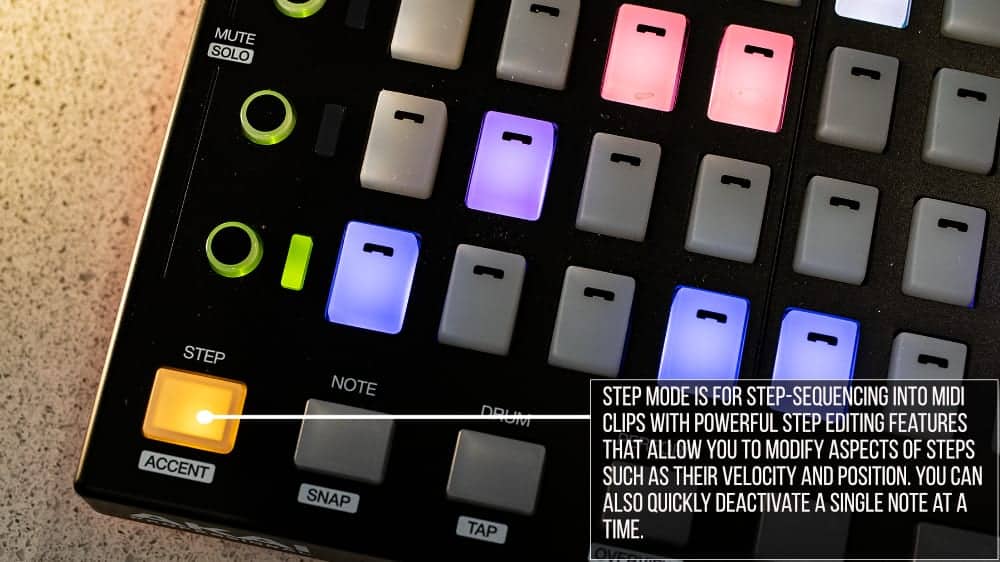
- Step Mode for step-sequencing into MIDI Clips with powerful step editing features that allow you to modify aspects of steps such as their velocity and position.
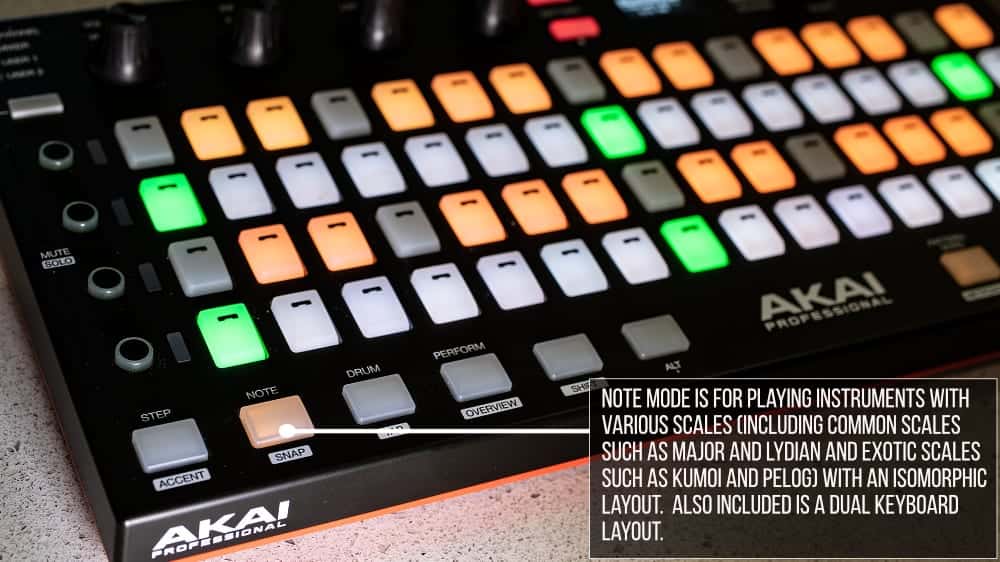
- Note Mode for playing instruments with various scales and layouts.
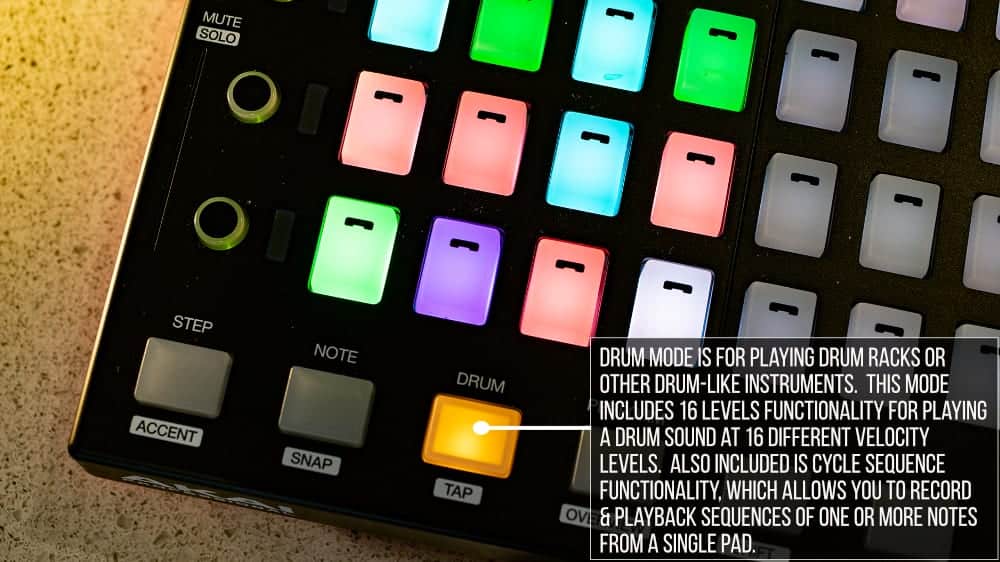
- Drum Mode for playing Drum Racks or other drum-like instruments. This Mode includes 16 Levels functionality for playing a drum sound at 16 different velocity levels. Also included is Cycle Sequence functionality, which allows you to record and playback sequences of one or more notes from a single pad.
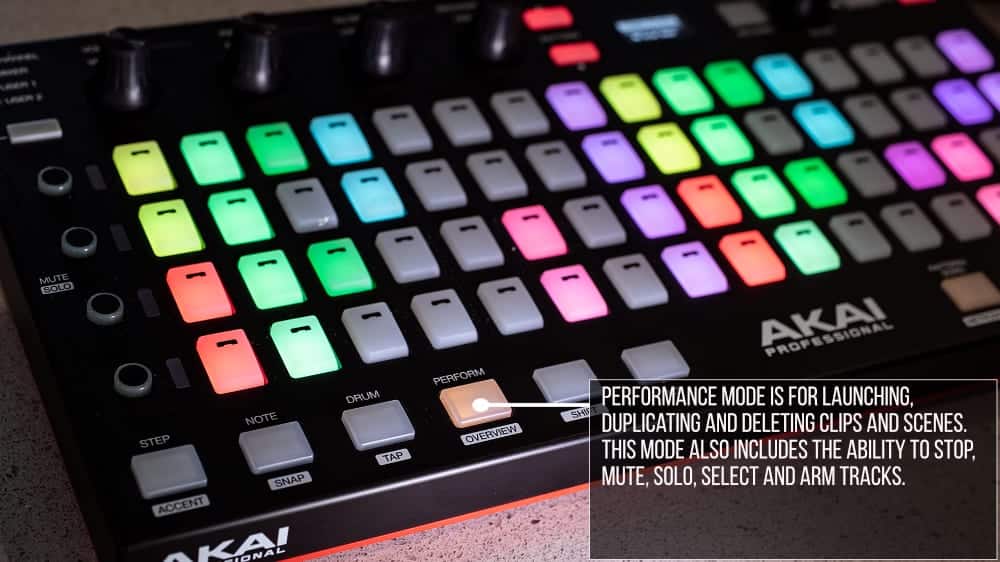
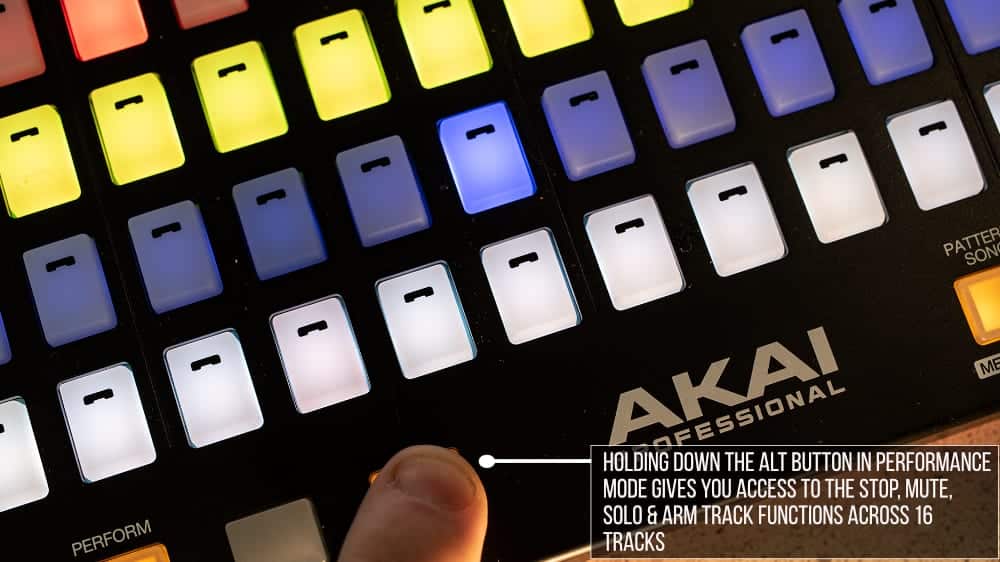
- Performance Mode for launching, duplicating and deleting Clips and Scenes. This Mode also includes the ability to stop, mute, solo, select and arm Tracks.
Encoder Modes:
- Chain and User Chain Modes for controlling parameters of the selected Drum Rack pad with easy to use and intelligent user mapping capabilities.
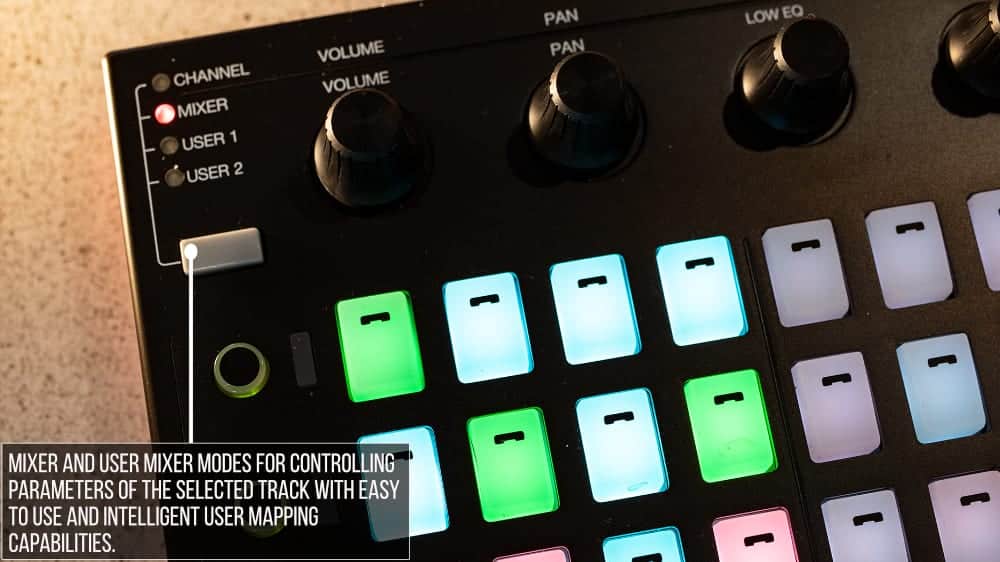
- Mixer and User Mixer Modes for controlling parameters of the selected Track with easy to use and intelligent user mapping capabilities.
- Global Mode for controlling global parameters such as tempo and global quantization.
Other Features:
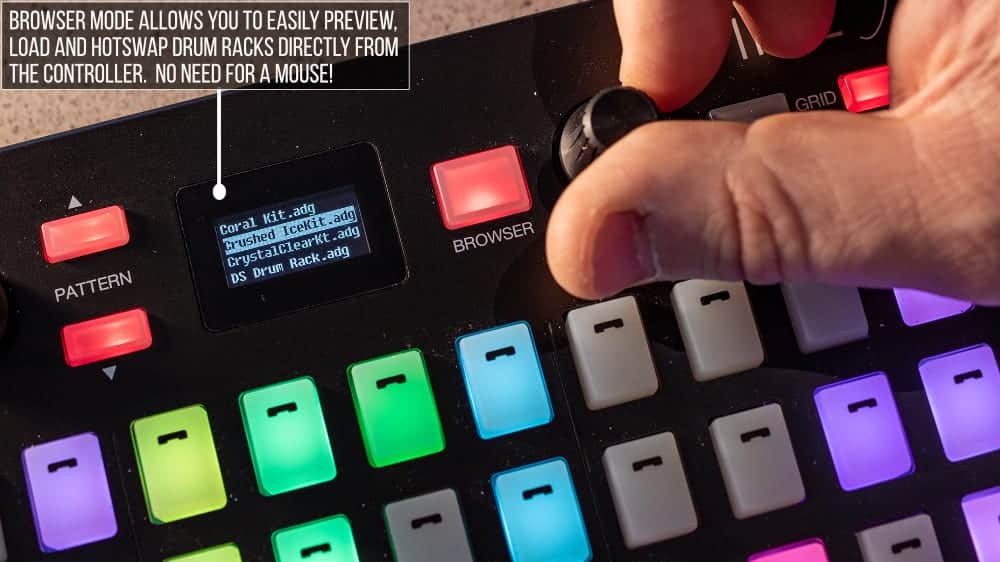
- Easy loading and hotswapping for Drum Racks.
- Transport, navigation and view-related control.
- Note Repeat functionality that allows pads to produce a stream of continuous, rhythmic notes at different rates.
- Note Delete and Erase for easy editing of MIDI Clip data.
- Track Locking for maintaining control over a particular Track even while you (or someone else you’re working with) navigate to other Tracks in the Set.
- Max for Live Integration with included documentation, devices and objects that make re-purposing controls in Max for Live devices a breeze.
Frequently Asked Questions
Yes, CrossFire is fully compatible with Ableton Live 12.1 and above. Make sure you are running at least this version before installing.
You need an Akai Fire controller and a compatible version of Ableton Live. CrossFire is a Control Surface script, so no additional plugins or devices are required.
CrossFire is a Control Surface script that maps the Akai Fire to Ableton Live, giving you hands-on control over Drum Racks, step sequencing, clip launching, and track management. It installs into Live as a custom Control Surface and runs directly within the application.
CrossFire includes Step Mode for step-sequencing into MIDI clips with velocity and position editing, Note Mode for playing instruments across various scales and layouts, Drum Mode for playing Drum Racks with 16 Levels and Cycle Sequence functionality, and Performance Mode for launching, duplicating, and deleting clips and scenes.
Absolutely. While Drum Rack control and sequencing are the primary focus, CrossFire also covers clip and scene launching, track selection, muting, soloing, arming, and encoder-based parameter control, making it a well-rounded control surface for general Live use.
CrossFire installs as a Control Surface script within Ableton Live. Full installation instructions are included with your download, and you select it from the Control Surface dropdown in Live’s preferences once the files are in place.
Correct. The Akai Fire was originally designed as a dedicated controller for FL Studio and lacked native Ableton Live support. CrossFire bridges that gap by providing a fully featured Control Surface script built specifically for Live.
Important Information
Crossfire V1.1.0
– Updated for compatibility with Live 11/Python 3.
– In Step Mode, the 4th Encoder can now be used for adjusting Step Probability.
– Added MUTE_BUTTONS_USE_TRACK_COLORS option to User Preferences. When set to
TRUE, the Mute Buttons in Performance Mode will reflect Track colors.
For existing users, you’ll need to add this option to User Preferences manually. To do that, just
add the following line at the bottom of your User Preferences file:
MUTE_BUTTONS_USE_TRACK_COLORS = TRUE
– Added SWAP_PERFORMANCE_MODE_FEATURES option to User Preferences. When set to
TRUE, the features of Performance Mode will be swapped such that the secondary set of features
will be will be accessible by default and the primary set of features will be accessible when ALT
is held or locked.
For existing users, you’ll need to add this option to User Preferences manually. To do that, just
add the following line at the bottom of your User Preferences file:
SWAP_PERFORMANCE_MODE_FEATURES = TRUE
– Various other minor improvements.
Our Products are generally provided as Zip file downloads which in all cases will need to be extracted and saved to your hard drive prior to installation. Details on the different file type provided and what to do with them are below.
.alp Files – These are Ableton Live Packs and will either install directly into the Packs Section of the browser of Ableton Live or ask you to save them to your hard drive. For packs that install to the library, when you double click on them you will see a pop up window asking you to confirm that installation is ok as the files are described as “Legacy”. This is fine and you are ok to proceed, the packs are created using the format for an earlier version of Live and so remain compatible with the current version.
Control Surface Scripts – Please refer directly to the supplied user manual for installation instructions, due to the changes in the Python language used by Live across versions of 10, 11, 12 and 12.1 you will need to ensure you have installed to the correct location and used the correct files as instructed and supplied.
END-USER LICENSE AGREEMENT FOR ISOTONIK STUDIOS SOFTWARE PRODUCTS.
PLEASE READ THE TERMS AND CONDITIONS OF THIS LICENSE AGREEMENT CAREFULLY BEFORE CONTINUING WITH THIS PROGRAM INSTALL.
This End-User License Agreement (referred to as “EULA”) is a legal agreement between an individual or a single entity (referred to as “LICENSEE”) and Isotonik Studios for the Isotonik Studios software product(s) which may include associated software components, media, printed materials, and “online” or electronic documentation (referred to as “SOFTWARE PRODUCT”). By installing, copying, or otherwise using the SOFTWARE PRODUCT, the LICENSEE agrees to be bound by the terms of this EULA.
This EULA represents the entire agreement concerning the program between the LICENSEE and Isotonik Studios and it supersedes any prior proposal, representation, or understanding between the parties. If the LICENSEE does not agree to the terms of this EULA, the LICENSEE should not install or use the SOFTWARE PRODUCT.
The SOFTWARE PRODUCT is protected by copyright laws and international copyright treaties, as well as other intellectual property laws and treaties. The SOFTWARE PRODUCT is licensed, not sold.
- GRANT OF LICENSE.
The SOFTWARE PRODUCT is licensed as follows:
(a) Installation and Use. Providing that the LICENSEE has paid any applicable license fees, Isotonik Studios grants the LICENSEE the right to install and use copies of the SOFTWARE PRODUCT on up to two computers in the LICENSEE’s possession that are running a validly licensed copy of the operating system for which the SOFTWARE PRODUCT was designed [e.g., Windows 10, macOS]. The computer(s) must be owned by the LICENSEE.
(b) Backup Copies. The LICENSEE may also make copies of the SOFTWARE PRODUCT as may be necessary for backup and archival purposes.
- DESCRIPTION OF OTHER RIGHTS AND LIMITATIONS.
(a) Maintenance of Copyright Notices. The LICENSEE must not remove or alter any copyright notices on any and all copies of the SOFTWARE PRODUCT.
(b) Distribution. The LICENSEE may not distribute registered copies of the SOFTWARE PRODUCT to third parties.
(c) Prohibition on Reverse Engineering, Decompilation, and Disassembly. The LICENSEE may not reverse engineer, decompile, or disassemble the SOFTWARE PRODUCT, except and only to the extent that such activity is expressly permitted by applicable law notwithstanding this limitation.
(d) Rental. The LICENSEE may not rent, lease, or lend the SOFTWARE PRODUCT.
(e) License transfer The LICENSEE may not transfer their license to the SOFTWARE PRODUCT to any third party. Any attempt to do so will be considered a violation of this EULA.
(f) Support Services. Isotonik Studios may provide the LICENSEE with support services related to the SOFTWARE PRODUCT for a period of 12 months following the date of purchase. Any supplemental software code provided to the LICENSEE as part of the Support Services shall be considered part of the SOFTWARE PRODUCT and subject to the terms and conditions of this EULA.
(g) Compliance with Applicable Laws. The LICENSEE must comply with all applicable laws regarding use of the SOFTWARE PRODUCT.
- TERMINATION Without prejudice to any other rights, Isotonik Studios may terminate this EULA if the LICENSEE fails to comply with the terms and conditions of this EULA. In such event, the LICENSEE must destroy all copies of the SOFTWARE PRODUCT in the LICENSEE’s possession.
- COPYRIGHT All title, including but not limited to copyrights, in and to the SOFTWARE PRODUCT and any copies thereof are owned by Isotonik Studios or its suppliers. All title and intellectual property rights in and to the content which may be accessed through use of the SOFTWARE PRODUCT is the property of the respective content owner and may be protected by applicable copyright or other intellectual property laws and treaties. This EULA grants the LICENSEE no rights to use such content. All rights not expressly granted are reserved by Isotonik Studios.
- NO WARRANTIES Isotonik Studios expressly disclaims any warranty for the SOFTWARE PRODUCT. The SOFTWARE PRODUCT is provided ‘As Is’ without any express or implied warranty of any kind, including but not limited to any warranties of merchantability, noninfringement, or fitness of a particular purpose. Isotonik Studios does not warrant or assume responsibility for the accuracy or completeness of any information, text, graphics, links or other items contained within the SOFTWARE PRODUCT. Isotonik Studios makes no warranties respecting any harm that may be caused by the transmission of a computer virus, worm, time bomb, logic bomb, or other such computer program. Isotonik Studios further expressly disclaims any warranty or representation to the LICENSEE or to any third party.
- LIMITATION OF LIABILITY In no event shall Isotonik Studios be liable for any damages (including, without limitation, lost profits, business interruption, or lost information) arising out of the LICENSEE’s use of or inability to use the SOFTWARE PRODUCT, even if Isotonik Studios has been advised of the possibility of such damages. In no event will Isotonik Studios be liable for loss of data or for indirect, special, incidental, consequential (including lost profit), or other damages based in contract, tort or otherwise. Isotonik Studios shall have no liability with respect to the content of the SOFTWARE PRODUCT or any part thereof, including but not limited to errors or omissions contained therein, libel, infringements of rights of publicity, privacy, trademark rights, business interruption, personal injury, loss of privacy, moral rights or the disclosure of confidential information.