DJ Filter Control by Killihu
DEAD CENTRE. EVERY TIME.
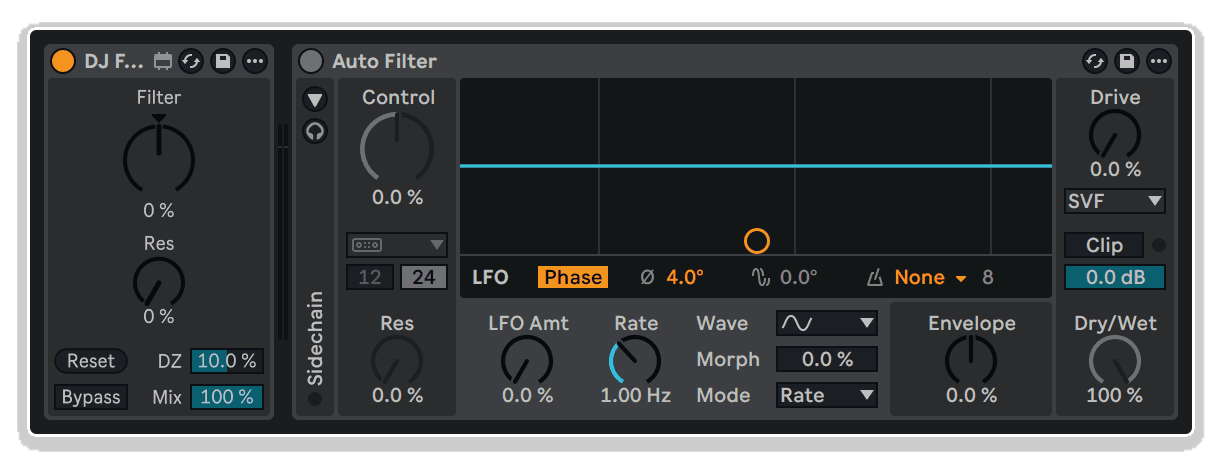
DJ Filter Control by KILLIHU gives Push and external controller users the tactile confidence of a hardware DJ filter — complete with a dead zone, instant reset, and key performance controls, all mapped and ready to go in Ableton Live.
- Dead Zone (DZ) Control: Expands the filter's neutral position so the effect only kicks in once you've moved beyond a defined range
- Reset Button: Instantly snaps the Filter knob back to its default centre position
- Resonance Control: Dial in filter character directly from the device
- Bypass Toggle: Kill the filter entirely without disrupting your chain
- Dry/Wet Control: Blend filtered and unfiltered signal for subtle or dramatic effect
- Push-Optimised Layout: All controls surface cleanly on Push controllers for hands-on live performance
- Auto Filter Integration: Works directly with Ableton's native Auto Filter in DJ mode
DJ Filter Control by Killihu
DEAD CENTRE. EVERY TIME.
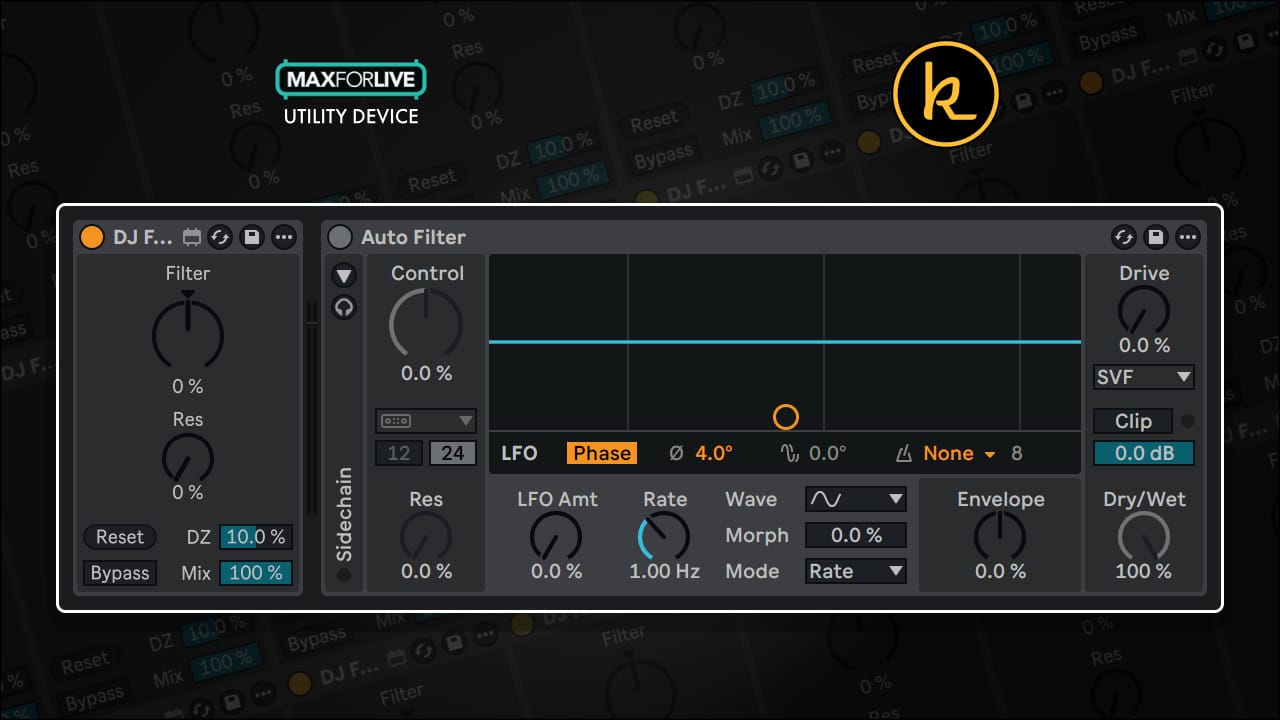
DJ Filter Control by KILLIHU gives Push and external controller users the tactile confidence of a hardware DJ filter — complete with a dead zone, instant reset, and key performance controls, all mapped and ready to go in Ableton Live.
- Dead Zone (DZ) Control: Expands the filter's neutral position so the effect only kicks in once you've moved beyond a defined range
- Reset Button: Instantly snaps the Filter knob back to its default centre position
- Resonance Control: Dial in filter character directly from the device
- Bypass Toggle: Kill the filter entirely without disrupting your chain
- Dry/Wet Control: Blend filtered and unfiltered signal for subtle or dramatic effect
- Push-Optimised Layout: All controls surface cleanly on Push controllers for hands-on live performance
- Auto Filter Integration: Works directly with Ableton's native Auto Filter in DJ mode
Buying for someone?Send a gift card →
Additional information
| MaxforLive | Control Devices |
|---|---|
| OS | Mac, Windows |
| Ableton Live Compatibility | Ableton Live 12 Standard with MaxforLive, Ableton Live 12 Suite |
| Min. Requirements | Ableton Live 12 with Max for Live (Suite or Standard + Max for Live add-on) |
Product reviews
5 out of 5
3 reviews
How item rating is calculated
We show the average based on reviews. Only genuine reviews are displayed.
Sort by
October 14, 2026
This reviewer bought this product from our store.
Simple and practical
I recommend this product
July 9, 2026
This reviewer bought this product from our store.
So great - and free to download makes this a must! Thanks Killihu!!
I recommend this product
June 11, 2026
This reviewer bought this product from our store.
Does exactly what it needs to do, fast and easy!
Ease of use and setup
I recommend this product
DJ Filter Control by Killihu
There’s a reason hardware DJ mixers feel so intuitive — that filter knob has a fixed centre position you can find blindfolded, mid-mix, at 3am. The moment you try to replicate that workflow in Ableton Live using Push or any other endless encoder, the magic falls apart. Without a physical detent, you’re guessing where neutral is, and in a live performance, guessing isn’t good enough.
DJ Filter Control by KILLIHU is a free Max for Live device built specifically to solve this problem. It wraps around Ableton’s native Auto Filter — bringing dead zone control, a one-click reset, and essential performance parameters together in a single, streamlined interface designed to work seamlessly with Push and other external controllers. It’s a small but genuinely smart fix that makes DJ-style filter sweeps feel natural and reliable every time you reach for that knob.
How It Works
Setup is deliberately simple. Load Ableton’s Auto Filter onto your track first, then drop DJ Filter Control before it in the chain. From that point, the device takes over control of the key Auto Filter parameters, routing them through its own interface so you have everything you need in one place. No complex routing, no macro gymnastics — just load and go.
The star of the show is the DZ (Dead Zone) control. This lets you define a range around the centre position of the Filter knob where the Auto Filter remains completely inactive. Think of it as digitally recreating that physical click-point on a hardware filter — you can nudge the knob slightly and nothing happens until you deliberately push past the threshold. The result is a confident, stable neutral position that you can return to reliably, even in the heat of a live set.
When you need to snap back to centre immediately — say, between tracks or at a breakdown — the Reset button returns the Filter knob to its default position instantly. No hunting, no fiddling. One tap and you’re neutral again.
Key Features
- Dead Zone (DZ) Control: Sets a neutral range around centre where the filter stays inactive — recreating the feel of a hardware DJ filter knob with a fixed detent
- Reset Button: One-click return of the Filter knob to its default centre position — perfect for quick transitions in live performance
- Resonance Control: Adjust filter resonance directly from the device without diving into Auto Filter’s interface
- Bypass Toggle: Instantly disable the entire filter effect, keeping your signal chain clean without removing the device
- Dry/Wet Blend: Control the balance between filtered and unfiltered signal for everything from subtle colouring to full wet sweeps
- Push-Ready Layout: All controls are surfaced in a layout optimised for Push controllers, keeping your workflow hands-on and screen-free
- Seamless Auto Filter Integration: Designed to work directly with Ableton’s native Auto Filter in DJ mode — no third-party dependencies
- Free to Use: Available at no cost, with an optional contribution if you find it genuinely useful in your workflow
Built for Live Performance
If you play live sets in Ableton — whether you’re DJing, performing electronic music, or running a hybrid live/DJ show — you’ll know how important muscle memory is. DJ Filter Control is the kind of utility that quietly becomes indispensable. It bridges the gap between the tactile confidence of hardware and the flexibility of software, letting you focus on the music rather than fighting with your controller. Load it up on your bass channels, synth loops, or full stems, and feel the difference a proper dead zone makes when you’re sweeping into a drop.
Technical Details
DJ Filter Control requires Ableton Live 12 with Max for Live. It is designed to be used in conjunction with Ableton’s native Auto Filter device. Compatible with Mac and Windows. To use correctly, place Auto Filter on your track first, then load DJ Filter Control directly before it in the device chain.
Frequently Asked Questions
A: DJ Filter Control is a free Max for Live device that improves how Ableton’s Auto Filter behaves when controlled from Push or other external encoders. Because these controllers lack a fixed centre detent (unlike hardware DJ mixer filter knobs), it’s hard to reliably return the filter to a neutral position. DJ Filter Control adds a configurable dead zone and a one-click reset button to make this easy and reliable in live performance.
A: Load Ableton’s native Auto Filter onto your track first, then place DJ Filter Control directly before it in the device chain. DJ Filter Control will then take over control of the relevant Auto Filter parameters through its own interface. That’s it — no complex routing or macro setup required.
A: The DZ control lets you define a range around the centre position of the Filter knob where the Auto Filter remains completely inactive. This means small, accidental movements of the encoder won’t trigger any filtering — only deliberate movements beyond the dead zone threshold will activate the effect. It effectively recreates the feel of the physical click-stop found on hardware DJ mixer filter knobs.
A: Yes. DJ Filter Control is specifically designed to work well with Push controllers, surfacing controls like resonance, bypass, and dry/wet in a layout that’s accessible from Push’s interface. It should also work with other external MIDI controllers and encoders.
A: You need Ableton Live 12 with Max for Live. This can be Ableton Live 12 Suite (which includes Max for Live) or Ableton Live 12 Standard with the Max for Live add-on.
A: Yes, DJ Filter Control is completely free with no feature limitations. The developer, KILLIHU, invites users to make an optional contribution if they find it useful — but there’s no paywall, no demo mode, and no restricted features.
A: Absolutely. You can load DJ Filter Control (along with its paired Auto Filter) onto as many tracks as you like. It’s particularly effective on bass channels, synth loops, drum buses, or full-track stems wherever you want DJ-style filter sweeping.
A: Auto Filter on its own doesn’t offer a dead zone around the centre position, making it difficult to hold a neutral position reliably with an endless encoder. DJ Filter Control adds that dead zone, a reset button, and consolidates key controls (resonance, bypass, dry/wet) into a single interface — making the whole workflow much more performance-friendly, especially when using Push or similar controllers.
Important Information
v1.0.0 – Initial Release
Our Products are generally provided as Zip file downloads which in all cases will need to be extracted before use. For Max for Live Devices please place the extracted device in your User Library. For Ableton Live Packs please double click the extracted .alp file to install. For Ableton Live Projects please place in your projects folder.
END-USER LICENSE AGREEMENT FOR ISOTONIK STUDIOS SOFTWARE PRODUCTS.
PLEASE READ THE TERMS AND CONDITIONS OF THIS LICENSE AGREEMENT CAREFULLY BEFORE CONTINUING WITH THIS PROGRAM INSTALL.
This End-User License Agreement (referred to as “EULA”) is a legal agreement between an individual or a single entity (referred to as “LICENSEE”) and Isotonik Studios for the Isotonik Studios software product(s) which may include associated software components, media, printed materials, and “online” or electronic documentation (referred to as “SOFTWARE PRODUCT”). By installing, copying, or otherwise using the SOFTWARE PRODUCT, the LICENSEE agrees to be bound by the terms of this EULA.
This EULA represents the entire agreement concerning the program between the LICENSEE and Isotonik Studios and it supersedes any prior proposal, representation, or understanding between the parties. If the LICENSEE does not agree to the terms of this EULA, the LICENSEE should not install or use the SOFTWARE PRODUCT.
The SOFTWARE PRODUCT is protected by copyright laws and international copyright treaties, as well as other intellectual property laws and treaties. The SOFTWARE PRODUCT is licensed, not sold.
- GRANT OF LICENSE.
The SOFTWARE PRODUCT is licensed as follows:
(a) Installation and Use. Providing that the LICENSEE has paid any applicable license fees, Isotonik Studios grants the LICENSEE the right to install and use copies of the SOFTWARE PRODUCT on up to two computers in the LICENSEE’s possession that are running a validly licensed copy of the operating system for which the SOFTWARE PRODUCT was designed [e.g., Windows 10, macOS]. The computer(s) must be owned by the LICENSEE.
(b) Backup Copies. The LICENSEE may also make copies of the SOFTWARE PRODUCT as may be necessary for backup and archival purposes.
- DESCRIPTION OF OTHER RIGHTS AND LIMITATIONS.
(a) Maintenance of Copyright Notices. The LICENSEE must not remove or alter any copyright notices on any and all copies of the SOFTWARE PRODUCT.
(b) Distribution. The LICENSEE may not distribute registered copies of the SOFTWARE PRODUCT to third parties.
(c) Prohibition on Reverse Engineering, Decompilation, and Disassembly. The LICENSEE may not reverse engineer, decompile, or disassemble the SOFTWARE PRODUCT, except and only to the extent that such activity is expressly permitted by applicable law notwithstanding this limitation.
(d) Rental. The LICENSEE may not rent, lease, or lend the SOFTWARE PRODUCT.
(e) License transfer The LICENSEE may not transfer their license to the SOFTWARE PRODUCT to any third party. Any attempt to do so will be considered a violation of this EULA.
(f) Support Services. Isotonik Studios may provide the LICENSEE with support services related to the SOFTWARE PRODUCT for a period of 12 months following the date of purchase. Any supplemental software code provided to the LICENSEE as part of the Support Services shall be considered part of the SOFTWARE PRODUCT and subject to the terms and conditions of this EULA.
(g) Compliance with Applicable Laws. The LICENSEE must comply with all applicable laws regarding use of the SOFTWARE PRODUCT.
- TERMINATION Without prejudice to any other rights, Isotonik Studios may terminate this EULA if the LICENSEE fails to comply with the terms and conditions of this EULA. In such event, the LICENSEE must destroy all copies of the SOFTWARE PRODUCT in the LICENSEE’s possession.
- COPYRIGHT All title, including but not limited to copyrights, in and to the SOFTWARE PRODUCT and any copies thereof are owned by Isotonik Studios or its suppliers. All title and intellectual property rights in and to the content which may be accessed through use of the SOFTWARE PRODUCT is the property of the respective content owner and may be protected by applicable copyright or other intellectual property laws and treaties. This EULA grants the LICENSEE no rights to use such content. All rights not expressly granted are reserved by Isotonik Studios.
- NO WARRANTIES Isotonik Studios expressly disclaims any warranty for the SOFTWARE PRODUCT. The SOFTWARE PRODUCT is provided ‘As Is’ without any express or implied warranty of any kind, including but not limited to any warranties of merchantability, noninfringement, or fitness of a particular purpose. Isotonik Studios does not warrant or assume responsibility for the accuracy or completeness of any information, text, graphics, links or other items contained within the SOFTWARE PRODUCT. Isotonik Studios makes no warranties respecting any harm that may be caused by the transmission of a computer virus, worm, time bomb, logic bomb, or other such computer program. Isotonik Studios further expressly disclaims any warranty or representation to the LICENSEE or to any third party.
- LIMITATION OF LIABILITY In no event shall Isotonik Studios be liable for any damages (including, without limitation, lost profits, business interruption, or lost information) arising out of the LICENSEE’s use of or inability to use the SOFTWARE PRODUCT, even if Isotonik Studios has been advised of the possibility of such damages. In no event will Isotonik Studios be liable for loss of data or for indirect, special, incidental, consequential (including lost profit), or other damages based in contract, tort or otherwise. Isotonik Studios shall have no liability with respect to the content of the SOFTWARE PRODUCT or any part thereof, including but not limited to errors or omissions contained therein, libel, infringements of rights of publicity, privacy, trademark rights, business interruption, personal injury, loss of privacy, moral rights or the disclosure of confidential information.
More from Killihu
 ★ Popular