Master Pitch by KILLIHU
GLOBAL MIDI TRANSPOSE
This plugin transposes all MIDI tracks in the project at once. It is designed to help with the tasks of musical composition, not to automate it. Master Pitch is an audio effect so you can load it into the master track. It does not process audio, it only sends the transposition signal to all Track Pitch plugins loaded in the project.Buying for someone?Send a gift card →

Killihu
killihu is an audio developer focused primarily on developing resources for Ableton Live.
View all products by KillihuOverview
Global MIDI transpose for all tracks at once
- Transposes all MIDI tracks in the project at once
- Loads into the master track as an audio effect, does not process audio
- Sends the transposition signal to all Track Pitch plugins loaded in the project
- Track Pitch receives transposition information from Master Pitch each time it is loaded
- Use the RESEND button to manually resend transposition information if it is not received correctly
- This plugin is free, contributions welcome if you find it useful
- Max for Live Audio Effect .amxd device
Reviews
No reviews yet. Be the first to review this product.
Master Pitch
Transpose all MIDI tracks at once
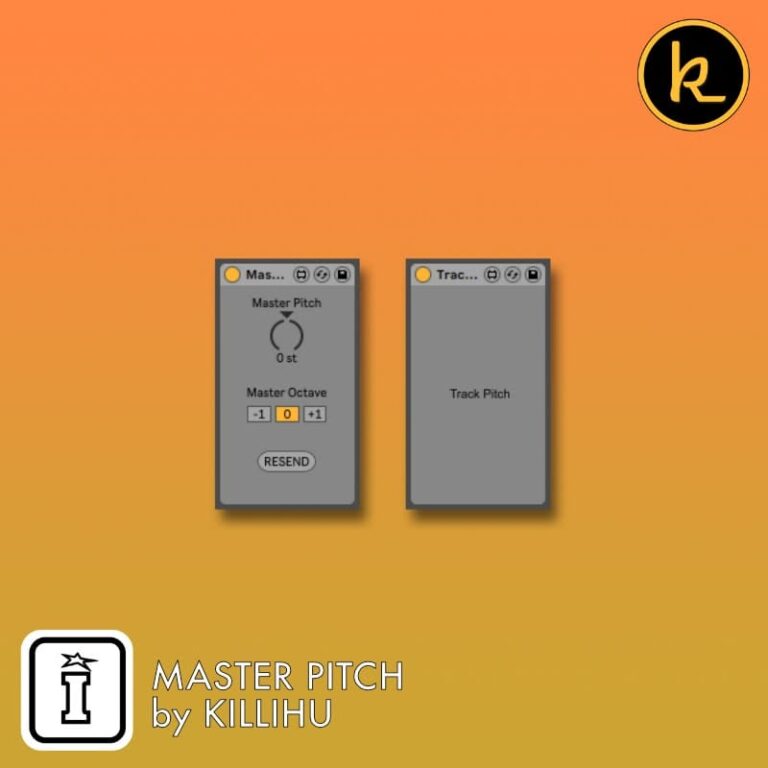
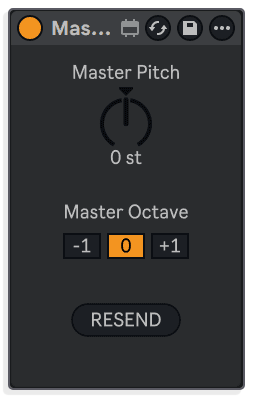
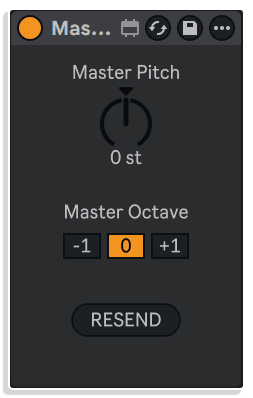
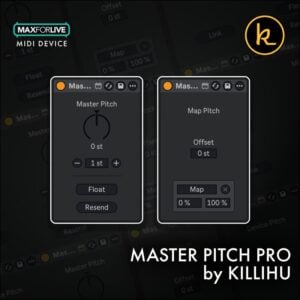
Master Pitch loads into the master track as an audio effect and sends a transposition signal to all Track Pitch plugins in the project. Use the Master Pitch knob, Master Octave buttons, and RESEND button to control and rebroadcast the setting.
Master Pitch
Control global pitch from a single device
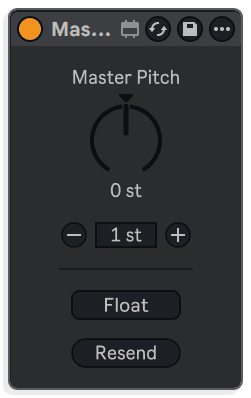
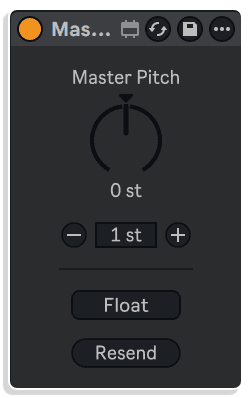
Place the master device on any track to set a global transposition value from -24 to +24 semitones. Use the knob or the plus and minus buttons, and open a floating window with the Float button for quick access.
Track Pitch
Transpose MIDI notes on individual tracks
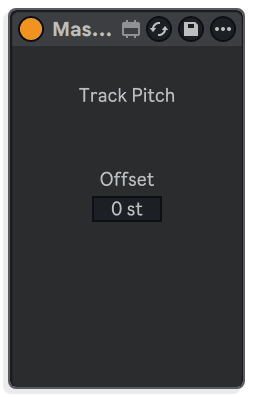
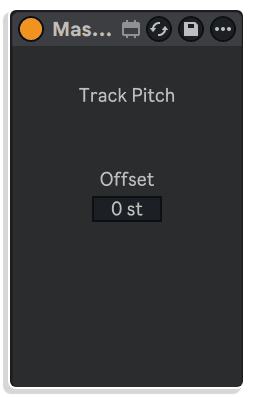
Insert the Track device at the start of a MIDI track's effects chain to transpose incoming notes using the master value. An Offset control adds an extra per-track transposition on top, useful in Drum Rack chains.
Important Information
CHANGELOG
Pro
v1.3 · released 16 Oct 2026
New Features
- Modifying the Master Pitch does not cut off the notes currently playing.
- Now MIDI note transposition works the same as in the Pitch device included with Live.
Earlier releases
v1.4.1 Bugfixes:
– Fixed pitchbend control in MPE version.
v1.4 New features and improvements:
– Modified GUI to adapt to the new rack design in Live version 12.2, does not change the operation of the device.
– Modified the appearance of the knobs for better visualization when using Live 12’s modulation function.
v1.3 – Added “Track Pitch – MPE” plugin for compatibility with MPE instruments in Live 11.
v1.2 – Fixed a bug that caused transpose to work incorrectly in some of the latest versions of Ableton Live and Max for Live.
v1.1 – Replaced “Master/Slave” references by “Master/Track”.
v1.0 – Initial release.
INSTALLATION
Our Products are generally provided as Zip file downloads which in all cases will need to be extracted and saved to your hard drive prior to installation. Details on the different file type provided and what to do with them are below.
.alp Files – These are Ableton Live Packs and will either install directly into the Packs Section of the browser of Ableton Live or ask you to save them to your hard drive. For packs that install to the library, when you double click on them you will see a pop up window asking you to confirm that installation is ok as the files are described as “Legacy”. This is fine and you are ok to proceed, the packs are created using the format for an earlier version of Live and so remain compatible with the current version.
.amxd files – These are individual MaxforLive Devices and can be stored anywhere on your hard drive. We’d advise creating a folder for them and then adding that folder as a location within the Places section of Lives Browser.
LICENSE
END-USER LICENSE AGREEMENT FOR ISOTONIK STUDIOS SOFTWARE PRODUCTS.
PLEASE READ THE TERMS AND CONDITIONS OF THIS LICENSE AGREEMENT CAREFULLY BEFORE CONTINUING WITH THIS PROGRAM INSTALL.
This End-User License Agreement (referred to as “EULA”) is a legal agreement between an individual or a single entity (referred to as “LICENSEE”) and Isotonik Studios for the Isotonik Studios software product(s) which may include associated software components, media, printed materials, and “online” or electronic documentation (referred to as “SOFTWARE PRODUCT”). By installing, copying, or otherwise using the SOFTWARE PRODUCT, the LICENSEE agrees to be bound by the terms of this EULA.
This EULA represents the entire agreement concerning the program between the LICENSEE and Isotonik Studios and it supersedes any prior proposal, representation, or understanding between the parties. If the LICENSEE does not agree to the terms of this EULA, the LICENSEE should not install or use the SOFTWARE PRODUCT.
The SOFTWARE PRODUCT is protected by copyright laws and international copyright treaties, as well as other intellectual property laws and treaties. The SOFTWARE PRODUCT is licensed, not sold.
- GRANT OF LICENSE.
The SOFTWARE PRODUCT is licensed as follows:
(a) Installation and Use. Providing that the LICENSEE has paid any applicable license fees, Isotonik Studios grants the LICENSEE the right to install and use copies of the SOFTWARE PRODUCT on up to two computers in the LICENSEE’s possession that are running a validly licensed copy of the operating system for which the SOFTWARE PRODUCT was designed [e.g., Windows 10, macOS]. The computer(s) must be owned by the LICENSEE.
(b) Backup Copies. The LICENSEE may also make copies of the SOFTWARE PRODUCT as may be necessary for backup and archival purposes.
- DESCRIPTION OF OTHER RIGHTS AND LIMITATIONS.
(a) Maintenance of Copyright Notices. The LICENSEE must not remove or alter any copyright notices on any and all copies of the SOFTWARE PRODUCT.
(b) Distribution. The LICENSEE may not distribute registered copies of the SOFTWARE PRODUCT to third parties.
(c) Prohibition on Reverse Engineering, Decompilation, and Disassembly. The LICENSEE may not reverse engineer, decompile, or disassemble the SOFTWARE PRODUCT, except and only to the extent that such activity is expressly permitted by applicable law notwithstanding this limitation.
(d) Rental. The LICENSEE may not rent, lease, or lend the SOFTWARE PRODUCT.
(e) License transfer The LICENSEE may not transfer their license to the SOFTWARE PRODUCT to any third party. Any attempt to do so will be considered a violation of this EULA.
(f) Support Services. Isotonik Studios may provide the LICENSEE with support services related to the SOFTWARE PRODUCT for a period of 12 months following the date of purchase. Any supplemental software code provided to the LICENSEE as part of the Support Services shall be considered part of the SOFTWARE PRODUCT and subject to the terms and conditions of this EULA.
(g) Compliance with Applicable Laws. The LICENSEE must comply with all applicable laws regarding use of the SOFTWARE PRODUCT.
- TERMINATION Without prejudice to any other rights, Isotonik Studios may terminate this EULA if the LICENSEE fails to comply with the terms and conditions of this EULA. In such event, the LICENSEE must destroy all copies of the SOFTWARE PRODUCT in the LICENSEE’s possession.
- COPYRIGHT All title, including but not limited to copyrights, in and to the SOFTWARE PRODUCT and any copies thereof are owned by Isotonik Studios or its suppliers. All title and intellectual property rights in and to the content which may be accessed through use of the SOFTWARE PRODUCT is the property of the respective content owner and may be protected by applicable copyright or other intellectual property laws and treaties. This EULA grants the LICENSEE no rights to use such content. All rights not expressly granted are reserved by Isotonik Studios.
- NO WARRANTIES Isotonik Studios expressly disclaims any warranty for the SOFTWARE PRODUCT. The SOFTWARE PRODUCT is provided ‘As Is’ without any express or implied warranty of any kind, including but not limited to any warranties of merchantability, noninfringement, or fitness of a particular purpose. Isotonik Studios does not warrant or assume responsibility for the accuracy or completeness of any information, text, graphics, links or other items contained within the SOFTWARE PRODUCT. Isotonik Studios makes no warranties respecting any harm that may be caused by the transmission of a computer virus, worm, time bomb, logic bomb, or other such computer program. Isotonik Studios further expressly disclaims any warranty or representation to the LICENSEE or to any third party.
- LIMITATION OF LIABILITY In no event shall Isotonik Studios be liable for any damages (including, without limitation, lost profits, business interruption, or lost information) arising out of the LICENSEE’s use of or inability to use the SOFTWARE PRODUCT, even if Isotonik Studios has been advised of the possibility of such damages. In no event will Isotonik Studios be liable for loss of data or for indirect, special, incidental, consequential (including lost profit), or other damages based in contract, tort or otherwise. Isotonik Studios shall have no liability with respect to the content of the SOFTWARE PRODUCT or any part thereof, including but not limited to errors or omissions contained therein, libel, infringements of rights of publicity, privacy, trademark rights, business interruption, personal injury, loss of privacy, moral rights or the disclosure of confidential information.
Frequently Asked Questions
What does Master Pitch actually do?
Master Pitch lets you transpose all MIDI tracks in your project simultaneously from a single control. It works by sending a transposition signal from the Master Pitch plugin on your master track to Track Pitch plugins loaded on each individual MIDI track.
Does Master Pitch process or affect my audio?
No, Master Pitch is loaded as an audio effect but it does not process audio at all. It purely handles the transposition signalling between plugins and leaves your audio completely untouched.
What is the difference between Master Pitch and Track Pitch?
Master Pitch is the central controller that you place on your master track, while Track Pitch is the companion plugin you load on every MIDI track you want to include in the global transpose. The two work together as a system.
Do I need to add Track Pitch to every MIDI track manually?
Yes, Track Pitch needs to be loaded on each MIDI track you want to transpose. A time-saving tip is to load Track Pitch into an empty MIDI track and save it as your default MIDI track, so it is included automatically whenever you create a new MIDI track.
What should I do if a Track Pitch plugin does not receive the transposition signal correctly?
Simply hit the RESEND button on the Master Pitch plugin and it will push the transposition information out to all Track Pitch instances again.
Is this plugin suitable for automating key changes in a live set or arrangement?
Master Pitch is designed as a compositional aid rather than an automation tool, so it is best suited to quickly exploring different keys during the writing process rather than triggering automated key changes mid-performance or within an arrangement.
What are the compatibility requirements for Master Pitch?
Master Pitch is a Max for Live device, so you will need Ableton Live Suite or Ableton Live Standard with a Max for Live licence to use it. Check the product listing to confirm which specific versions of Ableton Live and Max for Live are supported.
In Depth
This plugin transposes all MIDI tracks in the project at once. It is designed to help with the tasks of musical composition, not to automate it.
Master Pitch is an audio effect so you can load it into the master track. It does not process audio, it only sends the transposition signal to all Track Pitch plugins loaded in the project.
Track Pitch is the plugin that you must load in all the tracks that you want to transpose globally. You can load it into an empty MIDI track and save the track as the default MIDI track.
Each time a Track Pitch plugin is loaded, it receives the transposition information established in the Master Pitch plugin. If for some reason it is not received correctly, you can use the RESEND button to send it again.
This plugin is free. Consider making a contribution if it is useful for you.
More from Killihu
 ★ Popular
Frequently Bought Together