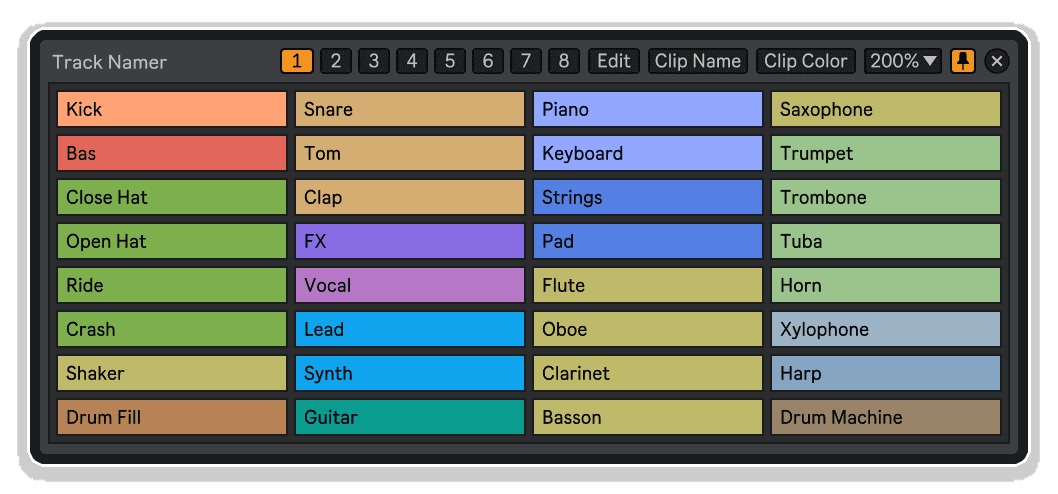
Track Namer by Killihu
NAME IT. FIND IT. OWN YOUR SESSION.
Stop scrolling through a sea of "Audio" and "MIDI" tracks. Track Namer by KILLIHU is a slick Max for Live utility that brings fast, intelligent track naming directly into your Ableton Live workflow — so your sessions stay clean, organised, and ready to share.
- Instant track naming: Rename any track directly from within Live without breaking your creative flow
- Keyboard-driven workflow: Navigate and name tracks rapidly using your keyboard
- Session hygiene: Keep complex, multi-track Ableton projects organised and legible at a glance
- Lightweight footprint: A tiny, focused utility that stays out of your way until you need it
- Max for Live powered: Deep Live integration via the M4L framework for reliable, native performance
- Drop-in simple: No complex setup — drop it in and start naming immediately
USER GUIDE:
Track Namer Manual
Track Namer by Killihu
NAME IT. FIND IT. OWN YOUR SESSION.
Stop scrolling through a sea of "Audio" and "MIDI" tracks. Track Namer by KILLIHU is a slick Max for Live utility that brings fast, intelligent track naming directly into your Ableton Live workflow — so your sessions stay clean, organised, and ready to share.
- Instant track naming: Rename any track directly from within Live without breaking your creative flow
- Keyboard-driven workflow: Navigate and name tracks rapidly using your keyboard
- Session hygiene: Keep complex, multi-track Ableton projects organised and legible at a glance
- Lightweight footprint: A tiny, focused utility that stays out of your way until you need it
- Max for Live powered: Deep Live integration via the M4L framework for reliable, native performance
- Drop-in simple: No complex setup — drop it in and start naming immediately
USER GUIDE:
Track Namer Manual
Buying for someone?Send a gift card →
Additional information
| MaxforLive | Control Devices |
|---|---|
| OS | Mac, Windows |
| Ableton Live Compatibility | Ableton Live 11 Standard with MaxforLive, Ableton Live 11 Suite, Ableton Live 12 Standard with MaxforLive, Ableton Live 12 Suite |
| Min. Requirements | Ableton Live 11 Suite or Ableton Live 11 Standard with Max for Live add-on |
PRICE: £4.00
Product reviews
5 out of 5
1 review
How item rating is calculated
We show the average based on reviews. Only genuine reviews are displayed.
Sort by
October 14, 2026
This reviewer bought this product from our store.
Simple and practical
I recommend this product
Track Namer by Killihu
You’ve spent hours building a killer session — layers of synths, percussion busses, send channels, MIDI routing, and more. Then you go back in the next day and stare at rows of “Audio”, “Audio 2”, “MIDI”, “MIDI 3”. Sound familiar? KILLIHU‘s Track Namer is a beautifully simple Max for Live device designed to solve exactly that problem. Fast, intuitive, and completely unobtrusive, it slots into your workflow and lets you name your tracks properly — without the faff.
Track organisation might not be the most glamorous part of making music, but it’s one of the most important. Whether you’re working alone on a complex live performance rig, collaborating with other producers, or preparing a session for a mix engineer, clean track names are the difference between a session that flows and one that costs you precious time. Track Namer gives you the tool to make that process effortless, fast, and even enjoyable.
Key Features
- Rapid track renaming: Name any track in your Ableton session quickly and directly through the device interface — no menu-diving required
- Keyboard-first navigation: Move between tracks and confirm names using your keyboard, keeping your hands off the mouse and your mind on the music
- Works across all track types: Compatible with Audio tracks, MIDI tracks, Return tracks, and more — covers your full session
- Minimal UI, maximum clarity: Clean, uncluttered interface that delivers what you need without visual noise
- Lightweight utility design: Purpose-built as a focused utility — it loads fast, runs lean, and never gets in the way
- Max for Live native: Built on the M4L framework for deep, reliable integration directly within Ableton Live
- Instant drop-in setup: Drag it onto any track, and it’s ready to go — no configuration, no fuss
Why Session Organisation Matters
Every professional producer knows the drill: a well-named session is a session you can actually work in. When you’re deep in a creative flow, the last thing you want is to stop and wrestle with Ableton’s default double-click-to-rename workflow. Track Namer strips that friction away. Instead of a disruptive context switch, you get a smooth, keyboard-driven naming experience that keeps you in the zone. For live performers managing complex rigs, session musicians working to tight deadlines, or sound designers juggling dozens of layered tracks, this kind of micro-optimisation adds up to something genuinely significant over time.
The Workflow Difference
Imagine building a new track and being able to name each layer as you go — kicks, snares, bass, pad, arps — without ever stopping your creative momentum. Or returning to a live performance template and instantly knowing which channel carries your vocal bus and which one routes your drum machine. Track Namer makes both of those scenarios feel natural and effortless. It’s the kind of small tool that, once you’ve used it, you’ll wonder how you ever worked without it. Tidy session, tidy mind — and more energy left for the part that actually matters: making great music.
Who Is Track Namer For?
Track Namer is ideal for any Ableton Live producer who values a clean, professional workflow. It’s especially useful for live performers who need instantly readable session layouts, educators and content creators who share their screens and sessions, and collaborative producers who pass projects between studios. If you’re the kind of person who colour-codes their tracks and groups their chains logically — Track Namer is your new best friend. And if you’re the kind of person who knows they should do all that but never quite gets round to it, Track Namer makes starting that habit almost effortless.
Technical Details
Track Namer is a Max for Live Control Device. It requires Ableton Live 11 Suite or higher, or Ableton Live 11 Standard with the Max for Live add-on. Compatible with both Mac and Windows. Simply drop the device onto any track in your session to get started.
Frequently Asked Questions
A: Track Namer is a Max for Live utility device that gives you a fast, keyboard-driven way to rename your Ableton Live tracks directly from within the device interface — without the interruption of Ableton’s standard double-click renaming workflow.
A: Track Namer requires Ableton Live 11 or higher. It works with Ableton Live Suite, or Ableton Live Standard with the Max for Live add-on purchased separately.
A: Yes — Track Namer is compatible with both Mac and Windows operating systems, as long as you’re running a supported version of Ableton Live with Max for Live.
A: Track Namer is designed to work across all track types within your Ableton Live session, including Audio, MIDI, and Return tracks. Please refer to the user guide for the full scope of supported track types.
A: Not at all. Track Namer is a lightweight utility device built specifically to have a minimal footprint. It’s designed to stay out of your way and has a negligible impact on CPU performance.
A: Absolutely. Track Namer is particularly useful for live performers who need instantly legible, well-organised session layouts. Having clearly named tracks in a live rig can make the difference between a smooth performance and a stressful one.
A: Yes — a full user guide PDF is available at: https://isotonikstudios.com/wp-content/uploads/track-namer-manual.pdf
A: No. Track Namer is a ready-to-use device — simply drag it onto any track in your Ableton session and it’s ready to go. No Max for Live programming knowledge or configuration is required.
Important Information
v1.0.0 – Initial Release
Our Products are generally provided as Zip file downloads which in all cases will need to be extracted before use. For Max for Live Devices please place the extracted device in your User Library. For Ableton Live Packs please double click the extracted .alp file to install. For Ableton Live Projects please place in your projects folder.
END-USER LICENSE AGREEMENT FOR ISOTONIK STUDIOS SOFTWARE PRODUCTS.
PLEASE READ THE TERMS AND CONDITIONS OF THIS LICENSE AGREEMENT CAREFULLY BEFORE CONTINUING WITH THIS PROGRAM INSTALL.
This End-User License Agreement (referred to as “EULA”) is a legal agreement between an individual or a single entity (referred to as “LICENSEE”) and Isotonik Studios for the Isotonik Studios software product(s) which may include associated software components, media, printed materials, and “online” or electronic documentation (referred to as “SOFTWARE PRODUCT”). By installing, copying, or otherwise using the SOFTWARE PRODUCT, the LICENSEE agrees to be bound by the terms of this EULA.
This EULA represents the entire agreement concerning the program between the LICENSEE and Isotonik Studios and it supersedes any prior proposal, representation, or understanding between the parties. If the LICENSEE does not agree to the terms of this EULA, the LICENSEE should not install or use the SOFTWARE PRODUCT.
The SOFTWARE PRODUCT is protected by copyright laws and international copyright treaties, as well as other intellectual property laws and treaties. The SOFTWARE PRODUCT is licensed, not sold.
- GRANT OF LICENSE.
The SOFTWARE PRODUCT is licensed as follows:
(a) Installation and Use. Providing that the LICENSEE has paid any applicable license fees, Isotonik Studios grants the LICENSEE the right to install and use copies of the SOFTWARE PRODUCT on up to two computers in the LICENSEE’s possession that are running a validly licensed copy of the operating system for which the SOFTWARE PRODUCT was designed [e.g., Windows 10, macOS]. The computer(s) must be owned by the LICENSEE.
(b) Backup Copies. The LICENSEE may also make copies of the SOFTWARE PRODUCT as may be necessary for backup and archival purposes.
- DESCRIPTION OF OTHER RIGHTS AND LIMITATIONS.
(a) Maintenance of Copyright Notices. The LICENSEE must not remove or alter any copyright notices on any and all copies of the SOFTWARE PRODUCT.
(b) Distribution. The LICENSEE may not distribute registered copies of the SOFTWARE PRODUCT to third parties.
(c) Prohibition on Reverse Engineering, Decompilation, and Disassembly. The LICENSEE may not reverse engineer, decompile, or disassemble the SOFTWARE PRODUCT, except and only to the extent that such activity is expressly permitted by applicable law notwithstanding this limitation.
(d) Rental. The LICENSEE may not rent, lease, or lend the SOFTWARE PRODUCT.
(e) License transfer The LICENSEE may not transfer their license to the SOFTWARE PRODUCT to any third party. Any attempt to do so will be considered a violation of this EULA.
(f) Support Services. Isotonik Studios may provide the LICENSEE with support services related to the SOFTWARE PRODUCT for a period of 12 months following the date of purchase. Any supplemental software code provided to the LICENSEE as part of the Support Services shall be considered part of the SOFTWARE PRODUCT and subject to the terms and conditions of this EULA.
(g) Compliance with Applicable Laws. The LICENSEE must comply with all applicable laws regarding use of the SOFTWARE PRODUCT.
- TERMINATION Without prejudice to any other rights, Isotonik Studios may terminate this EULA if the LICENSEE fails to comply with the terms and conditions of this EULA. In such event, the LICENSEE must destroy all copies of the SOFTWARE PRODUCT in the LICENSEE’s possession.
- COPYRIGHT All title, including but not limited to copyrights, in and to the SOFTWARE PRODUCT and any copies thereof are owned by Isotonik Studios or its suppliers. All title and intellectual property rights in and to the content which may be accessed through use of the SOFTWARE PRODUCT is the property of the respective content owner and may be protected by applicable copyright or other intellectual property laws and treaties. This EULA grants the LICENSEE no rights to use such content. All rights not expressly granted are reserved by Isotonik Studios.
- NO WARRANTIES Isotonik Studios expressly disclaims any warranty for the SOFTWARE PRODUCT. The SOFTWARE PRODUCT is provided ‘As Is’ without any express or implied warranty of any kind, including but not limited to any warranties of merchantability, noninfringement, or fitness of a particular purpose. Isotonik Studios does not warrant or assume responsibility for the accuracy or completeness of any information, text, graphics, links or other items contained within the SOFTWARE PRODUCT. Isotonik Studios makes no warranties respecting any harm that may be caused by the transmission of a computer virus, worm, time bomb, logic bomb, or other such computer program. Isotonik Studios further expressly disclaims any warranty or representation to the LICENSEE or to any third party.
- LIMITATION OF LIABILITY In no event shall Isotonik Studios be liable for any damages (including, without limitation, lost profits, business interruption, or lost information) arising out of the LICENSEE’s use of or inability to use the SOFTWARE PRODUCT, even if Isotonik Studios has been advised of the possibility of such damages. In no event will Isotonik Studios be liable for loss of data or for indirect, special, incidental, consequential (including lost profit), or other damages based in contract, tort or otherwise. Isotonik Studios shall have no liability with respect to the content of the SOFTWARE PRODUCT or any part thereof, including but not limited to errors or omissions contained therein, libel, infringements of rights of publicity, privacy, trademark rights, business interruption, personal injury, loss of privacy, moral rights or the disclosure of confidential information.
More from Killihu


 ★ Popular