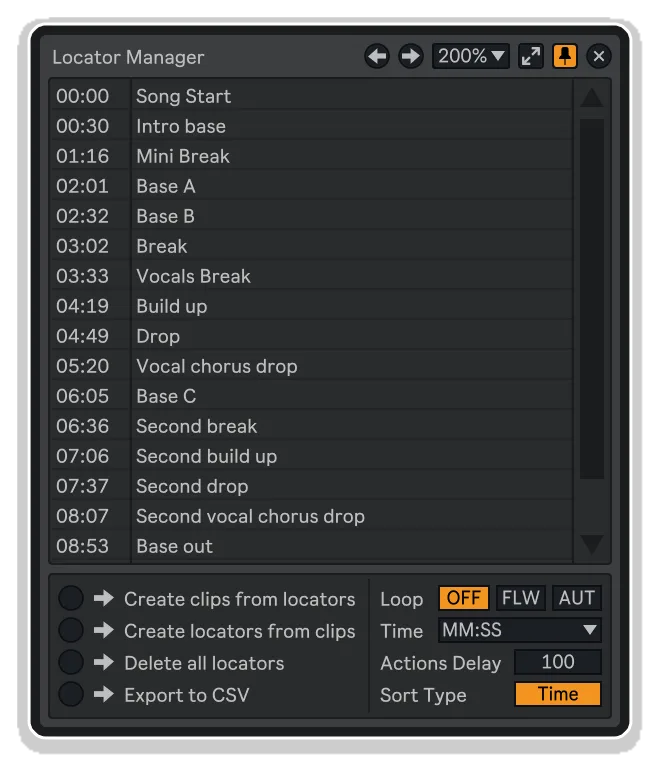
Locator Manager by KILLIHU
THE LOCATORS BROWSER—FINALLY VISIBLE, INSTANTLY ACCESSIBLE
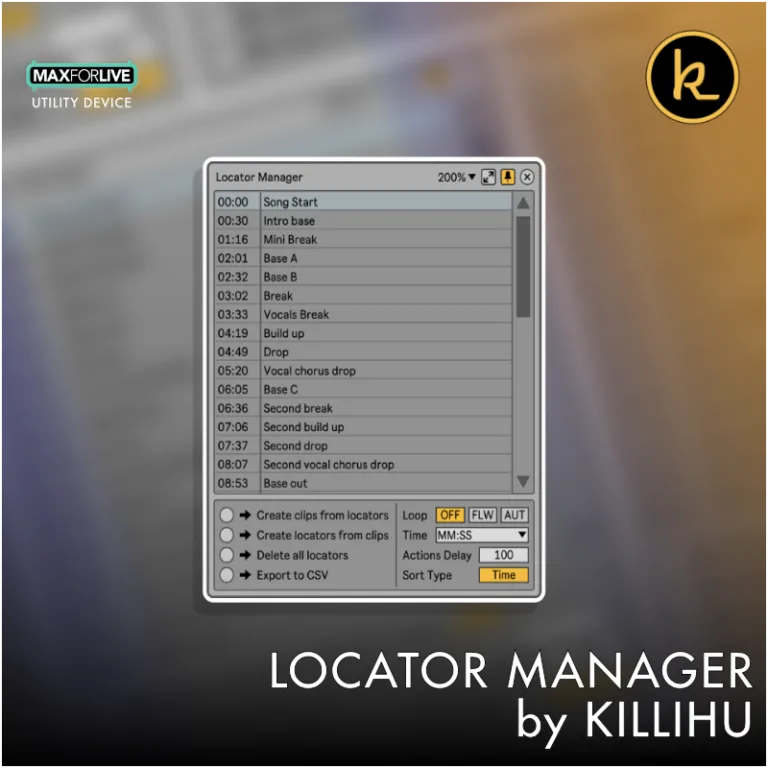
Tired of losing track of locators in dense Ableton Live arrangements? Locator Manager by killihu gives you a real-time floating window that displays every marker in your project—updated live as you work.
Navigate instantly, trigger via MIDI, set intelligent loop regions, and convert between clips and locators with surgical precision. Perfect for film scoring, DJ sets, and complex production workflows.
Inside you’ll find:
- Real-time floating locator browser with automatic updates
- One-click navigation to any timeline position
- Three intelligent loop modes: Off, Follow, and Auto-size
- MIDI note and CC triggering for remote control
- Bidirectional locator-to-clip and clip-to-locator conversion
- Multiple time display formats (bars, beats, minutes, hours, milliseconds)
- Sort by time or name with flexible zoom levels
- CSV export for documentation and batch operations
- Delete all locators with one click
- Always-on-top docking and keyboard-mappable visibility toggle
- Resizable, customizable floating interface
- Complete PDF reference manual included
Reclaim control of your arrangement timeline and make locators finally work the way they should.
USER GUIDE: Locator Manager 1.3
Locator Manager by KILLIHU
THE LOCATORS BROWSER—FINALLY VISIBLE, INSTANTLY ACCESSIBLE
Tired of losing track of locators in dense Ableton Live arrangements? Locator Manager by killihu gives you a real-time floating window that displays every marker in your project—updated live as you work.
Navigate instantly, trigger via MIDI, set intelligent loop regions, and convert between clips and locators with surgical precision. Perfect for film scoring, DJ sets, and complex production workflows.
Inside you’ll find:
- Real-time floating locator browser with automatic updates
- One-click navigation to any timeline position
- Three intelligent loop modes: Off, Follow, and Auto-size
- MIDI note and CC triggering for remote control
- Bidirectional locator-to-clip and clip-to-locator conversion
- Multiple time display formats (bars, beats, minutes, hours, milliseconds)
- Sort by time or name with flexible zoom levels
- CSV export for documentation and batch operations
- Delete all locators with one click
- Always-on-top docking and keyboard-mappable visibility toggle
- Resizable, customizable floating interface
- Complete PDF reference manual included
Reclaim control of your arrangement timeline and make locators finally work the way they should.
USER GUIDE: Locator Manager 1.3
Additional information
| MaxforLive | Control Devices |
|---|---|
| Ableton Live Compatibility | Ableton Live 11 Standard with MaxforLive, Ableton Live 11 Suite, Ableton Live 12 Standard with MaxforLive, Ableton Live 12 Suite |
| Min. Requirements | Ableton Live 11 Standard with MaxforLive Installed or Ableton Live 11 Suite |
| OS | Mac, Windows |

Product reviews
Write a review
No reviews yet. Be the first to review this product.
Locator Manager by KILLIHU
Overview & Inspiration
Managing locators in Ableton Live shouldn’t feel like navigating a maze. Whether you’re scoring film cues, building intricate DJ sets, or simply organizing complex arrangements, keeping track of timeline markers becomes a workflow bottleneck.
Locator Manager by killihu transforms your locator workflow with a sleek floating window that displays every marker in your project—updated in real-time. No more blind scrolling through the arrangement. No more hidden markers buried in dense timelines. Just instant visibility and precision control over your project structure.
This MaxforLive utility brings professional timeline navigation to Ableton Live, putting your entire project roadmap at your fingertips.
Features & Highlights
Real-Time Floating Locator Browser – A dedicated, resizable floating window displays all your locators, automatically updating as you add, rename, move, or delete markers anywhere in your project.
Instant Navigation & Looping – Click any locator to jump directly to that position in your arrangement. Set loop regions to follow locator positions with three intelligent modes: Off, Follow (fixed length), or Auto (automatically sized to next locator).
MIDI Triggering – Assign MIDI notes or CC messages to trigger locators remotely, perfect for live performance setups and hands-free arrangement navigation during recording sessions.
Locator-to-Clip Conversion – Generate MIDI clips at locator positions (with names preserved in Live 12), making it simple to transfer project structure between sessions. Reverse the process to create locators from clip positions on any track.
Flexible Time Display – View locator positions in multiple formats: bars/beats, minutes/seconds, hours/minutes, or any combination with millisecond precision—whatever matches your workflow.
Customizable Sorting & Organization – Sort locators by time or name (alphabetically). Adjust zoom levels and choose between two window sizes to match your screen real estate needs.
CSV Export & Batch Operations – Export your complete locator list to CSV for documentation or external editing. Delete all locators with one click, or use the actions delay parameter to fine-tune operation timing for complex projects.
Always-On-Top Docking – Keep the locator window visible above other windows, ensuring your timeline roadmap is always accessible without desktop juggling.
Mappable Show/Hide Button – Assign a keyboard shortcut to toggle the floating window instantly, streamlining your navigation workflow even further.
How to Use
Drop Locator Manager onto any track in your Live set. Click the Show/Hide button on the device rack to open the floating locator browser. Your project’s locators will appear in the window, automatically updating as you work.
Click any locator in the list to jump to that timeline position. Use the Loop Mode buttons to control how the arrangement loop behaves when navigating: set it to Auto for automatic loop sizing between markers, Follow to maintain your current loop length, or Off to disable loop movement entirely.
For MIDI control, configure your MIDI input source and choose between Note or CC triggering modes. Assign starting notes or CC numbers to correspond with your locator list order. Use the Actions menu to create clips from locators (perfect for transferring structure to other projects), generate locators from existing clips, delete all markers at once, or export your locator list to CSV format.
Customize the time display format to match your working style, sort by time or name, and adjust zoom levels as needed. The window can be docked on top of other applications for permanent visibility.
Ideal For
- Film composers and sync artists managing complex cue sheets
- DJ/live performers building structured sets with precise transitions
- Producers working on long-form arrangements with multiple sections
- Session musicians who need quick navigation during recording
- Sound designers organizing layered soundscapes and ambient pieces
- Anyone frustrated with Ableton’s native locator visibility limitations
What’s Included
- Locator Manager MaxforLive device (.amxd)
- Complete PDF reference manual
- Real-time floating locator browser with auto-update
- MIDI note and CC triggering capability
- Locator-to-clip and clip-to-locator conversion tools
- CSV export functionality
- Multiple time display formats
- Keyboard-mappable show/hide control
Requirements
- Ableton Live 11 Standard (with MaxforLive) or Ableton Live 11 Suite or higher
- Ableton Live 12 Standard (with MaxforLive) or Ableton Live 12 Suite for full locator naming support
- MaxforLive 8+
- Compatible with both Mac and Windows
Explore More
Device Navigator | Master Pitch Pro | Sound Browser | Notes-Ki | View All killihu Products
Frequently Asked Questions
A: Locator Manager is a MaxforLive device developed by Killihu that enhances navigation and workflow in Ableton Live by providing advanced locator management features.
A: To use Locator Manager, you’ll need:
- Ableton Live 11, or 12 (Standard with MaxforLive or Suite)
- Operating System: macOS or Windows
A: MaxforLive is a platform that allows users to build devices that extend the functionality of Ableton Live. It comes bundled with Live Suite or can be purchased separately for Live Standard via your Ableton.com account.
A: You can explore other products by Killihu here:
https://isotonikstudios.com/product-category/isotonik-collective/killihu/
Important Information
v1.3.1 Bugfixes:
– Previously, when creating locators from unnamed clips,
v1.3 New features and improvements:
– Added two mappable buttons to select the previous or next locator to the one currently selected in the floating window list.
– It is now possible to maintain the position of the floating window on the screen, so that it does not return to its default position when reopening projects.
– It is now possible to set the zoom of the floating window to a value less than 100%.
– Updated PDF Manual.
v1.2 New features and improvements:
– Modified GUI to adapt to the new rack design in Live version 12.2, does not change the operation of the device.
V1.1 – Released April 2025
v1.1 New features and improvements:
– Now when triggering the action “Create locators from clips”, the names of the clips are assigned to the locators (Live 12 only).
– Now the device can manage thousands of locators.
– Added option to sort the locator list by name.
– Added Bars as a time display unit.
– Added an action to export the locator list to a text file. Formatted with tabs for use as a CSV file.
– Added MIDI control. Locators can be selected using MIDI notes and MIDI CCs.
– Added additional size to the floating window to display a longer list.
– Updated PDF Manual.
v1.1 Bugfixes:
– Fixed an issue that sometimes caused the list to scroll horizontally on Mac OS when using a trackpad.
- It is now possible to set the Actions Delay control to 0. If you have a low latency audio interface, the delete locators and create locators actions can be executed instantly or with a time close to 0 ms.
v1.0.1 Bugfixes:
- Fixed a bug that in some projects caused the locators to not be displayed in the correct order.
- Fixed a bug that caused the display in MM:SS to be incorrect in projects longer than an hour.
Our Products are generally provided as Zip file downloads which in all cases will need to be extracted and saved to your hard drive prior to installation. Details on the different file type provided and what to do with them are below.
.alp Files – These are Ableton Live Packs and will either install directly into the Packs Section of the browser of Ableton Live or ask you to save them to your hard drive. For packs that install to the library, when you double click on them you will see a pop up window asking you to confirm that installation is ok as the files are described as “Legacy”. This is fine and you are ok to proceed, the packs are created using the format for an earlier version of Live and so remain compatible with the current version.
.amxd files – These are individual MaxforLive Devices and can be stored anywhere on your hard drive. We’d advise creating a folder for them and then adding that folder as a location within the Places section of Lives Browser.
END-USER LICENSE AGREEMENT FOR ISOTONIK STUDIOS SOFTWARE PRODUCTS.
PLEASE READ THE TERMS AND CONDITIONS OF THIS LICENSE AGREEMENT CAREFULLY BEFORE CONTINUING WITH THIS PROGRAM INSTALL.
This End-User License Agreement (referred to as “EULA”) is a legal agreement between an individual or a single entity (referred to as “LICENSEE”) and Isotonik Studios for the Isotonik Studios software product(s) which may include associated software components, media, printed materials, and “online” or electronic documentation (referred to as “SOFTWARE PRODUCT”). By installing, copying, or otherwise using the SOFTWARE PRODUCT, the LICENSEE agrees to be bound by the terms of this EULA.
This EULA represents the entire agreement concerning the program between the LICENSEE and Isotonik Studios and it supersedes any prior proposal, representation, or understanding between the parties. If the LICENSEE does not agree to the terms of this EULA, the LICENSEE should not install or use the SOFTWARE PRODUCT.
The SOFTWARE PRODUCT is protected by copyright laws and international copyright treaties, as well as other intellectual property laws and treaties. The SOFTWARE PRODUCT is licensed, not sold.
- GRANT OF LICENSE.
The SOFTWARE PRODUCT is licensed as follows:
(a) Installation and Use. Providing that the LICENSEE has paid any applicable license fees, Isotonik Studios grants the LICENSEE the right to install and use copies of the SOFTWARE PRODUCT on up to two computers in the LICENSEE’s possession that are running a validly licensed copy of the operating system for which the SOFTWARE PRODUCT was designed [e.g., Windows 10, macOS]. The computer(s) must be owned by the LICENSEE.
(b) Backup Copies. The LICENSEE may also make copies of the SOFTWARE PRODUCT as may be necessary for backup and archival purposes.
- DESCRIPTION OF OTHER RIGHTS AND LIMITATIONS.
(a) Maintenance of Copyright Notices. The LICENSEE must not remove or alter any copyright notices on any and all copies of the SOFTWARE PRODUCT.
(b) Distribution. The LICENSEE may not distribute registered copies of the SOFTWARE PRODUCT to third parties.
(c) Prohibition on Reverse Engineering, Decompilation, and Disassembly. The LICENSEE may not reverse engineer, decompile, or disassemble the SOFTWARE PRODUCT, except and only to the extent that such activity is expressly permitted by applicable law notwithstanding this limitation.
(d) Rental. The LICENSEE may not rent, lease, or lend the SOFTWARE PRODUCT.
(e) License transfer The LICENSEE may not transfer their license to the SOFTWARE PRODUCT to any third party. Any attempt to do so will be considered a violation of this EULA.
(f) Support Services. Isotonik Studios may provide the LICENSEE with support services related to the SOFTWARE PRODUCT for a period of 12 months following the date of purchase. Any supplemental software code provided to the LICENSEE as part of the Support Services shall be considered part of the SOFTWARE PRODUCT and subject to the terms and conditions of this EULA.
(g) Compliance with Applicable Laws. The LICENSEE must comply with all applicable laws regarding use of the SOFTWARE PRODUCT.
- TERMINATION Without prejudice to any other rights, Isotonik Studios may terminate this EULA if the LICENSEE fails to comply with the terms and conditions of this EULA. In such event, the LICENSEE must destroy all copies of the SOFTWARE PRODUCT in the LICENSEE’s possession.
- COPYRIGHT All title, including but not limited to copyrights, in and to the SOFTWARE PRODUCT and any copies thereof are owned by Isotonik Studios or its suppliers. All title and intellectual property rights in and to the content which may be accessed through use of the SOFTWARE PRODUCT is the property of the respective content owner and may be protected by applicable copyright or other intellectual property laws and treaties. This EULA grants the LICENSEE no rights to use such content. All rights not expressly granted are reserved by Isotonik Studios.
- NO WARRANTIES Isotonik Studios expressly disclaims any warranty for the SOFTWARE PRODUCT. The SOFTWARE PRODUCT is provided ‘As Is’ without any express or implied warranty of any kind, including but not limited to any warranties of merchantability, noninfringement, or fitness of a particular purpose. Isotonik Studios does not warrant or assume responsibility for the accuracy or completeness of any information, text, graphics, links or other items contained within the SOFTWARE PRODUCT. Isotonik Studios makes no warranties respecting any harm that may be caused by the transmission of a computer virus, worm, time bomb, logic bomb, or other such computer program. Isotonik Studios further expressly disclaims any warranty or representation to the LICENSEE or to any third party.
- LIMITATION OF LIABILITY In no event shall Isotonik Studios be liable for any damages (including, without limitation, lost profits, business interruption, or lost information) arising out of the LICENSEE’s use of or inability to use the SOFTWARE PRODUCT, even if Isotonik Studios has been advised of the possibility of such damages. In no event will Isotonik Studios be liable for loss of data or for indirect, special, incidental, consequential (including lost profit), or other damages based in contract, tort or otherwise. Isotonik Studios shall have no liability with respect to the content of the SOFTWARE PRODUCT or any part thereof, including but not limited to errors or omissions contained therein, libel, infringements of rights of publicity, privacy, trademark rights, business interruption, personal injury, loss of privacy, moral rights or the disclosure of confidential information.