
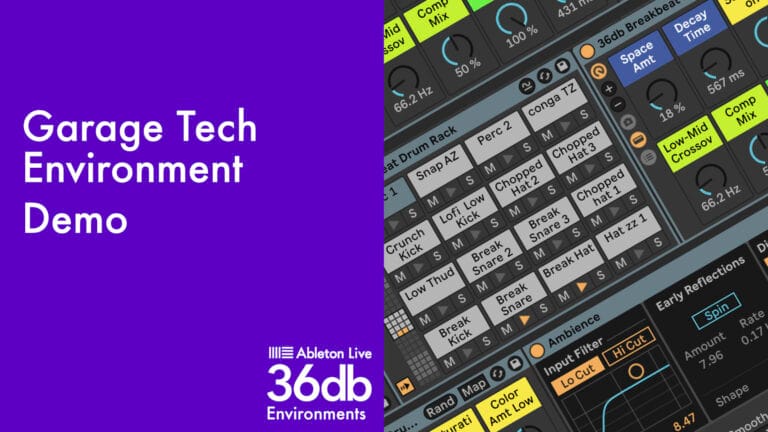
The Garage Tech Environment is designed for use with Ableton Live, and you will need a version that supports Ableton’s native Instrument and Effects Racks. Live 10 or higher is recommended for full compatibility.
Garage Tech Environment by 36db
ESSENTIAL TOOLS FOR CRAFTING CLUB-READY TRACKS WITH ABLETON LIVE
TRIPLE PACK SAVINGS: Select any three or more 36db products (Environments, Elements, or Artist Series Packs) and save 20% automatically at checkout!
36db’s Garage Tech Environment for Ableton Live™ is your go-to toolkit for crafting club-ready tracks inspired by Mark Knight, East End Dubs, Pangaea, Eats Everything, Skream, and Apollonia.
With 140 presets mapped to 16 macros for Instrument & Effects Racks, this template uses only Ableton Live™ native plug-ins. It includes fully functioning instruments, Drum Racks™, FX chains, channel strips, and MIDI, giving you endless ways to deconstruct and remix. Plus, it’s PUSH 3 ready, making it perfect for live performances, DJ gigs, or studio sessions, offering seamless integration and versatility for both beginners and pros.
Check out the table below for all the features, and for more detail watch the Walkthrough videos.
USER GUIDE: 36db Garage Tech Environment Live 11 Content
Buying for someone?Send a gift card →
Additional information
| Controllers | Ableton Push THREE Controller, Ableton Push THREE Standalone, Ableton Push TWO |
|---|---|
| Ableton Live Compatibility | Ableton Live 11 Suite, Ableton Live 12 Suite |
| Min. Requirements | Ableton Live 11 Suite |
| OS | Mac, Windows |
PRICE: £35.00
Product reviews
5 out of 5
1 review
How item rating is calculated
We show the average based on reviews. Only genuine reviews are displayed.
Sort by
April 7, 2025
This reviewer bought this product from our store.
Another great enviroment by 36dB Live. Full of presets, intruments, clips and samples to create music. Love it!
Garage Tech Environment by 36db
How to use this environment!
Focus On The Music
When trying to tap into your creative side, it can be tough to find the perfect mix of sounds. That’s where 36db’s Environments comes in. With our top-of-the-line instruments and effects racks, you can focus on the music and let your creative ideas flow freely.
Intuitive Controls
We have meticulously mapped the 36db macros to ensure maximum control and a hands-on experience with every Instrument & Effects Rack. This allows your musical ideas to come to life quickly, helping you maintain the desired vibe.
Stunning Effects
Discover the unparalleled style and texture of each 36db Effects Rack, elevating your sounds and bringing your tracks to life. Each Effects Rack includes 10 presets to enhance your sounds.
Tips and Tricks
Each of our Instrument Racks contain tips and insights. Open the info tab at the bottom left of the clip viewer and highlight the rack.
There are colour coded tutorials on what each of the macros will achieve when changed. By flicking through the presets you’ll find a host of new sounds and effects textures that instantly change the instrument or effect. You can also try using the randomize button at the top right of the rack. You’ll get some impressive results, or a cool new starting point to dial in and make your own preset snapshot. This will be saved with the rack within your Environment, or within the Rack preset when you save it to your browser.
GARAGE TECH ENVIRONMENT CONTENTS
- 4 x Live sets. Full Environment, Drum Rack™ Channel & Drum tracks.
- 50 x Custom Instrument Rack presets.
- 80 x Custom Effects Racks presets.
- 1 x Custom Drum Rack™ featuring 16 custom drum sounds & percussive.
- Drums as individual tracks with MIDI.
- 2 x Custom Modular Percussion Drum Racks™ featuring 32 samples from our Modular Synth.
- 1 x Sliced instrument with Modular S&H Samples.
- 5 x Custom synth Instrument Racks using Ableton’s Analog™.
- 1 x EFX Instrument Racks using Ableton’s Analog™.
- 2 x Custom vocal samples.
- 23 x MIDI Clips.
- 4 x Custom Effects Racks.
- 4 x Return Channels.
- 1 x Custom Drum Channel Strips with 10 Custom Presets.
- 1 x Master Channel Strip.
- Full Presets for each Instrument Rack™ and Effect Rack.
Frequently Asked Questions
No third-party plugins are required. The Garage Tech Environment is built entirely within Ableton Live’s native devices, so everything works straight out of the box.
It is specifically designed for Garage, Tech House, and Underground Club music, drawing inspiration from artists like Mark Knight, Skream, Eats Everything, and East End Dubs. If you are crafting peak-time club tracks or late-night grooves, this is built for that.
The pack includes a collection of Instrument Racks and Effects Racks, all with meticulously mapped 36db macros for hands-on control. Each Effects Rack comes loaded with 10 presets, and the pack also includes tips and tricks to help you get the most out of every sound.
Once downloaded, you simply drag the included files into your Ableton Live User Library or place them in a location you can browse from within Live’s browser. From there, everything is ready to load and use immediately.
Absolutely. The macros are designed to give you immediate, intuitive control without needing to dive deep into device chains. The included tips and tricks also help you get up and running quickly, regardless of your experience level.
Yes, if you select any three or more 36db products from the Environments, Elements, or Artist Series ranges, a 20% discount is applied automatically at checkout.
Important Information
V1.0.0 – Initial Release – 2025
Our Products are generally provided as Zip file downloads which in all cases will need to be extracted and saved to your hard drive prior to installation. Details on the different file type provided and what to do with them are below.
.alp Files: These are Ableton Live Packs and will either install directly into the Packs Section of the browser of Ableton Live or ask you to save them to your hard drive. For packs that install to the library, when you double click on them you will see a pop up window asking you to confirm that installation is ok as the files are described as “Legacy”. This is fine and you are ok to proceed, the packs are created using the format for an earlier version of Live and so remain compatible with the current version.
Royalty-Free Preset, Patch & Sample Pack License Agreement
This License Agreement ("Agreement") is made between Isotonik Studios Ltd, a private limited company incorporated in England & Wales (Company No. 10701748), with its registered office at 186 West Street, Dunstable, United Kingdom, LU6 1NX ("Licensor"), and the individual or entity ("Licensee") who purchases, downloads, or otherwise acquires the preset, patch or sample pack (the "Product").
By downloading, installing, or using the Product, the Licensee agrees to the terms set out below. If the Licensee does not agree to these terms, they must not use the Product.
1. Grant of License
The Licensor grants the Licensee a non-exclusive, non-transferable, worldwide, royalty-free license to use the presets, patches, samples, loops, and related content contained in the Product (the "Content") in original musical compositions, performances, and productions for both commercial and non-commercial purposes.
2. Permitted Uses
The Licensee may:
- Use the Content in combination with other sounds in music productions, including albums, singles, film scores, TV shows, radio broadcasts, podcasts, video games, live performances, and advertising.
- Modify, process, and combine the Content with other sounds to create derivative works.
- Distribute such derivative works in physical or digital formats without owing further royalties to the Licensor.
3. Restrictions
The Licensee may not:
- Resell, redistribute, sublicense, rent, lease, lend, share, or make the raw Content (in whole or in part) available as-is or in isolation, whether for free or for payment, in any way that competes with the original Product.
- Use the Content in a way that allows others to extract or use the sounds as standalone files (e.g., in sample libraries, preset or patch banks, sound packs, or virtual instruments).
- Claim ownership of the Content in its unmodified form.
4. Ownership
All rights, title, and interest in and to the Content remain the exclusive property of the Licensor. This Agreement grants a license to use the Content but does not transfer ownership.
5. Termination
This License is effective until terminated. It will terminate automatically if the Licensee breaches any term of this Agreement. Upon termination, the Licensee must cease all use of the Content in new works, but may continue to use works already created in compliance with this Agreement.
6. No Warranty
The Content is provided "as is" without warranty of any kind, whether express or implied. The Licensor is not liable for any damages arising from the use or inability to use the Content.
7. Governing Law
This Agreement shall be governed by and construed in accordance with the laws of England and Wales, and any disputes shall be subject to the exclusive jurisdiction of the courts of England and Wales.
© 2025 Isotonik Studios Ltd. All Rights Reserved.
More from 36db
Frequently Bought Together
Black Week: 30% off with code BLACK2026
 Synth Patches
 Synth Patches
 Max for Live
- This item: Garage Tech Environment by 36db£35.00
- Tech House Environment by 36db£35.00
- Progressive House Environment by 36db£35.00
Total price: £105.00 £73.50