



Neuraloot by Sonus Dept.
NEURAL NETWORK MAXFORLIVE DEVICES FOR ABLETON LIVE
NEURALOOT is a suite of Max for Live devices built around the neural oscillator, which is a wavetable oscillator whose shape is generated by a neural network (the decoder section of an autoencoder, if you want to get more technical).
This in house neural network was trained on thousands of waveforms, and it learnt how to encode in the most exact way any shape in just eight parameters, that make up the latent space of the network. Each combination of these parameters is able to reconstruct a waveform, and changing gradually one or more components of the latent space lets you seamlessly morph a shape into another one.
The complexity and the properties of the generated shapes makes them perfect to be used as modulators, sequencers and drone generators. NEURALOOT takes advantage of the neural oscillator to create all this nice stuff.
USER GUIDE: Neuraloot Manual
Neuraloot by Sonus Dept.
NEURAL NETWORK MAXFORLIVE DEVICES FOR ABLETON LIVE
NEURALOOT is a suite of Max for Live devices built around the neural oscillator, which is a wavetable oscillator whose shape is generated by a neural network (the decoder section of an autoencoder, if you want to get more technical).
This in house neural network was trained on thousands of waveforms, and it learnt how to encode in the most exact way any shape in just eight parameters, that make up the latent space of the network. Each combination of these parameters is able to reconstruct a waveform, and changing gradually one or more components of the latent space lets you seamlessly morph a shape into another one.
The complexity and the properties of the generated shapes makes them perfect to be used as modulators, sequencers and drone generators. NEURALOOT takes advantage of the neural oscillator to create all this nice stuff.
USER GUIDE: Neuraloot Manual
Additional information
| MaxforLive | Audio Devices, Control Devices, Instruments |
|---|---|
| Ableton Live Compatibility | Ableton Live 11 Standard with MaxforLive, Ableton Live 11 Suite, Ableton Live 12 Standard with MaxforLive, Ableton Live 12 Suite |
PRICE: £23.00



Product reviews
No reviews yet. Be the first to review this product.
Neuraloot by Sonus Dept.
NEURALFO
NeuraLFO uses the neural oscillator to modulate up to eight different parameters, that can belong to any Ableton Live device or track. Mapping a control to a slot of NeuraLFO is as easy as clicking on the map button and then clicking on the control you want to modulate.
The first part of the device, that you will also encounter, with some variations, in the following modules, allows you to modulate the waveform and the resulting signal, so that it can evolve over time. A diverse and complex signal that becomes, if you want, even more complex and articulated: is there something more effective for modulations that are anything butdull?
The visual feedback lets you immediately see how the waveform and the resulting signal are changing.
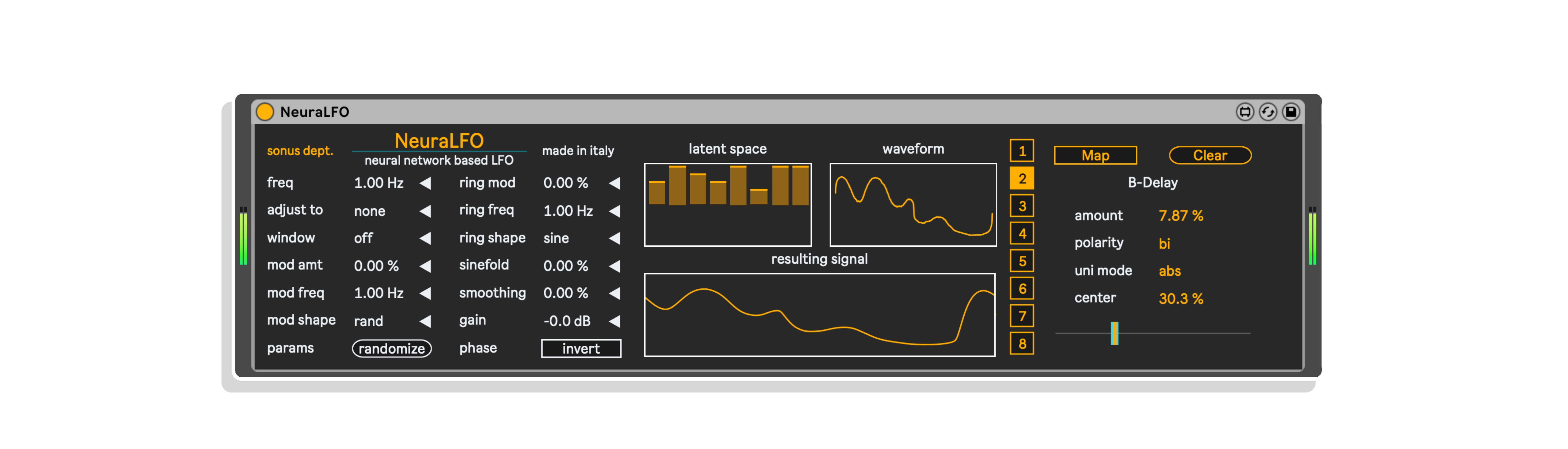
The first part lets you choose how to build, modulate and transform the neural signal. Some explanations for the more unusual terms: adjust to can sync the frequency of the wave to a time division (e.g. 1/16), in the modulation shape “rand sine” is a herd of sines whose phase is modulated by random signals, sinefold is a Chebyshev distortion, and smoothing is a lowpass filter that make the signal less jagged
The visualization section lets you manually change the eight parameters of the latent space and see how this and the modulations of the first section affect the resulting waveform and the output signal, that will be used to modulate the chosen parameters.
The last part is more self-explanatory. Click on map and then on the parameter you want to modulate to control it by the LFO. The polarity of the signal can be bipolar or unipolar (and in this case positive or negative). The unipolar mode lets you choose how to transform the signal into an unipolar one: “abs” does it by calculating the absolute value of the signal, “offset” by mapping [-1, 1] interval to [0, 1], so when the signal is 0 the LFO is at 50% of its peak.
NEURALSCORE & NEURALSCORE+
Neuralscore is a MIDI sequencer that uses the position of the neural oscillator at a given time step to determine which note to play, chosen among the ones of the scale you set. In the updated version of Neuraloot, Neuralscore+ has been added, featuring three neural waves, the first that still controls the pitch, the second controlling the actual chance of a note to be played and the third controlling the velocity of the note.
This device features four different sequencer lanes, and each one can have a different scale, extension, note velocity, root note, note length, bar length and number of steps. Regarding the steps, they can range from 2 to 32, but they will be always subdivisions of the number of bars (1 to 8) you chose. This different take on step sequencing allows you to use weird and unusual meters, but that will be always in sync with your song.
Another feature is the possibility to define your own scale, specifying the distance in semitones from the root for each grade. This is not only cool for melodies, but also to control drum machines the way you want.
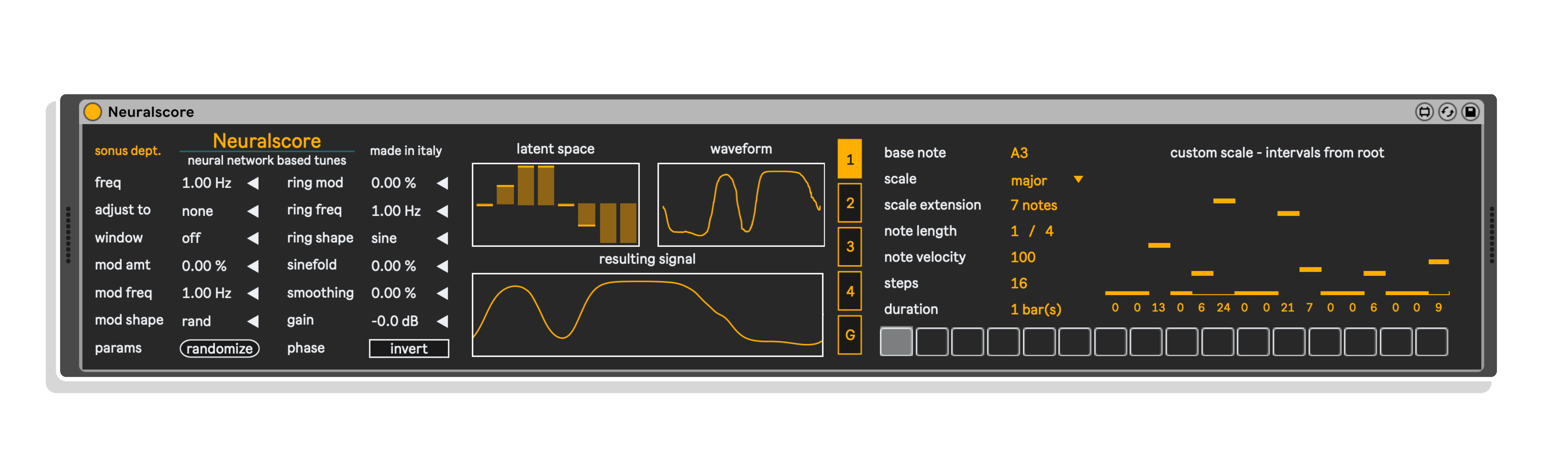
The second part features four sequencer lanes, each one with a number of steps that ranges from 2 to 32, and that can be spread in up to eight bars.
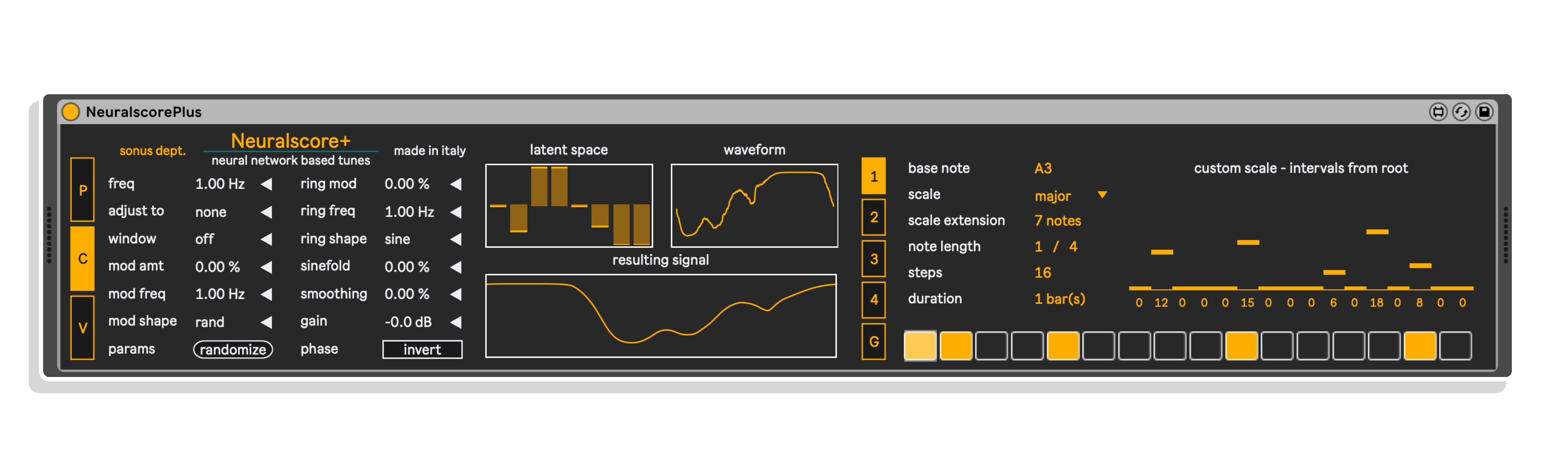
The parameters are pretty self-explanatory. The custom scale allows to specify your own scale, by selecting the interval in semitones of each grade from the root. Remember to choose “custom” from scale list to use your custom scale.
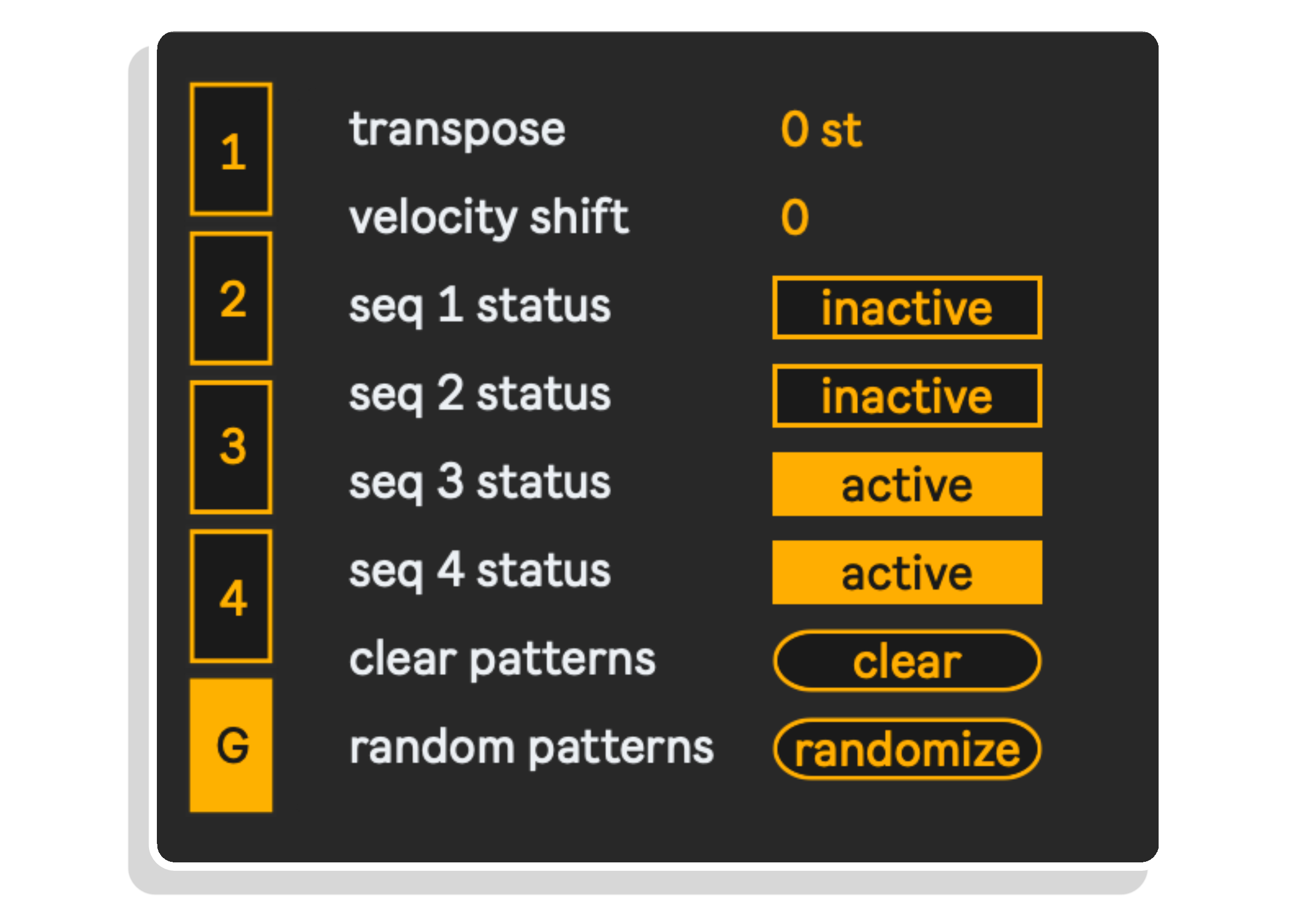
The G (read global) part of the second section allows to specify some global settings: transpose and velocity shift, i.e. a number (which can also be negative) to sum or subtract to all notes’ velocities.
Then you have handy switches to turn on and off the four lanes, a button to clear all patterns at once and another one to randomize the patterns.
The first section has the controls to edit the parameters of the three neural waves: P controls the pitch, C the chance of the note to be played, V the velocity. Chance threshold and velocity range can be set in the G tab of the second section
The G (read global) part of the second section allows to specify some global settings: transpose and velocity shift, i.e. a number (which can also be negative) to sum or subtract to all notes’ velocities.
Then you have switches to turn on and off the four lanes, setters for chance threshold, sliders for velocity ranges and buttons to clear or randomize patterns and parameters.
The second part features four sequencer lanes, each one with a number of steps that ranges from 2 to 32, and that can be spread in up to eight bars.
The parameters are pretty self-explanatory. The custom scale allows to specify your own scale, by selecting the interval in semitones of each grade from the root. Remember to choose “custom” from scale list to use your custom scale.
NEURALSCAPE
Neuralscape is a drone generator. If you already know Sonus Dept.’s Max for Live bundles, you know that we like to include these compact devices to create bizarre and evolving textures, that are ready to be sent to a reverb or other nice creative effects to obtain dense synthetic soundscapes. Neuralscape uses the neural oscillator output to do different things: it controls the frequencies of a 100 oscillator bank, the playback rate of a sample and some parameters of the effects. This way, you can have jagged and ever changing textures, that you can leave it as it is or you can further treat with some effects. We recommend a convolution reverb, a distortion or, even better, the device Babel, included in our M4L bundle Æthernity!
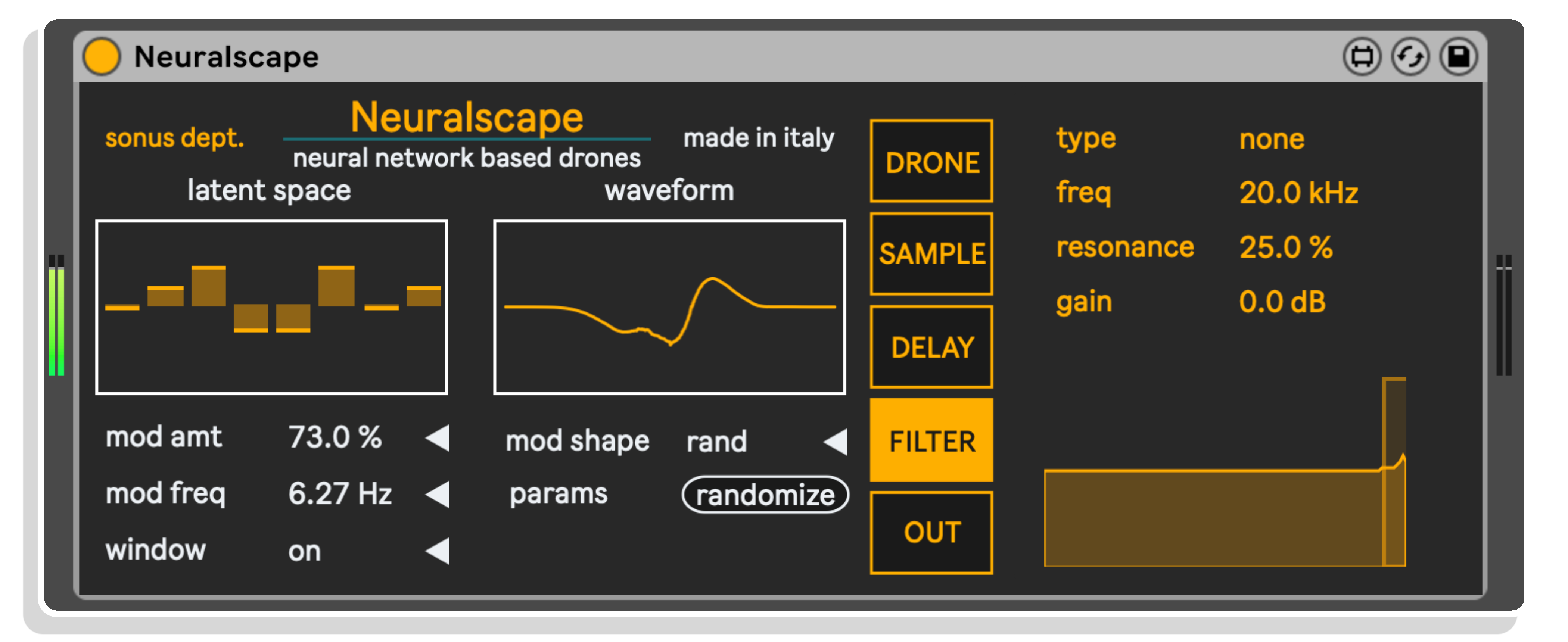
The first generator called Drone is an oscillator bank with 100 oscillators, with their frequencies controlled by the shape of the neural wave and by the options of the dedicated tab.
The second generator is a sample player, with the playing rate controlled by the shape of the neural wave. You can load a sample with the dedicated button or by dragging it directly in the bottom part of the tab. With the reverse option you can choose when the sample should play backwards: only when values of the wave are negative, never or always.
The remaining tabs feature a stereo delay, with its delay times that can be modulated by a LFO, a filter and an output control, with a bonus ring modulator!
NEURALOSCILLATOR & NEURALOSCILLATORM
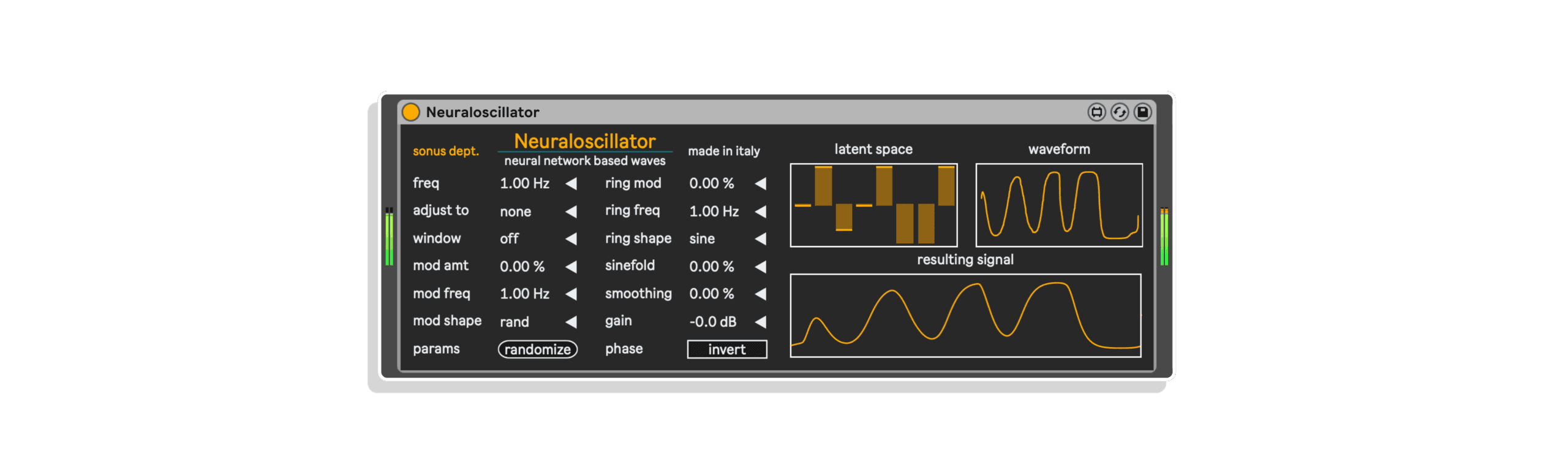
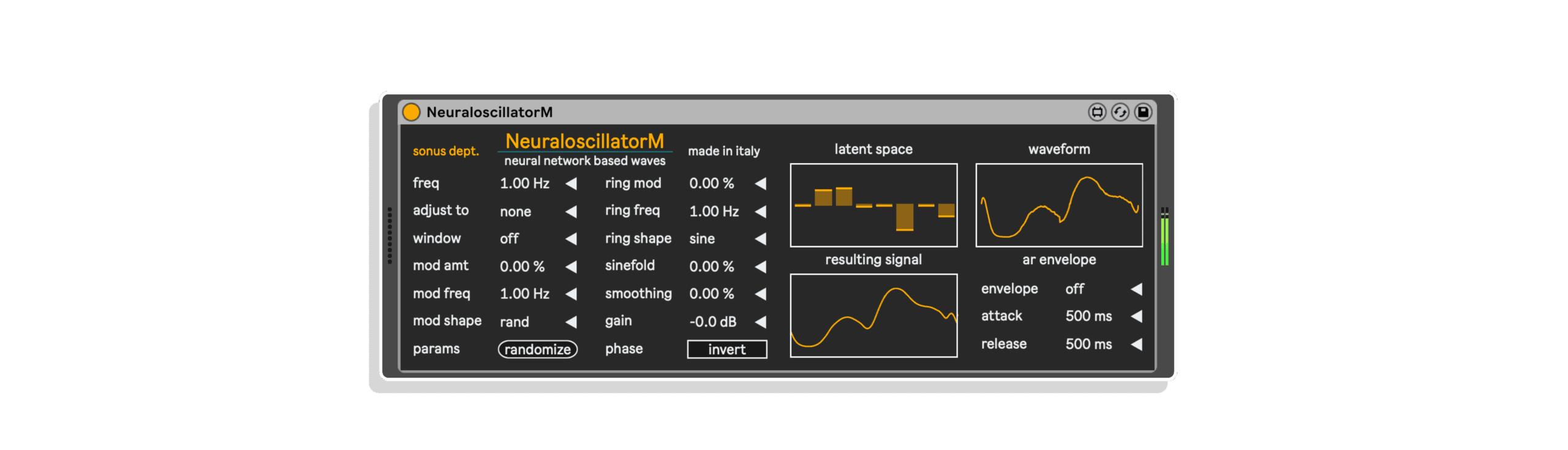
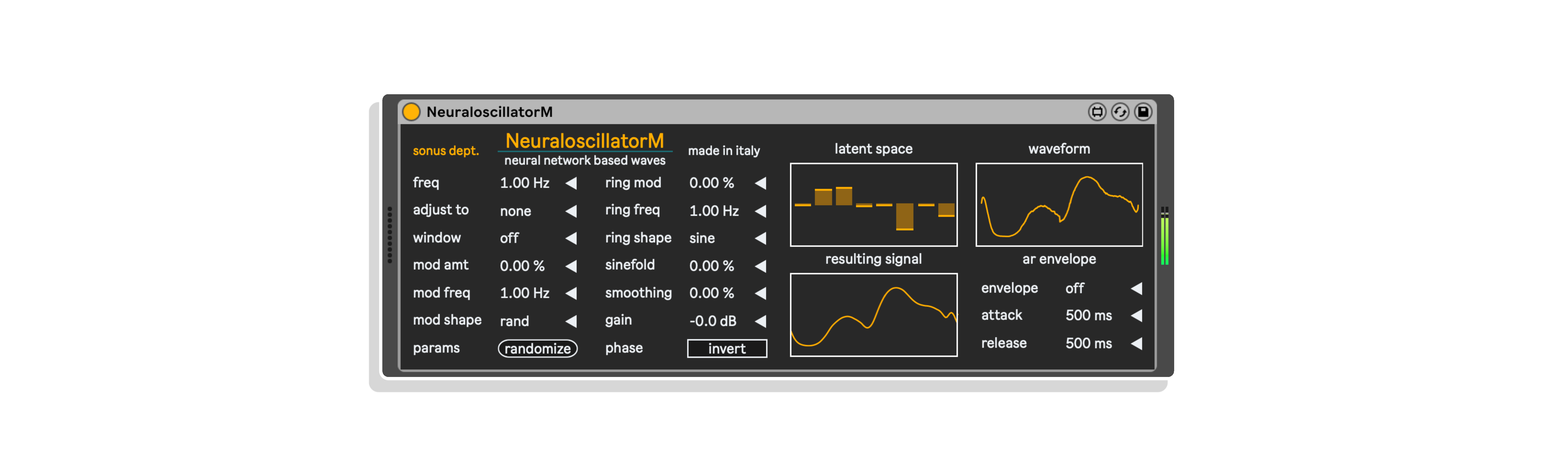
Neuraloscillator and NeuraloscillatorM are two (not only) utility modules, that generate the neural wave and output it as audio. This way, it can be further modified by any effect you like and then be used as modulator signal feeding the manipulated output to another utility module of this package, AnyMapper.
But this is only a part of the story! These modules have extended frequency range for the oscillator, so that it can be used as a (not so) classic sound signal. Try it with some reverberation, a glitch effect or anything else that comes to your mind: the neural oscillator can be the starting point of a whole world of timbres!
Is that all? No, because while Neuraloscillator acts as audio device, NeuraloscillatorM is an instrument device where the frequency of the neural oscillator can be controlled by MIDI notes, and it also has an optional basic envelope that turns this device in a minimal yet complete monophonic synthesizer. The first step for a complete neural synthesizer?
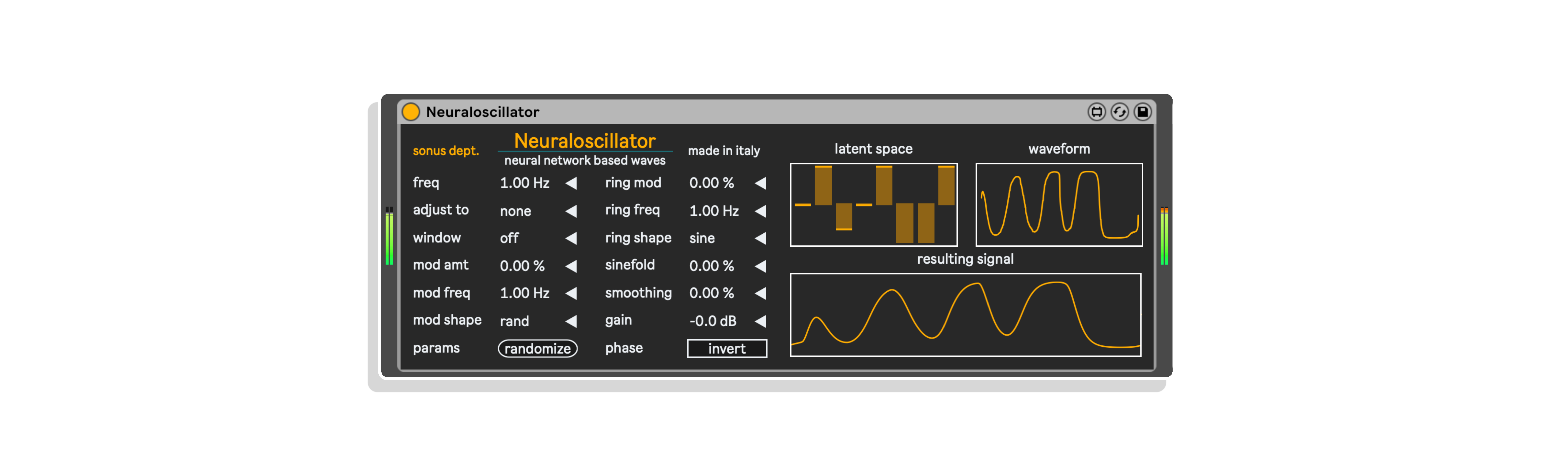
The two siblings one above the other. As explained before, Neuraloscillator is an effect device while NeuraloscillatorM is an instrument device. Other differences are the frequency range (up to 880 Hz for the former, up to 20 kHz for the latter) and the optional AR envelope in NeuraloscillatorM. When the envelope is turned off, the generation is continuous but its frequency can still be changed either manually or by sending a MIDI note (in addition, of course, to automating the parameter).
ANYMAPPER
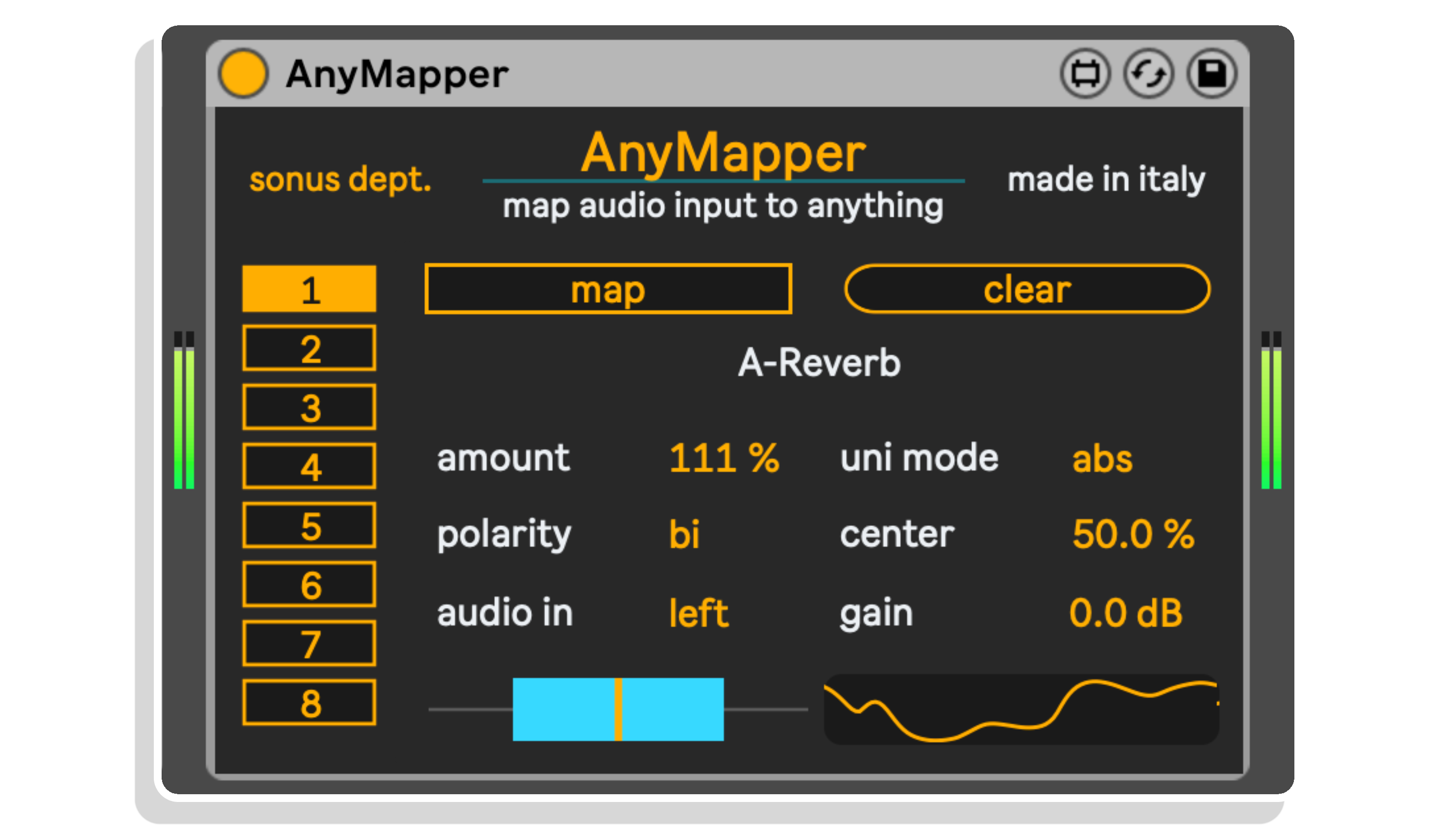
AnyMapper is another utility module that uses its audio input as modulation source for up to eight different parameters. Basically, it is the second part of NeuraLFO, and not only it allows manipulated signal from Neuraloscillator to be used as modulator, but it can use any audio signal to control any automatable parameter within Live.
The device is similar to the second half of NeuraLFO. Here you can also select which audio channel to use, with ring modulation between channels and mono mixing as additional options.
Moreover, for each slot you can adjust the gain of the incoming signal.
Frequently Asked Questions
Neuraloot is a suite of Max for Live devices built around a neural oscillator, a wavetable oscillator whose waveform shapes are generated by a neural network trained on thousands of waveforms. The suite includes NeuraLFO, which lets you modulate up to eight parameters across any Ableton Live device or track using these neural-generated waveforms.
Neuraloot requires Ableton Live with Max for Live, so you’ll need either Ableton Live Suite or a copy of Live Standard with a separate Max for Live licence. Check the product page for the minimum recommended versions to ensure full compatibility.
The neural oscillator uses the decoder section of an autoencoder, a type of neural network trained on thousands of waveforms, to generate its wavetable shapes. This means the waveforms it produces exist in a learned sonic space, giving you organic, complex shapes that go far beyond standard LFO waveforms.
Mapping is straightforward: click the map button in NeuraLFO, then click on any parameter in any Ableton Live device or track you want to modulate. You can assign up to eight different parameters per instance of the device.
The waveforms are designed to evolve dynamically over time, with built-in modulation controls that allow the shape and resulting signal to shift and develop throughout your session. Visual feedback is provided so you can see exactly how the waveform is changing in real time.
Absolutely. The neural oscillator generates complex, unpredictable waveforms that are well suited to both deep modulation duties and creative sound design applications. If you want modulations and textures that are anything but predictable, this is built for that purpose.
After purchase, download the device files from your Isotonik Studios account and drag them into your Ableton Live User Library or a folder of your choice. From there, you can load the devices directly onto any MIDI or audio track in your session.
Important Information
V1.0.0 – Initial Release – February 2024
Our Products are generally provided as Zip file downloads which in all cases will need to be extracted and saved to your hard drive prior to installation. Details on the different file type provided and what to do with them are below.
.alp Files – These are Ableton Live Packs and will either install directly into the Packs Section of the browser of Ableton Live or ask you to save them to your hard drive. For packs that install to the library, when you double click on them you will see a pop up window asking you to confirm that installation is ok as the files are described as “Legacy”. This is fine and you are ok to proceed, the packs are created using the format for an earlier version of Live and so remain compatible with the current version.
.amxd files – These are individual MaxforLive Devices and can be stored anywhere on your hard drive. We’d advise creating a folder for them and then adding that folder as a location within the Places section of Lives Browser.
END-USER LICENSE AGREEMENT FOR ISOTONIK STUDIOS SOFTWARE PRODUCTS.
PLEASE READ THE TERMS AND CONDITIONS OF THIS LICENSE AGREEMENT CAREFULLY BEFORE CONTINUING WITH THIS PROGRAM INSTALL.
This End-User License Agreement (referred to as “EULA”) is a legal agreement between an individual or a single entity (referred to as “LICENSEE”) and Isotonik Studios for the Isotonik Studios software product(s) which may include associated software components, media, printed materials, and “online” or electronic documentation (referred to as “SOFTWARE PRODUCT”). By installing, copying, or otherwise using the SOFTWARE PRODUCT, the LICENSEE agrees to be bound by the terms of this EULA.
This EULA represents the entire agreement concerning the program between the LICENSEE and Isotonik Studios and it supersedes any prior proposal, representation, or understanding between the parties. If the LICENSEE does not agree to the terms of this EULA, the LICENSEE should not install or use the SOFTWARE PRODUCT.
The SOFTWARE PRODUCT is protected by copyright laws and international copyright treaties, as well as other intellectual property laws and treaties. The SOFTWARE PRODUCT is licensed, not sold.
- GRANT OF LICENSE.
The SOFTWARE PRODUCT is licensed as follows:
(a) Installation and Use. Providing that the LICENSEE has paid any applicable license fees, Isotonik Studios grants the LICENSEE the right to install and use copies of the SOFTWARE PRODUCT on up to two computers in the LICENSEE’s possession that are running a validly licensed copy of the operating system for which the SOFTWARE PRODUCT was designed [e.g., Windows 10, macOS]. The computer(s) must be owned by the LICENSEE.
(b) Backup Copies. The LICENSEE may also make copies of the SOFTWARE PRODUCT as may be necessary for backup and archival purposes.
- DESCRIPTION OF OTHER RIGHTS AND LIMITATIONS.
(a) Maintenance of Copyright Notices. The LICENSEE must not remove or alter any copyright notices on any and all copies of the SOFTWARE PRODUCT.
(b) Distribution. The LICENSEE may not distribute registered copies of the SOFTWARE PRODUCT to third parties.
(c) Prohibition on Reverse Engineering, Decompilation, and Disassembly. The LICENSEE may not reverse engineer, decompile, or disassemble the SOFTWARE PRODUCT, except and only to the extent that such activity is expressly permitted by applicable law notwithstanding this limitation.
(d) Rental. The LICENSEE may not rent, lease, or lend the SOFTWARE PRODUCT.
(e) License transfer The LICENSEE may not transfer their license to the SOFTWARE PRODUCT to any third party. Any attempt to do so will be considered a violation of this EULA.
(f) Support Services. Isotonik Studios may provide the LICENSEE with support services related to the SOFTWARE PRODUCT for a period of 12 months following the date of purchase. Any supplemental software code provided to the LICENSEE as part of the Support Services shall be considered part of the SOFTWARE PRODUCT and subject to the terms and conditions of this EULA.
(g) Compliance with Applicable Laws. The LICENSEE must comply with all applicable laws regarding use of the SOFTWARE PRODUCT.
- TERMINATION Without prejudice to any other rights, Isotonik Studios may terminate this EULA if the LICENSEE fails to comply with the terms and conditions of this EULA. In such event, the LICENSEE must destroy all copies of the SOFTWARE PRODUCT in the LICENSEE’s possession.
- COPYRIGHT All title, including but not limited to copyrights, in and to the SOFTWARE PRODUCT and any copies thereof are owned by Isotonik Studios or its suppliers. All title and intellectual property rights in and to the content which may be accessed through use of the SOFTWARE PRODUCT is the property of the respective content owner and may be protected by applicable copyright or other intellectual property laws and treaties. This EULA grants the LICENSEE no rights to use such content. All rights not expressly granted are reserved by Isotonik Studios.
- NO WARRANTIES Isotonik Studios expressly disclaims any warranty for the SOFTWARE PRODUCT. The SOFTWARE PRODUCT is provided ‘As Is’ without any express or implied warranty of any kind, including but not limited to any warranties of merchantability, noninfringement, or fitness of a particular purpose. Isotonik Studios does not warrant or assume responsibility for the accuracy or completeness of any information, text, graphics, links or other items contained within the SOFTWARE PRODUCT. Isotonik Studios makes no warranties respecting any harm that may be caused by the transmission of a computer virus, worm, time bomb, logic bomb, or other such computer program. Isotonik Studios further expressly disclaims any warranty or representation to the LICENSEE or to any third party.
- LIMITATION OF LIABILITY In no event shall Isotonik Studios be liable for any damages (including, without limitation, lost profits, business interruption, or lost information) arising out of the LICENSEE’s use of or inability to use the SOFTWARE PRODUCT, even if Isotonik Studios has been advised of the possibility of such damages. In no event will Isotonik Studios be liable for loss of data or for indirect, special, incidental, consequential (including lost profit), or other damages based in contract, tort or otherwise. Isotonik Studios shall have no liability with respect to the content of the SOFTWARE PRODUCT or any part thereof, including but not limited to errors or omissions contained therein, libel, infringements of rights of publicity, privacy, trademark rights, business interruption, personal injury, loss of privacy, moral rights or the disclosure of confidential information.
More from Sonus Dept.
Frequently Bought Together
 ★ Popular
 ★ Popular