The script is designed for use with Ableton Live and requires a version that supports custom Control Surface Scripts. We recommend using Live 10 or later for the best experience.
AKAI MIDIMIX XL by Sigabort
ABLETON LIVE CONTROL SURFACE SCRIPT
This Control Surface Script for Ableton Live extends the use of the AKAI MIDIMIX including the Ring Focus Box and 24 Parameter Control.
- Session Control
- 24 Parameter Device Control
- Send & Return Control
USER GUIDE: MIDI_Mix_XL Control Surface Script User Guide Live 11-12
AKAI MIDIMIX XL by Sigabort
ABLETON LIVE CONTROL SURFACE SCRIPT
This Control Surface Script for Ableton Live extends the use of the AKAI MIDIMIX including the Ring Focus Box and 24 Parameter Control.
- Session Control
- 24 Parameter Device Control
- Send & Return Control
USER GUIDE: MIDI_Mix_XL Control Surface Script User Guide Live 11-12
Product reviews
5 out of 5
5 reviews
How item rating is calculated
We show the average based on reviews. Only genuine reviews are displayed.
Sort by
June 16, 2025
This reviewer bought this product from our store.
moi aussi je le recommande, il se transforme vite from mixer into device control, parfait pour contrôler de macros assigné dans midi, instrument and effect rack
December 24, 2023
This reviewer bought this product from our store.
Génial !
je recommande vivement
December 24, 2023
This reviewer bought this product from our store.
Génial !
je recommande a tous
November 25, 2020
This reviewer bought this product from our store.
This is fantastic. Makes a cheap controller extremely powerful with logical controls and layout. I am really happy with it and recommend it to anyone! Also, I had done something silly during setup and the customer service was top-notch, fast and helpful response even though the problem was entirely of my own making! Top product all round
August 15, 2020
This reviewer bought this product from our store.
It does exactly as described and gives a fantastic device control experience. Havent figured out if its possible to select devices within a rack though. Best use is probably building your own macros and using them. I would not have bought the midimix without this software but now I have a cheap controller doing advanced stuff. Very happy with it and Im shure it will speed up my workflow considerably once I set up proper macros for the racks i normally use.Thanks
AKAI MIDIMIX XL by Sigabort
When the AKAI MIDIMIX landed on our front door step it charmed us, it’s small, light and gives control over 8 tracks in Ableton Live…
But then that’s about it, and as we don’t like leaving things as standard when a little effort can turn them into something awesome, we decided to give it Sigabort’s XL treatment!!
With Sigabort’s MIDIMIX XL Control Surface Script this tiny controller starts to offer even more, offering both Session and Device modes it has become one of the best portable controllers out there.
First up – if a Controller is going to take up a Control Surface Slot in Live then it deserves at the very least the onscreen Ring Focus Box, with a 1 x 8 box showing you visually which eight tracks are being controlled by the MIDIMIX, it’s lack of LED’s can be partially excused.
Secondly – Any controller that get’s the Isotonik touch is certain to have LaunchSync compatibility, with this you can use the MIDIMIX as the Master or Slave controller linking it with an Ableton Push or adding further controls to an AKAI APC40 or a Novation LaunchPad!
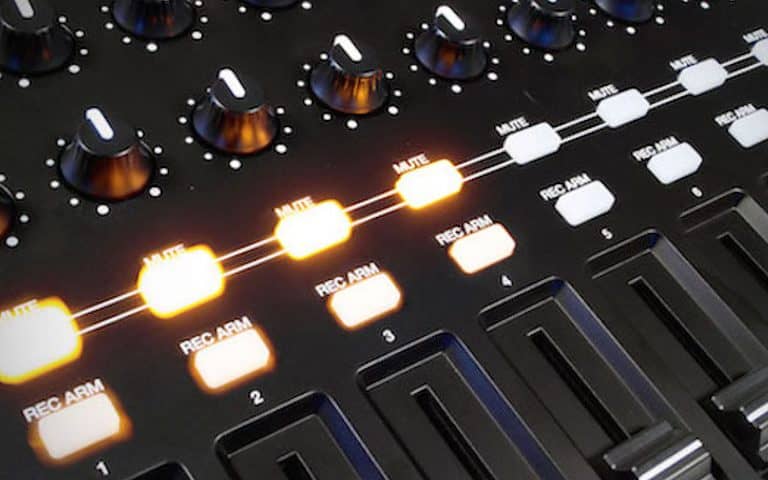
Thirdly – We’ve done it before and this is the latest controller to get the magic of our 24 Parameter device control, simply tap the SOLO button and the Mute buttons control the selection of the first 8 devices on the Track in focus, the REC ARM buttons turn the devices on and off whilst the 24 Potentiometers Blue Hand Map to the device in focus….
Bank Left and Bank Right then allow you to cycle through all of the available parameters, so grab hold of an Operator and have complete control over your tweaking with just one controller!
Fourthly – There’s further options for controlling three sends on the Pots rather than just two and the Pan which is switchable from the controller when enabled in the Config.txt file. And there’s a choice of Returns Mode as well…
Mode 0 – no return tracks are shown
Mode 1 – normal tracks have priority – return tracks will only be displayed if there are not enough normal tracks to fill the display – you can use the BANK LEFT/RIGHT buttons to scroll through normal tracks until the return tracks are displayed.
Mode 2 – return tracks have priority – return tracks will always be displayed and will occupy the right hand portion of the controller – you can use the BANK LEFT/RIGHT buttons to scroll through the normal tracks that can be controlled.
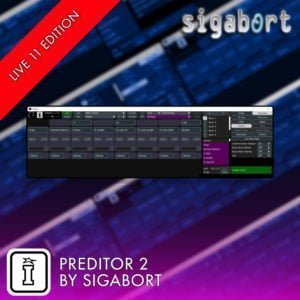
Finally (for now) – We’ve even given it compatibility with our Isotonik Parameter Editor, PrEditor 2 that will allow you to configure exclusively per controller how you want the parameters to line up, you’ll find working in banks of 24 at a time is a completely different experience to just 8 at a time.
Frequently Asked Questions
All you need is the AKAI MIDIMIX controller, a copy of Ableton Live, and this Control Surface Script installed correctly. No extra hardware or third-party software is required.
The Ring Focus Box displays a 1×8 visual highlight on screen showing exactly which eight tracks the MIDIMIX is currently controlling. It gives you clear visual feedback directly within Live, which the hardware itself cannot provide due to its limited LED setup.
24 Parameter Device Control allows you to control up to 24 parameters of a device in Ableton Live using the MIDIMIX’s knobs, going well beyond the default 8-parameter limit. This makes it significantly more practical for detailed sound design and mixing tasks.
Yes, Send and Return Control is included as part of the script, letting you manage your effects routing directly from the controller without touching your mouse or keyboard.
After downloading, you place the script folder into the correct MIDI Remote Scripts directory within your Ableton Live application folder, then select it as a Control Surface within Live’s preferences. Full installation instructions are included with the download.
Absolutely. The MIDIMIX is a compact and lightweight controller, and with the Session and Device modes unlocked by this script it becomes a very capable tool for both studio production and live performance situations.
Important Information
February 2024
Release version for Live 12.1 Compatibility
February 2021
Release version for Live 11 Compatibility
October 2018
Release version for Live 10.0.4 Compatibility
Our Products are generally provided as Zip file downloads which in all cases will need to be extracted and saved to your hard drive prior to installation. Details on the different file type provided and what to do with them are below.
.alp Files – These are Ableton Live Packs and will either install directly into the Packs Section of the browser of Ableton Live or ask you to save them to your hard drive. For packs that install to the library, when you double click on them you will see a pop up window asking you to confirm that installation is ok as the files are described as “Legacy”. This is fine and you are ok to proceed, the packs are created using the format for an earlier version of Live and so remain compatible with the current version.
Control Surface Scripts – Please refer directly to the supplied user manual for installation instructions, due to the changes in the Python language used by Live across versions of 10, 11, 12 and 12.1 you will need to ensure you have installed to the correct location and used the correct files as instructed and supplied.
END-USER LICENSE AGREEMENT FOR ISOTONIK STUDIOS SOFTWARE PRODUCTS.
PLEASE READ THE TERMS AND CONDITIONS OF THIS LICENSE AGREEMENT CAREFULLY BEFORE CONTINUING WITH THIS PROGRAM INSTALL.
This End-User License Agreement (referred to as “EULA”) is a legal agreement between an individual or a single entity (referred to as “LICENSEE”) and Isotonik Studios for the Isotonik Studios software product(s) which may include associated software components, media, printed materials, and “online” or electronic documentation (referred to as “SOFTWARE PRODUCT”). By installing, copying, or otherwise using the SOFTWARE PRODUCT, the LICENSEE agrees to be bound by the terms of this EULA.
This EULA represents the entire agreement concerning the program between the LICENSEE and Isotonik Studios and it supersedes any prior proposal, representation, or understanding between the parties. If the LICENSEE does not agree to the terms of this EULA, the LICENSEE should not install or use the SOFTWARE PRODUCT.
The SOFTWARE PRODUCT is protected by copyright laws and international copyright treaties, as well as other intellectual property laws and treaties. The SOFTWARE PRODUCT is licensed, not sold.
- GRANT OF LICENSE.
The SOFTWARE PRODUCT is licensed as follows:
(a) Installation and Use. Providing that the LICENSEE has paid any applicable license fees, Isotonik Studios grants the LICENSEE the right to install and use copies of the SOFTWARE PRODUCT on up to two computers in the LICENSEE’s possession that are running a validly licensed copy of the operating system for which the SOFTWARE PRODUCT was designed [e.g., Windows 10, macOS]. The computer(s) must be owned by the LICENSEE.
(b) Backup Copies. The LICENSEE may also make copies of the SOFTWARE PRODUCT as may be necessary for backup and archival purposes.
- DESCRIPTION OF OTHER RIGHTS AND LIMITATIONS.
(a) Maintenance of Copyright Notices. The LICENSEE must not remove or alter any copyright notices on any and all copies of the SOFTWARE PRODUCT.
(b) Distribution. The LICENSEE may not distribute registered copies of the SOFTWARE PRODUCT to third parties.
(c) Prohibition on Reverse Engineering, Decompilation, and Disassembly. The LICENSEE may not reverse engineer, decompile, or disassemble the SOFTWARE PRODUCT, except and only to the extent that such activity is expressly permitted by applicable law notwithstanding this limitation.
(d) Rental. The LICENSEE may not rent, lease, or lend the SOFTWARE PRODUCT.
(e) License transfer The LICENSEE may not transfer their license to the SOFTWARE PRODUCT to any third party. Any attempt to do so will be considered a violation of this EULA.
(f) Support Services. Isotonik Studios may provide the LICENSEE with support services related to the SOFTWARE PRODUCT for a period of 12 months following the date of purchase. Any supplemental software code provided to the LICENSEE as part of the Support Services shall be considered part of the SOFTWARE PRODUCT and subject to the terms and conditions of this EULA.
(g) Compliance with Applicable Laws. The LICENSEE must comply with all applicable laws regarding use of the SOFTWARE PRODUCT.
- TERMINATION Without prejudice to any other rights, Isotonik Studios may terminate this EULA if the LICENSEE fails to comply with the terms and conditions of this EULA. In such event, the LICENSEE must destroy all copies of the SOFTWARE PRODUCT in the LICENSEE’s possession.
- COPYRIGHT All title, including but not limited to copyrights, in and to the SOFTWARE PRODUCT and any copies thereof are owned by Isotonik Studios or its suppliers. All title and intellectual property rights in and to the content which may be accessed through use of the SOFTWARE PRODUCT is the property of the respective content owner and may be protected by applicable copyright or other intellectual property laws and treaties. This EULA grants the LICENSEE no rights to use such content. All rights not expressly granted are reserved by Isotonik Studios.
- NO WARRANTIES Isotonik Studios expressly disclaims any warranty for the SOFTWARE PRODUCT. The SOFTWARE PRODUCT is provided ‘As Is’ without any express or implied warranty of any kind, including but not limited to any warranties of merchantability, noninfringement, or fitness of a particular purpose. Isotonik Studios does not warrant or assume responsibility for the accuracy or completeness of any information, text, graphics, links or other items contained within the SOFTWARE PRODUCT. Isotonik Studios makes no warranties respecting any harm that may be caused by the transmission of a computer virus, worm, time bomb, logic bomb, or other such computer program. Isotonik Studios further expressly disclaims any warranty or representation to the LICENSEE or to any third party.
- LIMITATION OF LIABILITY In no event shall Isotonik Studios be liable for any damages (including, without limitation, lost profits, business interruption, or lost information) arising out of the LICENSEE’s use of or inability to use the SOFTWARE PRODUCT, even if Isotonik Studios has been advised of the possibility of such damages. In no event will Isotonik Studios be liable for loss of data or for indirect, special, incidental, consequential (including lost profit), or other damages based in contract, tort or otherwise. Isotonik Studios shall have no liability with respect to the content of the SOFTWARE PRODUCT or any part thereof, including but not limited to errors or omissions contained therein, libel, infringements of rights of publicity, privacy, trademark rights, business interruption, personal injury, loss of privacy, moral rights or the disclosure of confidential information.