

Rewarp All Clips by Elisabeth Homeland
Notice: Elisabeth Homeland products are no longer available for purchase on Isotonik Studios. This page remains available for existing customers who need product information and support resources.
USER GUIDE: ReWarp All Clips Documentation
Rewarp All Clips by Elisabeth Homeland
Notice: Elisabeth Homeland products are no longer available for purchase on Isotonik Studios. This page remains available for existing customers who need product information and support resources.
USER GUIDE: ReWarp All Clips Documentation
Out of stock
Additional information
| MaxforLive | Control Devices |
|---|---|
| Ableton Live Compatibility | Ableton Live 10 Standard with MaxforLive, Ableton Live 10 Suite, Ableton Live 11 Standard with MaxforLive, Ableton Live 11 Suite, Ableton Live 12 Standard with MaxforLive, Ableton Live 12 Suite |
| Min. Requirements | Ableton Live 10 Standard with MaxforLive Installed or Ableton Live 10 Suite |
| OS | Mac, Windows |
PRICE: Name your price
Product reviews
No reviews yet. Be the first to review this product.
Rewarp All Clips by Elisabeth Homeland
Overview & Inspiration
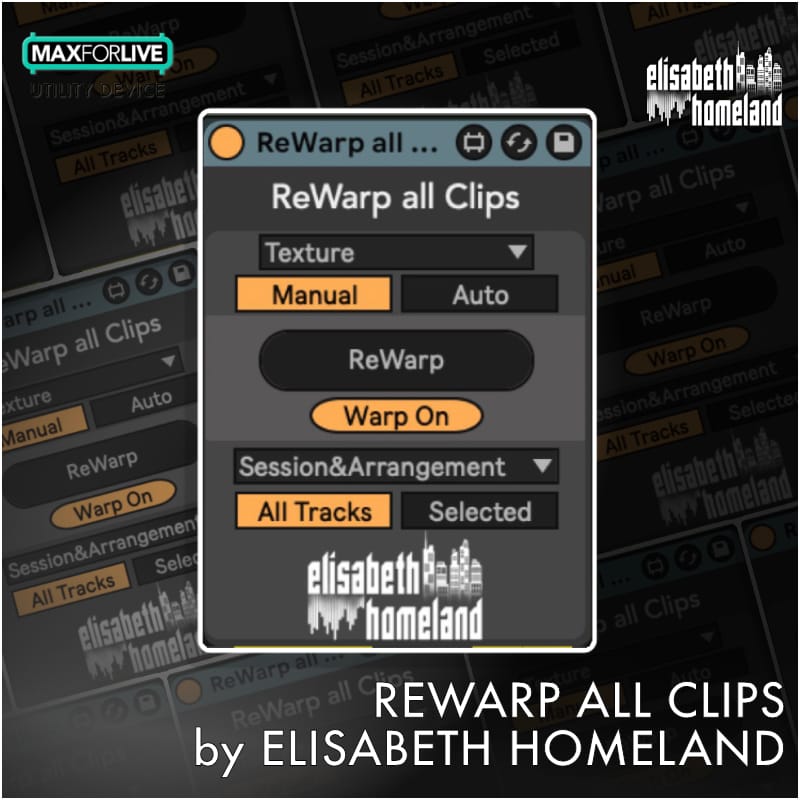
Ever needed to change the warp mode across dozens—or hundreds—of clips in your Ableton Live set? ReWarp All Clips is a MaxforLive device that lets you set the warp mode of every clip in your project (or just selected tracks) with one click.
Whether you’re preparing stems for a DJ set, switching all samples from Beats to Texture mode for creative resampling, or ensuring consistent warp settings across a large arrangement, ReWarp All Clips eliminates tedious manual adjustment. Choose between Manual mode with keyboard shortcuts or Auto mode for immediate application whenever you add new clips.
Features & Highlights
One-Click Warp Mode Changes – Select any warp mode (Beats, Tones, Texture, Re-Pitch, Complex, Complex Pro) and apply it instantly across your entire Live set or only selected tracks. No more clicking through individual clips.
Manual or Auto Mode – Manual mode applies changes only when you press the ReWarp button—perfect for deliberate workflow control. Auto mode immediately applies settings to all clips and automatically re-warps new clips when you add them to tracks.
MIDI and Keyboard Mappable – Map the ReWarp button to any MIDI controller or keyboard shortcut for instant access during production or performance. Switch between warp modes on the fly without interrupting your creative flow.
Enable or Disable Warp Globally – Turn warp on or off for all clips simultaneously. Useful for creative resampling, audio experimentation, or preparing tracks for specific export scenarios. Includes safety warnings to prevent accidental clip length changes.
Session View, Arrangement View, or Both – Choose whether the device affects clips in Session View, Arrangement View, or both simultaneously. Target your changes precisely based on your current workflow.
All Tracks or Selected Tracks Only – Apply changes across your entire Live set or limit them to selected tracks. Perfect for working on specific sections of a large project without affecting everything else.
Lightweight and Non-Intrusive – Place the device on any track in your project. It doesn’t generate audio or MIDI—just quietly manages warp settings in the background until you need it.
How to Use
Drop ReWarp All Clips onto any MIDI or audio track in your Ableton Live set. Select your desired warp mode from the dropdown menu (Beats, Tones, Texture, Re-Pitch, Complex, or Complex Pro).
In Manual mode, press the ReWarp button (or use your mapped keyboard/MIDI shortcut) to apply the selected warp mode to all clips in your set—or only selected tracks if that option is enabled. Choose whether to affect Session View clips, Arrangement View clips, or both.
Switch to Auto mode if you want the device to immediately apply warp settings whenever you change them or add new clips to your project. In Auto mode, when you add clips to a track and then deselect and reselect that track, the device automatically re-warps those new clips to match your settings.
Use the Enable/Disable Warp toggle carefully—disabling warp can change clip lengths, so save your Live set before using this feature. Select whether to affect all tracks or only selected tracks based on your current task.
Ideal For
- DJs preparing stems and sample packs with consistent warp settings
- Producers switching warp modes for creative resampling or sound design
- Live performers needing quick warp mode changes during sets
- Mixing and mastering engineers ensuring consistent time-stretching across projects
- Anyone working with large Live sets containing hundreds of audio clips
- Sound designers experimenting with different warp algorithms en masse
What’s Included
- ReWarp All Clips MaxforLive device (.amxd)
- User manual with setup and usage instructions
- Manual and Auto mode options
- MIDI/keyboard mapping support
Requirements
- Ableton Live 11 or 12
- Live Suite or Live Standard with MaxforLive
- Mac or Windows
BUILD YOUR OWN BUNDLE: Purchase any three ELISABETH HOMELAND products at the same time and get an automatic 20% at checkout!
EXPLORE MORE FROM ELISABETH HOMELAND:
Notes & Pictures | Re-Record | Track Presets | Ground Control | Varispeed | Toggle Suite
Frequently Asked Questions
A: ReWarp All Clips is a MaxforLive device that allows you to change the warp mode (Beats, Tones, Texture, Re-Pitch, Complex, Complex Pro) for every audio clip in your Ableton Live set with a single click. You can target all tracks or only selected tracks, and choose between Manual mode (with keyboard/MIDI shortcuts) or Auto mode for immediate application.
A: Yes, ReWarp All Clips is a MaxforLive device.
A: MaxforLive is a platform that integrates the visual programming environment Max with Ableton Live, allowing users to create and use custom audio, MIDI, and control devices.
A: Manual mode only applies warp mode changes when you press the ReWarp button (which can be mapped to keyboard/MIDI shortcuts). Auto mode immediately applies the selected warp mode to all clips and automatically re-warps new clips when you add them to tracks and reselect the track.
A: You can explore more of Elisabeth Homeland’s tools and devices here: ELISABETH HOMELAND
Important Information
V1.0.0 – Initial Release – May 2025
Our Products are generally provided as Zip file downloads which in all cases will need to be extracted and saved to your hard drive prior to installation. Details on the different file type provided and what to do with them are below.
.alp Files – These are Ableton Live Packs and will either install directly into the Packs Section of the browser of Ableton Live or ask you to save them to your hard drive. For packs that install to the library, when you double click on them you will see a pop up window asking you to confirm that installation is ok as the files are described as “Legacy”. This is fine and you are ok to proceed, the packs are created using the format for an earlier version of Live and so remain compatible with the current version.
.amxd files – These are individual MaxforLive Devices and can be stored anywhere on your hard drive. We’d advise creating a folder for them and then adding that folder as a location within the Places section of Lives Browser.
END-USER LICENSE AGREEMENT FOR ISOTONIK STUDIOS SOFTWARE PRODUCTS.
PLEASE READ THE TERMS AND CONDITIONS OF THIS LICENSE AGREEMENT CAREFULLY BEFORE CONTINUING WITH THIS PROGRAM INSTALL.
This End-User License Agreement (referred to as “EULA”) is a legal agreement between an individual or a single entity (referred to as “LICENSEE”) and Isotonik Studios for the Isotonik Studios software product(s) which may include associated software components, media, printed materials, and “online” or electronic documentation (referred to as “SOFTWARE PRODUCT”). By installing, copying, or otherwise using the SOFTWARE PRODUCT, the LICENSEE agrees to be bound by the terms of this EULA.
This EULA represents the entire agreement concerning the program between the LICENSEE and Isotonik Studios and it supersedes any prior proposal, representation, or understanding between the parties. If the LICENSEE does not agree to the terms of this EULA, the LICENSEE should not install or use the SOFTWARE PRODUCT.
The SOFTWARE PRODUCT is protected by copyright laws and international copyright treaties, as well as other intellectual property laws and treaties. The SOFTWARE PRODUCT is licensed, not sold.
- GRANT OF LICENSE.
The SOFTWARE PRODUCT is licensed as follows:
(a) Installation and Use. Providing that the LICENSEE has paid any applicable license fees, Isotonik Studios grants the LICENSEE the right to install and use copies of the SOFTWARE PRODUCT on up to two computers in the LICENSEE’s possession that are running a validly licensed copy of the operating system for which the SOFTWARE PRODUCT was designed [e.g., Windows 10, macOS]. The computer(s) must be owned by the LICENSEE.
(b) Backup Copies. The LICENSEE may also make copies of the SOFTWARE PRODUCT as may be necessary for backup and archival purposes.
- DESCRIPTION OF OTHER RIGHTS AND LIMITATIONS.
(a) Maintenance of Copyright Notices. The LICENSEE must not remove or alter any copyright notices on any and all copies of the SOFTWARE PRODUCT.
(b) Distribution. The LICENSEE may not distribute registered copies of the SOFTWARE PRODUCT to third parties.
(c) Prohibition on Reverse Engineering, Decompilation, and Disassembly. The LICENSEE may not reverse engineer, decompile, or disassemble the SOFTWARE PRODUCT, except and only to the extent that such activity is expressly permitted by applicable law notwithstanding this limitation.
(d) Rental. The LICENSEE may not rent, lease, or lend the SOFTWARE PRODUCT.
(e) License transfer The LICENSEE may not transfer their license to the SOFTWARE PRODUCT to any third party. Any attempt to do so will be considered a violation of this EULA.
(f) Support Services. Isotonik Studios may provide the LICENSEE with support services related to the SOFTWARE PRODUCT for a period of 12 months following the date of purchase. Any supplemental software code provided to the LICENSEE as part of the Support Services shall be considered part of the SOFTWARE PRODUCT and subject to the terms and conditions of this EULA.
(g) Compliance with Applicable Laws. The LICENSEE must comply with all applicable laws regarding use of the SOFTWARE PRODUCT.
- TERMINATION Without prejudice to any other rights, Isotonik Studios may terminate this EULA if the LICENSEE fails to comply with the terms and conditions of this EULA. In such event, the LICENSEE must destroy all copies of the SOFTWARE PRODUCT in the LICENSEE’s possession.
- COPYRIGHT All title, including but not limited to copyrights, in and to the SOFTWARE PRODUCT and any copies thereof are owned by Isotonik Studios or its suppliers. All title and intellectual property rights in and to the content which may be accessed through use of the SOFTWARE PRODUCT is the property of the respective content owner and may be protected by applicable copyright or other intellectual property laws and treaties. This EULA grants the LICENSEE no rights to use such content. All rights not expressly granted are reserved by Isotonik Studios.
- NO WARRANTIES Isotonik Studios expressly disclaims any warranty for the SOFTWARE PRODUCT. The SOFTWARE PRODUCT is provided ‘As Is’ without any express or implied warranty of any kind, including but not limited to any warranties of merchantability, noninfringement, or fitness of a particular purpose. Isotonik Studios does not warrant or assume responsibility for the accuracy or completeness of any information, text, graphics, links or other items contained within the SOFTWARE PRODUCT. Isotonik Studios makes no warranties respecting any harm that may be caused by the transmission of a computer virus, worm, time bomb, logic bomb, or other such computer program. Isotonik Studios further expressly disclaims any warranty or representation to the LICENSEE or to any third party.
- LIMITATION OF LIABILITY In no event shall Isotonik Studios be liable for any damages (including, without limitation, lost profits, business interruption, or lost information) arising out of the LICENSEE’s use of or inability to use the SOFTWARE PRODUCT, even if Isotonik Studios has been advised of the possibility of such damages. In no event will Isotonik Studios be liable for loss of data or for indirect, special, incidental, consequential (including lost profit), or other damages based in contract, tort or otherwise. Isotonik Studios shall have no liability with respect to the content of the SOFTWARE PRODUCT or any part thereof, including but not limited to errors or omissions contained therein, libel, infringements of rights of publicity, privacy, trademark rights, business interruption, personal injury, loss of privacy, moral rights or the disclosure of confidential information.