Chance Ten by LDM Design
CAN PROBABILITY BE YOUR MOST CREATIVE COLLABORATOR?
MIX & MATCH DEAL: Choose any three or more LDM Design products and get 20% off your entire order — discount applies automatically at checkout.
Brian Eno’s legendary probability techniques arrive in Ableton Live through 10 focused MaxforLive devices inspired by his BBC-documented compositional methods. Embrace controlled randomness as creative partner rather than absolute control.
Inside you’ll find:
- Chance_Play — probabilistic note gating with preserve downbeat mode
- Chance_Transpose — probability-based pitch shifting with manual trigger
- Chance_Repeat — note stuttering with adjustable delay and velocity
- Alt_Notes — intelligent note substitution for 8 incoming notes
- Chance_Drillz — glitchy stutter with speed, duration, and velocity mode control
- Chance_Note — scale-aware random note generation with octave range
- Chance_Parameter — MIDI-triggered randomization for any Live parameter
- Chance_ParaTrigger — note-on/note-off parameter envelopes
- Midi_Panner — automatic LFO or note-triggered panning
- Chance_MIDIlay — polyphonic MIDI delay with velocity feedback
- Velocity_Seq — bonus velocity sequencer (2-16 steps)
- Single-function modular design for custom MIDI FX chains
- Clean, consistent interfaces across all devices
- Comprehensive PDF user guide
Stack devices, chain them, combine them in any order to build evolving patterns that breathe with organic variation. Your hi-hats never sound mechanical. Basslines surprise with occasional octave jumps. Melodies drift between scales with controlled unpredictability. Probability becomes instrument, randomness becomes musicality.
Requires: Ableton Live 10/11/12 Standard (with MaxforLive) or Suite | Mac & Windows
USER GUIDE: Chance10 User Guide
Chance Ten by LDM Design
CAN PROBABILITY BE YOUR MOST CREATIVE COLLABORATOR?
MIX & MATCH DEAL: Choose any three or more LDM Design products and get 20% off your entire order — discount applies automatically at checkout.
Brian Eno’s legendary probability techniques arrive in Ableton Live through 10 focused MaxforLive devices inspired by his BBC-documented compositional methods. Embrace controlled randomness as creative partner rather than absolute control.
Inside you’ll find:
- Chance_Play — probabilistic note gating with preserve downbeat mode
- Chance_Transpose — probability-based pitch shifting with manual trigger
- Chance_Repeat — note stuttering with adjustable delay and velocity
- Alt_Notes — intelligent note substitution for 8 incoming notes
- Chance_Drillz — glitchy stutter with speed, duration, and velocity mode control
- Chance_Note — scale-aware random note generation with octave range
- Chance_Parameter — MIDI-triggered randomization for any Live parameter
- Chance_ParaTrigger — note-on/note-off parameter envelopes
- Midi_Panner — automatic LFO or note-triggered panning
- Chance_MIDIlay — polyphonic MIDI delay with velocity feedback
- Velocity_Seq — bonus velocity sequencer (2-16 steps)
- Single-function modular design for custom MIDI FX chains
- Clean, consistent interfaces across all devices
- Comprehensive PDF user guide
Stack devices, chain them, combine them in any order to build evolving patterns that breathe with organic variation. Your hi-hats never sound mechanical. Basslines surprise with occasional octave jumps. Melodies drift between scales with controlled unpredictability. Probability becomes instrument, randomness becomes musicality.
Requires: Ableton Live 10/11/12 Standard (with MaxforLive) or Suite | Mac & Windows
USER GUIDE: Chance10 User Guide
Additional information
| MaxforLive | MIDI Devices, Sequencers |
|---|---|
| Ableton Live Compatibility | Ableton Live 10 Standard with MaxforLive, Ableton Live 10 Suite, Ableton Live 11 Standard with MaxforLive, Ableton Live 11 Suite, Ableton Live 12 Standard with MaxforLive, Ableton Live 12 Suite |
| Min. Requirements | Ableton Live 10 Standard with MaxforLive Installed or Ableton Live 10 Suite |
| OS | Mac, Windows |
PRICE: £35.00
Product reviews
5 out of 5
1 review
How item rating is calculated
We show the average based on reviews. Only genuine reviews are displayed.
Sort by
October 27, 2018
This reviewer bought this product from our store.
Along with this colorful new Isotonik site cometh my endorsement for Chance TEN.
I first found out about it after watching Brian Eno's feature on the BBC showing his probability techniques in Logic. I use Ableton, however. I've tried (and continue to) exercise my way through many randomization devices out there, to add organic spice to my productions. But Chance TEN is a special sort of package, like building blocks that work so well together — the UI is relatively light and elegant, so newbies to probabilistic fun will have a smooth entry. And it's laid out pretty consistently from one device to another. My favorite is "Chance Drillz", which I often use to add subtle trails to hi-hat and other crisp percussion patterns. It's a joy for freezing the possibilities, curating the audio, then running it again to place so-and-so descending rush here and so-and-so ramp up there.
Even if you have NO idea what you're doing, it's so easy to drag and drop one (or more) of the modules, hear what it effect it has on your existing notes. And if it feels a touch too unnoticeable, most of the modules have a button to change magnitude to 100% so it'll affect everything incoming... AHA! Then you'll hear the difference, and can dial it in accordingly. There are masterful takes on similar techniques that were more difficult to do before, an optimal implementation of these archetypes, if you will. If Thanos was into electronic music and 2 Infinity Gauntlets and 10 gems, then one of these would belong in each slot.
LDM Designs has put together a valuable, precious package to surprise you with new possibilities, and we are all the better for it. Thank you also LDM Design for adding a velocity curve to Chance Drillz at my request, this was most gracious of you, and it's truly made a difference in playing with "ghost rhythms" that are felt like subtle shadows! I'm excited to see what other enhancements to an already outstanding collection will arrive!
Chance Ten by LDM Design
Overview & Inspiration
Chance TEN brings Brian Eno’s legendary probability techniques to Ableton Live through 10 focused MaxforLive devices that introduce controlled randomness into every aspect of your MIDI workflow.
When Brian Eno demonstrated his probability scripts on the BBC, it revealed a compositional philosophy: embracing chance as a creative partner rather than fighting for absolute control. Chance TEN translates this approach into modular MaxforLive devices, each handling a specific function with elegant simplicity. Set the probability of notes passing through, being transposed, repeated, or replaced. Use MIDI input to trigger parameter changes with randomization. The single-function design lets you mix and match devices to build unique MIDI FX chains tailored to your workflow.
The result is music that breathes with organic variation. Patterns that subtly evolve. Hi-hats that never sound mechanical. Basslines that surprise you with occasional octave jumps. Melodies that drift between scales with controlled unpredictability. This is probability as instrument, randomness as musicality.
The 10 Devices (Plus Bonus)
Chance_Play — Probabilistic Note Gating
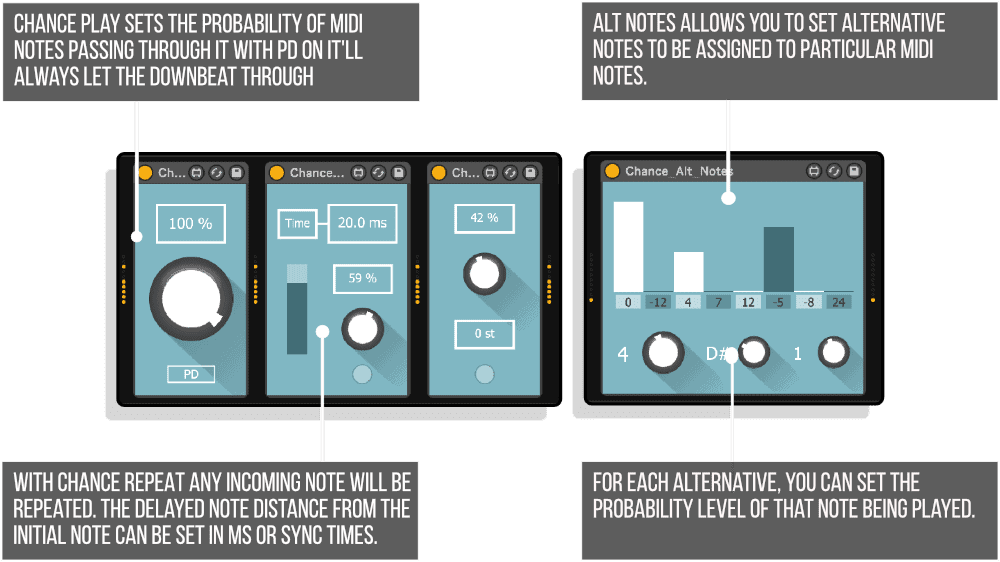
The simplest concept with profound musical impact. Set the probability of any MIDI note getting through the device. Play a dense pattern in the piano roll, set probability to 40%, and watch sparse, evolving rhythms emerge. The PD (Preserve Downbeat) mode ensures notes landing on the downbeat of any bar always play through, maintaining rhythmic anchor points while the rest of the pattern breathes with uncertainty.
Perfect for creating variation in drum patterns without programming multiple clips. Your hi-hat pattern becomes different every time through the loop, but the kick on beat one stays solid. Subtle enough for minimal techno, dramatic enough for glitch-hop.
Chance_Transpose — Probability-Based Pitch Shifting
Set the probability of any note being transposed by the amount you specify. Your bassline mostly plays as written, but occasionally jumps an octave up. Your melody sometimes drops a perfect fifth. The trigger button gives you hands-on control, transposing all notes when held down, then returning to the set probability when released.
This device shines in combination with others. Follow it with Chance_Note to create melodies that occasionally leap to unexpected scale degrees, or precede it with Chance_Play to thin out the density before transposition adds complexity back in.
Chance_Repeat — Controlled Note Stuttering
When triggered, any incoming note repeats with a delayed copy. Set the delay time in milliseconds or sync times. Control the velocity level of the repeated note independently. Set the probability of any note triggering the device, or use the trigger button for manual control.
Essential for adding movement to static patterns. Your snare occasionally doubles itself with a ghost note. Your chord stabs sometimes stutter. The delay time control means you can sync repeats to musical divisions or use millisecond timing for tighter, more mechanical effects.
Alt_Notes — Intelligent Note Substitution
This device assigns alternative notes to specific incoming MIDI notes, each with its own probability. If an E3 comes in, you can set probabilities for transposing it by -12, 4, 7, 12, -5, -8, or 24 semitones. Transpose amounts can be set within 2 octaves above or below the initial note.
Eight different incoming notes can be given individual alternate probabilities. This creates intelligent melodic variation that respects your composition while introducing controlled unpredictability. Your melody stays in key but explores harmonic alternatives you programmed as possibilities.
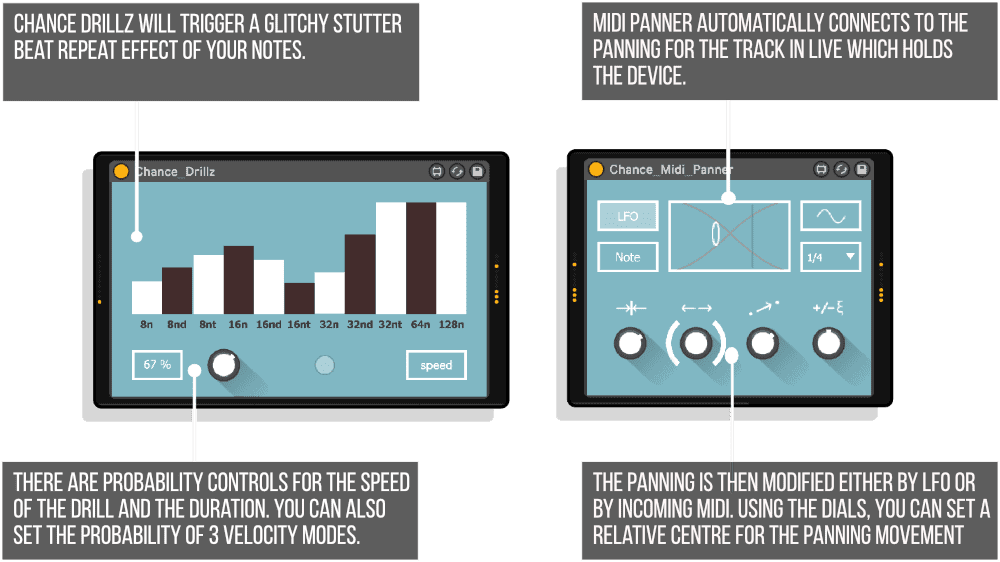
Chance_Drillz — Glitchy Stutter and Beat Repeat
Trigger glitchy stutter and beat-repeat effects with probability controls for speed and duration. Set the probability of three velocity modes: level, rising, and falling velocity. The device creates descending rushes, ramping build-ups, and subtle trailing patterns that add texture without overwhelming your mix.
Chance_Drillz was enhanced at user request to include velocity curves, making it perfect for “ghost rhythms” that sit in the background as subtle shadows. Use it on hi-hats for crisp trailing patterns, on percussion for evolving textures, or on melodic content for experimental glitch effects.
Chance_Note — Scale-Aware Random Note Generation
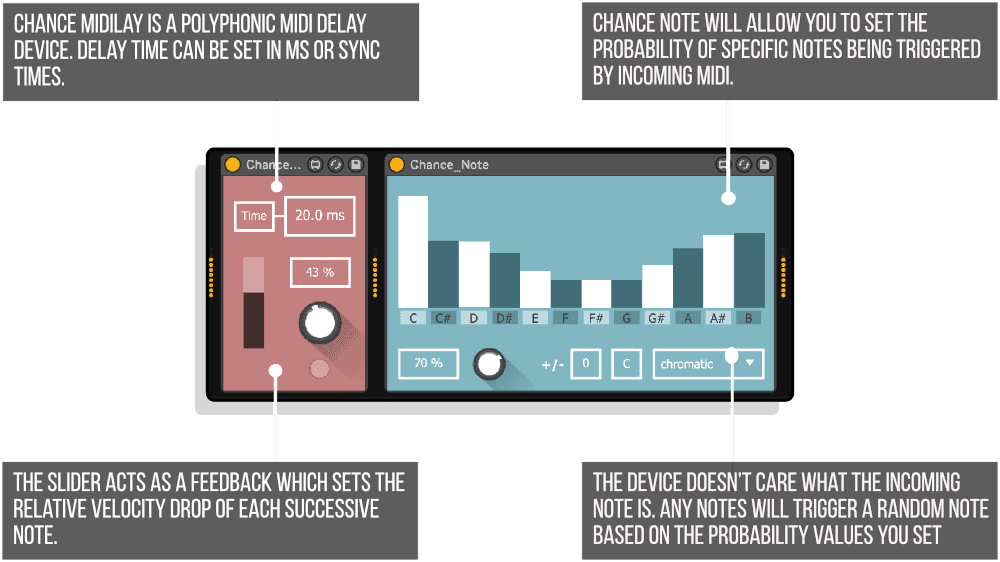
Set the probability of specific notes being triggered by any incoming MIDI. The device doesn’t care what note comes in — it triggers a random note based on probability values you set for all 12 chromatic pitches. Set a scale and root note to automatically adjust probabilities so only scale notes can be triggered, then fine-tune individual note probabilities from there.
The octave randomization control adds vertical range. Your single-note input can trigger melodies spanning multiple octaves, all constrained to your chosen scale and weighted toward the probabilities you’ve set. Perfect for generative composition where you want harmonic control over algorithmic randomness.
Chance_Parameter — MIDI-Triggered Parameter Randomization
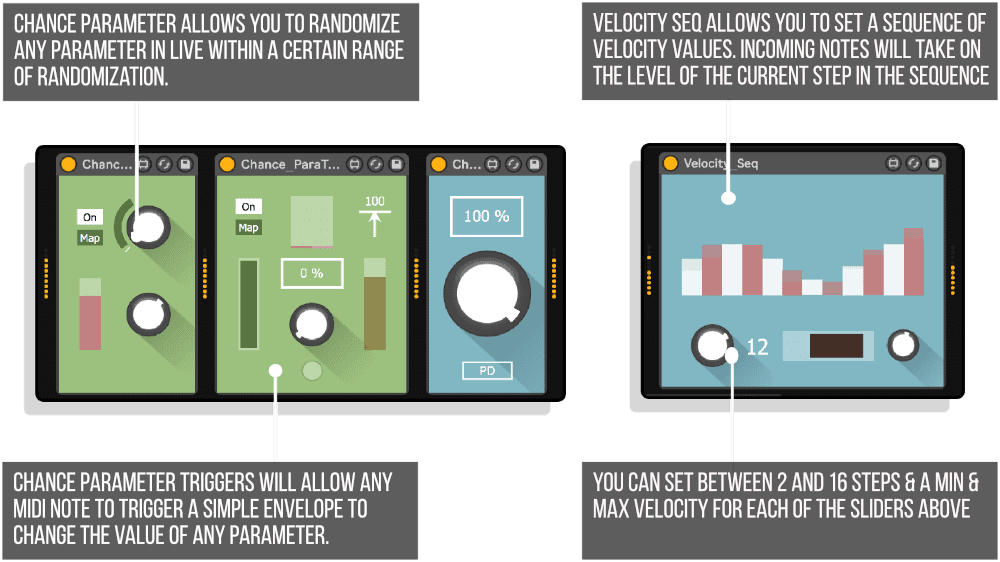
Map any parameter in Live, then randomize it within a range every time a MIDI note passes through. The top dial controls the parameter directly. The bottom dial sets the randomization range, shown as a modulation ring. The white indicator moves randomly within that range each time a note triggers the device.
The smoothing slider prevents sudden parameter jumps. Use it on filter cutoff for evolving timbral movement, on reverb size for shifting spaces, on delay feedback for unpredictable echoes. Because it’s MIDI-triggered, the randomization stays musical and rhythmically locked to your performance.
Chance_ParaTrigger — MIDI Envelope for Any Parameter
Any MIDI note triggers a simple envelope that changes a mapped parameter. Note-on and note-off signals cause the parameter to rise and fall. Set the on/off values using the range slider. Add smoothing for both note-on and note-off triggers independently. The minimum velocity threshold means only notes above a certain velocity will trigger the device.
Different from Chance_Parameter’s randomization, this device creates predictable envelopes tied to note duration. Use it to open a filter when notes play and close it when they release, or modulate reverb wet/dry amount based on how long notes are held.
Midi_Panner — Automatic and Triggered Panning
This device automatically connects to the track panning in Live. The panning is then modified either by LFO or by incoming MIDI notes. Set a relative center, panning range, smoothing, and randomization amount.
LFO mode provides sync’d automatic panning with various waveform types. Note mode alternates panning left to right upon each incoming MIDI note, perfect for percussive sounds that need movement. The smoothing control is essential for sustained sounds to avoid clicks from sudden panning changes. Randomization adds unpredictability to both modes.
Chance_MIDIlay — Polyphonic MIDI Delay
A polyphonic MIDI delay where delay time can be set in milliseconds or sync times. The feedback slider sets the relative velocity drop of each successive delayed note, creating natural-sounding decaying echoes. Set the probability of notes triggering the device, or use the trigger button for direct control.
Unlike audio delays, MIDI delays create new note events that trigger your instrument again. This means the delayed notes can have different timbres if your instrument has velocity-sensitive parameters, round-robin samples, or envelope retriggering. The polyphony means chords delay as chords, not as blurred reverberations.
Velocity_Seq — The Bonus Device
Not based on chance, but too useful to leave out. Velocity_Seq allows you to set a sequence of velocity values from 2 to 16 steps. Any incoming notes take on the velocity level of the current step in the sequence. The range slider sets minimum and maximum velocity levels. The randomization dial adds controlled variation to each step relative to the values you’ve set.
This device instantly adds movement and life to flat MIDI performances. Your quantized drum pattern suddenly has dynamics. Your sustained pads breathe with velocity variation. Combine it with the Chance devices for evolving rhythmic and dynamic complexity.
Features & Highlights
Brian Eno’s Creative Philosophy — Inspired by the BBC documentary showing Eno’s probability scripts in Logic, Chance TEN brings these techniques to Ableton Live with clean, intuitive interfaces.
Modular Single-Function Design — Each device does one thing exceptionally well. Stack them, chain them, combine them in any order to build custom MIDI FX chains that match your creative vision.
Probability and Trigger Modes — Most devices offer both probability-based operation and manual trigger buttons for direct control during performance.
Clean, Consistent Interface Design — LDM Design’s signature minimal aesthetic makes these devices approachable for newcomers while remaining efficient for experienced users. Controls are clearly labeled, visual feedback is immediate.
Parameter Mapping Integration — Chance_Parameter and Chance_ParaTrigger can map to any parameter anywhere in Live, including third-party plugins, making the entire environment responsive to controlled randomness.
Musical Probability Controls — Percentages, smoothing amounts, velocity ranges, and timing divisions keep randomness musical rather than chaotic. You define the boundaries, probability explores within them.
Real-Time Visual Feedback — Modulation rings, moving indicators, and clear percentage displays show exactly what’s happening, essential for understanding and tweaking probability behaviors during performance.
Organic Variation Without Programming — Create evolving patterns that never repeat exactly the same way twice without programming multiple MIDI clips or complex automation.
How to Use
Drop any Chance device (or multiple devices) onto a MIDI track before your instrument. Each device passes MIDI through with its particular flavor of controlled randomness. Start simple: try Chance_Play on a drum pattern, set probability to 60%, enable Preserve Downbeat, and listen to how the pattern evolves while maintaining rhythmic anchor points.
Build complexity through chains. Try this signal path: Chance_Play (thin out notes) followed by Chance_Transpose (occasional octave jumps) followed by Chance_Note (replace some notes with scale alternatives) followed by Velocity_Seq (add dynamic variation). Each device adds a layer of controlled unpredictability.
Use trigger buttons during performance for manual control. Hold the Chance_Transpose trigger to force all notes up an octave during a build. Tap the Chance_Drillz trigger to add stutter fills at precise moments. This hybrid approach combines probability with performance control.
Experiment with extreme settings to understand each device’s character, then dial back to subtle amounts. Even 10-20% probability on Chance_Play creates noticeable variation without disrupting the fundamental pattern. Small amounts of randomness yield organic results.
Ideal For
- Electronic music producers looking to escape overly quantized, mechanical patterns
- Brian Eno fans who want to apply oblique strategies and generative techniques in Ableton Live
- Live performers who need dynamic, evolving arrangements that never sound exactly the same twice
- Beat makers who want organic variation in drum programming without manual editing
- Experimental musicians exploring controlled chaos and probability-based composition
- Anyone who’s heard that BBC documentary and thought “I want to do that in Live”
- Producers who love happy accidents but want to define the boundaries where accidents can happen
What’s Included
- Chance_Play — Probabilistic note gating (.amxd)
- Chance_Transpose — Probability-based transposition (.amxd)
- Chance_Repeat — Note repetition with probability (.amxd)
- Alt_Notes — Alternative note substitution (.amxd)
- Chance_Drillz — Glitchy stutter and beat repeat (.amxd)
- Chance_Note — Scale-aware random note generation (.amxd)
- Chance_Parameter — MIDI-triggered parameter randomization (.amxd)
- Chance_ParaTrigger — MIDI envelope for any parameter (.amxd)
- Midi_Panner — Automatic and triggered panning (.amxd)
- Chance_MIDIlay — Polyphonic MIDI delay (.amxd)
- Velocity_Seq — Velocity sequencer, bonus device (.amxd)
- Comprehensive PDF user guide
- Mac and Windows compatible
- Requires Ableton Live 10/11/12 Standard (with MaxforLive) or Suite
Technical Notes
All devices are MaxforLive MIDI effects that process note data before it reaches your instruments. They work with any instrument in Live including native devices, third-party plugins, and external hardware via MIDI routing. Devices can be chained in any order, and multiple instances can be used simultaneously on different tracks.
Parameter mapping uses Live’s standard MIDI mapping system, meaning Chance_Parameter and Chance_ParaTrigger can control any automatable parameter. The devices add no latency and use minimal CPU resources, making them suitable for live performance and large projects with many instances.
Explore More from LDM Design
Chance Pack FOUR | LP Pack | FRAKTOR | ADD | View All LDM Design Products
Frequently Asked Questions
A: Chance TEN is a collection of 10 MaxforLive MIDI devices (plus one bonus device) inspired by Brian Eno’s probability-based composition techniques shown in his BBC documentary. The devices introduce controlled randomness into your MIDI workflow through probabilistic note gating, transposition, repetition, note substitution, parameter modulation, and more. Each device is single-function with a clean interface, designed to be mixed and matched to create custom MIDI FX chains. The pack includes Chance_Play, Chance_Transpose, Chance_Repeat, Alt_Notes, Chance_Drillz, Chance_Note, Chance_Parameter, Chance_ParaTrigger, Midi_Panner, Chance_MIDIlay, and the bonus Velocity_Seq.
A: Yes, Chance TEN consists of MaxforLive devices.
A: MaxforLive is a platform that integrates the visual programming environment Max with Ableton Live, allowing users to create and use custom audio, MIDI, and control devices.
A: Chance TEN was directly inspired by a BBC documentary showing Brian Eno’s use of probability scripts in Logic to create evolving, organic compositions. The pack translates these concepts into Ableton Live-native MaxforLive devices, making Eno’s compositional philosophy accessible to Live users. The idea is to embrace controlled randomness as a creative partner, allowing patterns to evolve naturally within boundaries you define rather than repeating mechanically.
A: Absolutely! The single-function modular design is specifically intended for stacking and chaining. You can create complex MIDI FX chains by combining devices in any order. For example: Chance_Play (thin out notes) → Chance_Transpose (occasional octave jumps) → Chance_Note (replace notes with scale alternatives) → Velocity_Seq (add dynamic variation). Each device adds a layer of controlled unpredictability.
A: Most Chance devices offer both modes. Probability mode uses percentage-based randomness to determine when effects occur. Trigger mode provides a manual button for direct, hands-on control during performance. For example, Chance_Transpose can randomly transpose notes based on a set probability, or you can hold the trigger button to force all notes to transpose, returning to probability mode when released.
A: You can explore more of LDM Design’s tools and devices here: LDM Design
Important Information
Chance 10 Pack – Released April 18th 2019
– All devices changed to allow non-note midi messages to pass through. Chance Drillz now has a velocity scale knob.
– Parameter names cleaned up for all devices. live.banks added to make Push ready.
Our Products are generally provided as Zip file downloads which in all cases will need to be extracted and saved to your hard drive prior to installation. Details on the different file type provided and what to do with them are below.
.alp Files – These are Ableton Live Packs and will either install directly into the Packs Section of the browser of Ableton Live or ask you to save them to your hard drive. For packs that install to the library, when you double click on them you will see a pop up window asking you to confirm that installation is ok as the files are described as “Legacy”. This is fine and you are ok to proceed, the packs are created using the format for an earlier version of Live and so remain compatible with the current version.
.amxd files – These are individual MaxforLive Devices and can be stored anywhere on your hard drive. We’d advise creating a folder for them and then adding that folder as a location within the Places section of Lives Browser.
END-USER LICENSE AGREEMENT FOR ISOTONIK STUDIOS SOFTWARE PRODUCTS.
PLEASE READ THE TERMS AND CONDITIONS OF THIS LICENSE AGREEMENT CAREFULLY BEFORE CONTINUING WITH THIS PROGRAM INSTALL.
This End-User License Agreement (referred to as “EULA”) is a legal agreement between an individual or a single entity (referred to as “LICENSEE”) and Isotonik Studios for the Isotonik Studios software product(s) which may include associated software components, media, printed materials, and “online” or electronic documentation (referred to as “SOFTWARE PRODUCT”). By installing, copying, or otherwise using the SOFTWARE PRODUCT, the LICENSEE agrees to be bound by the terms of this EULA.
This EULA represents the entire agreement concerning the program between the LICENSEE and Isotonik Studios and it supersedes any prior proposal, representation, or understanding between the parties. If the LICENSEE does not agree to the terms of this EULA, the LICENSEE should not install or use the SOFTWARE PRODUCT.
The SOFTWARE PRODUCT is protected by copyright laws and international copyright treaties, as well as other intellectual property laws and treaties. The SOFTWARE PRODUCT is licensed, not sold.
- GRANT OF LICENSE.
The SOFTWARE PRODUCT is licensed as follows:
(a) Installation and Use. Providing that the LICENSEE has paid any applicable license fees, Isotonik Studios grants the LICENSEE the right to install and use copies of the SOFTWARE PRODUCT on up to two computers in the LICENSEE’s possession that are running a validly licensed copy of the operating system for which the SOFTWARE PRODUCT was designed [e.g., Windows 10, macOS]. The computer(s) must be owned by the LICENSEE.
(b) Backup Copies. The LICENSEE may also make copies of the SOFTWARE PRODUCT as may be necessary for backup and archival purposes.
- DESCRIPTION OF OTHER RIGHTS AND LIMITATIONS.
(a) Maintenance of Copyright Notices. The LICENSEE must not remove or alter any copyright notices on any and all copies of the SOFTWARE PRODUCT.
(b) Distribution. The LICENSEE may not distribute registered copies of the SOFTWARE PRODUCT to third parties.
(c) Prohibition on Reverse Engineering, Decompilation, and Disassembly. The LICENSEE may not reverse engineer, decompile, or disassemble the SOFTWARE PRODUCT, except and only to the extent that such activity is expressly permitted by applicable law notwithstanding this limitation.
(d) Rental. The LICENSEE may not rent, lease, or lend the SOFTWARE PRODUCT.
(e) License transfer The LICENSEE may not transfer their license to the SOFTWARE PRODUCT to any third party. Any attempt to do so will be considered a violation of this EULA.
(f) Support Services. Isotonik Studios may provide the LICENSEE with support services related to the SOFTWARE PRODUCT for a period of 12 months following the date of purchase. Any supplemental software code provided to the LICENSEE as part of the Support Services shall be considered part of the SOFTWARE PRODUCT and subject to the terms and conditions of this EULA.
(g) Compliance with Applicable Laws. The LICENSEE must comply with all applicable laws regarding use of the SOFTWARE PRODUCT.
- TERMINATION Without prejudice to any other rights, Isotonik Studios may terminate this EULA if the LICENSEE fails to comply with the terms and conditions of this EULA. In such event, the LICENSEE must destroy all copies of the SOFTWARE PRODUCT in the LICENSEE’s possession.
- COPYRIGHT All title, including but not limited to copyrights, in and to the SOFTWARE PRODUCT and any copies thereof are owned by Isotonik Studios or its suppliers. All title and intellectual property rights in and to the content which may be accessed through use of the SOFTWARE PRODUCT is the property of the respective content owner and may be protected by applicable copyright or other intellectual property laws and treaties. This EULA grants the LICENSEE no rights to use such content. All rights not expressly granted are reserved by Isotonik Studios.
- NO WARRANTIES Isotonik Studios expressly disclaims any warranty for the SOFTWARE PRODUCT. The SOFTWARE PRODUCT is provided ‘As Is’ without any express or implied warranty of any kind, including but not limited to any warranties of merchantability, noninfringement, or fitness of a particular purpose. Isotonik Studios does not warrant or assume responsibility for the accuracy or completeness of any information, text, graphics, links or other items contained within the SOFTWARE PRODUCT. Isotonik Studios makes no warranties respecting any harm that may be caused by the transmission of a computer virus, worm, time bomb, logic bomb, or other such computer program. Isotonik Studios further expressly disclaims any warranty or representation to the LICENSEE or to any third party.
- LIMITATION OF LIABILITY In no event shall Isotonik Studios be liable for any damages (including, without limitation, lost profits, business interruption, or lost information) arising out of the LICENSEE’s use of or inability to use the SOFTWARE PRODUCT, even if Isotonik Studios has been advised of the possibility of such damages. In no event will Isotonik Studios be liable for loss of data or for indirect, special, incidental, consequential (including lost profit), or other damages based in contract, tort or otherwise. Isotonik Studios shall have no liability with respect to the content of the SOFTWARE PRODUCT or any part thereof, including but not limited to errors or omissions contained therein, libel, infringements of rights of publicity, privacy, trademark rights, business interruption, personal injury, loss of privacy, moral rights or the disclosure of confidential information.
More from LDM Design
Frequently Bought Together
 -20%
-20%Ned RUSHFunction Suite by Ned RushLive 11 & 12 · Max for Live Original price was: £30.00.£24.00Current price is: £24.00.