

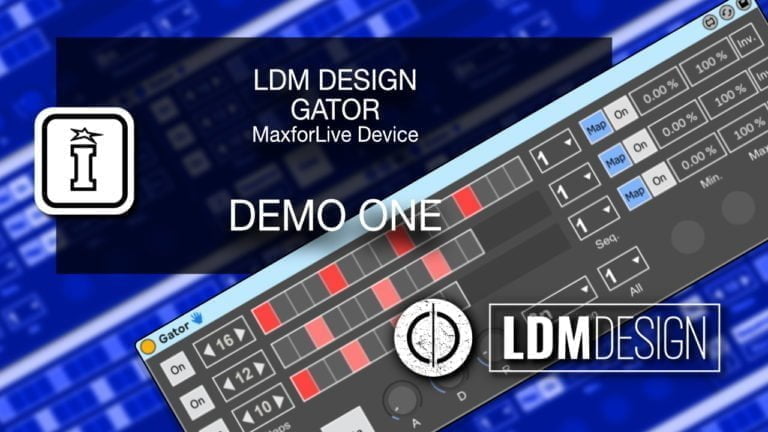
Gator by LDM Design
RHYTHMIC GATES THAT BREATHE WITH YOUR MUSIC
TRIPLE PACK SAVINGS: Add any three or more LDM Design products to your cart and save 20% automatically at checkout!
Transform any sound into stuttering, pulsing, evolving textures with three independent gate sequencers that control any parameters you choose. Inspired by Reason’s Alligator but reimagined for Ableton’s flexible routing, Gator brings rhythmic parameter sequencing to Audio Effect Racks with surgical precision and creative probability.
Inside you’ll find:
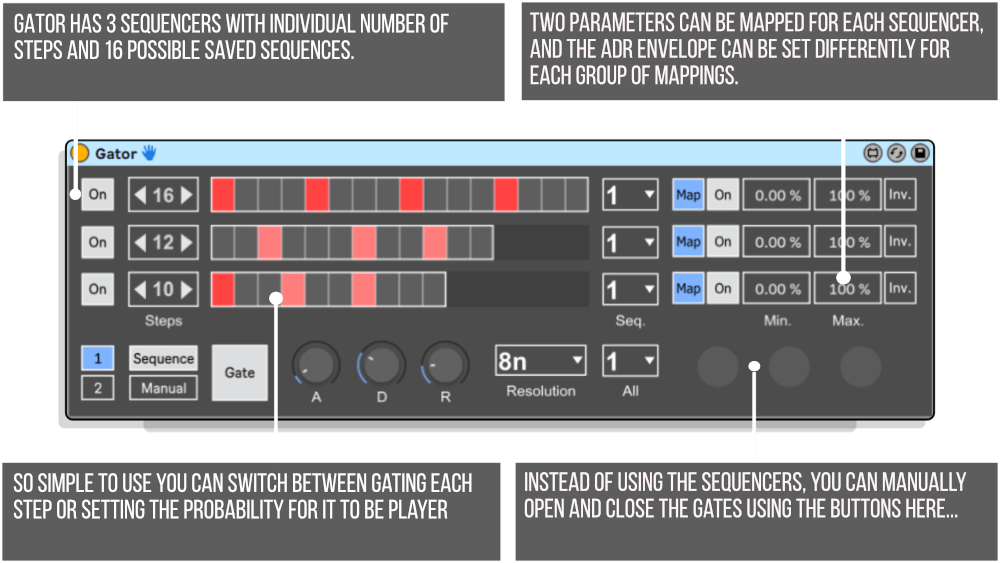
- 3 Independent Sequencers — up to 16 steps each with individual probability per step
- 16 Saveable Patterns — per sequencer for instant switching and dynamic arrangements
- Dual Parameter Mapping — control 2 different parameters per sequencer (6 total mappings)
- Independent ADR Envelopes — shape attack, decay, release for each parameter group
- Min/Max Scaling & Invert — fine-tune parameter ranges and reverse gate behavior
- Polyrhythmic Capability — different step counts per sequencer create evolving patterns
- Manual Trigger Mode — play gates like an instrument via MIDI controller or automation
Perfect for rhythmic filtering, stutter effects, polyrhythmic modulation, and probability-based glitches. Build custom effect chains, then use Gator to sequence when they open and close with complex, evolving patterns that never feel static.
Requires Ableton Live 11/12 Standard with MaxforLive or Suite | Mac/Windows
USER GUIDE: Gator User Guide
Gator by LDM Design
RHYTHMIC GATES THAT BREATHE WITH YOUR MUSIC
TRIPLE PACK SAVINGS: Add any three or more LDM Design products to your cart and save 20% automatically at checkout!
Transform any sound into stuttering, pulsing, evolving textures with three independent gate sequencers that control any parameters you choose. Inspired by Reason’s Alligator but reimagined for Ableton’s flexible routing, Gator brings rhythmic parameter sequencing to Audio Effect Racks with surgical precision and creative probability.
Inside you’ll find:
- 3 Independent Sequencers — up to 16 steps each with individual probability per step
- 16 Saveable Patterns — per sequencer for instant switching and dynamic arrangements
- Dual Parameter Mapping — control 2 different parameters per sequencer (6 total mappings)
- Independent ADR Envelopes — shape attack, decay, release for each parameter group
- Min/Max Scaling & Invert — fine-tune parameter ranges and reverse gate behavior
- Polyrhythmic Capability — different step counts per sequencer create evolving patterns
- Manual Trigger Mode — play gates like an instrument via MIDI controller or automation
Perfect for rhythmic filtering, stutter effects, polyrhythmic modulation, and probability-based glitches. Build custom effect chains, then use Gator to sequence when they open and close with complex, evolving patterns that never feel static.
Requires Ableton Live 11/12 Standard with MaxforLive or Suite | Mac/Windows
USER GUIDE: Gator User Guide
Additional information
| MaxforLive | MIDI Devices, Sequencers |
|---|---|
| Min. Requirements | Ableton Live 11 Standard with MaxforLive Installed or Ableton Live 11 Suite |
| OS | Mac, Windows |
PRICE: £12.00
Product reviews
3 out of 5
1 review
How item rating is calculated
We show the average based on reviews. Only genuine reviews are displayed.
Sort by
March 27, 2025
This reviewer bought this product from our store.
A pretty fun sequencer that can get cool results when mapped to the volume/mute in parallel chains. A lot of it's usefulness is undercut by the fact you can't automate or midi map the sequencer presets.
Gator by LDM Design
Gate sequencers typically force you into rigid workflows with fixed routing and limited control. Gator breaks free from those constraints, giving you three independent sequencers that control any parameters you choose in Ableton’s Audio Effect Rack architecture. Build your own custom processing chains, then use Gator to rhythmically open and close gates with surgical precision and creative probability.
Inspired by Reason’s classic Alligator plugin but reimagined for Ableton Live’s flexible routing, Gator expands the concept dramatically. Each of the three sequencers features up to 16 steps with individual probability settings, 16 saveable patterns, independent ADR envelopes, and dual parameter mapping. The result is a rhythmic gate sequencer that can transform any sound into stuttering, pulsing, evolving textures that dance with your music.
Overview & Workflow
Gator works within Ableton’s Audio Effect Rack, designed to control the volume (or any other parameter) of three parallel effect chains. Load up an Audio Effect Rack with three chains, fill each with different effects, then use Gator to sequence when each chain opens and closes. Chain 1 might have a delay, Chain 2 could have distortion, and Chain 3 might feature reverb. Gator rhythmically gates these chains, creating complex, evolving effects that pulse in time with your music.
The genius of this approach is flexibility. Unlike hardware gate sequencers or plugins with fixed signal paths, you choose what effects each chain contains and what parameters Gator controls. Want to gate filter cutoff instead of volume? Map it. Need to sequence reverb decay time? No problem. The three sequencers give you independent rhythmic control over any three parameters across your effect chains.
Three Independent Sequencers
Each of Gator’s three sequencers operates independently with its own pattern, step count, and probability settings. Sequencer 1 might run a 16-step pattern, Sequencer 2 could use 12 steps, and Sequencer 3 might cycle through 8 steps. This polyrhythmic capability creates complex evolving patterns where gates open and close in different relationships to each other, ensuring your rhythmic effects never feel static or predictable.
Every sequencer stores up to 16 different patterns, switchable on the fly during performance or automation. Create subtle variations or dramatically different gate patterns, then switch between them to build dynamic arrangements. Each step within a pattern can have its own probability setting, so a step might open the gate 100% of the time, 50% of the time, or anywhere in between. This probabilistic approach ensures your rhythmic effects stay fresh through infinite repetitions.
Dual Parameter Mapping with ADR Envelopes
Here’s where Gator gets really powerful. Each of the three sequencers can control two different parameters simultaneously, creating two groups of three mappings (six total parameter destinations). Group 1 might control the volume of each chain, while Group 2 controls filter cutoff. Each group has its own independent Attack-Decay-Release envelope, determining how quickly parameters open and close with each gate trigger.
The ADR envelopes add expressive dynamics to your rhythmic gates. A fast attack with slow decay creates snappy transients that bloom into sustained effects. Long attack times produce gradual swells. Short release creates abrupt cuts, while longer release lets effects fade naturally. Apply different envelope shapes to your two parameter groups, and suddenly you’re creating complex, evolving modulation where volume and filter (or any two parameters) move with different timing relationships.
Each parameter mapping includes min/max value scaling and invert functionality. Set the minimum to 20% and maximum to 80%, and Gator never closes the gate completely or opens it fully, creating subtle pulsing effects. Invert the mapping, and closing the gate actually increases the parameter value, perfect for reverse effects like opening a filter as you close the volume gate.
Manual Triggering & Performance Control
Don’t want sequenced patterns? Switch off the sequencers and trigger gates manually using the buttons on Gator’s interface. Map these buttons to a MIDI controller or chord pad and play your gates like an instrument. Automate the button states in Ableton’s arrangement, creating precisely timed gate openings that sync to specific moments in your track. This manual mode transforms Gator from a sequencer into a performance instrument for rhythmic effect control.
Creative Applications
Rhythmic Filtering: Create three chains with different filter types (low pass, band pass, high pass). Sequence the chain volumes to create evolving filter patterns that sweep through your sound in rhythmic patterns.
Stutter Effects: Map gate controls to delay feedback and filter cutoff. Create rhythmic delay throws that only happen on specific beats, with filter movement synchronized to gate openings.
Probability-Based Glitch: Use high probability on some steps, low probability on others. Your sound occasionally stutters and glitches in controlled yet unpredictable ways, perfect for adding live energy to static loops.
Polyrhythmic Modulation: Set each sequencer to different step counts (16, 12, 8). The resulting polyrhythms create complex, evolving patterns that take many bars to repeat, ensuring your effects never feel looped or mechanical.
Dynamic Build-Ups: Automate between pattern presets that progressively increase in density and complexity. Start sparse and minimal, then switch to busier patterns as your track builds, all with smooth automation.
How to Use
Create an Audio Effect Rack in Ableton Live with three parallel chains. Load each chain with the effects you want to rhythmically sequence (delays, reverbs, filters, distortion, etc.). Insert Gator before the rack and map its three sequencers to the Chain Mix Volume parameters of your three chains (or any other parameters you want to sequence).
Program your gate patterns using the step sequencers, set probability levels for variation, and dial in your ADR envelope shapes. Use the min/max controls to fine-tune how much each parameter opens and closes. Save multiple pattern variations to the 16 preset slots for each sequencer, then automate or manually switch between patterns during playback.
All parameters are fully mappable to Push, MIDI controllers, or automation. Map pattern selection to a MIDI controller for live performance switching, automate probability levels to create evolving complexity, or use manual trigger mode with a pad controller for hands-on gate performance.
Ideal For
Electronic producers creating rhythmic gate effects and stutters. Sound designers building evolving, pulsing textures. Live performers who want hands-on rhythmic effect control. Experimental musicians exploring polyrhythmic modulation. Anyone working with Audio Effect Racks who wants dynamic, sequenced parameter control. Producers seeking probability-based variation in their effects processing.
What’s Included
- Gator MaxforLive control device
- Comprehensive user guide with mapping instructions
- Full parameter mapping for Push and MIDI controllers
- Compatible with Ableton Live 11 & 12 (Standard with MaxforLive or Suite)
Requirements
- Ableton Live 11 Standard with MaxforLive installed, or Ableton Live 11/12 Suite
- Mac or Windows operating system
Gator by LDM Design gives you rhythmic gate sequencing with the flexibility to control any parameter across three independent chains. Polyrhythmic patterns, probability-based variation, dual parameter mapping with ADR envelopes, and 16 saveable patterns per sequencer make this an essential tool for dynamic, evolving effects that pulse with your music.
TRIPLE PACK SAVINGS
TRIPLE PACK SAVINGS: Add any three or more LDM Design products to your cart and save 20% automatically at checkout!
Explore More LDM Design Tools: Trisektor | Chance Pack THREE | GDelay | Gravity Pack | View All LDM Design Products
Frequently Asked Questions
A: Gator is a MaxforLive rhythmic gate sequencer featuring three independent sequencers that control parameters in Ableton’s Audio Effect Rack. Inspired by Reason’s Alligator plugin but more flexible, each sequencer offers up to 16 steps with probability per step, 16 saveable patterns, and dual parameter mapping with independent ADR envelopes. You can create custom effect chains and use Gator to rhythmically sequence when effects open and close, creating stutters, pulsing textures, and evolving polyrhythmic patterns.
A: Yes, Gator is a MaxforLive device.
A: MaxforLive is a platform that integrates the visual programming environment Max with Ableton Live, allowing users to create and use custom audio, MIDI, and control devices.
A: Gator is designed to work with Ableton’s Audio Effect Rack containing three parallel chains. You create an effect rack, load each chain with the effects you want (delays, reverbs, filters, distortion, etc.), then map Gator’s three sequencers to control parameters in those chains (typically the Chain Mix Volume, but any parameter works). Gator then rhythmically sequences those parameters, opening and closing gates in time with your music. Each sequencer can control two different parameters simultaneously with independent ADR envelope shaping.
A: Probability per step lets you set the likelihood that each step will trigger the gate. Set a step to 100% and it always triggers, set it to 50% and it triggers only half the time (randomly determined). This creates variation in your rhythmic patterns, ensuring they don’t sound mechanical or repetitive. It’s perfect for adding controlled unpredictability to your gate sequences.
A: You can explore more of LDM Design’s tools and devices here: LDM Design
Important Information
V1.0.0 – Initial Release – March 2023
Our Products are generally provided as Zip file downloads which in all cases will need to be extracted and saved to your hard drive prior to installation. Details on the different file type provided and what to do with them are below.
.alp Files – These are Ableton Live Packs and will either install directly into the Packs Section of the browser of Ableton Live or ask you to save them to your hard drive. For packs that install to the library, when you double click on them you will see a pop up window asking you to confirm that installation is ok as the files are described as “Legacy”. This is fine and you are ok to proceed, the packs are created using the format for an earlier version of Live and so remain compatible with the current version.
.amxd files – These are individual MaxforLive Devices and can be stored anywhere on your hard drive. We’d advise creating a folder for them and then adding that folder as a location within the Places section of Lives Browser.
END-USER LICENSE AGREEMENT FOR ISOTONIK STUDIOS SOFTWARE PRODUCTS.
PLEASE READ THE TERMS AND CONDITIONS OF THIS LICENSE AGREEMENT CAREFULLY BEFORE CONTINUING WITH THIS PROGRAM INSTALL.
This End-User License Agreement (referred to as “EULA”) is a legal agreement between an individual or a single entity (referred to as “LICENSEE”) and Isotonik Studios for the Isotonik Studios software product(s) which may include associated software components, media, printed materials, and “online” or electronic documentation (referred to as “SOFTWARE PRODUCT”). By installing, copying, or otherwise using the SOFTWARE PRODUCT, the LICENSEE agrees to be bound by the terms of this EULA.
This EULA represents the entire agreement concerning the program between the LICENSEE and Isotonik Studios and it supersedes any prior proposal, representation, or understanding between the parties. If the LICENSEE does not agree to the terms of this EULA, the LICENSEE should not install or use the SOFTWARE PRODUCT.
The SOFTWARE PRODUCT is protected by copyright laws and international copyright treaties, as well as other intellectual property laws and treaties. The SOFTWARE PRODUCT is licensed, not sold.
- GRANT OF LICENSE.
The SOFTWARE PRODUCT is licensed as follows:
(a) Installation and Use. Providing that the LICENSEE has paid any applicable license fees, Isotonik Studios grants the LICENSEE the right to install and use copies of the SOFTWARE PRODUCT on up to two computers in the LICENSEE’s possession that are running a validly licensed copy of the operating system for which the SOFTWARE PRODUCT was designed [e.g., Windows 10, macOS]. The computer(s) must be owned by the LICENSEE.
(b) Backup Copies. The LICENSEE may also make copies of the SOFTWARE PRODUCT as may be necessary for backup and archival purposes.
- DESCRIPTION OF OTHER RIGHTS AND LIMITATIONS.
(a) Maintenance of Copyright Notices. The LICENSEE must not remove or alter any copyright notices on any and all copies of the SOFTWARE PRODUCT.
(b) Distribution. The LICENSEE may not distribute registered copies of the SOFTWARE PRODUCT to third parties.
(c) Prohibition on Reverse Engineering, Decompilation, and Disassembly. The LICENSEE may not reverse engineer, decompile, or disassemble the SOFTWARE PRODUCT, except and only to the extent that such activity is expressly permitted by applicable law notwithstanding this limitation.
(d) Rental. The LICENSEE may not rent, lease, or lend the SOFTWARE PRODUCT.
(e) License transfer The LICENSEE may not transfer their license to the SOFTWARE PRODUCT to any third party. Any attempt to do so will be considered a violation of this EULA.
(f) Support Services. Isotonik Studios may provide the LICENSEE with support services related to the SOFTWARE PRODUCT for a period of 12 months following the date of purchase. Any supplemental software code provided to the LICENSEE as part of the Support Services shall be considered part of the SOFTWARE PRODUCT and subject to the terms and conditions of this EULA.
(g) Compliance with Applicable Laws. The LICENSEE must comply with all applicable laws regarding use of the SOFTWARE PRODUCT.
- TERMINATION Without prejudice to any other rights, Isotonik Studios may terminate this EULA if the LICENSEE fails to comply with the terms and conditions of this EULA. In such event, the LICENSEE must destroy all copies of the SOFTWARE PRODUCT in the LICENSEE’s possession.
- COPYRIGHT All title, including but not limited to copyrights, in and to the SOFTWARE PRODUCT and any copies thereof are owned by Isotonik Studios or its suppliers. All title and intellectual property rights in and to the content which may be accessed through use of the SOFTWARE PRODUCT is the property of the respective content owner and may be protected by applicable copyright or other intellectual property laws and treaties. This EULA grants the LICENSEE no rights to use such content. All rights not expressly granted are reserved by Isotonik Studios.
- NO WARRANTIES Isotonik Studios expressly disclaims any warranty for the SOFTWARE PRODUCT. The SOFTWARE PRODUCT is provided ‘As Is’ without any express or implied warranty of any kind, including but not limited to any warranties of merchantability, noninfringement, or fitness of a particular purpose. Isotonik Studios does not warrant or assume responsibility for the accuracy or completeness of any information, text, graphics, links or other items contained within the SOFTWARE PRODUCT. Isotonik Studios makes no warranties respecting any harm that may be caused by the transmission of a computer virus, worm, time bomb, logic bomb, or other such computer program. Isotonik Studios further expressly disclaims any warranty or representation to the LICENSEE or to any third party.
- LIMITATION OF LIABILITY In no event shall Isotonik Studios be liable for any damages (including, without limitation, lost profits, business interruption, or lost information) arising out of the LICENSEE’s use of or inability to use the SOFTWARE PRODUCT, even if Isotonik Studios has been advised of the possibility of such damages. In no event will Isotonik Studios be liable for loss of data or for indirect, special, incidental, consequential (including lost profit), or other damages based in contract, tort or otherwise. Isotonik Studios shall have no liability with respect to the content of the SOFTWARE PRODUCT or any part thereof, including but not limited to errors or omissions contained therein, libel, infringements of rights of publicity, privacy, trademark rights, business interruption, personal injury, loss of privacy, moral rights or the disclosure of confidential information.
More from LDM Design
Frequently Bought Together
 -20%
-20%Chaos CultureModulat by Chaos Culture - Live 12Live 11 & 12 · Max for Live Original price was: £100.00.£80.00Current price is: £80.00.