ClyphX Pro by nativeKONTROL

ADVANCED ABLETON LIVE CONTROL

ClyphX Pro is a deceptively simple scripting language for music producers and performers who use Ableton Live 12 that allows for easy control and manipulation of virtually every aspect of a Live Set in highly useful and interesting ways.

With ClyphX Pro, you can easily:

  • Control virtually every aspect of your Live Sets using simple words or phrases (called Actions).
  • Trigger Actions in ways that suit your workflow – from Session View Clips, Arrangement View Locators, MIDI Controllers or MaxforLive Devices.
  • Store and recall Snapshots of Tracks, Devices or your entire Set.
  • Automate Scale Settings and other features of Push/Push 2 and Arsenal-powered Control Surface scripts.
  • Extend the functionality of other Control Surface scripts.

USER GUIDE: Macrobat User Manual

Additional information

Ableton Live Compatibility

Ableton Live 12 Intro, Ableton Live 12 Standard, Ableton Live 12 Standard with MaxforLive, Ableton Live 12 Suite

OS

Mac, Windows

Min. Requirements

Ableton Live 12 Intro

PRICE: £66.00
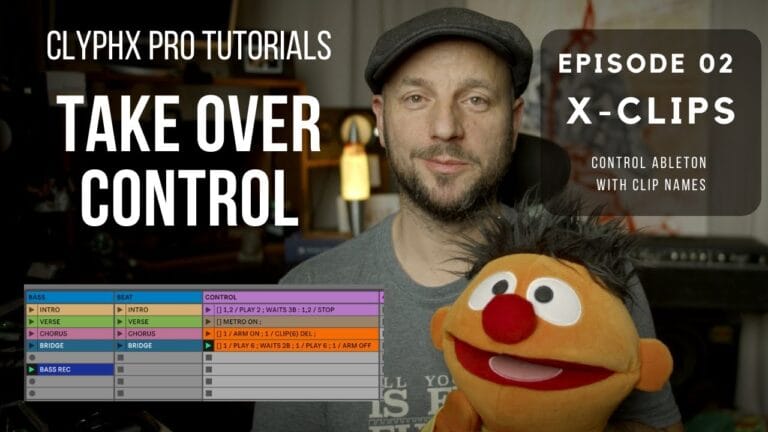
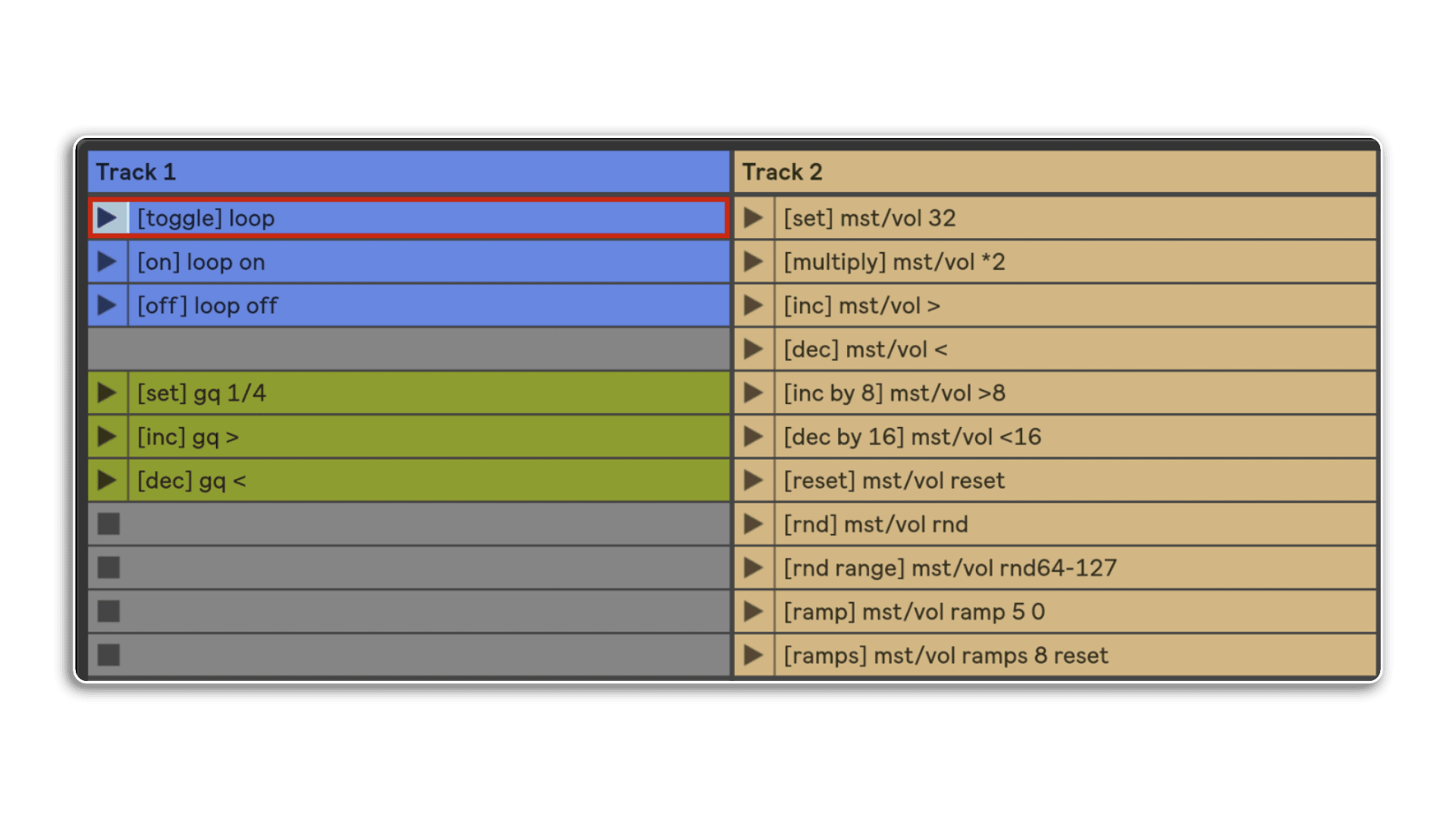
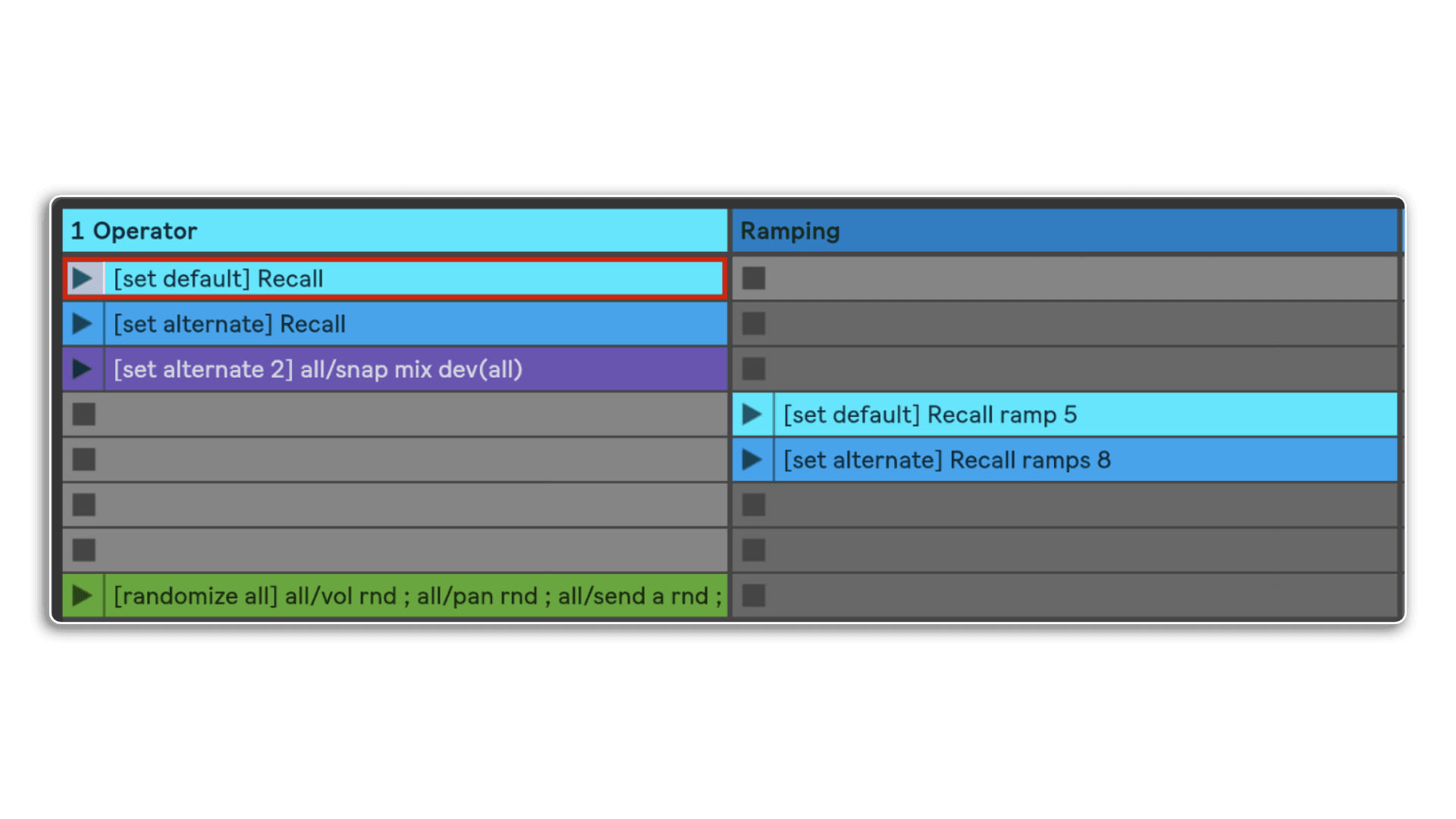
X-Clips are just one of the ways of triggeringactions via ClyphX Pro. You simply name a clip and launch it to trigger its actions. They're simple to create and follow a robust& simple to understand pattern
clyphx pro by nativekontrol
Here we see examples of controlling parameters via specific values or releative adjustments, when ramping between values you can choose between beats of Milliseconds
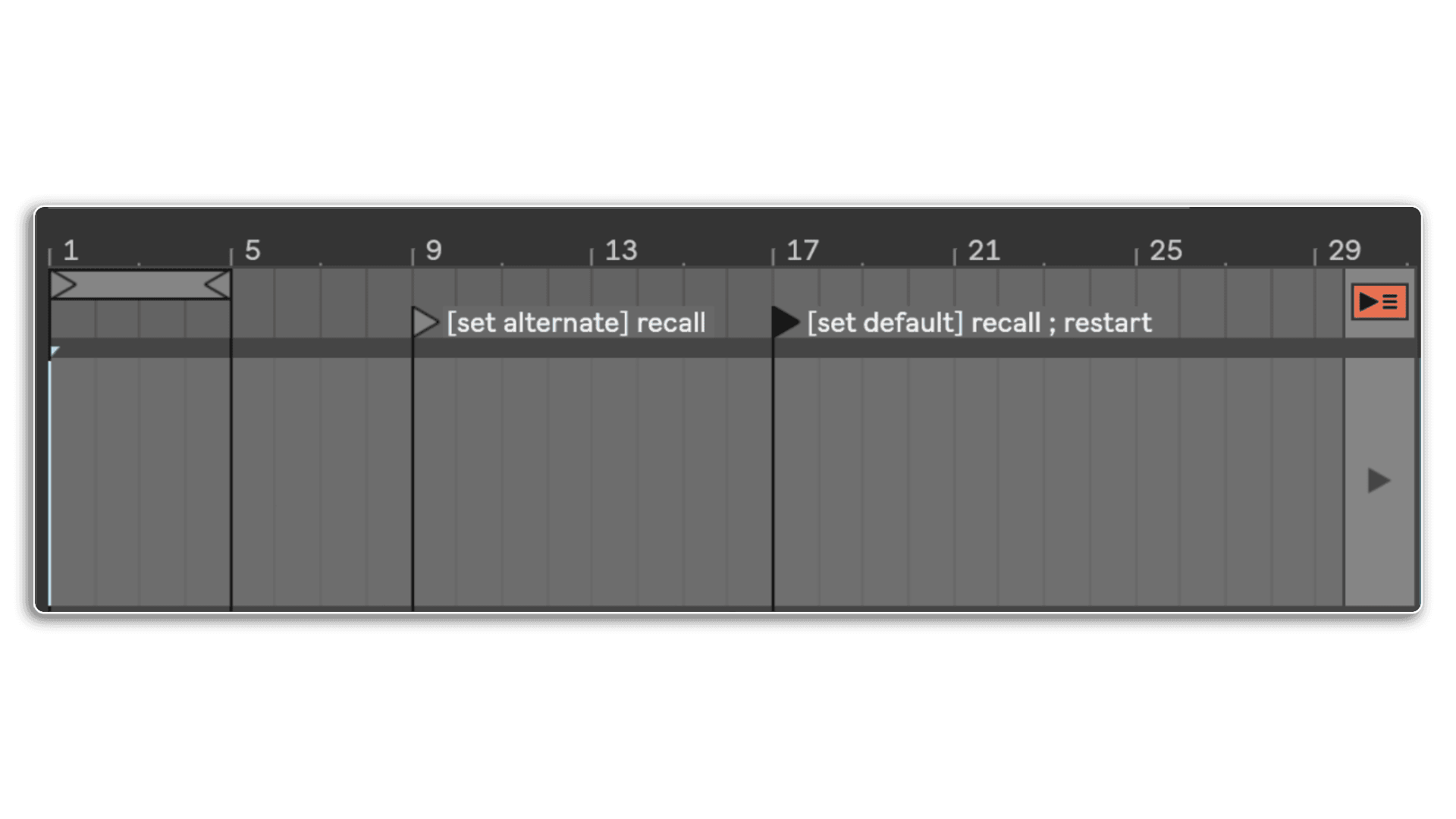
In addition to X-Clips we have X-Locators which will trigger actions when the playhead passes them in Arrangement View
clyphx pro by nativekontrol
The two listed above are snap actions so will recall states of parameters when the playhead passes them
Snap Actions are one of the most powerful features of ClyphX Pro, it isn't just the storing and recall of parameters, you can morph between them as well
clyphx pro by nativekontrol
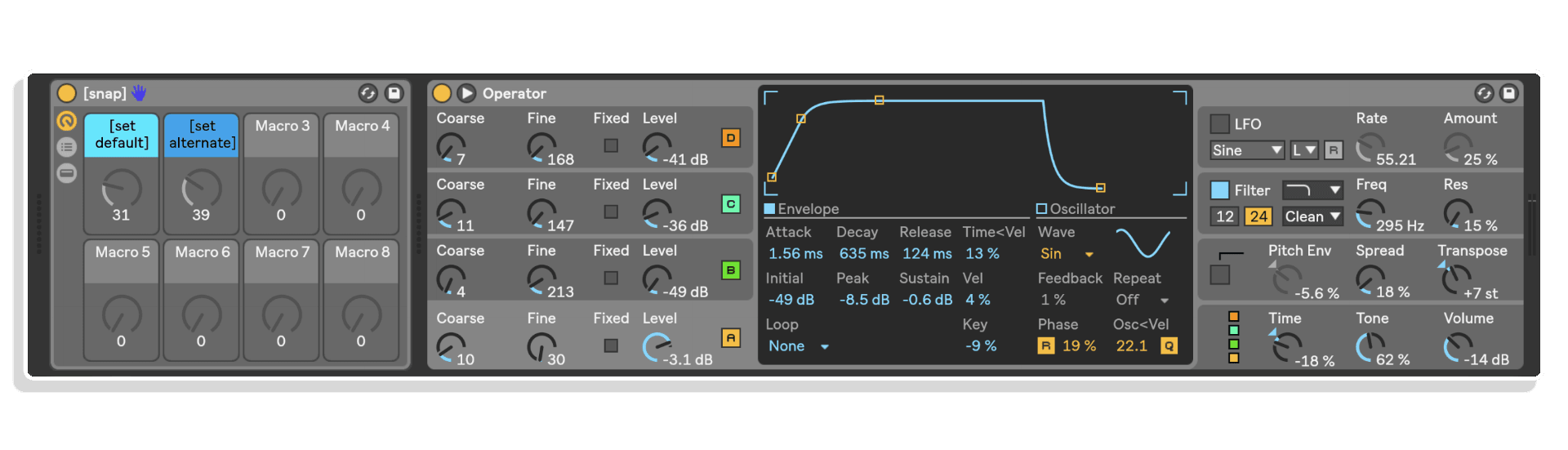
You can store snapshots within your set & recall them on the fly, with the ramping option you can morph between snaps in beats or MS
Part of Clyph Pro is Macrobat (Macro + Acrobat = Acrobat) you can then use these to map to any parameter. The difference to standard macros is what you can control by MAcrobat Macros doesn't have to be contained within the rack
clyphx pro by nativekontrol
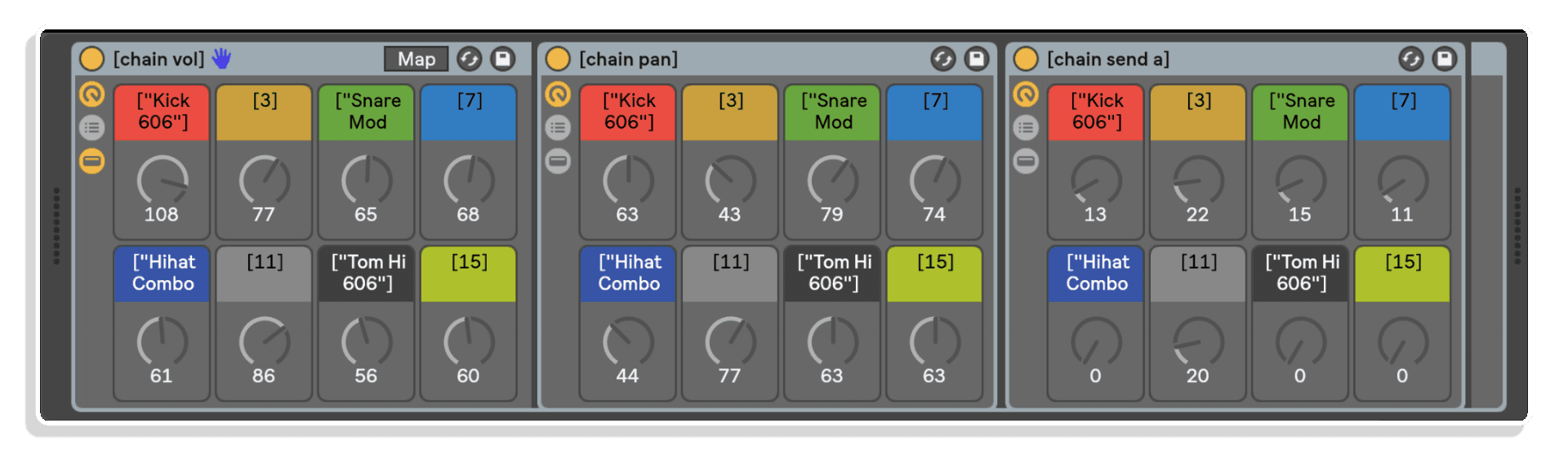
The above rack is focused on a Drum Rack & looks after the Pan, Volume and Send of the Chains within the rack. Imagien controlling this set of three rack with the Ableton Push, they take seconds to set up and will save you hours in workflow!
Combine Snap Actions with Macrobat & you can dial in the morph between snaps by hand!
clyphx pro by nativekontrol
Which as this is done by Macro's can be saved as automation within your track
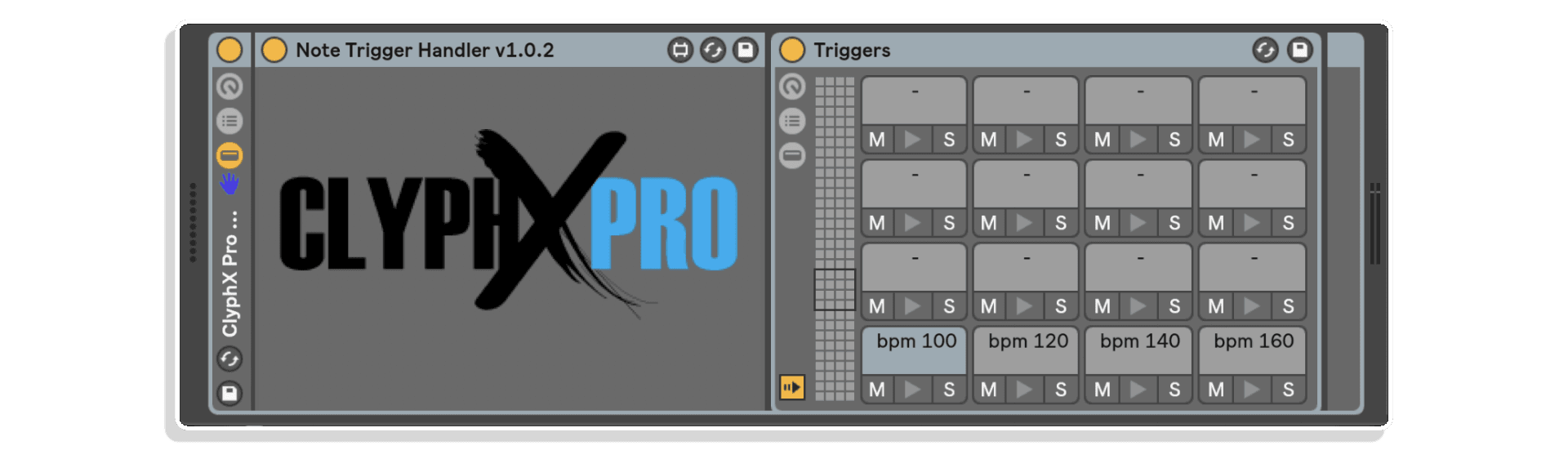
With MaxforLive we've extended the available trigger options to be able to trigger by MIDI notes
clyphx pro by nativekontrol
The drum rack shown here simply has its actions listed as the names of each Drum cell, these can be ClyphX Pro Macros as well...
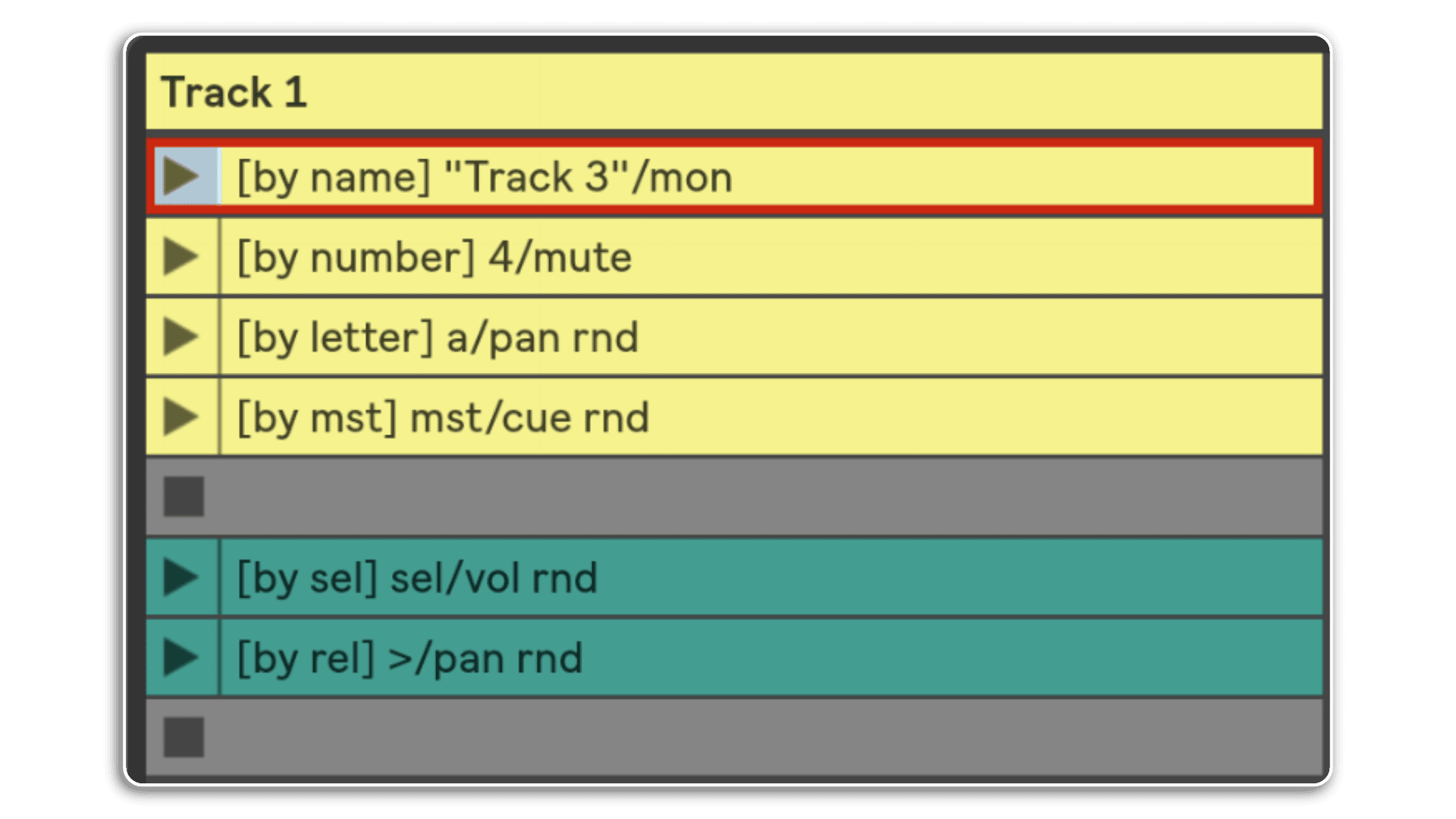
You can target Track Actions by name, number, letter for return tracks or MST for the Main track
clyphx pro by nativekontrol
& you can apply actions to the selected track or relative to the selected track left or right
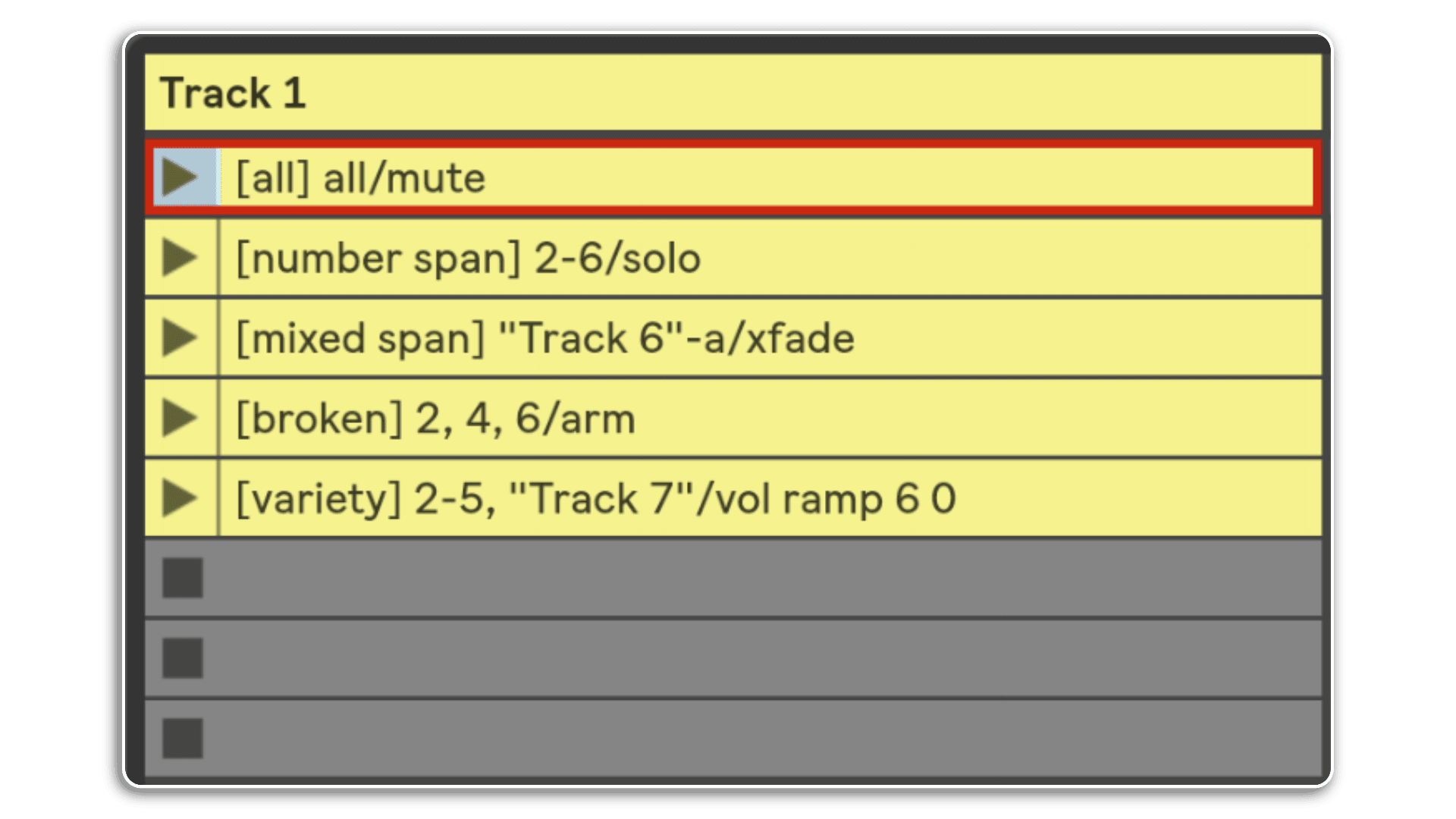
Track Actions can also be applied to a span of tracks or to all tracks
clyphx pro by nativekontrol
Using the broken and variety options you can even set a particular setof tracks to apply the actions to...
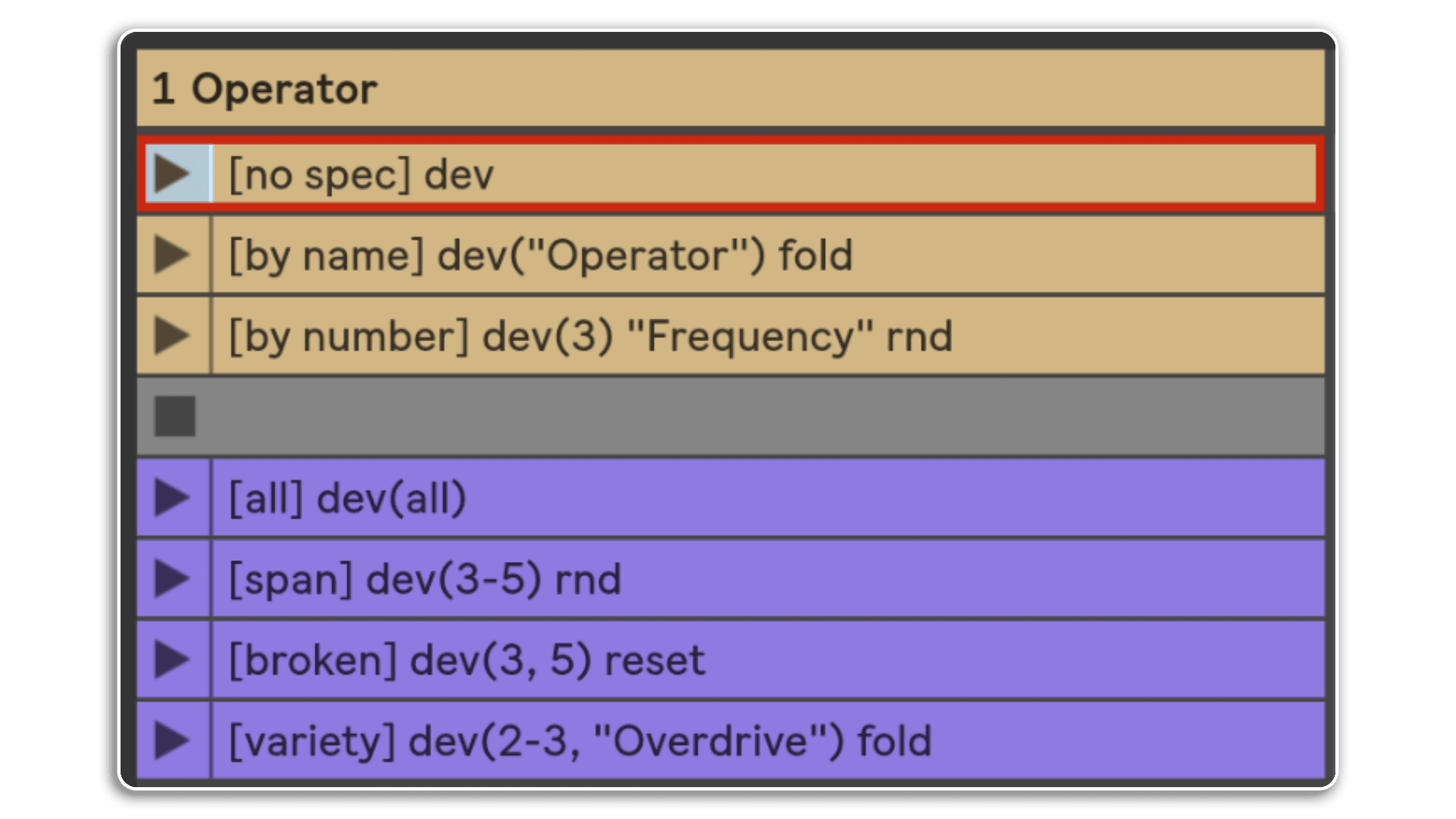
Working with Devices is the same. You can target the selected device or target devices by name or number
clyphx pro by nativekontrol
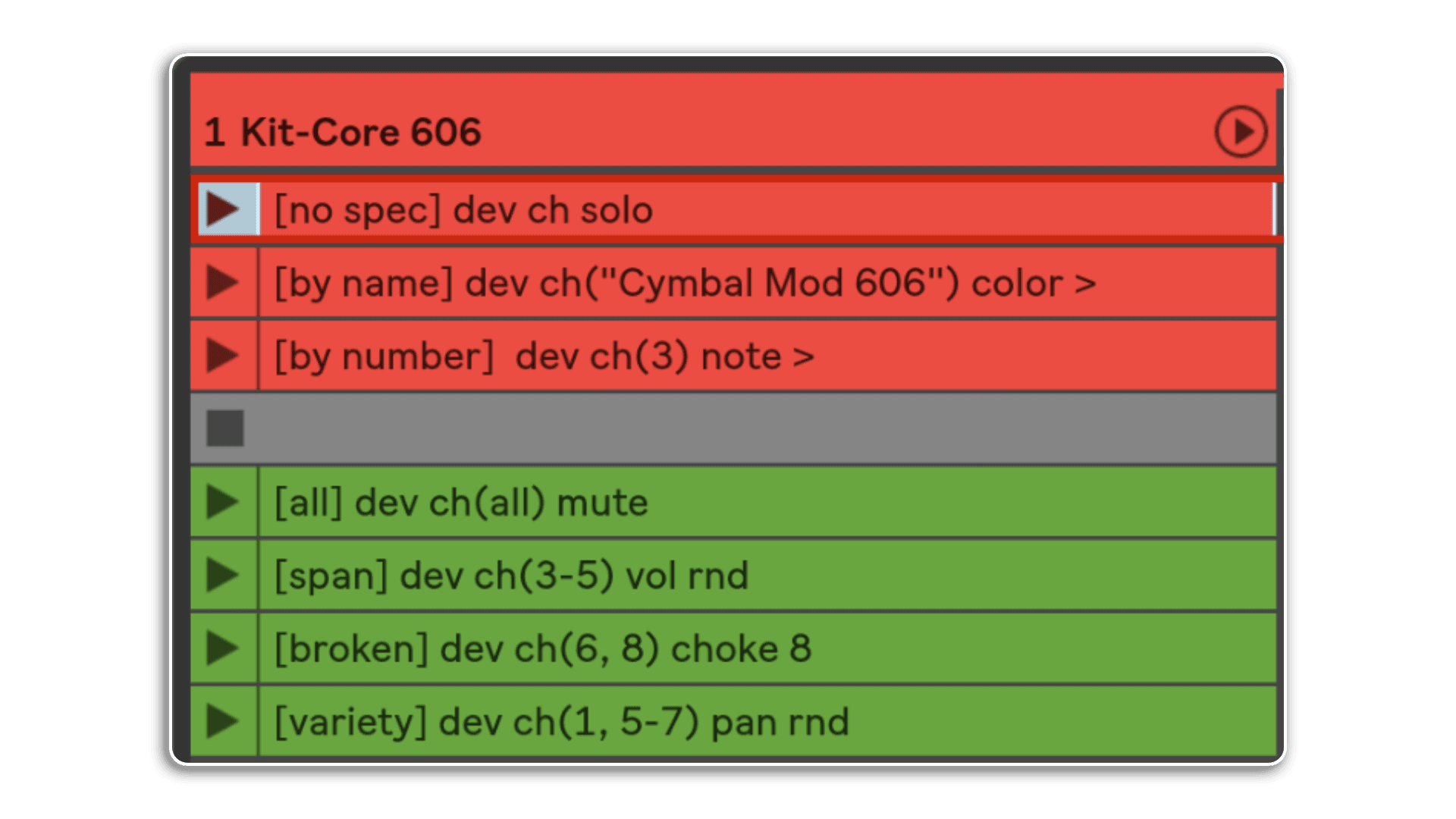
The options for a range of devices is consistent. All or a span or a chosen set of devices defined by name & / or number
Here we see a Drum Rack group, it then makes sense that you'd be able to target your chosen actions to chains
clyphx pro by nativekontrol
With all of the previous options, the depth of ClyphX Pro is impressive!
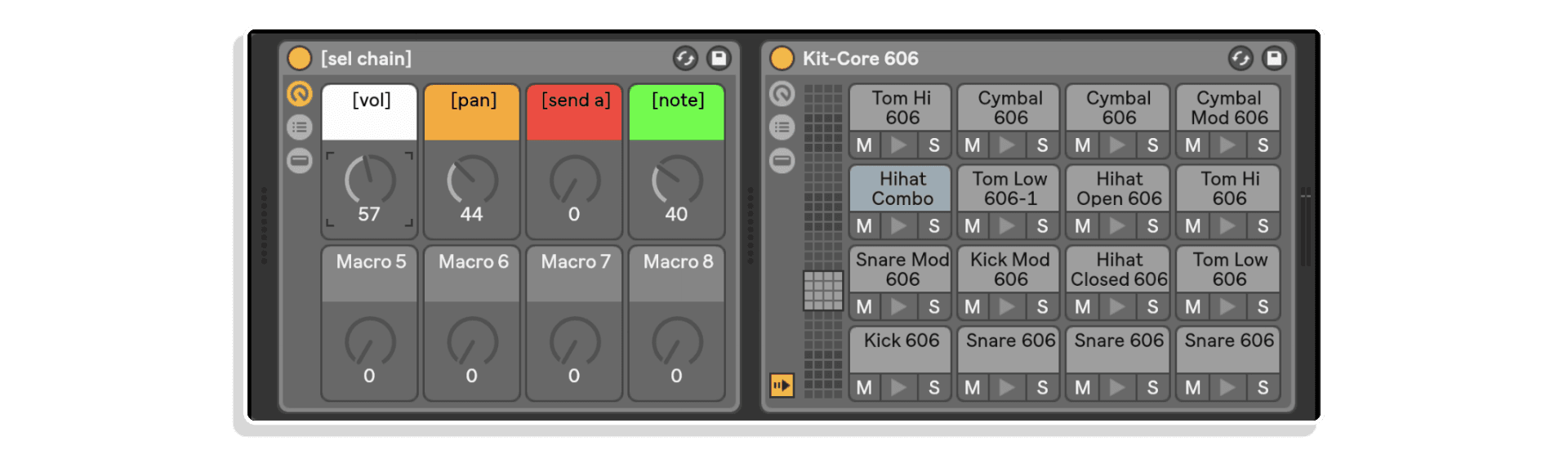
Macrobat also provides for some automap magic too! Here the four macros are automatically mapped to the Drum Rack
clyphx pro by nativekontrol
Changing the name of the [vol] macro to [vol 0db] will limit the volume to zero decibels. How easy is that?
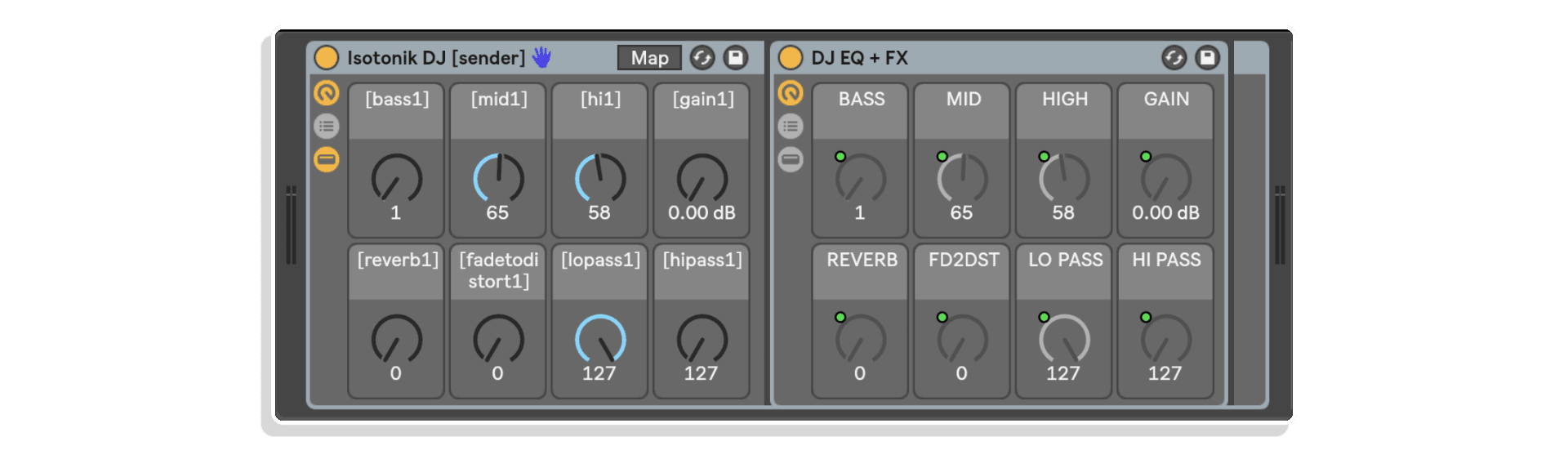
This Macrobat rack is part of the extra goodies lesson. Its core purpose is to allow you to DJ with the Ableton Push. This is a Dj Rack that is controlled by the Macrobat Rack to the left. This grouped rack is then placed in each of 8 Tracks
clyphx pro by nativekontrol
Selecting the Main Track in the Live set then presents you with the choice of 8 reciever MAcrobat racks to choose from. Each one will give you controil of one of the effects across all 8 tracks at the same time!
And finally in addition to the core trigger types its also possible to trigger actions from MaxforLive Devices. Included within the lessons is this example device that can easily be edited to include it's contents within your own devices.
clyphx pro by nativekontrol
The text area allows you to type in any action you want and clicking on the trigger button will perform what you've typed!

Product reviews

Write a review

Leave a quick review of your shopping experience. Your feedback helps others make the right choice.
5/1000
0/500
0/500
What is the most important thing to know?

Would you recommend this product? *

5 out of 5
35 reviews
How item rating is calculated
5 stars
97% (34)
4 stars
3% (1)
3 stars
0% (0)
2 stars
0% (0)
1 star
0% (0)
Sort by
Showing 5 of 35 reviews
October 16, 2025
Andre Gerlach
Verified Purchase

Very nice!

Helpful?
September 10, 2025
Adam McCready
Verified Purchase

Phrases like game changing get thrown around like confetti at a wedding but it's not often the phrase is genuinely deserved but thanks to ClythX Pro (and the great Youtube tuition vids) it's two days in and I am already getting functionality out of Live that I have always wanted but was starting to despair of Ableton implementing so huge thanks to the ClythX team for making something that is going to make possible so many workflow and creativity hacks that I thought would only be dreams. Awesome, and game changing, tool.

Helpful?
July 17, 2025
semmy
Verified Purchase

ClyphX Pro is hands down one of the most powerful tools I've added to my Ableton Live setup. What seems like a simple scripting language quickly opens up into a deep and flexible control system. From launching clips to automating effects chains, creating macros, and even controlling Push or custom setups – this tool can do almost anything.

Helpful?
June 23, 2025
Robledo Silva
Verified Purchase

ClyphX Pro is a great tool for performing with Ableton Live. It opens up new possibilities for using my discontinued Novation SL MK2, without needing to learn Python. It’s also really powerful for automating or randomizing parameters. I’m still learning what more I can do with it, and every new thing I discover opens up even new possibilities for my performances.

Helpful?
June 19, 2025
felix
Verified Purchase

You could say ClyphX Pro is like a bridge between your imagination and Ableton’s interface. It’s a really handy extension that opens up a whole new range of possibilities—once you get how to make it work for you.

Helpful?

ClyphX Pro by nativeKONTROL

Discover the next level of control over Ableton Live 11. No matter how you use Live, ClyphX Pro offers features that you’ll find indispensable on stage, in the studio and beyond.

With ClyphX Pro, you can easily:

  • Control virtually every aspect of your Live Sets using simple words or phrases (called Actions).
  • Trigger Actions in ways that suit your workflow – from Session View Clips, Arrangement View Locators, MIDI Controllers or MaxforLive Devices.
  • Store and recall Snapshots of Tracks, Devices or your entire Set.
  • Automate Scale Settings and other features of Push/Push 2 and Arsenal-powered Control Surface scripts.
  • Extend the functionality of other Control Surface scripts.

ClyphX Pro also includes:

  • A component (called Macrobat) that adds new functionality to Live Racks.
  • Script Linking that can link up to 6 Control Surface scripts together in various ways.
  • Premade MaxforLive Devices that allow for new functionality such as sequencing Actions from MIDI Clips.
  • Live Lessons and example Sets to get you up and running quickly.

Checkout the Schlapbe Video Tutorials – YOUTUBE

CLYPHX PRO BINDINGS EXTENSION – MORE DETAILS

CLYPHX PRO G-CONTROLS EXTENSION – MORE DETAILS

CLYPHX PRO YOUTUBE PLAYLISTQ&A WITH STRAY YOUTUBE PLAYLIST

Frequently Asked Questions

ClyphX Pro is a scripting language for Ableton Live that enables users to control and manipulate various aspects of their Live Sets using simple commands called Actions.

We provide the files for Live 11 compatibility however these are provided without support.

Only to be able to trigger actions by playing mIDI Notes using the included Note Trigger Hadnler Dveice, all other functionality does not require MaxforLive, which is included in Ableton Live Suite or can be purchased separately as an add-on for Ableton Live Standard from your account at Ableton.com account.

ClyphX Pro is compatible with both macOS and Windows systems.

Yes. The Live 12 upgrade was released ahead of Live 12 being made publicly available, so existing ClyphX Pro customers can download the latest version directly from their account at any time.

Log in at My Account > Downloads and you will find the current version of ClyphX Pro alongside any other Isotonik purchases. The download includes setup files for Live 10, Live 11, and Live 12 — pick the folder that matches your install.

There is no charge for the upgrade and no separate purchase is needed.

Important Information

ClyphX Pro v1.3.0

Updated for Live 12.1 / Python 3

General Changes:

  • Updated for compatibility with Live 11/Python 3.
  • Various other minor improvements.

Global Action Changes:

  • Added SETPLAYSEL Action for playing the selection in Arrangement View.
  • Added TFOLLOW Action for toggling Tempo Follower.

Navigation and View Action Changes:

  • Added LEFTSEL and RIGHTSEL Actions for creating/modifying the selection in Arrangement View.

Track Action Changes:

  • Added PANL and PANR Actions for adjusting Split Stereo Panning.
  • Added SPLITPAN Action for toggling Split Stereo Panning.

Device Action Changes:

  • The DEV SET and DEV SET x Actions now support 16 Macros. Also, the latter has been improved to support value/keyword lists with lengths between 1 and 16.
  • Added DEV ADDMACRO and DEV REMMACRO Actions for adding/removing Rack Macros.
  • Added DEV VAR, DEV VARDEL, DEV VARLRECALL, DEV VARRECALL and DEV VARSTORE Actions for working with Rack Macro Variations.

Snap Action Changes:

  • Track Left and Right Split Stereo Panning are now included in Snaps.

Clip Action Changes:

  • Added CLIP LEGATO Action for toggling Clip Legato switches.
  • Added CLIP LMODE action for setting Clip Launch Modes.
  • Added CLIP LQ Action for adjusting Clip Launch Quantizations.
  • Added CLIP TOARR Action for copying Clips to Arrangement View.
  • Added CLIP VELOCITY Action for adjusting Clip Velocity Amounts.

Clip Envelope Action Changes:

  • All Actions related to shaped envelope insertion have been removed due to an incompatibility present since Live 10.1.
  • Envelopes can now be inserted and captured for Track Left and Right Split Stereo Panning
    parameters.

Our Products are generally provided as Zip file downloads which in all cases will need to be extracted and saved to your hard drive prior to installation. Details on the different file type provided and what to do with them are below.

.alp Files – These are Ableton Live Packs and will either install directly into the Packs Section of the browser of Ableton Live or ask you to save them to your hard drive. For packs that install to the library, when you double click on them you will see a pop up window asking you to confirm that installation is ok as the files are described as “Legacy”. This is fine and you are ok to proceed, the packs are created using the format for an earlier version of Live and so remain compatible with the current version.

Control Surface Scripts – Please refer directly to the supplied user manual for installation instructions, due to the changes in the Python language used by Live across versions of 10, 11, 12 and 12.1 you will need to ensure you have installed to the correct location and used the correct files as instructed and supplied.

END-USER LICENSE AGREEMENT FOR ISOTONIK STUDIOS SOFTWARE PRODUCTS.

PLEASE READ THE TERMS AND CONDITIONS OF THIS LICENSE AGREEMENT CAREFULLY BEFORE CONTINUING WITH THIS PROGRAM INSTALL.

This End-User License Agreement (referred to as “EULA”) is a legal agreement between an individual or a single entity (referred to as “LICENSEE”) and Isotonik Studios for the Isotonik Studios software product(s) which may include associated software components, media, printed materials, and “online” or electronic documentation (referred to as “SOFTWARE PRODUCT”). By installing, copying, or otherwise using the SOFTWARE PRODUCT, the LICENSEE agrees to be bound by the terms of this EULA.

This EULA represents the entire agreement concerning the program between the LICENSEE and Isotonik Studios and it supersedes any prior proposal, representation, or understanding between the parties. If the LICENSEE does not agree to the terms of this EULA, the LICENSEE should not install or use the SOFTWARE PRODUCT.

The SOFTWARE PRODUCT is protected by copyright laws and international copyright treaties, as well as other intellectual property laws and treaties. The SOFTWARE PRODUCT is licensed, not sold.

  1. GRANT OF LICENSE.

The SOFTWARE PRODUCT is licensed as follows:

(a) Installation and Use. Providing that the LICENSEE has paid any applicable license fees, Isotonik Studios grants the LICENSEE the right to install and use copies of the SOFTWARE PRODUCT on up to two computers in the LICENSEE’s possession that are running a validly licensed copy of the operating system for which the SOFTWARE PRODUCT was designed [e.g., Windows 10, macOS]. The computer(s) must be owned by the LICENSEE.

(b) Backup Copies. The LICENSEE may also make copies of the SOFTWARE PRODUCT as may be necessary for backup and archival purposes.

  1. DESCRIPTION OF OTHER RIGHTS AND LIMITATIONS.

(a) Maintenance of Copyright Notices. The LICENSEE must not remove or alter any copyright notices on any and all copies of the SOFTWARE PRODUCT.

(b) Distribution. The LICENSEE may not distribute registered copies of the SOFTWARE PRODUCT to third parties.

(c) Prohibition on Reverse Engineering, Decompilation, and Disassembly. The LICENSEE may not reverse engineer, decompile, or disassemble the SOFTWARE PRODUCT, except and only to the extent that such activity is expressly permitted by applicable law notwithstanding this limitation.

(d) Rental. The LICENSEE may not rent, lease, or lend the SOFTWARE PRODUCT.

(e) License transfer The LICENSEE may not transfer their license to the SOFTWARE PRODUCT to any third party. Any attempt to do so will be considered a violation of this EULA.

(f) Support Services. Isotonik Studios may provide the LICENSEE with support services related to the SOFTWARE PRODUCT for a period of 12 months following the date of purchase. Any supplemental software code provided to the LICENSEE as part of the Support Services shall be considered part of the SOFTWARE PRODUCT and subject to the terms and conditions of this EULA.

(g) Compliance with Applicable Laws. The LICENSEE must comply with all applicable laws regarding use of the SOFTWARE PRODUCT.

  1. TERMINATION Without prejudice to any other rights, Isotonik Studios may terminate this EULA if the LICENSEE fails to comply with the terms and conditions of this EULA. In such event, the LICENSEE must destroy all copies of the SOFTWARE PRODUCT in the LICENSEE’s possession.
  2. COPYRIGHT All title, including but not limited to copyrights, in and to the SOFTWARE PRODUCT and any copies thereof are owned by Isotonik Studios or its suppliers. All title and intellectual property rights in and to the content which may be accessed through use of the SOFTWARE PRODUCT is the property of the respective content owner and may be protected by applicable copyright or other intellectual property laws and treaties. This EULA grants the LICENSEE no rights to use such content. All rights not expressly granted are reserved by Isotonik Studios.
  3. NO WARRANTIES Isotonik Studios expressly disclaims any warranty for the SOFTWARE PRODUCT. The SOFTWARE PRODUCT is provided ‘As Is’ without any express or implied warranty of any kind, including but not limited to any warranties of merchantability, noninfringement, or fitness of a particular purpose. Isotonik Studios does not warrant or assume responsibility for the accuracy or completeness of any information, text, graphics, links or other items contained within the SOFTWARE PRODUCT. Isotonik Studios makes no warranties respecting any harm that may be caused by the transmission of a computer virus, worm, time bomb, logic bomb, or other such computer program. Isotonik Studios further expressly disclaims any warranty or representation to the LICENSEE or to any third party.
  4. LIMITATION OF LIABILITY In no event shall Isotonik Studios be liable for any damages (including, without limitation, lost profits, business interruption, or lost information) arising out of the LICENSEE’s use of or inability to use the SOFTWARE PRODUCT, even if Isotonik Studios has been advised of the possibility of such damages. In no event will Isotonik Studios be liable for loss of data or for indirect, special, incidental, consequential (including lost profit), or other damages based in contract, tort or otherwise. Isotonik Studios shall have no liability with respect to the content of the SOFTWARE PRODUCT or any part thereof, including but not limited to errors or omissions contained therein, libel, infringements of rights of publicity, privacy, trademark rights, business interruption, personal injury, loss of privacy, moral rights or the disclosure of confidential information.


MORE FROM nativeKONTROL...

FREQUENTLY BOUGHT TOGETHER

CONTACT US...
Tick the box below to sign up to our mailing list and register for our Access All Areas competition where you could win a years worth of new releases?
ClyphX Pro by nativeKONTROL
£66.00