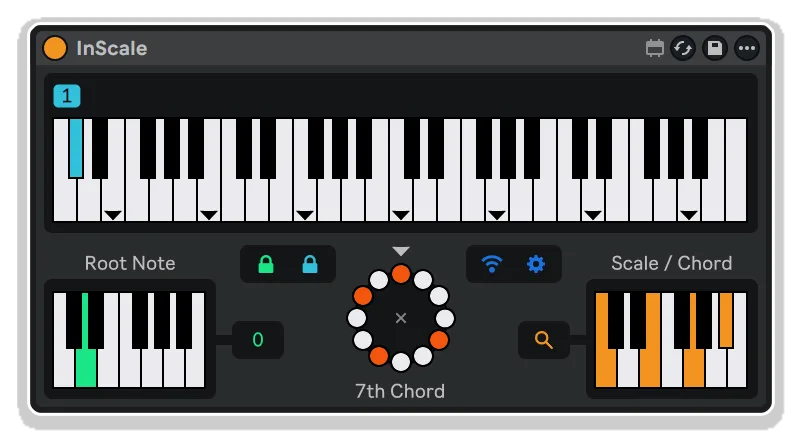
inScale by KILLIHU
WHAT IF EVERY NOTE YOU PLAYED WAS ALWAYS THE RIGHT NOTE?
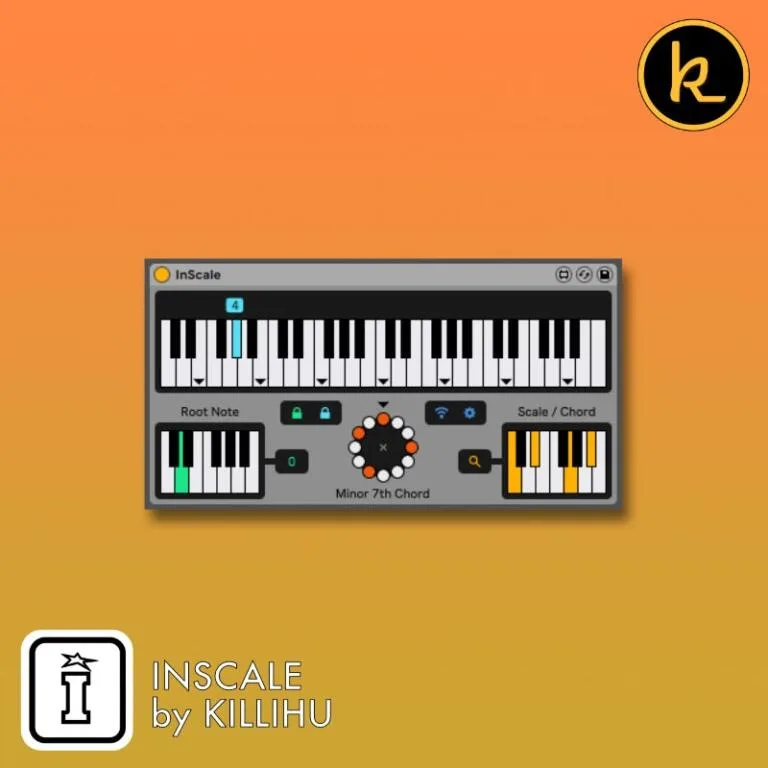
inScale transforms your MIDI keyboard into an intelligent scale-locked instrument where wrong notes simply don’t exist. Play any white key and stay perfectly in tune with your chosen scale, switch between 20 presets using black keys, and shift root notes with your first octave – all without interrupting your creative flow.
Inside you’ll find:
- Over 400 scale presets from global musical traditions (Western, Carnatic, Raga, Jazz, Blues, Greek, Japanese, and more)
- 20 customizable preset slots for instant scale switching during performance
- Visual circle of notes interface for intuitive scale construction and visualization
- Remote control capability via iOS/Android devices using Open Stage Control
- Intelligent MIDI mapping: white keys perform, black keys change presets, first octave selects root
- “In the Box” mode with Live 12 rack featuring custom MIDI editor note names
- Automation support for evolving harmonic progressions
- Optional lock controls to persist settings between sessions
- Transpose function (-4 to +4 octaves) for extended range
Whether you’re improvising live, exploring exotic modes, or ensuring your compositions never leave the harmonic path, inScale provides the framework without limiting your expression.
MaxforLive device for Ableton Live 10/11/12 (Mac & Windows)
USER GUIDE: inScale 1.1
inScale by KILLIHU
WHAT IF EVERY NOTE YOU PLAYED WAS ALWAYS THE RIGHT NOTE?
inScale transforms your MIDI keyboard into an intelligent scale-locked instrument where wrong notes simply don’t exist. Play any white key and stay perfectly in tune with your chosen scale, switch between 20 presets using black keys, and shift root notes with your first octave – all without interrupting your creative flow.
Inside you’ll find:
- Over 400 scale presets from global musical traditions (Western, Carnatic, Raga, Jazz, Blues, Greek, Japanese, and more)
- 20 customizable preset slots for instant scale switching during performance
- Visual circle of notes interface for intuitive scale construction and visualization
- Remote control capability via iOS/Android devices using Open Stage Control
- Intelligent MIDI mapping: white keys perform, black keys change presets, first octave selects root
- “In the Box” mode with Live 12 rack featuring custom MIDI editor note names
- Automation support for evolving harmonic progressions
- Optional lock controls to persist settings between sessions
- Transpose function (-4 to +4 octaves) for extended range
Whether you’re improvising live, exploring exotic modes, or ensuring your compositions never leave the harmonic path, inScale provides the framework without limiting your expression.
MaxforLive device for Ableton Live 10/11/12 (Mac & Windows)
USER GUIDE: inScale 1.1
Buying for someone?Send a gift card →
Additional information
| MaxforLive | Control Devices |
|---|---|
| Ableton Live Compatibility | Ableton Live 10 Standard with MaxforLive, Ableton Live 10 Suite, Ableton Live 11 Standard with MaxforLive, Ableton Live 11 Suite, Ableton Live 12 Standard with MaxforLive, Ableton Live 12 Suite |
| Min. Requirements | Ableton Live 10 Standard with MaxforLive Installed or Ableton Live 10 Suite |
| OS | Mac, Windows |
PRICE: £22.00
Product reviews
4 out of 5
1 review
How item rating is calculated
We show the average based on reviews. Only genuine reviews are displayed.
Sort by
July 6, 2026
This reviewer bought this product from our store.
pro
Really cool and basic features. Anybody can test his own capacity to differenciate sounds and harmonies
-
get an instant listening of the scale without having to memorize finger steps !! also helped Ear training exercise with different intervals/chord triads/fourths ...
It would be great if one could :
- be able to save a specific personal scale
- be able to "recall scales" with a wider range / one or 2 octaves lower
- be able to recall scales with a CC command
I recommend this product
inScale by KILLIHU
Wrong notes can derail a performance or interrupt your creative flow. inScale eliminates that friction entirely, transforming your MIDI keyboard into an intelligent instrument that keeps you locked into your chosen scale no matter what white keys you press.
Designed for both live performance and studio composition, inScale gives you instant access to over 400 scales and chords from around the world, with the ability to switch between 20 custom presets on the fly using your keyboard’s black keys. The first octave of your controller becomes a dedicated root note selector, while the remaining octaves are your performance zone where every white key triggers a scale-appropriate note.
Whether you’re exploring exotic modes from distant cultures, building chord progressions, or ensuring your improvisations never stray from the harmonic path, inScale provides the framework without limiting your expression.
Features & Highlights
20 Customizable Presets: Store your most-used scales and chord sets across 20 slots, accessible instantly via black keys or automation. Each preset remembers your scale selection and can optionally store root note and transposition settings.
400+ Scale Database: Access an extensive library of scales and chords organized by geographic and ethnic origin, including Western, Carnatic, Raga, Chinese, Greek, Hungarian, Japanese, Jazz, Blues, Jewish, and Southeast Asian traditions. The scale browser makes finding the perfect mode effortless.
Visual Circle of Notes Interface: See your scale structure at a glance with the intuitive circular note display. Click notes to build custom scales, or use the synchronized keyboard view below. Both interfaces stay in perfect sync, giving you multiple ways to visualize and edit your harmonic framework.
Intelligent MIDI Mapping: Play white keys (C2-C6) to perform in your selected scale, press black keys to change presets, and use the first octave (C1-B1) to shift the root note. This ergonomic layout keeps everything within reach during performance.
Remote Control via Mobile Devices: Use any iOS or Android tablet or phone as a wireless remote control for inScale. Built on Open Stage Control, the remote interface mirrors the plugin’s functionality, perfect for placing next to your MIDI keyboard or across the room from your computer.
Flexible Workflow Options: Use inScale with external MIDI keyboards for traditional performance, or work entirely “in the box” using the included Live 12 rack that displays custom note names in the MIDI editor. The rack shows preset numbers, root note options, and performance keys clearly labeled.
Automation & Lock Controls: Automate preset and root note changes for evolving compositions, or activate lock controls to prevent accidental changes and persist settings between sessions. Transposition control (-4 to +4 octaves) expands your playable range dramatically.
How to Use
Insert inScale before any MIDI instrument in your Live set. The device receives MIDI input and transposes incoming notes to match your selected scale before sending them to your synth or sampler.
Performance Mode (with external MIDI keyboard):
Use your keyboard’s first octave (C1-B1) to select the root note. Play white keys in octaves 2-5 (C2-C6) to perform in the current scale. Press black keys to cycle through your 20 presets. Visual feedback appears as yellow dots above the preset keyboard, showing which scale degrees you’re playing in real-time.
In the Box Mode (MIDI editor):
Load the included Live 12 rack (searches for InScale.amxd in User Library/Max Devices/killihu/). The MIDI editor displays custom note names: slots 01-20 for preset selection, C-B for root note selection, and numbered performance keys showing scale degrees. This makes programming MIDI clips intuitive even without a hardware controller.
Building Custom Scales:
Click the magnifying glass icon to open the scale browser and explore 400+ presets organized by cultural tradition. Or click notes directly on the circle or keyboard interface to create your own scales and chords. The device automatically identifies known scales by name when it finds a match in its database.
Remote Control Setup:
Run the included Open Stage Control server application on your computer, then access the interface from any mobile device’s web browser using the displayed IP address. Load the inScale.json session file, adjust the layout for your device’s screen, and activate the Remote Control Link switch in the plugin. Your tablet becomes a wireless control surface with full visual feedback.
Ideal For
Live Performers: Eliminate wrong notes during improvisation. Switch between scales mid-performance using black keys or remote control while keeping your hands on the white keys for uninterrupted playing.
Composers & Songwriters: Explore exotic scales and modes without memorizing complex interval patterns. Audition different harmonic frameworks instantly by changing presets, with every white key guaranteed to fit your chosen scale.
Electronic Music Producers: Lock your sequences into specific scales before recording, then use automation to create evolving harmonic journeys across your arrangement.
Music Students & Educators: Learn scales from around the world by actually playing them rather than just reading about them. The visual circle of notes interface makes intervallic relationships immediately clear.
Modal Jazz & World Music Enthusiasts: Access authentic scales from Carnatic, Raga, Japanese, Greek, and other musical traditions without extensive theoretical study. Play with confidence knowing every note fits the mode.
What’s Included
- inScale MaxforLive device (AMXD file)
- Live 12 rack with custom MIDI editor note names
- Open Stage Control server application (Mac and Windows versions)
- inScale.json remote control session file
- Comprehensive reference manual
- 20 preset slots for storing custom scale configurations
- 400+ built-in scale presets from global musical traditions
Requirements
- Ableton Live 10, 11, or 12 with Max for Live
- Mac or Windows operating system
- MIDI keyboard recommended (2-octave minimum, 5-octave optimal)
- Optional: iOS device (10.3+) or Android device with Firefox 75+ or Chrome 60+ for remote control
Explore More
Frequently Asked Questions
A: inScale is a MaxforLive MIDI device that keeps you locked into your chosen musical scale by intelligently transposing white keys to scale-appropriate notes. It includes over 400 preset scales from global musical traditions, 20 customizable preset slots accessible via black keys, visual circle of notes interface, and optional remote control via iOS/Android devices.
A: Yes, inScale is a MaxforLive device and requires Ableton Live 10, 11, or 12 with Max for Live installed.
A: MaxforLive is a platform that integrates the visual programming environment Max with Ableton Live, allowing users to create and use custom audio, MIDI, and control devices. It extends Live’s capabilities with powerful custom instruments, effects, and MIDI processors like inScale.
A: Yes! Version 1.1 includes a Live 12 rack that displays custom note names in the MIDI editor, making it easy to program preset changes, root note selection, and performances directly in Live’s piano roll without hardware controllers.
A: You can explore more of killihu’s tools and devices here: killihu
Important Information
v1.1.1 Bugfixes:
– Previously, with some color themes, the triangular marks indicating the start of the scale did not display the correct color.
v1.1 New features and improvements:
– It is now possible to save the root note and transposition value in presets.
– It is now possible to use automation to change presets and root notes.
– Added additional keys/notes for preset switching. This makes it easier to use the device from Live’s MIDI editor. A rack is included for Live 12 that displays control names in Live’s MIDI editor.
– Updated PDF manual.
– This version does not include the remote control software. It is possible to download version 1.0 which does include it.
v1.1 Bugfixes:
– Previously the background of the settings section allowed mouse clicks to pass through.
Initial Release – November 2024
Our Products are generally provided as Zip file downloads which in all cases will need to be extracted and saved to your hard drive prior to installation. Details on the different file type provided and what to do with them are below.
.alp Files – These are Ableton Live Packs and will either install directly into the Packs Section of the browser of Ableton Live or ask you to save them to your hard drive. For packs that install to the library, when you double click on them you will see a pop up window asking you to confirm that installation is ok as the files are described as “Legacy”. This is fine and you are ok to proceed, the packs are created using the format for an earlier version of Live and so remain compatible with the current version.
.amxd files – These are individual MaxforLive Devices and can be stored anywhere on your hard drive. We’d advise creating a folder for them and then adding that folder as a location within the Places section of Lives Browser.
END-USER LICENSE AGREEMENT FOR ISOTONIK STUDIOS SOFTWARE PRODUCTS.
PLEASE READ THE TERMS AND CONDITIONS OF THIS LICENSE AGREEMENT CAREFULLY BEFORE CONTINUING WITH THIS PROGRAM INSTALL.
This End-User License Agreement (referred to as “EULA”) is a legal agreement between an individual or a single entity (referred to as “LICENSEE”) and Isotonik Studios for the Isotonik Studios software product(s) which may include associated software components, media, printed materials, and “online” or electronic documentation (referred to as “SOFTWARE PRODUCT”). By installing, copying, or otherwise using the SOFTWARE PRODUCT, the LICENSEE agrees to be bound by the terms of this EULA.
This EULA represents the entire agreement concerning the program between the LICENSEE and Isotonik Studios and it supersedes any prior proposal, representation, or understanding between the parties. If the LICENSEE does not agree to the terms of this EULA, the LICENSEE should not install or use the SOFTWARE PRODUCT.
The SOFTWARE PRODUCT is protected by copyright laws and international copyright treaties, as well as other intellectual property laws and treaties. The SOFTWARE PRODUCT is licensed, not sold.
- GRANT OF LICENSE.
The SOFTWARE PRODUCT is licensed as follows:
(a) Installation and Use. Providing that the LICENSEE has paid any applicable license fees, Isotonik Studios grants the LICENSEE the right to install and use copies of the SOFTWARE PRODUCT on up to two computers in the LICENSEE’s possession that are running a validly licensed copy of the operating system for which the SOFTWARE PRODUCT was designed [e.g., Windows 10, macOS]. The computer(s) must be owned by the LICENSEE.
(b) Backup Copies. The LICENSEE may also make copies of the SOFTWARE PRODUCT as may be necessary for backup and archival purposes.
- DESCRIPTION OF OTHER RIGHTS AND LIMITATIONS.
(a) Maintenance of Copyright Notices. The LICENSEE must not remove or alter any copyright notices on any and all copies of the SOFTWARE PRODUCT.
(b) Distribution. The LICENSEE may not distribute registered copies of the SOFTWARE PRODUCT to third parties.
(c) Prohibition on Reverse Engineering, Decompilation, and Disassembly. The LICENSEE may not reverse engineer, decompile, or disassemble the SOFTWARE PRODUCT, except and only to the extent that such activity is expressly permitted by applicable law notwithstanding this limitation.
(d) Rental. The LICENSEE may not rent, lease, or lend the SOFTWARE PRODUCT.
(e) License transfer The LICENSEE may not transfer their license to the SOFTWARE PRODUCT to any third party. Any attempt to do so will be considered a violation of this EULA.
(f) Support Services. Isotonik Studios may provide the LICENSEE with support services related to the SOFTWARE PRODUCT for a period of 12 months following the date of purchase. Any supplemental software code provided to the LICENSEE as part of the Support Services shall be considered part of the SOFTWARE PRODUCT and subject to the terms and conditions of this EULA.
(g) Compliance with Applicable Laws. The LICENSEE must comply with all applicable laws regarding use of the SOFTWARE PRODUCT.
- TERMINATION Without prejudice to any other rights, Isotonik Studios may terminate this EULA if the LICENSEE fails to comply with the terms and conditions of this EULA. In such event, the LICENSEE must destroy all copies of the SOFTWARE PRODUCT in the LICENSEE’s possession.
- COPYRIGHT All title, including but not limited to copyrights, in and to the SOFTWARE PRODUCT and any copies thereof are owned by Isotonik Studios or its suppliers. All title and intellectual property rights in and to the content which may be accessed through use of the SOFTWARE PRODUCT is the property of the respective content owner and may be protected by applicable copyright or other intellectual property laws and treaties. This EULA grants the LICENSEE no rights to use such content. All rights not expressly granted are reserved by Isotonik Studios.
- NO WARRANTIES Isotonik Studios expressly disclaims any warranty for the SOFTWARE PRODUCT. The SOFTWARE PRODUCT is provided ‘As Is’ without any express or implied warranty of any kind, including but not limited to any warranties of merchantability, noninfringement, or fitness of a particular purpose. Isotonik Studios does not warrant or assume responsibility for the accuracy or completeness of any information, text, graphics, links or other items contained within the SOFTWARE PRODUCT. Isotonik Studios makes no warranties respecting any harm that may be caused by the transmission of a computer virus, worm, time bomb, logic bomb, or other such computer program. Isotonik Studios further expressly disclaims any warranty or representation to the LICENSEE or to any third party.
- LIMITATION OF LIABILITY In no event shall Isotonik Studios be liable for any damages (including, without limitation, lost profits, business interruption, or lost information) arising out of the LICENSEE’s use of or inability to use the SOFTWARE PRODUCT, even if Isotonik Studios has been advised of the possibility of such damages. In no event will Isotonik Studios be liable for loss of data or for indirect, special, incidental, consequential (including lost profit), or other damages based in contract, tort or otherwise. Isotonik Studios shall have no liability with respect to the content of the SOFTWARE PRODUCT or any part thereof, including but not limited to errors or omissions contained therein, libel, infringements of rights of publicity, privacy, trademark rights, business interruption, personal injury, loss of privacy, moral rights or the disclosure of confidential information.
More from Killihu
 ★ Popular
Frequently Bought Together