Looper:Mode by KB Live Solutions
FINALLY, A CONTROL SURFACE SCRIPT DEDICATED TO LIVE’S LOOPER
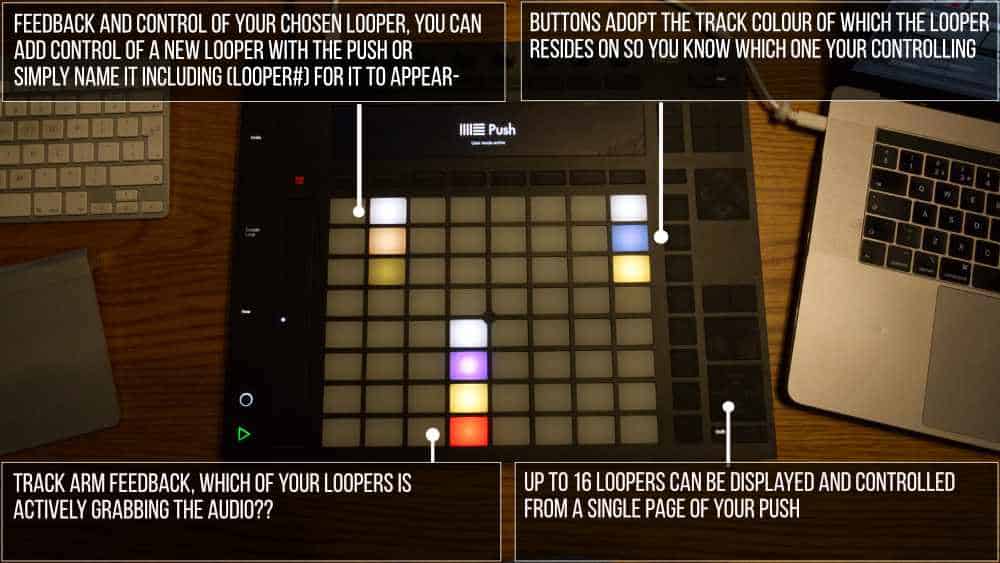
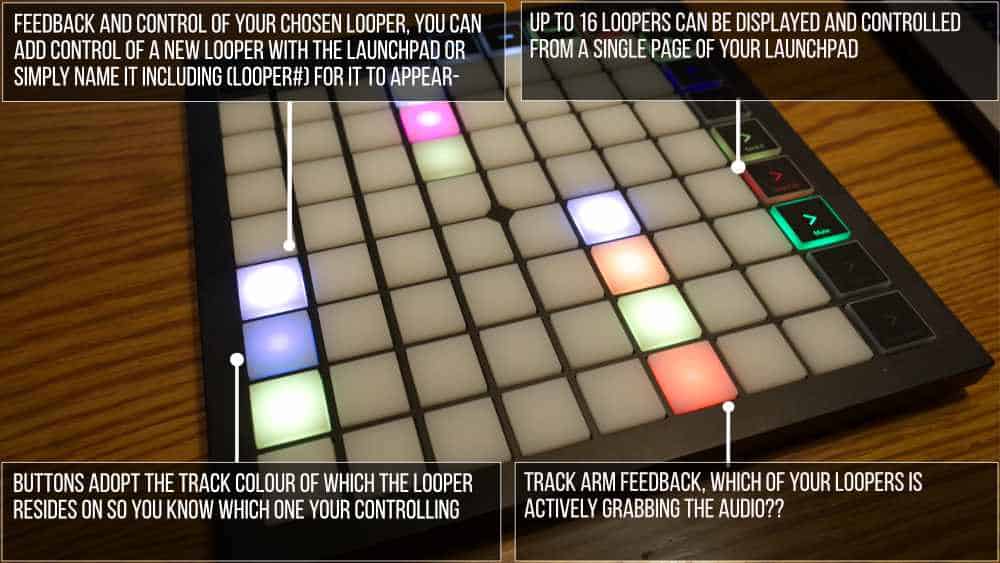
LOOPER:MODE lets you easily monitor and control up to 16 Looper devices on a single page. You can view and control the state of the Looper, along with the Mute and Arm status of the track.
USER GUIDE: Launchpad Mini MK3 Installation
Looper:Mode by KB Live Solutions
FINALLY, A CONTROL SURFACE SCRIPT DEDICATED TO LIVE’S LOOPER
LOOPER:MODE lets you easily monitor and control up to 16 Looper devices on a single page. You can view and control the state of the Looper, along with the Mute and Arm status of the track.
USER GUIDE: Launchpad Mini MK3 Installation
Buying for someone?Send a gift card →
Additional information
| Controllers | Ableton Push One, Ableton Push THREE Controller, Ableton Push TWO, Novation Launchpad |
|---|---|
| Ableton Live Compatibility | Ableton Live 10 Intro, Ableton Live 10 Standard, Ableton Live 10 Standard with MaxforLive, Ableton Live 10 Suite, Ableton Live 11 Intro, Ableton Live 11 Standard, Ableton Live 11 Standard with MaxforLive, Ableton Live 11 Suite, Ableton Live 12 Intro, Ableton Live 12 Standard, Ableton Live 12 Standard with MaxforLive, Ableton Live 12 Suite |
| Min. Requirements | Ableton Live Intro 10 |
| OS | Mac, Windows |
PRICE: £25.00
Product reviews
4.5 out of 5
2 reviews
How item rating is calculated
We show the average based on reviews. Only genuine reviews are displayed.
Sort by
November 12, 2022
This reviewer bought this product from our store.
Very practical and also....support was very fast to help when i had a problem to make it work at begining:-) I'll buy more of their tool and devices:-)
January 12, 2025
This reviewer bought this product from our store.
Nearly perfect. Unfortunately Ableton live has a limitation that requires you to midi map a button to the looper in order to be able to control it with quantization. It would have been nice if this were mentioned upfront. Otherwise the device is perfect and works as advertised.
Reply from Darren E Cowley (Admin)
January 13, 2025
Looper:Mode by KB Live Solutions
Have you ever been fighting with Live’s Looper and its lack of visual feedback?
Then LOOPER:MODE is here for you. On a single page of your favorite controller, LOOPER:MODE allows you to monitor and control up to 16 Looper devices simultaneously at the push of a button.
All you need to do is select a Looper in Live, press the “New” button of the LaunchPad when in User Mode, and the Looper will instantly be added to the pads matrix and show 4 buttons.
The top button will reflect the state of the Looper, and will let you change it.
The 2nd button will show the color of the track on which the Looper is, and pressing will take you instantly to the Looper device.
The third button will act as a Mute button for the track and the fourth button is for the Arm button.
Of course, you can still map the Looper to your favorite pedal or use the Multi-Purpose button, and all the settings will be recalled when opening an existing set.
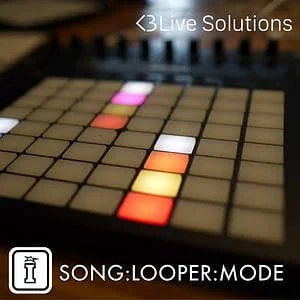
PLEASE NOTE: ALSO AVAILABLE AS A COMBINED SCRIPT WITH SONG:MODE – SONG:LOOPER:MODE – LaunchPad Edition
Frequently Asked Questions
Looper:Mode is designed as a control surface script for the Novation Launchpad, used in User Mode. Check the product details to confirm which specific Launchpad models are supported before purchasing.
You can monitor and control up to 16 Looper devices simultaneously from a single page on your Launchpad. Each Looper is represented by a column of four pads showing state, track colour, mute, and arm controls.
Simply select a Looper device in Ableton Live, then press the New button on your Launchpad while in User Mode. The Looper is instantly assigned to the matrix and ready to control.
Each Looper gets four dedicated pads: the top pad reflects and controls the current Looper state, the second pad shows the track colour and navigates directly to the device, the third pad mutes the track, and the fourth pad arms it.
Looper:Mode is a control surface script rather than a Max for Live device, so it integrates directly with Ableton Live’s control surface settings rather than sitting on a track in your session.
Looper:Mode requires Ableton Live as it relies on Live’s built-in Looper device and control surface scripting. Check the product page for the minimum supported version to ensure compatibility with your setup.
Yes, the product description confirms that standard MIDI mapping remains available alongside Looper:Mode, so you can complement the script with any additional custom mappings you need.
Important Information
Live 11 Version – Released 12/2/2021
- Additional Files provided for Live 11 compatibility
Version 1.1 – Released 5th October 2020
- Fixes a bug that could prevent SONG:LOOPER:MODE and LOOPER:MODE from working
Initial Release – 29th September 2020
Installing a control surface script
These steps work for any third-party control surface script (also called a remote script) in Ableton Live 10.1.13 or later, on Mac and Windows.
1. Download and unzip
Download the product from your Isotonik Studios account and unzip it. Inside you will find the script folder and the product manual. Keep the script folder exactly as it is: do not rename it, and do not put it inside another folder.
2. Create a “Remote Scripts” folder in your User Library
Live loads third-party scripts from a folder called “Remote Scripts” inside your User Library. If you do not have one yet, create it, spelled exactly as shown.
- Mac: Macintosh HD/Users/[username]/Music/Ableton/User Library
- Windows: \Users\[username]\Documents\Ableton\User Library
If you have moved your User Library, find it in Live under Preferences > Library > Location of User Library (Settings in Live 12), and create the “Remote Scripts” folder there.
3. Copy the script folder into “Remote Scripts”
Place the script folder directly inside “Remote Scripts”, so the script’s files sit one level down:
User Library > Remote Scripts > [script folder] > script files
4. Restart Live
If Live is already open, close it and open it again so it finds the new script.
5. Select the script
Connect your controller, then open Preferences > Link, Tempo & MIDI (Settings in Live 12). In a free Control Surface slot, choose the script from the dropdown, then set its Input and Output to your controller’s ports.
6. Switch on the MIDI ports
In the MIDI Ports section, switch on Remote (and Track, if the product’s manual asks for it) for the ports the script uses. Live usually shows a confirmation message in its status bar when the script loads.
Good to know
- Live 11 and later only run scripts written for Python 3. A script made for Live 10 or earlier will not appear in Live 11 or 12, so download the version that matches your Live version.
- If the script does not appear in the Control Surface list, check that it is not nested inside an extra folder (the most common cause after unzipping), then restart Live.
- Scripts in your User Library’s “Remote Scripts” folder keep working when you update Live.
- Keep your controller on its default MIDI settings unless the product’s manual says otherwise.
Please refer to this product’s manual for further details specific to this product.
END-USER LICENSE AGREEMENT FOR ISOTONIK STUDIOS SOFTWARE PRODUCTS.
PLEASE READ THE TERMS AND CONDITIONS OF THIS LICENSE AGREEMENT CAREFULLY BEFORE CONTINUING WITH THIS PROGRAM INSTALL.
This End-User License Agreement (referred to as “EULA”) is a legal agreement between an individual or a single entity (referred to as “LICENSEE”) and Isotonik Studios for the Isotonik Studios software product(s) which may include associated software components, media, printed materials, and “online” or electronic documentation (referred to as “SOFTWARE PRODUCT”). By installing, copying, or otherwise using the SOFTWARE PRODUCT, the LICENSEE agrees to be bound by the terms of this EULA.
This EULA represents the entire agreement concerning the program between the LICENSEE and Isotonik Studios and it supersedes any prior proposal, representation, or understanding between the parties. If the LICENSEE does not agree to the terms of this EULA, the LICENSEE should not install or use the SOFTWARE PRODUCT.
The SOFTWARE PRODUCT is protected by copyright laws and international copyright treaties, as well as other intellectual property laws and treaties. The SOFTWARE PRODUCT is licensed, not sold.
- GRANT OF LICENSE.
The SOFTWARE PRODUCT is licensed as follows:
(a) Installation and Use. Providing that the LICENSEE has paid any applicable license fees, Isotonik Studios grants the LICENSEE the right to install and use copies of the SOFTWARE PRODUCT on up to two computers in the LICENSEE’s possession that are running a validly licensed copy of the operating system for which the SOFTWARE PRODUCT was designed [e.g., Windows 10, macOS]. The computer(s) must be owned by the LICENSEE.
(b) Backup Copies. The LICENSEE may also make copies of the SOFTWARE PRODUCT as may be necessary for backup and archival purposes.
- DESCRIPTION OF OTHER RIGHTS AND LIMITATIONS.
(a) Maintenance of Copyright Notices. The LICENSEE must not remove or alter any copyright notices on any and all copies of the SOFTWARE PRODUCT.
(b) Distribution. The LICENSEE may not distribute registered copies of the SOFTWARE PRODUCT to third parties.
(c) Prohibition on Reverse Engineering, Decompilation, and Disassembly. The LICENSEE may not reverse engineer, decompile, or disassemble the SOFTWARE PRODUCT, except and only to the extent that such activity is expressly permitted by applicable law notwithstanding this limitation.
(d) Rental. The LICENSEE may not rent, lease, or lend the SOFTWARE PRODUCT.
(e) License transfer The LICENSEE may not transfer their license to the SOFTWARE PRODUCT to any third party. Any attempt to do so will be considered a violation of this EULA.
(f) Support Services. Isotonik Studios may provide the LICENSEE with support services related to the SOFTWARE PRODUCT for a period of 12 months following the date of purchase. Any supplemental software code provided to the LICENSEE as part of the Support Services shall be considered part of the SOFTWARE PRODUCT and subject to the terms and conditions of this EULA.
(g) Compliance with Applicable Laws. The LICENSEE must comply with all applicable laws regarding use of the SOFTWARE PRODUCT.
- TERMINATION Without prejudice to any other rights, Isotonik Studios may terminate this EULA if the LICENSEE fails to comply with the terms and conditions of this EULA. In such event, the LICENSEE must destroy all copies of the SOFTWARE PRODUCT in the LICENSEE’s possession.
- COPYRIGHT All title, including but not limited to copyrights, in and to the SOFTWARE PRODUCT and any copies thereof are owned by Isotonik Studios or its suppliers. All title and intellectual property rights in and to the content which may be accessed through use of the SOFTWARE PRODUCT is the property of the respective content owner and may be protected by applicable copyright or other intellectual property laws and treaties. This EULA grants the LICENSEE no rights to use such content. All rights not expressly granted are reserved by Isotonik Studios.
- NO WARRANTIES Isotonik Studios expressly disclaims any warranty for the SOFTWARE PRODUCT. The SOFTWARE PRODUCT is provided ‘As Is’ without any express or implied warranty of any kind, including but not limited to any warranties of merchantability, noninfringement, or fitness of a particular purpose. Isotonik Studios does not warrant or assume responsibility for the accuracy or completeness of any information, text, graphics, links or other items contained within the SOFTWARE PRODUCT. Isotonik Studios makes no warranties respecting any harm that may be caused by the transmission of a computer virus, worm, time bomb, logic bomb, or other such computer program. Isotonik Studios further expressly disclaims any warranty or representation to the LICENSEE or to any third party.
- LIMITATION OF LIABILITY In no event shall Isotonik Studios be liable for any damages (including, without limitation, lost profits, business interruption, or lost information) arising out of the LICENSEE’s use of or inability to use the SOFTWARE PRODUCT, even if Isotonik Studios has been advised of the possibility of such damages. In no event will Isotonik Studios be liable for loss of data or for indirect, special, incidental, consequential (including lost profit), or other damages based in contract, tort or otherwise. Isotonik Studios shall have no liability with respect to the content of the SOFTWARE PRODUCT or any part thereof, including but not limited to errors or omissions contained therein, libel, infringements of rights of publicity, privacy, trademark rights, business interruption, personal injury, loss of privacy, moral rights or the disclosure of confidential information.
More from KB Live Solutions
Frequently Bought Together
 -30%★ Popular
Consolex8056 by MonomonoLive 11 & 12 · Max for Live Original price was: £50.00.£35.00Current price is: £35.00.
 ★ Popular
 ★ Popular