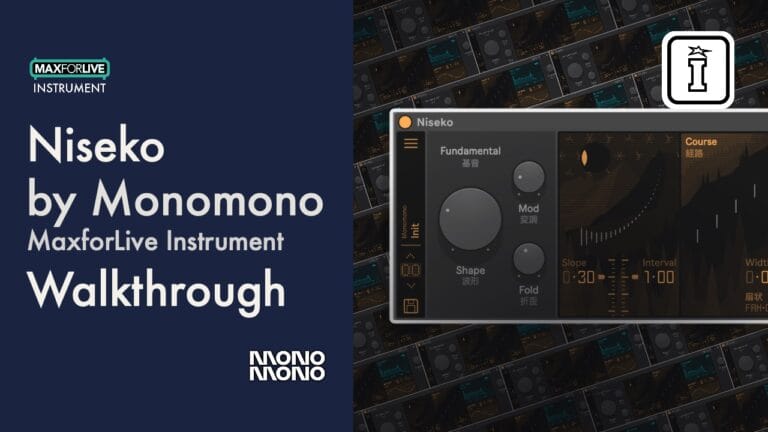
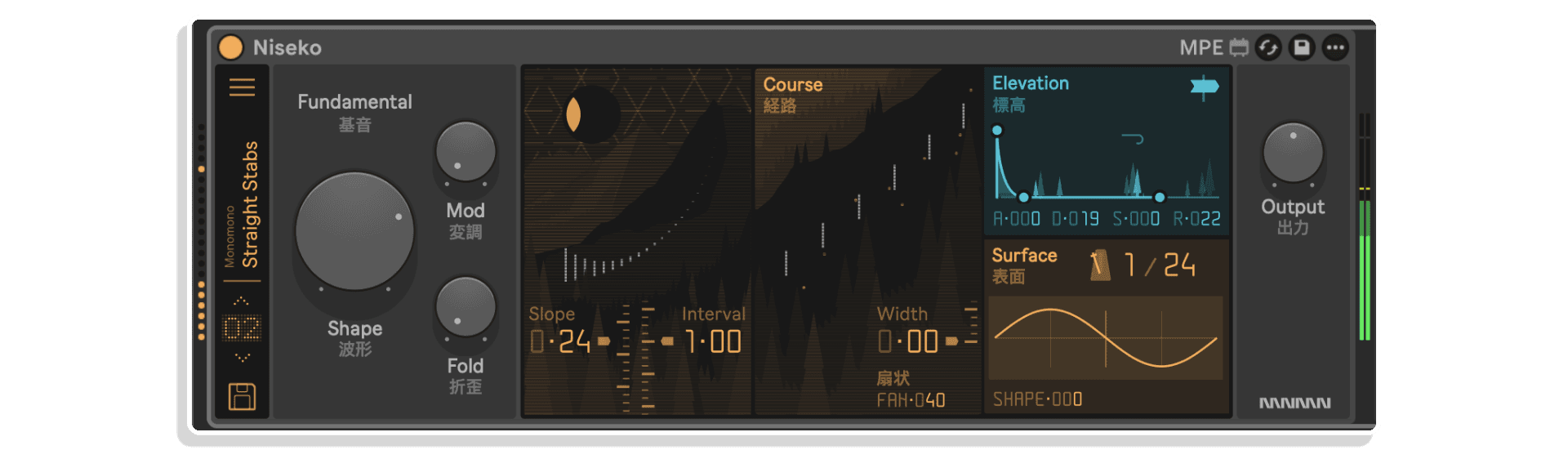
Niseko by Monomono
STOP SUBTRACTING. START BUILDING.
MAKE YOUR OWN TRIPLE PACK: Buy any three or more MONOMONO products at the same time and get a 20% Discount (automatically applied at checkout)
Additive synthesis from the ground up. Niseko gives you 24 partials per voice to construct harmonic content directly – no filtering required, no starting point handed to you. Shift from natural harmonic series to inharmonic textures, place each partial in the stereo field at the source, and shape tone with FM, wavefold, and a saturating output stage that keeps the sound musical no matter how far you push it.
Inside you’ll find:
- 8-voice polyphonic 12-bit additive engine with 24 partials per voice
- Adjustable partial interval — from harmonic to inharmonic tuning
- Per-partial stereo placement with Width and Fan controls
- FM modulation, Wavefold, LFO, ADSR and Glide
- MPE and aftertouch support with back-panel MPE controls
- Built-in preset library with export and import
- Full Push 3 Standalone and Push 2 support
Where most synths tell you what to take away, Niseko asks what you want to add. Build your sound partial by partial and hear the difference.
Requires Ableton Live 11 Suite or higher
USER GUIDE:
Niseko Manual V1.05
Niseko Quick Start V1.0
Niseko by Monomono
STOP SUBTRACTING. START BUILDING.
MAKE YOUR OWN TRIPLE PACK: Buy any three or more MONOMONO products at the same time and get a 20% Discount (automatically applied at checkout)
Additive synthesis from the ground up. Niseko gives you 24 partials per voice to construct harmonic content directly – no filtering required, no starting point handed to you. Shift from natural harmonic series to inharmonic textures, place each partial in the stereo field at the source, and shape tone with FM, wavefold, and a saturating output stage that keeps the sound musical no matter how far you push it.
Inside you’ll find:
- 8-voice polyphonic 12-bit additive engine with 24 partials per voice
- Adjustable partial interval — from harmonic to inharmonic tuning
- Per-partial stereo placement with Width and Fan controls
- FM modulation, Wavefold, LFO, ADSR and Glide
- MPE and aftertouch support with back-panel MPE controls
- Built-in preset library with export and import
- Full Push 3 Standalone and Push 2 support
Where most synths tell you what to take away, Niseko asks what you want to add. Build your sound partial by partial and hear the difference.
Requires Ableton Live 11 Suite or higher
USER GUIDE:
Niseko Manual V1.05
Niseko Quick Start V1.0
Additional information
| Controllers | Ableton Push One, Ableton Push THREE Controller, Ableton Push THREE Standalone, Ableton Push TWO |
|---|---|
| MaxforLive | Instruments |
| Ableton Live Compatibility | Ableton Live 11 Standard with MaxforLive, Ableton Live 11 Suite, Ableton Live 12 Standard with MaxforLive, Ableton Live 12 Suite |
| Min. Requirements | Ableton Live 11 Standard with MaxforLive Installed or Ableton Live 11 Suite |
| OS | Mac, Windows |
PRICE: £33.00
Product reviews
5 out of 5
6 reviews
How item rating is calculated
We show the average based on reviews. Only genuine reviews are displayed.
Sort by
May 4, 2026
This reviewer bought this product from our store.
This Is One of the best max 4 live devices. Amazing sound and incredibile UI/UX. Monomono Is Always 10/10. Thanks.
I recommend this product
May 3, 2026
This reviewer bought this product from our store.
Niseko has been a lot of fun to make sounds with. It can go from melodic to out of the stratosphere within a few parameter changes, I’ve been enjoying dialing it in.
The UI adds to the creative experience.
I can’t recall which ones specifically off of the top of my head, but there were a couple of parameters that I couldn’t map to aftertouch
I recommend this product
May 3, 2026
This reviewer bought this product from our store.
A fresh and powerful synthesizer
Another masterpiece from Monomono. After the wonderful recreation of well-known synths, this new Niseko is a non-trivial implementation of additive synthesis.
Few controls with understandable outcomes and very interesting sounds.
Would be nice to have the list of presets organized by category.
I recommend this product
May 2, 2026
This reviewer bought this product from our store.
Yet another blinding synth from monomono, this one can make some very interesting distonal sounds and the stereo spread with the coarse function and playing around with the slope, is quite unique feature.
You can get the room spinning around
Easy to use interface, hours of fun
I recommend this product
May 1, 2026
This reviewer bought this product from our store.
Push 3 Standalone compatibility.
Shopping experience very quick and easy. I really appreciated the email notification of the new Monomono release and especially the loyalty discount for having purchased other Monomono products in the past.
Having an additive synth that runs on the Push 3 Standalone.
MPE Support.
A bit of a CPU hog.
I recommend this product
Niseko by Monomono
Most synthesizers hand you a harmonically rich waveform and tell you to start cutting. Niseko does the opposite. Rather than shaping an existing signal through filters and subtraction, it builds tone from the ground up — giving you direct, deliberate command over harmonic content at the source.
Niseko is an 8-voice polyphonic 12-bit additive synthesizer for Ableton Live. Each voice is formed by a set of 24 partials, each one contributing to the overall harmonic structure. The result is a synthesis engine that rewards precision and experimentation in equal measure — one where every adjustment is audible, meaningful, and musical.
Unlike subtractive designs, which rely on filtering away harmonic content, Niseko constructs its character partial by partial — from smooth, breathable pads and cutting leads to metallic, inharmonic textures that standard synthesis simply cannot produce.
The Additive Engine
At the heart of Niseko are 24 partials per voice. The Slope control exponentially adjusts the level of each partial, shaping the overall harmonic weight from bright and present to warm and rolled-off. The Waveshape parameter sets the waveform for each partial independently, letting you move from pure sine tones to more complex harmonic contributions per partial layer.
The Interval control is where things get genuinely distinctive. Adjusting partial spacing shifts the sound from natural harmonic relationships into inharmonic territory — bell-like overtones, metallic clangs, and abstract textures that sit firmly outside what a traditional synth architecture can reach. This single parameter opens an enormous range of timbral possibilities without touching anything else.
FM modulation routes the 2nd and 3rd partials into the 1st, adding sidebands and harmonic complexity with a simple, intuitive control. Combined with the Wavefold amount, which folds the waveform back on itself to introduce additional harmonics, Niseko can move from pristine and clean to dense and saturated within the same instrument.
Spatial Design Built In
Niseko’s stereo placement is not an afterthought. Per-partial stereo positioning distributes each harmonic across the stereo field at the source — before any mixing or effects processing — giving the instrument a naturally wide, detailed sound that occupies space in a mix without relying on chorus or reverb.
The Width control adjusts how broadly the partials are spread across the stereo field, while the Fan parameter narrows the placement of lower partials while keeping the high-end partials wider. The result is a stereo image that feels organised and professional — bass content stays centred while harmonic detail spreads outward, exactly as a well-mixed sound should behave.
Two visual displays keep you oriented: one shows the spatial relationships between partials in the stereo field, the other shows the level of each partial in real time. Both update instantly as you adjust parameters, making Niseko as informative to watch as it is to hear.
Modulation and Expression
A flexible ADSR envelope controls the amplitude shaping of each voice, from punchy and percussive to long, slow evolutions. The LFO features a morphing waveshape and tempo sync, adding rhythmic movement or subtle drift depending on the rate and depth. Modulation destinations are accessible directly from the interface, letting you route the envelope and LFO to the parameters that matter most for your sound.
Glide with adjustable rate enables smooth pitch transitions between notes, adding expressive legato playing for melodic lines and basslines. A built-in Low Pass Filter rounds off the high-frequency content when needed, giving you a final layer of tonal control over the composite sound. The Saturating VCA-based output adds subtle warmth and character at the output stage, keeping Niseko from sounding sterile even at high partial counts.
For expressive performance, MPE and aftertouch support are built in and accessible via the back panel toggle. Push 3 Standalone and Push 2 are both fully supported, making Niseko a capable live instrument as well as a studio sound design tool.
Presets and Sound Library
A curated built-in preset library covers a broad palette — smooth evolving pads, sharp leads, experimental inharmonic textures, and more. Presets can be exported and imported, making it straightforward to share sounds or back up your work. The preset number display and list view keep navigation fast, even in a live context.
Features at a Glance
- 8-voice polyphonic 12-bit additive synthesizer
- 24 partials per voice with exponential level control (Slope)
- Adjustable partial interval for harmonic and inharmonic tuning
- Per-partial waveshape selection
- FM modulation — 2nd and 3rd partials into 1st
- Wavefold amount for additional harmonic complexity
- Per-partial stereo width with Fan control for frequency-aware placement
- Real-time visualisation of partial levels and spatial relationships
- LFO with morphing waveshape and tempo sync
- Flexible ADSR four-stage envelope with modulation routing
- Built-in Low Pass Filter
- Saturating VCA-based output for warmth and character
- Glide with adjustable rate
- MPE and aftertouch support
- Built-in preset system with export and import
- Full Push 3 Standalone and Push 2 support
How to Use
Start with the preset list to explore the timbral range Niseko covers, then use those presets as a launchpad for your own sounds. Adjust the Interval to shift the harmonic relationships between partials — small movements produce subtle tuning shifts, while larger adjustments push into inharmonic and metallic territory. Use Slope to shape how the harmonic energy is distributed across all 24 partials, favouring the lower or upper range of the stack.
Add FM modulation or Wavefold to introduce harmonic complexity and bite. Set Width and Fan to position the sound in the stereo field — the visualiser displays help you understand how each partial is placed spatially before you commit. Assign the ADSR and LFO to modulation destinations to build movement into your sound over time, from subtle breathing to more dramatic evolving textures.
For live performance, connect via MPE or aftertouch for per-note expression, and use Glide to add legato transitions between pitches. Push 3 Standalone players can use Niseko as a standalone instrument without a laptop in the session.
Ideal For
- Sound designers who want precise harmonic control beyond what subtractive synthesis offers
- Producers working in ambient, experimental, electronic, and cinematic genres
- MPE and Push 3 players looking for an expressive, spatially rich instrument
- Anyone frustrated by the limitations of filter-based synthesis wanting to build from scratch
- Producers who want width and stereo placement baked into the instrument, not added in post
Requirements
- Ableton Live 11 Suite or higher
- MaxforLive (included with Live Suite)
- Push 3 Standalone or Push 2 supported (optional)
MAKE YOUR OWN TRIPLE PACK: Buy any three or more MONOMONO products at the same time and get a 20% Discount (automatically applied at checkout)
Explore More by MONOMONO:
Maya | Mono One | CompX54 | ConsoleX8056 | Tape
Frequently Asked Questions
A: Niseko is an 8-voice polyphonic 12-bit additive synthesizer for Ableton Live. Each voice is built from 24 individually controllable partials, giving you direct command over harmonic content from the ground up. Rather than filtering a rich waveform, Niseko constructs its tone partial by partial — covering everything from smooth pads and sharp leads to metallic, inharmonic textures.
A: Yes. Niseko is a MaxforLive instrument device. MaxforLive is included with Ableton Live Suite.
A: MaxforLive is a platform that integrates the visual programming environment Max with Ableton Live, allowing users to create and use custom audio, MIDI, and control devices within their Live sessions.
A:
- Ableton Live 11 Suite or higher
- Mac or Windows operating system
- Push 3 Standalone or Push 2 supported (optional)
A: Explore the full MONOMONO catalogue here: isotonikstudios.com/brand/monomono/
Important Information
## v1.05 – 12 May 2026
Course modulation LFO rates and crossover frequency adjusted
## v1.04 – 7 May 2026
Fixed the issue with incorrect pitch tracking at certain sampling rates
V1.02 – Released 2nd May 2026
Mapping for preset selection on Push 2 / Push 3 / SA is fixed in Bank 8 (Presets)
V1.01 – Released 1st May 2026
1. Automation recording into undo stack
2. Resetting the automation on session reload
Initial Release – April 2026
Our Products are generally provided as Zip file downloads which in all cases will need to be extracted and saved to your hard drive prior to installation. Details on the different file type provided and what to do with them are below.
.alp Files – These are Ableton Live Packs and will either install directly into the Packs Section of the browser of Ableton Live or ask you to save them to your hard drive. For packs that install to the library, when you double click on them you will see a pop up window asking you to confirm that installation is ok as the files are described as “Legacy”. This is fine and you are ok to proceed, the packs are created using the format for an earlier version of Live and so remain compatible with the current version.
.amxd files – These are individual MaxforLive Devices and can be stored anywhere on your hard drive. We’d advise creating a folder for them and then adding that folder as a location within the Places section of Lives Browser.
END-USER LICENSE AGREEMENT FOR ISOTONIK STUDIOS SOFTWARE PRODUCTS.
PLEASE READ THE TERMS AND CONDITIONS OF THIS LICENSE AGREEMENT CAREFULLY BEFORE CONTINUING WITH THIS PROGRAM INSTALL.
This End-User License Agreement (referred to as “EULA”) is a legal agreement between an individual or a single entity (referred to as “LICENSEE”) and Isotonik Studios for the Isotonik Studios software product(s) which may include associated software components, media, printed materials, and “online” or electronic documentation (referred to as “SOFTWARE PRODUCT”). By installing, copying, or otherwise using the SOFTWARE PRODUCT, the LICENSEE agrees to be bound by the terms of this EULA.
This EULA represents the entire agreement concerning the program between the LICENSEE and Isotonik Studios and it supersedes any prior proposal, representation, or understanding between the parties. If the LICENSEE does not agree to the terms of this EULA, the LICENSEE should not install or use the SOFTWARE PRODUCT.
The SOFTWARE PRODUCT is protected by copyright laws and international copyright treaties, as well as other intellectual property laws and treaties. The SOFTWARE PRODUCT is licensed, not sold.
- GRANT OF LICENSE.
The SOFTWARE PRODUCT is licensed as follows:
(a) Installation and Use. Providing that the LICENSEE has paid any applicable license fees, Isotonik Studios grants the LICENSEE the right to install and use copies of the SOFTWARE PRODUCT on up to two computers in the LICENSEE’s possession that are running a validly licensed copy of the operating system for which the SOFTWARE PRODUCT was designed [e.g., Windows 10, macOS]. The computer(s) must be owned by the LICENSEE.
(b) Backup Copies. The LICENSEE may also make copies of the SOFTWARE PRODUCT as may be necessary for backup and archival purposes.
- DESCRIPTION OF OTHER RIGHTS AND LIMITATIONS.
(a) Maintenance of Copyright Notices. The LICENSEE must not remove or alter any copyright notices on any and all copies of the SOFTWARE PRODUCT.
(b) Distribution. The LICENSEE may not distribute registered copies of the SOFTWARE PRODUCT to third parties.
(c) Prohibition on Reverse Engineering, Decompilation, and Disassembly. The LICENSEE may not reverse engineer, decompile, or disassemble the SOFTWARE PRODUCT, except and only to the extent that such activity is expressly permitted by applicable law notwithstanding this limitation.
(d) Rental. The LICENSEE may not rent, lease, or lend the SOFTWARE PRODUCT.
(e) License transfer The LICENSEE may not transfer their license to the SOFTWARE PRODUCT to any third party. Any attempt to do so will be considered a violation of this EULA.
(f) Support Services. Isotonik Studios may provide the LICENSEE with support services related to the SOFTWARE PRODUCT for a period of 12 months following the date of purchase. Any supplemental software code provided to the LICENSEE as part of the Support Services shall be considered part of the SOFTWARE PRODUCT and subject to the terms and conditions of this EULA.
(g) Compliance with Applicable Laws. The LICENSEE must comply with all applicable laws regarding use of the SOFTWARE PRODUCT.
- TERMINATION Without prejudice to any other rights, Isotonik Studios may terminate this EULA if the LICENSEE fails to comply with the terms and conditions of this EULA. In such event, the LICENSEE must destroy all copies of the SOFTWARE PRODUCT in the LICENSEE’s possession.
- COPYRIGHT All title, including but not limited to copyrights, in and to the SOFTWARE PRODUCT and any copies thereof are owned by Isotonik Studios or its suppliers. All title and intellectual property rights in and to the content which may be accessed through use of the SOFTWARE PRODUCT is the property of the respective content owner and may be protected by applicable copyright or other intellectual property laws and treaties. This EULA grants the LICENSEE no rights to use such content. All rights not expressly granted are reserved by Isotonik Studios.
- NO WARRANTIES Isotonik Studios expressly disclaims any warranty for the SOFTWARE PRODUCT. The SOFTWARE PRODUCT is provided ‘As Is’ without any express or implied warranty of any kind, including but not limited to any warranties of merchantability, noninfringement, or fitness of a particular purpose. Isotonik Studios does not warrant or assume responsibility for the accuracy or completeness of any information, text, graphics, links or other items contained within the SOFTWARE PRODUCT. Isotonik Studios makes no warranties respecting any harm that may be caused by the transmission of a computer virus, worm, time bomb, logic bomb, or other such computer program. Isotonik Studios further expressly disclaims any warranty or representation to the LICENSEE or to any third party.
- LIMITATION OF LIABILITY In no event shall Isotonik Studios be liable for any damages (including, without limitation, lost profits, business interruption, or lost information) arising out of the LICENSEE’s use of or inability to use the SOFTWARE PRODUCT, even if Isotonik Studios has been advised of the possibility of such damages. In no event will Isotonik Studios be liable for loss of data or for indirect, special, incidental, consequential (including lost profit), or other damages based in contract, tort or otherwise. Isotonik Studios shall have no liability with respect to the content of the SOFTWARE PRODUCT or any part thereof, including but not limited to errors or omissions contained therein, libel, infringements of rights of publicity, privacy, trademark rights, business interruption, personal injury, loss of privacy, moral rights or the disclosure of confidential information.